
Why This Matters
Picture this: you're 25 minutes into a system design interview, and you've just sketched out a database schema for an e-commerce platform. The interviewer leans in and says, "Okay, a customer searches for their order history. We have 50 million rows in the orders table. How fast is that query?" Without an index, the database has to scan every single row, one by one, like flipping through every page of a 50-million-page book to find one paragraph. With the right index, it jumps straight to the answer in three or four hops. That's the difference between a query that takes 2 seconds (and tanks your user experience) and one that returns in 2 milliseconds. This is what indexing is: building a sorted shortcut structure next to your data so the database can find rows without reading the whole table. Think of how Amazon serves order lookups for hundreds of millions of customers. Every time you check "Where's my package?", an index on your account ID lets their database skip past the other 499 million customers' orders and land on yours almost instantly. Without that index, the page would spin for seconds, and at Amazon's scale, seconds mean millions in lost revenue.
Here's the thing interviewers won't tell you: they're silently evaluating whether you reach for indexing on your own or whether they have to drag it out of you. Proactively saying "we'd want an index on this column because our main read pattern filters by it" signals that you've actually operated production systems, not just drawn boxes on whiteboards. Candidates who need to be prompted get dinged for it, even if they eventually give the right answer.
But indexing isn't free, and interviewers will test whether you know that. Every index you add slows down writes, because each INSERT or UPDATE now has to modify the table and every index on it. Pile on too many indexes and your write throughput craters, your storage balloons, and you've traded one production problem for another. Missing indexes cause slow queries. Too many indexes cause write amplification and bloated disks. The best candidates can articulate both sides of this tradeoff without being asked. By the end of this lesson, you'll have a clear mental model for how indexes actually work under the hood, when to reach for different types, and exactly how to talk about them in your interview so the decision sounds deliberate, not guessed at.
How It Works
Think of a book's table of contents. If you need to find the chapter on "Caching Strategies," you don't flip through all 400 pages. You check the table of contents, find the page number, and jump straight there. A database index works the same way, except instead of chapter titles, it stores sorted column values, and instead of page numbers, it stores pointers to where the actual rows live on disk.
That's the analogy. Now let's get into what actually happens.
Full Table Scan vs. Index Lookup
Say you have an orders table with 50 million rows and you run SELECT * FROM orders WHERE user_id = 42. Without an index, the database has no choice. It reads every single row, all 50 million, checks whether user_id equals 42, and collects the matches. This is a full table scan. It's exactly as painful as it sounds.
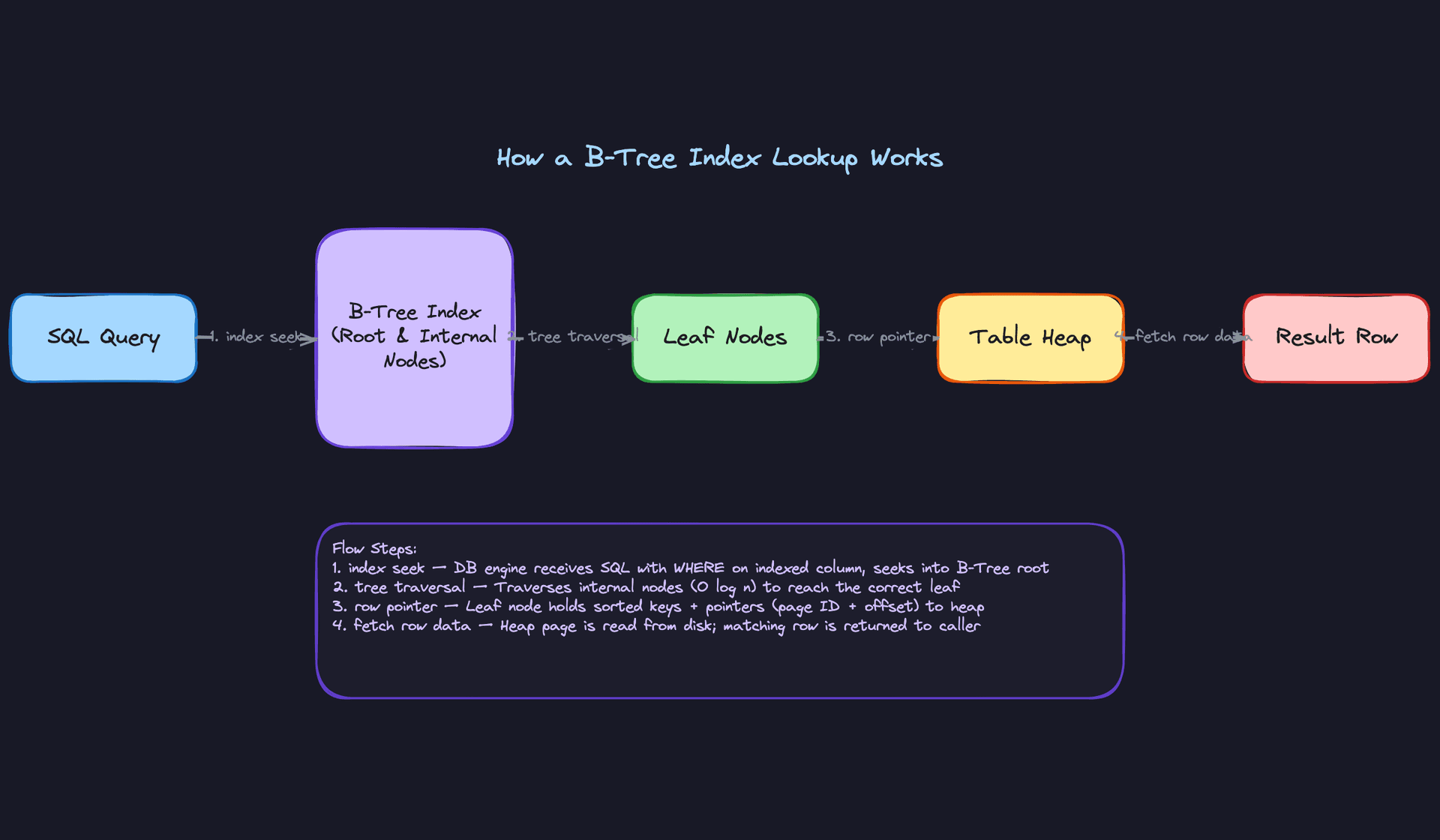
Now add a B-Tree index on user_id. The same query takes a completely different path:
- The query planner sees there's an index on
user_idand decides to use it. - It starts at the root node of the B-Tree, which contains a handful of boundary values that tell it which branch to follow.
- It traverses down through one or two internal nodes, narrowing the search range at each level.
- It lands on a leaf node that contains the value
42alongside a pointer (a row ID or physical address) to the actual row in the table. - It follows that pointer to the table heap, fetches the full row, and returns it.
That's 3 to 4 hops through the tree, then one disk read for the row. On a table with 50 million rows, a B-Tree index typically has only 3 or 4 levels deep. Three hops instead of 50 million row checks.
Here's what that flow looks like:
The B-Tree Structure
A B-Tree is a balanced, sorted tree. "Balanced" is the key word here.
The root node sits at the top and contains a small set of key values that act as signposts. If you're looking for user_id = 42 and the root contains [20, 60, 100], you know to follow the branch between 20 and 60. Internal nodes work the same way, further narrowing the range.
Leaf nodes are where the real action is. They contain the actual indexed values in sorted order, each paired with a pointer back to the corresponding row in the table. Leaf nodes also link to each other (like a linked list), which is what makes range queries fast. When you ask for WHERE user_id BETWEEN 40 AND 50, the database finds the leaf node containing 40, then walks sideways through the linked leaf nodes until it passes 50. No tree traversal needed for each value in the range.
Because the tree is always balanced (every path from root to leaf is the same length), lookups are guaranteed O(log n). For 50 million rows, that's roughly log base several-hundred of 50,000,000, which works out to about 3 or 4 levels. This guarantee holds regardless of how the data was inserted. The tree rebalances itself on every write.
Your 30-second explanation: "A B-Tree index is a sorted tree structure that sits alongside the table. When a query filters on an indexed column, the database traverses the tree from root to leaf in 3 or 4 hops, finds a pointer to the matching row, and fetches it directly. Instead of scanning millions of rows, you're doing a handful of lookups. The tradeoff is that every write to the table also has to update the index, so you pay on the write side for what you gain on reads."
The Write-Side Cost
This is where candidates lose credibility if they're not careful. Every time you INSERT a new row, the database doesn't just write to the table. It also inserts the new value into every index on that table, finding the correct sorted position in each B-Tree and potentially splitting nodes to keep things balanced.
Updates are even trickier. If you UPDATE a column that's indexed, the old entry in the index needs to be removed and a new one inserted in the correct sorted position. DELETE operations leave dead entries that need cleanup.
A table with 8 indexes means every single INSERT does 9 writes: one to the table, eight to the indexes. On a write-heavy workload, this adds up fast. If your interviewer hears you suggest an index, they may ask "what's the cost?" Have this answer ready.
Clustered vs. Non-Clustered
One more distinction you need in your back pocket.
A clustered index determines the physical order of data on disk. The rows in the table are literally sorted by the clustered index key. In MySQL's InnoDB, the primary key is always the clustered index. In PostgreSQL, you can choose to cluster a table on any index, though the ordering isn't maintained automatically after writes.
You only get one clustered index per table. Think about why: data can only be physically sorted one way.
A non-clustered index is a separate structure that lives alongside the table. Its leaf nodes contain the indexed values plus pointers back to the heap (or to the clustered index key, depending on the database engine). You can have many non-clustered indexes on a single table.
Key insight: When an interviewer asks about your primary key choice, they're indirectly asking about your clustered index. Choosing a monotonically increasing ID (like an auto-increment or a time-sorted UUID) means new rows always append to the end of the clustered index, avoiding expensive page splits. Choosing a random UUID as a primary key scatters inserts across the entire tree. This is a real production concern that shows you understand what's happening beneath the ORM.
The practical difference shows up in query performance too. A query that can be satisfied entirely by the clustered index never needs a second lookup, because the leaf nodes of a clustered index are the actual data rows. Non-clustered indexes always require that extra hop back to the table (unless you're using a covering index, which we'll get to in the next section).
Patterns You Need to Know
In an interview, you'll usually need to pick a specific approach. Here are the ones worth knowing.
Single-Column Index
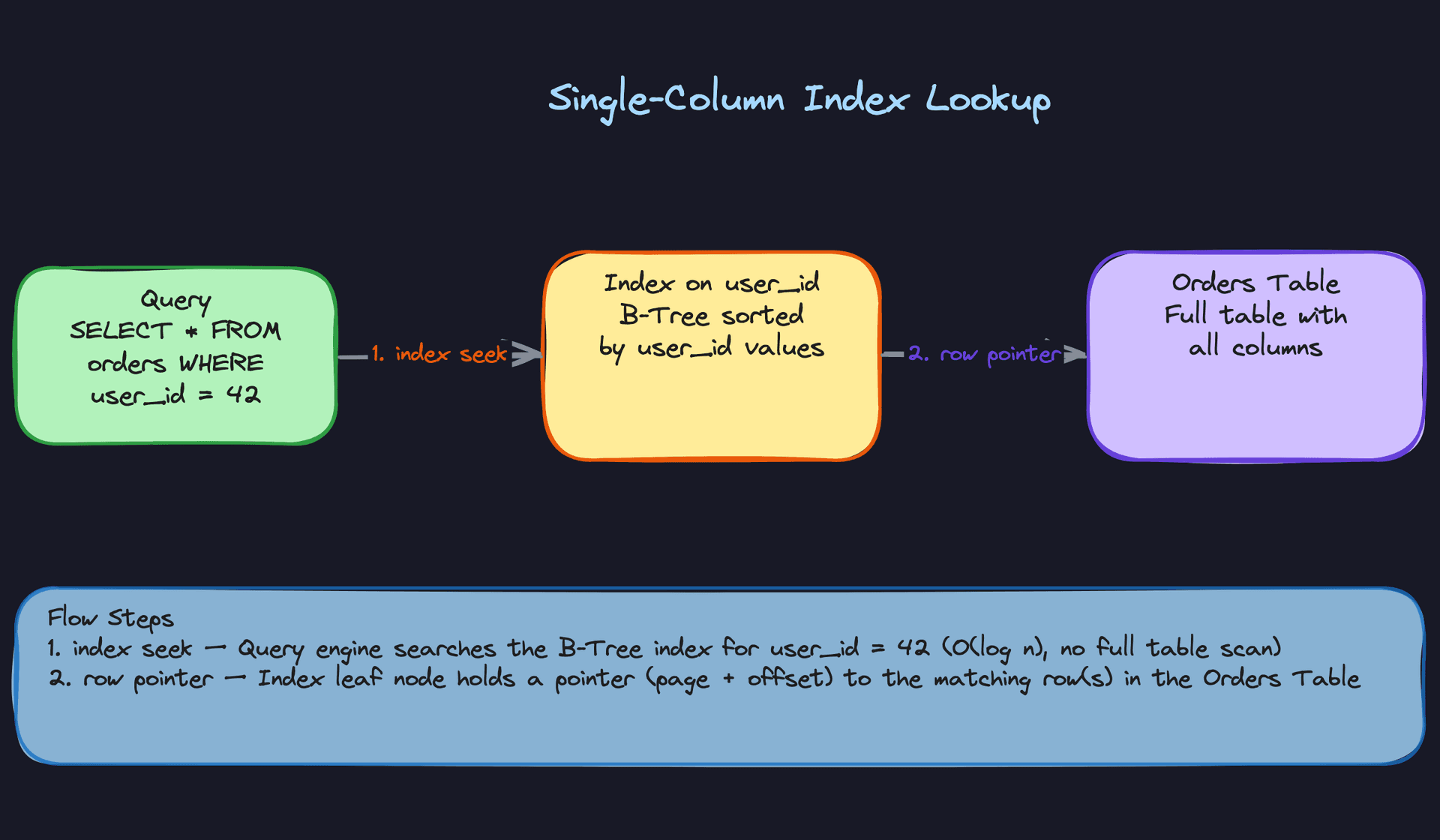
This is your bread and butter. You have one column that shows up frequently in WHERE clauses or JOIN conditions, so you build a B-Tree index on it. Think of an orders table where almost every query starts with WHERE user_id = ?. The database builds a sorted tree on user_id values, and instead of scanning millions of rows, it traverses 3-4 tree levels and lands directly on the matching entries.
It works beautifully for filtering or sorting on that one column. It falls apart the moment your queries start filtering on multiple columns together. If your hot query is WHERE user_id = 42 AND status = 'shipped', a single-column index on user_id narrows things down, but the database still has to scan through all of user 42's orders to find the shipped ones. That's when you need something more targeted.
When to reach for this: Any time you identify a primary access pattern that filters on a single column. In an interview, this is your first move after introducing a table. Say it out loud: "Our main read pattern is by user_id, so we'd index on that."
Composite (Multi-Column) Index
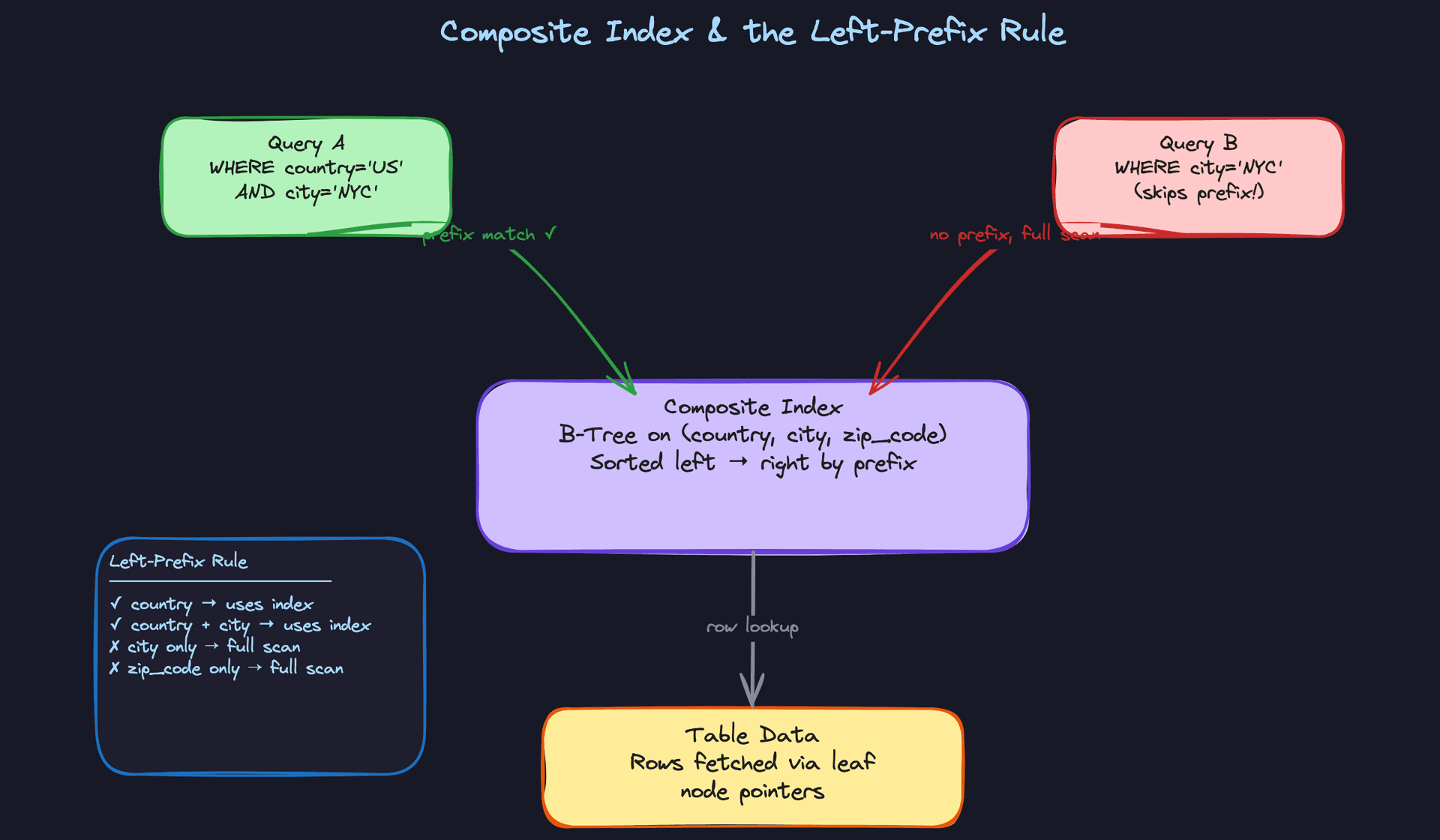
Most real queries filter on more than one column. A composite index handles this by building a single B-Tree sorted on multiple columns in a specific order. An index on (country, city, zip_code) sorts first by country, then within each country by city, then within each city by zip code. It's like a phone book: last name first, then first name.
Here's where candidates get tripped up: the left-prefix rule. That (country, city, zip_code) index helps queries that filter on country alone, or country + city, or all three together. But a query filtering on just city? The index is useless. The data is sorted by country first; there's no way to jump to a specific city without knowing the country. This is exactly the kind of thing interviewers test.
Column order is a design decision, not an afterthought. Put the column that appears in every query first (often a tenant ID or user ID). Put the column used for range scans (dates, timestamps) last, because a range condition "breaks" the ability to use subsequent columns in the index. If your queries look like WHERE tenant_id = ? AND created_at > ?, the index should be (tenant_id, created_at), not the reverse.
Interview tip: When you propose a composite index, always state the column order and explain why. "I'd index on (tenant_id, status, created_at) because every query scopes to a tenant, most filter by status, and then we range-scan on date." That specificity is what separates you from someone who just says "add an index."
Covering Index
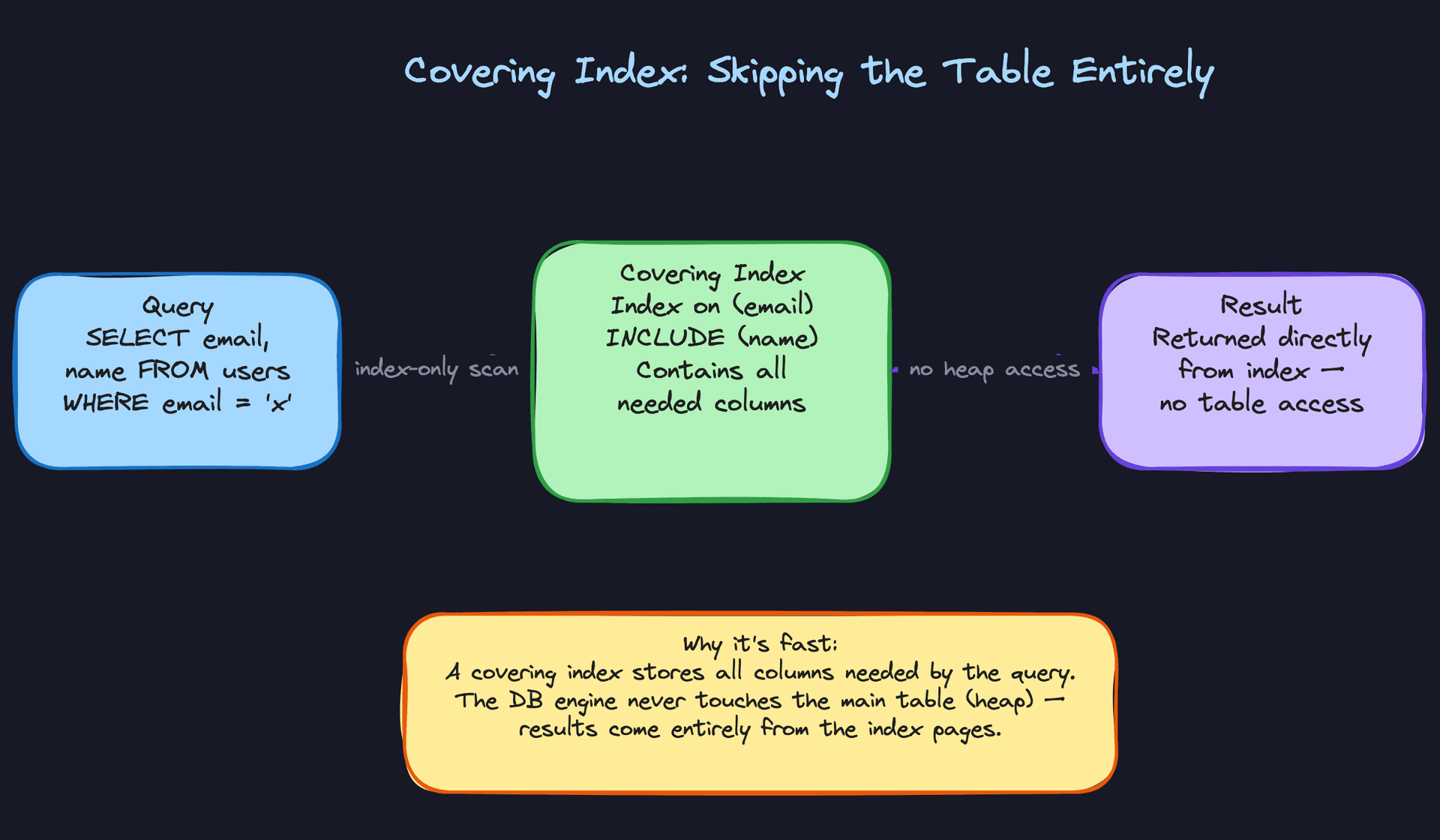
Every index lookup we've discussed so far ends the same way: the database finds the matching entry in the index, grabs the row pointer, then goes back to the table heap to fetch the full row. That final hop to the heap is random I/O, and it's expensive.
A covering index eliminates that hop entirely. If the index contains every column the query needs, the database can answer the query straight from the index without ever touching the table. Say you have a query like SELECT email, name FROM users WHERE email = 'alice@example.com'. If your index is on (email) with INCLUDE (name), both columns live in the index's leaf nodes. The query planner sees this, marks it as an "index-only scan," and skips the heap entirely.
This is a power move in interviews. Most candidates stop at "add an index on the WHERE column." Going one step further and saying "I'd make it a covering index by including the SELECT columns so we avoid the heap lookup" signals genuine performance intuition. The tradeoff is a fatter index (more storage, slightly more write overhead per row), but for hot read paths, it's almost always worth it.
When to reach for this: High-throughput read queries where you've already identified the index but want to squeeze out the last bit of latency. Especially effective for queries that return only a few narrow columns.
Partial (Filtered) Index
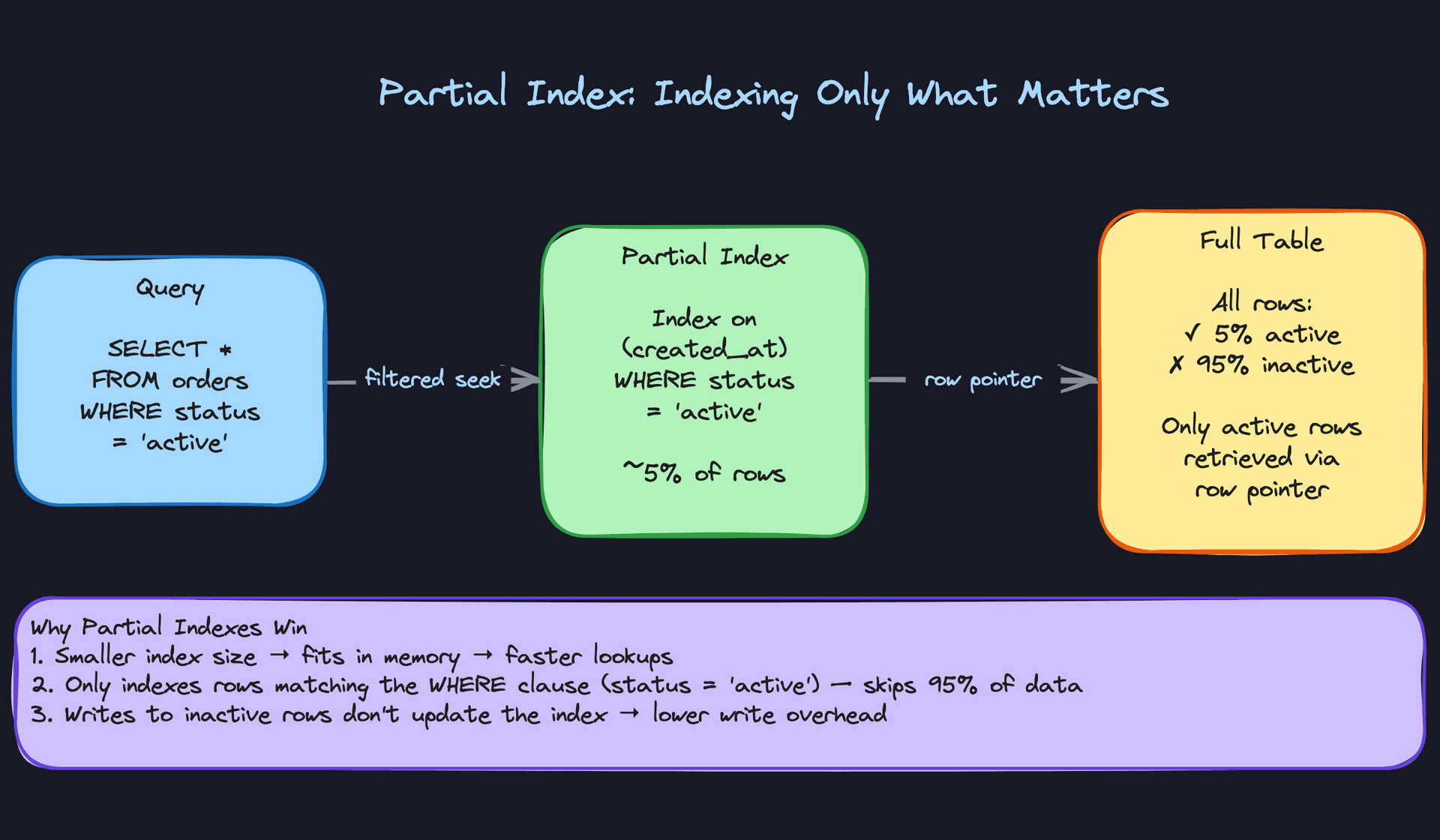
Imagine an orders table with 100 million rows, but 95% of those orders are completed and archived. Your application almost exclusively queries active orders. A full index on created_at covers all 100 million rows, but you only ever care about the 5 million active ones. That's a lot of wasted space and write overhead.
A partial index solves this by indexing only the rows that match a predicate: CREATE INDEX idx_active_orders ON orders(created_at) WHERE status = 'active'. The resulting index is a fraction of the size, faster to scan, cheaper to maintain on writes, and fits more easily in memory. When 95% of your data is irrelevant to your query patterns, there's no reason to index it.
Not every database supports partial indexes (PostgreSQL does natively; MySQL doesn't in the same way). But even in databases without native support, you can sometimes achieve a similar effect with a composite index where the filtered column comes first. Knowing this nuance shows the interviewer you think about portability.
When to reach for this: When your queries consistently target a small, well-defined subset of a large table. Multi-tenant systems where you query "active" entities, e-commerce platforms filtering by order status, or any system with a clear hot/cold data split.
Hash Index
B-Trees dominate the indexing world for good reason: they handle equality checks, range queries, and sorting. But if your access pattern is strictly equality lookups (WHERE session_id = ?) with zero need for range scans or ordering, a hash index gives you O(1) lookups instead of O(log n).
In practice, you'll rarely propose a hash index in an interview. Most databases default to B-Trees, and the flexibility of supporting range queries is too valuable to give up. But if the interviewer pushes you on a key-value lookup pattern (session stores, cache layers, exact-match lookups on UUIDs), mentioning hash indexes shows you know the option exists. Keep it brief: "For this pure equality lookup, a hash index would be slightly faster, but a B-Tree works fine here too and gives us more flexibility if requirements change."
Key insight: Knowing about hash indexes isn't about using them constantly. It's about demonstrating that you understand why B-Trees are the default, not just that they are.
| Pattern | Best For | Tradeoff | Supports Range Queries? |
|---|---|---|---|
| Single-column | One filter/sort column | Doesn't help multi-column queries | Yes |
| Composite | Multi-column filters | Column order is critical; wrong order = useless | Yes |
| Covering | High-read, narrow queries | Fatter index, more write cost per row | Yes |
| Partial | Queries targeting a data subset | Only helps queries matching the filter predicate | Yes |
| Hash | Pure equality lookups | No range queries, no sorting | No |
For most interview problems, you'll default to single-column or composite B-Tree indexes. Reach for covering indexes when the interviewer is pressing you on read latency for a specific hot query. Partial indexes are your answer when someone points out that a table has hundreds of millions of rows but the application only cares about a small slice. And if you ever find yourself designing a session store or cache lookup, that's your moment to briefly mention hash indexes before moving on.
What Trips People Up
Here's where candidates lose points, and it's almost always one of these.
The Mistake: "Let's Just Index Everything"
This one sounds like: "We'll add indexes on user_id, email, created_at, status, name, and city. That way any query will be fast."
The interviewer hears someone who doesn't understand the cost side of the equation. Every index you add is a separate data structure that must be updated on every single INSERT, UPDATE (to indexed columns), and DELETE. If your orders table has six indexes and you're processing 5,000 writes per second, that's 5,000 writes to the table plus up to 30,000 index updates. Your write throughput just cratered.
Storage bloats too. Each index is a copy of the indexed columns plus pointers, sorted and maintained in its own B-Tree. On a table with hundreds of millions of rows, a single unnecessary index can cost gigabytes of disk and memory that your buffer pool could be using for something useful.
Interview tip: Instead, say something like: "I'd start by identifying our two or three hottest read patterns and index specifically for those. We're doing 10x more reads than writes here, so the tradeoff is worth it. But I wouldn't index columns we're not actively querying against."
That framing shows you think in tradeoffs, not absolutes.
The Mistake: Getting Composite Index Column Order Wrong
Candidates say: "We need a composite index on city, country, and zip_code." Then they move on, as if the order doesn't matter.
It matters enormously. A composite index on (country, city, zip_code) is a fundamentally different structure than one on (city, country, zip_code). The B-Tree sorts by the leftmost column first, then by the second column within each group of the first, and so on. This is the left-prefix rule: the database can only use the index if your query filters on a contiguous prefix of the column list, starting from the left.
So an index on (country, city, zip_code) helps with: - WHERE country = 'US' (yes, uses the first column) - WHERE country = 'US' AND city = 'NYC' (yes, first two columns) - WHERE country = 'US' AND city = 'NYC' AND zip_code = '10001' (yes, all three)
But WHERE city = 'NYC' alone? The database can't jump into the middle of the sort order. It would have to scan the entire index, which often means the query planner just ignores it and does a full table scan instead.
Common mistake: Candidates list composite index columns in whatever order they appear in the table schema. The interviewer hears someone who hasn't thought about which column should come first based on actual query patterns and selectivity.
When you propose a composite index, say the column order out loud and explain why. "I'd put tenant_id first because every query in this multi-tenant system filters on tenant. Then created_at second, since most queries also do a date range scan within a tenant." That specificity is what separates a strong answer from a hand-wavy one.
The Mistake: "We Should Index This Table" (Without Saying Why)
The vague version sounds like: "This table is going to get a lot of reads, so we should add some indexes."
That's like saying "this road gets a lot of traffic, so we should add some signs." Which signs? Where? For whom?
Interviewers want you to connect every index to a specific access pattern. Not "the users table needs indexes," but "our login flow queries users by email on every request, so we need an index on email. The admin dashboard filters by created_at for the last 30 days, so we need an index there too. But we don't need to index bio or avatar_url because nothing queries on those."
Interview tip: Build a habit: every time you draw a table on the whiteboard, immediately say "and the primary read patterns are X and Y, so we'd index on these columns." Tying indexes to access patterns in the same breath shows the interviewer you think about data modeling and query performance as one connected problem, not two separate afterthoughts.
The Mistake: Assuming the Database Will Always Use Your Index
You carefully designed the perfect index on created_at. Then someone writes this query:
SELECT * FROM orders WHERE YEAR(created_at) = 2024
The index sits there, unused. Wrapping an indexed column in a function makes it invisible to the query planner. The database sees YEAR(created_at) as a computed expression, not as a reference to the created_at column, so it can't seek into the B-Tree. Full table scan.
This isn't the only way indexes get silently ignored. Querying with OR across different columns, using LIKE '%something' with a leading wildcard, or selecting a large enough percentage of the table (say, 40%+) can all cause the optimizer to decide a sequential scan is cheaper than bouncing between the index and the heap thousands of times.
The fix for the function problem is to rewrite the query: WHERE created_at >= '2024-01-01' AND created_at < '2025-01-01'. Same logic, but now the planner recognizes it as a range scan on the indexed column.
Common mistake: Candidates propose an index and assume the job is done. In production, you'd run EXPLAIN ANALYZE to verify the planner actually picked it up. Mentioning that in your interview signals you've debugged slow queries before, not just theorized about them.If an interviewer pushes you with "are you sure the database will use that index?", don't panic. Walk through the conditions: Is the column wrapped in a function? Is the query selecting a huge fraction of the table? Is there a type mismatch between the query parameter and the column? Showing that you know indexes can be ignored is almost as valuable as knowing how to create them.
How to Talk About This in Your Interview
The best candidates don't wait to be asked about indexing. They weave it into their design the moment they sketch a table on the whiteboard. Every time you introduce a table, finish the thought: "Our primary read pattern is fetching orders by user_id, so we'd put a B-Tree index on that column." That single habit tells the interviewer you think about performance as a first-class concern, not an afterthought you bolt on when things get slow.
When to Bring It Up
Any time you draw a database table, you should be thinking about indexes. But there are specific moments where the interviewer is practically begging you to talk about them:
- You've just described a query that filters, sorts, or joins on a specific column. Say the index out loud.
- The interviewer mentions "high read traffic," "latency requirements," or "queries are slow." This is your opening.
- You're designing a multi-tenant system. The words "tenant isolation" or "per-customer queries" should immediately trigger "composite index with tenant_id as the leftmost column."
- You're discussing a table that will grow to millions or billions of rows. At that scale, a missing index isn't a minor inefficiency; it's a system-down event.
- The interviewer asks "how would this scale?" and you've been focused on application-layer changes. Step back and talk about the database layer first.
Don't wait for the prompt "how would you optimize this query?" If you hear it, you've already missed the chance to bring it up proactively.
Sample Dialogue
Interviewer: "So you've got this orders table with hundreds of millions of rows. Users are complaining that the 'My Orders' page takes several seconds to load. What's going on?"
You: "The first thing I'd check is whether we have an index on user_id in the orders table. If that page is doing a SELECT * FROM orders WHERE user_id = ?, and there's no index, the database is scanning the entire table for every single request. Adding a B-Tree index on user_id turns that into a three or four level tree traversal instead of a full scan."
Interviewer: "Okay, but they also want to see their orders sorted by most recent first, and we filter by status. Only active orders show up."
You: "Then I'd go with a composite index on (user_id, status, created_at). User_id first because every query is scoped to one user. Status second because we're filtering on it. Created_at last so the database can return results already sorted without a separate sort step. Actually, since we're almost always filtering for status equals 'active' and that's maybe 10-15% of rows, a partial index with a WHERE status = 'active' clause could be even better. Smaller index, faster writes, and it matches our actual query pattern."
Interviewer: "This table gets a lot of writes too. Thousands of new orders per second. Doesn't all this indexing slow that down?"
You: "It does, and that's the tradeoff I'd want to be deliberate about. Each index adds overhead to every insert. I wouldn't add more indexes than our read patterns actually require. If we had a bulk import job, say, loading historical data, I might even drop the indexes, do the bulk load, and rebuild them after. For steady-state traffic at thousands of writes per second, two or three well-chosen indexes are fine. Ten indexes on the same table? That's where you start feeling real pain. I'd also want to run EXPLAIN ANALYZE on our actual queries in staging to verify the planner is using the indexes the way we expect."
Follow-Up Questions to Expect
"What if the query planner isn't using your index?" The optimizer might skip an index if the query returns a large percentage of the table, if you're wrapping the indexed column in a function, or if statistics are stale. I'd check the EXPLAIN output and consider running ANALYZE to refresh table statistics.
"How do you decide the column order in a composite index?" Put the equality filters first (columns compared with =), then range filters (columns using >, <, BETWEEN). Within equality columns, lead with the most commonly filtered one across your query patterns.
"When would you choose a hash index over a B-Tree?" Only when I'm doing pure equality lookups and never need range queries or sorting on that column. In practice this is rare, and some databases (like PostgreSQL) have historically had limitations on hash index durability, so B-Tree is almost always the safer default.
"How many indexes is too many?" There's no magic number, but I start getting cautious beyond four or five on a write-heavy table. Each index adds a write to every insert and potentially a rebalance on updates. I'd profile actual write latency and monitor index bloat over time.
What Separates Good from Great
- A mid-level candidate says "we should add an index on this table." A senior candidate names the exact columns, states the order, explains why that order matches the query pattern, and acknowledges the write cost in the same breath.
- Senior candidates connect indexes to operational reality. They mention monitoring index bloat, verifying plans with EXPLAIN, and adjusting indexing strategy based on whether the workload is read-heavy or write-heavy. They treat indexes as living things that need maintenance, not set-and-forget configuration.
- The strongest candidates know when not to index. When an interviewer describes a write-heavy analytics pipeline or a table with only a few thousand rows, saying "we probably don't need an index here, the table fits in memory and a sequential scan is fine" shows more sophistication than reflexively adding indexes to everything.
Key takeaway: Don't wait to be asked about indexing. Every time you introduce a table, name the index, tie it to a specific query pattern, and acknowledge the write-side cost. That three-part habit is the single fastest way to signal production experience in a system design interview.
