
Understanding the Problem
What is Google Drive?
Product definition: Google Drive is a cloud file storage and synchronization service that lets users upload, download, organize, share, and sync files across multiple devices.
Think of it as a hard drive that lives in the cloud. You drop a file in on your laptop, and it appears on your phone seconds later. You share a folder with a coworker, and they can view or edit anything inside it. Every change is versioned, so you can roll back to yesterday's copy if something goes wrong.
The interesting engineering challenges aren't in storing files. Object storage solves that. The hard parts are syncing efficiently across devices, handling conflicts when two people edit the same file offline, and doing all of this at massive scale without ever losing a single byte of user data.
Functional Requirements
Core Requirements:
- File upload and download, including large files (up to 10GB). Uploads must be resumable so a dropped connection doesn't waste hours of progress.
- Folder organization. Users can create nested folder hierarchies, move files between folders, and rename things freely.
- File sharing with permissions. An owner can share a file or folder with specific users as viewers or editors. Folder permissions cascade to children.
- Cross-device sync. When a file changes on one device, all other devices belonging to that user (or shared users) should reflect the change within seconds.
- File versioning and revision history. Users can view past versions of a file and restore any previous revision.
Below the line (out of scope):
- Real-time collaborative editing (that's Google Docs, a fundamentally different problem involving operational transforms on document content)
- Full-text search across file contents
- Third-party app integrations and plugin ecosystems
Note: "Below the line" features are acknowledged but won't be designed in this lesson.
One scope boundary worth calling out explicitly: we will handle sync conflicts when two users edit the same file offline and both come back online. That's squarely in scope. What we won't do is let two cursors type in the same document simultaneously. Make sure your interviewer knows you understand the difference.
Non-Functional Requirements
- Durability above all else. Zero data loss, ever. If a user uploads a file and gets a success response, that file must survive any single hardware failure, any availability zone outage, anything short of a full regional disaster. Target eleven nines (99.999999999%) durability.
- Strong consistency for metadata. When you rename a file or update permissions, every subsequent read must reflect that change. Stale metadata leads to permission leaks and confused sync clients. Eventual consistency is acceptable for sync propagation latency (a few seconds is fine), but the metadata store itself must be strongly consistent.
- High availability for reads. Target 99.9% availability. Users should always be able to browse their files and download content, even during partial outages. Writes can tolerate slightly lower availability if needed.
- Low-latency sync notifications. When a file changes, other connected devices should be notified within 1-2 seconds (p99). The actual chunk download takes longer, but the "hey, something changed" signal needs to be fast.
- Support for files up to 10GB without timeouts, memory exhaustion, or requiring the user to keep their browser tab open for the entire duration.
Tip: Always clarify requirements before jumping into design. This shows maturity. Spending 3-5 minutes on requirements isn't wasted time; it's the part where senior candidates separate themselves from everyone else.
Back-of-Envelope Estimation
Start with the user base and work outward.
- 500M total registered users, 10M DAU
- Average file size: 500KB (lots of documents, images, small files; a few large videos pulling the average up)
- Average storage per user: 5GB
| Metric | Calculation | Result |
|---|---|---|
| Total storage | 500M users × 5GB | ~2.5 exabytes |
| Daily uploads | 10M DAU × 2 uploads/day | 20M files/day |
| Average upload QPS | 20M / 86,400 sec | ~230 QPS |
| Peak upload QPS | ~20× average (bursty workload) | ~5,000 QPS |
| Peak download QPS | ~4× upload (reads dominate) | ~20,000 QPS |
| Daily upload bandwidth | 20M files × 500KB | ~10 TB/day |
| Peak upload bandwidth | 5,000 QPS × 500KB | ~2.5 GB/s |
| Peak download bandwidth | 20,000 QPS × 500KB | ~10 GB/s |
A few things jump out from these numbers. 2.5 exabytes of storage means we're firmly in the territory of distributed blob storage; no single system holds this. 10 GB/s of peak download bandwidth screams CDN. And 5,000 peak upload QPS, where each upload might involve multiple chunks for large files, means our upload service needs to handle tens of thousands of concurrent chunk transfers.
Don't memorize these exact figures. The interviewer cares that you can reason through the math, spot the bottlenecks, and let the numbers guide your architecture decisions. If your estimate says downloads outnumber uploads 4:1, that should naturally lead you toward CDN caching and read-optimized infrastructure.
The Set Up
Core Entities
The single most important design decision you'll make early in this interview is separating file metadata from file content. Metadata (name, owner, size, permissions) lives in a relational database where you can query and index it. The actual bytes live in blob storage (think S3) where you can store terabytes cheaply. If you try to shove both into the same system, you'll hit scaling walls within minutes of the discussion.
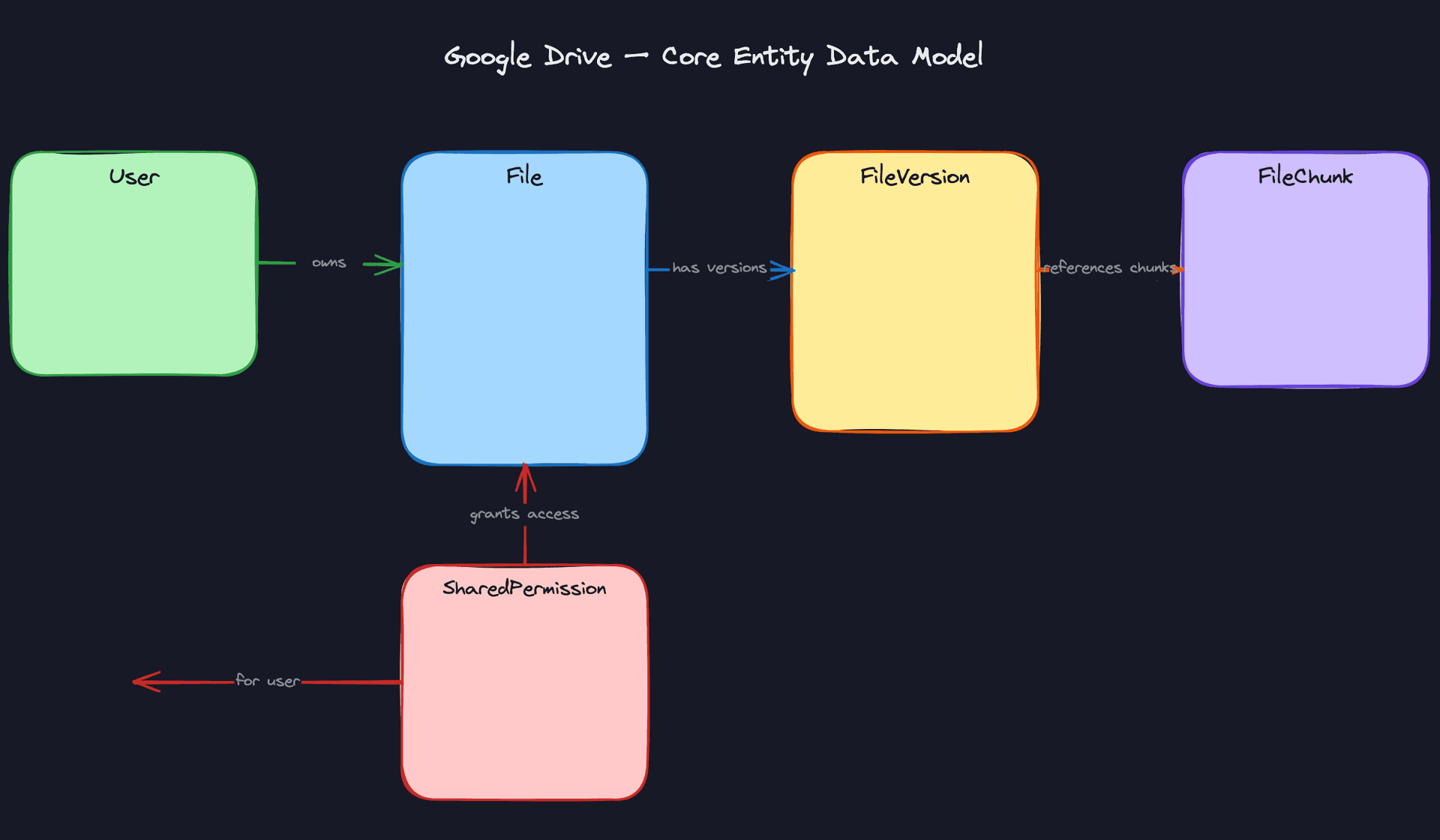
Five entities form the backbone of this design:
User is your account record. Beyond the basics like email and display name, it tracks storage quota and current usage. You'll need these numbers enforced at upload time to prevent overages.
File is the metadata record for every file and folder in the system. Notice the is_folder boolean: folders are just files with no content. Each file points to its parent folder (forming a tree) and its latest version. The content_hash here is a fingerprint of the entire file, not individual chunks.
FileVersion captures every revision. When a user edits a file, you don't overwrite the old data. You create a new version with its own chunk manifest (an ordered list of chunk hashes that compose this version). This is what powers "Version History" and one-click rollback.
FileChunk is where things get interesting. Every file gets split into 4MB chunks, and each chunk is stored by its SHA-256 hash. Two users upload the same presentation deck? The chunks are identical, stored once, referenced twice. That reference_count field is what keeps garbage collection from deleting chunks still in use.
SharedPermission links a file or folder to a user with a specific role. Folder-level permissions cascade down to children, but any child can override with its own permission record. The interviewer may ask how you resolve "User X has viewer access on the folder but editor access on one file inside it." The answer: most-specific permission wins.
CREATE TABLE users (
    id              UUID PRIMARY KEY DEFAULT gen_random_uuid(),
    email           VARCHAR(255) NOT NULL UNIQUE,
    display_name    VARCHAR(255) NOT NULL,
    storage_quota   BIGINT NOT NULL DEFAULT 16106127360,  -- 15GB free tier
    storage_used    BIGINT NOT NULL DEFAULT 0,
    created_at      TIMESTAMP NOT NULL DEFAULT now()
);
CREATE TABLE files (
    id                UUID PRIMARY KEY DEFAULT gen_random_uuid(),
    owner_id          UUID NOT NULL REFERENCES users(id),
    name              VARCHAR(1024) NOT NULL,
    parent_folder_id  UUID REFERENCES files(id),          -- NULL = root folder
    is_folder         BOOLEAN NOT NULL DEFAULT false,
    size_bytes        BIGINT NOT NULL DEFAULT 0,
    content_hash      VARCHAR(64),                        -- SHA-256 hex, NULL for folders
    latest_version_id UUID,                               -- FK added after file_versions exists
    created_at        TIMESTAMP NOT NULL DEFAULT now(),
    updated_at        TIMESTAMP NOT NULL DEFAULT now()
);
CREATE INDEX idx_files_parent ON files(parent_folder_id, name);
CREATE INDEX idx_files_owner  ON files(owner_id);
CREATE TABLE file_versions (
    id              UUID PRIMARY KEY DEFAULT gen_random_uuid(),
    file_id         UUID NOT NULL REFERENCES files(id),
    version_number  INT NOT NULL,
    size_bytes      BIGINT NOT NULL,
    content_hash    VARCHAR(64) NOT NULL,                 -- hash of full content at this version
    chunk_manifest  JSONB NOT NULL,                       -- ordered list of chunk hashes
    edited_by       UUID NOT NULL REFERENCES users(id),
    created_at      TIMESTAMP NOT NULL DEFAULT now(),
    UNIQUE(file_id, version_number)
);
CREATE INDEX idx_versions_file ON file_versions(file_id, version_number DESC);
Why JSONB for chunk_manifest? A 10GB file at 4MB chunks produces ~2,500 entries. That's well within JSONB's comfort zone, and it keeps the version record self-contained. You don't need a separate join table for the chunk ordering.
CREATE TABLE file_chunks (
    id               UUID PRIMARY KEY DEFAULT gen_random_uuid(),
    chunk_hash       VARCHAR(64) NOT NULL UNIQUE,         -- SHA-256, content-addressable
    size_bytes       INT NOT NULL,
    storage_key      VARCHAR(512) NOT NULL,               -- path in blob storage
    reference_count  INT NOT NULL DEFAULT 1,              -- for garbage collection
    created_at       TIMESTAMP NOT NULL DEFAULT now()
);
CREATE INDEX idx_chunks_hash ON file_chunks(chunk_hash);
Key insight: Thechunk_hashas a unique key is what makes deduplication work. Before uploading any chunk, the client sends its hash to the server. If a row with that hash already exists, the server just incrementsreference_countand skips the upload entirely. For organizations where hundreds of people share the same files, this saves enormous amounts of storage.
CREATE TABLE shared_permissions (
    id          UUID PRIMARY KEY DEFAULT gen_random_uuid(),
    file_id     UUID NOT NULL REFERENCES files(id),
    user_id     UUID NOT NULL REFERENCES users(id),
    role        VARCHAR(20) NOT NULL CHECK (role IN ('viewer', 'editor', 'owner')),
    granted_by  UUID NOT NULL REFERENCES users(id),
    created_at  TIMESTAMP NOT NULL DEFAULT now(),
    UNIQUE(file_id, user_id)                              -- one permission per user per file
);
CREATE INDEX idx_permissions_user ON shared_permissions(user_id);
CREATE INDEX idx_permissions_file ON shared_permissions(file_id);
The UNIQUE(file_id, user_id) constraint prevents duplicate permission records. If someone re-shares a file with a different role, you upsert rather than insert.
API Design
Each endpoint maps directly to a functional requirement from our requirements gathering. The upload flow is intentionally split into two calls because the client uploads chunks directly to blob storage (bypassing our servers), so we need an initialization step and a completion confirmation.
// Initialize a file upload. Returns presigned URLs for each chunk.
POST /files/upload/init
{
  "name": "quarterly-report.pdf",
  "parent_folder_id": "uuid-of-folder",
  "size_bytes": 52428800,
  "chunk_hashes": ["a1b2c3...", "d4e5f6...", "g7h8i9..."]
}
-> {
  "upload_id": "uuid",
  "presigned_urls": {
    "a1b2c3...": "https://storage.example.com/upload/...",
    "d4e5f6...": null,   // null = chunk already exists, skip upload
    "g7h8i9...": "https://storage.example.com/upload/..."
  }
}
Notice the response: any chunk hash that already exists in our system returns null instead of a URL. The client skips those entirely. This is deduplication happening at the API level.
// Confirm all chunks are uploaded. Commits the file metadata.
PUT /files/upload/complete
{
  "upload_id": "uuid",
  "chunk_hashes": ["a1b2c3...", "d4e5f6...", "g7h8i9..."]
}
-> {
  "file_id": "uuid",
  "version_number": 1,
  "created_at": "2025-01-15T10:30:00Z"
}
PUT here because this is idempotent. If the client's network drops right after sending this request, it can safely retry without creating duplicate files.
// Download a file. Returns chunk manifest so client can fetch in parallel.
GET /files/{file_id}/download?version=latest
-> {
  "file_id": "uuid",
  "name": "quarterly-report.pdf",
  "version_number": 3,
  "size_bytes": 52428800,
  "chunks": [
    { "hash": "a1b2c3...", "url": "https://cdn.example.com/chunks/a1b2c3...", "size": 4194304 },
    { "hash": "d4e5f6...", "url": "https://cdn.example.com/chunks/d4e5f6...", "size": 4194304 },
    { "hash": "g7h8i9...", "url": "https://cdn.example.com/chunks/g7h8i9...", "size": 1048576 }
  ]
}
Tip: When the interviewer asks "why not just stream the file through your server?", this is your answer. The client downloads chunks in parallel directly from CDN/blob storage. Your API server never touches the actual bytes. This keeps your compute layer thin and your bandwidth costs low.
// Share a file or folder with another user.
POST /files/{file_id}/share
{
  "user_email": "colleague@company.com",
  "role": "editor"
}
-> {
  "permission_id": "uuid",
  "user_id": "uuid-of-colleague",
  "role": "editor"
}
// Fetch changes since last sync. Cursor-based pagination.
GET /sync/changes?cursor=1705312200000&limit=100
-> {
  "changes": [
    { "file_id": "uuid", "action": "modified", "version": 4, "updated_at": "..." },
    { "file_id": "uuid", "action": "deleted", "deleted_at": "..." },
    { "file_id": "uuid", "action": "created", "version": 1, "created_at": "..." }
  ],
  "next_cursor": "1705315800000",
  "has_more": false
}
The cursor is a timestamp (epoch millis). Each device remembers its last cursor and asks "what changed since then?" on reconnect. This is far cheaper than diffing the entire file tree on every sync.
Common mistake: Candidates often design a single POST /files/upload endpoint that accepts the entire file body. This breaks down immediately for large files (timeouts, no resume on failure, server memory pressure). Splitting upload into init/chunk/complete is not over-engineering; it's the baseline expectation for a file storage system.A quick note on HTTP verb choices: POST for creating new resources (initiating uploads, sharing), PUT for idempotent completions, GET for reads. The sync endpoint is a GET because it's a pure read with no side effects, and the cursor travels as a query parameter so responses are cacheable by intermediaries when appropriate.
High-Level Design
1) File Upload
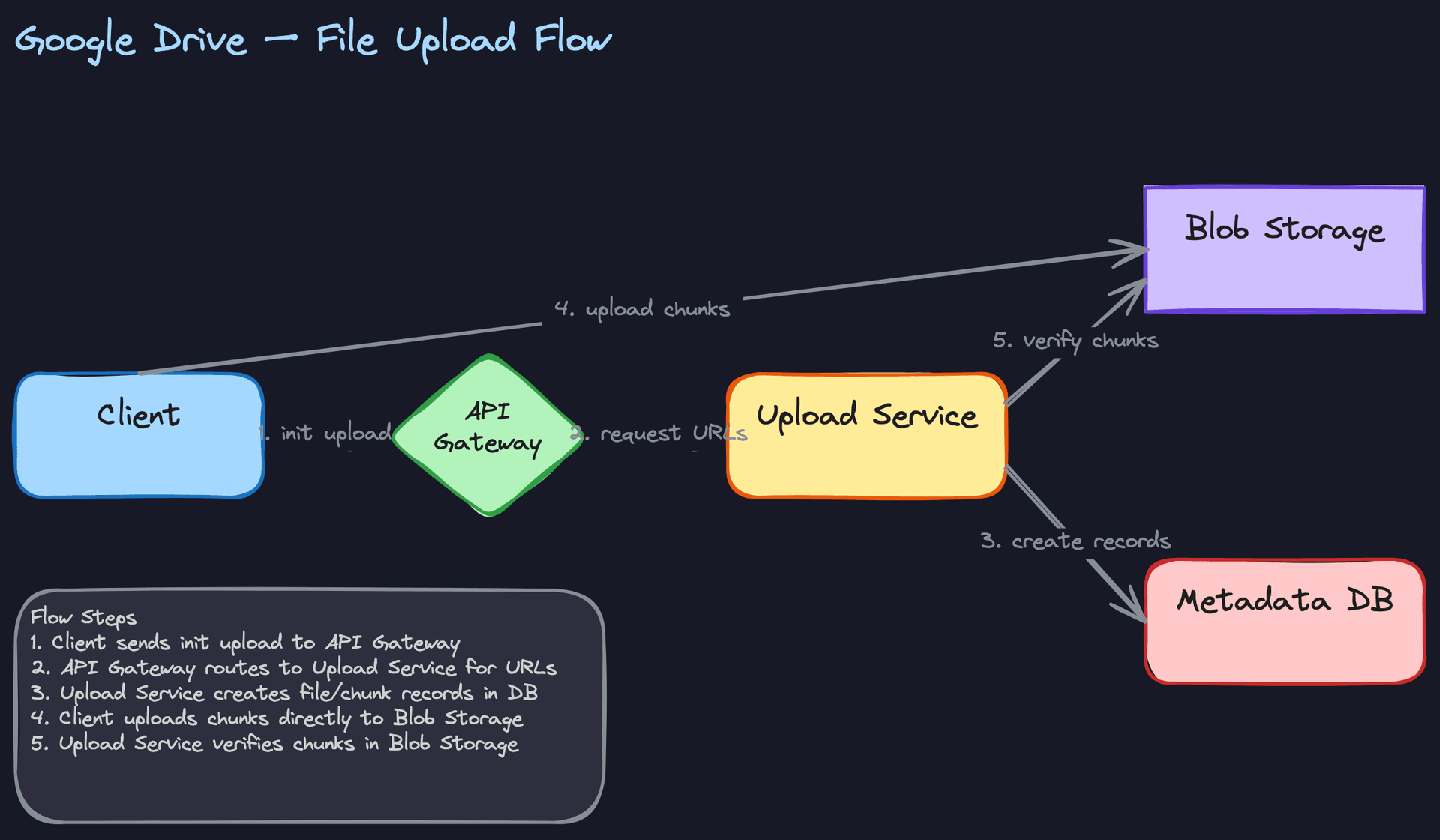
Uploading a 5GB video by piping every byte through your application servers is a recipe for disaster. Your servers become bottlenecks, you burn bandwidth you don't need to burn, and a single network hiccup means starting over from scratch. The entire upload flow is designed around one principle: the client should talk directly to blob storage for the heavy lifting, and your services should only coordinate metadata.
Components involved: - Client (desktop/mobile app with local chunking logic) - API Gateway (authentication, rate limiting) - Upload Service (generates presigned URLs, tracks upload state) - Blob Storage (S3 or GCS for raw chunk bytes) - Metadata DB (Postgres for file, version, and chunk records)
Here's how a file upload actually works, step by step:
- The client splits the file into fixed-size chunks (4MB each) locally and computes a SHA-256 hash for each chunk.
- The client sends
POST /files/upload/initwith the file name, total size, parent folder, and the list of chunk hashes. - The Upload Service creates a preliminary File record in the Metadata DB with
status: "pending". This reserves thefile_idbut the file is invisible to other users and excluded from sync, search, and listing queries until it's committed. The Upload Service also checks the Chunk Index. Any chunk hash that already exists (from a previous upload by this user or anyone) is marked as "skip." This is deduplication happening before a single byte crosses the wire. - The Upload Service generates presigned URLs (time-limited, scoped to a specific key) for only the new chunks and returns them to the client along with the reserved
file_id. - The client uploads each new chunk directly to Blob Storage using the presigned URLs. These uploads happen in parallel (typically 4-6 concurrent connections). If one fails, only that chunk is retried.
- Once all chunks are uploaded, the client calls
PUT /files/upload/completewith the file ID. - The Upload Service verifies that every chunk exists in Blob Storage (checksums match), then atomically transitions the File record from
pendingtocommitted, writes the FileVersion record, and persists the chunk manifest, all in a single transaction.
POST /files/upload/init
{
  "name": "quarterly-report.pdf",
  "parent_folder_id": "f47ac10b-58cc-4372-a567-0e02b2c3d479",
  "size_bytes": 15728640,
  "chunk_hashes": [
    "a3f2b8c1d4e5...",
    "b7c9d0e1f2a3...",
    "c1d2e3f4a5b6...",
    "d5e6f7a8b9c0..."
  ]
}

Response 200:
{
  "upload_id": "up_abc123",
  "file_id": "file_xyz789",
  "status": "pending",
  "presigned_urls": {
    "a3f2b8c1d4e5...": "https://storage.example.com/chunks/a3f2...?sig=xxx&exp=3600",
    "c1d2e3f4a5b6...": "https://storage.example.com/chunks/c1d2...?sig=yyy&exp=3600"
  },
  "existing_chunks": ["b7c9d0e1f2a3...", "d5e6f7a8b9c0..."]
}
Notice that only 2 of the 4 chunks need uploading. The other two already exist in storage. For a company where thousands of people share the same slide deck template, this saves enormous amounts of bandwidth and storage.
PUT /files/upload/complete
{
  "upload_id": "up_abc123",
  "file_id": "file_xyz789"
}

Response 200:
{
  "file_id": "file_xyz789",
  "version": 1,
  "status": "committed"
}
Tip: When you explain this flow, emphasize why the client uploads directly to blob storage. If 5,000 users are uploading simultaneously at peak QPS, routing all those bytes through your application tier would require massive horizontal scaling of upload servers and double your bandwidth costs. Presigned URLs let blob storage (which is designed for this) absorb the load.
The pending status is the safety net for the entire flow. If the client crashes mid-upload, you have a pending File record and some orphaned chunks in blob storage, but no committed file visible to anyone. A background garbage collection job runs periodically and cleans up both: it deletes pending File records whose presigned URLs have expired (say, 24 hours after creation) and removes any orphaned chunks that no committed file references. This two-pronged cleanup keeps your Metadata DB and Blob Storage from accumulating ghosts of abandoned uploads.
2) File Download
Downloads are the read-heavy side of the system. With 20,000 peak download QPS versus 5,000 upload QPS, you need to think about caching from the start.
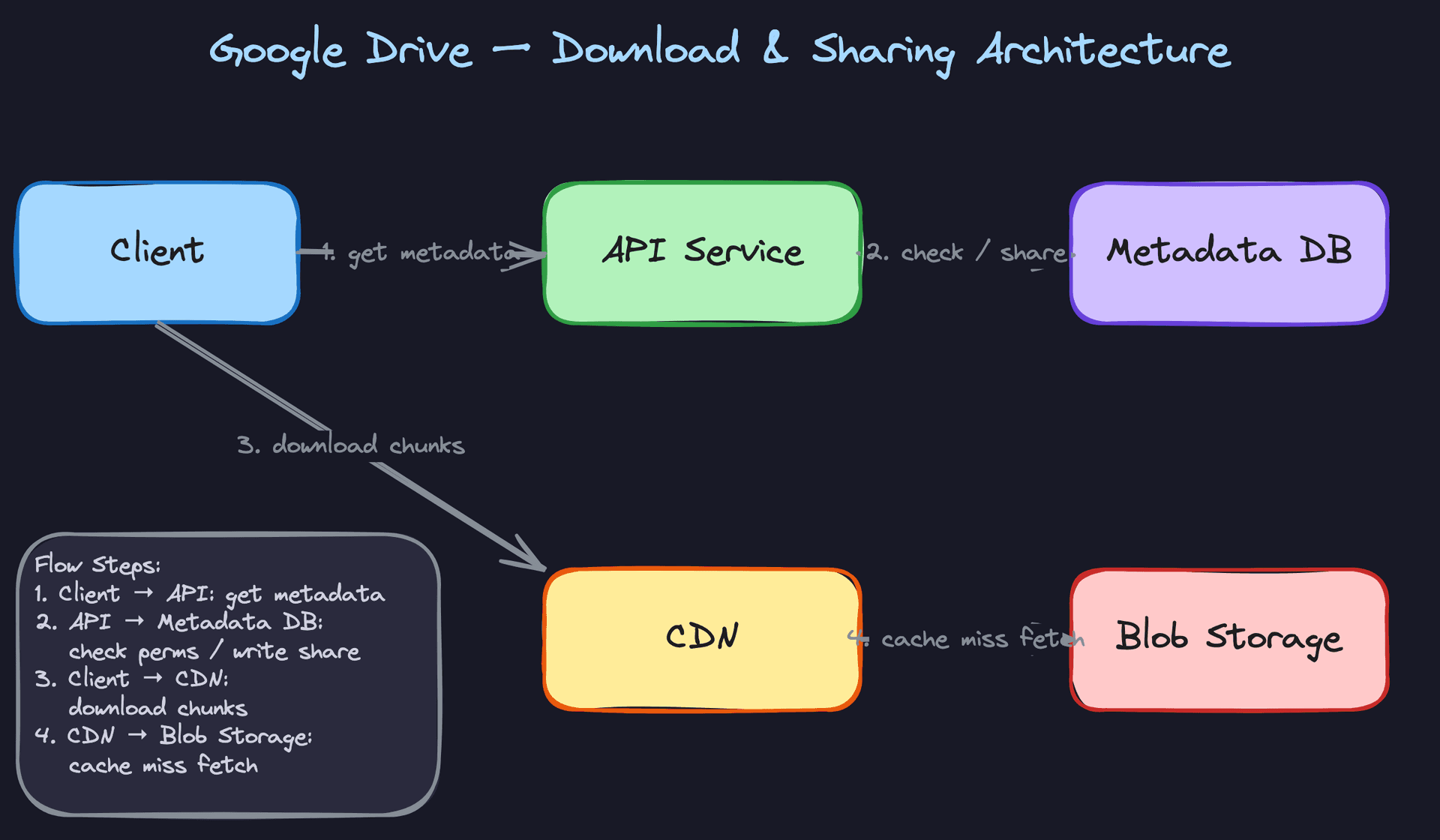
Components involved: - Client (reassembles chunks into the original file) - API Service (serves metadata, checks permissions) - Metadata DB (file records, version manifests, permissions) - CDN (edge-cached chunk delivery) - Blob Storage (origin for all chunks)
The download flow:
- The client sends
GET /files/{id}/downloadwith an optionalversionparameter. - The API Service queries the Metadata DB for the file's metadata and checks whether the requesting user has at least
viewerpermission (either directly or inherited from a parent folder). - The API Service returns the chunk manifest for the requested version: an ordered list of chunk hashes with their CDN-accessible URLs.
- The client downloads chunks in parallel from the CDN. Each chunk is addressed by its content hash, making it perfectly cacheable (the same hash always returns the same bytes).
- On a CDN cache miss, the CDN fetches from Blob Storage, caches the chunk at the edge, and serves it.
- The client reassembles chunks in order and writes the file to disk.
GET /files/file_xyz789/download?version=3

Response 200:
{
  "file_id": "file_xyz789",
  "name": "quarterly-report.pdf",
  "version": 3,
  "size_bytes": 15728640,
  "chunks": [
    {
      "index": 0,
      "hash": "a3f2b8c1d4e5...",
      "size_bytes": 4194304,
      "url": "https://cdn.example.com/chunks/a3f2b8c1d4e5..."
    },
    {
      "index": 1,
      "hash": "b7c9d0e1f2a3...",
      "size_bytes": 4194304,
      "url": "https://cdn.example.com/chunks/b7c9d0e1f2a3..."
    }
  ]
}
Content-addressable storage makes CDN caching almost free. When a company-wide PDF gets shared with 10,000 employees, the CDN serves it from edge after the first few requests. The origin blob storage barely notices.
Common mistake: Candidates sometimes design the download path to stream the full file through the API service. This kills your API servers under load. The API service should only serve metadata (a few KB); the multi-megabyte chunk transfers go through CDN and blob storage directly.
3) Cross-Device Sync
This is the feature that separates a file storage service from a file sync service. When you edit a file on your laptop, your phone should reflect the change within seconds. When you've been on a plane for six hours, reconnecting should efficiently catch you up on everything that changed.
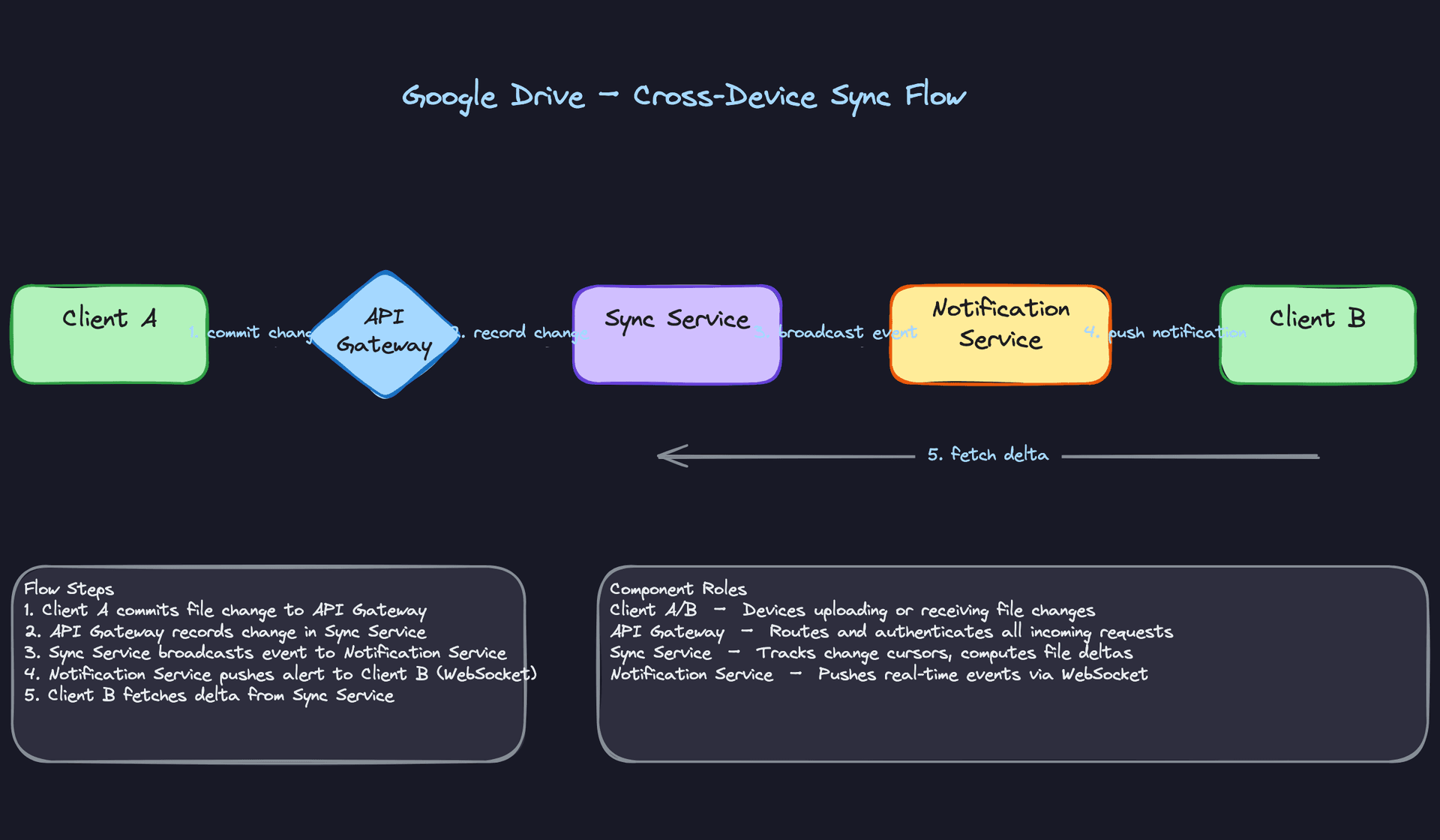
Components involved: - Client A (the device that made a change) - API Gateway - Sync Service (maintains change log, computes deltas) - Notification Service (manages WebSocket connections) - Client B, C, ... (other devices owned by the same user, or collaborators)
The sync flow when a file changes:
- Client A finishes uploading a new version (the upload flow from above completes).
- The Upload Service notifies the Sync Service that file
xyz789has a new version. - The Sync Service appends an entry to the change log:
{file_id, new_version, timestamp, change_type: "modified", cursor_position: 948271}. - The Sync Service tells the Notification Service to broadcast to all devices that are subscribed to this file (the owner's other devices, plus any collaborators with edit/view access).
- The Notification Service pushes a lightweight event over WebSocket:
{file_id: "xyz789", change_type: "modified", new_version: 3}. - Client B receives the push, requests the chunk manifest for version 3, compares it against its local manifest for version 2, and downloads only the chunks that differ.
For offline devices, the catch-up path is different:
- Client C comes online after being offline for two days.
- Client C calls
GET /sync/changes?since=cursor_945000with the last cursor it processed. - The Sync Service returns all change log entries after that cursor, batched.
- Client C processes each change in order, downloading new chunks and deleting locally cached chunks for deleted files.
GET /sync/changes?since=945000&limit=100

Response 200:
{
  "changes": [
    {
      "cursor": 945001,
      "file_id": "file_xyz789",
      "change_type": "modified",
      "version": 3,
      "timestamp": "2025-01-15T10:23:45Z"
    },
    {
      "cursor": 945002,
      "file_id": "file_abc456",
      "change_type": "deleted",
      "timestamp": "2025-01-15T11:05:12Z"
    }
  ],
  "next_cursor": 945002,
  "has_more": true
}
The cursor is a monotonically increasing sequence number, not a timestamp. Timestamps can collide or drift across servers; sequence numbers from a single-writer change log cannot.
Tip: Interviewers love to probe the boundary between online and offline sync. Make sure you articulate both paths clearly. The WebSocket push handles the "instant" case; the cursor-based changelog handles the "catch-up" case. They're complementary, not alternatives.
Only changed chunks get transferred during sync. If you edited one paragraph in a 100MB document, maybe 1 or 2 of the 25 chunks actually changed. The client diffs the chunk manifests (old version vs. new version) and fetches only what's new. This is the single biggest bandwidth optimization in the entire system.
4) Sharing and Permissions
Sharing looks simple on the surface, but permission resolution for nested folders gets tricky fast.
Components involved: - API Service (handles share requests, permission checks) - Metadata DB (SharedPermission table, folder hierarchy) - Notification Service (alerts recipients) - Permission Cache (Redis, for hot-path access checks)
The sharing flow:
- User A calls
POST /files/{id}/sharewith the target user's email and the desired role (vieweroreditor). - The API Service looks up the target user by email, verifies that User A has
owneroreditorpermission on the file/folder, and writes a SharedPermission record. - The Notification Service sends a push notification and/or email to the recipient.
- When User B later accesses the file, the API Service checks permissions by querying the SharedPermission table for a direct match on the file ID. If none is found, it walks up the folder hierarchy checking for inherited permissions.
POST /files/file_xyz789/share
{
  "email": "bob@company.com",
  "role": "editor"
}

Response 200:
{
  "permission_id": "perm_def456",
  "file_id": "file_xyz789",
  "user_id": "user_bob",
  "role": "editor"
}
Folder-level sharing cascades to all children. If you share a folder with Bob as a viewer, Bob can view every file and subfolder inside it. But permissions can be overridden: you might share the folder as viewer but grant editor on a specific file within it. The resolution rule is simple: the most specific permission wins. Direct file permission beats inherited folder permission.
For the hot path (every single download and sync request checks permissions), you cache resolved permissions in Redis with a short TTL (60 seconds). When a permission changes, you invalidate the cache entry for that file and its parent chain.
-- Permission resolution query (simplified)
-- Walks up the folder tree to find the most specific permission
WITH RECURSIVE folder_chain AS (
    SELECT id, parent_folder_id, 0 AS depth
    FROM files WHERE id = $file_id
    UNION ALL
    SELECT f.id, f.parent_folder_id, fc.depth + 1
    FROM files f
    JOIN folder_chain fc ON f.id = fc.parent_folder_id
)
SELECT sp.role, fc.depth
FROM shared_permissions sp
JOIN folder_chain fc ON sp.file_id = fc.id
WHERE sp.user_id = $user_id
ORDER BY fc.depth ASC
LIMIT 1;
Warning: Don't skip the caching discussion. Without it, every API call triggers a recursive folder walk. At 20,000 download QPS, that's a database killer. The interviewer will notice if your permission checks don't scale.
Putting It All Together
Four flows, one architecture. The API Gateway handles auth and routing for all requests. Behind it, specialized services divide the work: the Upload Service coordinates chunked uploads and deduplication, the API Service handles metadata reads, permission checks, and sharing, the Sync Service maintains the change log and computes deltas, and the Notification Service manages persistent WebSocket connections for real-time push.
Blob Storage (S3/GCS) is the single source of truth for file content, addressed by chunk hash. The Metadata DB (Postgres, sharded by user ID for large scale) stores everything else: file records, version histories, chunk manifests, folder structure, and permissions. Redis sits in front of the Metadata DB for permission lookups and recently-accessed file metadata.
The CDN serves chunk downloads at the edge, and because chunks are content-addressed (immutable hash = immutable content), cache invalidation is never needed. New versions simply reference new chunk hashes.
All three diagrams below show different slices of the same system. In your interview, sketch the upload flow first (it's the most complex), then layer on sync and sharing.
Deep Dives
"How do we handle uploading a 5GB video file without it failing halfway through?"
This is usually the first deep dive an interviewer will push on, because the naive answer is so obviously broken at scale. Your goal is to show that you understand why chunking exists, and then go further into deduplication and delta sync.
Bad Solution: Single-blob upload
The client sends the entire file as one HTTP request body to your server, which streams it into blob storage. Simple, right?
It falls apart fast. A 5GB upload over a typical home connection takes 30+ minutes. If the connection drops at 4.8GB, you start over from zero. Your server is also holding that connection open the entire time, tying up resources. There's no way to deduplicate content either; if two users upload the same 2GB presentation, you store it twice.
Warning: Candidates who skip straight to "we'll use S3 multipart upload" without explaining why chunking matters are missing the point. The interviewer wants to hear you reason about failure modes, not just name an AWS feature.
Good Solution: Fixed-size chunking with content-addressable storage
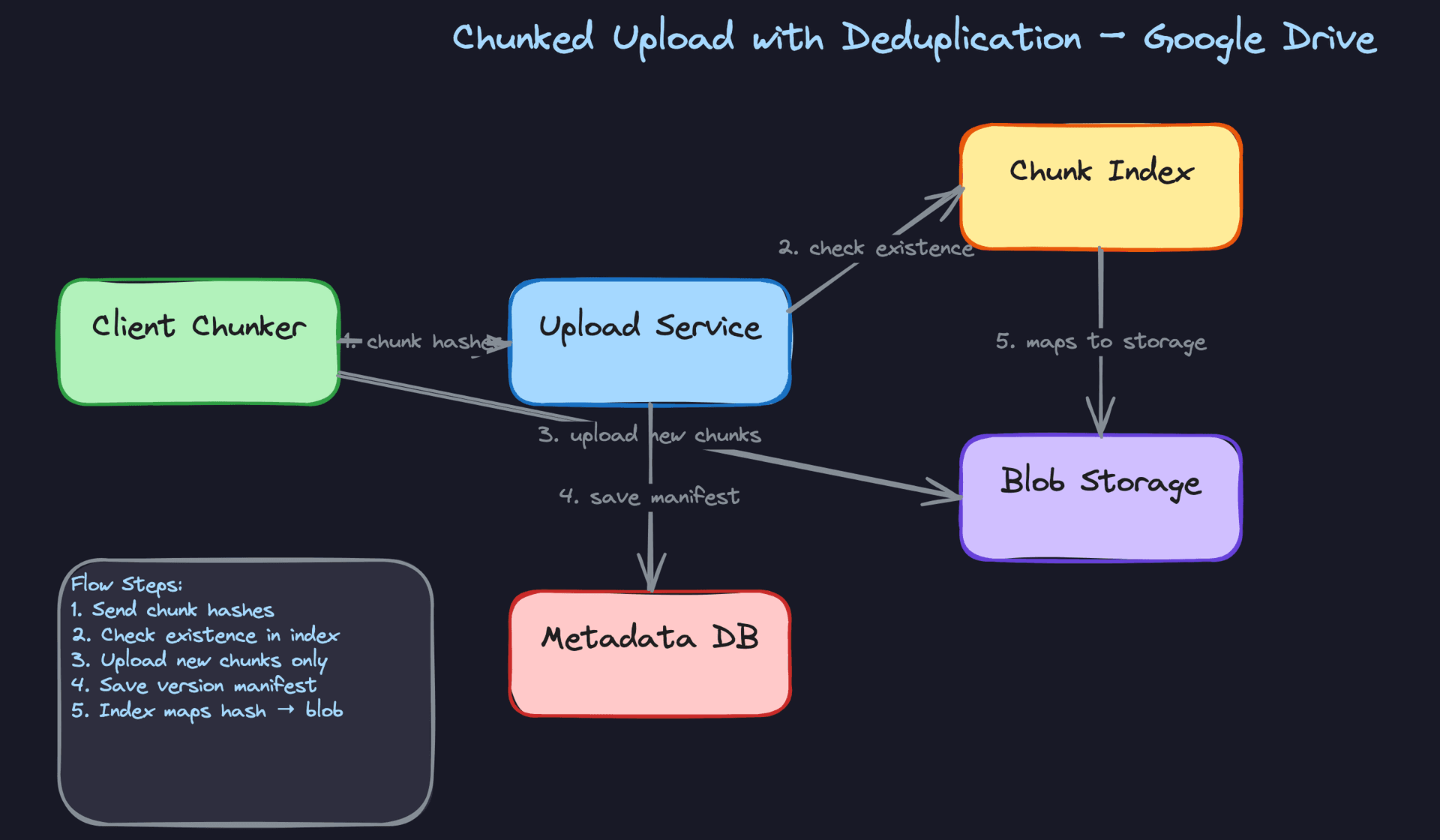
Split every file into fixed 4MB chunks on the client side. Before uploading, compute the SHA-256 hash of each chunk. Send the list of hashes to the Upload Service, which checks the Chunk Index to see which ones already exist. The client only uploads the chunks that are genuinely new.
import hashlib

CHUNK_SIZE = 4 * 1024 * 1024  # 4MB

def chunk_file(file_path):
    chunks = []
    with open(file_path, 'rb') as f:
        while True:
            data = f.read(CHUNK_SIZE)
            if not data:
                break
            chunk_hash = hashlib.sha256(data).hexdigest()
            chunks.append({'hash': chunk_hash, 'data': data, 'size': len(data)})
    return chunks
Each chunk is stored once in blob storage, keyed by its hash. The file version's metadata just records an ordered manifest of chunk hashes:
{
  "version_id": "v-abc123",
  "chunk_manifest": [
    "a3f2b8c1...",
    "7e91d4f0...",
    "a3f2b8c1...",
    "c44b12e9..."
  ]
}
Notice that a3f2b8c1... appears twice. We don't store it twice; the manifest just references it in two positions. This gives you resumable uploads (retry only failed chunks), cross-user deduplication (two people uploading the same PDF share chunks), and cross-version deduplication (editing a small part of a large file reuses most chunks).
The trade-off: fixed-size chunking is sensitive to insertions. If someone inserts a single byte at the beginning of a file, every 4MB boundary shifts, and every chunk hash changes. You end up re-uploading the entire file even though the actual content delta was tiny.
Great Solution: Variable-size chunking with rolling hashes
Instead of cutting at fixed byte offsets, use a Rabin fingerprint (rolling hash) to find chunk boundaries based on the content itself. You slide a window across the file and cut whenever the rolling hash hits a specific pattern (e.g., the low 13 bits are all zero, giving an average chunk size of ~8KB for small-granularity sync, or tune to ~4MB for storage efficiency).
WINDOW_SIZE = 48
MOD_MASK = (1 << 13) - 1  # average chunk ~8KB; tune for your use case
MAX_CHUNK = 16 * 1024 * 1024  # 16MB hard ceiling to bound chunk size

def variable_chunk(file_path):
    chunks = []
    with open(file_path, 'rb') as f:
        buf = bytearray()
        rolling_hash = 0
        while True:
            byte = f.read(1)
            if not byte:
                if buf:
                    chunks.append(hashlib.sha256(buf).hexdigest())
                break
            buf.append(byte[0])
            rolling_hash = update_rabin(rolling_hash, byte[0])
            if (rolling_hash & MOD_MASK) == 0 or len(buf) >= MAX_CHUNK:
                chunks.append(hashlib.sha256(buf).hexdigest())
                buf = bytearray()
                rolling_hash = 0
    return chunks
The magic: because boundaries are determined by content, not position, inserting bytes at the start of the file only affects the first chunk. Every subsequent boundary re-anchors on the same content patterns. The result is true delta sync. When a user edits the middle of a 2GB file, only the handful of chunks around the edit are new. Everything else matches existing hashes and gets skipped.
The MAX_CHUNK ceiling is there because content-defined chunking has no guaranteed upper bound on chunk size. If the rolling hash never hits the target pattern (unlikely but possible with certain byte sequences), you'd end up with a single enormous chunk. The hard cap at 16MB forces a boundary regardless, keeping upload and retry granularity reasonable.
Tip: Mentioning Rabin fingerprinting by name and explaining why content-defined boundaries survive insertions is what separates senior candidates from mid-level ones. You don't need to implement the full rolling hash on a whiteboard, but you should be able to explain the principle in two sentences.
"How do we handle two users editing the same file offline?"
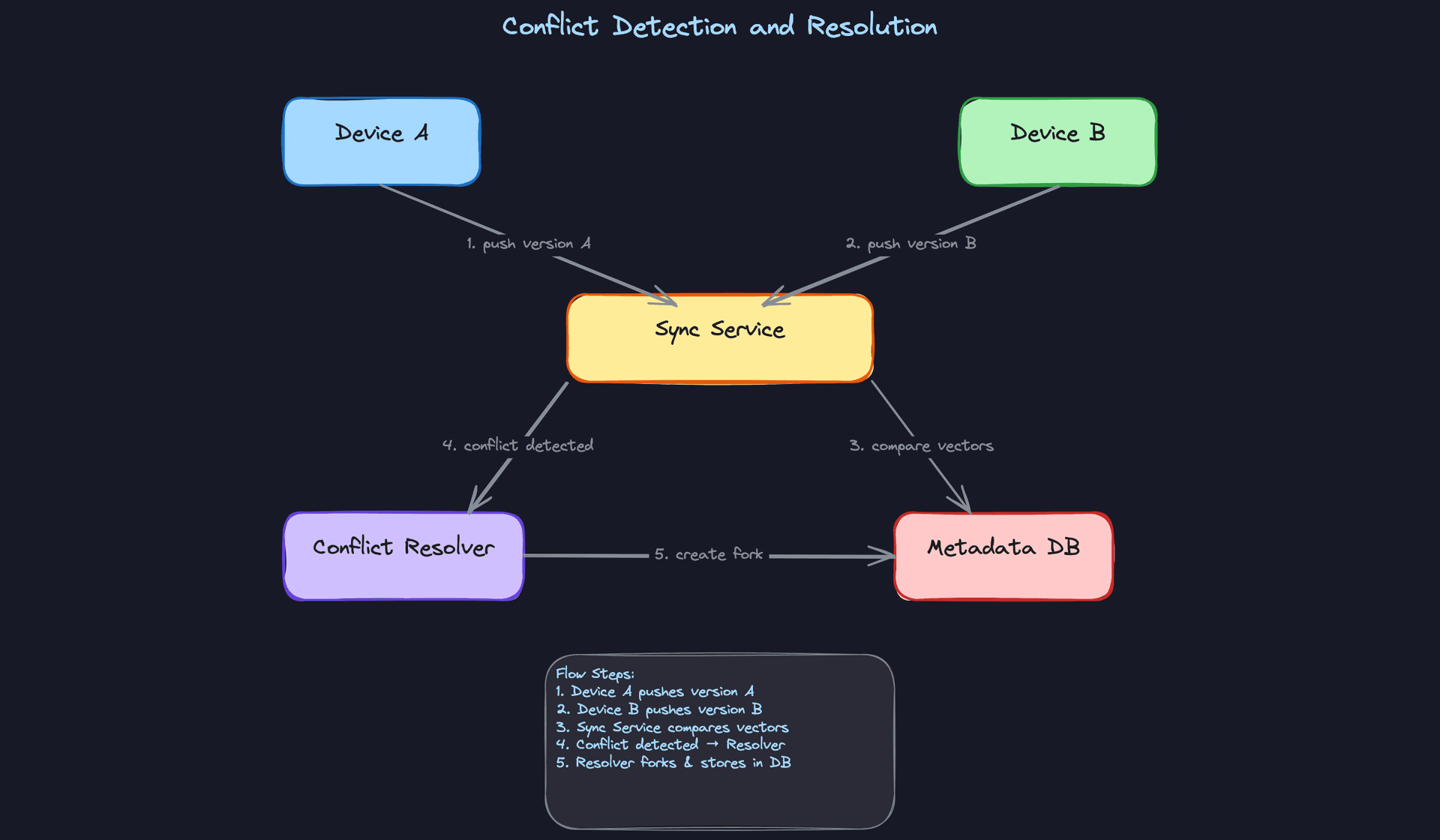
This question tests whether you understand distributed systems causality. The interviewer isn't expecting you to build Google Docs; remember, we scoped out real-time collaborative editing. But you do need a strategy for when Device A and Device B both modify report.pdf while disconnected, then come back online.
Bad Solution: Last-write-wins
Whichever device syncs second simply overwrites the first device's changes. The server compares timestamps and keeps the latest one.
This silently destroys data. If Alice spent three hours editing a presentation on a plane and Bob made a quick fix from his phone, Bob's trivial change could erase Alice's work entirely. Users will lose trust in your product immediately. Timestamps are also unreliable across devices; clock skew makes "latest" meaningless without synchronized clocks.
Warning: Some candidates propose last-write-wins and then try to salvage it with "we'll keep the old version in history." That's better than nothing, but the user never knows their changes were overwritten. Silent data loss is the worst kind.
Good Solution: Version vectors with conflict forking
Assign each device a logical clock. Every file carries a version vector: a map of {device_id: sequence_number} that tracks which edits from which devices are reflected in this version.
{
  "file_id": "f-789",
  "version_vector": {
    "device_A": 3,
    "device_B": 5
  }
}
When Device A syncs, the server compares vectors. If A's vector is a strict superset of the server's, it's a clean fast-forward. If neither vector dominates the other (A has {A:4, B:5} and the server has {A:3, B:6}), that's a conflict.
On conflict, the server creates a fork: both versions are preserved, and the user sees something like report.pdf and report (conflicted copy - Alice's Laptop).pdf. This is exactly what Dropbox does. No data is lost, and the user decides how to merge.
CREATE TABLE file_version_vectors (
    file_id       UUID NOT NULL REFERENCES files(id),
    device_id     UUID NOT NULL,
    sequence_num  BIGINT NOT NULL DEFAULT 0,
    PRIMARY KEY (file_id, device_id)
);
The trade-off is user experience. Non-technical users find "conflicted copy" confusing. They may not realize they need to manually reconcile two files. For binary files like images or PDFs, there's really no automated merge possible, so this is the best you can do. But for text-based files, you can do better.
Great Solution: Content-aware merging with CRDT fallback
For text files (code, markdown, plain text), apply operational transformation or CRDT-based three-way merge. Both conflicting versions share a common ancestor (the last synced version). Diff each against the ancestor, and if the edits touch different regions of the file, merge them automatically.
def three_way_merge(ancestor_chunks, version_a_chunks, version_b_chunks):
    """Attempt automatic merge; return None if conflicting regions overlap."""
    diff_a = compute_diff(ancestor_chunks, version_a_chunks)
    diff_b = compute_diff(ancestor_chunks, version_b_chunks)

    if regions_overlap(diff_a, diff_b):
        return None  # fall back to conflict fork

    merged = apply_diffs(ancestor_chunks, diff_a, diff_b)
    return merged
For binary files where merging is impossible, you still fall back to the conflict fork from the Good solution. But you present a merge UI that shows both versions side by side with metadata (who edited, when, file size diff) so the user can make an informed choice.
The version vector approach remains the foundation. CRDTs or OT sit on top as an optimization for file types where automatic merging is feasible. In an interview, frame it this way: "Version vectors give us correctness. Content-aware merging gives us a better user experience on top of that correctness guarantee."
Tip: Staff-level candidates will proactively mention that conflict resolution strategy should vary by file type. Don't propose one universal solution. Show the interviewer you think about the problem in layers.
"How do we keep files in sync across devices without killing our servers?"
Sync is the heartbeat of a product like Google Drive. Get it wrong and users see stale files. Over-engineer it and you're burning server resources on millions of idle connections. The interviewer wants to see you balance responsiveness with efficiency.
Bad Solution: Periodic polling
Every client polls GET /sync/changes every 30 seconds. The server checks what's changed since the client's last known state and returns a list of updates.
With 10M DAU and an average of 2 active devices per user, that's 20M devices polling every 30 seconds: ~667K QPS just for sync checks. The vast majority of those responses will be empty (nothing changed). You're burning enormous bandwidth and server compute on "nope, nothing new" responses.
Warning: Polling isn't always wrong. For very low-scale systems or as a fallback mechanism, it's fine. But if you propose it as your primary sync strategy for a Google Drive-scale system without acknowledging the cost, the interviewer will push back hard.
Good Solution: WebSocket push with cursor-based catch-up
Online devices maintain a persistent WebSocket connection to the Notification Service. When any file changes, the Sync Service publishes an event, and the Notification Service pushes a lightweight notification to all affected devices (the file owner plus anyone the file is shared with).
The notification is small; just a signal that something changed:
{
  "type": "file_changed",
  "file_id": "f-789",
  "new_version": 7,
  "timestamp": "2025-01-15T10:30:00Z"
}
The client then fetches the actual delta using a cursor-based changelog:
GET /sync/changes?cursor=eyJsYXN0X3NlcSI6MTAwNDJ9
The cursor is an opaque token encoding the client's position in the server's change log. The server returns only changes after that position. When a device comes back online after being offline for hours, it uses the same cursor endpoint to catch up on everything it missed.
This eliminates empty polling entirely. You only talk to devices when there's actually something to say. The cursor-based changelog also handles the offline-to-online transition gracefully; no special logic needed.
The weakness: for users with deeply nested folder trees containing thousands of files, figuring out which files changed can still require scanning a lot of changelog entries. The client downloads the full list of changes and applies them locally, which works but isn't optimal for large sync gaps.
Great Solution: Merkle tree-based hierarchical sync
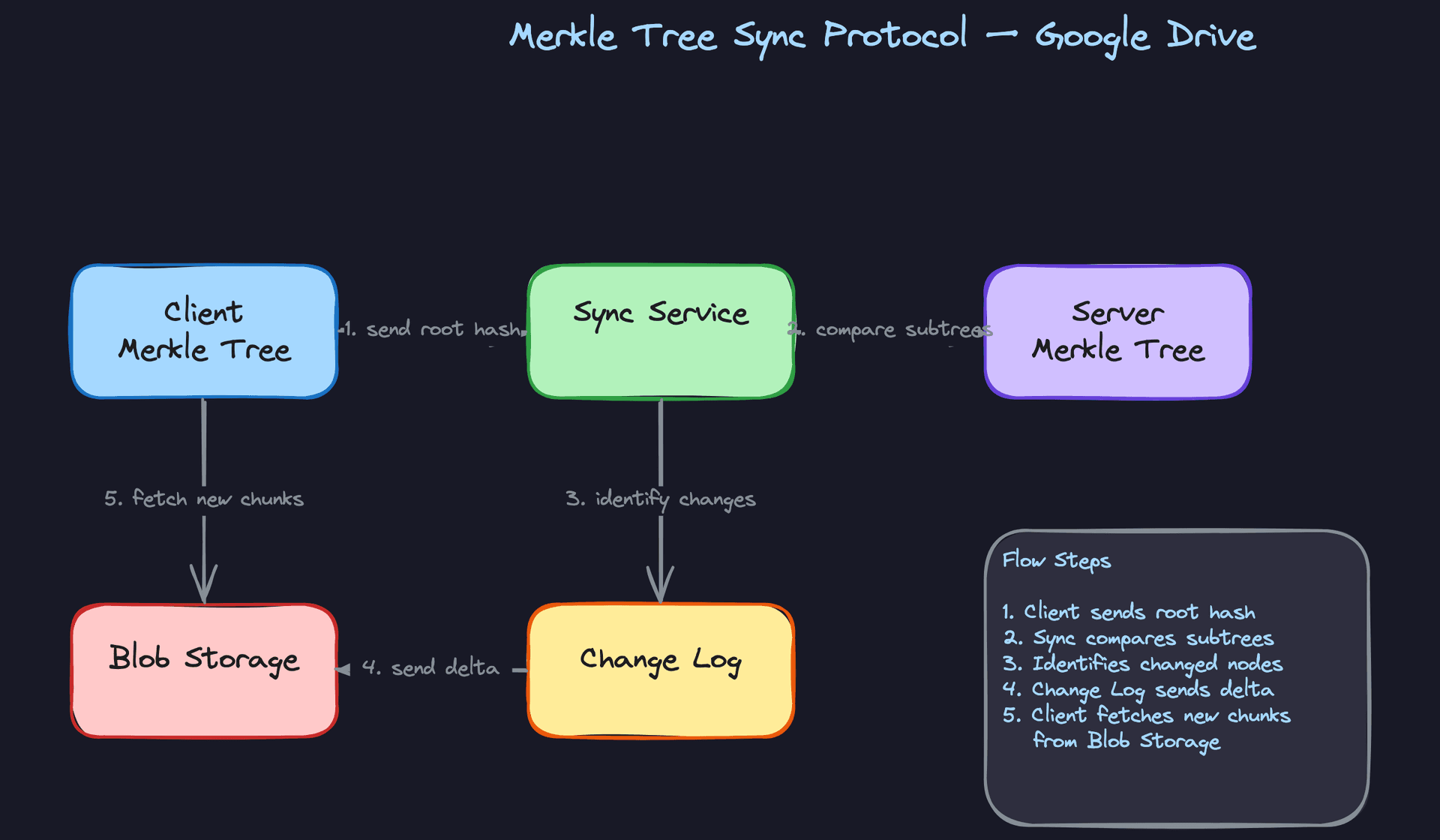
Build a hash tree (Merkle tree) over the file system hierarchy. Each folder's hash is computed from the hashes of its children. The root hash represents the entire state of a user's Drive.
root: hash(folder_A_hash + folder_B_hash)
├── folder_A: hash(file1_hash + file2_hash)
│   ├── file1: content_hash_v3
│   └── file2: content_hash_v1
└── folder_B: hash(file3_hash)
    └── file3: content_hash_v5
When a client reconnects, it sends its root hash to the Sync Service. If it matches the server's root hash, everything is in sync. Done. One comparison.
If the roots differ, the server and client walk down the tree together, comparing hashes at each level. If folder_A's hash matches but folder_B's doesn't, you skip the entire folder_A subtree and only drill into folder_B. For a user with 50,000 files where only 3 changed, you identify those 3 files in O(log N) comparisons instead of scanning the entire changelog.
def merkle_sync(client_tree, server_tree):
    """Returns list of files that need syncing."""
    if client_tree.hash == server_tree.hash:
        return []

    if client_tree.is_file:
        return [server_tree.file_id]

    changes = []
    for child_name in set(client_tree.children) | set(server_tree.children):
        c_child = client_tree.children.get(child_name)
        s_child = server_tree.children.get(child_name)
        if c_child is None:
            changes.append(('new', s_child))      # new on server
        elif s_child is None:
            changes.append(('deleted', c_child))   # deleted on server
        elif c_child.hash != s_child.hash:
            changes.extend(merkle_sync(c_child, s_child))
    return changes
You still use WebSockets for real-time push to online devices. The Merkle tree is the catch-up mechanism for offline devices or for periodic consistency checks. Think of it as two layers: WebSocket push for low-latency online sync, Merkle tree comparison for correctness verification and efficient offline recovery.
Tip: Drawing the Merkle tree on the whiteboard and walking through a concrete example ("user has 10,000 files, 2 changed, here's how we find them in 4 comparisons") is extremely effective. Interviewers remember visual explanations.
"How do we keep 2.5 exabytes of data durable without going bankrupt?"
This deep dive is less about a single algorithm and more about operational maturity. The interviewer is testing whether you think about cost, durability, and lifecycle management together.
Every chunk stored in blob storage gets replicated 3 times across different availability zones. That's your baseline durability guarantee: even if an entire AZ goes down, no data is lost. For the math, 3x replication of 2.5 EB means 7.5 EB of raw storage. At roughly $0.023/GB/month for standard S3, that's about $172M/month. You need a cost strategy.
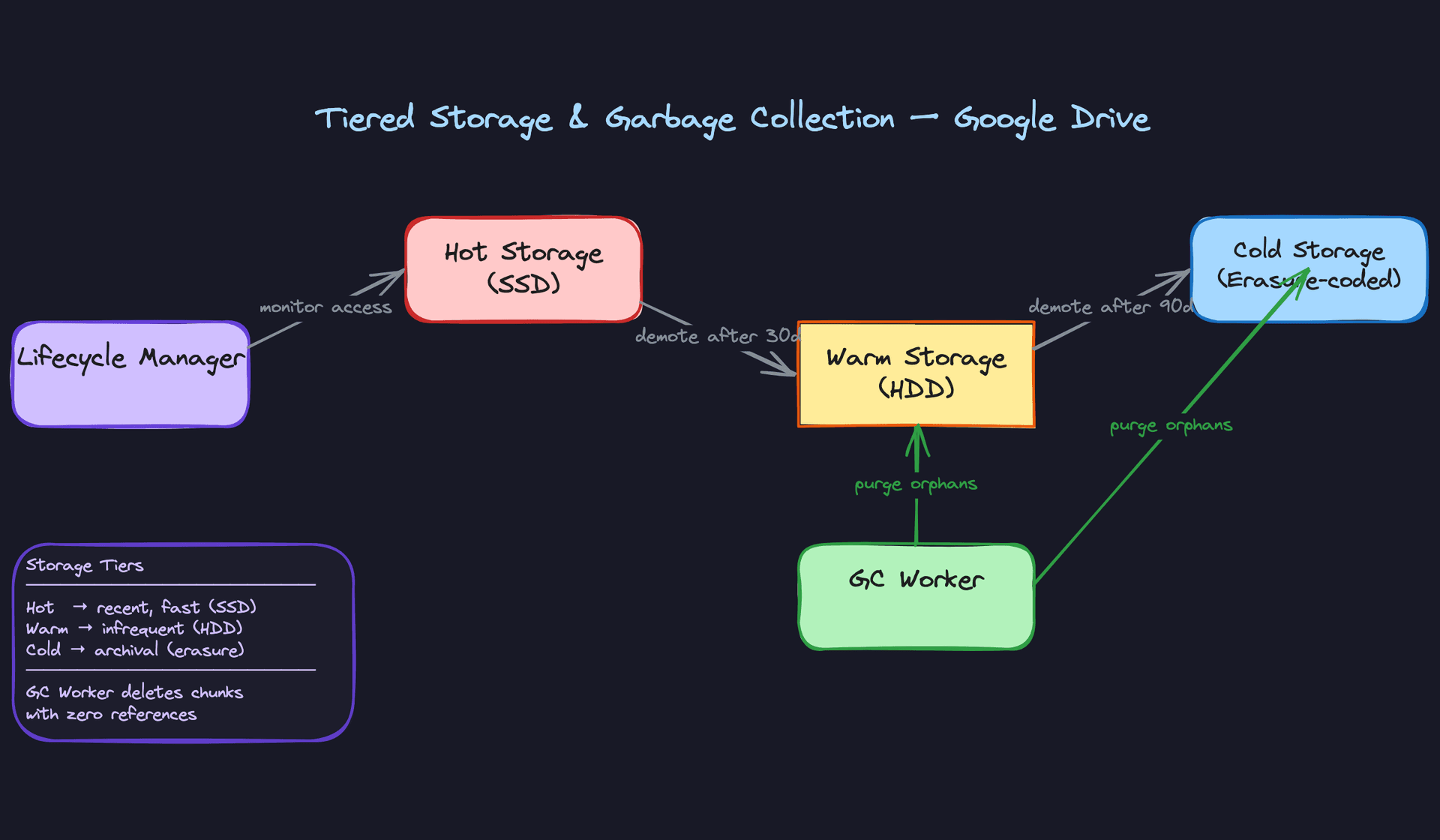
Tiered storage is the answer. Classify chunks by access recency:
| Tier | Backing | Access Pattern | Cost (relative) |
|---|---|---|---|
| Hot | SSD/standard object store | Accessed in last 30 days | 1x |
| Warm | HDD/infrequent access tier | 30-90 days since last access | 0.4x |
| Cold | Erasure-coded archival | 90+ days, rarely accessed | 0.1x |
A Lifecycle Manager runs daily, checking each chunk's last access timestamp and moving it between tiers. The key insight for cold storage: switch from 3x replication to erasure coding (e.g., Reed-Solomon 6+3, where you split data into 6 data fragments and 3 parity fragments). You get the same durability as 3x replication but at 1.5x storage overhead instead of 3x. The trade-off is higher latency on reads, since you need to fetch and reconstruct from multiple fragments. That's acceptable for files nobody has touched in three months.
Garbage collection is the other half of cost control. When a user deletes a file or when old versions get pruned, the chunks in those versions might still be referenced by other files or versions (remember, deduplication means chunks are shared). Each chunk maintains a reference_count. When a version is deleted, you decrement the reference count for each chunk in its manifest. A GC Worker periodically scans for chunks where reference_count = 0 and deletes them.
-- Find orphaned chunks eligible for deletion
SELECT id, storage_key, size_bytes
FROM file_chunks
WHERE reference_count = 0
  AND updated_at < now() - INTERVAL '7 days'  -- grace period
LIMIT 10000;
That 7-day grace period matters. Without it, you risk a race condition: a new upload could be referencing a chunk hash that the GC Worker is about to delete. The grace period ensures that any in-flight uploads have time to complete and increment the reference count before the chunk is purged.
Tip: Staff-level candidates will mention the GC race condition unprompted. If you bring up the grace period and explain why it's necessary, you're demonstrating operational thinking that goes beyond textbook architecture.
What is Expected at Each Level
Interviewers calibrate their expectations heavily based on the role you're targeting. A mid-level candidate who nails the fundamentals will outscore a senior candidate who name-drops Merkle trees but can't explain the upload flow. Know your level and make sure you cover its expectations completely before reaching upward.
Mid-Level
- Separate metadata from file content. This is the single most important architectural decision in this problem. If you store file bytes in the same database as file names and permissions, the interviewer will flag it immediately. You should articulate that metadata lives in a relational database while file content goes to blob storage (S3), and explain why: different access patterns, different scaling characteristics, different durability mechanisms.
- Design a working upload and download flow with clear API contracts. You don't need presigned URLs or chunking optimizations yet. But you do need a client that talks to an API service, which writes metadata and coordinates storage of the actual bytes. Sketch the endpoints. Show
POST /files/uploadandGET /files/{id}/downloadwith reasonable request/response shapes. - Identify the core entities and their relationships. File, Folder, User, and some notion of sharing permissions. You should recognize that folders are really just files with
is_folder = trueand a parent pointer, forming a tree. Getting the data model right signals that you understand the domain. - Acknowledge that chunking matters for large files, even if your design doesn't fully implement it. Saying "we'd want to break large files into chunks so uploads can resume if the connection drops" is enough. You don't need to discuss rolling hashes or deduplication, but you should know that uploading a 5GB file as a single HTTP request is a non-starter.
Senior
- Design the full chunked upload pipeline, including deduplication. You should explain how the client splits files into fixed-size chunks, computes SHA-256 hashes, and sends those hashes to the server to check which chunks already exist. Only new chunks get uploaded. This shows you understand both the mechanics and the cost savings at scale.
- Implement a real sync protocol with WebSocket push and cursor-based catch-up. Polling every 5 seconds is the mid-level answer. At senior, the interviewer expects you to describe how online devices receive push notifications through persistent WebSocket connections, while offline devices request changes since their last sync cursor on reconnect. You should be able to sketch the
GET /sync/changes?since=cursorendpoint and explain what a cursor represents. - Handle conflict detection using version vectors. Two devices editing the same file offline is a scenario the interviewer will probe. You need to explain how each device maintains a version vector, how the server detects that neither version is an ancestor of the other, and what happens next (forking into a "conflicted copy" that the user resolves manually). Last-write-wins is not an acceptable answer at this level.
- Proactively address failure modes. What happens when a client uploads 47 of 50 chunks and then crashes? What if the metadata commit succeeds but one chunk didn't actually land in blob storage? Senior candidates bring these up without being asked and propose solutions: upload session state with TTL-based cleanup, chunk verification before committing the version record, idempotent retry with chunk hashes as natural deduplication keys.
Staff+
- Drive toward Merkle tree sync for efficiency. Rather than sending a full changelog, you propose that client and server each maintain a hash tree of the file system hierarchy. Comparing root hashes tells you instantly whether anything diverged. Walking down the tree narrows the diff to specific subtrees. This reduces sync bandwidth from O(total files) to O(changed files), and you should be able to explain why that matters when a user has 100,000 files but only changed three.
- Discuss variable-size chunking with rolling hashes and its impact on delta transfer. Fixed-size chunks break down when you insert a byte at the beginning of a file; every chunk boundary shifts, and the entire file re-uploads. Rabin fingerprinting produces content-defined boundaries that are stable across insertions. You should connect this to real cost savings: bandwidth, storage, and sync latency.
- Propose tiered storage with concrete cost reasoning. Hot storage on SSDs for recently accessed files, warm on HDDs after 30 days, cold with erasure coding after 90 days. Staff candidates don't just name the tiers; they reason about the tradeoffs. Erasure coding (e.g., Reed-Solomon 6+3) uses 1.5x storage instead of 3x replication, but retrieval is slower. For files nobody has opened in six months, that's the right call.
- Reason about operational concerns that most candidates never touch. Garbage collection races: what if a GC worker deletes a chunk whose reference count just hit zero, but a concurrent upload is about to reference that same hash? Quota enforcement at scale: do you check quota before or after upload, and how do you handle the race between concurrent uploads from different devices? Cross-region replication: do you replicate blob storage synchronously (latency cost) or asynchronously (risk of data loss during regional failure)? These are the questions that separate architects from feature builders.
Key takeaway: Google Drive is fundamentally two systems wearing a trench coat: a metadata service that needs strong consistency and relational queries, and a blob storage system that needs raw throughput and durability. Every good design decision in this problem flows from keeping those two concerns cleanly separated and optimizing each on its own terms.
