
Understanding the Problem
What is a Rate Limiter?
Product definition: A rate limiter is a gatekeeper that sits in front of your backend services, counting requests per client and rejecting those that exceed a configured threshold.
Think of it as a bouncer at a club. There's a maximum capacity, and once you've hit it, nobody else gets in until someone leaves. Except here, "capacity" is defined per user, per IP address, or per API endpoint, and the "leaving" happens automatically when the time window resets.
Why does this matter? Without rate limiting, a single misbehaving client (or a coordinated attack) can overwhelm your servers, spike your cloud bill, and cause cascading failures that take down services for everyone. Rate limiters protect against abuse, enforce fair usage across pricing tiers, and give your infrastructure breathing room during traffic spikes.
Functional Requirements
Core Requirements:
- Multiple rate limiting rules. Support limiting by different keys: per user ID, per IP address, per API endpoint, or any combination. A single system might enforce "100 requests/minute per user on
/api/orders" alongside "1000 requests/hour per IP globally." - Clear rejection feedback. When a client is throttled, return HTTP 429 (Too Many Requests) with a
Retry-Afterheader telling them exactly when to try again. Silent drops are hostile to developers integrating with your API. - Configurable limits per service or tier. Free-tier users get 10 requests/second. Premium users get 100. An admin should be able to create, update, and delete these rules without redeploying anything.
- Rate limit headers on every response. Even allowed requests should include
X-RateLimit-Limit,X-RateLimit-Remaining, andX-RateLimit-Resetso clients can self-throttle before hitting the wall.
Below the line (out of scope):
- Rate limiting by request cost. Some APIs weight expensive queries (like GraphQL) differently. We'll assume uniform cost per request.
- IP reputation or bot detection. That's a WAF concern, not a rate limiter's job.
- Billing integration. We won't design the system that charges users for overages or upgrades their tier.
Note: "Below the line" features are acknowledged but won't be designed in this lesson. Mentioning them briefly in your interview shows awareness without derailing your design.
Non-Functional Requirements
Here's the question you should ask before writing a single box on the whiteboard: "What happens if the rate limiter itself goes down?"
That question reveals more about your engineering judgment than any algorithm discussion. The answer shapes everything.
- Low latency. The rate limiter sits in the critical path of every single request. It must add less than 5ms of overhead (p99). If your rate limiter is slower than the API it's protecting, you've made things worse.
- High availability. If the limiter is unavailable, we fail open (allow traffic through) rather than fail closed (block everything). A brief window of unthrottled traffic is far less damaging than a total outage for all users.
- Distributed consistency. The limiter must work correctly across multiple server instances. If you have 20 API gateway nodes, a user's count needs to be shared, not tracked independently per node. Some slight over-admission (a few extra requests sneaking through) is acceptable; we don't need perfect accuracy.
- Scale. 10M daily active users, average 10K QPS, with burst peaks exceeding 50K QPS during flash sales or viral events.
Warning: Candidates who skip the "fail open vs. fail closed" discussion are leaving points on the table. Interviewers specifically probe this because it tests whether you think about failure modes, not just the happy path.
Back-of-Envelope Estimation
One thing that makes rate limiter estimation unusual: the storage footprint is tiny. You're storing counters, not documents or images. The bottleneck is operations per second, not bytes.
| Metric | Calculation | Estimate |
|---|---|---|
| Daily active users | Given | 10M |
| Avg requests/user/day | ~100 requests across all endpoints | 1B requests/day |
| Average QPS | 1B / 86,400 seconds | ~11,500 QPS |
| Peak QPS | 5x average (burst traffic) | ~50,000+ QPS |
| Counter size | Composite key (~80 bytes) + count (8 bytes) + TTL (8 bytes) | ~100 bytes each |
| Active counters | 10M users × 3 rules avg (different endpoints/windows) | ~30M counters |
| Counter storage | 30M × 100 bytes | ~3 GB |
| Rules storage | Thousands of rules, each ~500 bytes | Negligible |
| Bandwidth per check | Request key (~100 bytes) + response (~50 bytes) | ~150 bytes × 50K QPS = ~7.5 MB/s |
3 GB of counter data fits comfortably in a single Redis instance's memory. That's reassuring. It means our bottleneck won't be storage; it'll be the throughput of atomic operations at 50K+ QPS, which Redis handles well (it benchmarks at 100K+ operations/second on modest hardware).
Tip: Always clarify requirements before jumping into design. This shows maturity. In particular, ask: "Should this be a standalone middleware service, or a library embedded in each application server?" Push toward the middleware/gateway approach. That's where the interesting distributed systems problems live, and it's what the interviewer wants to hear you reason about.
The Set Up
Core Entities
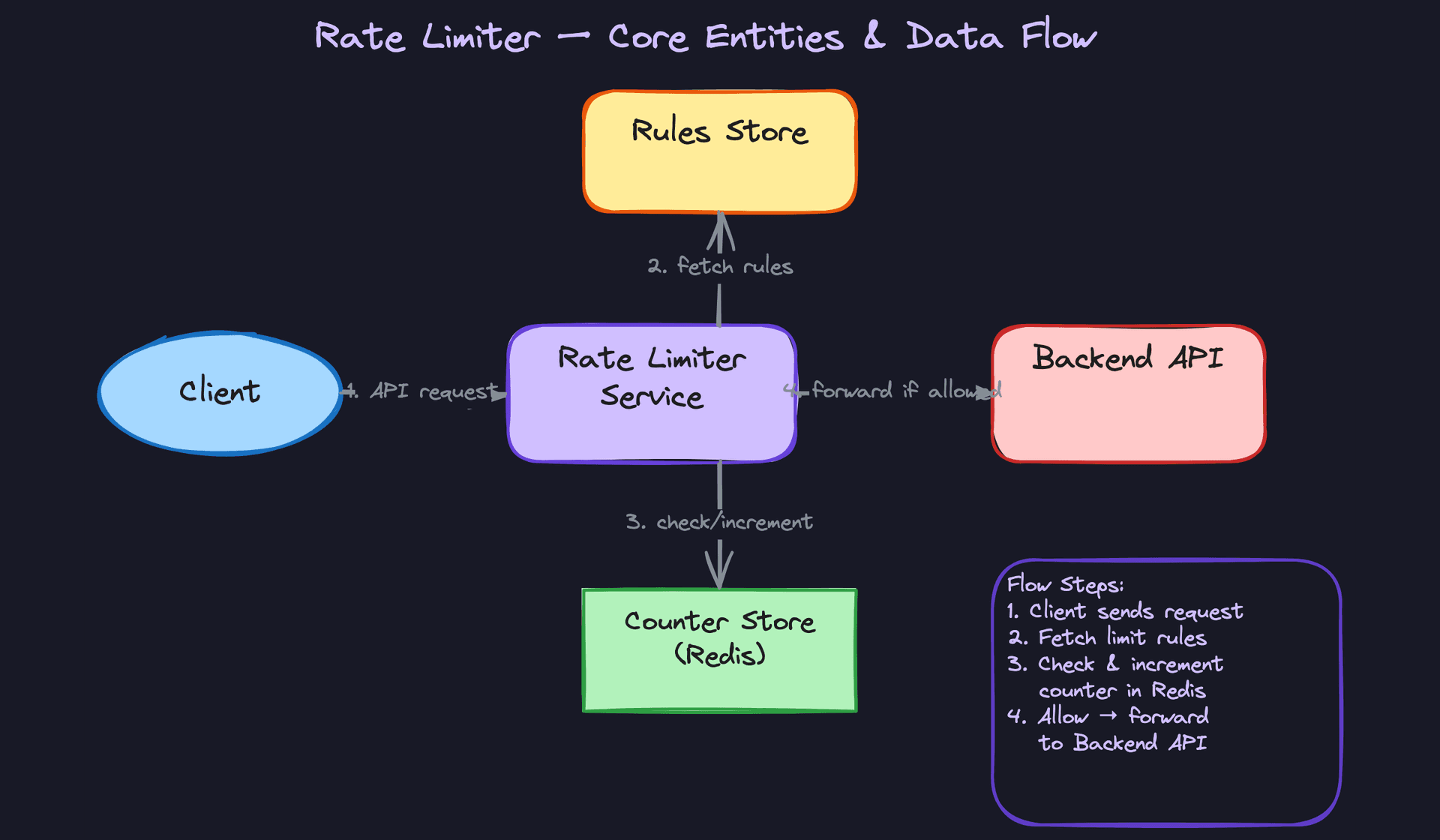
Three entities drive the entire system. Get these on the whiteboard early, because every design decision flows from how they relate to each other.
Rule defines what "too many requests" means for a given context. A rule says something like "users on the free tier can hit /api/orders at most 100 times per minute." It captures the endpoint pattern, the limit, the time window, and what type of key to throttle on (user ID, IP, API key, etc.).
Counter is the living, breathing state of the system. For every combination of a rule and a specific client, there's a counter tracking how many requests have come in during the current time window. Counters are ephemeral. They're born when the first request arrives, they tick upward, and they expire when the window closes.
Client Identity is the key you're rate limiting on. Sometimes it's a user ID extracted from an auth token. Sometimes it's a raw IP address. Sometimes it's an API key passed in a header. The same request might actually map to multiple identities depending on which rules apply.
Tip: Just list the entities for now. We'll define the full schema during the high-level design.
Notice how Counter sits at the intersection of Rule and Client Identity. That composite relationship (which rule, which client, which window) forms the natural key for your counter store. If you can articulate this cleanly on the whiteboard, the interviewer knows you understand the data model before you've written a single line of schema.
API Design
There are really two separate APIs here: one that gets called on every single inbound request (the check endpoint), and one that admins use occasionally to manage rules. Interviewers want to see you distinguish between the hot path and the cold path.
The Check Endpoint (hot path)
This is the core of the system. Every application server (or API gateway) calls this before processing a request.
// Check if a request should be allowed or throttled
POST /rate-limit/check
{
  "client_key": "user:abc-123",
  "endpoint": "/api/orders",
  "tier": "free"
}
-> {
  "allowed": true,
  "remaining": 74,
  "limit": 100,
  "retry_after": null,
  "reset_at": 1700000060
}
Why POST and not GET? This call has side effects. It increments the counter as part of checking it. A GET request that mutates state would violate HTTP semantics, and it would also cause problems with caching layers that assume GET is safe to retry.
When a request is denied, the response flips:
-> {
  "allowed": false,
  "remaining": 0,
  "limit": 100,
  "retry_after": 12,
  "reset_at": 1700000060
}
That retry_after field maps directly to the Retry-After HTTP header your gateway sends back to the client. Clients that respect it will back off on their own, reducing load without you having to reject them again.
Common mistake: Candidates design the check as a two-step "read then write" operation: first query the counter, then increment it separately. This is where race conditions are born. Design the API so that checking and incrementing are a single atomic operation from the start.
The Rules Management API (cold path)
// Create a new rate limiting rule
POST /rules
{
  "endpoint_pattern": "/api/orders",
  "key_type": "user_id",
  "limit": 100,
  "window_seconds": 60,
  "tier": "free"
}
-> { "rule_id": "rule-7f3a", "created_at": "..." }
// Update an existing rule
PUT /rules/{rule_id}
{
  "limit": 200,
  "window_seconds": 60
}
-> { "rule_id": "rule-7f3a", "updated_at": "..." }
// List all rules (for dashboard/debugging)
GET /rules?endpoint=/api/orders
-> { "rules": [ ... ] }
// Delete a rule
DELETE /rules/{rule_id}
-> { "deleted": true }
Standard REST here. POST to create, PUT to update, GET to list, DELETE to remove. Nothing surprising, and that's the point. The rules API is a straightforward CRUD interface backed by a traditional database. Don't overthink it.
One thing worth calling out: when a rule is updated, the rate limiter service needs to pick up the change quickly. You don't want to wait for a cache to expire naturally if someone just doubled a customer's rate limit during an incident. We'll address that propagation mechanism in the high-level design.
Tip: Spending 2-3 minutes on a clean API design signals to the interviewer that you think about system boundaries before jumping into implementation. It also gives you a contract to reference throughout the rest of the interview when discussing the request lifecycle.
High-Level Design
Before jumping to the distributed architecture, start your interview answer with the simplest version that works on a single machine. Then evolve it. This shows the interviewer you think incrementally, not that you memorized a final-state diagram.
1) Request Lifecycle: Checking and Enforcing a Rate Limit
On a single server, the entire flow lives in-process. A request arrives, you hash it to a key, check a local counter, and either forward or reject. No network hops, no coordination headaches.
Components: - Client: sends an API request with some identity (user ID in a JWT, API key in a header, or just a source IP) - API Server: hosts both the application logic and an embedded rate limiting middleware - Local Counter Map: an in-process hash map (like a ConcurrentHashMap or Python dict) storing request counts keyed by client identity + time window
Data flow:
- Client sends
POST /api/orderswith anAuthorization: Bearer <token>header. - The rate limiter middleware intercepts the request before it reaches the handler.
- It extracts the key. For per-user limiting, that's the
user_idfrom the decoded token. - It looks up the applicable rule for this endpoint (e.g., 100 requests per 60 seconds for
/api/orders). - It reads the counter from the local map using a composite key like
user:123:/api/orders:window_17000000. - If the counter is below the limit, increment it and forward the request to the handler.
- If the counter meets or exceeds the limit, immediately return HTTP 429 with a
Retry-Afterheader.
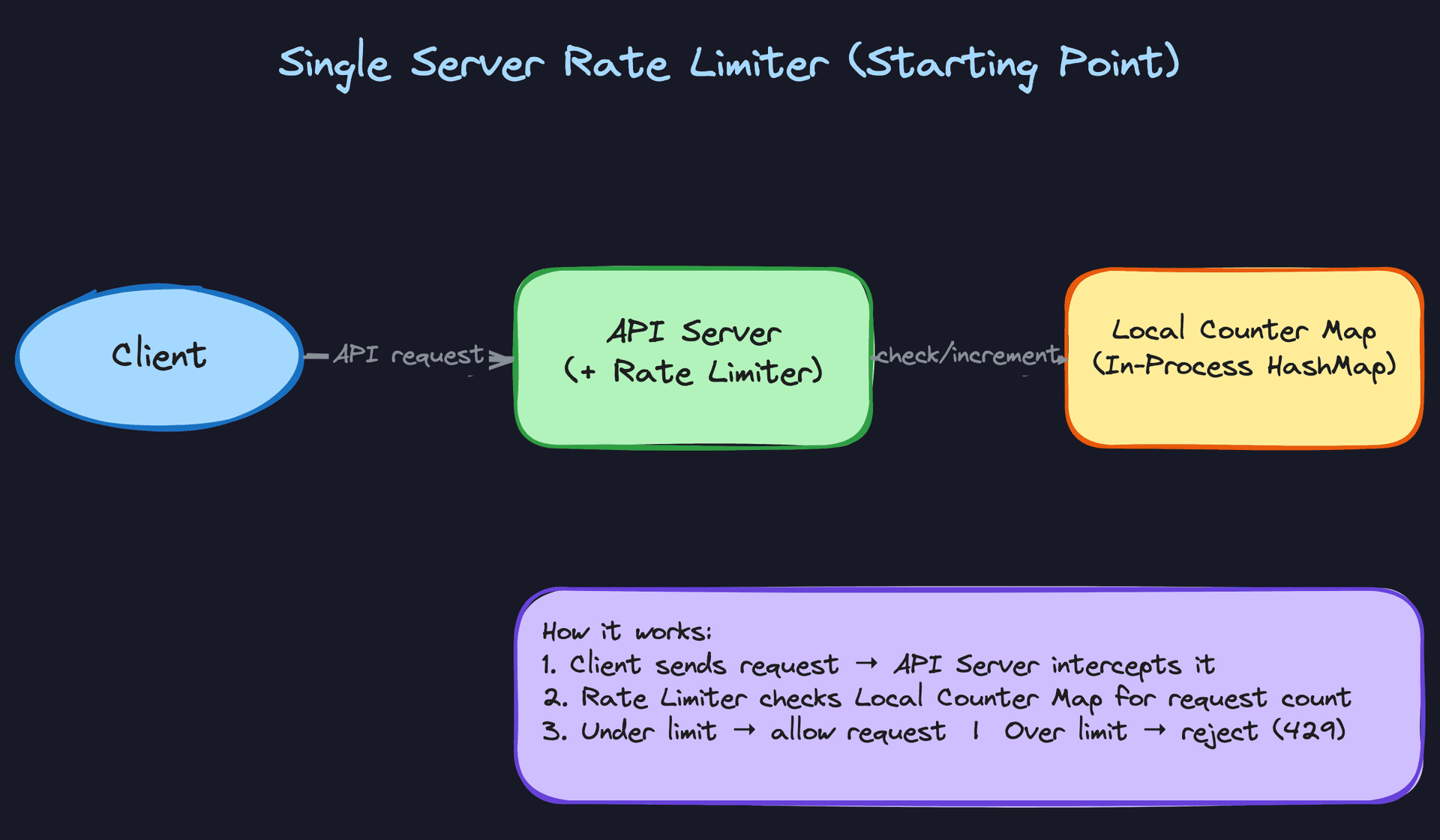
This works perfectly for a single-process application. But you already know the problem: the moment you have two API servers behind a load balancer, each one tracks its own counters. A user could send 100 requests to Server A and 100 to Server B, blowing past a limit of 100 while each server thinks everything is fine.
Tip: Don't skip the single-server version. Spend 30 seconds on it, then say "this breaks with multiple servers because counters aren't shared, so let's centralize them." That transition is exactly what the interviewer wants to hear.
2) Rules Configuration: How Limits Get Defined and Loaded
Rate limits aren't hardcoded. Someone needs to configure them, and the system needs to load them efficiently on every request.
Components: - Admin / Dashboard: a human (or CI pipeline) that defines rate limiting rules - Rules Management API: endpoints for CRUD operations on rules - Rules Database: a relational store (Postgres, MySQL) holding the source of truth for all rules - Local Rules Cache: an in-memory cache on each gateway instance, refreshed periodically
Data flow:
- An admin calls
PUT /admin/rate-ruleswith a rule definition:
{
  "rule_id": "orders-per-user",
  "endpoint_pattern": "/api/orders",
  "key_type": "user_id",
  "limit": 100,
  "window_seconds": 60
}
- The management API validates the rule and writes it to the Rules DB.
- Each gateway instance maintains a local cache of rules, refreshed every 10-30 seconds via polling, or instantly via a pub/sub notification (Redis pub/sub, a Kafka topic, or a simple webhook).
- When a request arrives, the gateway looks up matching rules from its local cache. No DB call on the hot path.
Why not just read rules from Redis? You could, but rules change infrequently (maybe a few times per day), while counters change on every single request. Keeping rules in a relational DB gives you schema validation, audit logs, and easy querying. The local cache eliminates any latency concern.
Common mistake: Candidates sometimes put rules and counters in the same store without explaining why. These have completely different access patterns. Counters need sub-millisecond atomic increments at 50K QPS. Rules need structured storage with infrequent reads. Different tools for different jobs.
3) Distributed Rate Limiting: Centralizing State Across Servers
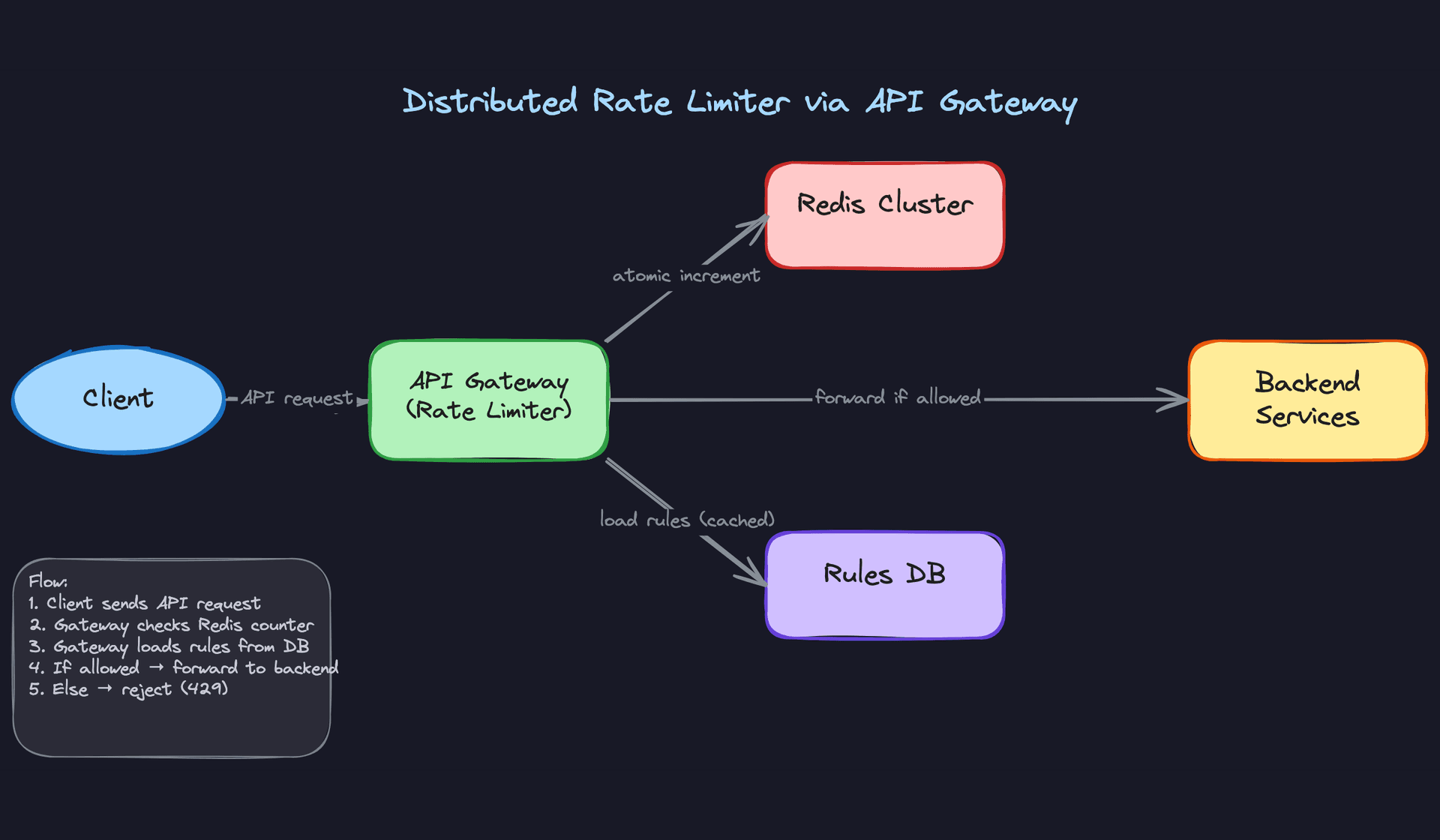
This is the core of the design. Every gateway instance needs to see the same counter for a given user and endpoint, which means the counters must live in a shared store.
Components: - Client: sends requests to any gateway instance (routed by a load balancer) - API Gateway (multiple instances): each runs the rate limiting logic as middleware - Redis Cluster: the centralized counter store, shared across all gateway instances - Rules DB: stores configurations, cached locally by each gateway - Backend Services: the protected upstream services
Data flow:
- Client sends a request. The load balancer routes it to any available gateway instance.
- The gateway extracts the client key (e.g.,
user_id: 123) and looks up the matching rule from its local cache: "100 requests per 60 seconds for/api/ordersper user." - The gateway constructs a Redis key:
ratelimit:orders-per-user:123:window_28333(where the window identifier isfloor(current_timestamp / window_seconds)). - It sends an atomic
INCRcommand to Redis. Redis increments the counter and returns the new value in a single operation. - If this is the first request in the window (counter returns 1), the gateway also sets a TTL on the key equal to
window_seconds, so Redis automatically cleans up expired counters. - If the returned count is ≤ 100, the gateway forwards the request to the backend service.
- If the returned count is > 100, the gateway returns HTTP 429.
Steps 4 and 5 can be collapsed into a single Redis Lua script to avoid a race between the INCR and EXPIRE commands. We'll dig into that in the deep dives.
Key insight: TheINCR-first approach is a subtle but important design choice. You don't read the counter, check it, then write. You increment first, then check the returned value. This eliminates an entire class of race conditions becauseINCRis atomic in Redis.
4) Response Enrichment: Helping Clients Self-Throttle
Every response from the rate limiter, whether the request is allowed or denied, should include headers that tell the client where they stand.
HTTP/1.1 200 OK
X-RateLimit-Limit: 100
X-RateLimit-Remaining: 73
X-RateLimit-Reset: 1700000060
Or when throttled:
HTTP/1.1 429 Too Many Requests
X-RateLimit-Limit: 100
X-RateLimit-Remaining: 0
X-RateLimit-Reset: 1700000060
Retry-After: 23
The Retry-After header is the number of seconds until the current window resets. Calculating it is straightforward: window_start + window_seconds - current_time.
These headers cost almost nothing to add (you already have the counter value from the INCR response), but they're enormously valuable. Well-behaved clients can implement exponential backoff or spread their requests more evenly. Without these headers, clients have no idea why they're being rejected or when to try again, so they just retry immediately and make the problem worse.
Don't wait for the interviewer to ask about this. Mention it proactively. It signals that you think about the developer experience of the systems you build, not just the backend mechanics.
Putting It All Together
The full architecture looks like this: multiple API gateway instances sit behind a load balancer, each running rate limiting middleware. When a request arrives, the gateway checks its local rules cache, sends an atomic increment to a shared Redis Cluster, and makes an allow/deny decision based on the returned count. Allowed requests are forwarded to backend services. Denied requests get a 429 with informative headers.
Rules are managed through a separate admin API, stored in a relational database, and cached locally on each gateway with a short TTL. Counters live exclusively in Redis, with TTLs matching window durations so expired data cleans itself up.
The gateway placement is a deliberate choice. Alternatives include embedding the limiter as a library inside each backend service (tight coupling, harder to update rules globally) or running it as a standalone sidecar (adds a network hop). The API gateway approach gives you a single enforcement point, centralized configuration, and clean separation from business logic. It's also how most production systems (Kong, Envoy, AWS API Gateway) actually implement it.
Warning: If you only draw the distributed version without first acknowledging the single-server case, you miss a chance to show your thought process. Interviewers don't just evaluate your final answer. They evaluate how you got there.
Deep Dives
"Which rate limiting algorithm should we use?"
This is where interviewers separate candidates who've memorized a definition from those who've actually thought about tradeoffs. You'll almost certainly be asked to pick an algorithm and defend it, so know at least three and understand when each one breaks down.
Bad Solution: Fixed Window Counter
The simplest approach. Divide time into fixed windows (say, one-minute intervals starting at :00, :01, :02...), and keep a counter per window per user. When a request arrives at 10:03:47, you map it to the "10:03" window, increment the counter, and reject if it exceeds the limit.
def fixed_window_check(user_id, limit, window_seconds):
    window_start = int(time.time()) // window_seconds * window_seconds
    key = f"rate:{user_id}:{window_start}"
    count = redis.incr(key)
    if count == 1:
        redis.expire(key, window_seconds)
    return count <= limit
The fatal flaw: boundary bursts. Imagine a limit of 100 requests per minute. A user sends 100 requests at 10:00:59 (end of one window) and another 100 at 10:01:00 (start of the next). That's 200 requests in two seconds, double the intended rate. The algorithm sees two separate windows, each within limits, and allows all of them.
Warning: Many candidates propose fixed windows and stop there. The interviewer will immediately ask "what happens at window boundaries?" If you can't answer, it signals you haven't thought deeply about the problem.
Good Solution: Sliding Window Log
Instead of bucketing into fixed windows, store the timestamp of every single request. When a new request comes in, remove all timestamps older than the window size, count what remains, and compare against the limit.
def sliding_log_check(user_id, limit, window_seconds):
    now = time.time()
    key = f"rate:{user_id}"
    cutoff = now - window_seconds

    # Remove expired entries and add current
    pipe = redis.pipeline()
    pipe.zremrangebyscore(key, 0, cutoff)
    pipe.zadd(key, {str(now): now})
    pipe.zcard(key)
    pipe.expire(key, window_seconds)
    _, _, count, _ = pipe.execute()

    return count <= limit
This is perfectly accurate. No boundary burst problem. But the memory cost is brutal. If you allow 10,000 requests per hour per user, you're storing 10,000 timestamps per user in a Redis sorted set. Multiply that across millions of users and you're burning through memory fast. The sorted set operations (ZREMRANGEBYSCORE, ZCARD) also get slower as the set grows.
It's a real solution, and you should mention it. But immediately flag the memory concern and transition to something better.
Great Solution: Sliding Window Counter
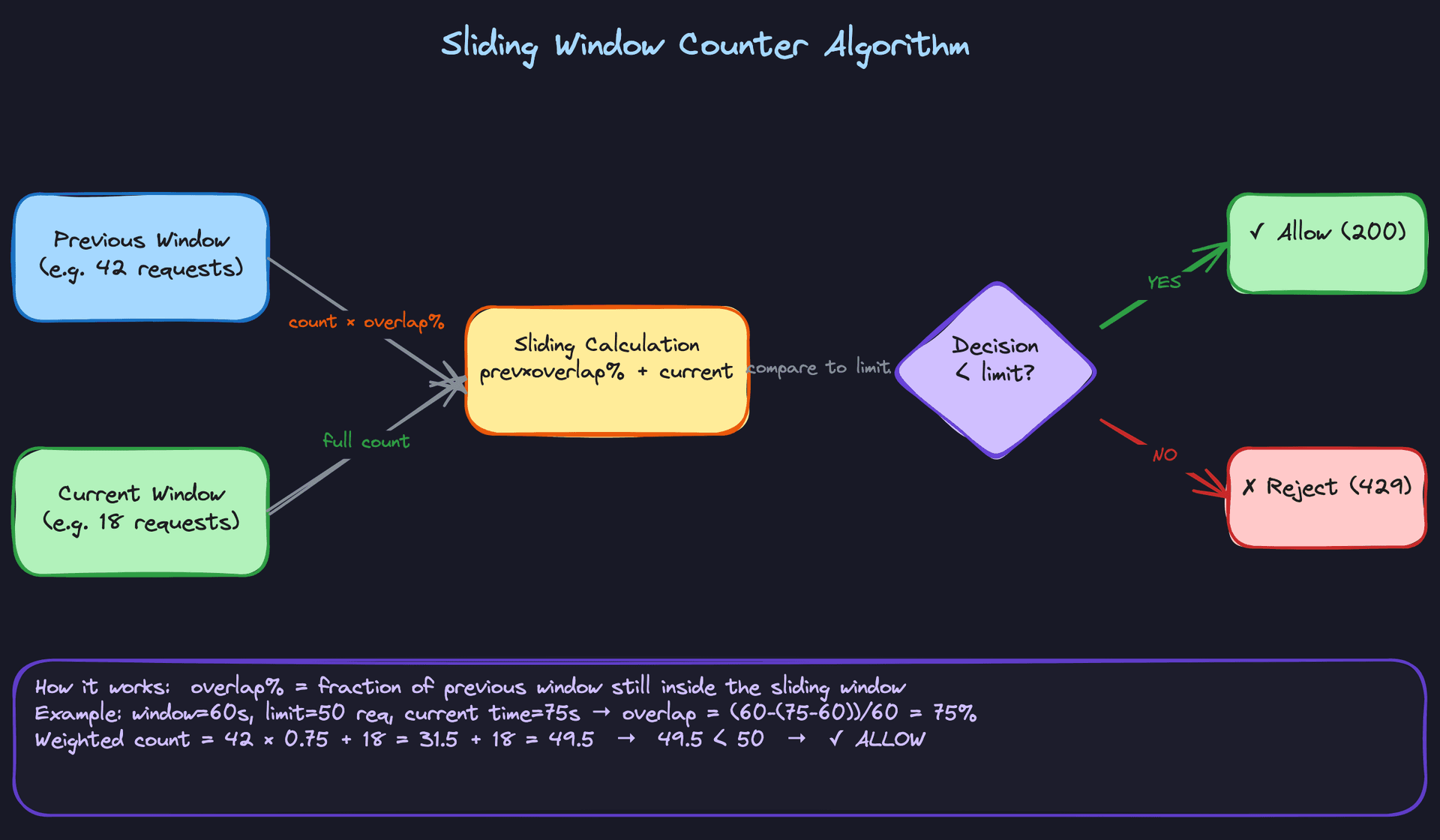
This is the sweet spot that most production systems land on. You keep two fixed window counters (the previous window and the current window) and interpolate between them based on where you are in the current window.
Say the limit is 100 requests per minute. The previous window (10:00 to 10:01) had 42 requests. The current window (10:01 to 10:02) has 18 requests so far. It's currently 10:01:15, meaning we're 25% into the current window, so 75% of the previous window still overlaps with our sliding view.
Weighted count = (42 × 0.75) + 18 = 31.5 + 18 = 49.5
Since 49.5 < 100, the request is allowed.
def sliding_window_counter_check(user_id, limit, window_seconds):
    now = time.time()
    current_window = int(now) // window_seconds * window_seconds
    previous_window = current_window - window_seconds
    elapsed = now - current_window
    overlap = 1 - (elapsed / window_seconds)

    prev_key = f"rate:{user_id}:{previous_window}"
    curr_key = f"rate:{user_id}:{current_window}"

    prev_count = int(redis.get(prev_key) or 0)
    curr_count = int(redis.get(curr_key) or 0)

    weighted = prev_count * overlap + curr_count
    if weighted >= limit:
        return False

    redis.incr(curr_key)
    redis.expire(curr_key, window_seconds * 2)
    return True
You only ever store two integers per user per rule. Memory is constant regardless of the request rate. The accuracy isn't perfect (Cloudflare measured it at roughly 99.97% accuracy in practice), but it's close enough for virtually every use case.
Tip: Mention the sliding window counter by name and explain the interpolation math. This is what distinguishes senior candidates. If you can sketch the weighted formula on the whiteboard and explain why it approximates a true sliding window, you've nailed this portion of the interview.
One more algorithm worth having in your back pocket: the token bucket. It works differently. A bucket starts full of tokens (say, 100). Each request consumes one token. Tokens refill at a steady rate (say, 100 per minute). If the bucket is empty, the request is rejected. The bucket has a maximum capacity, which controls burst size.
Token bucket is excellent when you want to allow short bursts while enforcing a long-term average rate. Stripe uses it. AWS uses it. If the interviewer asks about burst tolerance, this is your answer. But for the primary design, sliding window counter is usually the better default because it's simpler to reason about and implement in a distributed setting.
"How do we prevent race conditions across multiple gateway instances?"
Picture this: two gateway instances receive a request for the same user at nearly the same instant. Both read the counter and see 99 (limit is 100). Both decide to allow the request. Both increment to 100. The user just made 101 requests, and neither instance caught it.
This is the race condition at the heart of distributed rate limiting, and interviewers will probe it hard.
Bad Solution: Read-Then-Write
The naive approach is exactly what I just described. Read the current count, compare to the limit, then write the incremented value if allowed.
# DON'T DO THIS
count = redis.get(key)
if int(count or 0) < limit:
    redis.incr(key)  # Race condition right here
    return True
return False
Between the GET and the INCR, another instance can slip in. Under high concurrency, you might exceed the limit by 5x or more. This isn't a theoretical concern; it happens constantly at scale.
Warning: If you propose a read-then-write pattern without addressing atomicity, expect the interviewer to immediately challenge you. Some candidates try to fix this with distributed locks (like Redlock). That technically works but adds enormous latency and complexity. There's a much simpler path.
Good Solution: Atomic INCR with Post-Check
Redis's INCR command is atomic. It increments and returns the new value in a single operation. Flip the logic: increment first, then check if you've exceeded the limit.
def check_rate_limit(key, limit, window_seconds):
    count = redis.incr(key)
    if count == 1:
        redis.expire(key, window_seconds)
    if count > limit:
        return False  # Over limit, but counter is already incremented
    return True
No race condition on the counter itself. Two instances incrementing simultaneously will get back 100 and 101 (or whatever the actual order is), and the one that gets 101 knows to reject.
The problem? Two commands (INCR and EXPIRE) aren't atomic together. If your process crashes between them, you've got a key with no TTL that lives forever and eventually blocks the user permanently. Also, when you reject a request, you've already incremented the counter, which means you're "using up" a slot for a rejected request. Under heavy abuse, the counter inflates past the limit and legitimate requests in the same window get penalized.
Great Solution: Redis Lua Script
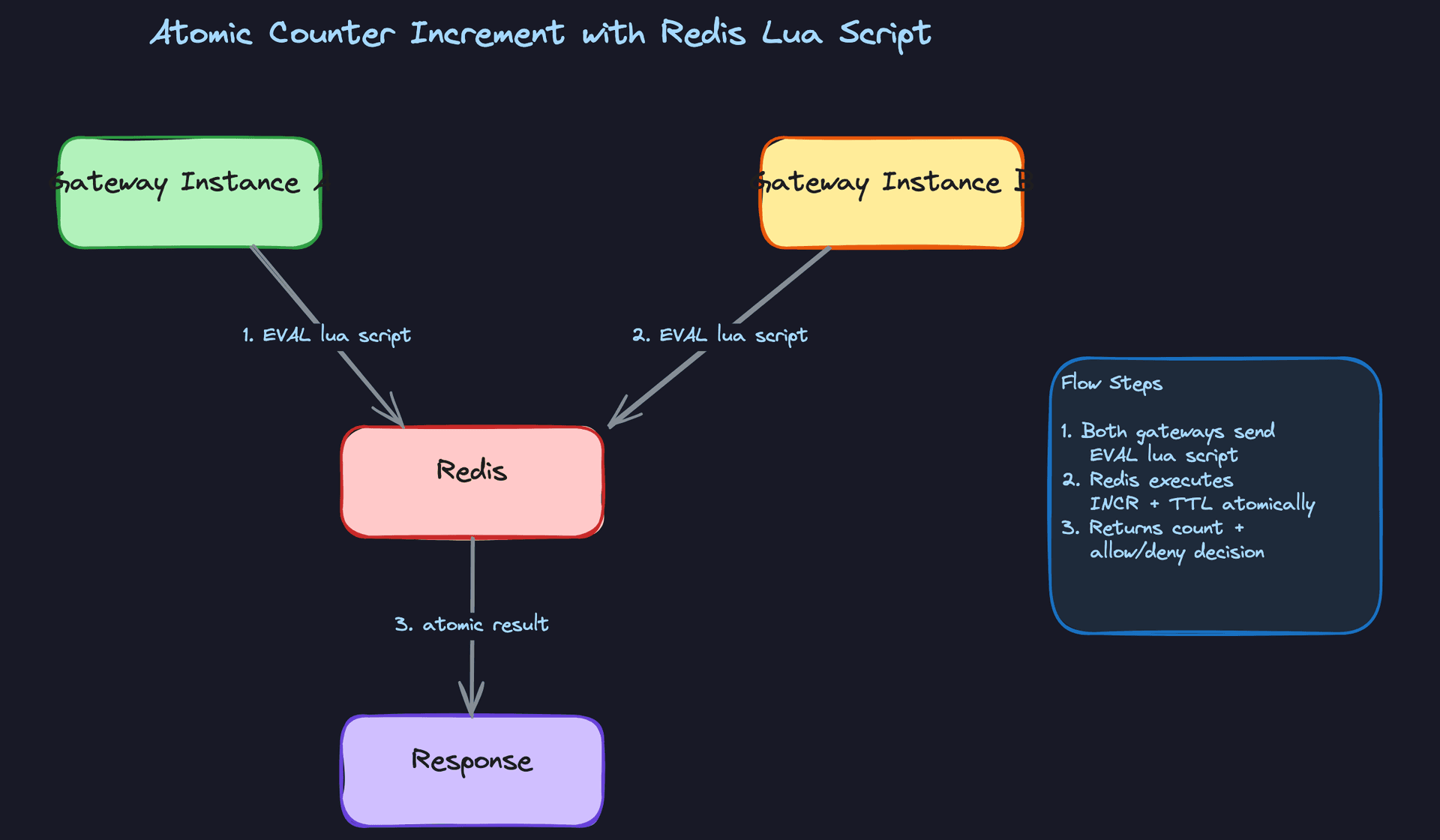
A Lua script in Redis executes atomically. The entire script runs as a single operation with no interleaving from other commands. You can bundle the increment, the limit check, and the TTL setting into one round trip.
RATE_LIMIT_SCRIPT = """
local key = KEYS[1]
local limit = tonumber(ARGV[1])
local window = tonumber(ARGV[2])

local current = redis.call('INCR', key)
if current == 1 then
    redis.call('EXPIRE', key, window)
end

if current > limit then
    return {0, current, redis.call('TTL', key)}
end
return {1, current, redis.call('TTL', key)}
"""

def check_rate_limit(user_id, limit, window_seconds):
    key = f"rate:{user_id}:{int(time.time()) // window_seconds}"
    allowed, count, ttl = redis.eval(
        RATE_LIMIT_SCRIPT, 1, key, limit, window_seconds
    )
    return {
        "allowed": bool(allowed),
        "remaining": max(0, limit - count),
        "retry_after": ttl if not allowed else None,
    }
Everything happens in one atomic operation, one network round trip. The TTL is guaranteed to be set when the key is first created. The response includes everything you need to populate rate limit headers.
You can extend this script to handle the sliding window counter logic too, fetching both window keys and computing the weighted sum atomically.
Tip: Writing out the Lua script (even pseudocode) during an interview is a strong signal. It shows you understand Redis's execution model and that you've thought about real production failure modes, not just the happy path.
"What happens when Redis goes down?"
This question reveals how you think about failure modes. A rate limiter that takes down your entire API is worse than no rate limiter at all.
Bad Solution: Fail Closed (Block Everything)
If Redis is unreachable, reject all requests. The rate limiter can't verify counts, so it assumes the worst.
This is the safest choice from a pure rate-limiting perspective. Zero risk of abuse during the outage. But you've just turned a Redis failure into a complete API outage. Your rate limiter, a protective mechanism, has become the single point of failure for your entire platform.
Don't do this. Or at least, don't propose it as your only strategy.
Warning: Some candidates default to fail-closed because it sounds "safe." In most real systems, a brief window of unthrottled traffic is far less damaging than blocking every single user. The interviewer wants to see you reason about this tradeoff explicitly.
Good Solution: Fail Open
If Redis is unreachable, allow all requests through. You lose rate limiting temporarily, but your API stays up.
def check_rate_limit_with_fallback(user_id, limit, window_seconds):
    try:
        return check_rate_limit(user_id, limit, window_seconds)
    except redis.ConnectionError:
        logger.warning("Redis unavailable, failing open")
        return {"allowed": True, "remaining": -1, "retry_after": None}
    except redis.TimeoutError:
        logger.warning("Redis timeout, failing open")
        return {"allowed": True, "remaining": -1, "retry_after": None}
This is a reasonable default for most services. You should set a short timeout on Redis calls (50ms or less) so a slow Redis doesn't add latency to every request. Log the failures aggressively so your on-call team knows rate limiting is degraded.
The downside is obvious: during the outage, you have zero protection. A malicious actor could hammer your API with impunity.
Great Solution: Local Fallback Counters
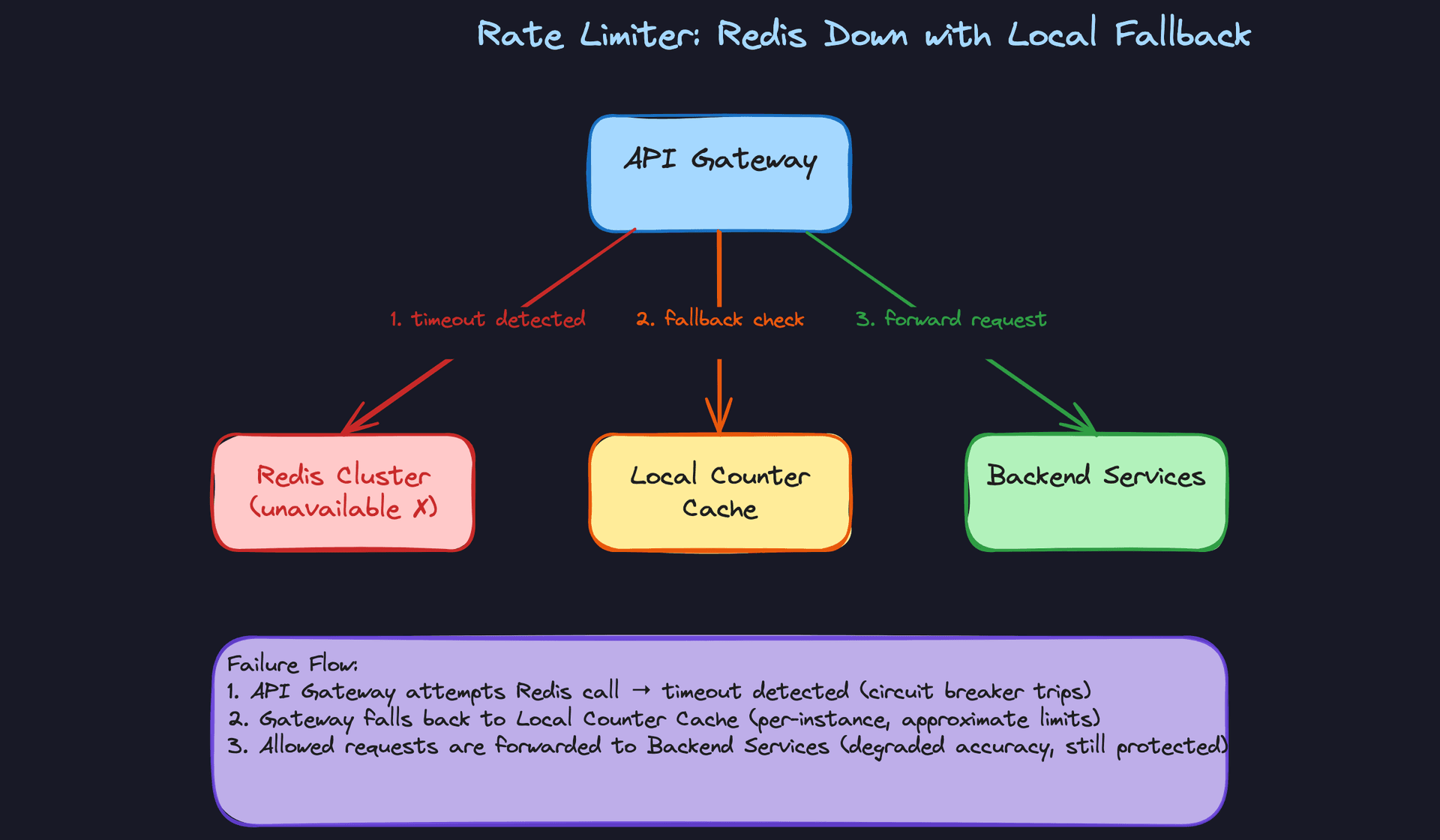
When Redis becomes unavailable, each gateway instance falls back to a local in-memory counter. The limits won't be globally accurate (each instance only sees its own traffic), so you adjust them. If you have 10 gateway instances and the global limit is 1000 requests/minute, each instance enforces a local limit of roughly 100 requests/minute.
class LocalFallbackLimiter:
    def __init__(self, num_instances):
        self.num_instances = num_instances
        self.counters = {}  # key -> (count, window_start)

    def check(self, user_id, global_limit, window_seconds):
        local_limit = global_limit // self.num_instances
        now = int(time.time())
        window_start = now // window_seconds * window_seconds
        key = f"{user_id}:{window_start}"

        count, ws = self.counters.get(key, (0, window_start))
        if ws != window_start:
            count = 0  # New window

        count += 1
        self.counters[key] = (count, window_start)

        # Clean up old entries periodically
        return count <= local_limit
This isn't perfect. Traffic isn't evenly distributed across instances, so some users might get slightly more or less than their limit. But it's vastly better than no limiting at all, and it keeps the system functional without any external dependency.
For the underlying Redis infrastructure, run a Redis Cluster with replicas. Async replication means a failover might lose a few seconds of counter updates, briefly allowing slightly more requests than intended. That's an acceptable tradeoff. The alternative (synchronous replication) would add latency to every single rate limit check, which defeats the purpose of using Redis in the first place.
Tip: Mentioning the local fallback strategy unprompted is a strong senior/staff signal. It shows you think about graceful degradation, not just the happy path. Bonus points if you mention that the number of instances can be discovered via service registry or configuration, and that you'd want metrics on how often the fallback activates.
"How do we enforce multiple rate limits on the same request?"
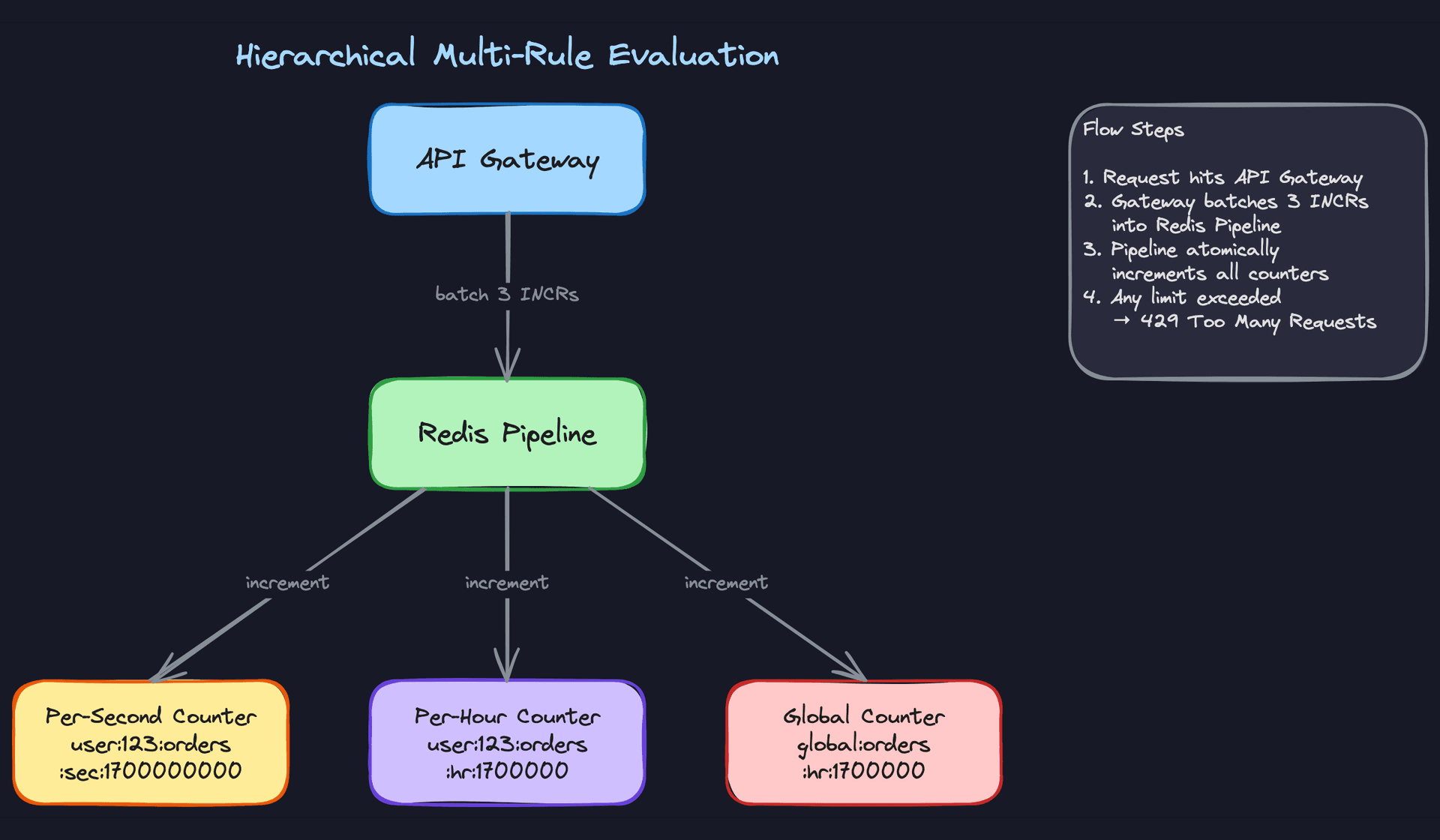
Real production systems don't have a single limit. Stripe, for example, enforces per-second, per-minute, and per-day limits simultaneously. A request to /api/orders might need to pass all of these:
- 10 requests/second per user
- 1,000 requests/hour per user
- 10,000 requests/hour globally for the endpoint
A request is only allowed if it passes every applicable rule. If any one rule says no, the request is rejected.
The naive approach is to evaluate each rule sequentially, making a separate Redis call for each. Three rules means three round trips. At 50K QPS, that's 150K Redis operations per second, and the latency adds up fast (3 × network RTT instead of 1).
The right approach is Redis pipelining. Bundle all the increment commands into a single pipeline, send them in one network round trip, and evaluate all the results together.
def check_multi_tier_limits(user_id, endpoint, rules):
    """
    rules = [
        {"scope": "user", "window": 1, "limit": 10},
        {"scope": "user", "window": 3600, "limit": 1000},
        {"scope": "global", "window": 3600, "limit": 10000},
    ]
    """
    now = int(time.time())
    pipe = redis.pipeline()
    keys = []

    for rule in rules:
        window_start = now // rule["window"] * rule["window"]
        if rule["scope"] == "user":
            key = f"rate:{user_id}:{endpoint}:{rule['window']}:{window_start}"
        else:
            key = f"rate:global:{endpoint}:{rule['window']}:{window_start}"
        keys.append(key)
        pipe.incr(key)
        pipe.expire(key, rule["window"] * 2)

    results = pipe.execute()
    # Results alternate: [incr_result, expire_result, incr_result, ...]
    counts = [results[i] for i in range(0, len(results), 2)]

    for i, rule in enumerate(rules):
        if counts[i] > rule["limit"]:
            return {
                "allowed": False,
                "violated_rule": rule,
                "retry_after": rule["window"] - (now % rule["window"]),
            }

    return {"allowed": True}
The key structure matters. Notice how each key encodes the scope (user vs. global), the endpoint, the window size, and the window start time. This prevents collisions between different rules while keeping keys predictable and easy to debug.
One subtlety: if the per-second check fails, you've already incremented the per-hour and global counters for a request that was ultimately rejected. For most systems, this slight over-counting is acceptable. If you need strict accuracy, wrap everything in a Lua script that only increments all counters when all checks pass, or use a two-phase approach where you check first (with GET) and only increment (with a pipelined INCR batch) if all checks pass.
Tip: When you bring up pipelining, mention the concrete improvement: N rules evaluated in 1 network round trip instead of N. Interviewers love when you quantify the optimization. "Three rules at 0.5ms per round trip means 1.5ms sequential versus 0.5ms pipelined. At 50K QPS, that's the difference between adding 1.5ms and 0.5ms to every request."
What is Expected at Each Level
Interviewers calibrate their expectations based on your target level. A solid mid-level answer that covers the fundamentals will pass at L4, but that same answer at L6 will fall flat. Here's where the bar sits for each.
Mid-Level (L3/L4)
- You recognize that a local in-memory counter breaks down the moment you have more than one server, and you articulate why a centralized store like Redis is necessary. This is the single most important conceptual leap at this level.
- You can walk through the full request lifecycle: client sends request, gateway extracts the key, checks the counter, increments or rejects with HTTP 429. No hand-waving through the middle.
- You implement at least one rate limiting algorithm correctly. Token bucket or fixed window counter are both fine. The interviewer isn't expecting you to compare three algorithms; they want to see that you deeply understand one.
- You acknowledge that race conditions exist when two servers read and write the same counter simultaneously. You don't need to solve it perfectly, but pretending it's not there is a red flag.
Tip: At this level, clarity beats cleverness. A clean, well-structured walkthrough of the basic design scores higher than a rushed attempt to cover every deep dive topic.
Senior (L5)
- You compare at least two algorithms and explain the tradeoffs in concrete terms. "Fixed window has a boundary burst problem where a user can send 2x the limit across two adjacent windows" is the kind of specificity interviewers want. Then you land on sliding window counter as the practical production choice.
- You solve the race condition, not just name it. Proposing Redis
INCR(atomic increment-then-check) or a Lua script that bundles increment, limit check, and TTL setting into a single atomic operation shows you've thought about real distributed systems. - You have a clear opinion on fail-open vs. fail-closed and can defend it. "We fail open because a brief window without rate limiting is better than a total outage for all users" demonstrates product thinking alongside engineering judgment.
- Rate limit response headers (
X-RateLimit-Remaining,X-RateLimit-Reset,Retry-After) and client-side backoff come up without the interviewer prompting you. This signals you've built or operated systems that real clients consume.
Staff+ (L6+)
- You drive the conversation toward hierarchical, multi-tier limiting on your own. Real production systems enforce limits at multiple granularities simultaneously (per-second burst limits, per-hour quotas, global endpoint caps), and you explain how Redis pipelining makes evaluating all of them in a single round trip practical.
- You discuss Redis Cluster topology, replication lag, and what it means for accuracy. Async replication creates brief windows where counters on replicas are stale, so a failover might allow a small burst of extra requests. You quantify this risk and explain why it's acceptable.
- Operational maturity is what separates staff answers from senior ones. You bring up rule hot-reloading without redeploying services, observability dashboards tracking rejection rates per rule and per client tier, and alerting when a single client is consistently hitting limits (which might indicate a bug, not abuse).
- You zoom out and address how rate limiting fits into the broader infrastructure. Where does it sit relative to the CDN, the load balancer, and the application layer? How does Envoy's external rate limit service work, and why did Stripe build a custom solution with local token buckets syncing to a central store? Referencing real-world architectures shows you've operated at this scale, not just whiteboarded it.
Key takeaway: A rate limiter is deceptively simple on a single machine and genuinely hard in a distributed system. The interview isn't really about the algorithm you pick. It's about how you handle shared mutable state across multiple servers, what you do when your coordination layer fails, and whether you can reason about the tradeoffs between accuracy, latency, and availability under pressure.
