
Data Partitioning & Bucketing
A Spark job scanning 10TB of raw event data to answer a question about yesterday is not a Spark problem. It's a storage design problem. With the right partitioning in place, that same query touches 50GB and finishes in seconds instead of minutes. That's not an optimization at the margins; it's the difference between a pipeline your team trusts and one they dread.
Partitioning and bucketing are two separate ideas that work at different levels. Partitioning controls how your data is physically split across directories on storage. A Hive-style partitioned table on S3 looks like a folder tree: s3://events/date=2024-01-15/country=US/part-00000.parquet. When you query for a single date, the engine skips every other folder entirely. Bucketing works inside those partitions. It uses a hash function to decide which file a row lands in, so rows with the same key always end up together. That pre-sorting is what makes certain joins and aggregations dramatically cheaper.
Both come up constantly in data engineering interviews at companies like Airbnb, Uber, and Spotify, not as trivia, but woven into pipeline design questions, join strategy discussions, and file format trade-offs. The candidates who lose points aren't the ones who don't know the terms. They're the ones who say "partition by date" and stop there, without touching cardinality, skew risk, or how the query engine actually uses that layout. Interviewers are specifically listening for two failure modes: over-partitioning, where you end up with millions of tiny files that choke the metadata layer, and under-partitioning, where your partitions are so coarse that pruning barely helps. Knowing where those traps are is what separates a junior answer from a senior one.
How It Works
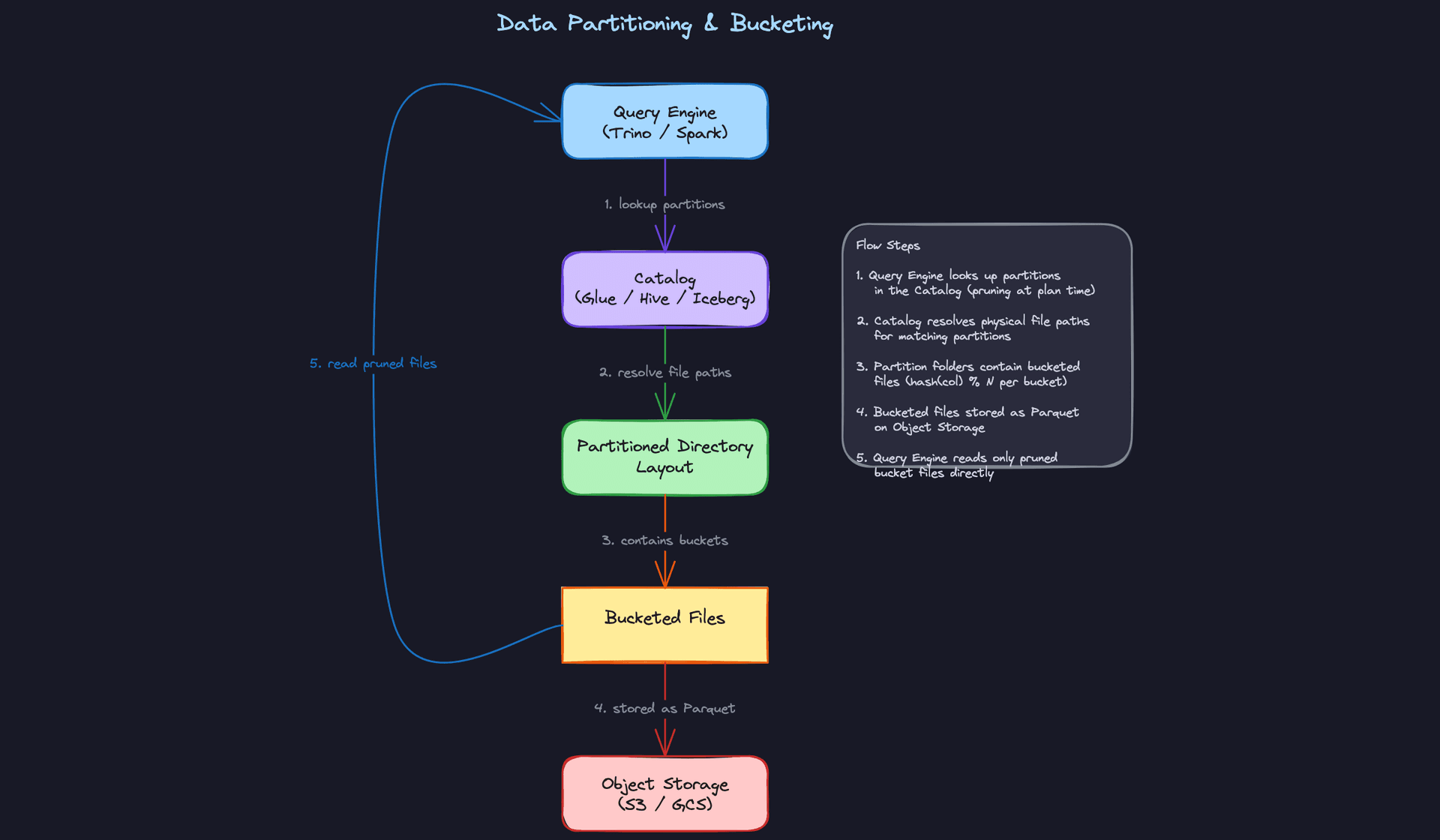
Start with the storage layout, because that's where everything begins. When you partition a table by event_date and country, your Spark job doesn't write one big file. It writes a directory tree. On S3, that looks like s3://events/date=2024-01-15/country=US/part-00000.parquet. Every unique combination of partition values becomes its own folder, and the files live inside those folders.
That directory structure is the whole trick. When Trino or Spark plans a query with WHERE date = '2024-01-15', it doesn't open a single file outside the date=2024-01-15/ prefix. It skips every other directory entirely. If you have two years of data and you're querying one day, you just went from scanning 730 partitions to scanning one. That's partition pruning.
Think of it like a filing cabinet. Instead of rifling through every folder to find January 15th, you walk straight to the drawer labeled "January 15th" and open only that one.
Bucketing works differently, and candidates often blur the two. Within a partition (or within a whole table), bucketing hashes a column value and uses that hash to decide which file a row lands in. The formula is hash(bucket_column) % num_buckets. Every row where user_id = 12345 always ends up in the same bucket file, no matter when you write it. That consistency is what makes bucket joins powerful: if two tables are bucketed on the same key with the same bucket count, Spark already knows which files contain matching rows. No shuffle needed.
Here's what that flow looks like:
The catalog is what makes any of this work
The query engine doesn't walk the S3 directory tree at query time. That would be painfully slow. Instead, it consults a catalog, whether that's a Hive Metastore, AWS Glue, or the metadata layer in Iceberg or Delta Lake. The catalog stores which partitions exist, where the files are, and often file-level statistics like min/max values per column.
This matters because pruning happens at query planning time, before a single byte of data is read. If the catalog doesn't know a partition exists, the engine can't prune it. This is why running MSCK REPAIR TABLE (or the Iceberg equivalent) after adding new partitions isn't optional; it's what registers those partitions so the planner can see them.
The read path compounds
The full read path runs in layers, and each layer multiplies the benefit of the previous one. The planner hits the catalog, prunes irrelevant partitions, opens only the surviving files, then applies column pruning using the column statistics embedded in Parquet or ORC. By the time actual I/O happens, you might be reading 1% of the raw data. That's not one optimization; it's four stacked on top of each other.
Your interviewer cares about this because it's the difference between a pipeline that costs $50/day and one that costs $5,000/day at scale. Knowing the mechanism tells them you can reason about query performance, not just write queries that happen to work.
Common mistake: Candidates say "I'd partition by date" and stop there. The interviewer is waiting for you to explain the granularity (daily? hourly?), the expected file sizes per partition, and which downstream queries justify that choice. The column name is the easy part.
Anchoring your choices to query patterns
When you recommend a partitioning scheme in an interview, the justification has to come from the access pattern. "I'd partition by event_date at daily granularity because the downstream dashboards always filter on a date range, and at roughly 50GB of events per day, each partition lands in the 128MB-1GB per file sweet spot." That sentence tells your interviewer you understand pruning, file sizing, and pipeline design simultaneously.
If you're also recommending bucketing, tie it to a specific join. "The events table gets joined to the users table on user_id daily, so bucketing both on user_id with 256 buckets lets Spark skip the shuffle on that join entirely."
Your 30-second explanation: "Partitioning splits your data into directories on object storage based on column values, so query engines can skip entire folders that don't match your filter. Bucketing hashes rows into a fixed number of files within those partitions, so rows with the same key always co-locate, which eliminates the shuffle on joins. A catalog like Glue or Iceberg tracks all of this metadata so the query planner can prune at planning time, before any data is read."
Patterns You Need to Know
In an interview, you'll usually need to pick a specific approach. Here are the ones worth knowing.
Single-Column Date Partitioning
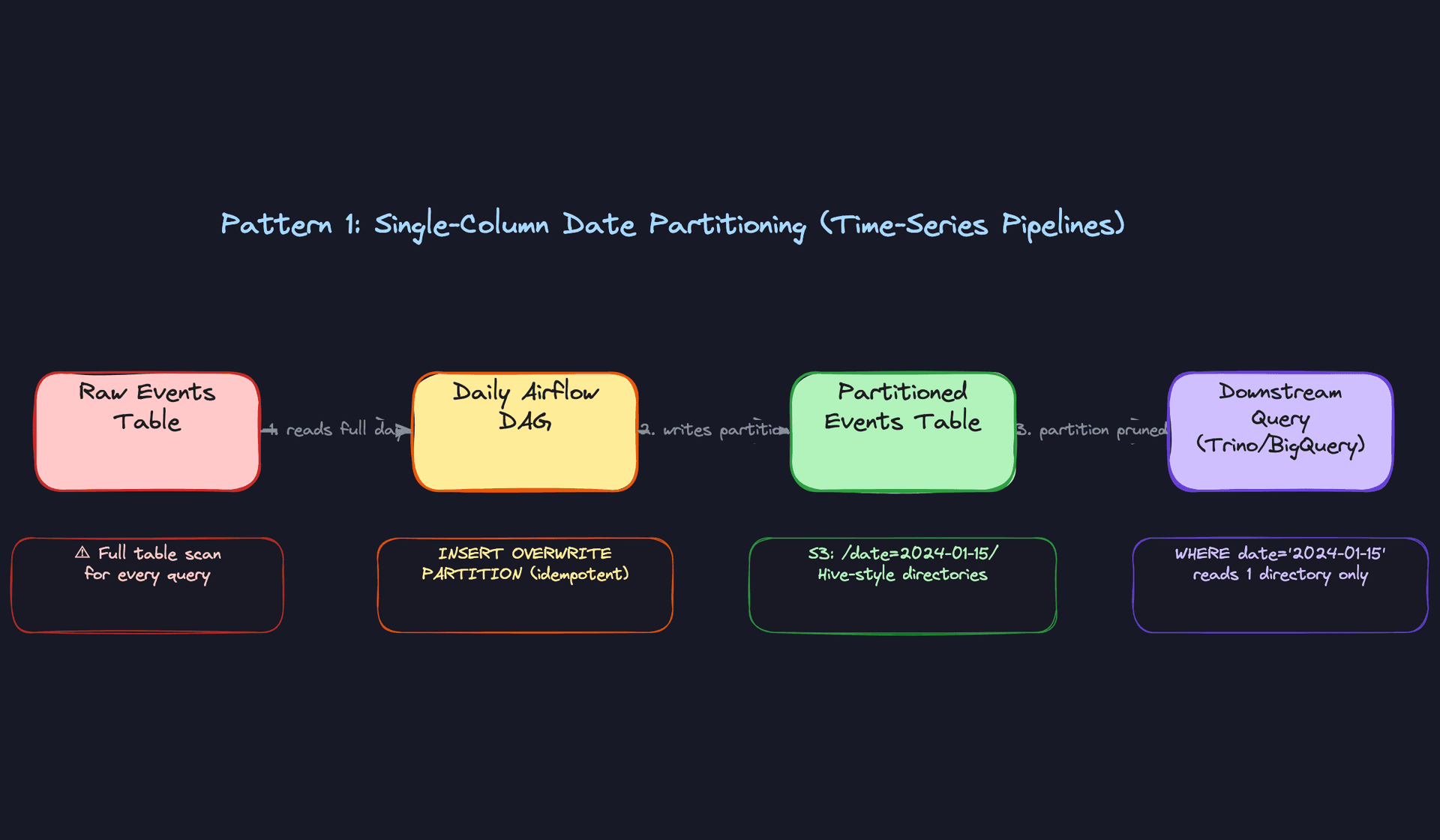
This is the default pattern for any time-series pipeline, and for good reason. Your data lands on disk in directories like s3://events/date=2024-01-15/, and when a downstream query filters on WHERE date = '2024-01-15', the query engine skips every other directory entirely. A 10TB table becomes a 50GB scan. That's partition pruning doing exactly what it's supposed to do.
The failure mode is granularity. Partition by hour on a low-volume table and you'll end up with thousands of tiny files. Partition by month on a high-volume table and your "pruned" partition is still 500GB. The right answer is almost always daily partitioning for event data, with the justification anchored to your expected data volume per partition and a target file size of 128MB to 1GB.
When your interviewer asks how you'd store a user events or clickstream table, this is your starting point. Say it, then immediately explain why daily granularity makes sense given the query patterns and data volume.
Composite Partitioning
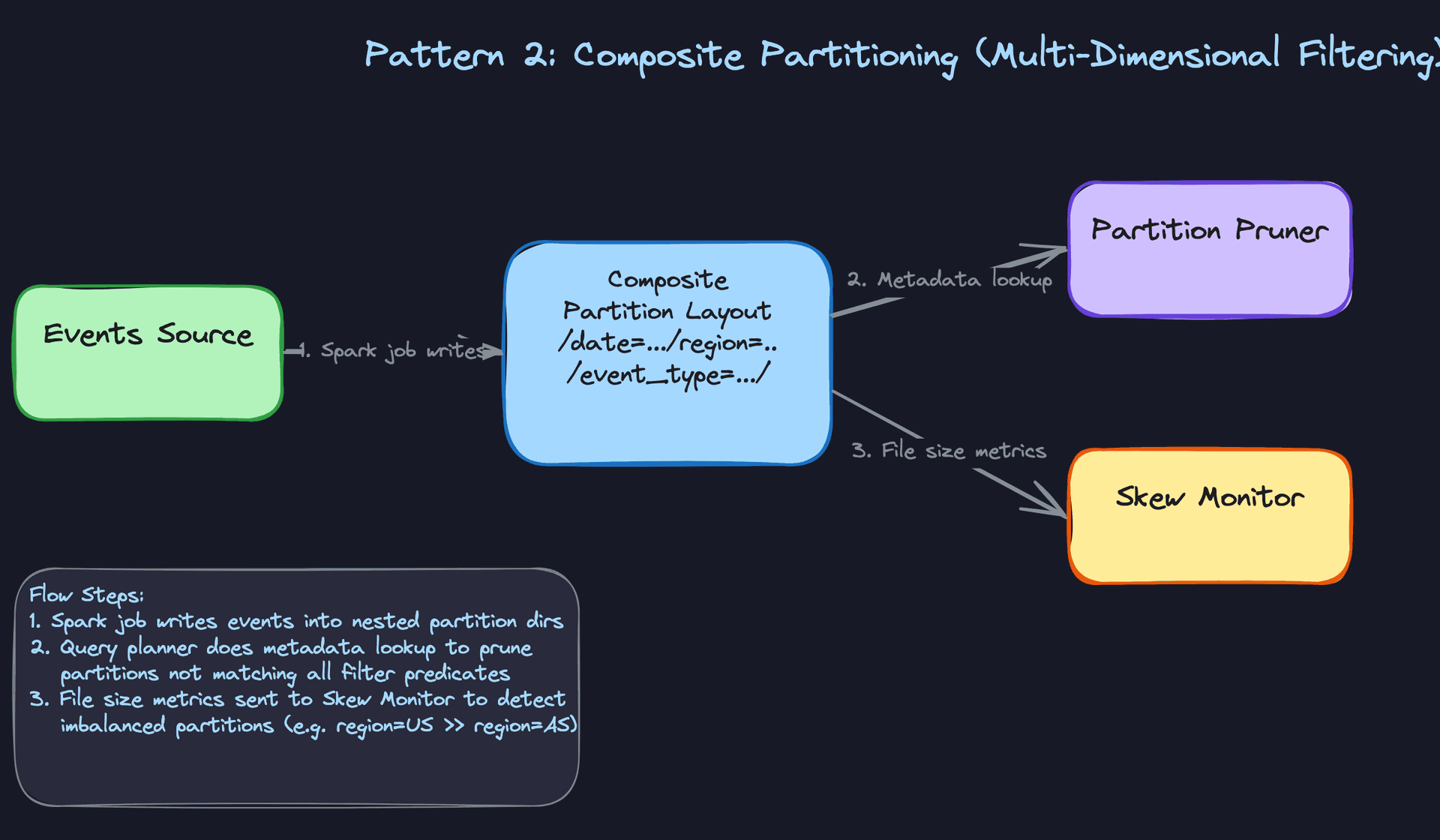
Sometimes date alone isn't enough. If your analysts always filter on both date and region, a composite partition like /date=2024-01-15/region=US/ lets the query engine prune on both dimensions simultaneously. You're stacking pruning layers.
The trap here is cardinality multiplication. Partition by date, region, and event_type and you might have 365 x 50 x 20 = 365,000 partition directories. If your daily data volume is modest, each of those directories holds a handful of kilobytes. The metadata overhead alone will slow your query planner to a crawl. You also need to watch for skew: region=US might be 100x larger than region=SG, which means one partition takes forever while the rest finish instantly.
Interview tip: When you propose composite partitioning, name the skew risk in the same breath. Say something like: "I'd partition by date and region, but I'd want to check the distribution first. If US traffic dominates, I'd consider whether sub-partitioning or Spark's Adaptive Query Execution is a better fit than adding another partition column."
Reach for this when your team's queries consistently filter on two or three low-cardinality dimensions together, and your data volume per combination is large enough to justify the directory structure.
Bucketing for Join Optimization
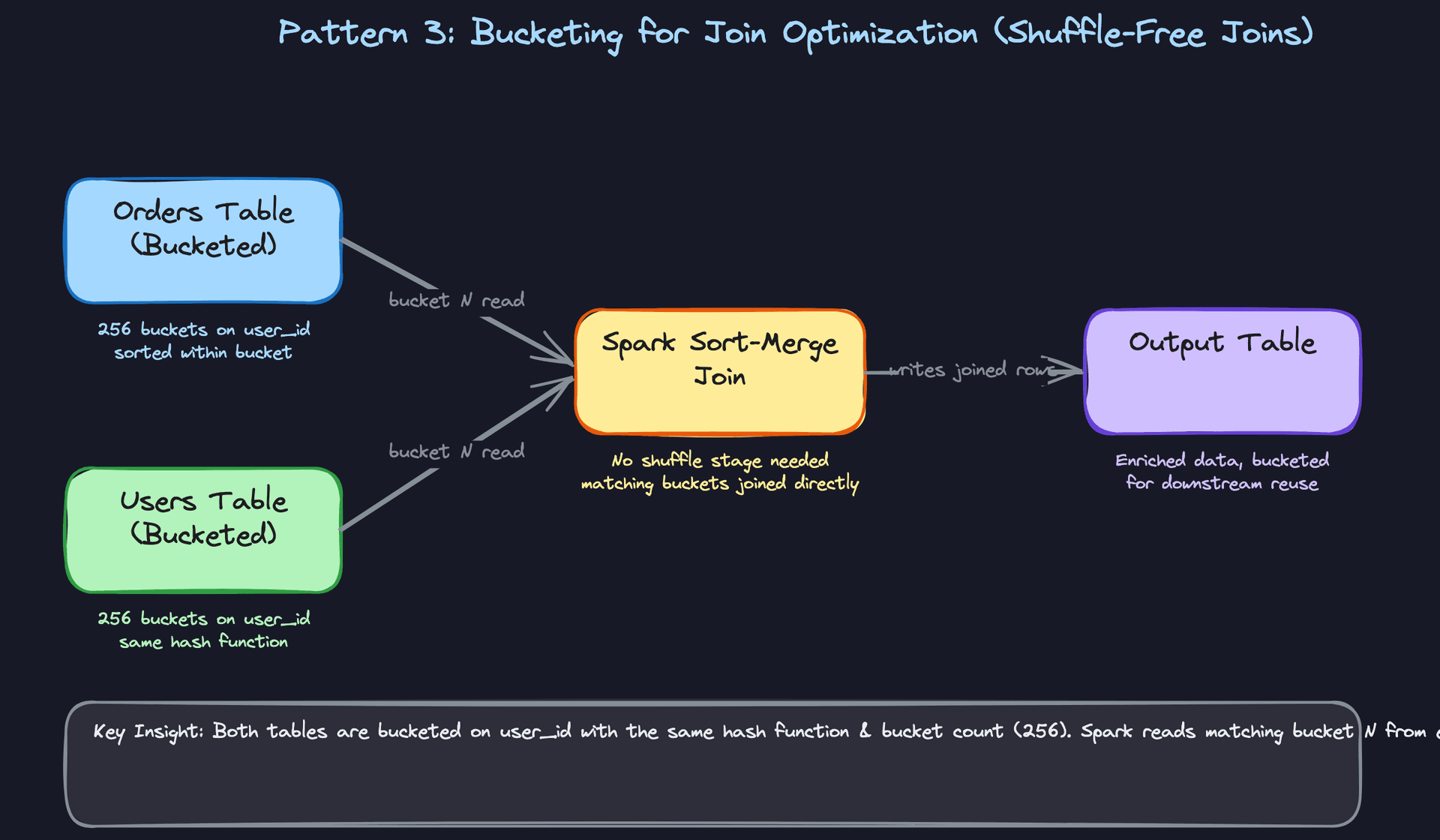
Bucketing solves a different problem than partitioning. Instead of controlling which files you read, it controls how rows are distributed across files. Every row gets assigned to a bucket using hash(bucket_column) % num_buckets, so all rows with the same key always land in the same bucket. Do this for two tables on the same join key with the same bucket count, and Spark can join bucket 1 from table A directly against bucket 1 from table B, with no shuffle stage at all.
That shuffle elimination is the concrete win you need to be able to explain. In a large Spark job, the shuffle is often the most expensive operation: it moves data across the network, spills to disk, and creates a synchronization barrier across all executors. Bucketed sort-merge joins sidestep all of that because the data is pre-organized by bucket. The catch is that the bucket counts must match exactly between both tables. If one table has 128 buckets and the other has 256, Spark falls back to a regular shuffle join and you've gained nothing.
Note that a single bucket can span multiple files, particularly for high-volume keys. The shuffle elimination benefit comes from co-locating data by bucket, not from cramming everything into one file.
Common mistake: Candidates describe bucketing correctly but forget to mention the matching bucket count requirement. That detail is what signals you've actually tuned a Spark job, not just read about it.
This pattern shines when you have two large tables that are joined repeatedly on the same high-cardinality key, like user_id or order_id. The upfront cost of writing bucketed files pays off every time that join runs.
Partition Evolution with Iceberg
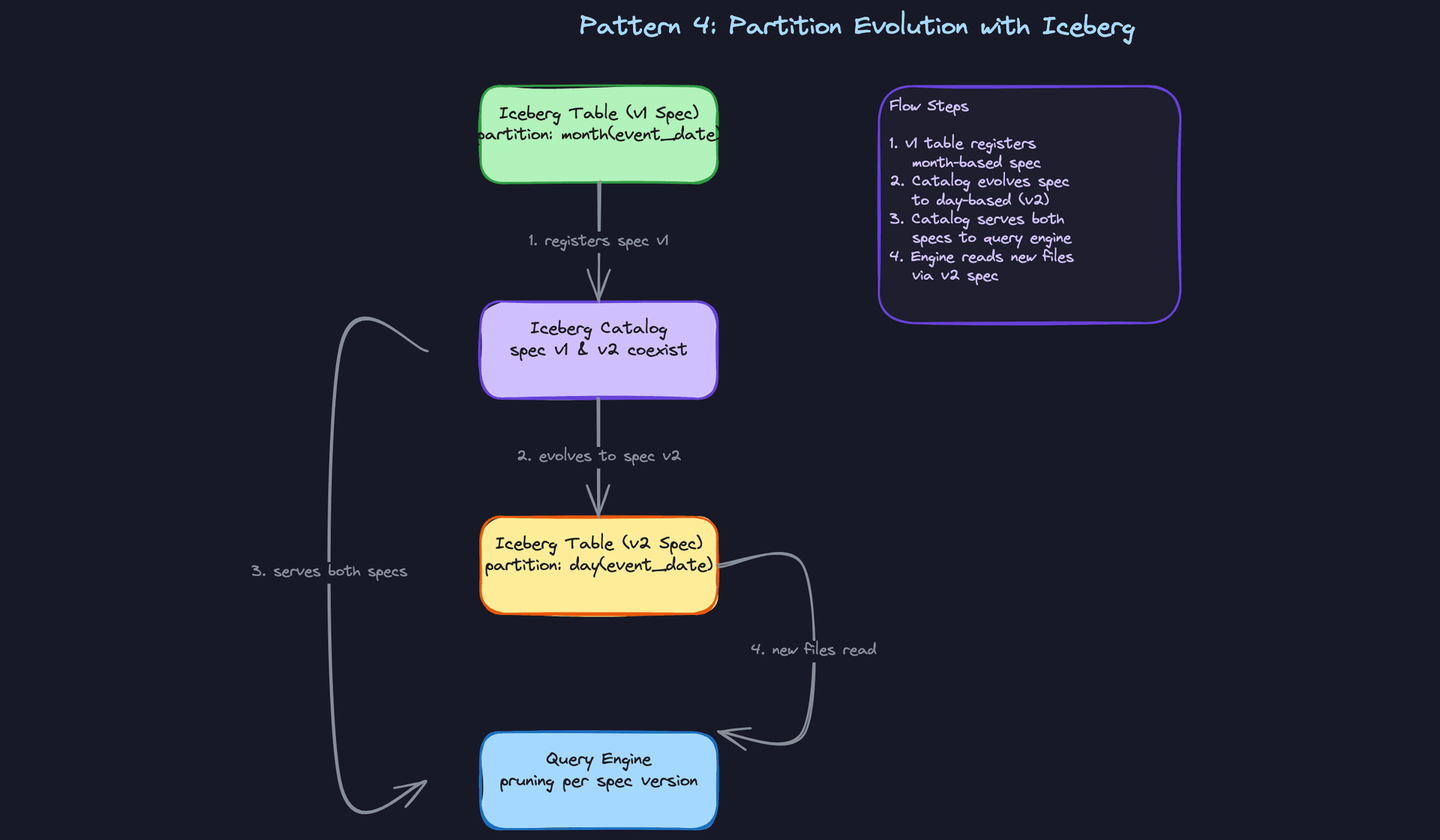
Classic Hive-style partitioning has one painful limitation: if you decide to change your partition scheme, you have to rewrite all your historical data. A table that started partitioned by month can't just become daily-partitioned without a full backfill. For a multi-year events table, that's a multi-day migration job.
Iceberg solves this with partition evolution. You can change the partition spec going forward, and Iceberg tracks both the old and new specs in its catalog. Old files stay where they are, partitioned by month. New files land in daily partitions. When a query runs, the engine reads the catalog, applies the correct pruning logic per file based on which spec version produced it, and returns results transparently. No rewrite, no downtime, no migration weekend. Iceberg also supports hidden partitioning, where you define a transform like days(event_timestamp) and the engine handles the partition column automatically, so your queries don't need to reference a synthetic date column at all.
Delta Lake doesn't offer the same mechanism here. Changing partition granularity in Delta Lake generally requires rewriting historical data to conform to the new scheme before you get the full pruning benefits. It's a meaningful distinction worth knowing if the interviewer pushes on table format trade-offs.
Key insight: If you mention Iceberg in an interview before the interviewer brings it up, it signals you're thinking about operational reality, not just the happy path. Partition evolution is one of the most compelling reasons to prefer Iceberg over raw Hive tables, and it's a concrete differentiator from Delta Lake for this specific use case.
Reach for this when the team needs flexibility to change partition granularity as data volumes grow, or when you're designing a table that will outlive its original query patterns.
Comparing the Patterns
| Pattern | What it optimizes | Key risk | Best fit |
|---|---|---|---|
| Single-column date | Read pruning on time-series queries | Wrong granularity, tiny files | Event tables, log pipelines |
| Composite partitioning | Pruning on multiple filter dimensions | Cardinality explosion, partition skew | Multi-dimensional analytical tables |
| Bucketing | Shuffle-free joins and aggregations | Mismatched bucket counts, write overhead | Repeatedly joined large tables |
| Iceberg partition evolution | Flexibility to change partition scheme without rewrites | Catalog complexity, engine compatibility | Long-lived tables with evolving query patterns |
For most interview problems, you'll default to single-column date partitioning. It's simple, well-understood by every query engine, and easy to reason about. Reach for composite partitioning when the interviewer tells you queries always filter on a second dimension alongside date, and make sure you address skew when you do. Bucketing is your answer specifically when the conversation turns to join performance on large tables. And if the interviewer asks about partition flexibility over time, that's your cue to bring in Iceberg and explain why its partition evolution model is a genuine operational advantage.
What Trips People Up
Here's where candidates lose points — and it's almost always one of these.
The Mistake: Partitioning on High-Cardinality Columns
The answer sounds confident: "I'd partition by user_id so each user's data is co-located." On the surface, it seems like good data locality thinking. In practice, a table with 100 million users just created 100 million directories on S3, each holding a few kilobytes of data.
Query engines don't just read files. They first have to list and load metadata for every partition they touch. At that scale, the metadata overhead alone can take longer than the actual query. Spark executors spend more time in the driver planning the job than doing real work.
Common mistake: Candidates say "partition by user_id for fast user-level lookups." The interviewer hears "I've never had to debug a small-files incident."
The rule of thumb you should internalize: target 128MB to 1GB per file, and work backwards from there. If your daily event volume is 500GB and you partition by date, you get a handful of reasonably-sized files per partition. If you partition by user_id on that same dataset, you get millions of files averaging a few KB each. Say that math out loud in the interview. It signals you've actually thought about what lands on disk.
Interview tip: Instead, say something like: "I'd avoid partitioning onuser_iddirectly because the cardinality would produce millions of tiny files. If I need fast per-user access, I'd look at bucketing onuser_idwithin a date partition, or consider a serving layer like DynamoDB for point lookups."
The Mistake: Ignoring Partition Skew
Partitioning by country or event_type sounds totally reasonable. Both are low-cardinality, human-interpretable, and commonly filtered in queries. Candidates propose this and move on.
The interviewer then asks: "What does your US partition look like compared to your Singapore partition?" If you haven't thought about skew, you're stuck. In most consumer products, one or two values dominate. The country=US partition might be 50x larger than every other country combined. That means one Spark task is processing 50x more data than its siblings, and your job's completion time is gated on that one slow task.
Skew doesn't just slow things down. It can cause OOM errors, task timeouts, and SLA misses on jobs that look fine in staging but fall apart on production data.
Know your mitigation options and be ready to name them: salting the skewed key to spread load across multiple partitions, sub-partitioning within the heavy partition (e.g., adding date under country), or leaning on Spark's Adaptive Query Execution to detect and split skewed tasks at runtime. AQE is not a substitute for a good partition design, but it's a legitimate runtime safety net worth mentioning.
The Mistake: Conflating Partitioning with Clustering and Z-Ordering
This one comes up most often when candidates have BigQuery or Delta Lake experience but haven't worked across both ecosystems. They'll say something like "I'd partition the table, or cluster it, same idea really." It's not the same idea.
Hive-style partitioning creates actual directory splits on storage. The query engine skips entire directories at the filesystem level. BigQuery clustering and Delta Lake Z-ordering do something different: they co-locate similar values within files to improve scan efficiency, but there are no directory boundaries. The pruning happens at the file and row-group level using column statistics, not at the directory level.
The practical difference matters. Clustering works well on high-cardinality columns where Hive-style partitioning would create a small-files disaster. Z-ordering lets you optimize for multi-dimensional filtering without nesting partition directories. These are complementary tools, not synonyms.
Interview tip: If you're discussing a Delta Lake or BigQuery table, distinguish explicitly: "I'd partition byevent_datefor coarse-grained pruning, then Z-order onuser_idandevent_typewithin each partition so range scans on those columns benefit from file-level statistics." That sentence alone signals you understand the layered read path.
The Mistake: Mismatched Bucket Counts
Candidates who've read about bucketing know the pitch: bucket both sides of a join on the same key, and Spark skips the shuffle entirely. That's correct. What they often miss is the constraint that makes it work.
The bucket counts must match exactly. If your orders table is bucketed into 256 buckets and your users table is bucketed into 128, Spark cannot align the bucket files and falls back to a full shuffle join. You've paid the write-time cost of bucketing and gotten none of the read-time benefit.
This is the kind of detail that separates someone who's read a blog post from someone who's actually tuned a Spark job. Interviewers who care about join optimization will probe exactly here.
The fix is straightforward: standardize bucket counts across related tables when you design the schema, and treat that count as a contract. Changing it later means rewriting the table. Mention that constraint proactively. "I'd bucket both tables on user_id with 256 buckets, and I'd document that count as a dependency so any downstream table joining on this key uses the same number." That answer closes the loop before the interviewer has to ask.
How to Talk About This in Your Interview
When to Bring It Up
You don't need to wait for a direct question about partitioning. These are the signals that should trigger it:
- The interviewer mentions a table with billions of rows or terabytes of data
- You hear "slow queries," "full table scans," or "the dashboard is timing out"
- The design involves a recurring join between two large tables on a known key
- Someone asks how you'd structure the storage layer, even loosely
- The word "pipeline" comes up and there's a clear time dimension in the data (events, logs, transactions)
Any time the conversation touches on how data is stored and how fast it can be read back, partitioning belongs in your answer.
Sample Dialogue
Interviewer: "Let's say you're designing the storage layer for a user events table. We're talking hundreds of millions of events per day. How would you approach it?"
You: "First question I'd ask myself is what the downstream query patterns look like. If analysts are mostly filtering by date range, I'd partition by event_date. That turns a full table scan into a targeted directory read. At a few hundred million events per day, you're probably looking at 50-200GB per daily partition in Parquet, which is a healthy file size range. I'd also think about whether there's a known join pattern. If this table gets joined to a users table on user_id regularly, I'd bucket both tables on user_id with the same bucket count, say 256. That lets Spark skip the shuffle entirely on those joins."
Interviewer: "Okay, but what if the data is skewed? Like, we have way more US events than anywhere else."
You: "Yeah, that's the classic country skew problem. A few options. If I'm on Spark 3+, I'd lean on Adaptive Query Execution first since it handles skewed joins at runtime without you having to change the schema. But if the skew is severe and consistent, I'd look at sub-partitioning: partition by event_date and then region, but only if the region cardinality is low and the file sizes stay reasonable. Salting is another option for the join specifically, though it adds complexity. I'd want to look at the actual size distribution before committing to a schema change."
Interviewer: "We're using Iceberg. Does that change anything?"
You: "Honestly, yes, and it's worth calling out. With Iceberg you get partition evolution, so if you start with monthly partitions and the data volume grows, you can switch to daily partitioning without rewriting historical data. The query engine handles both specs transparently. You also get hidden partitioning and file-level statistics, which means the planner can prune more aggressively than classic Hive-style layouts. I'd probably start with a more conservative partition granularity and evolve it as volume grows, rather than over-engineering the partition scheme upfront."
Follow-Up Questions to Expect
"How do you choose the number of buckets?" Target a bucket count that produces files in the 128MB-1GB range within each partition, and always use a power of 2 so you can scale by doubling without breaking existing joins.
"What happens if you over-partition?" You get millions of tiny files, which kills both write throughput and query planning time because the catalog has to enumerate all those file paths before a single byte gets read.
"How does this interact with Parquet column pruning?" Partitioning prunes at the directory level; Parquet's column statistics and row group filtering prune further within each file. They stack, and that compounding effect is why the read speedup can be dramatic.
"When would you NOT partition a table?" Small tables, lookup tables, or anything under a few GB. The metadata overhead and write complexity aren't worth it, and a broadcast join is usually faster than a bucketed join for small dimensions.
What Separates Good from Great
- A mid-level candidate names a partition column. A senior candidate names the column, justifies it against the query pattern, estimates the resulting file size, and flags the skew risk in the same breath.
- Mid-level candidates treat partitioning and bucketing as independent choices. Senior candidates explain how they interact: partition by date to scope the data, bucket by join key within each partition so downstream joins are shuffle-free.
- Bringing up Iceberg or Delta Lake unprompted, and explaining why (partition evolution, file statistics, schema flexibility) rather than just name-dropping the technology, is the clearest signal that you've actually worked at scale.
Key takeaway: Always anchor your partitioning choice to the query pattern that justifies it; the column name means nothing without the reasoning behind it.
