
Understanding the Problem
What is a Data Lake?
Product definition: A data lake is a centralized storage and processing system that ingests raw data from diverse sources, organizes it into tiered storage zones, and makes it queryable by analysts, ML pipelines, and downstream applications.
Unlike a data warehouse, a data lake stores data in its raw form first and imposes structure later. That "schema on read" approach gives you flexibility, but it also means the system needs strong metadata management, quality enforcement, and access patterns baked in from the start, otherwise you end up with a data swamp: petabytes of files nobody can trust or query efficiently.
The design challenge isn't just storage. It's building the infrastructure that makes raw data reliably usable: ingestion pipelines that don't drop events, transformation layers that enforce quality, and a catalog that lets a Trino query skip 99% of your files through partition pruning.
Functional Requirements
Before sketching any architecture, you need to nail down what this lake actually has to do. The answer changes dramatically based on who's consuming the data and how fresh it needs to be.
Core Requirements
- Multi-source ingestion: Accept data from both batch sources (databases, SaaS APIs, log files) and streaming sources (Kafka topics, CDC streams), landing everything in a raw zone.
- Tiered storage zones: Organize data into raw (immutable landing), curated (cleaned and partitioned), and serving (aggregated or feature-ready) zones with clear promotion logic between them.
- Schema registry and evolution: Track schema versions per dataset, validate incoming data against registered schemas, and handle safe changes (adding a column) without breaking downstream consumers.
- Data quality enforcement: Run automated quality checks on each partition before promoting data from raw to curated, with quarantine for failed partitions and alerting on anomalies.
- Query access patterns: Support ad-hoc SQL over curated and serving zones, large-scale Spark reads for ML training, and BI tool connectivity.
Below the line (out of scope)
- Real-time serving with sub-second latency (this is a data lake, not a feature store or OLAP cache).
- Fine-grained row-level access control per user (we'll assume zone-level permissions).
- Automated ML model training pipelines triggered by data arrival.
Note: "Below the line" features are acknowledged but won't be designed in this lesson.
Non-Functional Requirements
These are the constraints that will actually drive your architectural decisions. Pin them down early.
- Data freshness SLA: Streaming pipelines deliver data to the curated zone within 15 minutes of event time. Batch pipelines complete within 3 hours of their scheduled window. BI-facing serving tables refresh daily.
- Durability over availability: Data loss is unacceptable. The system should tolerate duplicates (handled via idempotent writes) rather than risk dropping events. Target 99.999% durability on object storage.
- Query performance: Ad-hoc SQL queries over the curated zone should return results in under 30 seconds for partition-pruned scans covering up to 90 days of data.
- Scale: 500 data sources, 200 billion events per day (~2.3M events/second peak), with a mix of 70% batch and 30% streaming ingestion by volume.
Back-of-Envelope Estimation
Assume 200B events/day, average event size of 500 bytes uncompressed (roughly 200 bytes after Parquet compression at ~2.5x ratio).
| Metric | Calculation | Result |
|---|---|---|
| Raw ingest volume/day | 200B events × 500B | ~100 TB/day uncompressed |
| Compressed storage/day | 100 TB ÷ 2.5 | ~40 TB/day to object storage |
| Annual raw storage | 40 TB × 365 | ~14.6 PB/year (before tiering) |
| Peak ingest throughput | 2.3M events/sec × 500B | ~1.1 GB/sec sustained write |
| Curated zone (cleaned + deduplicated) | ~60% of raw after filtering | ~24 TB/day |
| Serving zone (aggregated) | ~5% of curated | ~1.2 TB/day |
| Metadata catalog entries (partitions/day) | 500 sources × 288 hourly partitions | ~144,000 new partition records/day |
The metadata catalog number matters more than most candidates expect. At 144K new partitions per day, after a year you're managing 50+ million partition records. That's a real query performance concern for your catalog backend, and it's worth flagging to the interviewer.
Tip: Always clarify requirements before jumping into design. Asking "is this primarily batch or streaming?" and "what's the freshness SLA?" signals maturity and prevents you from designing the wrong system for 30 minutes.
The Set Up
Before any data flows, you need a metadata backbone. The actual bytes live in S3 or GCS, but every pipeline decision, from triggering a backfill to routing a failed partition to quarantine, is driven by querying a small set of relational tables. Get these entities right and the rest of the design falls into place.
Core Entities
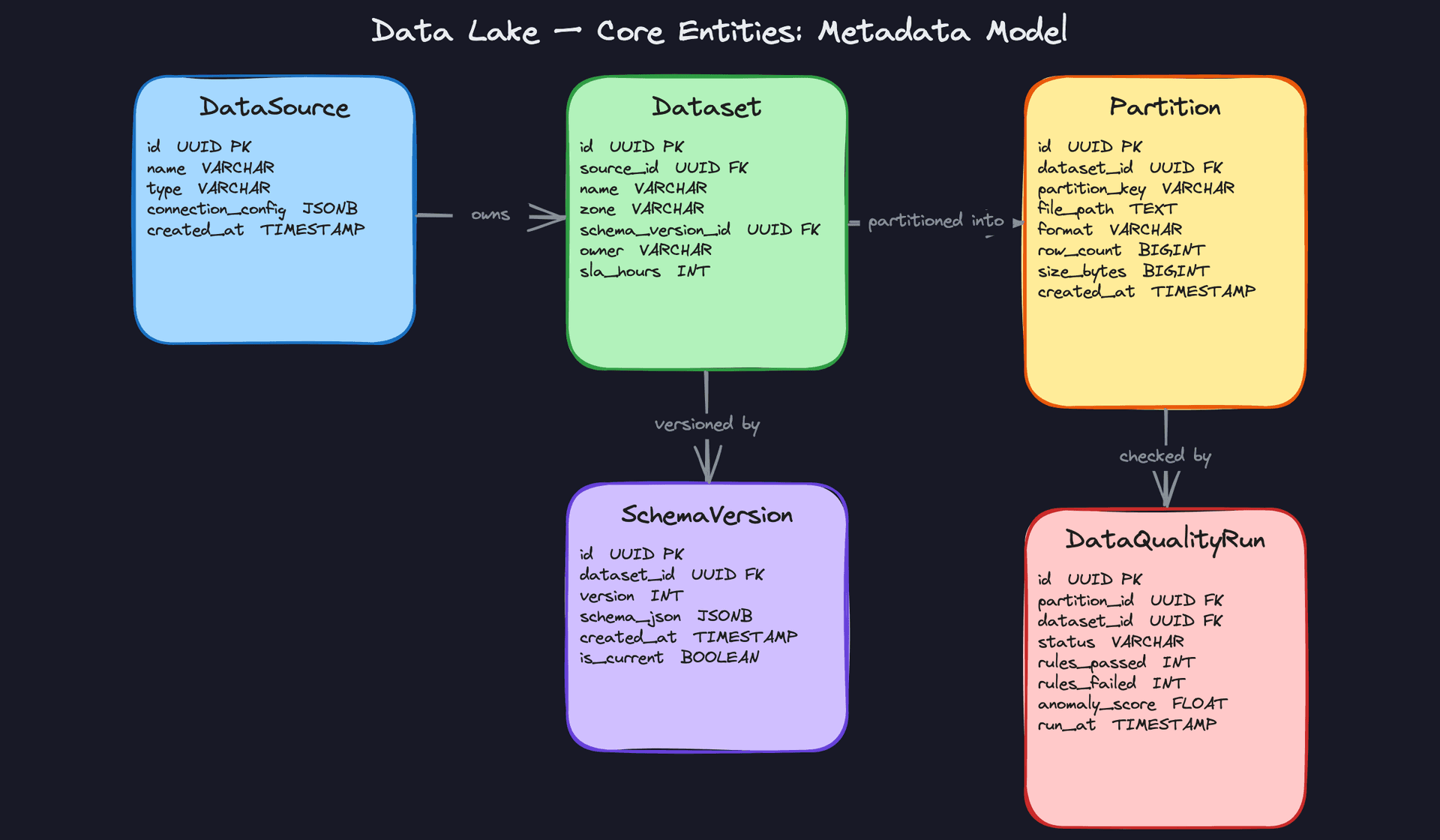
Five entities carry the whole system. Think of them as the control plane sitting above your object storage.
DataSource represents an origin system: a Postgres database, a Kafka topic, a SaaS API. It holds connection config and enough metadata to let ingestion workers know how to reach the source. You'll reference it constantly when onboarding new pipelines.
Dataset is a logical table or stream topic. It belongs to exactly one zone (raw, curated, or serving) and always points to a current SchemaVersion. The sla_hours column is easy to overlook but important: it's what your alerting system checks to know whether a pipeline is late.
SchemaVersion is a versioned snapshot of a dataset's schema stored as JSON. Every time a column is added or a type changes, you insert a new row and flip is_current. This gives you a full audit trail and lets downstream jobs ask "what did this schema look like at 2am on Tuesday?"
Partition is the unit of physical storage. One row per file group written to object storage. It records the file path, format (Parquet, Avro, JSON), row count, and size in bytes. The metadata catalog reads from this table to answer questions like "which files cover dt=2024-01-15?" without scanning S3 directly.
DataQualityRun links to a specific Partition and records what happened when quality checks ran: how many rules passed, how many failed, and an anomaly score. This is what powers your quarantine gate. If rules_failed > 0, the partition doesn't get promoted to curated.
CREATE TABLE data_sources (
    id                UUID PRIMARY KEY DEFAULT gen_random_uuid(),
    name              VARCHAR(255) NOT NULL UNIQUE,         -- e.g. 'postgres-events-prod'
    type              VARCHAR(50) NOT NULL,                  -- 'batch', 'streaming', 'cdc'
    connection_config JSONB NOT NULL DEFAULT '{}',           -- host, port, credentials ref
    owner             VARCHAR(255) NOT NULL,
    created_at        TIMESTAMP NOT NULL DEFAULT now()
);

CREATE TABLE schema_versions (
    id          UUID PRIMARY KEY DEFAULT gen_random_uuid(),
    dataset_id  UUID NOT NULL REFERENCES datasets(id),
    version     INT NOT NULL,
    schema_json JSONB NOT NULL,                              -- Avro/JSON Schema document
    is_current  BOOLEAN NOT NULL DEFAULT false,
    created_at  TIMESTAMP NOT NULL DEFAULT now(),
    UNIQUE (dataset_id, version)
);

CREATE TABLE datasets (
    id                UUID PRIMARY KEY DEFAULT gen_random_uuid(),
    source_id         UUID NOT NULL REFERENCES data_sources(id),
    name              VARCHAR(255) NOT NULL,                 -- e.g. 'user_events_raw'
    zone              VARCHAR(20) NOT NULL                   -- 'raw', 'curated', 'serving'
                        CHECK (zone IN ('raw', 'curated', 'serving')),
    schema_version_id UUID REFERENCES schema_versions(id),  -- current active schema
    owner             VARCHAR(255) NOT NULL,
    sla_hours         INT NOT NULL DEFAULT 24,               -- max acceptable lag in hours
    created_at        TIMESTAMP NOT NULL DEFAULT now()
);

CREATE INDEX idx_datasets_zone ON datasets(zone);
CREATE INDEX idx_datasets_source ON datasets(source_id);

CREATE TABLE partitions (
    id            UUID PRIMARY KEY DEFAULT gen_random_uuid(),
    dataset_id    UUID NOT NULL REFERENCES datasets(id),
    partition_key VARCHAR(255) NOT NULL,                     -- e.g. 'dt=2024-01-15/hour=03'
    file_path     TEXT NOT NULL,                             -- s3://bucket/prefix/...
    format        VARCHAR(20) NOT NULL                       -- 'parquet', 'avro', 'json'
                    CHECK (format IN ('parquet', 'avro', 'json')),
    row_count     BIGINT NOT NULL DEFAULT 0,
    size_bytes    BIGINT NOT NULL DEFAULT 0,
    created_at    TIMESTAMP NOT NULL DEFAULT now()
);

CREATE INDEX idx_partitions_dataset_key ON partitions(dataset_id, partition_key);

CREATE TABLE data_quality_runs (
    id            UUID PRIMARY KEY DEFAULT gen_random_uuid(),
    partition_id  UUID NOT NULL REFERENCES partitions(id),
    dataset_id    UUID NOT NULL REFERENCES datasets(id),
    status        VARCHAR(20) NOT NULL                       -- 'passed', 'failed', 'skipped'
                    CHECK (status IN ('passed', 'failed', 'skipped')),
    rules_passed  INT NOT NULL DEFAULT 0,
    rules_failed  INT NOT NULL DEFAULT 0,
    anomaly_score FLOAT,                                     -- 0.0 = clean, 1.0 = severe
    run_at        TIMESTAMP NOT NULL DEFAULT now()
);

CREATE INDEX idx_dq_runs_partition ON data_quality_runs(partition_id);
CREATE INDEX idx_dq_runs_dataset_status ON data_quality_runs(dataset_id, status, run_at DESC);
Key insight: Notice thatschema_versionsreferencesdatasetsanddatasetsreferencesschema_versions. In practice, you resolve this circular dependency by inserting the dataset first with a nullschema_version_id, then inserting the schema version, then updating the dataset. Iceberg handles this internally, but if you're building a custom catalog, you need to account for it.
API Design
The data lake's control plane exposes APIs for three audiences: ingestion workers registering new data, pipeline orchestrators querying partition metadata, and quality systems reporting check results. The actual data transfer happens out-of-band through object storage presigned URLs or direct S3 writes.
// Register a new data source
POST /sources
{
  "name": "postgres-events-prod",
  "type": "batch",
  "connection_config": { "host": "...", "port": 5432 },
  "owner": "data-eng-team"
}
-> { "source_id": "uuid", "created_at": "..." }
// Create or update a dataset (called when a pipeline is first deployed)
POST /datasets
{
  "source_id": "uuid",
  "name": "user_events_raw",
  "zone": "raw",
  "owner": "data-eng-team",
  "sla_hours": 4
}
-> { "dataset_id": "uuid" }
// Register a new schema version (called when source schema changes)
POST /datasets/{dataset_id}/schemas
{
  "schema_json": { ... },   // Avro schema document
  "set_current": true
}
-> { "schema_version_id": "uuid", "version": 3 }
// Register a newly written partition (called by ingestion worker after S3 write)
POST /datasets/{dataset_id}/partitions
{
  "partition_key": "dt=2024-01-15/hour=03",
  "file_path": "s3://datalake/raw/user_events/dt=2024-01-15/hour=03/part-0001.parquet",
  "format": "parquet",
  "row_count": 482910,
  "size_bytes": 94371840
}
-> { "partition_id": "uuid" }
// Submit quality check results for a partition
POST /partitions/{partition_id}/quality-runs
{
  "rules_passed": 12,
  "rules_failed": 1,
  "anomaly_score": 0.73,
  "status": "failed"
}
-> { "run_id": "uuid", "promotion_blocked": true }
// Query partitions for a dataset (used by query engines and backfill jobs)
GET /datasets/{dataset_id}/partitions?from=2024-01-15&to=2024-01-16&status=passed
-> {
  "partitions": [
    { "partition_key": "dt=2024-01-15/hour=00", "file_path": "...", "row_count": 391200 },
    ...
  ]
}
POST is the right verb for registering sources, datasets, schemas, and partitions because each call creates a new resource. The quality run endpoint also uses POST since you're creating a new run record, not updating the partition itself. The partition query uses GET with filter params because it's a pure read with no side effects.
Common mistake: Candidates sometimes design a single "ingest data" endpoint that accepts the raw payload and writes to S3 through the API server. Don't do this. The API layer manages metadata only. Data moves directly from ingestion workers to object storage. Routing terabytes through an API server is a fast path to a very bad day on-call.
One thing worth calling out: the GET /partitions endpoint is what your query engine calls to do partition pruning before it touches S3. Trino and Athena both support custom catalog connectors that hit exactly this kind of endpoint. Keeping it fast (indexed on dataset_id and partition_key) is what separates a usable catalog from one that adds 30 seconds to every query.
High-Level Design
A data lake isn't a single system. It's a pipeline of systems, each with a clear responsibility. The best way to walk through it is in the order data actually moves: land it, clean it, serve it.
1) Ingesting Data from Batch and Streaming Sources
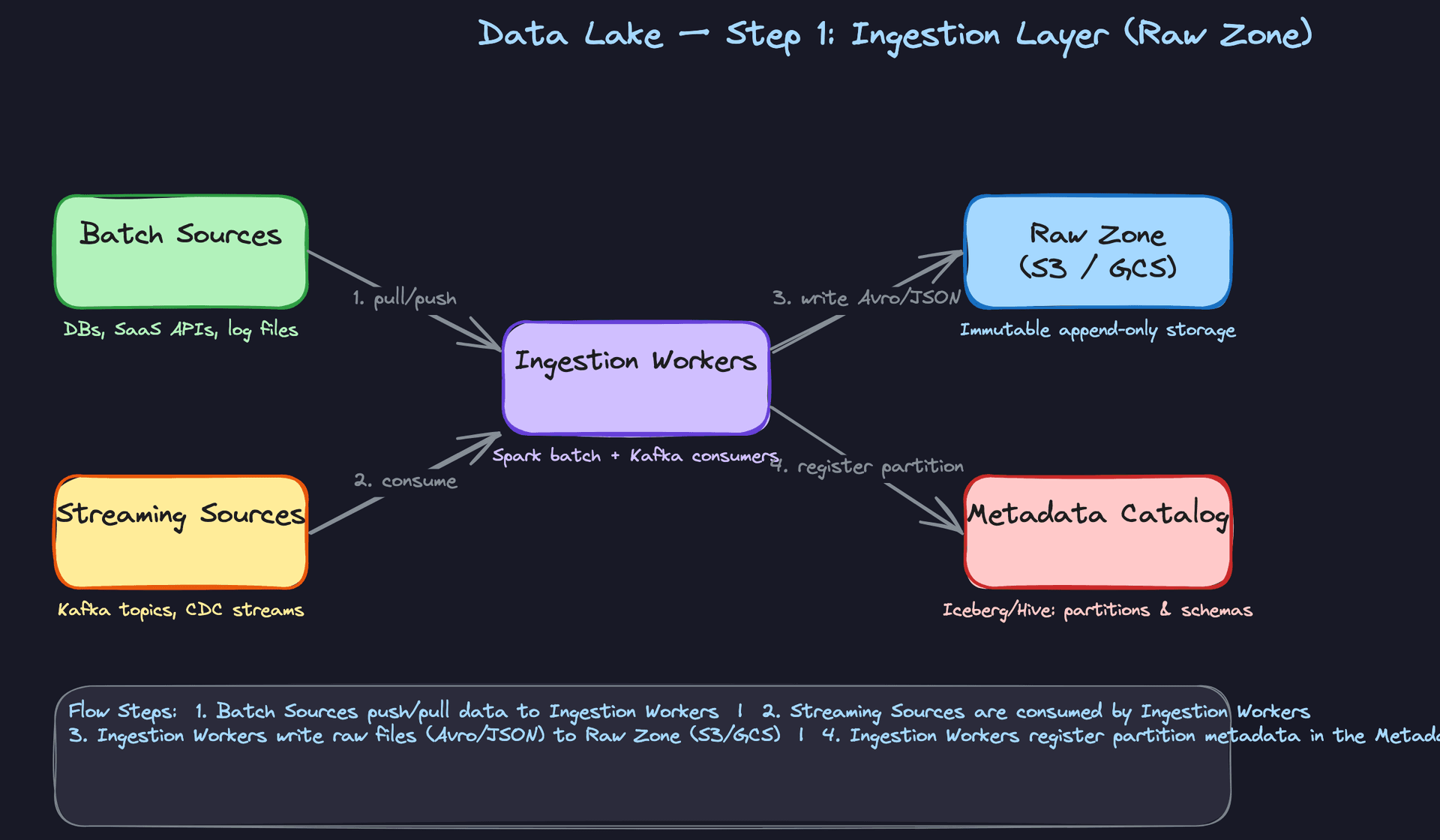
Components: Batch sources (databases, SaaS APIs, log files), streaming sources (Kafka topics, CDC streams), ingestion workers (Spark jobs, Kafka consumers), raw zone in object storage (S3 or GCS), metadata catalog.
The ingestion layer has two distinct paths, and you need to design both.
Batch ingestion flow: 1. An Airflow DAG triggers a Spark job on a schedule (hourly, daily, depending on SLA). 2. The Spark job pulls from the source system via JDBC, REST API, or file export. 3. Records are written to the raw zone as Avro or JSON files, partitioned by ingestion date: s3://data-lake/raw/events/dt=2024-01-15/. 4. After the write completes, the job registers the new partition with the metadata catalog.
Streaming ingestion flow: 1. Source systems publish events to Kafka topics. 2. A Kafka consumer (Flink job or Spark Structured Streaming) reads from the topic continuously. 3. Events are written to the raw zone in micro-batches, typically every 5 minutes, in Avro format. 4. Each micro-batch write registers a new partition entry in the catalog.
Why Avro for raw? Avro is schema-embedded, meaning every file carries its own schema definition. When a source changes its payload shape six months from now, you can still deserialize old files correctly because the schema is right there in the file header. JSON works too but is verbose and schema-less, which creates pain later. Parquet is columnar and great for reads, but it's a poor choice for raw because you're optimizing for write throughput and schema flexibility at this stage, not query performance.
Common mistake: Candidates often write raw data directly as Parquet "because it's faster to query." The raw zone isn't meant to be queried directly. It's your safety net. Optimize for faithful capture, not read performance.
One more thing to nail in the interview: raw zone files are append-only and immutable. You never modify them. If ingestion produces a bad file, you write a corrected version alongside it and handle deduplication downstream. This is what makes backfills safe.
2) Organizing Storage into Three Zones
Components: Raw zone (S3/GCS), curated zone (Parquet + Iceberg), serving zone (aggregated tables, feature sets), Spark transformation jobs.
The three-zone model is the backbone of the architecture. Each zone has a contract.
Raw zone: Immutable, append-only, schema-flexible. Think of it as your write-ahead log for the entire lake. Nothing is ever deleted or modified here. If you discover a bug in your pipeline three weeks later, you replay from raw.
Curated zone: This is where raw data becomes trustworthy. The flow: 1. A Spark job reads a raw partition. 2. It deduplicates records (using a unique event ID or composite key). 3. It casts types, normalizes nulls, and applies business-level cleaning rules. 4. It writes the result as Parquet, partitioned by event date (not ingestion date), registered as an Iceberg table.
The partition key matters here. Partitioning by event_date rather than ingestion_date means your downstream queries filter on when something happened, not when it arrived. This is almost always what analysts and ML engineers want.
Serving zone: Curated data gets aggregated, joined, or transformed into purpose-built tables. A daily active users table, a user feature vector for ML, a pre-joined fact table for BI. The serving zone is optimized for the consumer, not for generality.
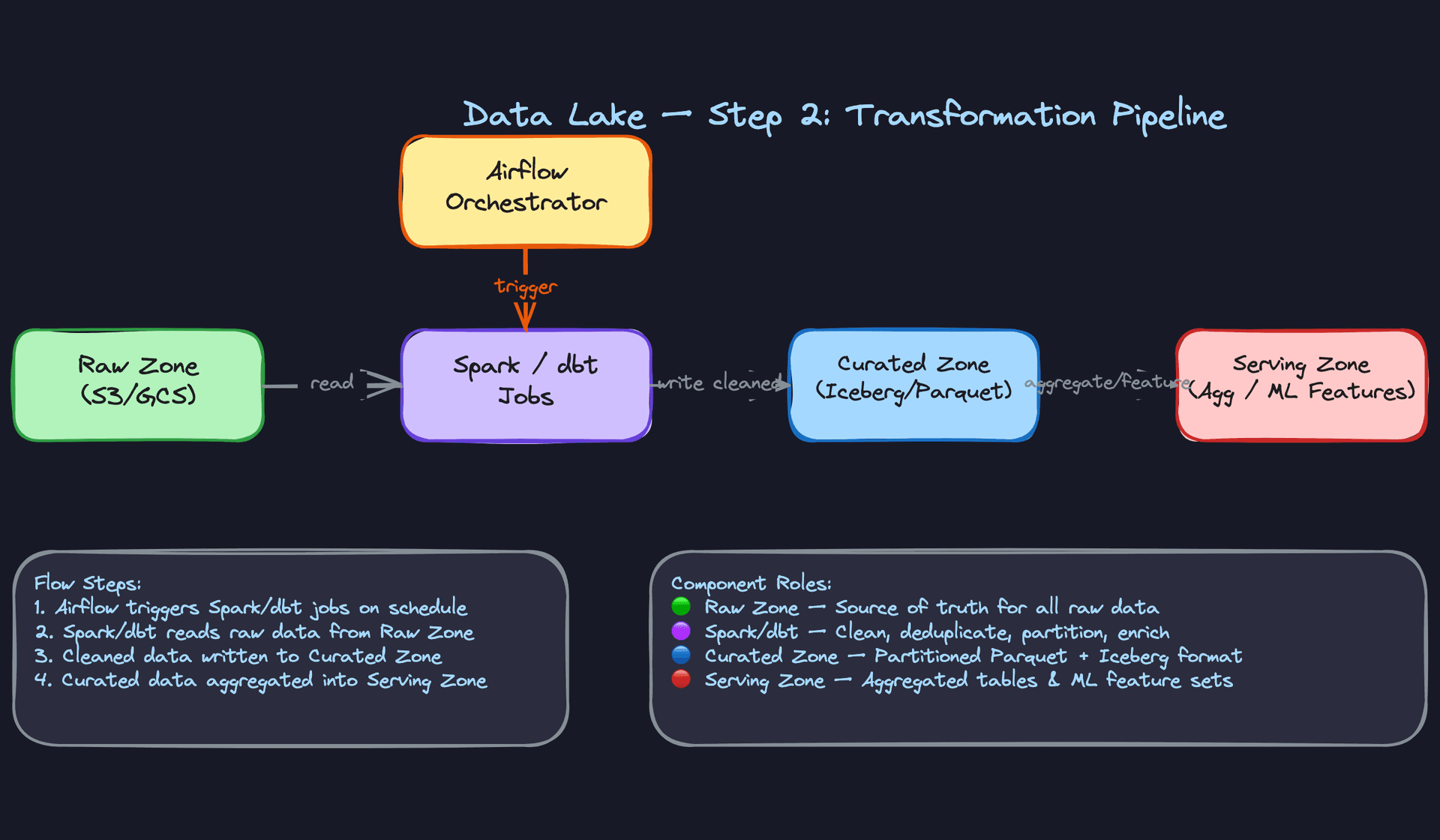
Key insight: The three-zone model is really a trust boundary model. Raw = untrusted. Curated = validated and clean. Serving = optimized for a specific consumer. Data only moves forward through the zones, never backward.
The file format progression matters too. Raw uses Avro (schema-embedded, write-optimized). Curated and serving use Parquet (columnar, read-optimized, compressible). This isn't arbitrary. You're trading write flexibility for read performance as data matures.
3) Adding a Metadata Catalog for Schema Evolution and Discoverability
Components: Apache Iceberg (or Hive Metastore), object storage, query engines (Trino, Spark), ingestion workers.
Object storage alone is just a pile of files. The metadata catalog is what makes it a queryable, evolvable system.
Apache Iceberg sits as a table format layer on top of S3. It maintains a transaction log that tracks every snapshot of a table: which files belong to which partition, what the current schema is, and the full history of schema changes. This gives you three capabilities that are hard to get any other way.
Schema evolution without rewrites. When a source adds a new column, Iceberg records the schema change in its metadata. Old files that don't have the column simply return null for it. No rewrite of historical data needed.
Time travel. Every Iceberg snapshot is addressable. You can query AS OF TIMESTAMP '2024-01-10 00:00:00' to see what a table looked like before a bad pipeline run corrupted it. This is invaluable for debugging and auditing.
Partition pruning. Iceberg's hidden partitioning means the query engine knows exactly which files to skip without scanning directory listings. A Trino query filtering on event_date = '2024-01-15' touches only the relevant files, not the entire table.
-- Iceberg time travel: query the table as it existed before a bad backfill
SELECT COUNT(*)
FROM curated.user_events
FOR SYSTEM_TIME AS OF TIMESTAMP '2024-01-14 23:59:59'
WHERE event_type = 'purchase';
Interview tip: If your interviewer asks "how do you handle a source adding a new column?", the answer isn't "rewrite the table." It's "Iceberg schema evolution with backward-compatible column additions." That's the signal they're looking for at senior level.
Hive Metastore is the older alternative. It works, and most teams have it, but it doesn't support ACID transactions or time travel natively. If you're designing from scratch, Iceberg (or Delta Lake if you're in a Databricks shop) is the right call.
4) Transforming Data with dbt and Spark, Orchestrated by Airflow
Components: Airflow (orchestrator), Spark jobs (heavy transforms), dbt (SQL-based transforms), curated zone (source), serving zone (sink).
Transformation is where business logic lives. Two tools handle most of it.
Spark handles anything that needs distributed compute: large joins across billions of rows, ML feature engineering, complex sessionization logic. A Spark job reads from the curated Iceberg table, applies transformations, and writes the result to the serving zone.
dbt handles SQL-based transformations that data analysts can own and version-control. A dbt model is just a SELECT statement with a name. dbt compiles it into a CREATE TABLE AS SELECT, runs it against your query engine (Trino or Spark SQL), and tracks lineage automatically. For aggregations, rollups, and business metric definitions, dbt is faster to iterate on than Spark.
Airflow ties it together. A typical DAG looks like this:
from airflow import DAG
from airflow.providers.apache.spark.operators.spark_submit import SparkSubmitOperator
from airflow.operators.bash import BashOperator
from datetime import datetime, timedelta

with DAG(
    dag_id="curated_to_serving_user_metrics",
    schedule_interval="0 3 * * *",   # 3am daily
    start_date=datetime(2024, 1, 1),
    catchup=True,                     # enables backfill
    default_args={"retries": 2, "retry_delay": timedelta(minutes=5)},
) as dag:

    # Step 1: Run Spark job to compute user sessions from curated events
    compute_sessions = SparkSubmitOperator(
        task_id="compute_user_sessions",
        application="s3://jobs/user_sessions.py",
        conf={"spark.sql.extensions": "org.apache.iceberg.spark.extensions.IcebergSparkSessionExtensions"},
    )

    # Step 2: Run dbt to build downstream metric tables
    run_dbt_metrics = BashOperator(
        task_id="run_dbt_user_metrics",
        bash_command="dbt run --select tag:user_metrics --vars '{run_date: {{ ds }}}'",
    )

    compute_sessions >> run_dbt_metrics
catchup=True is the detail that separates candidates who've operated pipelines from those who haven't. It means Airflow will automatically backfill missed runs when you deploy a new DAG or re-enable a paused one. Combined with idempotent writes (covered in the deep dives), this is how you safely reprocess historical data.
Common mistake: Designing the transformation layer without dependency management. If your serving zone table depends on three curated tables, and one of them hasn't finished yet, your transform will either fail or produce incorrect results. Airflow's task dependencies handle this explicitly.
5) Serving Data to Analysts, ML Engineers, and BI Tools
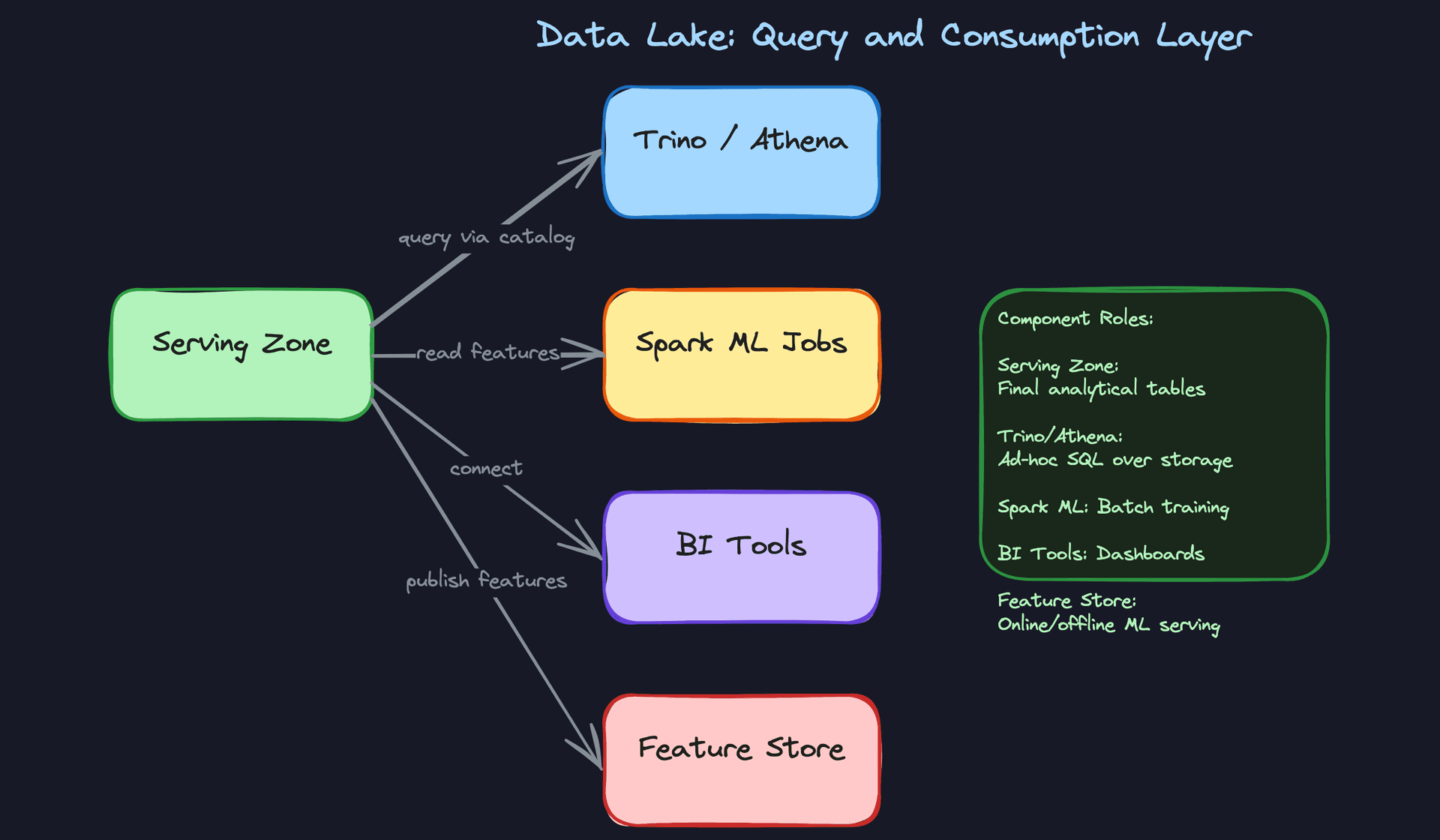
Components: Serving zone (Iceberg tables in S3), Trino/Athena (ad-hoc SQL), Spark (ML batch jobs), BI tools (Tableau, Looker), feature store.
Different consumers have different access patterns, and the serving zone needs to support all of them without one consumer degrading another.
Ad-hoc SQL queries go through Trino or Athena. Both are serverless query engines that read directly from S3 via the Iceberg catalog. An analyst writing a one-off query doesn't need a running cluster. Trino spins up workers, reads the relevant Parquet files, and returns results. For most analytical queries under a few terabytes, this is fast enough.
ML training jobs use Spark to read feature tables from the serving zone in bulk. These jobs are large and long-running. They read entire partitions, not filtered subsets. The key design decision here is to keep ML feature tables in the serving zone separate from BI-facing aggregation tables. They have different update frequencies, different schemas, and different consumers. Mixing them creates operational headaches.
BI tools connect via JDBC to Trino or directly to Snowflake/BigQuery if you've chosen a cloud warehouse for the serving layer. The serving zone tables they hit should be pre-aggregated. A Looker dashboard shouldn't be running a full table scan on 500GB of raw events every time someone loads it.
Feature store integration is worth mentioning explicitly. The serving zone computes offline features (historical aggregates per user, per item). A feature store like Feast or Tecton reads those offline features and syncs them to a low-latency online store (Redis, DynamoDB) for real-time model serving. The data lake is the source of truth; the feature store is the delivery mechanism.
Interview tip: When you mention the consumption layer, name the access pattern first, then the tool. "For ad-hoc SQL from analysts, I'd use Trino over Iceberg tables" lands better than "I'd use Trino." The interviewer wants to know you understand why, not just what.
Putting It All Together
The full architecture is a linear pipeline with three storage zones, a metadata catalog threading through all of them, and multiple consumer paths off the serving layer.
Data enters through batch Spark jobs or streaming Kafka consumers and lands in the raw zone as Avro or JSON. A quality gate (covered in the deep dives) validates each partition before promotion. Clean data moves to the curated zone as partitioned Parquet under Iceberg table management. Airflow-orchestrated Spark and dbt jobs transform curated data into purpose-built serving zone tables. Consumers, whether analysts running SQL, ML engineers training models, or BI dashboards, read exclusively from the serving zone.
The metadata catalog (Iceberg) is the connective tissue. It's not a separate step in the pipeline; it's present at every write. Every partition registration, every schema change, every snapshot is recorded there. Without it, you have files. With it, you have a queryable, evolvable, auditable system.
The raw zone is your insurance policy. Every other layer can be rebuilt from it. That's the property that makes the whole architecture trustworthy.
Deep Dives
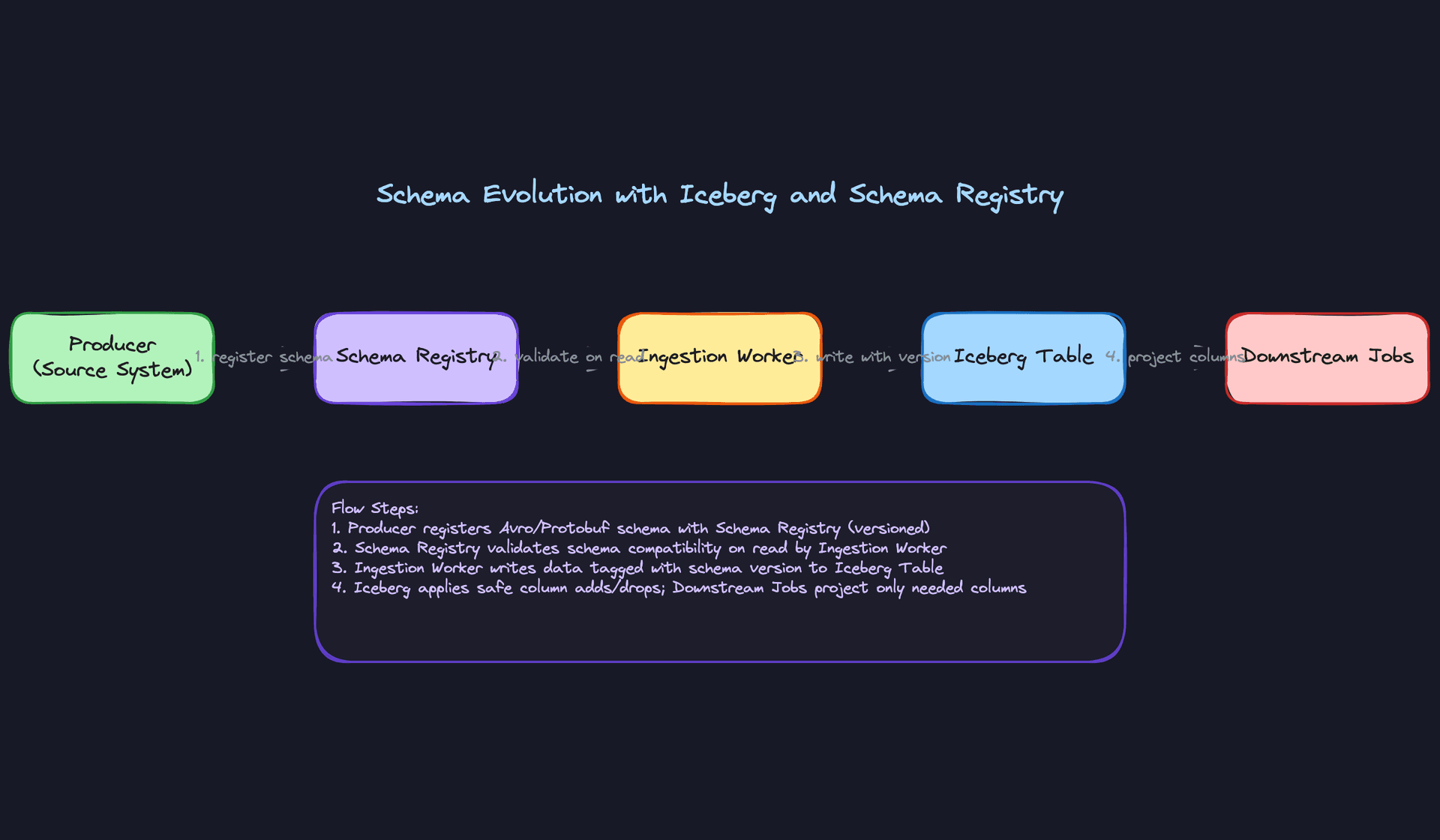
"How do we handle schema changes from source systems without breaking downstream jobs?"
Source systems change. A product team adds a device_type column, a backend engineer renames user_id to account_id, and suddenly three downstream Spark jobs are throwing AnalysisException at 3am. Schema evolution is one of the most common failure modes in real data lakes, and interviewers know it.
Bad Solution: Overwrite the table schema on every load
The naive approach is to infer the schema from each incoming file and apply it directly to the table. If the new file has a new column, update the table. If a column disappears, drop it. Simple, automatic, no manual intervention needed.
The problem is that every downstream job that references a dropped or renamed column now breaks silently or loudly depending on how it reads data. Worse, schema inference from JSON or CSV is unreliable. A column that was INT in Monday's file might be inferred as FLOAT on Tuesday because one value happened to be 1.0. You've introduced type drift without anyone noticing.
Warning: Candidates who say "just infer the schema automatically" are describing a data swamp, not a data lake. Interviewers will push back immediately.
Good Solution: Schema Registry with compatibility enforcement
Put a schema registry (Confluent Schema Registry for Avro/Protobuf, or a homegrown catalog entry) in front of every ingestion path. Producers register their schema before writing. The registry enforces a compatibility mode: BACKWARD means new readers can read old data, FORWARD means old readers can read new data, FULL means both.
Adding a nullable column with a default? That's backward-compatible. Renaming a field or changing STRING to INT? That's a breaking change and the registry rejects it at registration time, before a single byte hits object storage.
from confluent_kafka.schema_registry import SchemaRegistryClient, Schema

client = SchemaRegistryClient({"url": "http://schema-registry:8081"})

new_schema = Schema(
    schema_str=open("events_v2.avsc").read(),
    schema_type="AVRO"
)

# Will raise SchemaRegistryError if incompatible with previous version
schema_id = client.register_schema(
    subject_name="user-events-value",
    schema=new_schema
)
This stops bad schemas at the door. But it doesn't help you query a table where half the partitions have v1 schema and half have v2.
Great Solution: Iceberg schema evolution with per-column IDs
Apache Iceberg tracks columns by a stable integer ID, not by name. When you add a column, Iceberg assigns it a new ID. When you rename a column, the ID stays the same, only the name changes. Old files that don't have the new column just return NULL for it. Downstream jobs reading with SELECT * get the new column transparently; jobs that reference the old name by ID still work after a rename.
-- Safe operations in Iceberg: no file rewrites required
ALTER TABLE curated.user_events ADD COLUMN device_type STRING;
ALTER TABLE curated.user_events RENAME COLUMN user_id TO account_id;
ALTER TABLE curated.user_events ALTER COLUMN session_duration TYPE BIGINT;

-- Iceberg tracks that old files use column_id=3 for what is now 'account_id'
-- Readers transparently map the new name to the same column ID
The combination is: schema registry blocks breaking changes at ingestion, and Iceberg handles the safe changes (adds, renames, type promotions) without touching historical files. Downstream jobs use schema projection, explicitly selecting the columns they need rather than SELECT *, so they're insulated from additions.
Tip: Mentioning column IDs specifically is what separates a senior answer from a mid-level one. Most candidates know Iceberg supports schema evolution. Fewer can explain why it works without rewriting files.
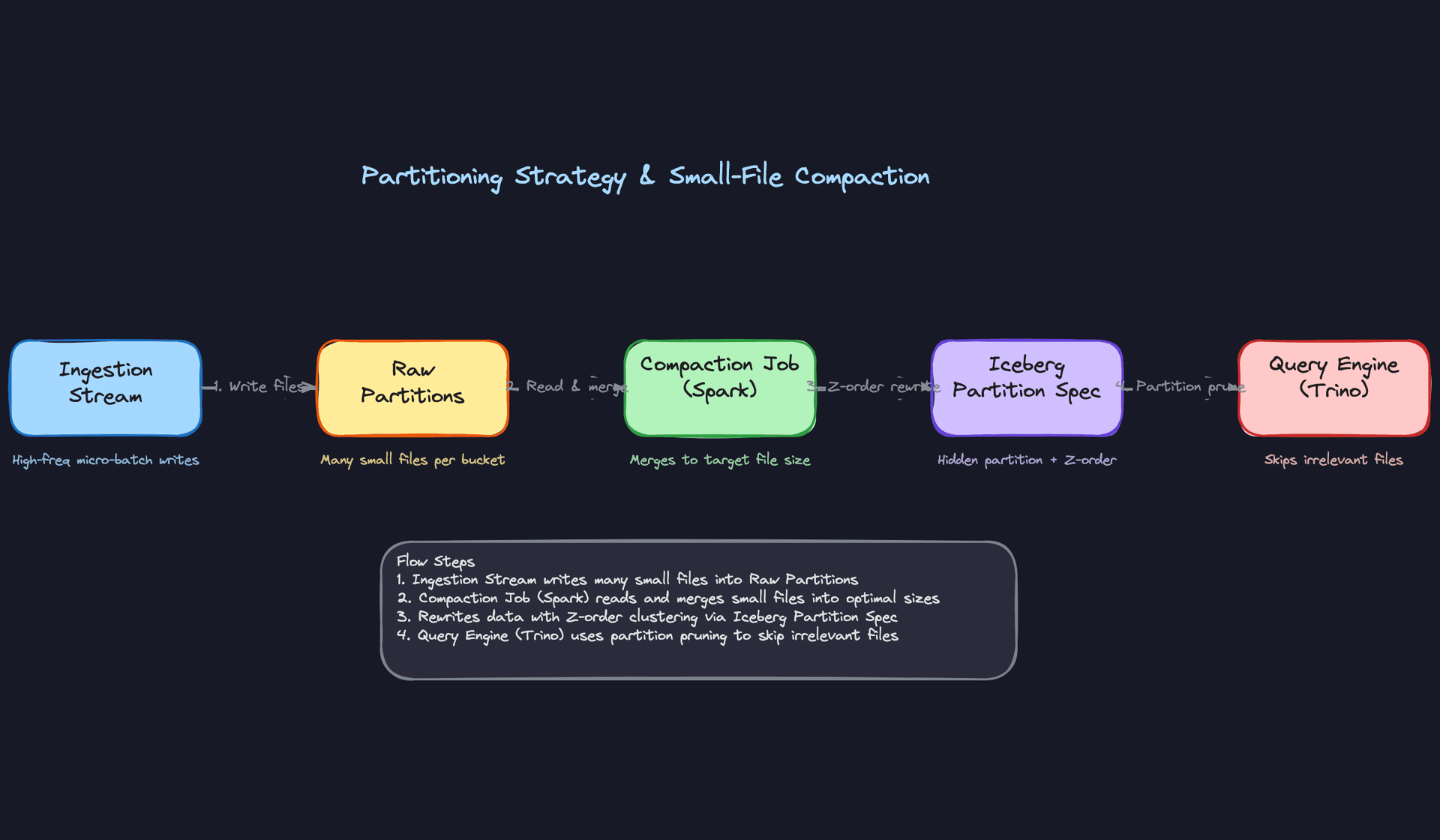
"How do we handle partitioning at scale without creating a small-file problem?"
Bad Solution: Partition by date, write every micro-batch as its own file
The instinct is correct: partition by event_date so queries can skip irrelevant days. The execution is where things fall apart. If you're running a Kafka consumer that flushes every 30 seconds, you're writing 2,880 files per day per table. At 10 tables, that's 28,800 files per day. After a year, your metadata catalog is tracking millions of files, and Trino spends more time listing partitions than actually reading data.
S3 LIST operations are slow and eventually consistent. HDFS NameNode memory fills up. Query planning time balloons. This is the small-file problem, and it's one of the most common production failures in data lakes.
Warning: Saying "partition by date" without addressing file size is an incomplete answer at the senior level. Expect a follow-up about what happens after six months of streaming writes.
Good Solution: Compaction jobs to merge small files
Run a periodic Spark compaction job that reads all the small files in a partition and rewrites them into target-sized files (typically 128MB to 512MB for Parquet). Schedule it in Airflow to run after the ingestion window closes.
from pyspark.sql import SparkSession

spark = SparkSession.builder \
    .config("spark.sql.extensions", "org.apache.iceberg.spark.extensions.IcebergSparkSessionExtensions") \
    .getOrCreate()

# Rewrite small files in yesterday's partition into 256MB target files
spark.sql("""
    CALL catalog.system.rewrite_data_files(
        table => 'curated.user_events',
        strategy => 'binpack',
        options => map(
            'target-file-size-bytes', '268435456',
            'min-file-size-bytes', '67108864'
        ),
        where => 'event_date = current_date - INTERVAL 1 DAY'
    )
""")
This works, but it's reactive. You're still generating the small files first and cleaning them up later. During the window between ingestion and compaction, any query hitting that partition pays the small-file tax.
Great Solution: Iceberg hidden partitioning with Z-order clustering
Iceberg's hidden partitioning lets you define a partition spec that transforms a column rather than using raw values. Instead of partitioning on the raw event_timestamp (which creates one partition per second), you partition on hours(event_timestamp) or days(event_timestamp). Iceberg handles the mapping transparently; queries that filter on event_timestamp still get partition pruning without knowing the partition spec.
CREATE TABLE curated.user_events (
    event_id     STRING,
    user_id      BIGINT,
    event_type   STRING,
    country      STRING,
    event_ts     TIMESTAMP,
    payload      MAP<STRING, STRING>
)
USING iceberg
PARTITIONED BY (days(event_ts), country)
TBLPROPERTIES (
    'write.target-file-size-bytes' = '268435456',
    'write.distribution-mode' = 'hash'
);
For tables queried across multiple dimensions (say, country and event_type), add Z-order clustering on top. Z-ordering co-locates rows with similar values across multiple columns in the same files, so a query filtering on country = 'US' AND event_type = 'purchase' skips far more files than date partitioning alone would allow.
-- Run after compaction to apply Z-order clustering
CALL catalog.system.rewrite_data_files(
    table => 'curated.user_events',
    strategy => 'sort',
    sort_order => 'zorder(country, event_type)',
    where => 'event_date >= current_date - INTERVAL 7 DAY'
);
Tip: Z-ordering is a strong signal. It tells the interviewer you've thought about multi-dimensional query patterns, not just "how do I avoid scanning the whole table."
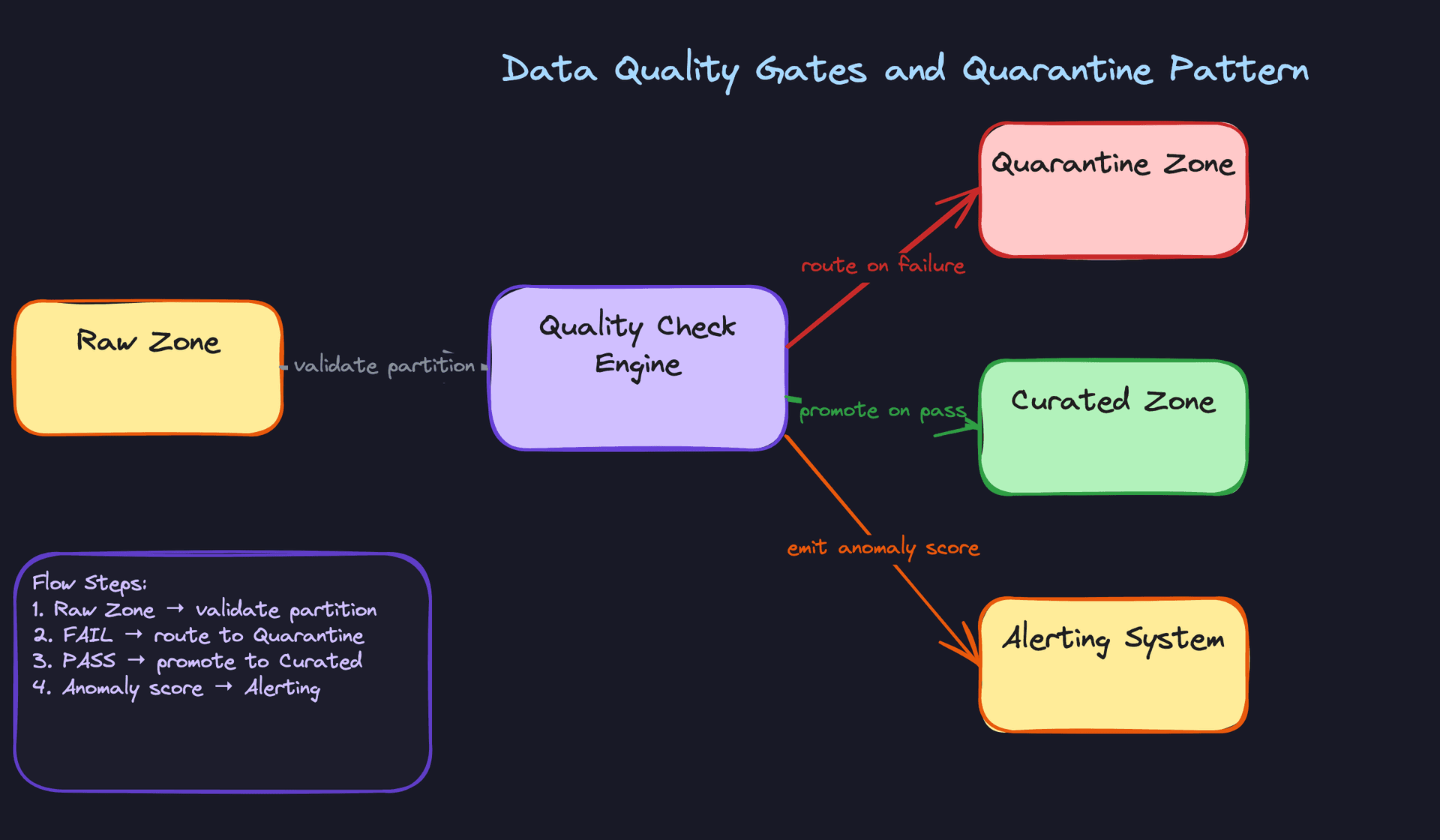
"How do we prevent bad data from polluting the curated zone?"
Bad Solution: Validate data after it's already in curated
Some teams run quality checks as a reporting step: after the Spark job writes to curated, a separate job scans it and sends a Slack alert if something looks wrong. The data is already there. Downstream BI dashboards and ML pipelines have already read it. You're alerting on a problem you can't undo without a full backfill.
This is the data swamp pattern. Raw data flows directly into curated with no gate, and quality is treated as someone else's problem.
Good Solution: Quality gates between raw and curated with Great Expectations
Run a validation job on each raw partition before promoting it to curated. Great Expectations lets you define a suite of expectations (null rate thresholds, value ranges, referential integrity checks) and returns a pass/fail result per partition.
import great_expectations as gx

context = gx.get_context()
batch_request = {
    "datasource_name": "spark_datasource",
    "data_connector_name": "runtime_data_connector",
    "data_asset_name": "user_events_raw",
    "runtime_parameters": {"batch_data": raw_df},
    "batch_identifiers": {"partition_key": partition_date},
}

results = context.run_checkpoint(
    checkpoint_name="user_events_quality_gate",
    validations=[{"batch_request": batch_request}],
)

if not results["success"]:
    # Route to quarantine, do not promote
    raw_df.write.parquet(f"s3://data-lake/quarantine/user_events/{partition_date}/")
    raise ValueError(f"Quality gate failed for partition {partition_date}")
Failed partitions go to a quarantine zone, not the trash. You need them for debugging. Passing partitions get promoted to curated. The Airflow task fails loudly and blocks downstream tasks from running on bad data.
Great Solution: Tiered quality rules with anomaly scoring and SLA-aware alerting
Static threshold rules catch known problems. They don't catch unknown ones, like a sudden 40% drop in event volume that's technically within your null rate threshold but signals a broken upstream producer.
Add anomaly detection on top of rule-based checks. Track a rolling baseline of row counts, null rates, and value distributions per partition. Score each new partition against the baseline and flag partitions with anomaly scores above a threshold, even if they pass all static rules.
from dataclasses import dataclass
from scipy import stats
import numpy as np

@dataclass
class PartitionMetrics:
    row_count: int
    null_rate: float
    p99_value: float

def compute_anomaly_score(
    current: PartitionMetrics,
    historical: list[PartitionMetrics],
    window: int = 14
) -> float:
    recent = historical[-window:]
    counts = [m.row_count for m in recent]

    # Z-score of current row count vs recent baseline
    z_score = abs((current.row_count - np.mean(counts)) / (np.std(counts) + 1e-9))
    return z_score

# Score > 3.0 triggers a warning; score > 5.0 blocks promotion
score = compute_anomaly_score(current_metrics, historical_metrics)
Wire the anomaly score into your DataQualityRun table (from the metadata model) and route alerts through PagerDuty for high-severity datasets or Slack for lower-priority ones, based on the dataset's SLA tier. A dataset feeding a real-time executive dashboard gets paged on. A dataset feeding a weekly report gets a Slack message.
Tip: Distinguishing between rule-based quality checks and anomaly detection shows you understand that data quality isn't just about schema correctness. Volume anomalies and distribution drift are just as dangerous.
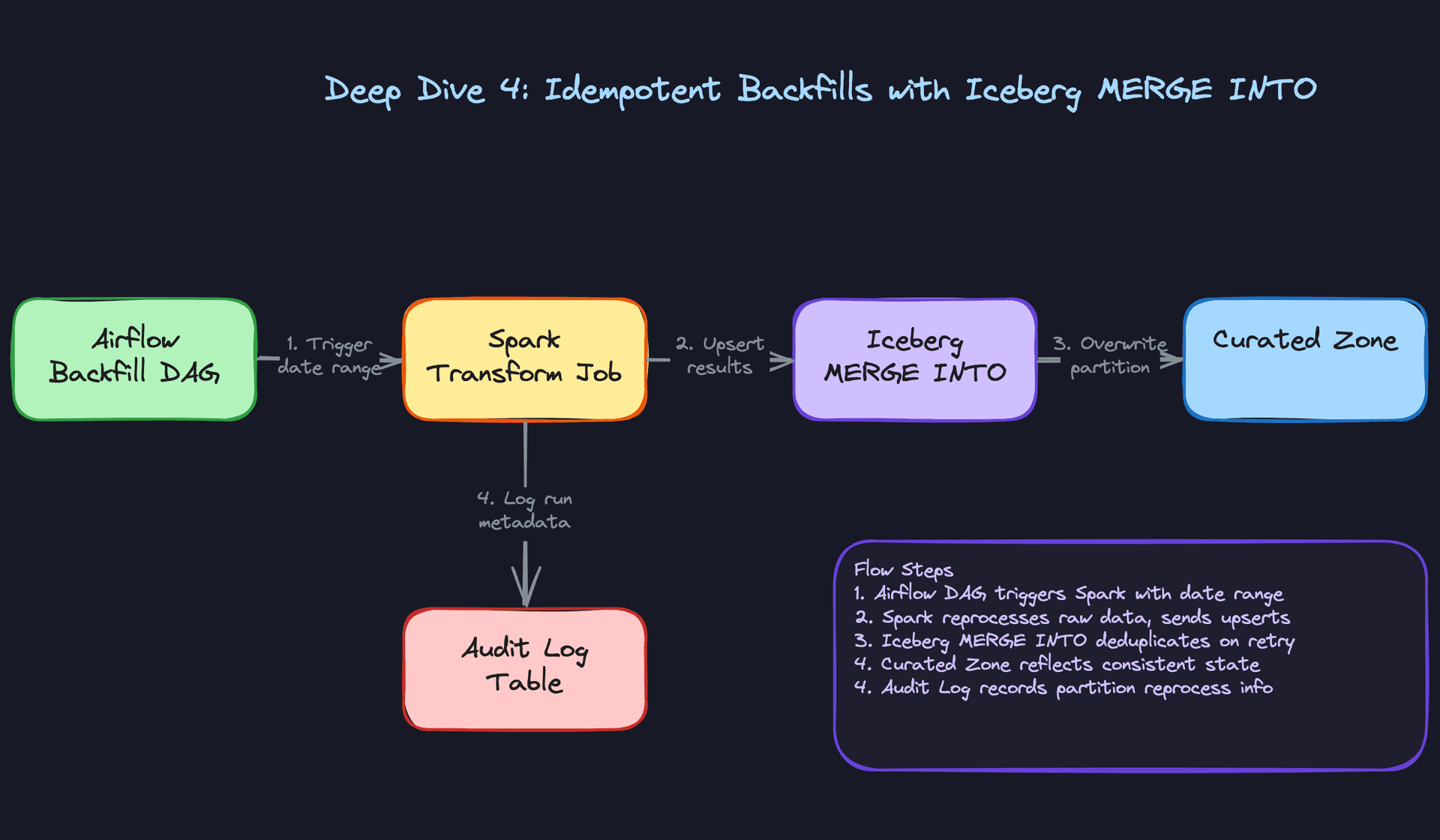
"How do we safely reprocess three weeks of corrupted curated data?"
Bad Solution: Delete the partitions and re-run the jobs
Delete the bad data, trigger the Airflow DAG for the affected date range, and let it re-run. Simple enough. The problem is that "re-run" is not the same as "idempotent re-run." If your Spark job appends to the output table rather than overwriting, you'll get duplicates. If the job fails halfway through a partition, you get partial data. If it fails and retries, you get partial data twice.
At scale, non-idempotent pipelines turn a three-week backfill into a three-week debugging session.
Warning: Saying "just re-run the DAG" without explaining how you prevent duplicates is a red flag. The interviewer will ask "what happens if the job fails halfway through?" and you need an answer.
Good Solution: Partition-level overwrite with dynamic partition mode
Configure your Spark job to overwrite only the partitions it touches, not the entire table. In Spark, partitionOverwriteMode = dynamic means that writing to event_date = 2024-01-15 replaces only that partition, leaving all others intact.
spark.conf.set("spark.sql.sources.partitionOverwriteMode", "dynamic")

result_df.write \
    .format("parquet") \
    .mode("overwrite") \
    .partitionBy("event_date") \
    .save("s3://data-lake/curated/user_events/")
This is idempotent at the partition level. Run it once, run it ten times, the result is the same. The Airflow backfill DAG can safely retry failed tasks without producing duplicates.
The gap: this works for partition-level rewrites, but not for row-level corrections. If you need to fix specific rows within a partition (say, a bad user ID mapping that affects 5% of rows in each partition), you're rewriting entire partitions to fix a small percentage of data.
Great Solution: Iceberg MERGE INTO for row-level idempotency with audit logging
Iceberg's MERGE INTO lets you upsert rows by a primary key. Reprocessed rows overwrite their previous versions; rows not in the reprocessed batch are left untouched. No duplicates, no full-partition rewrites for small corrections.
-- Reprocessed data lands in a staging table first
MERGE INTO curated.user_events AS target
USING staging.user_events_reprocessed AS source
ON target.event_id = source.event_id
   AND target.event_date = source.event_date
WHEN MATCHED THEN
    UPDATE SET
        target.user_id = source.user_id,
        target.event_type = source.event_type,
        target.payload = source.payload,
        target.processed_at = source.processed_at
WHEN NOT MATCHED THEN
    INSERT (event_id, user_id, event_type, event_date, payload, processed_at)
    VALUES (source.event_id, source.user_id, source.event_type,
            source.event_date, source.payload, source.processed_at);
Pair this with an audit log that records every backfill run: which partitions were reprocessed, by which DAG run, at what time, and what triggered it. When someone asks "why does this metric look different from last week's report?", you have a complete lineage trail.
CREATE TABLE pipeline.backfill_audit_log (
    id              UUID PRIMARY KEY DEFAULT gen_random_uuid(),
    dataset_id      UUID NOT NULL REFERENCES datasets(id),
    dag_run_id      VARCHAR NOT NULL,
    partition_key   VARCHAR NOT NULL,
    triggered_by    VARCHAR NOT NULL,   -- 'manual', 'quality_failure', 'bug_fix'
    rows_affected   BIGINT,
    started_at      TIMESTAMP NOT NULL,
    completed_at    TIMESTAMP,
    status          VARCHAR NOT NULL    -- 'running', 'success', 'failed'
);
Tip: The audit log is what staff-level candidates bring up unprompted. Backfill correctness matters, but so does the ability to explain to stakeholders what changed and why.
"How do we handle late-arriving events in our streaming pipeline?"
Bad Solution: Use processing time as the event timestamp
Just use current_timestamp() when the event arrives at the consumer. No watermarking needed, no out-of-order complexity. Windows close on a fixed schedule and you move on.
The problem is that processing time and event time diverge whenever there's network latency, a consumer lag spike, or a mobile client that was offline for two hours and then syncs. A purchase that happened at 11:58pm gets recorded in the midnight window. Your daily revenue metric is wrong, and it's wrong in a way that's hard to detect because the total across both windows is still correct.
Good Solution: Event-time windows with a fixed watermark
Switch to event-time processing. Use the timestamp embedded in the event itself. Define a watermark that tells the engine how long to wait for late data before closing a window.
from pyspark.sql import functions as F
from pyspark.sql.types import TimestampType

events = spark.readStream \
    .format("kafka") \
    .option("subscribe", "user-events") \
    .load() \
    .select(
        F.col("value").cast("string"),
        F.from_json(F.col("value"), event_schema).alias("data")
    ) \
    .select("data.*") \
    .withColumn("event_ts", F.col("event_timestamp").cast(TimestampType()))

windowed = events \
    .withWatermark("event_ts", "30 minutes") \
    .groupBy(
        F.window("event_ts", "1 hour"),
        F.col("event_type")
    ) \
    .count()

windowed.writeStream \
    .format("iceberg") \
    .outputMode("append") \
    .option("checkpointLocation", "s3://checkpoints/user-events-hourly/") \
    .toTable("curated.user_events_hourly")
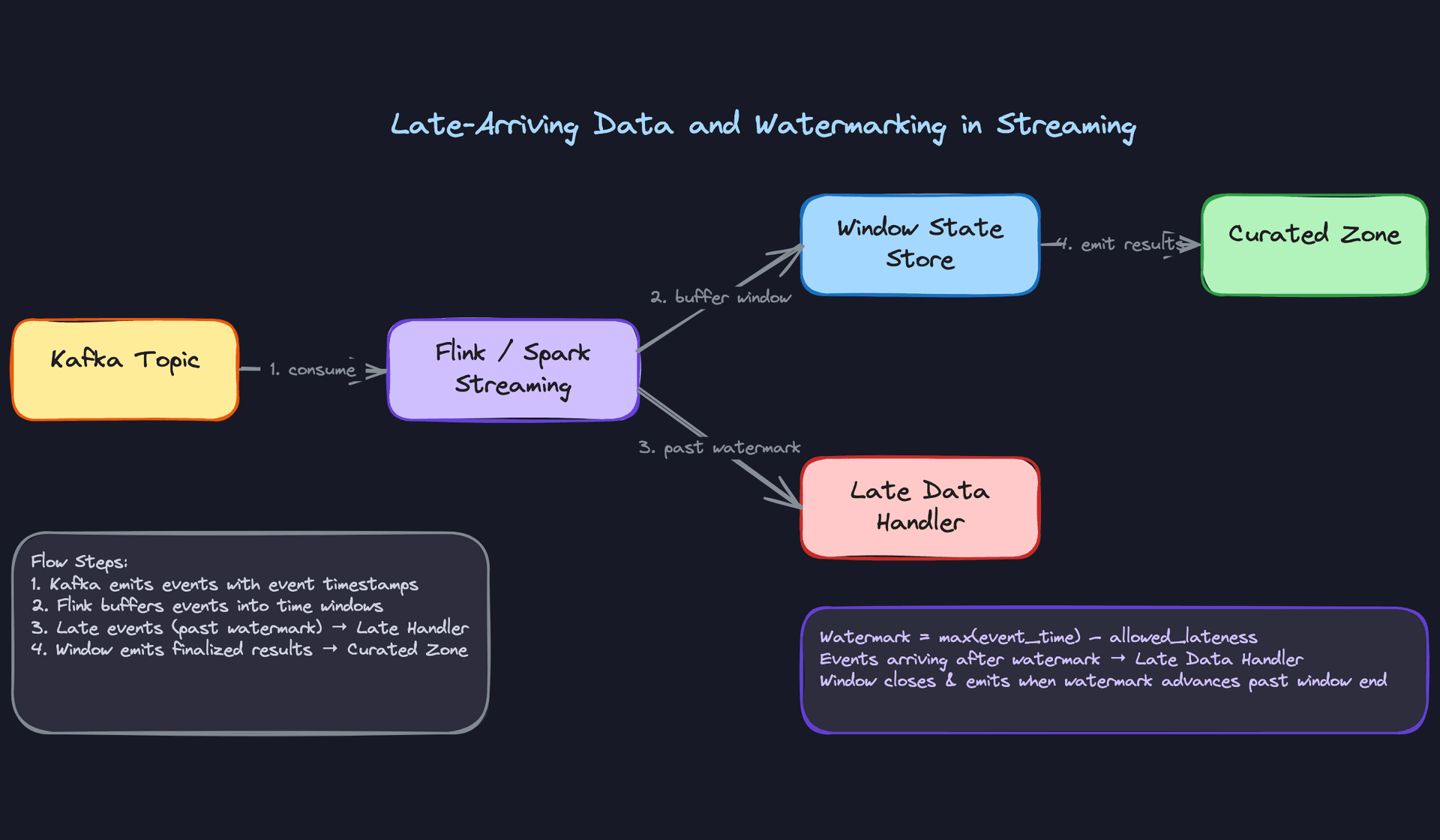
A 30-minute watermark means: if an event arrives more than 30 minutes after the current maximum event time seen, drop it. Windows emit results once the watermark passes their end time.
The trade-off is real: a longer watermark means more correct data but higher latency before results are available. A shorter watermark means faster results but more dropped late events. There's no universally correct value; it depends on your SLA and your upstream latency profile.
Great Solution: Separate late-data correction topic with downstream reconciliation
Don't drop late events. Route them to a correction topic instead. Events that arrive within the watermark go through the normal window aggregation. Events that arrive after the watermark close are written to a late_events Kafka topic or a dedicated late-data partition in the raw zone.
A separate reconciliation job (running hourly or daily depending on the SLA) reads from the late-data partition, identifies which windows are affected, and emits correction records that downstream consumers can apply as deltas.
# In Flink, side outputs handle late data cleanly
from pyflink.datastream import OutputTag

late_output_tag = OutputTag("late-events")

# Main stream: events within watermark
# Side output: events past watermark go to late_output_tag
# Downstream reconciliation job reads from late_output_tag topic
# and emits correction aggregates for affected windows
This is more complex to operate, but it means you never silently discard data. The reconciliation job can also be used to validate that your watermark setting is appropriate: if the late-data volume is consistently high, your watermark is too tight.
Tip: Most candidates describe watermarking correctly. What distinguishes a senior answer is acknowledging that dropping late data is a business decision, not a technical default, and proposing a correction mechanism rather than just tuning the watermark.
What is Expected at Each Level
Mid-Level
- Design the three-zone architecture (raw, curated, serving) and explain why raw is immutable. If you can't articulate why you'd never overwrite raw data, that's a gap.
- Choose Parquet over CSV or JSON for curated storage and give a real reason: columnar reads, predicate pushdown, compression ratios. "It's more efficient" won't cut it.
- Describe a basic Airflow DAG structure with upstream/downstream dependencies. You should know how to express "don't run the curated job until ingestion succeeds."
- Know what a metadata catalog does, even if you've never operated Iceberg in production. The concept of tracking partitions, schemas, and file locations separately from the data itself is non-negotiable.
Senior
- Go deep on schema evolution. The interviewer will push you: "A source team added a nullable column and renamed another. What breaks?" You need to distinguish safe changes (add nullable column) from breaking ones (rename, type change) and explain how Iceberg handles them without rewriting files.
- Explain the small-file problem and propose a compaction strategy. Streaming ingestion creates thousands of tiny files per hour. Know why that destroys query performance and how a scheduled Spark compaction job fixes it.
- Design a quality gate with a quarantine path. "We run dbt tests" is not enough. Walk through what happens when a partition fails: where it goes, who gets alerted, and how downstream jobs are blocked from consuming bad data.
- Size your system at rough order of magnitude. If the prompt says 500GB/day of raw events, you should be able to estimate monthly storage costs, Spark cluster sizing for daily transforms, and how partition count grows over a year.
Staff+
- Drive toward data contracts. At scale, the real problem isn't the pipeline, it's the coordination between the team producing data and the teams consuming it. Proactively raise schema ownership, versioning policies, and what happens when a producer makes a breaking change without notice.
- Raise the storage cost versus query performance tension without being prompted. Propose a tiered storage policy: hot partitions (last 30 days) on fast storage, warm (30-365 days) on standard object storage, cold (1 year+) on archival tiers. This signals operational maturity.
- Address GDPR deletion. Iceberg supports row-level deletes via merge-on-read delete files. You should be able to explain how a right-to-erasure request propagates from the raw zone through curated and serving, and why this is harder than it sounds.
- Think about SLA enforcement across zone boundaries. Who owns the SLA when the curated job misses its window because ingestion was late? Staff candidates define the escalation path, the monitoring, and the contractual boundary between pipeline stages.
One pattern separates candidates who pass from candidates who don't: the ones who fail treat the data lake as "S3 plus Spark." The ones who pass treat it as a system with a metadata layer, a quality enforcement layer, and organizational contracts sitting on top of object storage. The files are the least interesting part of the design.
Key takeaway: A data lake without a metadata catalog, schema evolution strategy, and quality gates isn't a data lake. It's a data swamp. The storage is cheap and easy; the governance is where the real engineering lives.
