
Understanding the Problem
Product definition: A metrics and monitoring system ingests high-frequency time-series data from instrumented services, stores it efficiently across multiple retention tiers, and surfaces it through dashboards and alerts so engineers can detect and respond to problems in production.
What is a Metrics & Monitoring System?
At companies like Uber or Netflix, thousands of microservices are constantly emitting signals: CPU usage, request latency, error rates, queue depths. A metrics and monitoring system is the infrastructure that collects all of those signals, stores them in a way that makes time-range queries fast, and wakes someone up at 3am when something goes wrong.
There are actually two distinct use cases hiding inside this problem. Operational metrics (CPU, p99 latency, error rates) are emitted every few seconds, queried in near-real-time, and typically retained for days to weeks. Business metrics (DAU, revenue, funnel conversion) are coarser-grained, updated per-minute or per-hour, and need to be queryable for months or years. These two workloads have meaningfully different ingestion frequencies, retention requirements, and query patterns. Clarify which one you're designing for, or whether you need to support both.
Tip: Always clarify requirements before jumping into design. Candidates who ask "are we handling operational metrics, business metrics, or both?" immediately signal they understand the problem space. Candidates who jump straight to "I'd use Prometheus" do not.
Functional Requirements
Core Requirements
- Ingest time-series data points from instrumented services at high throughput (push and pull models supported)
- Store data across multiple retention tiers: raw high-resolution data short-term, rolled-up aggregates long-term
- Evaluate alert rules continuously and fire notifications to channels like PagerDuty, Slack, or email when thresholds are breached
- Support dashboard queries over arbitrary time ranges with filtering and aggregation by tags (e.g., service, region, host)
- Apply rollup policies automatically: raw data for 7 days, 1-minute rollups for 30 days, hourly rollups for 1 year
Below the line (out of scope)
- Anomaly detection and ML-based alerting (we'll focus on threshold-based rules)
- Log aggregation and distributed tracing (separate systems, though they share infrastructure patterns)
- Self-serve metric registration UI for non-engineers
Note: "Below the line" features are acknowledged but won't be designed in this lesson.
Non-Functional Requirements
- Scale: 10,000 microservices emitting metrics; target ingestion of 1 million data points per second at peak
- Availability: 99.99% uptime for the ingestion path; alert delivery SLA of under 60 seconds from breach to notification
- Query latency: Dashboard queries over the last hour should return in under 2 seconds (p99); historical queries over 30 days can tolerate up to 10 seconds
- Durability: Zero data loss for raw data points once acknowledged by the ingestion API; rollup recomputation must be possible from raw data
Back-of-Envelope Estimation
Start with the ingestion side. 10,000 services, each emitting 100 metrics every 10 seconds, gives you 100,000 data points per second as a baseline. That's the floor. In practice, critical services emit at per-second granularity, traffic spikes can 3-5x normal load, and you need headroom for growth. Setting a design target of 1 million data points per second is the right call; it's a 10x buffer that keeps you from re-architecting the ingestion layer six months after launch.
Each data point is small: a metric ID (8 bytes), a timestamp (8 bytes), a float value (8 bytes), and maybe 200 bytes of tags. Call it ~250 bytes per point.
| Dimension | Calculation | Result |
|---|---|---|
| Ingestion QPS | 10K services × 100 metrics / 10s | ~1M points/sec |
| Ingestion bandwidth | 1M points/sec × 250 bytes | ~250 MB/sec |
| Raw storage (7 days) | 1M × 250B × 86,400s × 7 days | ~150 TB |
| 1-min rollup storage (30 days) | 1M/60 × 250B × 86,400s × 30 days | ~10 TB |
| Hourly rollup storage (1 year) | 1M/3600 × 250B × 86,400s × 365 days | ~2 TB |
| Alert rules evaluated | 100K rules × every 30 seconds | ~3,300 rule evals/sec |
Raw storage at 150 TB is the number that drives your architecture most directly. You cannot store 7 days of raw data in memory or on a single node. This is why the hot/cold storage split and aggressive rollup policy matter so much.
Time-series data compresses 10-20x with delta encoding, so that 150 TB of raw data lands closer to 8-15 TB on disk. The rollup tiers add another ~12 TB uncompressed (roughly 1-2 TB compressed). Either way, the total footprint after applying rollups and retention is an order of magnitude smaller than the naive raw number suggests.
Key insight: The rollup policy isn't just a product decision. It's what makes the storage problem tractable. Without it, you're budgeting for 150 TB of raw storage that ages out in a week. With it, your total live dataset fits comfortably in the tens of terabytes, and that's the difference between a system that costs a fortune and one that doesn't.
The Set Up
Before you start drawing boxes and arrows, you need to nail down what data you're actually storing. Interviewers can tell immediately whether you understand the domain by how cleanly you define your entities.
Core Entities
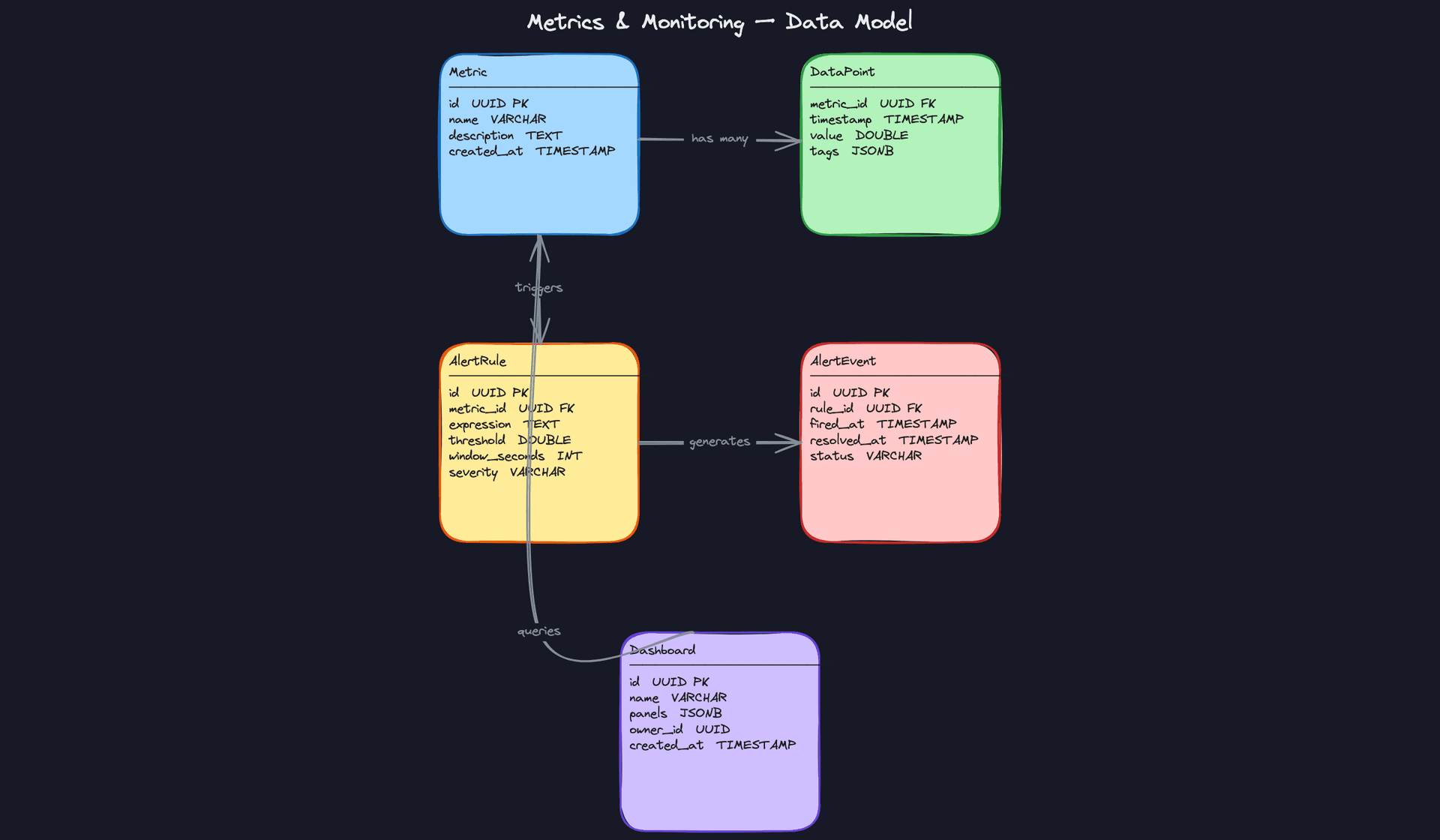
A metrics system has four entities that matter. Everything else is operational plumbing.
Metric is the named time-series definition. Think of it as the schema for a stream of measurements. api.latency.p99 is a Metric. It doesn't hold any values itself; it just defines what's being measured and provides a stable identifier everything else references.
DataPoint is a single timestamped measurement tied to a Metric. This is the entity that gets written millions of times per second. The key design decision here is the tags column: every DataPoint carries a set of key-value pairs like {host: "web-01", region: "us-east-1", service: "checkout"}. Those tags are what let you slice api.latency.p99 by region or service without needing separate metrics for each combination. This is what separates a metrics system from a plain event log.
Key insight: Tags are powerful, but they're also your biggest scaling risk. A metric with tags forendpoint,status_code, anduser_idcan generate millions of unique tag combinations. Each unique combination is effectively its own time-series in memory. This is called the cardinality explosion problem, and you should bring it up unprompted in your interview.
AlertRule defines when something is wrong. It binds to a Metric, specifies an expression, and includes a time window over which to evaluate it. The window_seconds field is important: you're rarely alerting on a single data point. You want "p99 latency above 500ms for 3 consecutive minutes," not "p99 latency above 500ms once."
AlertEvent is a fired instance of an AlertRule. It's the record that says "this rule triggered at this time and resolved at this time." You need this as a separate entity for audit trails, on-call history, and post-mortems.
CREATE TABLE metrics (
    id          UUID PRIMARY KEY DEFAULT gen_random_uuid(),
    name        VARCHAR(255) NOT NULL UNIQUE,  -- e.g. 'api.latency.p99'
    description TEXT,
    unit        VARCHAR(50),                   -- e.g. 'ms', 'requests', 'bytes'
    created_at  TIMESTAMP NOT NULL DEFAULT now()
);

CREATE TABLE data_points (
    metric_id   UUID NOT NULL REFERENCES metrics(id),
    timestamp   TIMESTAMP NOT NULL,
    value       DOUBLE PRECISION NOT NULL,
    tags        JSONB NOT NULL DEFAULT '{}',   -- {host, region, service, ...}
    PRIMARY KEY (metric_id, timestamp, tags)   -- composite key for deduplication
);

-- Partition by time in practice (e.g., TimescaleDB hypertable or Druid segment)
CREATE INDEX idx_data_points_metric_time ON data_points(metric_id, timestamp DESC);
CREATE INDEX idx_data_points_tags ON data_points USING GIN(tags);

CREATE TABLE alert_rules (
    id              UUID PRIMARY KEY DEFAULT gen_random_uuid(),
    metric_id       UUID NOT NULL REFERENCES metrics(id),
    name            VARCHAR(255) NOT NULL,
    expression      TEXT NOT NULL,             -- full evaluation logic, e.g. 'avg(value) > 500'
    window_seconds  INT NOT NULL DEFAULT 60,   -- evaluation window
    severity        VARCHAR(50) NOT NULL,       -- 'critical', 'warning', 'info'
    for_seconds     INT NOT NULL DEFAULT 0,    -- consecutive breach duration before firing
    created_at      TIMESTAMP NOT NULL DEFAULT now()
);

CREATE TABLE alert_events (
    id              UUID PRIMARY KEY DEFAULT gen_random_uuid(),
    rule_id         UUID NOT NULL REFERENCES alert_rules(id),
    fired_at        TIMESTAMP NOT NULL,
    resolved_at     TIMESTAMP,                 -- NULL = still firing
    status          VARCHAR(50) NOT NULL,       -- 'pending', 'firing', 'resolved'
    labels          JSONB NOT NULL DEFAULT '{}' -- snapshot of tags at fire time
);

CREATE INDEX idx_alert_events_rule ON alert_events(rule_id, fired_at DESC);
CREATE INDEX idx_alert_events_status ON alert_events(status) WHERE resolved_at IS NULL;
One thing worth flagging: in a real production system, data_points won't live in Postgres. You'd use a purpose-built time-series store like InfluxDB, TimescaleDB, or Apache Druid. The schema above is conceptual. The column shapes are right; the storage engine is the variable.
You'll notice alert_rules has no separate threshold column. That's intentional. A standalone threshold field only works for the simplest case ("value > 500"), and the moment you need rate-of-change alerts or multi-metric expressions, it breaks down. Keeping all evaluation logic in expression gives you one place to look and one thing to parse. If your interviewer asks about surfacing thresholds in a UI, you can mention parsing the expression or storing a structured representation in a JSONB column alongside it, but don't add a redundant scalar field just for convenience.
API Design
The API surface here splits cleanly into three concerns: ingesting data, querying it, and managing alert rules. Keep them separate in your head.
// Ingest a batch of data points from an agent or service
POST /v1/ingest
{
  "metric": "api.latency.p99",
  "points": [
    { "timestamp": "2024-01-15T10:00:00Z", "value": 342.5, "tags": { "host": "web-01", "region": "us-east-1" } },
    { "timestamp": "2024-01-15T10:00:01Z", "value": 389.1, "tags": { "host": "web-01", "region": "us-east-1" } }
  ]
}
-> { "accepted": 2, "rejected": 0 }
// Query a metric over a time range with optional tag filters
GET /v1/query?metric=api.latency.p99&start=2024-01-15T09:00:00Z&end=2024-01-15T10:00:00Z&tags=region:us-east-1&step=60s
-> {
  "metric": "api.latency.p99",
  "resolution": "60s",
  "series": [
    { "tags": { "region": "us-east-1", "host": "web-01" }, "points": [...] }
  ]
}
// Create an alert rule
POST /v1/alert-rules
{
  "metric": "api.latency.p99",
  "name": "High p99 latency",
  "expression": "avg(value) > 500",
  "window_seconds": 300,
  "for_seconds": 120,
  "severity": "critical"
}
-> { "id": "uuid", "status": "active" }
// Get currently firing alerts
GET /v1/alert-events?status=firing
-> {
  "events": [
    { "id": "uuid", "rule_id": "uuid", "fired_at": "...", "status": "firing", "labels": {...} }
  ]
}
The verb choices are deliberate. POST /v1/ingest uses POST because you're creating new data points, and batching is non-negotiable at scale. A single data point per request would be catastrophically inefficient at 1M writes/second. The query endpoint uses GET because reads should be cacheable and idempotent; query parameters carry the filter predicates rather than a request body.
Common mistake: Candidates sometimes design a separate POST /v1/metrics endpoint for registering a metric before you can write data points to it. That's fine as an explicit registration flow, but many systems (Prometheus included) create metrics implicitly on first write. Clarify with your interviewer which model they want. Either is defensible; just pick one and commit.Alert rule management uses standard REST: POST to create, GET to list, DELETE to remove. The interesting design question is whether alert evaluation is synchronous (the rule runs against the store on a schedule) or stream-based (the evaluator consumes from Kafka directly). Your API doesn't expose that distinction, but you'll need to explain it in the deep dives.
High-Level Design
The system has five distinct layers, each with a clear job. Walk through them in order during your interview; interviewers want to see you build up the architecture incrementally rather than dumping the full design upfront.
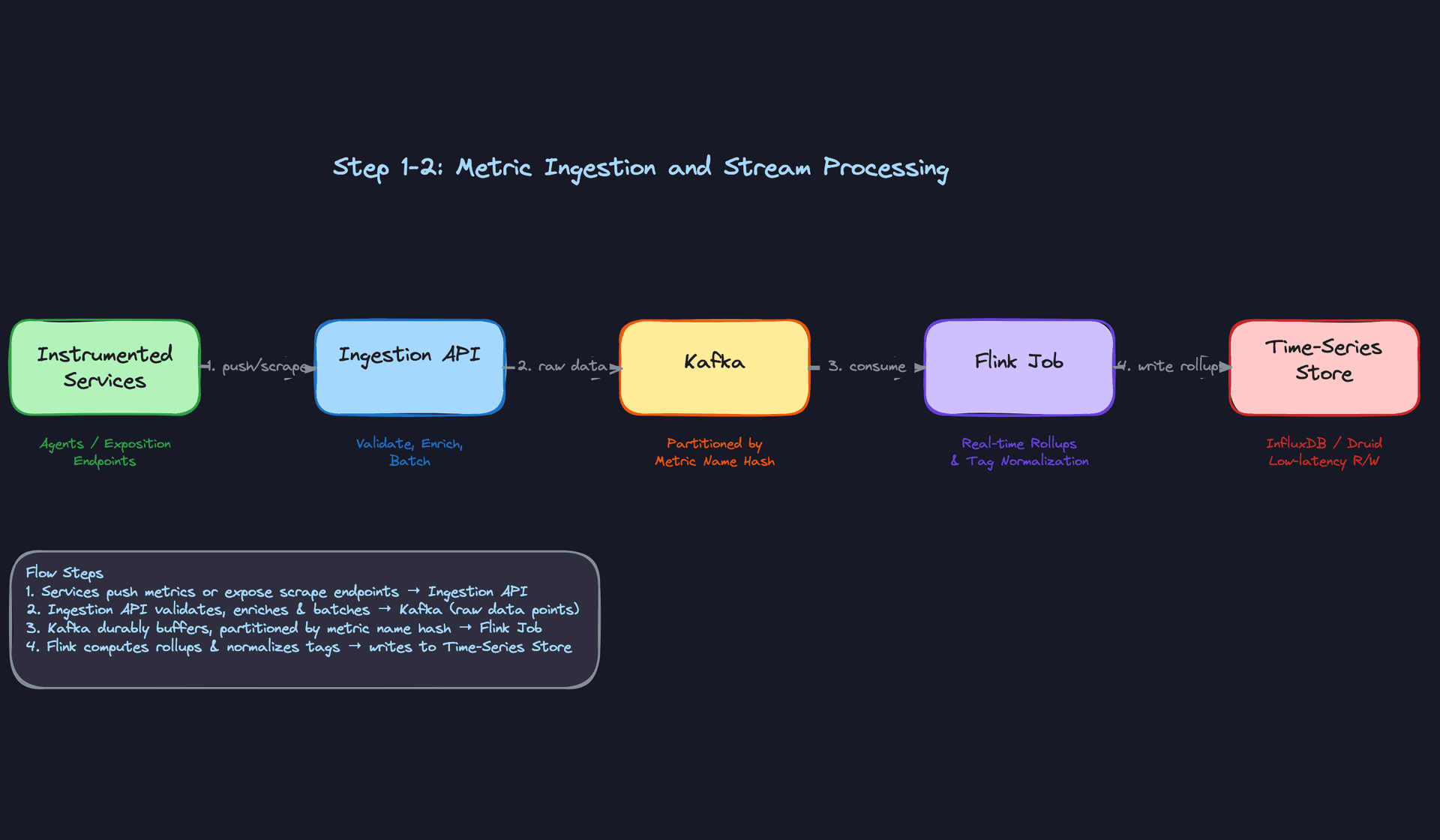
1) Metric Ingestion
Components: Instrumented services, collection agents, Ingestion API (stateless, horizontally scaled), Kafka.
Every service in your fleet runs a lightweight sidecar agent, think StatsD or a Prometheus client library. The agent buffers data points locally and flushes them in batches every few seconds. Batching is non-negotiable at scale; if 10,000 microservices each emit 100 metrics per second, you're looking at 1 million data points per second hitting your ingestion tier.
The data flow:
- The agent collects counters, gauges, and histograms from the host process.
- It batches them into a compact payload (Protobuf works well here) and POSTs to the Ingestion API.
- The Ingestion API validates the payload: checks that metric names are well-formed, tags are within the allowed key set, and values are finite numbers.
- It enriches each data point with server-side metadata: ingestion timestamp, datacenter region, and a normalized metric name.
- The API writes the batch to a Kafka topic, partitioned by a hash of the metric name.
Partitioning by metric name hash means all data points for api.latency.p99 always land in the same partition. This is important for the stream processing step: the Flink job can maintain per-metric state without cross-partition coordination.
{
  "metric": "api.latency.p99",
  "timestamp": 1718000000,
  "value": 142.7,
  "tags": {
    "service": "checkout",
    "region": "us-east-1",
    "host": "i-0abc123"
  }
}
The Ingestion API is stateless, so you can scale it horizontally behind a load balancer with no coordination overhead. Kafka acts as the durable buffer; if a downstream consumer falls behind, data doesn't get lost.
Interview tip: When you mention Kafka here, expect the interviewer to ask "why not write directly to the time-series store?" The answer: Kafka decouples ingestion throughput from write throughput. The time-series store can absorb writes at its own pace, and you can replay data if a consumer crashes.
2) Stream Processing and Rollups
Components: Flink job (or Kafka Streams), Time-Series Store.
Raw per-second data is expensive to store for 30 days. You need rollups: aggregate each metric down to per-minute and per-hour summaries. Doing this in a streaming job means rollups are available within seconds of the raw data arriving, which matters for dashboards showing "last 24 hours."
The data flow:
- The Flink job consumes from the Kafka topic using consumer groups.
- For each incoming data point, it applies tag normalization: lowercasing keys, dropping unknown tags, and enforcing cardinality limits (more on this in the deep dives).
- It maintains a tumbling window of 60 seconds per metric+tag combination, computing min, max, sum, count, and approximate percentiles (t-digest works well here).
- At window close, it emits both the raw data point and the 1-minute rollup record.
- Both get written to the time-series store.
# Simplified Flink tumbling window logic (PySpark Structured Streaming equivalent)
from pyspark.sql import functions as F
from pyspark.sql.window import Window

rollups = (
    raw_stream
    .withWatermark("timestamp", "30 seconds")
    .groupBy(
        F.window("timestamp", "1 minute"),
        "metric",
        "tags"
    )
    .agg(
        F.min("value").alias("min"),
        F.max("value").alias("max"),
        F.avg("value").alias("avg"),
        F.count("value").alias("count"),
        F.sum("value").alias("sum")
    )
)
One design decision worth flagging: you can compute rollups in the stream job (real-time) or as a scheduled batch job after the fact. Real-time rollups mean your dashboards are always fresh, but they require stateful stream processing, which adds operational complexity. Batch rollups are simpler but introduce lag. For a production monitoring system, real-time wins; you can't have a 5-minute delay on a dashboard showing current error rates.
3) Time-Series Storage
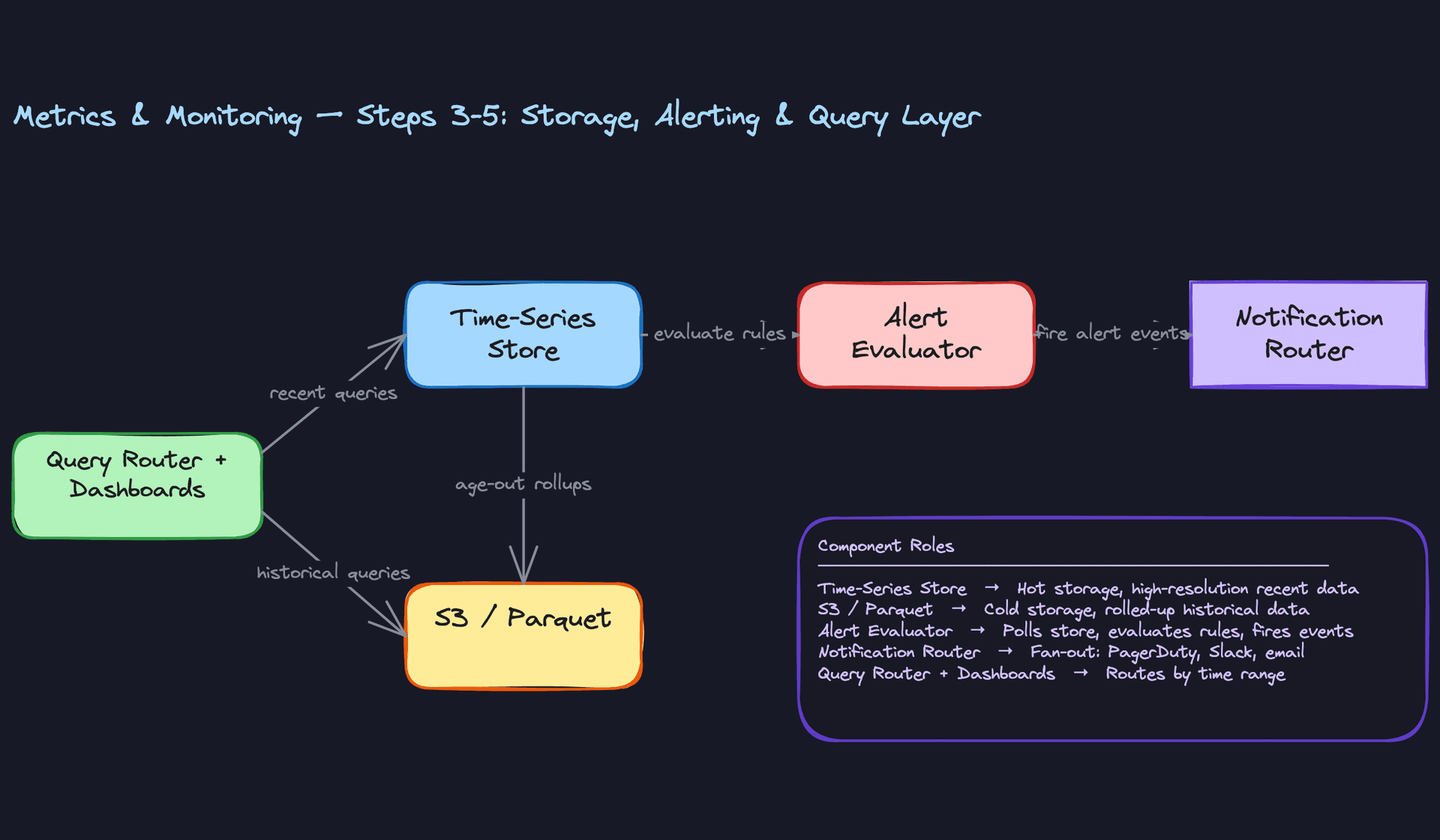
Components: Hot store (InfluxDB, TimescaleDB, or Apache Druid), Cold store (Parquet files on S3).
Not all data ages the same way. Raw per-second data from three weeks ago is almost never queried. What engineers want for historical analysis is the 1-minute or 1-hour rollup. This drives a two-tier storage design.
The data flow:
- The Flink job writes raw data points to the hot store. These are kept for 7 days, then expired.
- Rolled-up data (1-minute and 1-hour aggregates) is written to the hot store for fast recent queries, and simultaneously written to Parquet files on S3 for long-term retention.
- S3 Parquet files are partitioned by
metric_name / date / hour, which makes range scans efficient. - After 30 days, the hot store drops the 1-minute rollups. After 1 year, S3 retains the hourly rollups.
-- TimescaleDB hypertable for raw data points
CREATE TABLE data_points (
    metric_id     UUID NOT NULL REFERENCES metrics(id),
    timestamp     TIMESTAMPTZ NOT NULL,
    value         DOUBLE PRECISION NOT NULL,
    tags          JSONB NOT NULL DEFAULT '{}'
);

SELECT create_hypertable('data_points', 'timestamp', chunk_time_interval => INTERVAL '1 hour');

-- Retention policy: drop chunks older than 7 days
SELECT add_retention_policy('data_points', INTERVAL '7 days');

CREATE INDEX idx_data_points_metric_time ON data_points(metric_id, timestamp DESC);
CREATE INDEX idx_data_points_tags ON data_points USING GIN(tags);
Apache Druid is worth mentioning as an alternative to TimescaleDB. Druid pre-aggregates data at ingest time into segments, which makes fan-out queries across thousands of time-series very fast. The trade-off is operational complexity and the fact that Druid's data model is less flexible than a general-purpose relational store.
Common mistake: Candidates sometimes propose storing everything in a general-purpose database like Postgres. Postgres can handle time-series workloads at small scale, but at 1M data points per second, you need a store purpose-built for sequential writes and time-range scans. Bring this up yourself before the interviewer has to.
4) Alert Evaluation Engine
Components: Alert Evaluator service, Alert State Store (Redis or Postgres), Notification Router, downstream channels (PagerDuty, Slack, email).
Alerting is a separate concern from ingestion and storage. The evaluation engine needs to be reliable even when the rest of the system is under stress, which is exactly when alerts matter most.
The data flow:
- The Alert Evaluator runs on a configurable schedule, typically every 15 to 60 seconds per rule.
- For each active AlertRule, it queries the time-series store for the metric value over the rule's evaluation window (e.g., "average latency over the last 5 minutes").
- It compares the result against the rule's threshold expression.
- If the threshold is breached, it updates the rule's state in the Alert State Store and publishes an AlertEvent to a notification queue.
- The Notification Router consumes from the queue and fans out to the appropriate channels based on the rule's severity and routing configuration.
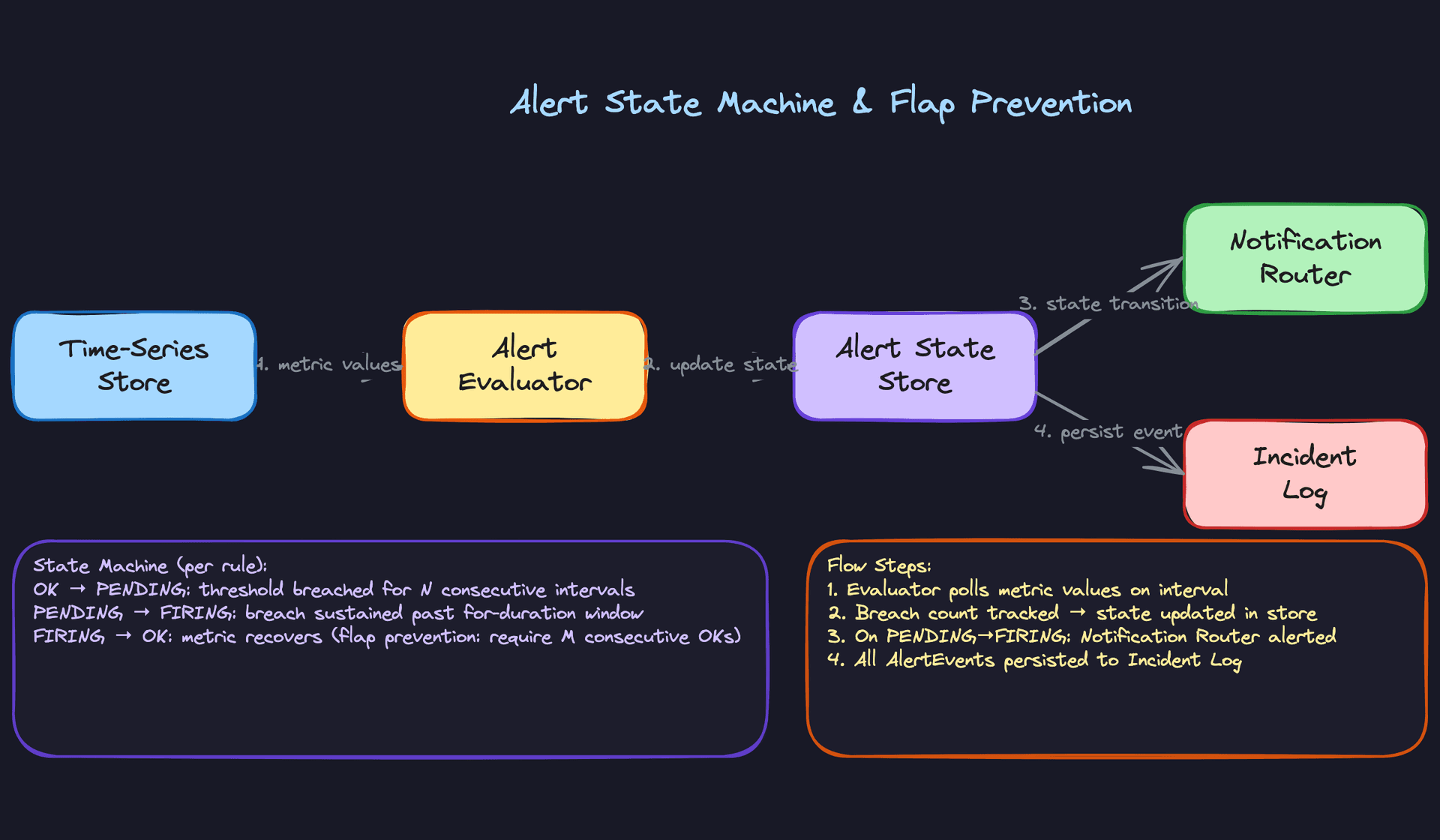
The Alert State Store is what prevents duplicate notifications. If a rule is already in "Firing" state and the next evaluation also breaches the threshold, you don't want to page someone again. Only state transitions (OK to Firing, Firing to Resolved) trigger notifications.
Key insight: The alert evaluator should read from the time-series store, not directly from the Kafka stream. Reading from the store means you get the benefit of rollups and can evaluate rules over multi-minute windows without maintaining complex stream state in the evaluator itself.
5) Query and Dashboard Layer
Components: Query Router, Grafana (or custom dashboard UI), hot store, Athena or Trino over S3.
Engineers querying dashboards have very different needs depending on the time range. "Show me the last 30 minutes" needs sub-second response from the hot store. "Show me last quarter's p99 latency trend" needs to scan months of Parquet files on S3.
The data flow:
- The dashboard UI sends a query with a time range and a metric selector (e.g., PromQL or SQL).
- The Query Router inspects the time range. If it falls within the hot store's retention window (last 7 days for raw, last 30 days for 1-minute rollups), it routes to the hot store.
- For queries spanning beyond the hot store's retention, it routes to Athena or Trino, which query the Parquet files on S3 directly.
- For queries that span both (e.g., "last 45 days"), the router splits the query, fetches results from both backends, and merges them before returning to the UI.
- Query results for common dashboard panels are cached in Redis with a short TTL (30 to 60 seconds) to prevent thundering herd during incidents when many engineers open the same dashboard simultaneously.
def route_query(metric: str, start_ts: int, end_ts: int) -> QueryResult:
    now = int(time.time())
    hot_store_cutoff = now - (30 * 24 * 3600)  # 30 days

    if start_ts >= hot_store_cutoff:
        return hot_store.query(metric, start_ts, end_ts)
    elif end_ts < hot_store_cutoff:
        return cold_store.query(metric, start_ts, end_ts)
    else:
        # Straddles the boundary; split and merge
        hot_result = hot_store.query(metric, hot_store_cutoff, end_ts)
        cold_result = cold_store.query(metric, start_ts, hot_store_cutoff)
        return merge_results(cold_result, hot_result)
The query router is a good place to enforce query guardrails: maximum time range, maximum number of concurrent queries per user, and query timeouts. Without these, a single expensive dashboard query during an incident can take down the query layer for everyone else.
Putting It All Together
The full system is a pipeline with clear hand-offs at each stage. Services emit metrics through agents to the Ingestion API, which validates and publishes to Kafka. A Flink job computes rollups in real time and writes to both the hot time-series store and cold Parquet storage on S3. The Alert Evaluator polls the hot store on a schedule, tracks state transitions in Redis, and fans out notifications through the Notification Router. The Query Router sits in front of both storage tiers and directs dashboard queries to the right backend based on time range, with a caching layer to absorb load spikes.
Each layer is independently scalable. The Ingestion API scales horizontally. Kafka partitioning distributes load across Flink workers. The hot store scales with sharding or replication. The cold store scales for free since S3 and Athena are serverless. The Alert Evaluator can be sharded by rule ID if you have millions of rules.
The most important design choice to articulate to your interviewer is the separation of the hot and cold storage tiers. It's what makes the system both fast for real-time queries and economical for long-term retention. Everything else in the design follows from that decision.
Deep Dives
By this point in the interview, you've sketched the pipeline. The interviewer has been nodding. Now they lean in and ask the hard questions. This is where mid-level candidates stall and senior candidates shine.
"How do we prevent a single service from blowing up the time-series store with too many tag combinations?"
This is the cardinality problem, and it's the most common scaling failure in metrics systems. Every unique combination of tag values creates a new time-series. A metric like http.requests tagged with endpoint, status_code, and user_id can produce hundreds of millions of distinct series overnight. Most time-series stores keep an in-memory index of active series. Blow past a few million and you're paging, then crashing.
Bad Solution: Let the store enforce limits
The naive answer is to just configure InfluxDB or Prometheus with a series limit and let it reject writes when the cap is hit. Simple to implement, zero engineering effort.
The problem is that this is completely opaque. The store starts silently dropping data points with no signal back to the emitting service. Engineers notice their dashboard panels going blank and spend hours debugging what looks like an application bug. Worse, the store might reject writes for legitimate metrics because a single misbehaving service consumed the entire budget.
Warning: Candidates who say "the database handles it" without explaining how the rejection is surfaced and attributed are missing the operational reality. Interviewers will push on this.
Good Solution: Cardinality cap per metric at the ingestion API
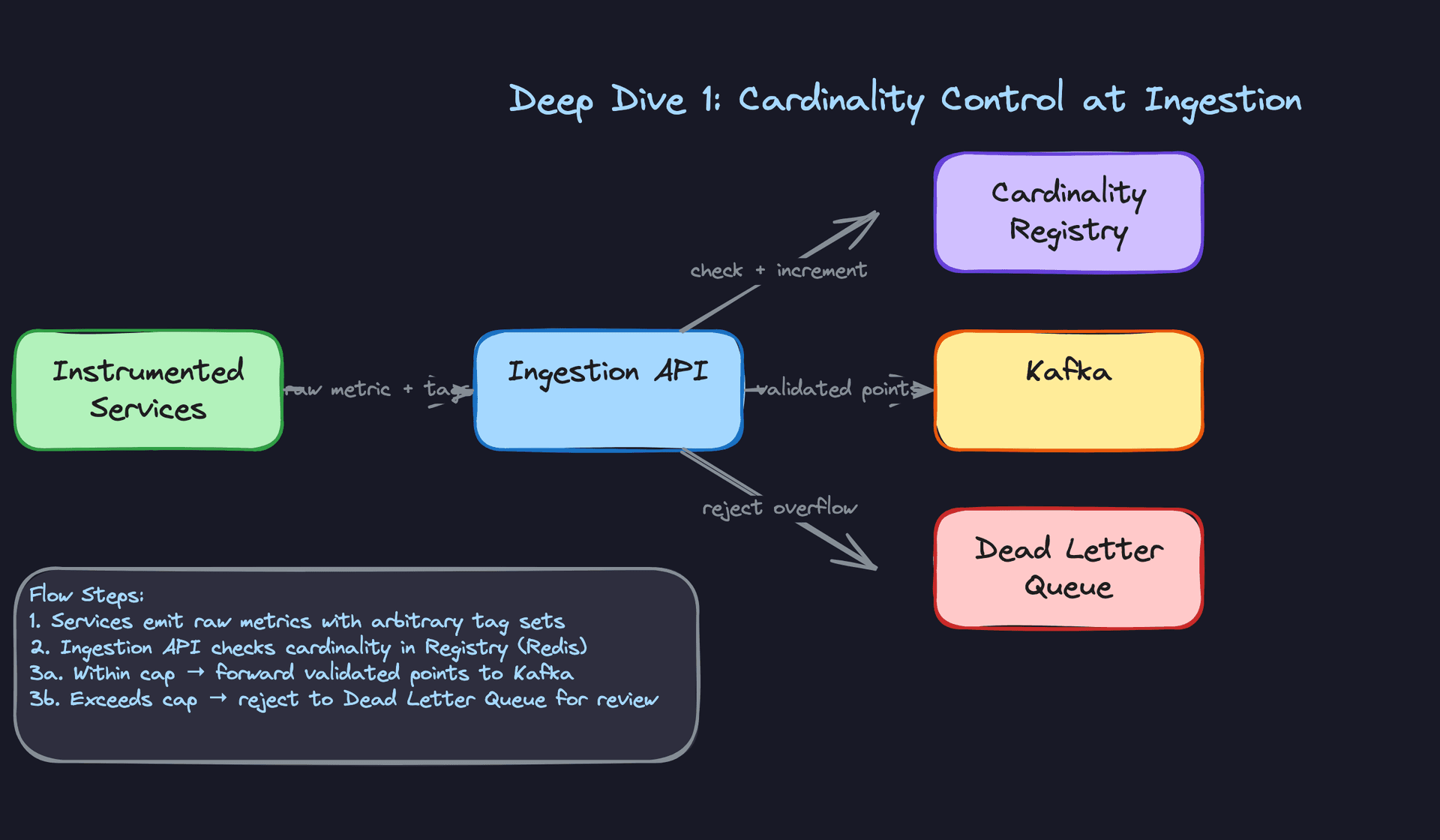
Instead of letting the store be the last line of defense, enforce cardinality limits at the ingestion layer. For each metric name, track the count of unique tag-set fingerprints in Redis. When a new data point arrives, compute a hash of its sorted tag key-value pairs and check it against the registry.
import hashlib
import redis

r = redis.Redis()
CARDINALITY_LIMIT = 10_000

def check_and_register(metric_name: str, tags: dict) -> bool:
    tag_fingerprint = hashlib.md5(
        str(sorted(tags.items())).encode()
    ).hexdigest()

    registry_key = f"cardinality:{metric_name}"

    # HyperLogLog for approximate counting, SET for exact tracking
    is_new = r.sadd(registry_key, tag_fingerprint)

    if is_new:
        current_count = r.scard(registry_key)
        if current_count > CARDINALITY_LIMIT:
            r.srem(registry_key, tag_fingerprint)  # roll back
            return False  # reject this data point

    return True
Rejected points go to a dead-letter queue with the metric name and offending tag set attached. An ops team can review them, and the emitting service gets a 429 response with a clear error message. This is already a solid answer.
The trade-off: Redis set membership for millions of fingerprints gets expensive. You can swap to a HyperLogLog for approximate counting at the cost of occasional false positives (rejecting a valid series that collides in the sketch).
Great Solution: Tag allowlisting plus pre-aggregation at the agent
The real fix is upstream. Rather than reacting to cardinality explosions, you prevent them by defining which tags are allowed per metric in a schema registry. The ingestion API validates incoming tag keys against the allowlist and strips any unlisted keys before the fingerprint is even computed.
For high-volume metrics where you know you need per-user breakdowns, you pre-aggregate at the agent level. Instead of emitting one data point per user per second, the agent emits a histogram or a count grouped by a lower-cardinality dimension (region, tier) and lets the query layer handle the user-level breakdown from raw logs if needed.
# Agent-side pre-aggregation before emit
from collections import defaultdict

class MetricBuffer:
    def __init__(self, allowed_tags: set):
        self.allowed_tags = allowed_tags
        self.buffer = defaultdict(list)

    def record(self, metric: str, value: float, tags: dict):
        # Strip disallowed tags before buffering
        safe_tags = {k: v for k, v in tags.items() if k in self.allowed_tags}
        key = (metric, frozenset(safe_tags.items()))
        self.buffer[key].append(value)

    def flush(self) -> list:
        points = []
        for (metric, tag_pairs), values in self.buffer.items():
            points.append({
                "metric": metric,
                "tags": dict(tag_pairs),
                "count": len(values),
                "sum": sum(values),
                "p99": sorted(values)[int(len(values) * 0.99)]
            })
        self.buffer.clear()
        return points
This shifts the cardinality problem left, where it's cheapest to solve. The ingestion API becomes a safety net, not the primary enforcement mechanism.
Tip: Mentioning that you'd expose cardinality metrics about your metrics system (meta-monitoring) is a strong signal. If you can alert when a metric's series count grows 10x in an hour, you catch the problem before it becomes an incident.
"How do we handle alert flapping when a metric briefly spikes above a threshold?"
Flapping is when an alert fires, resolves, fires, resolves, all within a few minutes because the metric is hovering right around the threshold. On-call engineers get paged repeatedly for what turns out to be normal variance. They start ignoring pages. That's how real incidents get missed.
Bad Solution: Fire on every threshold breach
The simplest evaluator polls the time-series store every 30 seconds, checks if the current value exceeds the threshold, and immediately sends a notification if it does. Then sends a resolution when the value drops back down.
This is exactly what causes alert storms. During a real incident, a metric might oscillate above and below threshold dozens of times per hour. Your on-call gets 40 pages. They mute the alert. Now you have no coverage.
Warning: A lot of candidates describe this exact approach without realizing it's the problem. If you say "the evaluator checks the metric and sends a notification," the interviewer will ask "what happens when the metric bounces around the threshold?" Have an answer ready.
Good Solution: Evaluation windows with consecutive-breach requirements
Instead of firing on a single breach, require the metric to stay above the threshold for a sustained window. The evaluator checks whether the condition has been true for, say, 5 consecutive evaluation cycles (2.5 minutes at 30-second intervals) before transitioning to a firing state.
from enum import Enum
from dataclasses import dataclass, field
from datetime import datetime

class AlertState(Enum):
    OK = "ok"
    PENDING = "pending"
    FIRING = "firing"

@dataclass
class AlertRuleState:
    rule_id: str
    state: AlertState = AlertState.OK
    consecutive_breaches: int = 0
    fired_at: datetime = None
    breach_threshold: int = 5  # consecutive evaluations required

def evaluate_rule(rule_state: AlertRuleState, current_value: float, threshold: float) -> AlertState:
    breaching = current_value > threshold

    if breaching:
        rule_state.consecutive_breaches += 1
    else:
        rule_state.consecutive_breaches = 0

    if rule_state.state == AlertState.OK and breaching:
        rule_state.state = AlertState.PENDING

    elif rule_state.state == AlertState.PENDING:
        if rule_state.consecutive_breaches >= rule_state.breach_threshold:
            rule_state.state = AlertState.FIRING
            rule_state.fired_at = datetime.utcnow()
        elif not breaching:
            rule_state.state = AlertState.OK  # resolved before firing

    elif rule_state.state == AlertState.FIRING and not breaching:
        if rule_state.consecutive_breaches == 0:
            rule_state.state = AlertState.OK

    return rule_state.state
Notifications only go out on state transitions: OK to PENDING (optional), PENDING to FIRING, and FIRING to OK. Not on every evaluation cycle. This eliminates most flapping.
Great Solution: Stateful alert evaluation with inhibition and grouping
The consecutive-breach approach handles individual alert flapping, but during a major incident you still get an alert storm: 200 services all breach their error-rate threshold simultaneously and you get 200 separate pages. The great solution adds two more layers.
First, alert inhibition. If a high-severity "region is down" alert is firing, suppress all lower-severity alerts whose tags match the same region. The root cause is already being worked; the child alerts are noise.
Second, alert grouping. Route alerts to the notification layer with a grouping key (by service, by region, by alert type). The notification router batches alerts that share a key and sends a single digest rather than individual pages. Prometheus Alertmanager does this natively; if you're building custom, you implement it in the notification router with a short aggregation window (30-60 seconds) before dispatching.
The alert state itself needs to be persisted, not held in memory. If the evaluator process restarts, you can't lose state for 10,000 active rules. A Redis hash keyed by rule ID works well here, with the full state serialized as JSON.
Tip: Describing the three-state machine (OK, Pending, Firing) unprompted is a senior-level signal. Describing inhibition and grouping on top of that is staff-level. Most candidates only get to the "check threshold, send alert" level.
"What happens when we discover a bug corrupted three months of rollup data?"
This is the backfill problem. It comes up in every data engineering system design, but it's especially sharp for metrics because rollups are the only thing serving historical dashboard queries. If they're wrong, every dashboard showing trends over the past quarter is wrong.
Bad Solution: Rerun the Flink streaming job against Kafka
Your first instinct might be to replay the Kafka topic from the beginning. Kafka stores data, you have consumer group offsets, just reset them and let the job reprocess.
This works only if your Kafka retention covers the full window you need to backfill. Default Kafka retention is 7 days. If the bug has been silently corrupting data for 90 days and you only notice now, the raw data is gone from Kafka. You have nothing to replay.
Even within the retention window, replaying a streaming job against historical data at full speed will produce rollup windows that don't align with wall-clock time, which can cause issues with watermarking and late-data handling in Flink. It's fragile.
Warning: Candidates who say "just replay Kafka" without asking about retention window length will get caught. The interviewer will immediately say "retention is 3 days, the bug is 90 days old." Know what your fallback is.
Good Solution: Reprocess from raw Parquet on S3
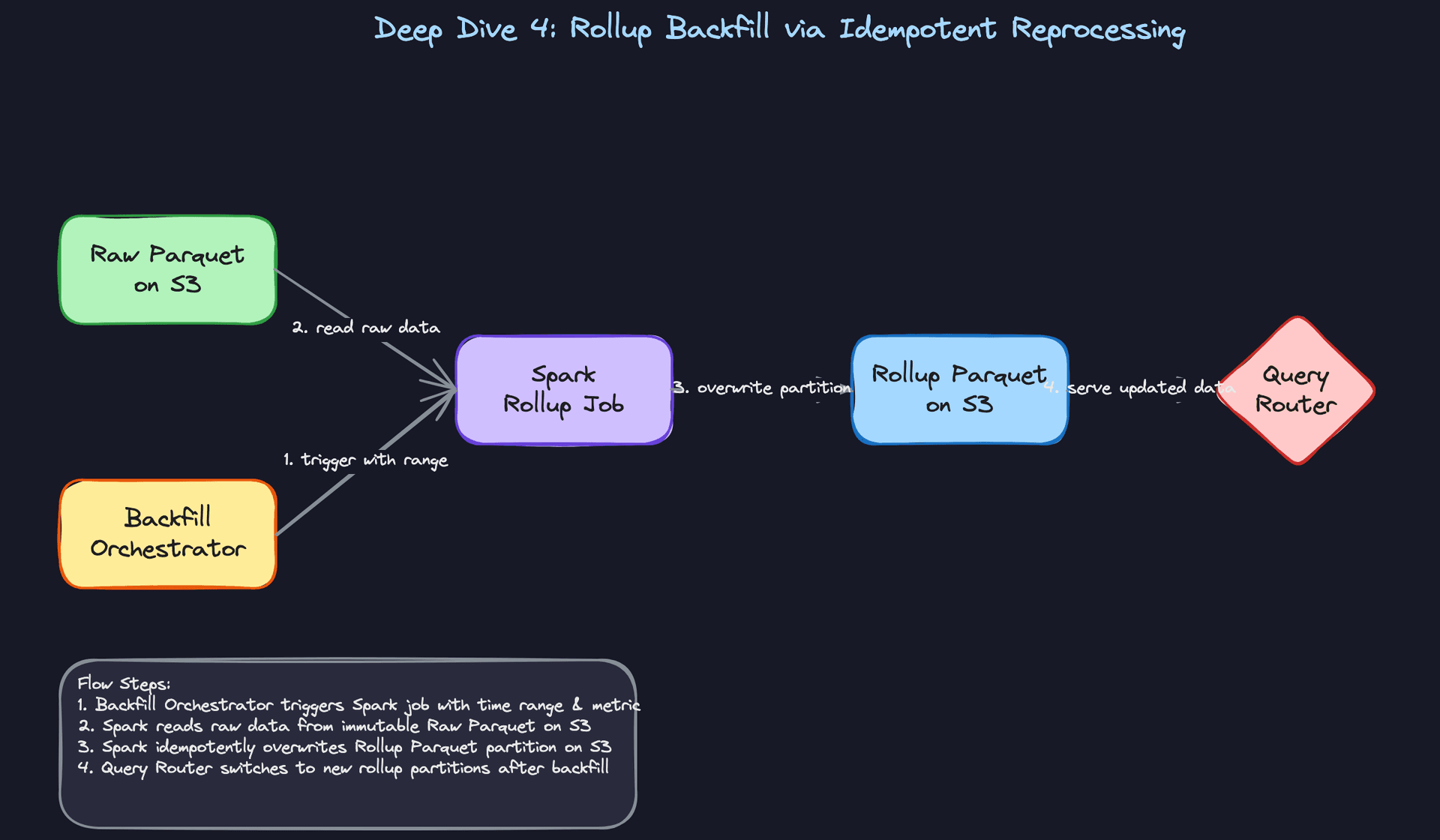
This is why you write raw data points to immutable Parquet files on S3 before the rollup step. S3 is your source of truth. Kafka is a transport layer, not an archive.
A backfill Airflow DAG partitions the work by time range and metric name, then triggers a Spark job for each partition. The Spark job reads raw Parquet, recomputes the rollup, and overwrites the corresponding rollup partition on S3.
# Airflow DAG for backfill orchestration
from airflow import DAG
from airflow.operators.python import PythonOperator
from datetime import datetime, timedelta

def trigger_rollup_backfill(start_date: str, end_date: str, metric_prefix: str):
    """Submits Spark job for a specific time partition."""
    spark_submit_cmd = f"""
    spark-submit \\
        --class com.metrics.RollupJob \\
        --conf spark.sql.sources.partitionOverwriteMode=dynamic \\
        s3://metrics-jobs/rollup-job.jar \\
        --start {start_date} \\
        --end {end_date} \\
        --metric-prefix {metric_prefix} \\
        --input s3://metrics-raw/parquet/ \\
        --output s3://metrics-rollups/parquet/
    """
    # execute spark_submit_cmd

with DAG("metrics_backfill", start_date=datetime(2024, 1, 1), schedule_interval=None) as dag:
    for week_offset in range(13):  # 13 weeks = ~90 days
        start = datetime(2024, 1, 1) + timedelta(weeks=week_offset)
        end = start + timedelta(weeks=1)
        PythonOperator(
            task_id=f"backfill_week_{week_offset}",
            python_callable=trigger_rollup_backfill,
            op_kwargs={
                "start_date": start.isoformat(),
                "end_date": end.isoformat(),
                "metric_prefix": "*"
            }
        )
The key is partitionOverwriteMode=dynamic. Spark only overwrites the partitions it touches, leaving unaffected historical data intact. Re-runs are safe because overwriting a partition with the same computation produces the same result.
Great Solution: Idempotent rollup jobs with partition-level completion tracking
The Spark approach is solid, but a 90-day backfill across thousands of metrics is a long-running operation. You need to handle partial failures, track which partitions completed successfully, and allow re-runs of only the failed partitions without reprocessing everything.
Add a completion log table (in Postgres or a metadata store like Apache Iceberg's catalog) that records each successfully written partition with a checksum of the output. The Airflow DAG checks this table before triggering each Spark task. If a partition is already marked complete with a matching checksum, skip it. If the backfill is interrupted and restarted, it picks up exactly where it left off.
CREATE TABLE rollup_partition_log (
    metric_prefix     VARCHAR(255) NOT NULL,
    time_bucket       TIMESTAMP NOT NULL,       -- e.g. 2024-03-01 00:00:00 for hourly bucket
    granularity       VARCHAR(20) NOT NULL,     -- '1m', '1h', '1d'
    row_count         BIGINT NOT NULL,
    output_checksum   VARCHAR(64) NOT NULL,     -- SHA-256 of sorted output
    completed_at      TIMESTAMP NOT NULL DEFAULT now(),
    job_run_id        VARCHAR(100) NOT NULL,
    PRIMARY KEY (metric_prefix, time_bucket, granularity)
);
When the query router needs to serve a historical query, it checks this log to confirm the partition it's about to read is from a completed, non-corrupted backfill run. If the partition is missing from the log, it can fall back to the raw Parquet layer and compute on the fly, at higher latency but with correct data.
Tip: Bringing up the completion log and checksum verification without being asked is a strong staff-level signal. It shows you're thinking about operational correctness, not just the happy path. The interviewer wants to know you've thought about what happens when the backfill itself fails halfway through.
What is Expected at Each Level
Interviewers aren't just checking whether you know the components. They're watching how you reason, what you raise unprompted, and where your instincts take you when the design gets hard.
Mid-Level
- Sketch the full ingestion pipeline: agent or scraper, Kafka as the durable buffer, and a time-series store like InfluxDB or Druid on the other end. You don't need to justify every choice, but you need to know why each layer exists.
- Explain the hot/cold storage split without being asked. Raw data in the time-series store for the last 7 days; rolled-up Parquet on S3 for longer retention. Bonus points for knowing that a query router needs to decide which backend to hit.
- Describe basic threshold alerting: a polling evaluator reads from the store on a schedule, compares against a rule, and fires a notification. Simple is fine at this level, as long as you can explain the moving parts.
- Define the core entities cleanly: Metric, DataPoint with tags, AlertRule, AlertEvent. If your schema has
user_idon a DataPoint, that's a red flag.
Senior
- Raise cardinality before the interviewer does. A metric tagged with
endpoint,status_code, anduser_idcan produce millions of unique time-series. You should name this problem, quantify it, and propose a fix: tag allowlisting at ingestion, a cardinality registry in Redis, and a dead-letter queue for overflow. - Propose rollup strategies with real numbers. "Raw data for 7 days, 1-minute rollups for 30 days, hourly rollups for a year" is the kind of concrete answer that signals production experience. Explain how Flink computes these in real time and why idempotent writes to the rollup store matter.
- Design the alert state machine properly. OK, Pending, Firing, Resolved. Notifications fire on state transitions, not on every threshold breach. This is how you prevent alert storms and flapping during incidents.
- Address notification deduplication. If three evaluator replicas all fire the same rule at the same time, your on-call engineer shouldn't get three pages. Explain how you'd deduplicate at the routing layer.
Staff+
- Think about what happens when the monitoring system itself becomes the bottleneck. During a major incident, every engineer opens their dashboards simultaneously. Query load spikes 10x. Walk through how you'd protect the time-series store: query rate limits, result caching, pre-computed rollup tables, and circuit breakers on the query router.
- Make the pipeline observable. Your metrics system needs its own metrics: ingestion lag, Kafka consumer offset drift, alert evaluator cycle time, cardinality per metric. If you can't monitor your monitoring system, you're flying blind during the incidents that matter most.
- Address schema evolution in tag sets. A service adds a new tag to
api.latency.p99. Existing alert rules that don't reference that tag should still work. New dashboards should be able to filter by it. Talk through how your ingestion layer handles additive tag changes versus breaking ones, and what guarantees you make to downstream consumers. - Own the multi-region story. Do you replicate the time-series store across regions for read performance, or do you keep a single global store and accept the latency? What happens to alerting if the primary region is degraded? Staff candidates drive this conversation; they don't wait to be asked.
One signal that cuts across all levels: idempotency. Agents retry on network failure. The ingestion API retries on Kafka timeouts. Flink jobs restart from checkpoints. Each of these can produce duplicate data points, and each requires a different deduplication strategy. If you bring this up unprompted, you stand out.
Naming tools is fine. Saying "I'd use Prometheus for scraping and Grafana for dashboards" is a reasonable starting point. But if that's where your answer ends, the interviewer will be disappointed. Every tool choice should come with a "because": because Druid's segment architecture supports parallel scan at the query volumes we described, because Kafka gives us replay for backfills, because Flink's stateful operators let us compute rollups without a separate batch job. Justify the architecture. The tools follow from that.
Key takeaway: A metrics system is only as trustworthy as its weakest guarantee. The candidates who impress at every level are the ones who treat idempotency, cardinality control, and alert reliability as first-class design constraints, not afterthoughts bolted on at the end.
