
Why This Matters
Picture this: you're twenty minutes into a system design interview, feeling good. You've just proposed splitting a monolith into three microservices, and the interviewer nods, then asks, "So what's the latency cost of that extra network hop between your auth service and your API gateway?" You freeze. You hadn't thought about it. And in that silence, every architectural choice you've made so far loses credibility. Because if you can't reason about what happens on the wire between your boxes, the interviewer has no reason to trust that your boxes are in the right place.
Here's the thing: networking isn't a separate topic from system design. It is system design. Every database query, every cache lookup, every message published to a queue, every CDN fetch is just one process talking to another process over a network. When Google serves a search result in 200 milliseconds, that budget gets carved up across DNS resolution, TCP connections, TLS handshakes, load balancer hops, and backend RPCs. The engineers who built that system didn't treat the network as a magic arrow between boxes. They treated it as the primary constraint. Interviewers won't ask you to "explain TCP." They'll ask "why is this slow?" or "what happens when this service goes down?" or "how does the client even find your server?" Your ability to answer those questions well comes entirely from your networking intuition.
By the end of this lesson, you'll be able to trace a single request from a user's browser all the way to your backend and back, name every hop along the way, and explain exactly where things break and why. You'll know the latency cost of a TCP handshake, why connection pooling matters between microservices, and when to mention HTTP/2 or QUIC without being prompted. That's the gap between a junior answer that draws arrows and a senior answer that reasons about what those arrows actually cost.
How It Works
Every system design answer you'll ever give involves a client talking to a server. But what actually happens in that gap between "the user clicks a button" and "the server processes the request"? There are at least five distinct steps, each with its own latency cost and failure mode. Knowing them turns hand-wavy arrows on your whiteboard into something an interviewer can trust.
The Life of a Single HTTP Request
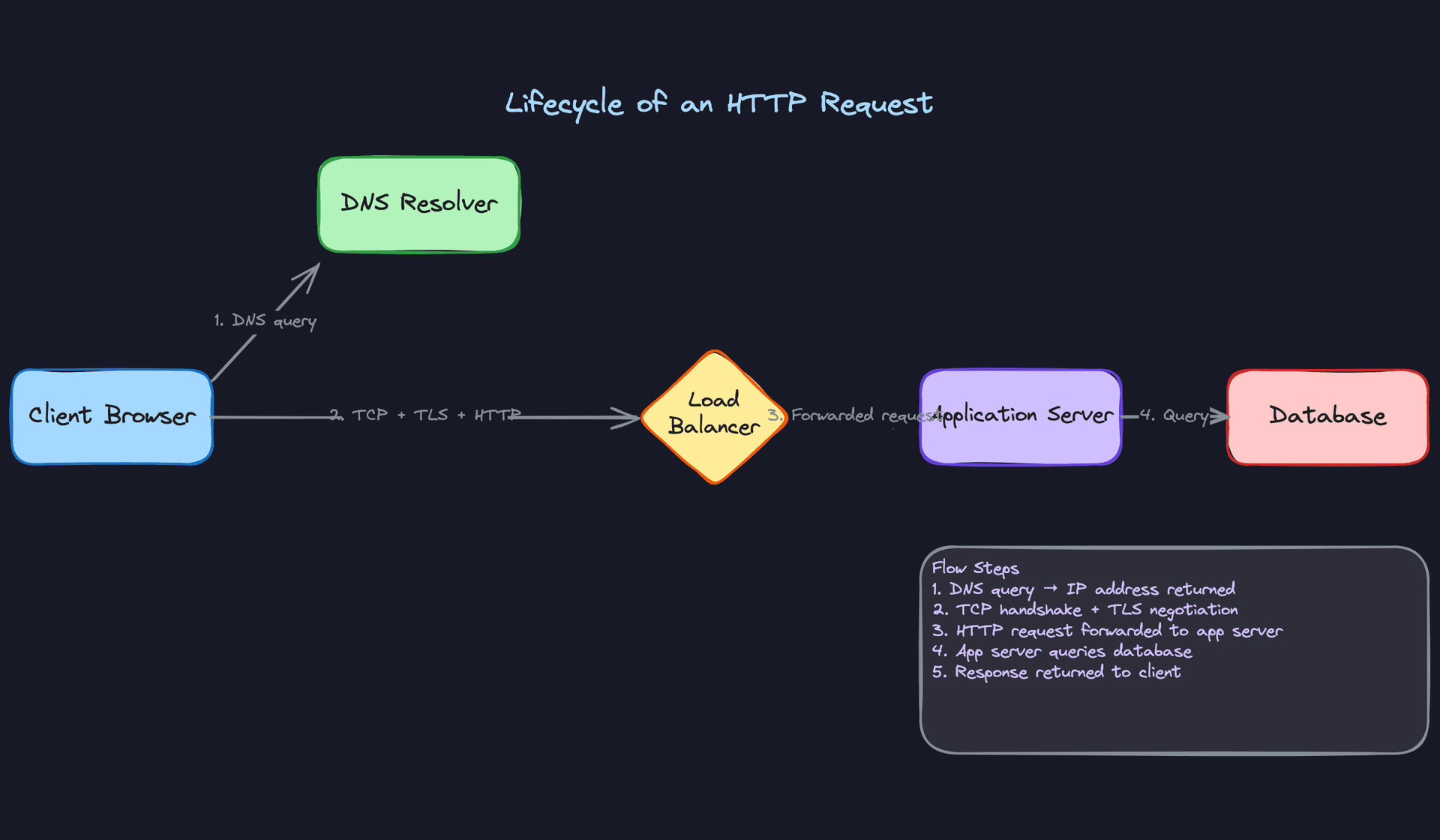
Imagine a user types app.example.com/feed into their browser and hits enter. Here's the chain of events, in order.
Step 1: DNS Resolution. The browser doesn't know where app.example.com lives. It only has a name, not an address. So it asks a DNS resolver (usually your ISP's or something like 8.8.8.8) to translate that domain into an IP address. The resolver might already have it cached. If not, it goes on a small quest: asking a root name server, then a .com TLD server, then the authoritative name server for example.com. The answer comes back with an IP address and a TTL (time to live), which tells the resolver how long it can cache that answer before asking again.
That TTL matters more than you'd think. If you're designing a system that needs to fail over between regions, the DNS TTL determines how quickly clients discover the new IP. A 5-minute TTL means up to 5 minutes of stale routing after a failover. Mention this in your interview and you'll get a nod.
Step 2: TCP Handshake. Now the browser has an IP address. Before it can send any data, it needs to establish a TCP connection. This is the famous three-way handshake: the client sends a SYN, the server responds with SYN-ACK, the client confirms with ACK. Only after this exchange can data flow.
That's one full round trip before a single byte of your actual request has been sent. If the server is 70ms away, you've already burned 70ms just saying hello. This is exactly why connection pooling and keep-alive connections exist. You pay the handshake cost once, then reuse the connection for many requests.
Step 3: TLS Negotiation. If the connection is HTTPS (and it almost always is), there's another round trip on top of TCP. The client and server need to agree on encryption parameters, exchange certificates, and derive session keys. With TLS 1.2, this adds two more round trips. TLS 1.3 brought it down to one. But either way, you're stacking latency on top of the TCP handshake before any application data moves.
This is why HTTP/2 and HTTP/3 exist. HTTP/2 multiplexes many requests over a single TCP+TLS connection, so you pay the setup cost once instead of six times. HTTP/3 goes further by replacing TCP entirely with QUIC (built on UDP), which merges the transport handshake and TLS negotiation into a single round trip. Dropping one of these facts unprompted during an interview signals that you think about performance at the protocol level, not just the application level.
Step 4: HTTP Request and Response. Finally, the browser sends the actual HTTP request: method, path, headers, maybe a body. This hits the load balancer first (more on that in the patterns section), which forwards it to an application server. The app server does its work, maybe queries a database or cache, and sends back an HTTP response with a status code, headers, and body.
Step 5: Connection Teardown (or Reuse). The connection either closes (TCP FIN handshake, another round trip) or stays open for reuse via HTTP keep-alive. In modern systems, reuse is the default. Closing and reopening connections for every request would be brutally expensive at scale.
Here's what that flow looks like:
The Layered Model (Only What Interviewers Care About)
You don't need to recite the OSI model. You need to know four layers and which protocols live where.
The application layer is where HTTP, gRPC, WebSocket, and DNS live. This is the layer your code interacts with directly. When you say "the client sends a POST request," you're talking about this layer.
The transport layer is TCP and UDP. TCP gives you reliable, ordered delivery. UDP gives you speed with no guarantees. Your interviewer cares about this layer because it determines connection behavior, latency characteristics, and how failures surface.
The network layer is IP. It handles routing packets from one machine to another across the internet. You rarely need to discuss this in detail, but knowing that IP addresses are how machines find each other (and that NAT, subnets, and routing tables exist) keeps you from getting tripped up.
The link layer is the physical stuff: Ethernet, WiFi, fiber. You almost never need to talk about this in a system design interview.
Here's the shortcut: interviewers care about Layer 7 (HTTP, routing rules, request content) and Layer 4 (TCP vs UDP, connection management, port-based routing). If you can confidently discuss those two, you're covered for 95% of interview scenarios.
Key insight: When someone says "L4 load balancer" or "L7 routing," they're referencing these layers directly. Knowing the layer numbers and what lives there lets you decode interview jargon instantly instead of nodding along and hoping.
DNS: More Than "It Just Works"
DNS is the first network operation in every request, and it's also one of the most common tools for traffic management at scale. Weighted DNS records let you send 90% of traffic to US-East and 10% to US-West during a canary deploy. GeoDNS routes users to the nearest data center based on their resolver's location.
The caching chain is worth knowing: the browser caches DNS results, the operating system caches them, the resolver caches them, and each level respects the TTL from the authoritative server. When you're designing a system that needs fast failover, you'll want short TTLs (30-60 seconds). When stability matters more, longer TTLs (5-15 minutes) reduce DNS lookup overhead and protect against DNS outages.
Why These Steps Matter for Your Interview
Three properties fall out of this mental model that interviewers probe constantly.
Latency is additive across hops. Every step in the chain adds time. DNS lookup (0-100ms depending on cache), TCP handshake (one RTT), TLS (one to two RTTs), then the actual request/response. When you add a microservice to your design, you're adding another TCP+TLS+HTTP cycle. Acknowledging this cost, even briefly, shows you understand the real-world implications of your architecture.
Every network step is a failure point. DNS can return stale records. TCP handshakes can time out. TLS certificates can expire. The response can arrive partially. Candidates who treat the arrows between boxes as reliable function calls are telling the interviewer they've never debugged a production system.
Connection setup is expensive, so systems amortize it. This is why connection pools, keep-alive, and multiplexing aren't optimizations. They're necessities. If your design has Service A calling Service B thousands of times per second, and you haven't mentioned connection reuse, the interviewer is going to ask about it.
Your 30-second explanation: "When a client makes an HTTP request, it first resolves the domain to an IP via DNS, then establishes a TCP connection with a three-way handshake, negotiates TLS encryption, and only then sends the actual HTTP request. Each step adds at least one network round trip. That's why modern systems use connection pooling, HTTP/2 multiplexing, and keep-alive to avoid repeating this setup for every request. And it's why every new network hop in your architecture has a real latency and reliability cost."
Patterns You Need to Know
In an interview, you'll usually need to pick a specific approach. Here are the ones worth knowing.
TCP vs UDP
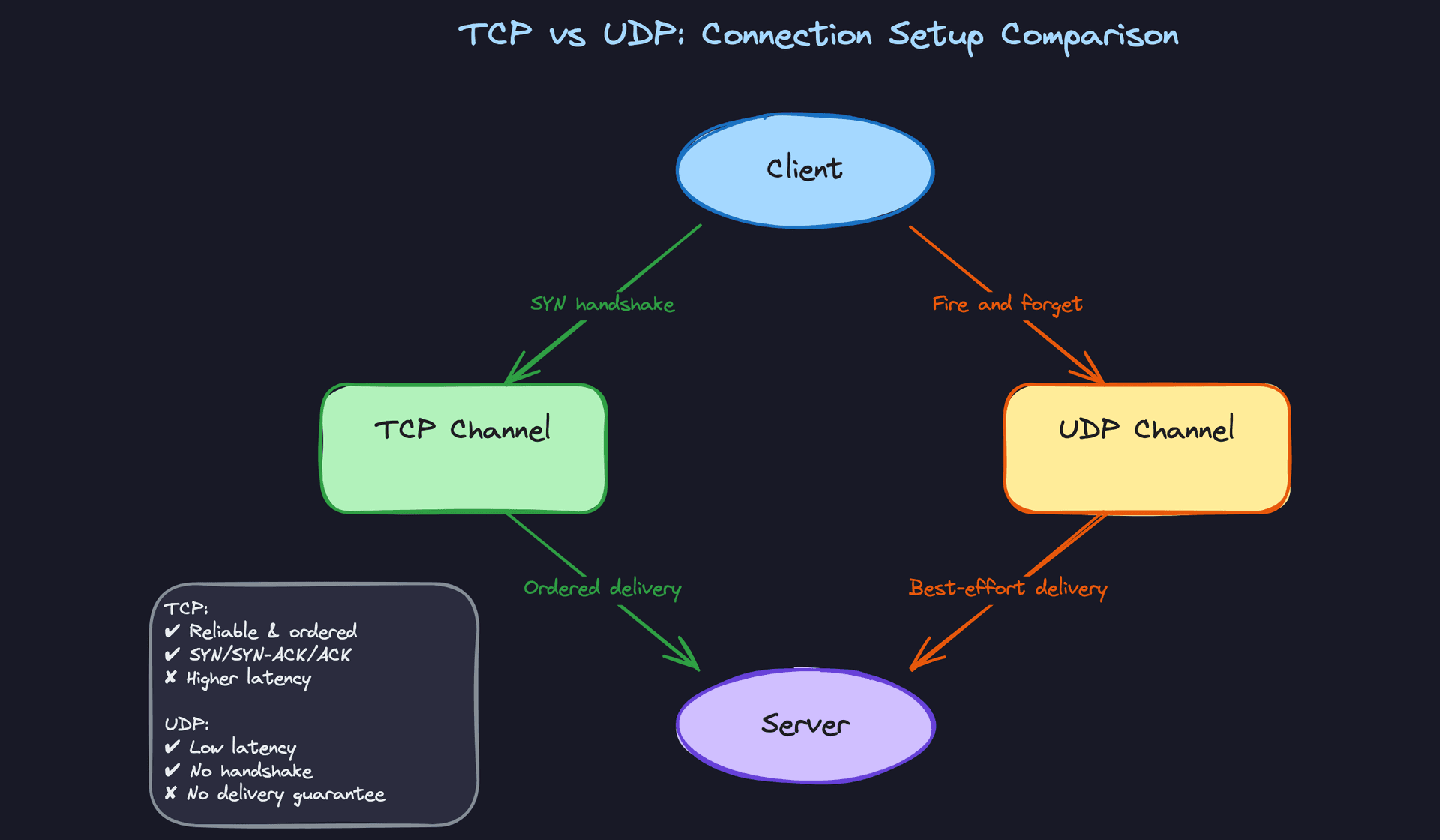
TCP is the protocol that says "I will deliver every byte, in order, or die trying." Before any data flows, the client and server perform a three-way handshake (SYN, SYN-ACK, ACK), which costs one full round trip. After that, TCP tracks every packet, retransmits anything that gets lost, and reassembles everything in sequence on the receiving end. This reliability is why virtually every API call, database query, and web request runs over TCP. The cost is latency: that handshake, plus retransmission delays when packets drop.
UDP skips all of that. There's no handshake, no ordering, no retransmission. The sender fires packets at the receiver and hopes for the best. That sounds reckless, but it's exactly what you want when speed matters more than completeness. A dropped frame in a live video stream? Nobody notices. A retransmitted frame that arrives 200ms late? That's a visible stutter. DNS queries also use UDP because they're tiny, single-packet exchanges where the overhead of a TCP handshake would double the total time.
When to reach for this: Any time you're designing a real-time system (video streaming, gaming, live location tracking), tell your interviewer "we'd use UDP here because retransmitting stale data is worse than dropping it." For anything transactional or stateful, TCP is the default and you don't need to justify it.
Interview tip: If an interviewer asks "why not just use TCP for everything?", the answer is: retransmission of stale data creates jitter in real-time applications, and the handshake overhead is wasteful for single-shot queries like DNS. Two sentences, and you've shown you understand the tradeoff.
HTTP/1.1 vs HTTP/2 vs HTTP/3
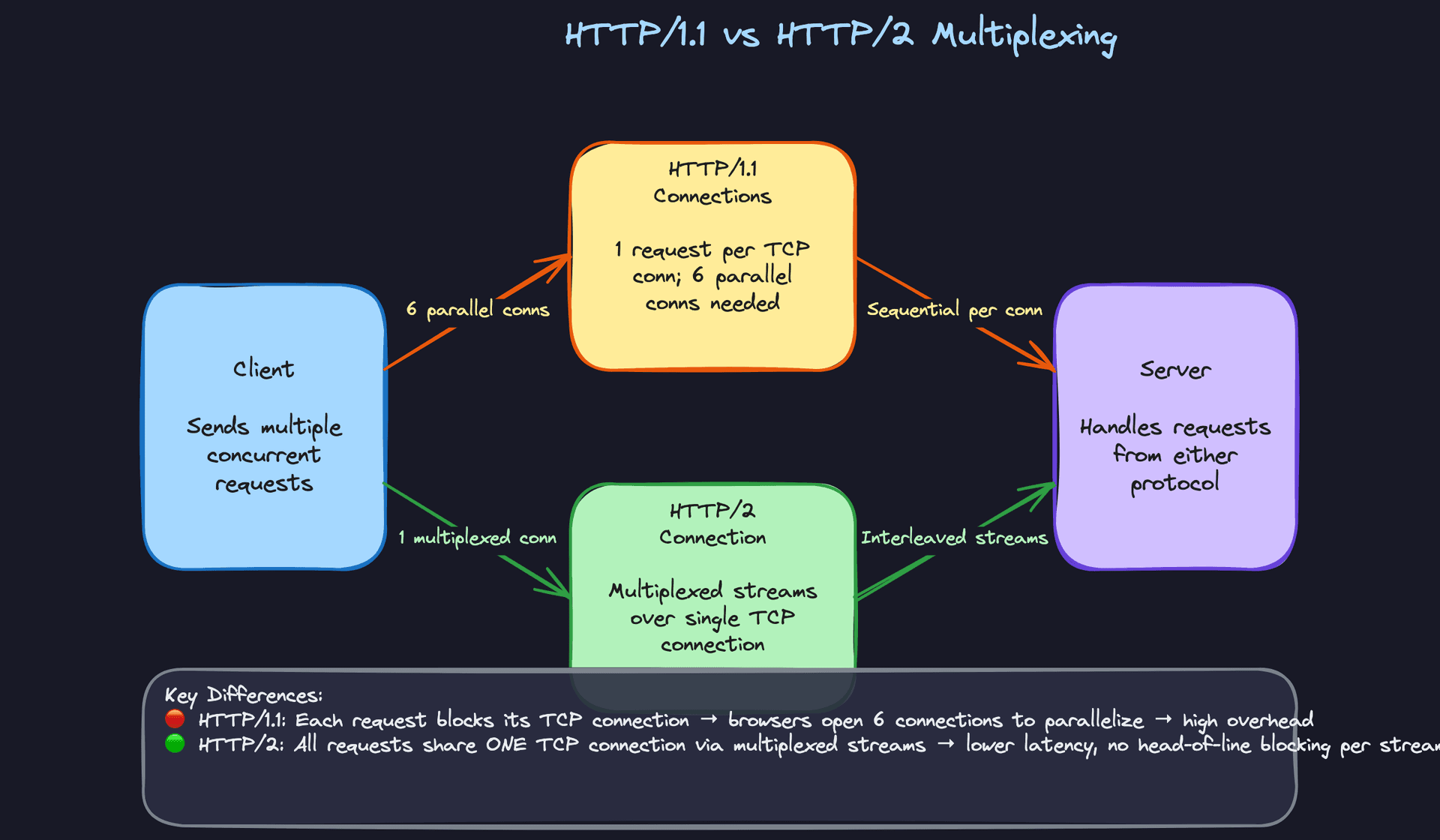
HTTP/1.1 has a brutal limitation: one request at a time per TCP connection. If you send a request and the response is slow, every subsequent request on that connection just waits. Browsers work around this by opening 6 parallel TCP connections to the same server, but that's 6 handshakes, 6 TLS negotiations, and 6 sets of congestion control competing with each other. This is head-of-line blocking, and it's the reason your page with 40 assets loads slowly even on a fast connection.
HTTP/2 fixes this by multiplexing many requests over a single TCP connection as interleaved streams. Request 1 can be half-delivered while request 2 starts flowing. One connection, one handshake, one TLS negotiation. The catch? TCP itself still has head-of-line blocking at the transport layer. If a single TCP packet is lost, the kernel holds up all streams until that packet is retransmitted, even streams whose data arrived fine.
HTTP/3 solves that last problem by ditching TCP entirely. It runs on QUIC, a protocol built on UDP that implements its own reliability per-stream. If stream 3 loses a packet, only stream 3 stalls. Streams 1, 2, and 4 keep flowing. QUIC also bakes TLS 1.3 into the protocol itself, so the handshake is faster (often zero round trips on reconnection).
When to reach for this: If you're designing anything with a browser-facing frontend or a mobile client hitting an API gateway, mention HTTP/2 as the baseline. If the interviewer pushes on mobile clients with flaky connections (think ride-sharing apps, IoT), bring up HTTP/3 and QUIC. You don't need to explain QUIC's internals; just knowing why it exists and that it eliminates TCP-level head-of-line blocking is enough.
Connection Pooling and Keep-Alive
Every new TCP connection costs a round trip for the handshake. Add TLS and you're looking at two or three round trips before a single byte of application data moves. In a monolith, this doesn't matter much because most calls are in-process. The moment you break into microservices, it matters enormously. Service A calling Service B, which calls Service C: if each hop opens a fresh connection, you've burned hundreds of milliseconds on handshakes alone.
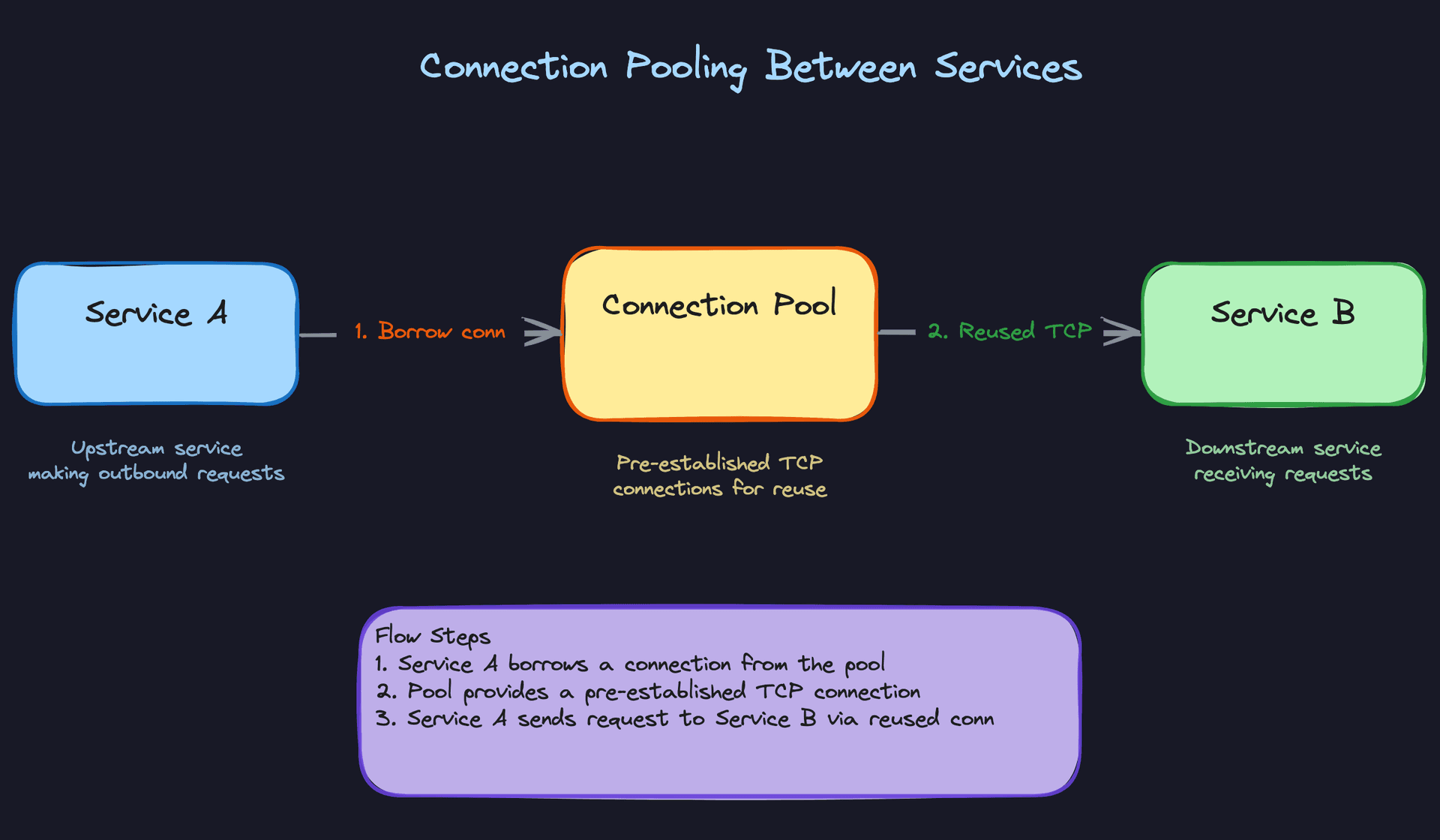
Connection pooling solves this by maintaining a set of pre-established TCP connections that your application borrows from and returns to. When Service A needs to talk to Service B, it grabs an already-connected socket from the pool, sends its request, and puts the socket back. No handshake. No TLS negotiation. The HTTP-level equivalent is the keep-alive header, which tells both sides "don't close this connection after one request/response cycle."
The gotchas are real, though. Pooled connections can go stale if the remote end closes them silently. You need health checks or idle timeouts. Pool sizing matters too: too small and requests queue up waiting for a connection; too large and you exhaust file descriptors or overwhelm the downstream service.
When to reach for this: Every single time you draw an arrow between two services in your design, you should have connection pooling in the back of your mind. When the interviewer asks "how would you reduce latency between these services?", say "connection pooling to amortize TCP and TLS handshake costs across requests." It's a one-sentence answer that signals real operational experience.
Common mistake: Candidates say "we'll add a cache" when asked about inter-service latency. Caching helps with redundant work, but if the latency problem is handshake overhead on every call, connection pooling is the right tool. Know the difference.
Layer 4 vs Layer 7 Load Balancing
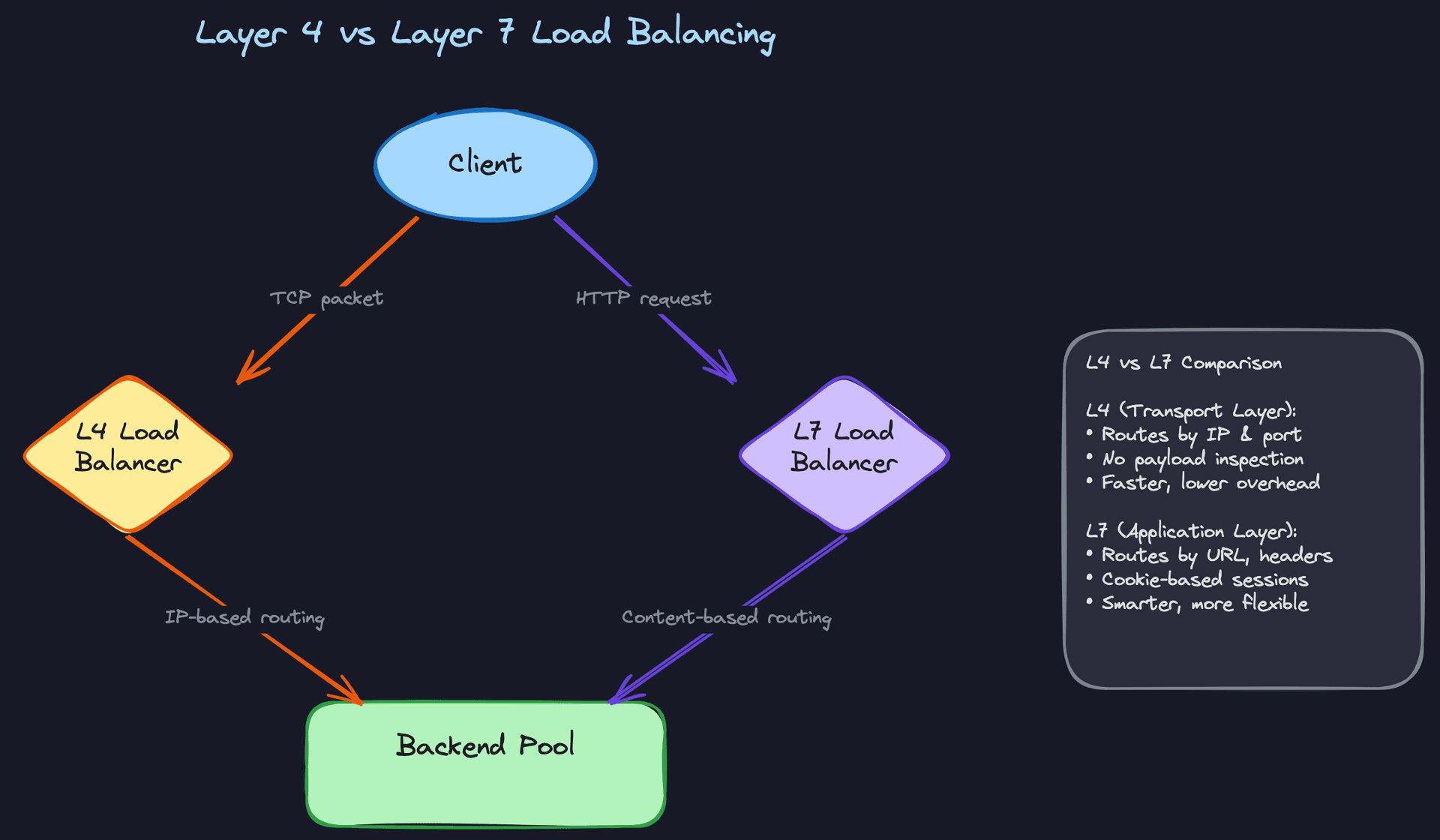
An L4 load balancer operates at the transport layer. It sees IP addresses and port numbers, and that's it. It picks a backend server using simple algorithms (round-robin, least connections, source IP hash) and forwards raw TCP packets. It never decrypts TLS, never inspects HTTP headers, never looks at URLs. This makes it extremely fast and cheap to operate. Linux's IPVS and cloud providers' network load balancers work this way.
An L7 load balancer operates at the application layer. It terminates the TLS connection from the client, reads the full HTTP request, and then makes routing decisions based on the URL path, headers, cookies, or even the request body. Want to route /api/v2/* to a new set of servers while /api/v1/* stays on the old ones? That's L7. Want to send authenticated users to a different backend than anonymous ones? Also L7. The tradeoff is that it must fully parse every request, which costs CPU and adds a small amount of latency.
Here's a nuance that trips people up: with L4, the load balancer doesn't terminate TLS, so your backend servers need their own certificates and handle encryption themselves. With L7, TLS terminates at the load balancer, meaning traffic between the LB and your backends can be plaintext (faster) or re-encrypted (more secure). This is a real architectural decision, and mentioning it shows you've thought beyond the happy path.
When to reach for this: If the interviewer's design needs content-based routing, A/B testing, or path-based microservice routing, say L7. If you need raw throughput for a service that handles millions of TCP connections (think a real-time gaming server or a message broker), say L4. Many production architectures use both: an L4 balancer at the edge distributing across a fleet of L7 balancers that handle routing logic.
Long-Lived Connections: WebSockets, SSE, and gRPC Streaming
Standard HTTP is request-response: the client asks, the server answers, done. But what about a chat application where the server needs to push a message the instant it arrives? Or a stock ticker that streams price updates continuously? Polling (asking the server every second "anything new?") wastes bandwidth and adds latency equal to half your polling interval on average.
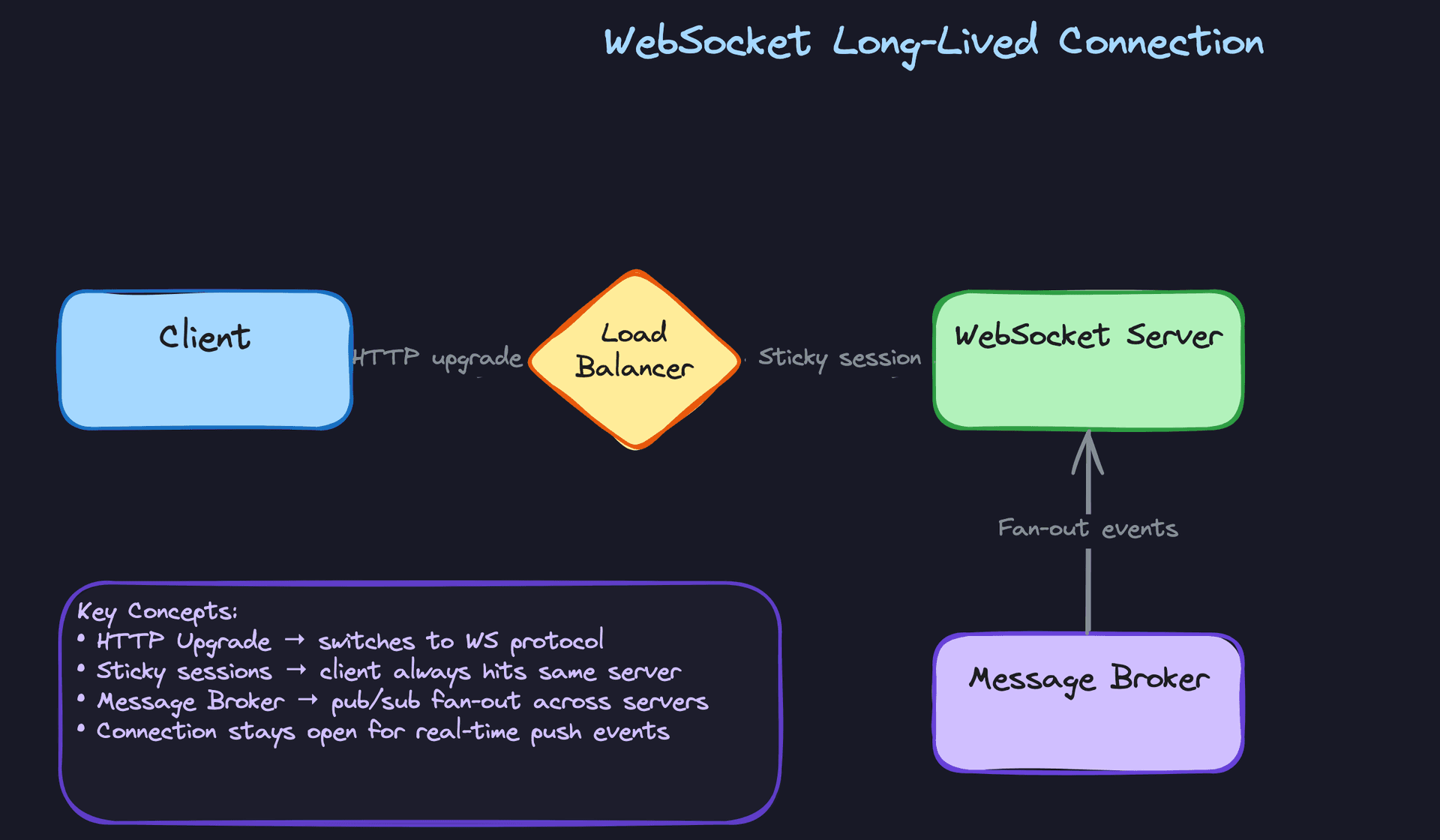
WebSockets start as a normal HTTP request with an Upgrade header. Once both sides agree, the connection flips into a full-duplex, persistent TCP channel. Either side can send data at any time without the overhead of HTTP headers on every message. Server-Sent Events (SSE) are simpler: the server holds an HTTP response open and streams text events down to the client. SSE is one-directional (server to client only) and works over plain HTTP, which makes it easier to deploy behind existing infrastructure. gRPC streaming uses HTTP/2's multiplexing to support bidirectional streaming with strong typing via Protocol Buffers.
The networking implications are significant. Long-lived connections mean your load balancer can't just round-robin each request; the client is pinned to one server for the life of the connection. That's sticky sessions, and it complicates scaling. Each open WebSocket consumes a file descriptor and memory on the server, so you hit connection limits much sooner than with short-lived HTTP. If the server needs to broadcast an event to thousands of connected clients spread across multiple server instances, you need a message broker (Redis Pub/Sub, Kafka) to fan out events to every instance.
When to reach for this: Chat systems, live dashboards, collaborative editing, notifications, anything where the server initiates communication. Tell your interviewer: "We need server push here, so I'd use WebSockets for bidirectional communication" or "SSE is simpler and sufficient since data only flows server-to-client." Then immediately address the infrastructure implications: sticky sessions at the load balancer and a pub/sub layer for cross-instance fan-out.
Key insight: The moment you introduce a long-lived connection in your design, you've changed the scaling model. You're no longer scaling for requests per second; you're scaling for concurrent connections. Make sure you say this out loud. Interviewers are checking whether you understand the operational shift.
| Pattern | Best For | Key Cost | Protocol Layer |
|---|---|---|---|
| TCP | APIs, data transfer, anything requiring reliability | Handshake latency, retransmission delays | Transport (L4) |
| UDP | Streaming, gaming, DNS | No delivery guarantee | Transport (L4) |
| HTTP/2 multiplexing | Browser/client-to-server at scale | TCP-level head-of-line blocking remains | Application (L7) |
| Connection pooling | Reducing inter-service latency | Pool sizing, stale connections | Transport (L4) |
| L4 vs L7 load balancing | Throughput (L4) vs smart routing (L7) | L7 adds parsing overhead; L4 can't inspect content | Transport / Application |
| WebSockets / SSE / gRPC streaming | Server push, real-time features | Sticky sessions, connection limits, fan-out complexity | Application (L7) |
For most interview problems, you'll default to TCP with HTTP/2 and connection pooling between services. That covers 90% of designs. Reach for UDP when you're building real-time streaming or gaming. Reach for WebSockets or SSE the moment the interviewer's scenario requires the server to push data to clients without being asked. And whenever you add a load balancer, spend five seconds deciding whether L4 or L7 is the right fit; saying "L7 because we need path-based routing" is the kind of precision that earns points.
What Trips People Up
Here's where candidates lose points, and it's almost always one of these.
The Mistake: Treating Network Arrows Like Function Calls
You draw a box for Service A, an arrow to Service B, another arrow to the database. Clean diagram. The interviewer nods. Then they ask: "What happens if Service B is slow to respond?" And you stare at your whiteboard like the arrow betrayed you.
This is the single most common networking mistake in system design interviews. Candidates draw arrows between components and reason about them as if they're local function calls: instant, reliable, guaranteed to return. In reality, every single arrow on your diagram is a network call that can time out, return an error, deliver a partial response, or simply never come back at all.
Here's what a bad answer sounds like: "Service A calls Service B, gets the user profile, then calls Service C to get recommendations, combines them, and returns the response." That sounds like a script that runs top to bottom. It ignores the fact that Service B might take 2 seconds instead of 20 milliseconds. It ignores that Service C might be down entirely. It ignores that the response from B might arrive after you've already timed out and returned an error to the user.
Common mistake: Candidates say "A calls B" the same way they'd say "this function returns a list." The interviewer hears someone who has never debugged a production outage caused by a downstream service being slow.
What to say instead: every time you draw an arrow, briefly acknowledge the failure mode. "Service A makes a network call to Service B. We'd want a timeout here, maybe 200ms, with a retry and circuit breaker so a slow Service B doesn't cascade into A becoming unresponsive." You don't need to design the full retry strategy. Just showing that you know the arrow is dangerous is enough.
The Mistake: Mixing Up Latency and Bandwidth
An interviewer asks: "We need to transfer 500MB of data from our US-East region to EU-West every hour. Is that feasible?" A candidate responds: "That's a lot of data, we'd need a really fast connection with low latency."
No. That's a bandwidth question, not a latency question. And confusing the two makes your back-of-the-envelope estimates fall apart.
Latency is how long a single byte takes to travel from point A to point B. It's the speed-of-light delay, the router hops, the queuing time. Bandwidth is how many bytes you can shove through the pipe per second. They're independent dimensions. A satellite internet connection has enormous bandwidth (you can stream 4K video) but terrible latency (600ms+ round trip). A fiber connection between two servers in the same data center has both low latency and high bandwidth.
This matters when you're estimating system performance. If a user in Tokyo hits your server in Virginia, the latency floor is around 80ms each way just from the speed of light through fiber. No amount of bandwidth fixes that. Conversely, if you're replicating a database across regions, the bottleneck might be bandwidth (how fast you can push the replication log), not latency.
Interview tip: When the interviewer asks about performance, pause and ask yourself: "Is this a latency problem or a throughput problem?" Then name which one you're solving. Saying "the bottleneck here is latency, not bandwidth, because each request is small but needs a round trip" signals that you think precisely about networks.
The Mistake: Saying "It's Encrypted" Without Knowing Where
The interviewer probes security: "How is traffic protected between the client and your backend?" The candidate says, "We use HTTPS, so everything is encrypted." Technically true. But then the follow-up lands: "What about traffic between your load balancer and your application servers?"
Silence.
Most production architectures terminate TLS at the load balancer. This means the load balancer decrypts the incoming HTTPS traffic, inspects the HTTP content (that's how L7 routing works), and then forwards the request to backend servers. That forwarded request? Often plain HTTP over the internal network. This is a deliberate design choice: it offloads the CPU cost of encryption from your app servers and lets the load balancer make smart routing decisions.
But it means your internal traffic is unencrypted unless you've explicitly set up mutual TLS (mTLS) between services. Candidates who say "it's encrypted" without understanding this boundary look like they've never thought about a real deployment topology.
Common mistake: Candidates say "we use HTTPS" as if encryption is a property of the entire system. The interviewer hears someone who doesn't know where TLS termination happens and can't reason about the security of internal traffic.
What to say instead: "TLS terminates at the load balancer. Internal traffic between the LB and app servers runs over our private network. If we need encryption there too, for compliance reasons or zero-trust architecture, we'd add mTLS between services." That's a ten-second answer that demonstrates real operational understanding.
The Mistake: Treating DNS as Invisible Infrastructure
Candidates almost never mention DNS in their designs. It's the first thing that happens when a user types a URL, and it's the last thing candidates think about.
Here's why that costs you points. An interviewer asks: "How would you handle failover if your primary region goes down?" A strong candidate says: "We'd update DNS to point to the secondary region. Our TTL is set to 60 seconds, so most clients would pick up the new IP within a minute or two. Some clients and resolvers cache aggressively beyond the TTL, so we'd expect a tail of traffic hitting the old region for a few minutes longer."
A weak candidate says: "We'd switch traffic to the other region." How? Magic?
DNS isn't just a lookup mechanism. It's an active traffic management tool. Weighted DNS routing lets you send 10% of traffic to a canary region. GeoDNS routes users to the nearest data center. Low TTLs give you fast failover; high TTLs reduce DNS lookup latency for your users. These are real tradeoffs you can bring up in an interview.
Interview tip: When you're designing a multi-region system, mention DNS by name. Say something like: "We'd use Route 53 with health checks and a 60-second TTL so we can fail over within a minute." That one sentence tells the interviewer you've thought about the full request path, starting from the very first hop.
DNS is also a failure point. If your authoritative DNS provider has an outage (this has happened to major providers and taken down huge chunks of the internet), none of your users can resolve your domain. Mentioning this when discussing availability shows you think about the edges of the system, not just the boxes in the middle.
How to Talk About This in Your Interview
Networking knowledge doesn't earn you points when you lecture about it. It earns you points when you weave it into your design naturally, at the right moments, with the right vocabulary. The goal is to make the interviewer think, "This person has actually debugged production latency issues," not "This person memorized a textbook."
When to Bring It Up
You don't wait for the interviewer to ask "tell me about TCP." That question almost never comes. Instead, watch for these moments:
You're adding a new service or hop to your architecture. Every time you draw an arrow between two boxes, that's a network round trip. Acknowledge it. "This call from the API gateway to the recommendation service adds a round trip, so we'd want connection reuse here, maybe a persistent gRPC channel."
The interviewer asks "why is this slow?" or "what's the latency of this path?" This is your cue to trace the request hop by hop, naming the networking cost at each step instead of hand-waving with "it should be fast."
You're discussing failover or regional redundancy. DNS TTLs, connection draining, health checks. These are all networking concepts hiding inside reliability questions.
Someone says "what happens when this service goes down?" Network failure modes are the answer. Timeouts, retries, connection exhaustion, partial failures. Don't just say "it fails." Say how it fails at the network level.
You're designing anything real-time. Chat, live dashboards, collaborative editing, gaming. The interviewer is waiting to hear you reason about persistent connections, WebSockets vs SSE, and what that means for your load balancing strategy.
Interview tip: A single sentence like "we'd want connection pooling between these services to avoid paying the TCP and TLS handshake cost on every request" signals more depth than a five-minute monologue about the OSI model.
Sample Dialogue
Interviewer: "Alright, let's say a user opens the app and taps to load their feed. Walk me through what happens."
You: "Sure. The client first needs to resolve our API domain to an IP address, so there's a DNS lookup. If it's cached on the device or a nearby resolver, that's sub-millisecond. If not, we're looking at maybe 20-50ms depending on the resolver chain. Once we have the IP, the client opens a TCP connection to our load balancer. That's one round trip for the handshake. Then TLS negotiation on top of that, another round trip, maybe two if we're not using TLS 1.3. So before any application data flows, we've already spent 2-3 round trips just on connection setup. This is why we'd want the mobile client to keep a persistent connection open rather than reconnecting every time."
Interviewer: "OK, but assume the connection is already established. What happens next?"
You: "Right, so the HTTP request hits our L7 load balancer. I'd use L7 here because we probably want to route based on the URL path, maybe /feed goes to the feed service while /notifications goes somewhere else. The load balancer forwards the request to one of our feed service instances. That's another network hop, but since it's within the same datacenter, we're talking sub-millisecond latency. The feed service then fans out: it might hit a cache like Redis for the precomputed feed, and if there's a cache miss, it queries the database. Each of those is another round trip within the datacenter."
Interviewer: "You mentioned the load balancer is L7. Why not L4?"
You: "L4 would be faster since it just routes based on IP and port without inspecting the payload. If all our traffic goes to a homogeneous backend pool, L4 is fine and cheaper. But here we have multiple services behind the same domain, so we need the load balancer to look at the HTTP path to make routing decisions. The tradeoff is slightly higher latency at the LB, but it gives us the flexibility to route different endpoints to different service pools. In practice, the L7 inspection cost is small, maybe a fraction of a millisecond."
Notice what happened there. The candidate didn't dump a networking lecture. They traced a real request path, named specific latency costs, and justified their choices when challenged. The interviewer pushed back, and the candidate engaged with the tradeoff directly.
Follow-Up Questions to Expect
"What could go wrong with this network path?" Walk through failure modes one at a time: DNS resolution could fail (mitigation: client-side caching with reasonable TTLs), the TCP connection could time out (mitigation: aggressive timeouts with retries to a different backend), the load balancer could become a bottleneck (mitigation: horizontal scaling of LB instances, or DNS-based load balancing in front of them).
"How would you reduce the latency you just described?" Talk about connection pooling between internal services, HTTP/2 multiplexing to avoid head-of-line blocking, TLS session resumption to skip repeated handshakes, and colocating services that talk frequently in the same availability zone.
"What happens if the network between your service and the database partitions?" This is a CAP theorem question wearing a networking costume. Acknowledge that the service will see timeouts or connection resets, and explain your strategy: do you fail open (serve stale data from cache), fail closed (return errors), or queue writes for later?
"How does the client know which region to connect to?" DNS-based routing. Mention GeoDNS or latency-based DNS routing, and note that the TTL on those records determines how quickly you can shift traffic during an incident.
What Separates Good from Great
- A mid-level candidate says "the client calls the API server." A senior candidate says "the client resolves our domain via DNS, establishes a persistent HTTP/2 connection through the load balancer, and the request is routed to the feed service. We'd want connection reuse on the backend side to keep internal latency low." Same idea, completely different signal.
- Mid-level candidates treat every arrow on their diagram as instant and reliable. Senior candidates casually note where retries, timeouts, and circuit breakers are needed, without being asked. They say things like "this is a cross-region call, so we're looking at 60-80ms of network latency, which means we should cache aggressively on the local side."
- Great candidates know when to stop. You mention TCP handshake overhead when it's relevant to a latency discussion. You do not explain how TCP congestion windows work unless the interviewer explicitly goes there. Precision is knowing what to say. Seniority is knowing what to leave out.
Common mistake: Using vague words like "call," "hit," or "talk to" when describing network interactions. Swap them for precise terms: "round trip," "connection reuse," "L7 routing," "TLS termination." The vocabulary alone changes how the interviewer perceives your experience level.
One more thing on vocabulary. Say "connection exhaustion" instead of "too many connections." Say "head-of-line blocking" instead of "things get slow." Say "TLS termination at the load balancer" instead of "we encrypt stuff." These aren't fancy words for the sake of it. They're the actual terms that engineers use in incident reviews and architecture discussions, and interviewers recognize them instantly.
Key takeaway: Every arrow you draw on a whiteboard is a network round trip with latency, failure modes, and connection overhead. Name those costs as you design, and you'll sound like someone who's built and operated real systems.
