
Why This Matters
A candidate draws a perfectly reasonable architecture on the whiteboard: load balancer, app servers, database, cache layer. The interviewer asks, "So how many app servers do you need?" Silence. Then a guess: "Maybe... fifty?" The actual answer, given the traffic numbers stated five minutes earlier, is three. The interview isn't over, but the damage is done. The interviewer just mentally downgraded this person from "senior" to "maybe mid-level." Not because the architecture was wrong, but because the candidate couldn't connect their design to reality with even rough math.
That's what these numbers are for. When you know that a single Redis instance handles 100K+ operations per second, you stop reflexively adding clusters you don't need. When you know the latency gap between RAM and a cross-continent network call is roughly a million x, the decision to add a cache or a CDN stops being a debate and starts being obvious. The engineers who get senior and staff offers don't draw better boxes. They say things like, "Each record is about 1 KB, we're storing 100 million of them, that's 100 GB, which fits in memory on a couple of nodes." That sentence takes five seconds and completely changes how an interviewer perceives you.
You don't need to memorize anything to four decimal places. You need order-of-magnitude intuition. Is this operation nanoseconds, microseconds, or milliseconds? Is this dataset megabytes, gigabytes, or terabytes? Getting within 10x of the real number is plenty. This guide gives you the specific numbers worth knowing, the mental math shortcuts to use them fast, and the patterns for weaving them into your answers so they sound natural instead of rehearsed.
The Framework
You need a mental model with four layers. Every time you face a design question, you'll run through these layers in order: figure out how fast things are (latency), how much data can move (throughput), how much fits where (capacity), and how many users you're actually serving (scale). Then you match them together to make decisions.
Here's the structure. Memorize this sequence.
| Layer | What It Answers | When You Use It |
|---|---|---|
| 1. Latency Hierarchy | "How fast is each operation?" | Choosing between cache, DB, disk; justifying CDNs; explaining why you need replication |
| 2. Throughput | "How much data can I move per second?" | Sizing data pipelines, streaming, bulk imports, backup strategies |
| 3. Capacity | "How much fits on one machine?" | Deciding whether to shard, how many Redis nodes you need, whether data fits in memory |
| 4. Scale Conversion | "How many requests per second does this actually generate?" | Converting "100M users" into concrete QPS so you can match against layers 1-3 |
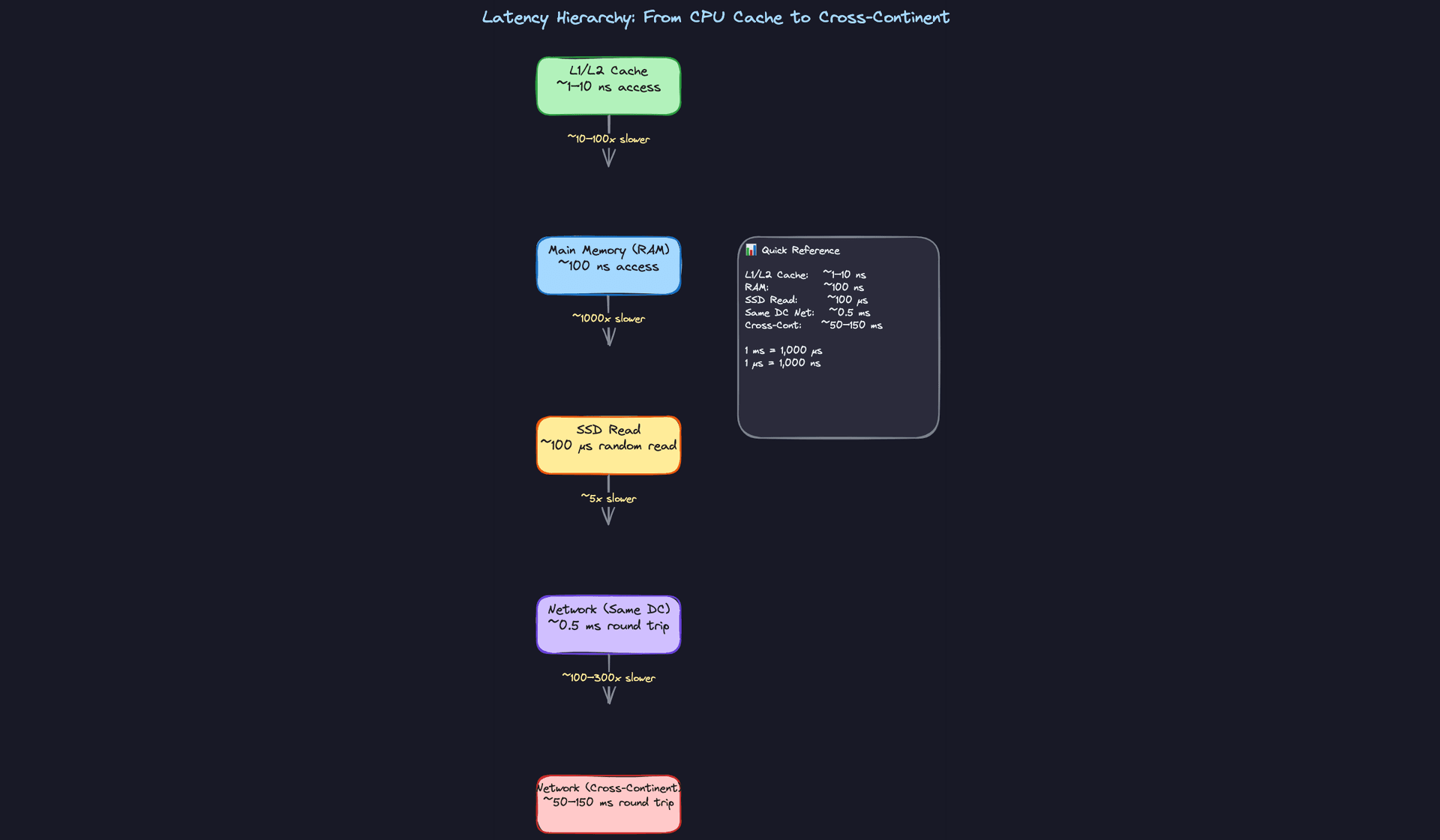
Layer 1: The Latency Hierarchy
This is the backbone. Every design tradeoff you'll make in an interview boils down to "how much slower is option B than option A?"
The hierarchy runs like this:
- L1/L2 CPU Cache: ~1-10 nanoseconds
- Main Memory (RAM): ~100 nanoseconds
- SSD random read: ~100 microseconds (that's 1,000x slower than RAM)
- HDD seek: ~10 milliseconds (100x slower than SSD)
- Network, same datacenter: ~0.5 milliseconds round trip
- Network, cross-continent: ~50-150 milliseconds round trip
The gaps between these layers are enormous. RAM to SSD is a 1,000x jump. Same-datacenter to cross-continent is a 100-300x jump. These aren't small differences you can hand-wave away. They're the reason entire architectural patterns exist.
What to do with this:
- When the interviewer asks you to design something, identify which layer your hot path lives on. A real-time chat system can't tolerate cross-continent latency on every message. A batch analytics job doesn't care about nanosecond differences.
- When you propose adding a cache, quantify the win. Don't just say "it'll be faster." Say the actual numbers.
- When you're debating between two storage options, state the latency gap out loud.
What to say:
- "A cache hit from Redis in the same datacenter is about 0.5 ms round trip, versus maybe 5-10 ms for a database query. That's a 10-20x improvement on our hot path, so caching makes sense here."
- "Cross-continent latency is 80-150 ms per round trip. If our users are global, we need to replicate data closer to them or put a CDN in front."
Key insight: Interviewers aren't testing whether you memorized "100 nanoseconds." They're testing whether you know that RAM is roughly 1,000x faster than SSD, and that this gap is large enough to justify a caching layer. Order of magnitude is what matters.
Layer 2: Throughput
Latency tells you how long one operation takes. Throughput tells you how much data you can shove through a pipe every second. Confusing these two is one of the fastest ways to blow an estimate (more on that in Common Mistakes).
The numbers you need:
- RAM sequential access: ~10 GB/s
- SSD sequential read: ~1 GB/s
- HDD sequential read: ~100 MB/s
- 1 Gbps network link: ~100 MB/s actual throughput (after protocol overhead)
- 10 Gbps network link: ~1 GB/s actual throughput
Notice the pattern: each step down is roughly a 10x drop. That makes it easy to remember.
What to do with this:
- When your design involves moving large amounts of data (replication, backups, bulk imports, video streaming), check whether the pipe is wide enough. If you need to replicate 1 TB of data over a 1 Gbps link, that's 1,000 GB / 0.1 GB per second = 10,000 seconds, which is nearly 3 hours. That might matter.
- When sizing a streaming pipeline or message queue, throughput is the constraint that matters, not latency.
- State throughput numbers when the interviewer asks "how long will that migration take?" or "can we do this in real time?"
What to say:
- "Sequential SSD reads give us about 1 GB/s. So scanning a 100 GB dataset from disk takes roughly 100 seconds. That's fine for a nightly batch job but too slow for a user-facing request."
- "Our network link between datacenters is probably 10 Gbps, so about 1 GB/s real throughput. Replicating 500 GB of data takes around 8-9 minutes. That's our recovery time if a region goes down."
Layer 3: Capacity Per Machine
Candidates constantly over-distribute their designs because they underestimate what a single modern server can do. Before you start sharding across 50 nodes, know what one box gives you.
A typical beefy server today:
- RAM: 128-512 GB (some cloud instances go to 1 TB+)
- SSD storage: 1-10 TB per machine (NVMe)
- PostgreSQL: 5,000-10,000 simple queries per second on decent hardware
- Redis: 100,000+ operations per second
- Kafka broker: 100,000+ messages per second
These numbers are your anchor. When someone says "we need to handle 20,000 QPS of simple reads," your first instinct should be: one PostgreSQL instance with read replicas might be enough. You don't need to jump to Cassandra.
What to do with this:
- After you estimate the scale requirements (next layer), immediately compare against single-machine capacity. Say the comparison out loud.
- If your data fits in RAM on 2-3 machines, say so. That's a much simpler architecture than a distributed database cluster.
- When proposing a technology, state its per-node capacity so the interviewer knows you've operated it before (or at least studied it).
What to say:
- "50 million user profiles at 2 KB each is 100 GB. That fits in RAM on a single large Redis instance, or maybe two for redundancy. We don't need a complex distributed cache here."
- "A single Postgres instance can handle maybe 5-10K simple QPS. Our estimated load is 3,000 QPS, so one primary with a couple of read replicas should work. We can revisit sharding if we grow 10x."
Do this: Every time you name a technology in your design, attach a capacity number to it. "We'll use Kafka" is junior. "We'll use Kafka, and a single broker handles 100K+ messages per second, so for our 200K msg/sec load we need 3-4 brokers" is senior.
Layer 4: Scale Conversion
This is where you turn the interviewer's vague "design for 100 million users" into concrete numbers you can work with.
The conversion formula is simple:
DAU × requests per user per day ÷ 86,400 seconds/day = average QPS
Round 86,400 to 100,000 for quick mental math (you'll be off by ~15%, which is totally fine).
So: 1 million DAU, each making 1 request/day = 1,000,000 / 100,000 = ~10 QPS average.
But nobody designs for average. Peak traffic is typically 3-5x average for most apps, and can spike to 10x during events. So that 10 QPS average becomes 30-100 QPS peak.
A few benchmarks to internalize:
- 1M DAU, 1 req/day: ~10 QPS avg, ~50 QPS peak
- 10M DAU, 10 req/day: ~1,000 QPS avg, ~5,000 QPS peak
- 100M DAU, 10 req/day: ~10,000 QPS avg, ~50,000 QPS peak
- 1B DAU, 10 req/day: ~100,000 QPS avg, ~500,000 QPS peak
What to do with this:
- As soon as the interviewer gives you a user count, convert it to QPS on the whiteboard. Do it visibly. This is one of the strongest signals you can send.
- Always state both average and peak. Then design for peak.
- Multiply QPS by payload size to get bandwidth requirements. 10,000 QPS × 2 KB response = 20 MB/s. That's well within a single 1 Gbps link.
What to say:
- "100 million DAU with maybe 5 requests per user per day gives us about 500 million requests daily. Dividing by 100K seconds in a day, that's roughly 5,000 QPS average. Let's plan for 20-25K QPS peak."
- "At 25K QPS and maybe 1 KB per request, we're looking at 25 MB/s of inbound traffic. That's nothing for a modern load balancer."
Example: "Alright, so we're looking at roughly 5,000 QPS average, probably 20K at peak. A single Postgres instance tops out around 10K simple QPS, so we'll need at least a primary plus a couple of read replicas to handle peak read load. Let me sketch out how the data flows..."
Tying the Layers Together
The real power isn't in any single layer. It's in chaining them.
You convert users to QPS (Layer 4). You check whether one machine can handle that QPS (Layer 3). You estimate how much data moves per second and whether your network or disk can keep up (Layer 2). And you pick the right storage tier based on your latency requirements (Layer 1).
That chain is the entire back-of-the-envelope process. Every estimation question in every system design interview follows it, whether the interviewer frames it that way or not.
When you get comfortable running through all four layers in 60-90 seconds, you stop sounding like someone reciting a textbook. You start sounding like someone who has actually sized a production system at 2 AM while an on-call page is going off. That's the energy interviewers are looking for.
Do this: Practice this framework on three different prompts tonight. Pick a URL shortener, a chat app, and a video streaming service. For each one, run through all four layers and write down the numbers. By the third one, it'll feel automatic.
Putting It Into Practice
Worked Example: "Design a URL Shortener for 100M New URLs per Day"
This is the kind of question where numbers either carry you or bury you. Let's walk through the math the way you'd actually do it on a whiteboard, with messy rounding and all.
Step 1: Convert daily volume to QPS.
There are 86,400 seconds in a day. You will never remember that number under pressure, so round it to 100,000 (100K). It's close enough and makes division trivial.
100M new URLs / 100K seconds = 1,000 writes per second.
The real answer is ~1,157 QPS, but saying "roughly 1,000 to 1,200 writes per second" is perfect. Nobody wants to watch you long-divide on a whiteboard.
Step 2: Estimate read traffic.
URL shorteners are read-heavy. A common ratio is 100:1 reads to writes (every shortened URL gets clicked many times). That gives you 100K read QPS. Now you're in territory where a single database won't cut it for reads, but a caching layer in front of it absolutely will.
Step 3: Estimate storage.
Each record needs: the short code (7 bytes), the original URL (average ~100 bytes), maybe a timestamp and user ID. Call it 500 bytes per record to be safe, or round up to 1 KB for padding and indexes.
100M URLs/day × 1 KB = 100 GB per day.
Over a year: 100 GB × 365 ≈ 36 TB per year.
That's more than a single machine's RAM but well within SSD capacity for a single server (modern machines carry 10+ TB of NVMe). You'd want sharding eventually, but you're not starting with 50 machines. Maybe 3-4 database nodes with a few terabytes each gets you through year one.
Do this: After you finish the math, always state the "so what." Don't just say "36 TB." Say "36 TB per year, which means a single sharded Postgres cluster with a few nodes can handle this for the first couple of years. We don't need anything exotic on the storage side."
Step 4: Sanity check.
Can one PostgreSQL instance handle 1,200 writes per second? Yes, easily. Simple key-value inserts on indexed tables can hit 5,000-10,000 QPS on decent hardware. Can Redis handle 100K read QPS for the redirect lookups? That's right in Redis's sweet spot. The math confirms the architecture: one write database (maybe replicated), a Redis caching layer for reads, done.
Worked Example: "Should We Cache User Profiles?"
This one comes up mid-interview, not as the main question. You're designing a social feed or a messaging system, and the interviewer asks how you'd handle fetching user profiles that appear on every post.
The math takes 15 seconds:
- 50M daily active users
- Each profile: username, avatar URL, bio, settings. Call it 2 KB.
- 50M × 2 KB = 100 GB
100 GB fits in RAM across 2-3 Redis nodes (each with 64 GB allocated to data). A cache hit returns in about 100 microseconds. A database read takes 5 milliseconds. That's a 50x latency improvement, and you've just eliminated millions of database queries per hour.
Do this: When you propose caching, always quantify three things: (1) will the data fit in memory, (2) what's the latency win, and (3) how much database load does it eliminate. Interviewers love this because most candidates just say "we'll add a cache" without proving it's feasible.
The Interview Dialogue (URL Shortener)
Here's what it actually sounds like when someone weaves numbers into their design naturally. Notice the candidate doesn't stop to do a "math section." The numbers show up as justification for decisions.
Interviewer: Let's design a URL shortening service. Something like bit.ly.
You: Sure. Before I start sketching, can I clarify the scale? Are we talking about a startup MVP or something closer to bit.ly's actual traffic?
Interviewer: Let's say 100 million new shortened URLs created per day, and it's read-heavy.
You: Got it. So 100 million writes a day. I like to round 86,400 seconds to 100K for quick math, so that's about 1,000 write QPS. If we assume a 100:1 read-to-write ratio, that's 100K redirect lookups per second. That read volume is the main challenge here, not the writes.
Interviewer: Okay, so what does the architecture look like?
You: For writes, a single Postgres instance can handle a few thousand simple inserts per second, so 1,000 write QPS is well within range. I'd start with one primary database with a replica for failover. For reads, 100K QPS is too much for the database directly, but Redis handles that comfortably. So I'd put a Redis cluster in front. On a cache miss, we fall through to the database, but the hit rate for URL redirects should be very high since popular links get clicked repeatedly.
Interviewer: Hold on. Are you sure one Postgres machine handles the writes? What about the storage growth?
You: Good question. Each record is maybe 500 bytes to 1 KB when you include the short code, original URL, timestamps, and index overhead. At 100 million records per day, that's roughly 100 GB of new data daily, or about 36 TB per year. A single machine can't hold all of that on SSD forever. So within the first year, I'd shard the database by the short code's hash. With 4 shards, each machine holds about 9 TB per year, which is comfortable for NVMe drives. And the write load splits too: 250 QPS per shard is nothing.
Interviewer: What about the short code itself? How do you generate it?
You: I'd use a base62 encoding. With 7 characters, that gives us 62^7, which is about 3.5 trillion possible codes. We're creating 100 million per day, so even over 10 years that's 365 billion codes. We'd use less than 10% of the keyspace. No collision concerns.
Do this: See how "62^7 is about 3.5 trillion" came out instantly? That's the kind of number you pre-compute before the interview. You know URL shortener is a common question. Have the keyspace math ready.
Interviewer: What if a Redis node goes down?
You: Since we're talking about 100 GB of profile-like data, we'd have a few Redis nodes. I'd run them with replicas. If a primary fails, the replica promotes. During the brief failover window, cache misses go to the database. Even if 10% of traffic hits the DB for a minute, that's 10K QPS, which Postgres can absorb temporarily. It's not pleasant, but it's survivable.
That last exchange is important. The interviewer threw a curveball about failure, and the candidate didn't panic. They quantified the worst case: "10% of 100K is 10K QPS, the database can handle that briefly." Numbers turned a scary failure scenario into a manageable one.
Your Mental Math Toolkit
Two small reference tables will save you enormous time under pressure. Memorize these tonight.
Powers of 2 (for storage and capacity)
| Power | Approximate Value | How to Remember |
|---|---|---|
| 2^10 | 1 thousand (1 KB) | "Ten is a thousand" |
| 2^20 | 1 million (1 MB) | "Twenty is a million" |
| 2^30 | 1 billion (1 GB) | "Thirty is a billion" |
| 2^40 | 1 trillion (1 TB) | "Forty is a trillion" |
When someone says "we have 1 billion users and each needs 1 KB of data," you should instantly think: 2^30 × 2^10 = 2^40 = 1 TB. Done.
Time conversions (for QPS estimates)
| Duration | Seconds | Quick Approximation |
|---|---|---|
| 1 day | 86,400 | ~100K (10^5) |
| 1 month | ~2.6 million | ~2.5M |
| 1 year | ~31.5 million | ~30M (3 × 10^7) |
With these two tables, you can convert almost any "X per day" or "Y total users" question into QPS and storage estimates in your head. The rounding introduces maybe 15% error. Nobody cares.
Common mistake: Candidates sometimes try to be exact. They'll write "86,400" on the board and start doing long division. This wastes time and signals that you don't do this kind of estimation regularly. Engineers who've actually sized systems in production round aggressively because they know the precision doesn't matter at this stage. Round to the nearest power of 10 and move on.
Putting the Toolkit Together
Here's the real rhythm you want in an interview. You hear a number ("100 million requests per day"), you immediately convert it ("so about 1,000 QPS, maybe 3-5K at peak"), and then you use that converted number to make an architectural decision ("a single machine handles that, so we don't need to shard writes on day one").
That three-beat pattern (raw number, convert, decide) is what separates candidates who sound like they've built things from candidates who are reciting a textbook. Practice it out loud tonight with 3-4 different scenarios. By tomorrow, it'll feel natural.
Common Mistakes
These are the mistakes that make interviewers write "lacks practical experience" in their feedback. Every one of them is fixable overnight if you know what to watch for.
Confusing Latency with Throughput
"Disk is slow, so we definitely can't store anything there." This is the kind of blanket statement that gets you dinged. A disk seek takes ~10ms (that's latency), but sequential disk reads push 100 MB/s on spinning disks and over 1 GB/s on SSDs (that's throughput). These are completely different numbers answering completely different questions.
If your system does random lookups on individual records, latency dominates. If your system scans large files or streams data, throughput is what matters. A candidate who says "disk is too slow for our analytics pipeline" has confused the two. Your analytics pipeline reads sequentially; it's fine on disk.
Don't do this: "We need to keep everything in memory because disk is 10ms per access." (This ignores that your batch job reads sequentially at 1 GB/s.)
Do this: Name which number you're using. "Random reads hit the 10ms seek penalty, so we'll cache hot keys. But the nightly export can read sequentially from SSD at 1 GB/s, so disk is fine there."
The fix: before citing a number, ask yourself whether your access pattern is random or sequential, then pick the right metric.
False Precision
"So 86,400 seconds per day times 1,157 requests per second gives us 99,964,800 requests per day, meaning we need exactly 347.1 servers."
Nobody talks like this in a real architecture review. And if you do it in an interview, the interviewer isn't thinking "wow, precise." They're thinking "this person has never capacity-planned anything real." Real engineers know that every input to your calculation is already an estimate. Your traffic assumption is a guess. Your per-machine throughput depends on query complexity, payload size, connection overhead, garbage collection pauses. Carrying four significant digits through a chain of guesses is nonsense.
Key insight: Interviewers trust round numbers more than exact ones. Saying "roughly 400 machines" signals you understand the inherent uncertainty. Saying "347 machines" signals you don't.
The fix: round every intermediate number to one significant digit, and present your final answer as "a few hundred" or "on the order of thousands."
Sizing for Average Load Only
Your system handles 1,000 QPS on average. You design for 1,000 QPS. The interviewer asks, "What happens during a flash sale?" and you stare blankly.
This one is almost guaranteed to come up. Interviewers love asking about spikes because it separates people who've been paged at 2 AM from people who haven't. Traffic is not uniform. Peak load is typically 3x to 10x the average, depending on the domain. Social media sees spikes during major events. E-commerce sees 10x on Black Friday. Even B2B SaaS sees Monday morning login storms.
Don't do this: "We get 1M requests per day, that's about 12 QPS, so a single machine handles it easily."
Do this: "12 QPS average, but let's assume 5x peak, so 60 QPS. Still manageable on one box, but I'd provision for at least 100 QPS to leave headroom."
The fix: always multiply your average by a peak factor (3x for most systems, 10x for consumer-facing spikes) and state that assumption out loud.
Skipping the Sanity Check
You crunch the numbers, arrive at an answer, and move on. But the answer was that your chat application needs 50 petabytes of storage per year. You didn't flinch. The interviewer noticed.
This is the most damaging mistake on this list because it tells the interviewer you don't have intuition, you just have arithmetic. Anyone can multiply. The skill being tested is whether the result feels right to you. If your estimate says a simple CRUD app needs 10,000 servers, something went wrong. Maybe you forgot to convert bytes to gigabytes. Maybe you accidentally estimated in bits instead of bytes. Maybe you used milliseconds where you meant microseconds.
Key insight: The sanity check is where you demonstrate real experience. Say it out loud: "Let me gut-check this. 36 TB per year for a URL shortener... that's about 3 TB per month, which fits on a single large SSD. That feels right for a billion short records."
The fix: after every calculation, compare your result against something concrete you already know (a single server's capacity, a well-known system's scale, your own experience) and say the comparison out loud.
Underestimating What a Single Machine Can Do
"We'll need to shard the database across 20 nodes from day one." For what? A system with 5,000 QPS of simple key-value lookups?
This is shockingly common. Candidates jump to distributed architectures because they think that's what the interviewer wants to hear. But premature distribution adds enormous complexity: coordination overhead, consistency challenges, operational burden. And it often isn't necessary.
A modern server is a beast. 64+ cores, 256 to 512 GB of RAM, NVMe SSDs doing millions of IOPS. A single PostgreSQL instance handles 5,000 to 10,000 simple queries per second. A single Redis instance pushes past 100,000 operations per second. A single Kafka broker handles 100,000+ messages per second.
Don't do this: Immediately proposing a 20-node Cassandra cluster for a system that stores 50 GB of data and handles 2,000 QPS.
Do this: "A single Postgres instance can handle this load. I'd start with one primary and a read replica for failover, then shard later if we grow past 10K QPS."
The fix: before proposing any distributed solution, check whether a single well-provisioned machine (or a simple primary-replica pair) can handle the load you just estimated.
Treating Estimation as a Separate Phase
Some candidates finish drawing their architecture, then say "okay, now let me do the math." By that point, the design is already locked in, and the numbers become a performance rather than a tool.
The best candidates weave numbers into every decision as they make it. "We need to store user sessions. 10 million active users times 1 KB per session is 10 GB. That fits in a single Redis node, so let's use Redis here." That's one sentence, and it justified the entire component choice. Compare that to someone who draws a "Session Store" box, moves on, and then twenty minutes later tries to retroactively prove it works.
Do this: Drop a quick calculation every time you introduce a component. It takes five seconds and it makes you sound like someone who has actually built systems, not just studied them.
The fix: treat numbers as the justification for each design choice in the moment you make it, not as a separate step at the end.
Quick Reference
Print this out. Tape it to your wall tonight. Glance at it in the morning before you walk in.
Latency Numbers
| Operation | Latency | Mental Bucket |
|---|---|---|
| L1 cache reference | ~1 ns | instant |
| L2 cache reference | ~4 ns | instant |
| RAM access | ~100 ns | instant |
| SSD random read | ~100 μs | fast |
| HDD seek | ~10 ms | slow |
| Same-datacenter round trip | ~0.5 ms | fast |
| US east coast to west coast | ~40 ms | noticeable |
| US to Europe | ~80 ms | noticeable |
| TCP handshake | +1 RTT | adds up |
| TLS handshake | +2 RTTs | adds up more |
The pattern to remember: each jump down is roughly 10x to 1000x slower. RAM to SSD is about 1000x. SSD to cross-continent network is about 1000x again.
Throughput Numbers
| Medium | Sequential Throughput |
|---|---|
| RAM | ~10 GB/s |
| NVMe SSD | ~1 GB/s |
| Spinning disk (HDD) | ~100 MB/s |
| 1 Gbps network link | ~100 MB/s actual |
| 10 Gbps network link | ~1 GB/s actual |
Notice that a 1 Gbps network and a spinning disk have roughly the same throughput. That's a handy anchor.
Single Machine Capacity
| Resource | What You Get |
|---|---|
| RAM | 128–512 GB |
| SSD storage | 1–10 TB |
| PostgreSQL (simple queries) | 5,000–10,000 QPS |
| Redis | 100,000+ ops/sec |
| Kafka (single broker) | 100,000+ messages/sec |
| Nginx / reverse proxy | 50,000+ concurrent connections |
A single modern machine is a beast. Don't jump to "we need 50 shards" before you've checked whether one box handles the load.
Time Conversions
| Period | Seconds (approx) |
|---|---|
| 1 day | ~86,400 → round to 100K |
| 1 month | ~2.5 million |
| 1 year | ~30 million |
To convert requests/day to QPS: divide by 100K.
- 1 million requests/day ≈ 12 QPS average
- 100 million requests/day ≈ 1,200 QPS average
- 1 billion requests/day ≈ 12,000 QPS average
Then multiply by 3–5x for peak traffic. Always.
Powers of 2 and Common Data Sizes
| Power | Approx Value | Name |
|---|---|---|
| 2^10 | 1,024 | ~1 thousand |
| 2^20 | 1,048,576 | ~1 million |
| 2^30 | ~1.07 billion | ~1 billion |
| 2^40 | ~1.1 trillion | ~1 trillion |
| Data Type | Typical Size |
|---|---|
| A tweet / short text record | ~1 KB |
| A user profile (JSON) | ~2 KB |
| A compressed photo | ~500 KB |
| A short video clip (1 min) | ~50 MB |
| An hour of HD video | ~2 GB |
When someone says "store 1 billion user profiles at 2 KB each," you should instantly think: 2 KB × 10^9 = 2 TB. That's one machine's SSD. Done.
Phrases to Use in the Interview
- "Let me sanity-check the scale. At 100 million DAU with maybe 5 requests per user, that's roughly 500 million requests a day, so about 5,000 QPS average, maybe 20K at peak."
- "A single Redis instance handles 100K ops/sec, so we'd need at most a handful of nodes for this read volume."
- "Each record is about 1 KB, so a billion records is roughly a terabyte. That fits on one machine's SSD, but we'd want replication for availability."
- "The latency difference matters here. A cache hit is 100 microseconds; a database read is 5 milliseconds. That's a 50x gap our users will feel."
- "Rounding aggressively: 86,400 seconds in a day, call it 100K. That gives us about 10 QPS per million daily requests."
- "Before we add complexity, let's check if a single Postgres instance can handle this. At 5K QPS for simple lookups, we're within range."
Red Flags to Avoid
- ❌ Giving a precise answer like "we need exactly 247 servers" (false precision screams inexperience)
- ❌ Confusing latency (how long one operation takes) with throughput (how many operations per second)
- ❌ Sizing everything for average load and forgetting peak traffic is 3–10x higher
- ❌ Jumping to distributed architectures without first checking what a single machine can handle
- ❌ Treating estimation as a separate "math step" instead of weaving numbers into every design decision
Key takeaway: You don't need exact numbers; you need the right order of magnitude and the confidence to do quick math out loud, because that's what separates candidates who have built real systems from those who have only read about them.
