
Understanding the Problem
What is a Data Warehouse?
Product definition: A data warehouse is a centralized analytical store that ingests data from multiple source systems, transforms it into a consistent model, and serves it to analysts, dashboards, and ML pipelines.
Unlike your operational databases, a data warehouse is built for reading, not writing. It's optimized for aggregations across millions of rows, historical trend analysis, and answering questions your OLTP systems were never designed to handle. Think of it as the single source of truth for business intelligence: the place where "how many orders did we process last quarter, broken down by region and product category?" becomes a two-second query instead of a three-hour engineering project.
The warehouse sits downstream of everything. It doesn't replace your production databases; it reflects them, cleaned up and organized for analysis.
Functional Requirements
Before sketching any architecture, you need to nail down what this warehouse actually does. Here's what to confirm with your interviewer.
Core Requirements
- Ingest data from multiple source systems: OLTP databases (via CDC), event streams (Kafka), and third-party SaaS APIs
- Store raw data in a landing zone, then transform it into cleaned staging tables and curated dimensional models (star schema)
- Support scheduled batch loads with configurable freshness (hourly or nightly), with the option for near-real-time ingestion
- Serve SQL queries to BI tools (Looker, Tableau), data science notebooks, and ML feature pipelines concurrently
- Track pipeline health: run status, row counts, data quality checks, and SLA breach alerts
Below the line (out of scope)
- Real-time streaming analytics with sub-second latency (that's a streaming platform, not a warehouse)
- Serving ML model predictions or online feature serving (separate feature store concern)
- Full data mesh implementation with federated ownership across domains
Note: "Below the line" features are acknowledged but won't be designed in this lesson.
Non-Functional Requirements
These are the constraints that actually drive your architecture decisions. Get specific numbers from your interviewer; vague answers lead to vague designs.
- Scale: 50 source tables across 10 source systems; 500 GB of new data ingested per day, growing to 5 TB/day within two years; total warehouse storage in the tens of terabytes
- Query concurrency: 200 concurrent analyst queries at peak, with p99 query latency under 10 seconds for dashboard queries against curated marts
- Freshness SLA: most tables refreshed hourly; critical revenue metrics refreshed every 15 minutes; nightly full reloads acceptable for historical backfill tables
- Reliability: pipeline availability of 99.9%, meaning less than 9 hours of downtime per year; failed runs must not corrupt downstream tables or silently produce wrong numbers
- Compliance: PII fields (email, name, payment info) must be masked or tokenized before landing in the warehouse; data retention capped at 3 years for GDPR compliance
Back-of-Envelope Estimation
These numbers give you a concrete foundation to justify partitioning strategies, storage formats, and cluster sizing later in the design.
| Dimension | Calculation | Estimate |
|---|---|---|
| Daily ingestion volume | 500 GB new data/day across all sources | ~500 GB/day |
| Raw storage (3-year retention) | 500 GB/day × 365 × 3 | ~550 TB raw |
| Compressed Parquet storage | ~4:1 compression on raw files | ~140 TB |
| Warehouse storage (curated only) | ~30% of compressed Parquet after dedup and aggregation (140 TB × 0.3) | ~45 TB |
| Peak ingestion throughput | 500 GB over 2-hour load window | ~70 MB/s |
| Analyst query load | 200 concurrent users, avg 5 queries/hour | ~17 queries/minute |
| CDC event volume | 10 source DBs × ~5,000 row changes/sec each | ~50,000 events/sec |
The CDC number is worth flagging out loud. At 50,000 events per second, you're not polling source databases on a cron job. You need a proper streaming backbone (Kafka) to absorb that write rate without hammering your production systems.
Tip: Always clarify requirements before jumping into design. Anchoring on "500 GB/day" versus "500 TB/day" changes every decision downstream, from file format choice to whether you need Spark at all. Interviewers notice when candidates skip this step.
The Set Up
A data warehouse isn't a single database. It's a layered system where raw data flows in one end, gets progressively cleaned and modeled, and exits as trusted metrics that analysts and dashboards can rely on. Before you draw any boxes in your interview, you need to name the layers and explain why each one exists.
Core Entities
The four layers of a warehouse map directly to the four entities your interviewer expects you to define.
Source Systems are everything upstream: OLTP databases (Postgres, MySQL), event streams (Kafka topics), and third-party SaaS APIs (Salesforce, Stripe). You don't own these. You extract from them. The key attribute here is the extraction method: CDC via Debezium, scheduled API pulls, or Kafka consumer groups. Each source has a different latency profile and reliability guarantee.
The Raw/Landing Zone is your append-only archive. Every record lands here exactly as received, no transformations, no type casting. Think of it as your audit log. If something breaks downstream three weeks later, you replay from here. Files are typically Parquet or Avro, partitioned by ingestion date, sitting in S3 or GCS.
The Curated Layer is where trust gets established. Raw data gets cleaned, typed, deduplicated, and modeled into a dimensional schema: fact tables joined to dimension tables. This is what your analysts actually query.
The Serving Layer sits on top of the curated layer and exposes pre-aggregated marts and metric definitions to BI tools. Looker, Tableau, and Superset connect here. The serving layer is also where a semantic layer (dbt metrics, LookML) ensures that "revenue" means the same thing in every dashboard.
Key insight: The raw zone is your safety net. Never transform in place. If your dbt model has a bug, you need to be able to reprocess from the raw files without going back to the source system.
Beyond the four layers, you need two supporting entities: a pipeline orchestration record and a data catalog entry.
The pipeline orchestration entity tracks every DAG run in Airflow: which table it targeted, how many rows it loaded, whether it succeeded, and when it ran. This is how you detect SLA breaches and debug failures without digging through logs.
The data catalog (DataHub, Glue Catalog, or even a homegrown metadata table) tracks lineage, ownership, freshness SLAs, and schema versions. Without it, no one knows who owns a table or whether it's safe to query.
Here are the schemas for the entities you'll reference throughout the rest of the design:
-- The dimensional fact table: one row per business event
CREATE TABLE fact_orders (
    order_id      BIGINT PRIMARY KEY,
    user_key      INT NOT NULL REFERENCES dim_users(user_key),
    product_key   INT NOT NULL REFERENCES dim_products(product_key),
    date_key      INT NOT NULL REFERENCES dim_date(date_key),
    revenue_usd   NUMERIC(12, 2) NOT NULL,
    quantity      INT NOT NULL DEFAULT 1,
    created_at    TIMESTAMP NOT NULL
)
PARTITION BY RANGE (date_key);  -- partition pruning on date for BI queries

CREATE INDEX idx_fact_orders_user    ON fact_orders(user_key);
CREATE INDEX idx_fact_orders_product ON fact_orders(product_key);
-- SCD Type 2 user dimension: one row per version of each user
CREATE TABLE dim_users (
    user_key      INT PRIMARY KEY GENERATED ALWAYS AS IDENTITY,
    user_id       UUID NOT NULL,              -- natural key from OLTP
    email         VARCHAR(255) NOT NULL,
    country       VARCHAR(100),
    plan_tier     VARCHAR(50),                -- 'free', 'pro', 'enterprise'
    valid_from    DATE NOT NULL,
    valid_to      DATE,                       -- NULL = current record
    is_current    BOOLEAN NOT NULL DEFAULT TRUE
);

CREATE INDEX idx_dim_users_natural ON dim_users(user_id, is_current);
-- Product dimension: relatively stable, no SCD needed for most cases
CREATE TABLE dim_products (
    product_key   INT PRIMARY KEY GENERATED ALWAYS AS IDENTITY,
    product_id    UUID NOT NULL,              -- natural key from OLTP
    name          VARCHAR(255) NOT NULL,
    category      VARCHAR(100),
    unit_price    NUMERIC(10, 2),
    is_active     BOOLEAN NOT NULL DEFAULT TRUE
);
-- Date dimension: pre-populated, never changes
CREATE TABLE dim_date (
    date_key      INT PRIMARY KEY,            -- YYYYMMDD integer for fast joins
    full_date     DATE NOT NULL,
    year          INT NOT NULL,
    quarter       INT NOT NULL,
    month         INT NOT NULL,
    day_of_week   VARCHAR(10) NOT NULL,
    is_holiday    BOOLEAN NOT NULL DEFAULT FALSE
);
-- Pipeline run log: one row per DAG execution
CREATE TABLE pipeline_run (
    run_id        UUID PRIMARY KEY DEFAULT gen_random_uuid(),
    dag_id        VARCHAR(255) NOT NULL,      -- e.g. 'fact_orders_daily'
    target_table  VARCHAR(255) NOT NULL,
    status        VARCHAR(50) NOT NULL,       -- 'running', 'success', 'failed'
    rows_loaded   BIGINT,
    started_at    TIMESTAMP NOT NULL DEFAULT now(),
    finished_at   TIMESTAMP
);

CREATE INDEX idx_pipeline_run_dag ON pipeline_run(dag_id, started_at DESC);
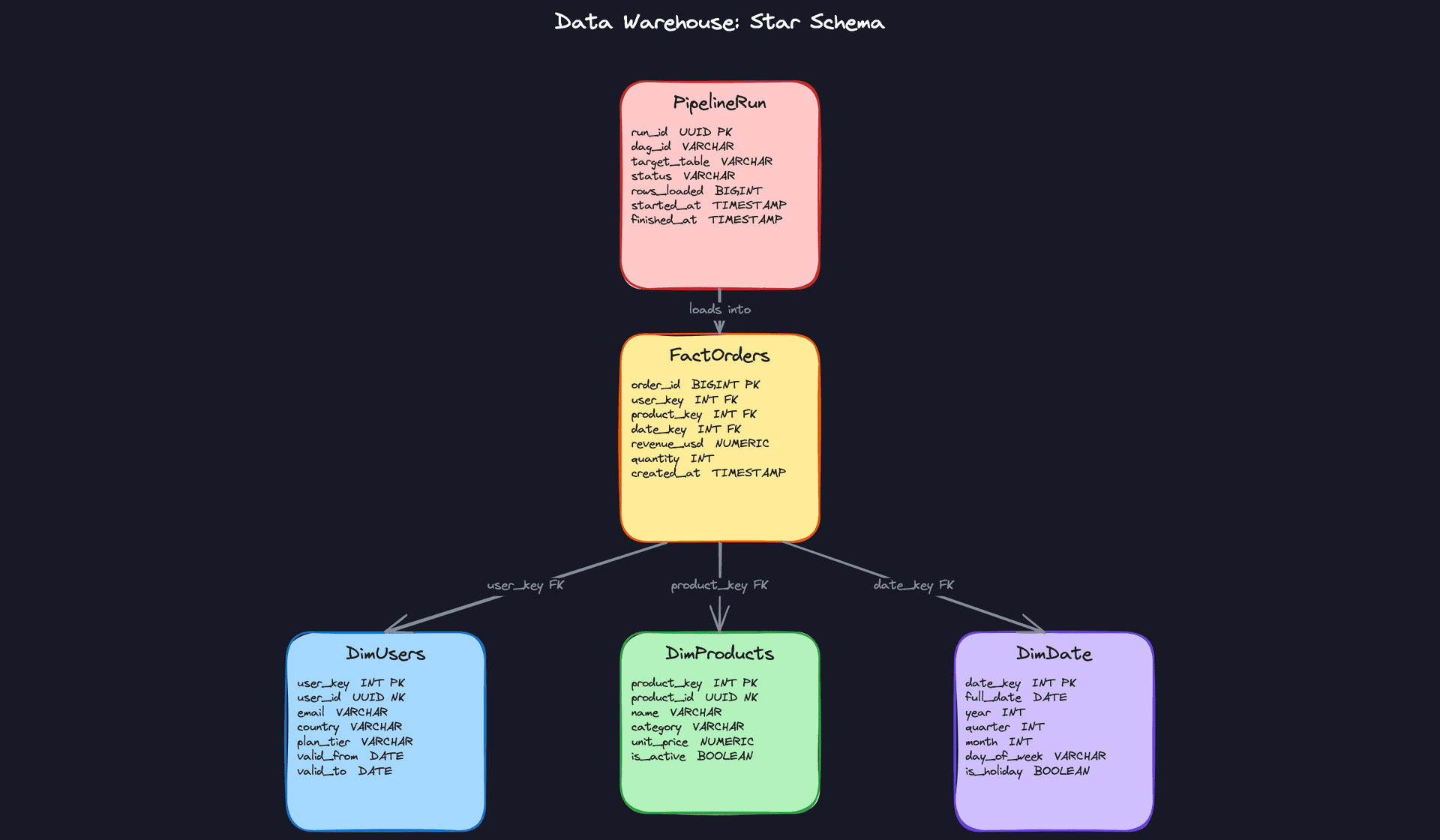
Interview tip: When you present the dimensional model, lead with the fact table and explain the grain first. "Each row in fact_orders represents one order" is the sentence that tells your interviewer you understand dimensional modeling. Candidates who skip the grain definition almost always get probed on it.
API Design
A data warehouse doesn't expose a traditional REST API to end users. The "API" here is the contract between pipeline stages and between the warehouse and its consumers. Your interviewer is really asking: how do external systems interact with this warehouse?
There are two interaction surfaces worth defining: the ingestion API (how data gets in) and the query/serving API (how data gets out).
// Register a new data source for ingestion
POST /sources
{
  "source_id": "stripe_payments",
  "type": "api_pull",           // "cdc", "api_pull", "kafka_topic"
  "connection_config": { ... },
  "schedule": "0 2 * * *",      // cron expression
  "target_raw_path": "s3://warehouse-raw/stripe/"
}
-> { "source_id": "stripe_payments", "status": "registered" }
// Trigger a manual backfill for a date range
POST /pipelines/{dag_id}/backfill
{
  "start_date": "2024-01-01",
  "end_date": "2024-01-31",
  "overwrite": true
}
-> { "run_id": "uuid", "status": "queued", "estimated_partitions": 31 }
// Get pipeline run status and quality metrics
GET /pipelines/{dag_id}/runs/{run_id}
-> {
  "run_id": "uuid",
  "status": "success",
  "rows_loaded": 1482930,
  "quality_checks": [
    { "check": "null_rate_revenue", "result": "pass", "value": 0.001 },
    { "check": "row_count_delta",   "result": "pass", "value": 0.04  }
  ],
  "finished_at": "2024-02-01T03:14:22Z"
}
// Query a curated mart (used by BI tools or the semantic layer)
GET /marts/{mart_name}/query
{
  "dimensions": ["country", "plan_tier"],
  "metrics":    ["revenue_usd", "order_count"],
  "filters":    { "date_range": { "start": "2024-01-01", "end": "2024-01-31" } }
}
-> { "rows": [ ... ], "query_id": "uuid", "bytes_scanned": 1240000 }
POST for writes and mutations (registering sources, triggering backfills), GET for reads (status checks, mart queries). The backfill endpoint is POST even though it's idempotent by intent, because it creates a new pipeline run record and has side effects on the warehouse state.
Common mistake: Candidates skip the backfill endpoint entirely. But backfills are one of the most operationally painful parts of running a warehouse, and mentioning it signals that you've actually dealt with production data pipelines. Even a brief mention earns you points.
The query endpoint on the serving layer is often abstracted away by a BI tool's SQL driver, but defining it explicitly shows you understand the separation between the warehouse storage engine and the API surface your consumers actually touch.
High-Level Design
A data warehouse isn't a single system. It's a chain of systems, each with a distinct contract: get the data, clean the data, model the data, serve the data. When that chain breaks anywhere, analysts lose trust and start building their own spreadsheets. Your job in the interview is to walk through each link deliberately, explaining not just what each layer does but why it's separated from the others.
1) Ingesting Data from Source Systems
The first problem is getting data out of systems that weren't designed to share it. You have three distinct source types, and each needs a different extraction strategy.
Core components: - Source systems (OLTP databases, SaaS APIs, application event streams) - Debezium (CDC agent reading the database write-ahead log) - Kafka (event streaming backbone) - Kafka Connect sink connector - Raw object store (S3 or GCS, storing Parquet or Avro files) - Airflow (scheduling batch API extracts)
Data flow:
- For OLTP databases (Postgres, MySQL), Debezium tails the write-ahead log and emits row-level change events (inserts, updates, deletes) to a Kafka topic. No polling, no load on the source.
- For SaaS APIs (Salesforce, Stripe, Zendesk), Airflow DAGs run on a schedule, call the API with a cursor or timestamp filter, and write the results as Parquet files directly to S3.
- For application event streams (clickstream, mobile events), the app tier publishes directly to Kafka topics. A Kafka Connect S3 sink connector flushes those topics to the raw object store on a configurable interval (typically every 5-15 minutes).
- Everything lands in S3/GCS under a consistent path structure:
s3://raw/{source}/{table}/year={y}/month={m}/day={d}/.
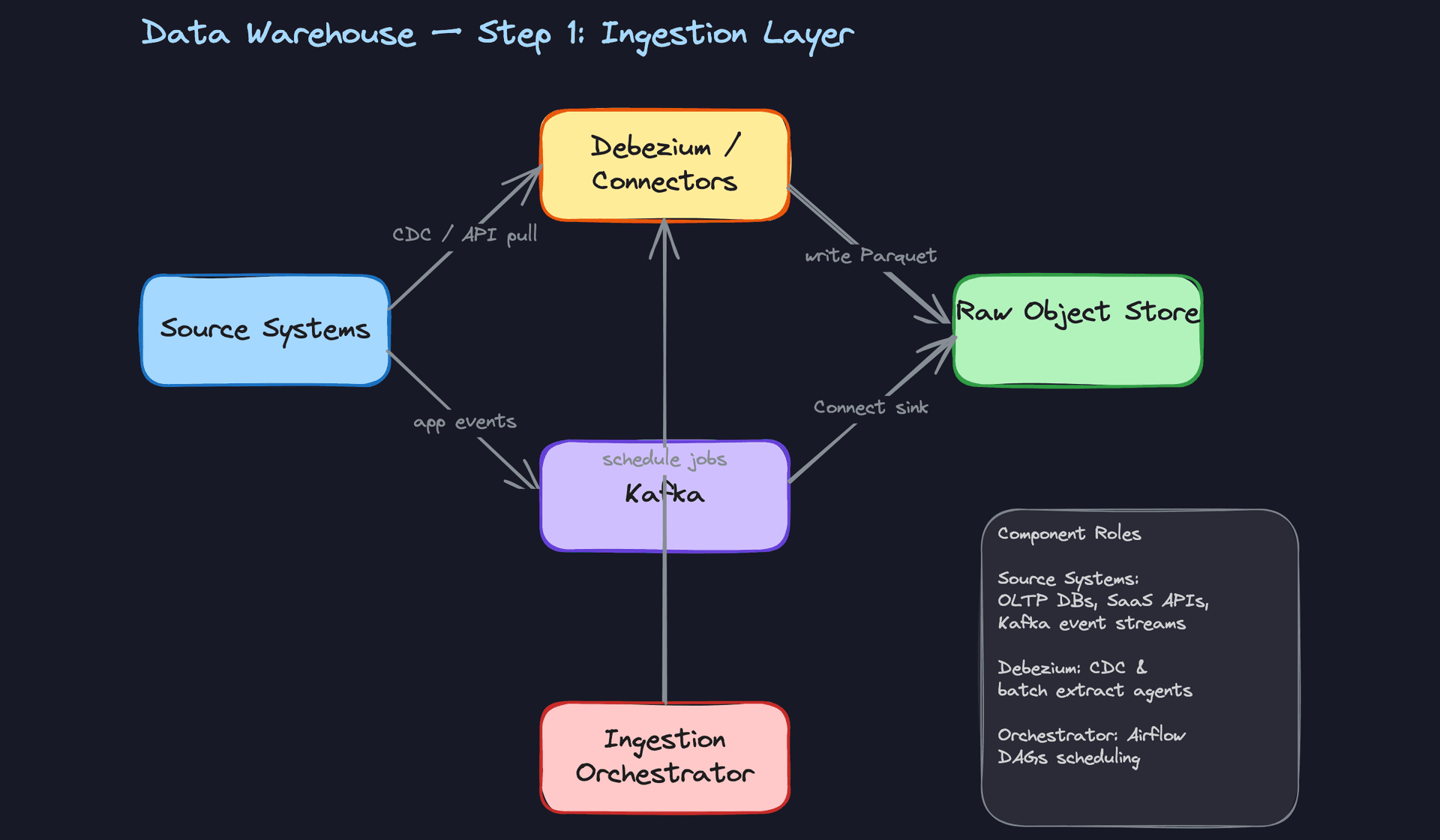
The raw object store is your source of truth. This is a critical design decision. You never transform in place. If a transformation job corrupts data or a schema changes unexpectedly, you can always replay from raw. Think of S3 as an immutable audit log of everything you ever received.
Key insight: CDC via Debezium is far more efficient than scheduled full-table dumps. A 100GB orders table might only have 50MB of changes per hour. But CDC requires the source database to have logical replication enabled, which is a conversation you need to have with the platform team early.
Common mistake: Candidates often propose polling the OLTP database directly from the warehouse load job. This creates read pressure on a production database and misses deletes entirely. CDC solves both problems.
The format choice matters too. Parquet is column-oriented and compresses well for analytical workloads. Avro is row-oriented and better for streaming (each message is self-contained). A common pattern: Kafka topics use Avro with a schema registry, and the S3 sink converts to Parquet on flush.
# Airflow task: incremental SaaS API extract
def extract_stripe_charges(**context):
    last_run = context["data_interval_start"].isoformat()
    charges = stripe.Charge.list(created={"gte": last_run}, limit=100)

    df = pd.DataFrame([c.to_dict() for c in charges.auto_paging_iter()])

    output_path = (
        f"s3://raw/stripe/charges/"
        f"year={context['ds'][:4]}/"
        f"month={context['ds'][5:7]}/"
        f"day={context['ds'][8:10]}/"
        f"charges_{context['run_id']}.parquet"
    )
    df.to_parquet(output_path, index=False)
The run_id in the filename is intentional. If this task retries, it writes a new file rather than overwriting, which keeps the raw layer append-only and makes deduplication a downstream concern.
2) Transforming Raw Data into Dimensional Models
Raw data is messy. Timestamps are strings. User IDs appear in three different formats. The same event gets delivered twice. The transformation layer exists to fix all of that before any analyst touches the data.
Core components: - Spark (or AWS Glue) for heavy pre-processing - Warehouse staging tables (Snowflake, BigQuery, or Redshift) - dbt for SQL-based transformations - Curated marts (fact and dimension tables)
Data flow:
- For large, complex sources (multi-TB event logs, wide JSON blobs), a Spark job reads raw Parquet from S3, applies type casting, flattens nested structures, and deduplicates on a natural key. The output lands in warehouse staging tables via a bulk COPY operation.
- For smaller, well-structured sources, raw files load directly into staging tables using the warehouse's native bulk load (Snowflake's
COPY INTO, BigQuery'sbq load). No Spark needed. - dbt takes over from staging. The first layer of dbt models (staging models) apply consistent naming conventions, cast types, and filter out test/internal records. These are thin wrappers, one per source table.
- The second layer of dbt models (mart models) joins staging tables together, builds the dimensional model, and materializes fact and dimension tables. This is where business logic lives.
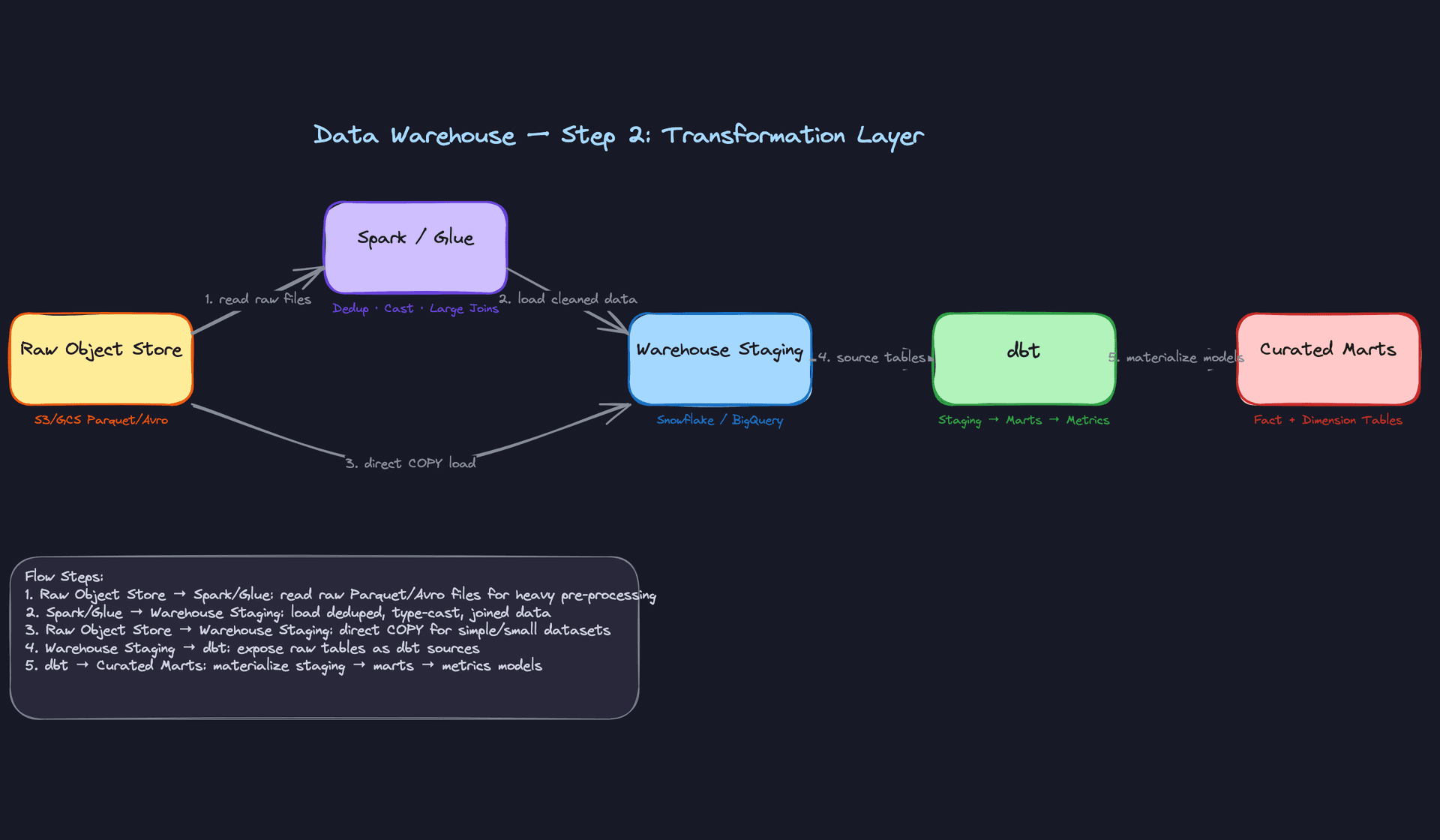
The separation between Spark and dbt is a common interview discussion point. Spark is expensive to operate but necessary when you need distributed compute for joins that won't fit in warehouse memory, or when you're processing raw files before they enter the warehouse at all. dbt runs entirely inside the warehouse engine, which means you pay for warehouse compute but get SQL simplicity and version-controlled transformations.
Interview tip: When the interviewer asks "why dbt?", the answer isn't "because it's popular." It's because dbt enforces a DAG of SQL transformations with built-in testing, documentation, and lineage. Every model is a SELECT statement. Every test is a SQL assertion. The whole transformation layer becomes auditable and reproducible.
Here's what a staging model looks like in practice:
-- models/staging/stg_orders.sql
WITH source AS (
    SELECT * FROM {{ source('raw', 'orders') }}
),

renamed AS (
    SELECT
        order_id::UUID                          AS order_id,
        user_id::UUID                           AS user_id,
        product_id::UUID                        AS product_id,
        amount_cents / 100.0                    AS revenue_usd,
        quantity::INT                           AS quantity,
        status::VARCHAR                         AS status,
        TO_TIMESTAMP(created_at_epoch)          AS created_at
    FROM source
    WHERE user_id IS NOT NULL          -- drop corrupted rows
      AND order_id NOT IN (
          SELECT order_id FROM {{ ref('stg_test_orders') }}
      )
)

SELECT * FROM renamed
And the mart model that builds the fact table:
-- models/marts/fact_orders.sql
SELECT
    o.order_id,
    u.user_key,
    p.product_key,
    d.date_key,
    o.revenue_usd,
    o.quantity,
    o.created_at
FROM {{ ref('stg_orders') }} o
JOIN {{ ref('dim_users') }}    u ON o.user_id = u.user_id
    AND o.created_at BETWEEN u.valid_from AND COALESCE(u.valid_to, '9999-12-31')
JOIN {{ ref('dim_products') }} p ON o.product_id = p.product_id
JOIN {{ ref('dim_date') }}     d ON o.created_at::DATE = d.full_date
The join to dim_users on the date range is the SCD Type 2 lookup. You're not just finding the user; you're finding the version of the user that existed when the order was placed. This is what makes historical analysis accurate.
3) Orchestrating the Pipeline End-to-End
Transformation logic is only half the problem. The other half is making sure things run in the right order, at the right time, and that failures don't silently corrupt downstream data.
Core components: - Airflow (DAG scheduler and executor) - dbt Cloud or dbt Core (triggered by Airflow) - Data quality check tasks (Great Expectations, dbt tests, or custom SQL assertions) - Alerting (PagerDuty, Slack webhooks)
Data flow:
- An Airflow DAG fires at the scheduled interval (say, 2 AM UTC for a nightly batch). The first task group runs all ingestion jobs in parallel: CDC flush confirmation, API extracts, event stream compaction.
- Once ingestion tasks complete, a sensor task confirms that expected file counts and sizes landed in S3. If the Stripe extract produced zero rows and yesterday it produced 50,000, something is wrong.
- dbt runs next, executing staging models first, then mart models in dependency order. dbt's built-in
dbt testruns after each model materializes, checking for nulls, uniqueness, and referential integrity. - If any test fails, the DAG marks that branch as failed. Downstream tasks that depend on the broken model are blocked. Analysts don't get stale data; they get no data and an alert.
- A final notification task posts a pipeline health summary to Slack: rows loaded per table, test pass/fail counts, total runtime.
Key insight: The default Airflow behavior on failure is to retry and then mark the task red. That's not enough. You need explicit downstream blocking so that a broken fact_orders model doesn't silently feed yesterday's numbers into a live executive dashboard.The DAG structure matters. A flat DAG where everything runs sequentially is safe but slow. A well-designed DAG parallelizes independent sources and only serializes at dependency boundaries.
# Simplified Airflow DAG structure
with DAG("warehouse_nightly", schedule_interval="0 2 * * *") as dag:

    ingest_group = TaskGroup("ingestion")
    extract_stripe  = PythonOperator(task_id="extract_stripe",  ...)
    extract_segment = PythonOperator(task_id="extract_segment", ...)
    confirm_cdc     = S3KeySensor(task_id="confirm_cdc_flush",  ...)

    validate_landing = PythonOperator(task_id="validate_row_counts", ...)

    dbt_run  = BashOperator(task_id="dbt_run",  bash_command="dbt run  --profiles-dir /opt/dbt")
    dbt_test = BashOperator(task_id="dbt_test", bash_command="dbt test --profiles-dir /opt/dbt")

    notify = SlackWebhookOperator(task_id="notify_success", ...)

    [extract_stripe, extract_segment, confirm_cdc] >> validate_landing
    validate_landing >> dbt_run >> dbt_test >> notify
Interviewers will often ask: "What happens if the pipeline fails at 3 AM and data is missing for yesterday?" The answer is that Airflow supports backfill runs. You fix the bug, trigger airflow dags backfill -s 2024-01-15 -e 2024-01-16 warehouse_nightly, and the idempotent pipeline re-runs cleanly for that date range without double-counting.
4) Serving Data to Analysts and BI Tools
Getting clean data into the warehouse is necessary but not sufficient. If every team defines "monthly revenue" differently in their own Looker dashboard, you have a political problem disguised as a technical one.
Core components: - Curated mart tables in Snowflake/BigQuery - Semantic layer (dbt Metrics, Looker LookML, or Cube.js) - BI tools (Looker, Tableau, Superset, Mode) - Role-based access control (warehouse-level grants)
Data flow:
- Analysts connect their BI tool directly to the warehouse via a SQL endpoint. Looker generates SQL against the mart tables; Tableau uses a live connection or extracts.
- The semantic layer sits between the marts and the BI tools. In Looker, LookML defines
measure: revenueonce. Every dashboard that uses revenue pulls from that definition. No more "finance says $4.2M, product says $3.9M." - dbt Metrics (or a standalone semantic layer like Cube.js) can expose metrics via an API, which means ML pipelines and notebooks can consume the same metric definitions without going through a BI tool.
- Access control is enforced at the warehouse layer. Analysts get read-only access to mart schemas. Raw and staging schemas are locked down to the pipeline service account. PII columns use column-level masking policies.
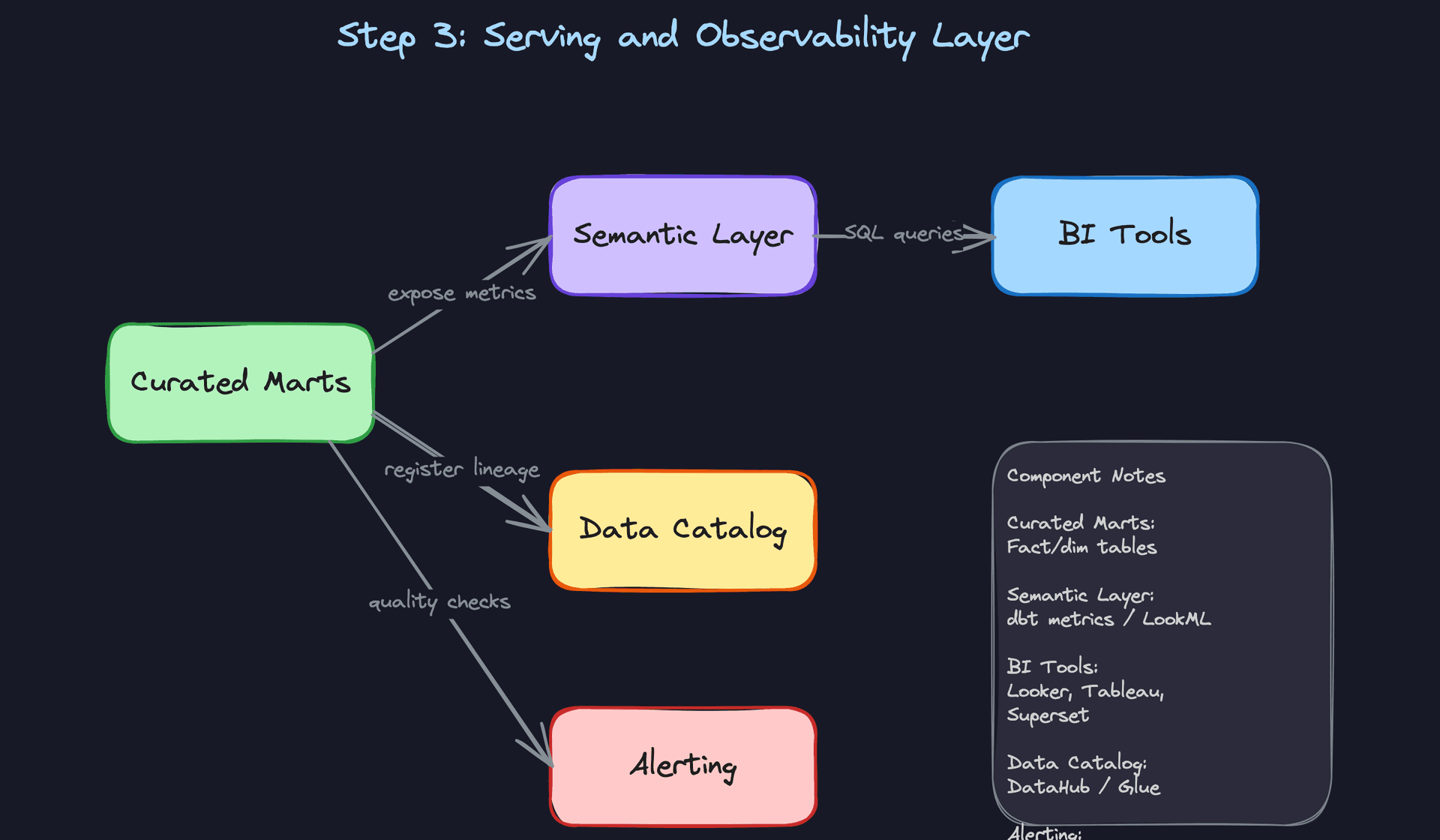
Common mistake: Candidates skip the semantic layer entirely and say "analysts just query the mart tables directly." That works at 10 analysts. At 100 analysts across 8 teams, you will have metric inconsistencies within six months. The semantic layer is how you prevent that.
The access control design is worth spelling out explicitly in your interview. In Snowflake, you'd create a role hierarchy:
-- Snowflake RBAC setup
CREATE ROLE analyst_read;
GRANT USAGE ON DATABASE warehouse TO ROLE analyst_read;
GRANT USAGE ON SCHEMA warehouse.marts TO ROLE analyst_read;
GRANT SELECT ON ALL TABLES IN SCHEMA warehouse.marts TO ROLE analyst_read;

-- PII masking: analysts see hashed email, data engineers see plaintext
CREATE MASKING POLICY email_mask AS (val STRING) RETURNS STRING ->
    CASE WHEN CURRENT_ROLE() IN ('data_engineer', 'admin')
         THEN val
         ELSE SHA2(val)
    END;

ALTER TABLE dim_users MODIFY COLUMN email SET MASKING POLICY email_mask;
This comes up at senior and staff levels. If you can sketch this out without being prompted, it signals you've actually operated a warehouse at scale.
5) Monitoring and Observability
A pipeline that runs without alerting is a pipeline you'll only notice is broken when an analyst files a ticket. Observability isn't an afterthought; it's what separates a warehouse people trust from one they work around.
Core components: - Pipeline run metadata table (logging every DAG execution) - Row count and null rate monitors (Great Expectations, dbt tests, Monte Carlo) - Schema change detection - SLA breach alerting
Every pipeline run should write a metadata record:
CREATE TABLE pipeline_runs (
    run_id          UUID PRIMARY KEY DEFAULT gen_random_uuid(),
    dag_id          VARCHAR(255) NOT NULL,
    target_table    VARCHAR(255) NOT NULL,
    status          VARCHAR(50) NOT NULL,      -- 'success', 'failed', 'skipped'
    rows_loaded     BIGINT,
    rows_expected   BIGINT,                    -- from yesterday's run or SLA config
    started_at      TIMESTAMP NOT NULL,
    finished_at     TIMESTAMP,
    error_message   TEXT
);
With this table, you can build a simple anomaly check: if rows_loaded for fact_orders today is less than 50% of the 7-day average, fire an alert before any analyst sees the data. This catches silent failures that don't throw exceptions (the API returned 200 but with an empty payload, for instance).
Schema change detection is equally important. If a source team renames a column in their OLTP database, your Debezium connector will start emitting events without that field. Without detection, your staging model silently starts producing NULLs. With detection, you get an alert the moment the schema fingerprint changes.
Interview tip: When the interviewer asks "how do you know your pipeline is healthy?", don't just say "we have monitoring." Walk through the specific signals: row counts, null rates, schema drift, SLA breach time. Concrete answers here separate senior candidates from mid-level ones.
Putting It All Together
The full architecture flows left to right through five distinct layers, each with a clear ownership boundary.
Source systems feed into the ingestion layer, where CDC (Debezium + Kafka) handles real-time database changes, scheduled Airflow tasks handle API extracts, and Kafka Connect handles application event streams. Everything lands in the raw object store as immutable Parquet or Avro files.
The transformation layer picks up from there. Spark handles heavy pre-processing for large or complex sources; everything else loads directly into warehouse staging tables via bulk COPY. dbt then runs a two-layer transformation: thin staging models that standardize and clean, followed by mart models that build the dimensional schema.
The orchestration layer (Airflow) sequences all of this, enforces dependencies, runs data quality checks after each stage, and blocks downstream consumers when something breaks.
The serving layer exposes curated marts to BI tools through a semantic layer that enforces consistent metric definitions. RBAC and column masking handle access control and PII.
The observability layer monitors every run, detects anomalies in row counts and schema shape, and fires alerts before analysts encounter bad data.
Each layer is independently deployable and replaceable. You can swap Snowflake for BigQuery, or Airflow for Dagster, without touching the layers above or below. That modularity is the point.
Deep Dives
The questions below are where interviewers separate candidates who've read about data warehouses from candidates who've actually run them in production. Expect follow-ups. Expect pushback. The interviewer wants to see how you reason under pressure, not just whether you know the right answer.
"How do we handle late-arriving data without reprocessing the entire partition?"
Late data is everywhere. A mobile client with a flaky connection sends an event 36 hours after it occurred. A third-party payment provider batches their webhook delivery. Your pipeline ran at midnight but the source system's ETL job finished at 12:03 AM. If your warehouse can't handle this gracefully, your dashboards will show incorrect numbers until someone notices and manually reruns a job.
Bad Solution: Full Daily Reload
The naive fix is to reload the entire partition every night. Just truncate yesterday's data and re-insert everything from the source. Simple to implement, easy to reason about.
The problem is cost and fragility. At 100GB/day that's manageable. At 10TB/day, you're scanning and rewriting terabytes of data every single night to fix a handful of late records. Worse, if the pipeline fails halfway through, you've deleted the old data and haven't finished writing the new data. Your fact table now has a hole in it.
Warning: Candidates who propose "just reprocess the partition" without acknowledging cost or atomicity will get pushed on it immediately. The interviewer is waiting for you to say this so they can ask "what happens when that job fails at 3 AM?"
Good Solution: Watermark-Based Incremental Load
Instead of reprocessing everything, track a watermark: the maximum event_timestamp your pipeline has successfully processed. On each run, query only records where event_timestamp > last_watermark. This dramatically reduces the data scanned.
The catch is that a strict watermark misses late arrivals by definition. If your watermark is 2024-01-15 00:00:00 and a record arrives with event_timestamp = 2024-01-14 22:00:00, it never gets picked up.
The fix is a lookback window. Instead of reading strictly from the watermark, you read from watermark - N days. Three days is a common default; tune it based on your SLA for late data and the cost of scanning extra partitions.
# dbt incremental model config
{{
    config(
        materialized='incremental',
        incremental_strategy='merge',
        unique_key='order_id',
        partition_by={'field': 'event_date', 'data_type': 'date'},
    )
}}

SELECT
    order_id,
    user_id,
    event_date,
    revenue_usd,
    _ingested_at
FROM {{ source('raw', 'orders') }}

{% if is_incremental() %}
WHERE event_date >= DATE_SUB(CURRENT_DATE(), INTERVAL 3 DAY)
{% endif %}
This is solid. You're only scanning three days of partitions, and you're merging on order_id so late arrivals update the existing row rather than creating duplicates.
Great Solution: Incremental MERGE with Explicit Deduplication Key
The watermark approach gets you most of the way there, but the MERGE statement is where candidates lose points. You need to be precise about what "deduplication" means for your fact table.
For immutable events (a click, a page view), the dedup key is the event's natural ID. For mutable records (an order that can be updated, refunded, or cancelled), you need to merge on the business key AND keep the most recent version based on a updated_at or _cdc_timestamp column.
-- Snowflake MERGE for late-arriving order updates
MERGE INTO fact_orders AS target
USING (
    SELECT
        order_id,
        user_key,
        product_key,
        date_key,
        revenue_usd,
        status,
        event_date,
        updated_at,
        -- deduplicate within the staging batch itself
        ROW_NUMBER() OVER (
            PARTITION BY order_id
            ORDER BY updated_at DESC
        ) AS rn
    FROM staging_orders
    WHERE event_date >= DATEADD(day, -3, CURRENT_DATE())
) AS source
ON target.order_id = source.order_id
   AND source.rn = 1
WHEN MATCHED AND source.updated_at > target.updated_at THEN
    UPDATE SET
        revenue_usd = source.revenue_usd,
        status      = source.status,
        updated_at  = source.updated_at
WHEN NOT MATCHED THEN
    INSERT (order_id, user_key, product_key, date_key, revenue_usd, status, event_date, updated_at)
    VALUES (source.order_id, source.user_key, source.product_key, source.date_key,
            source.revenue_usd, source.status, source.event_date, source.updated_at);
The ROW_NUMBER() inside the staging CTE is critical. If the same order appears twice in your three-day lookback window (once from the original insert, once from an update), you want only the latest version going into the MERGE. Without this, the MERGE itself can throw a non-deterministic update error.
Tip: Mentioning the ROW_NUMBER() dedup inside the staging CTE is the detail that signals you've actually debugged a MERGE statement in production. Most candidates forget it until the interviewer asks "what if the same order_id appears twice in your source?"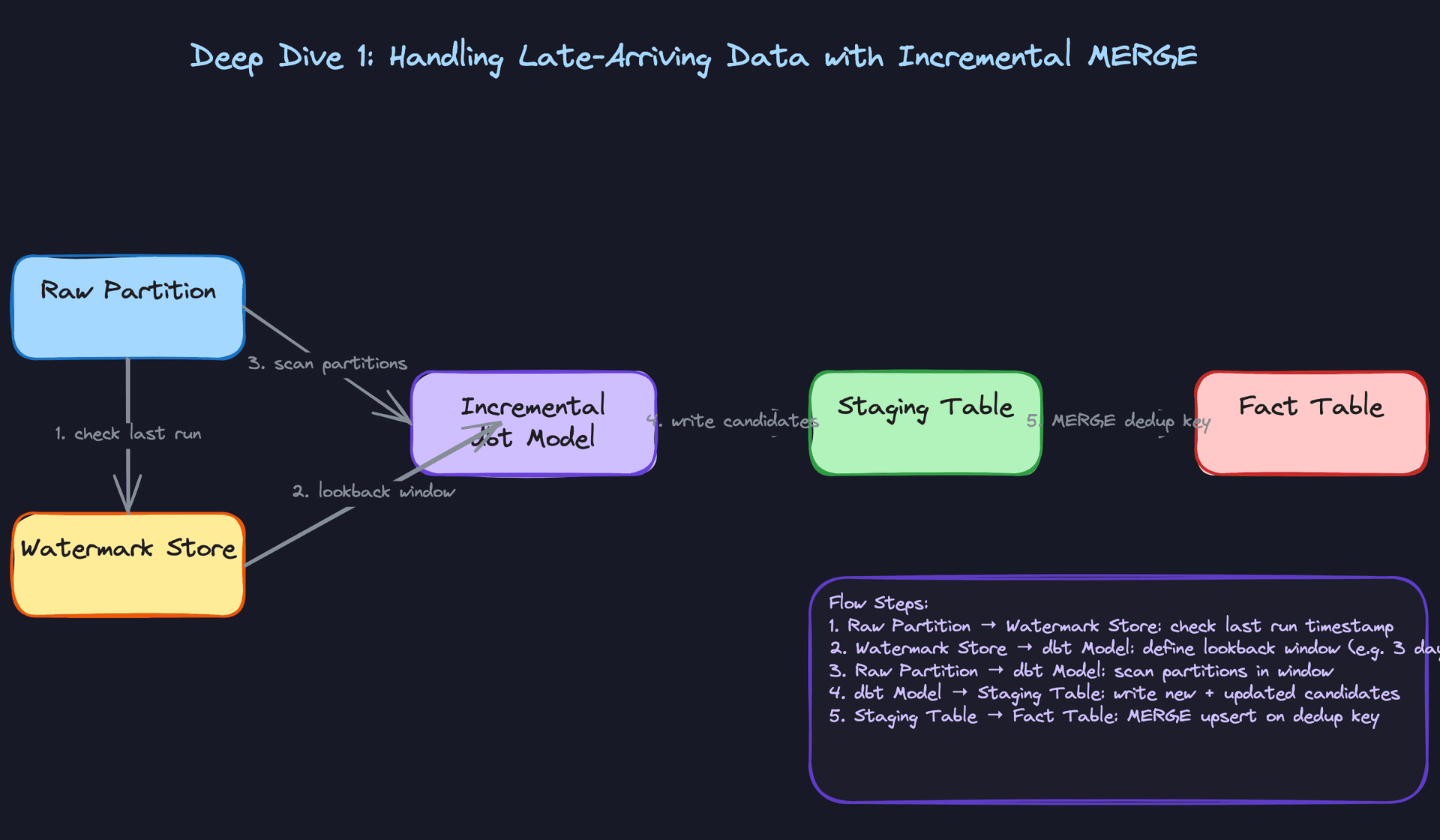
"How do we evolve schemas without breaking downstream consumers?"
Schema changes are inevitable. A product team adds a new field to their events. An engineer renames a column to be more descriptive. A data type changes from INT to BIGINT. Any of these can silently corrupt downstream pipelines or cause them to fail outright, and the failure often surfaces hours later when an analyst notices their dashboard is broken.
Bad Solution: Coordinate Changes Manually
The most common approach at smaller companies: send a Slack message to the data team, update the schema, hope everyone saw the message. Maybe write a migration script.
This breaks down immediately at scale. You have dozens of source systems, hundreds of dbt models, and multiple BI tools all depending on the same tables. Manual coordination doesn't work when you have 50 engineers shipping schema changes independently. And it provides zero enforcement: a producer can ship a breaking change without anyone noticing until the pipeline fails.
Warning: Saying "we'd communicate schema changes through documentation" in an interview at a company like Airbnb or Uber will end the conversation quickly. The interviewer wants a technical enforcement mechanism, not a process.
Good Solution: Avro Schema Registry with Compatibility Rules
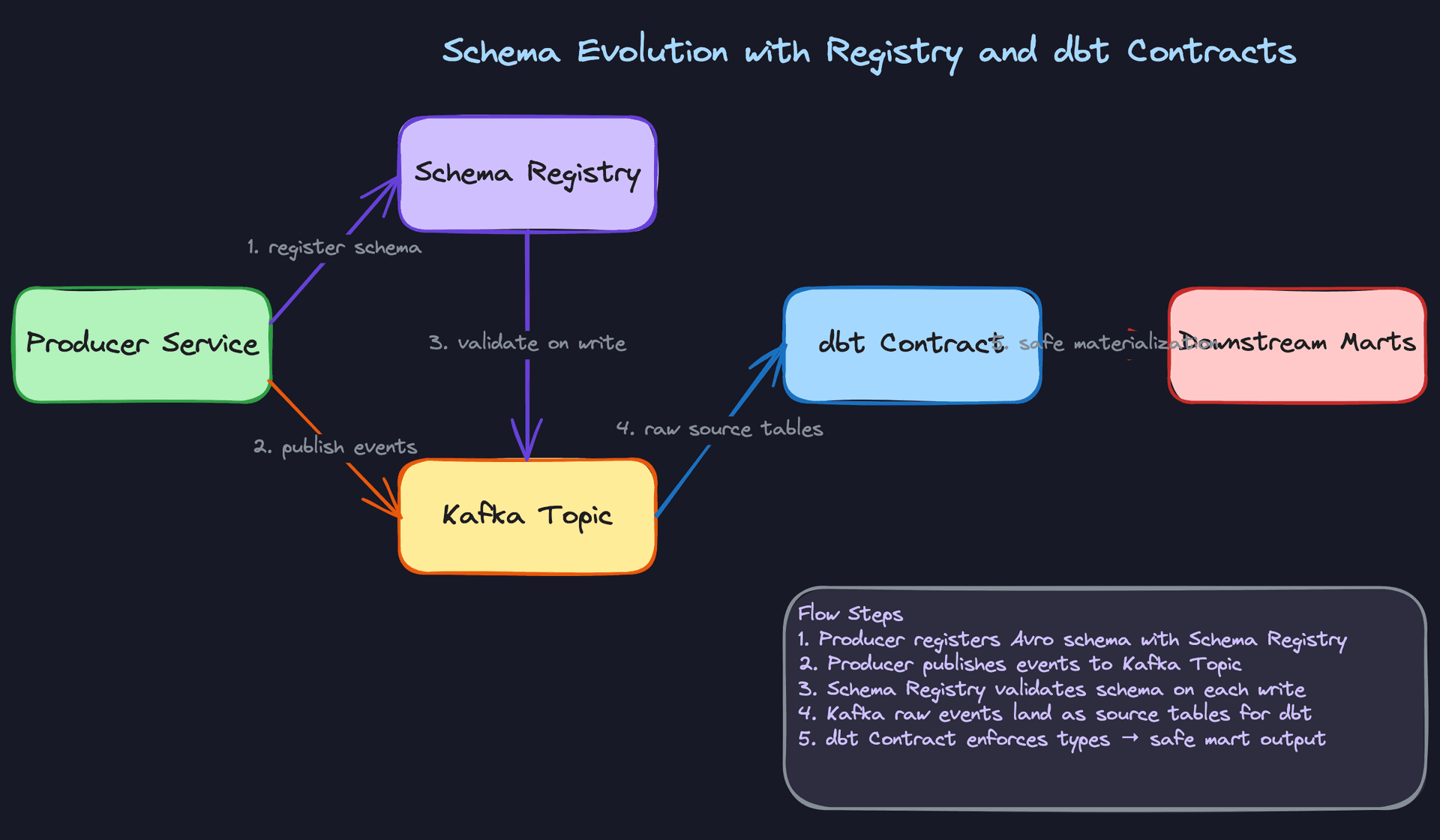
For event streams flowing through Kafka, the Confluent Schema Registry gives you enforcement at the producer level. Every event is serialized with an Avro schema, and the registry validates each new schema version against the previous one before allowing it to be registered.
You configure a compatibility mode per topic. BACKWARD compatibility means new consumers can read old messages. FORWARD means old consumers can read new messages. FULL gives you both.
// Safe: adding a nullable field with a default is backward compatible
{
  "type": "record",
  "name": "OrderEvent",
  "fields": [
    {"name": "order_id",    "type": "string"},
    {"name": "user_id",     "type": "string"},
    {"name": "revenue_usd", "type": "double"},
    {"name": "coupon_code", "type": ["null", "string"], "default": null}
  ]
}
Adding coupon_code as a nullable field with a null default is safe. Old consumers that don't know about coupon_code will just ignore it. Renaming revenue_usd to revenue is not safe. The registry will reject that registration under backward compatibility mode.
The rule of thumb: add nullable columns freely, never rename or remove columns without a deprecation period.
Great Solution: Schema Registry Plus dbt Contracts at the Warehouse Layer
The schema registry protects the Kafka layer, but what about batch sources, CSV uploads, or direct database extracts? You need a second enforcement layer inside the warehouse itself.
dbt contracts let you declare the expected column names, types, and nullability constraints on any model. If a source table changes in a way that violates the contract, the dbt run fails before the broken data propagates to downstream marts.
# dbt_project/models/staging/stg_orders.yml
models:
  - name: stg_orders
    config:
      contract:
        enforced: true
    columns:
      - name: order_id
        data_type: varchar
        constraints:
          - type: not_null
      - name: revenue_usd
        data_type: numeric
        constraints:
          - type: not_null
      - name: event_date
        data_type: date
        constraints:
          - type: not_null
If someone upstream changes revenue_usd to a varchar (it happens), the contract check fails at the staging layer. The production mart never sees the bad data. Pair this with a data catalog like DataHub to track lineage: when a contract fails, you can immediately see which downstream models and dashboards are affected.
The combination of schema registry (stream layer) plus dbt contracts (warehouse layer) gives you defense in depth. Neither layer alone is sufficient.
Tip: Walking through both layers, and explaining why you need both, is a strong senior signal. The schema registry only covers Kafka sources. dbt contracts only cover what's already in the warehouse. Together they cover your full surface area.
"How do we ensure pipeline retries don't double-count data?"
Airflow retries a failed task. A Spark job gets resubmitted after a cluster failure. An engineer manually reruns a DAG for a specific date. In all three cases, the same data runs through your pipeline twice. If your pipeline isn't idempotent, you now have duplicate rows in your fact table and inflated metrics in every dashboard that reads from it.
Bad Solution: Append-Only Inserts
The simplest pipeline just inserts new rows. Every run appends whatever it processed. Retries append again. You now have two copies of every row from the failed run.
Some teams try to fix this by checking for existence before inserting: INSERT INTO fact_orders SELECT ... WHERE order_id NOT IN (SELECT order_id FROM fact_orders). Don't do this. At scale, that NOT IN subquery is a full table scan. It's slow, expensive, and still has race conditions if two pipeline runs execute concurrently.
Warning: The NOT IN anti-pattern comes up surprisingly often. If you mention it, frame it as something you've seen fail, not something you'd propose.Good Solution: MERGE with a Deduplication Key
As covered in the late-arriving data deep dive, a MERGE statement on a natural dedup key (like order_id) makes your pipeline idempotent by construction. Running it twice produces the same result as running it once, because the second run matches on existing keys and updates rather than inserting duplicates.
This works well for fact tables with a clear natural key. The challenge is fact tables that don't have one. Clickstream events, for example, might have no unique identifier. You'd have to construct a synthetic key from (user_id, session_id, event_type, event_timestamp) and hope that combination is actually unique.
Great Solution: Write-Audit-Publish (WAP)
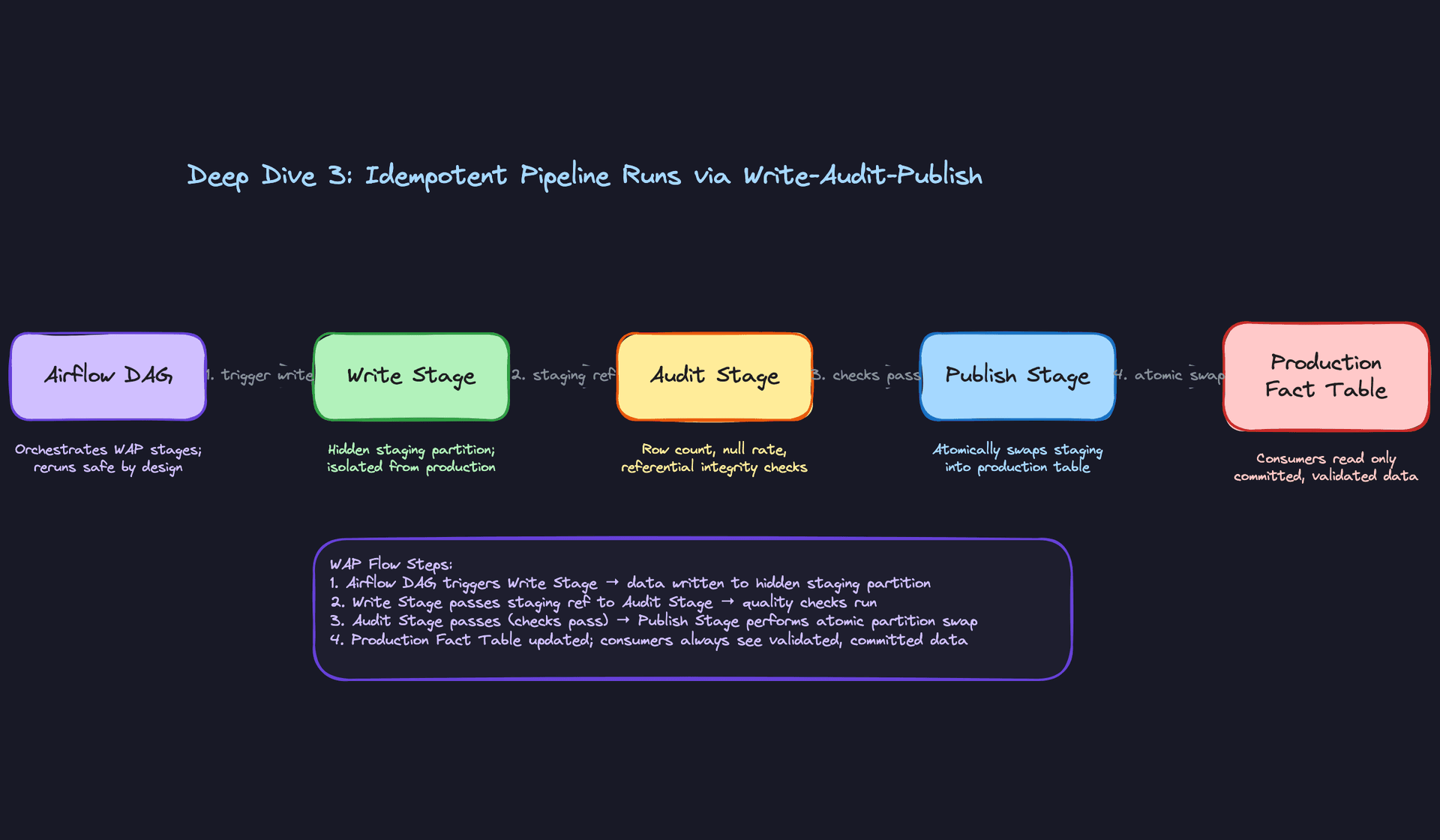
WAP is the pattern that makes idempotency a property of the pipeline architecture rather than something you bolt onto individual SQL statements.
The idea is simple: never write directly to the production table. Instead, write to a hidden staging partition, run quality checks against that staging partition, and only if the checks pass do you atomically swap the staging partition into production.
# Airflow DAG sketch for WAP pattern
from airflow.decorators import dag, task
from datetime import datetime

@dag(schedule_interval='@daily', start_date=datetime(2024, 1, 1))
def orders_pipeline():

    @task
    def write_to_staging(ds: str):
        # Write transformed data to a staging partition, NOT production
        spark.sql(f"""
            INSERT OVERWRITE staging_fact_orders
            PARTITION (event_date = '{ds}')
            SELECT * FROM transformed_orders
            WHERE event_date = '{ds}'
        """)
        return ds

    @task
    def audit(ds: str):
        result = spark.sql(f"""
            SELECT
                COUNT(*) AS row_count,
                SUM(CASE WHEN order_id IS NULL THEN 1 ELSE 0 END) AS null_keys,
                SUM(CASE WHEN revenue_usd < 0 THEN 1 ELSE 0 END) AS negative_revenue
            FROM staging_fact_orders
            WHERE event_date = '{ds}'
        """).collect()[0]

        assert result.null_keys == 0, "Null primary keys detected"
        assert result.negative_revenue == 0, "Negative revenue detected"
        assert result.row_count > 1000, f"Suspiciously low row count: {result.row_count}"
        return ds

    @task
    def publish(ds: str):
        # Atomic partition swap: staging becomes production
        spark.sql(f"""
            ALTER TABLE fact_orders
            EXCHANGE PARTITION (event_date = '{ds}')
            WITH TABLE staging_fact_orders
        """)

    ds = write_to_staging()
    ds = audit(ds)
    publish(ds)

orders_pipeline()
The key property here is that INSERT OVERWRITE on a specific partition is idempotent. You can run it ten times and the staging partition will always contain exactly the data from the most recent run. The audit step then validates that data before it ever touches production. If the audit fails, the production table is untouched.
Consumers always read from the production table, which only ever contains committed, validated data. There's no window where a partial write is visible.
Tip: The WAP pattern is what separates engineers who've designed pipelines from engineers who've operated them. Mentioning atomic partition swaps, and explaining that consumers never see intermediate state, is a strong signal at the senior and staff level.
"How do we partition and cluster fact tables for query performance at scale?"
A fact table with 5 billion rows and no partitioning is a money pit. Every query scans the entire table. At BigQuery's on-demand pricing, a single analyst running a week's worth of ad-hoc queries can cost more than a monthly salary.
Bad Solution: No Partitioning
An unpartitioned table forces the query engine to scan every row on every query. Even with columnar storage and predicate pushdown, you're still reading far more data than necessary. At 1TB+ table sizes, this becomes both slow and expensive.
Some teams try to compensate with materialized views or pre-aggregated summary tables. That helps for known query patterns but does nothing for ad-hoc analysis, which is exactly what analysts need the warehouse for.
Good Solution: Date Partitioning on the Fact Table
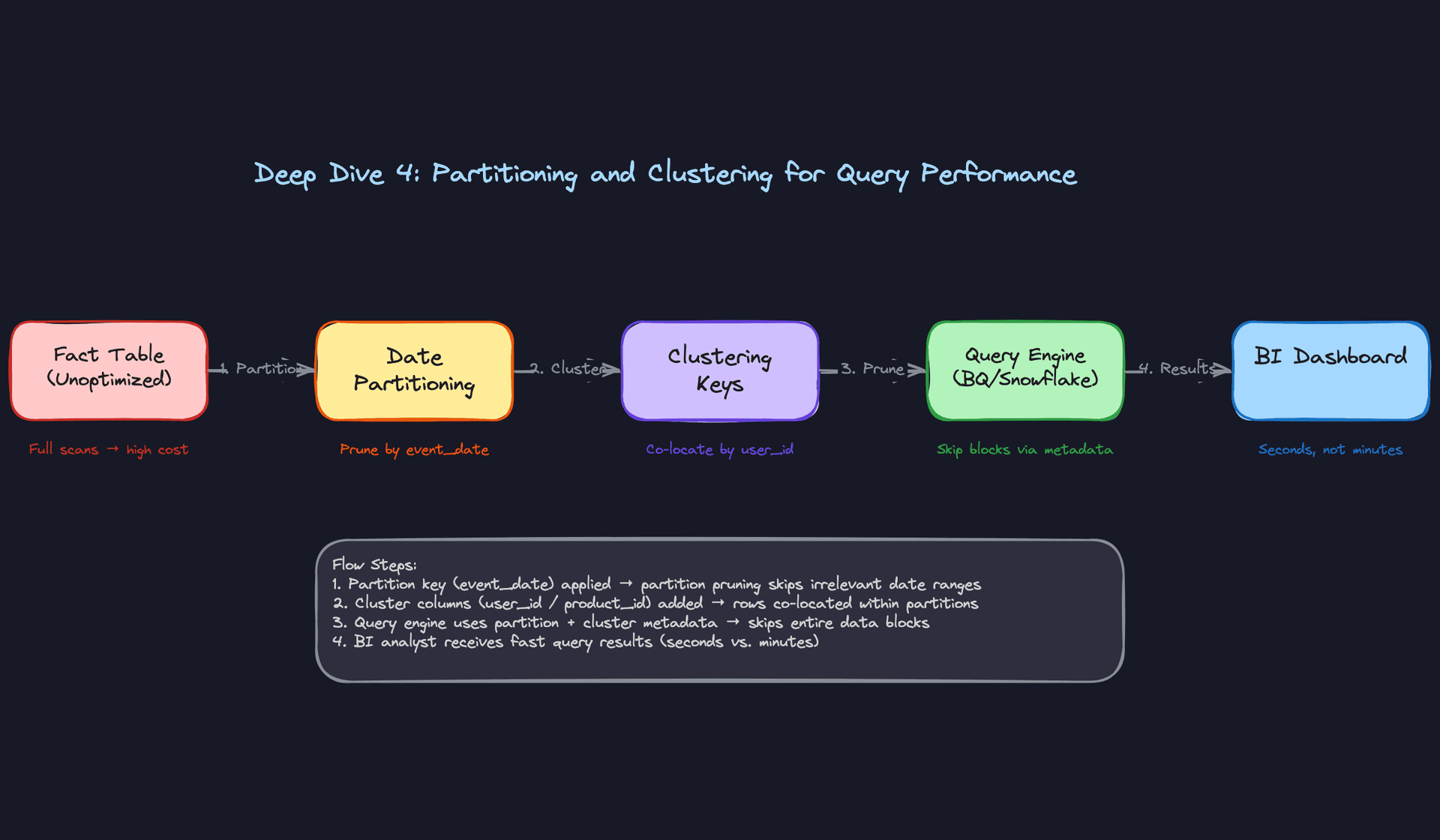
Partition your fact table on event_date. Almost every analytical query filters by date range, so partition pruning kicks in immediately. A query for "last 7 days" scans 7 partitions instead of the entire table.
-- BigQuery: create a date-partitioned fact table
CREATE TABLE `project.dataset.fact_orders`
(
    order_id     STRING    NOT NULL,
    user_key     INT64     NOT NULL,
    product_key  INT64     NOT NULL,
    revenue_usd  NUMERIC,
    status       STRING,
    event_date   DATE      NOT NULL,
    created_at   TIMESTAMP NOT NULL
)
PARTITION BY event_date
OPTIONS (
    partition_expiration_days = 1095  -- 3 year retention
);
This alone can reduce query costs by 90% for typical BI workloads. The interviewer will accept this answer at the mid-level. For senior, they'll push further.
Great Solution: Date Partitioning Plus Clustering Keys
Partitioning handles the time dimension. Clustering handles the filter columns within a partition. If your analysts frequently filter by user_id, product_category, or status, clustering on those columns tells the query engine to co-locate rows with the same values in adjacent storage blocks. The engine can then skip entire blocks that don't match the filter.
-- Snowflake: partition + cluster on a large fact table
CREATE TABLE fact_orders (
    order_id     VARCHAR    NOT NULL,
    user_key     INTEGER    NOT NULL,
    product_key  INTEGER    NOT NULL,
    revenue_usd  NUMERIC(12,2),
    status       VARCHAR(20),
    event_date   DATE       NOT NULL,
    created_at   TIMESTAMP  NOT NULL
)
CLUSTER BY (event_date, status);
-- Snowflake auto-clustering maintains this over time as data is inserted
One important nuance for BigQuery: avoid over-partitioning. BigQuery has a 4,000 partition limit per table, and each partition has metadata overhead. If you partition by hour on a high-volume table, you'll hit that limit in less than six months. Partition by day; cluster by hour if sub-day granularity matters for query performance.
The general rule: partition on the column used in WHERE clauses for range scans (almost always date). Cluster on the columns used in equality filters and GROUP BY clauses.
Tip: Bringing up the BigQuery partition limit unprompted shows you've thought about operational constraints, not just the happy path. Interviewers at companies running BigQuery at scale will notice.
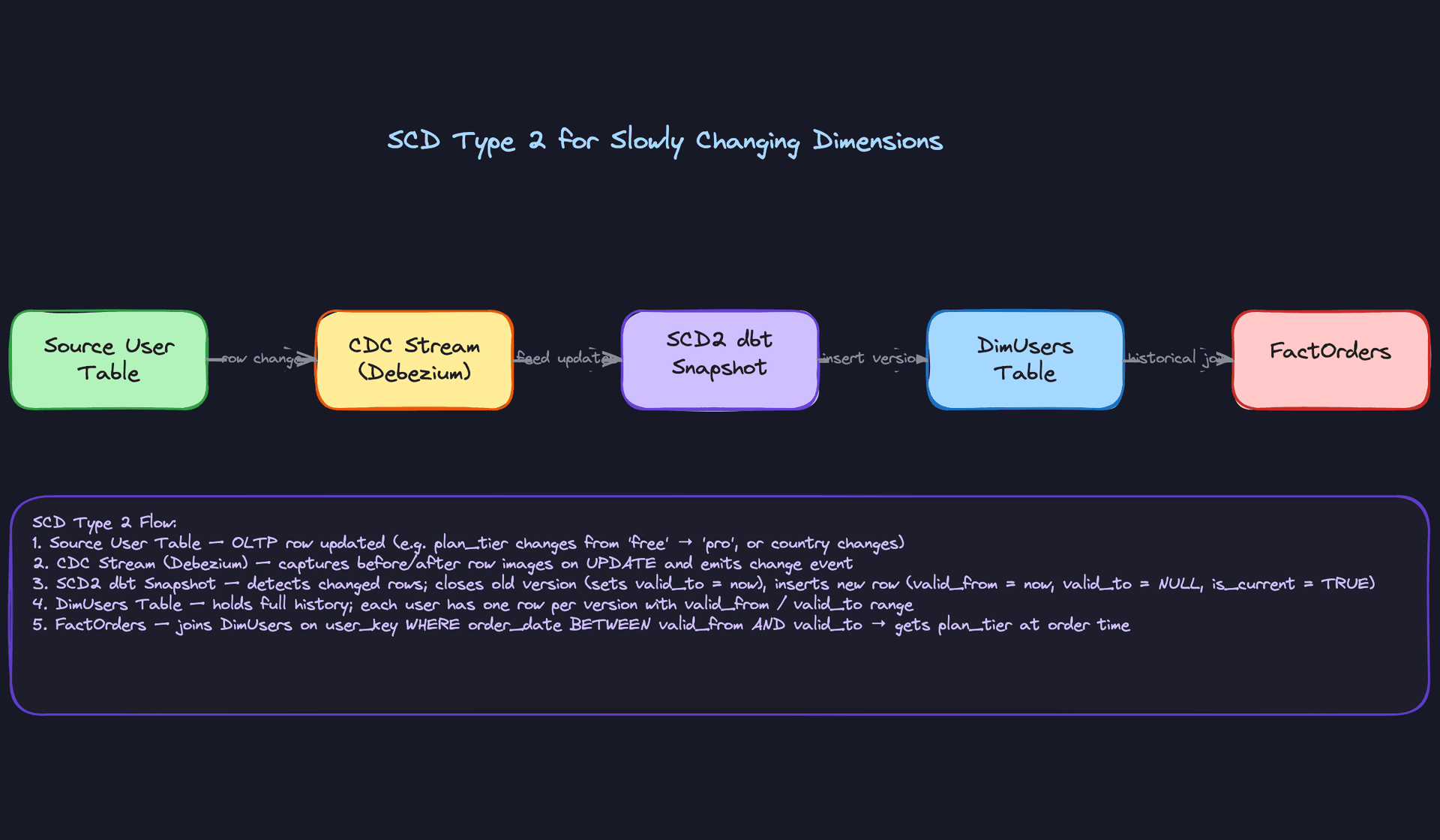
"How do we preserve historical accuracy when user attributes change over time?"
A user upgrades from a free plan to a paid plan on January 15th. You want to answer the question: "What was this user's plan tier when they placed their order on January 10th?" If your dimension table only stores the current plan tier, you've lost that information forever. Every historical fact join will show "paid" even for orders placed before the upgrade.
Bad Solution: Overwrite the Dimension Row
The simplest approach: when a user's attributes change, just update the row in dim_users. Fast, simple, and completely destroys your ability to do historical analysis.
This is called SCD Type 1. It's appropriate for correcting data errors (fixing a misspelled name) but not for tracking legitimate attribute changes over time. Using it for plan tier or country means your revenue-by-plan-tier report will be wrong for any historical period.
Warning: Candidates sometimes propose SCD Type 1 and then try to recover by saying "we'd store the plan_tier on the fact table directly." That works for a single attribute but doesn't scale to the full set of user dimensions, and it denormalizes your model in ways that create maintenance problems later.
Good Solution: SCD Type 2 with valid_from and valid_to
SCD Type 2 keeps every version of a dimension row. When a user's plan tier changes, you close the current row by setting valid_to to the change date and insert a new row with valid_from set to that same date.
CREATE TABLE dim_users (
    user_key    INTEGER     PRIMARY KEY,  -- surrogate key
    user_id     UUID        NOT NULL,     -- natural key from source
    email       VARCHAR(255) NOT NULL,
    country     VARCHAR(50),
    plan_tier   VARCHAR(20) NOT NULL,
    valid_from  DATE        NOT NULL,
    valid_to    DATE,                     -- NULL means current record
    is_current  BOOLEAN     NOT NULL DEFAULT true,
    created_at  TIMESTAMP   NOT NULL DEFAULT now()
);

CREATE INDEX idx_dim_users_natural ON dim_users(user_id, valid_from, valid_to);
The fact table stores the surrogate user_key, not the natural user_id. When an order is placed, you look up the user_key for the user's active record at that point in time. The join preserves the plan tier as it existed when the order was placed.
-- Correct historical join: get plan_tier at time of order
SELECT
    o.order_id,
    o.revenue_usd,
    u.plan_tier,
    u.country
FROM fact_orders o
JOIN dim_users u
    ON o.user_key = u.user_key;
-- user_key already encodes the correct historical version
Great Solution: dbt Snapshots to Automate SCD Type 2
Implementing SCD Type 2 manually in SQL is error-prone. dbt snapshots handle the valid_from/valid_to bookkeeping automatically. You define the snapshot config once, and dbt handles detecting changes, closing old records, and inserting new ones on every run.
# snapshots/snap_users.sql
{% snapshot snap_users %}
{{
    config(
        target_schema='snapshots',
        unique_key='user_id',
        strategy='check',
        check_cols=['plan_tier', 'country', 'email'],
    )
}}

SELECT
    user_id,
    email,
    country,
    plan_tier,
    updated_at
FROM {{ source('oltp', 'users') }}

{% endsnapshot %}
dbt adds dbt_scd_id, dbt_updated_at, dbt_valid_from, and dbt_valid_to columns automatically. Your downstream dim_users model then selects from this snapshot, mapping dbt_valid_from to valid_from and so on.
The CDC piece matters here too. If you're sourcing from Debezium, you get before/after row images on every UPDATE. Feed those into the snapshot and you capture every change, even if two changes happen within the same dbt run interval.
Tip: Knowing that dbt snapshots use acheckstrategy (compare specific columns) versus atimestampstrategy (compareupdated_at) and when to use each is a detail that separates candidates who've used dbt in anger from candidates who've just read the docs. Usetimestampwhen the source has a reliableupdated_atcolumn. Usecheckwhen it doesn't.
What is Expected at Each Level
Interviewers calibrate their expectations based on your level, but one question trips up candidates at every level: "What happens when data arrives late?" If your answer is "reprocess the partition," you've already lost points. The best answers name a lookback window (say, 3 days), explain why you chose it, and describe the MERGE deduplication key that makes retries safe.
Mid-Level
- Correctly describe the three-layer architecture: raw landing zone, staging/curated layer, and serving marts. You should be able to explain why each layer exists, not just name them.
- Articulate why a star schema outperforms a normalized schema for analytical workloads. The short answer: fewer joins, better query performance, and BI tools love it. Know it well enough to say it without hesitating.
- Explain what dbt does and why incremental models exist. "It runs SQL transformations" is not enough. You should be able to say what problem incremental models solve (cost and runtime at scale) and what the tradeoff is (complexity of deduplication logic).
- Identify the main ingestion patterns: CDC via Debezium for OLTP sources, Kafka Connect for event streams, and scheduled API pulls for SaaS tools. You don't need to design all three in depth, but you should know which pattern fits which source.
Senior
- Drive the freshness vs. cost conversation without being asked. The interviewer shouldn't have to prompt you. Near-real-time streaming costs significantly more than nightly batch; you should frame that trade-off and ask the business question that resolves it.
- Propose a concrete idempotency strategy. "Write-audit-publish with a staging table swap" is the answer interviewers want to hear, along with why it matters: retries from Airflow should never double-count rows in production.
- Explain SCD Type 2 end to end. That means
valid_from/valid_tocolumns, how a dbt snapshot materializes a new row on change, and howFactOrdersjoins toDimUsersonuser_keyto get the plan tier that was active at order time, not today's plan tier. - Identify partitioning and clustering keys from the query patterns, not from intuition. If analysts always filter by
event_dateand group byproduct_id, your answer should be: partition onevent_date, cluster onproduct_id. Explain the cost implication of over-partitioning in BigQuery specifically.
Staff+
- Design the schema evolution governance layer. That means a Confluent Schema Registry enforcing backward compatibility on Avro schemas, dbt contracts locking column types and nullability on curated models, and a clear policy distinguishing additive changes (safe: add a nullable column) from breaking changes (unsafe: rename a field).
- Own the observability design. Row count anomaly detection, null rate checks, referential integrity validation between fact and dimension tables, SLA breach alerting, and lineage tracking in a catalog like DataHub. A warehouse no one trusts is worse than no warehouse at all.
- Reason about multi-tenant access control and cost attribution. At a company with dozens of teams querying the warehouse, you need column-level security for PII, role-based access to marts, and a way to charge back compute costs to the teams generating them.
- Address the build-vs-buy question. Snowflake and BigQuery are the right default for most companies. But at petabyte scale with tight cost constraints, an open table format like Apache Iceberg on S3 with Spark for compute changes the economics dramatically. Staff candidates should know when that crossover happens and what organizational capability it requires.
Key takeaway: A data warehouse is not a database. It's a system of contracts: between producers and the schema registry, between pipelines and the idempotency guarantee, between the semantic layer and the analysts who trust the numbers. The candidates who pass at senior and above are the ones who design for trust, not just throughput.
