
Understanding the Problem
What is a Feature Store?
Product definition: A feature store is a centralized data system that computes, stores, and serves ML features consistently for both model training and real-time inference.
Most ML teams start by writing feature computation logic directly in their training notebooks. Then they rewrite it again in the inference service. Then a third time when someone needs a slightly different version. A feature store exists to break that cycle: one place where features are defined, computed, and served, regardless of whether a training job or a live model is asking for them.
The system has two fundamentally different access patterns, and that split drives almost every design decision you'll make. Offline reads are bulk historical pulls: a training job needs six months of user engagement features for 50 million users, and it can wait a few minutes. Online reads are point lookups at inference time: a recommendation model needs the latest features for a single user in under 10 milliseconds. You can't serve both patterns from the same storage layer, which is why a feature store always has two stores behind it.
Functional Requirements
Core Requirements
- Feature registration and versioning: data scientists can define a named feature view, specify its schema and compute logic, and publish it to a central registry
- Batch ingestion: a scheduled pipeline reads from a data warehouse (Snowflake, BigQuery), applies transformations, and writes feature values to the offline store
- Streaming ingestion: a real-time pipeline consumes events from Kafka, computes windowed aggregations (e.g. clicks in the last hour), and writes fresh values to the online store
- Point-in-time correct historical retrieval: given an entity dataframe with label timestamps, the system returns the feature values that existed at each label time, with no leakage of future data
- Low-latency online serving: given an entity ID and a feature view name, the serving API returns the latest feature vector within the latency SLA
Below the line (out of scope)
- Model registry and experiment tracking (MLflow, Vertex AI Model Registry)
- Feature monitoring and drift detection
- A/B testing infrastructure for feature rollouts
Note: "Below the line" features are acknowledged but won't be designed in this lesson.
Non-Functional Requirements
- Online serving latency: p99 under 10ms for a single entity lookup across a feature view with up to 50 features
- Scale: support billions of entity-feature rows in the offline store; tens of millions of entities with live values in the online store
- Schema evolution: adding or modifying features must not break existing training jobs or inference consumers; changes require versioning and a migration path
- Training-serving consistency: the feature value a model sees at training time must be byte-for-byte identical to what it sees at inference time for the same entity and timestamp; skew here silently degrades model performance
Back-of-Envelope Estimation
Assume a mid-size ML platform: 50 active feature views, 10 million entities (users or items), and a recommendation model serving 5,000 inference requests per second at peak.
| Dimension | Assumption | Estimate |
|---|---|---|
| Online read QPS | 5,000 inferences/sec, each fetching 3 feature views | 15,000 Redis lookups/sec |
| Online write QPS | Streaming pipeline updating 500 entities/sec per view | ~25,000 writes/sec across views |
| Offline storage | 10M entities x 50 features x 365 days x 8 bytes/value | ~1.5 TB/year (before compression) |
| Batch ingestion throughput | Daily job processing 10M entity rows | ~120K rows/sec over a 90-second Spark job |
| Online store memory | 10M entities x 50 features x 32 bytes avg value | ~16 GB in Redis |
The online store fits comfortably in a mid-sized Redis cluster. The offline store grows linearly with history depth, so partitioning by date is non-negotiable for keeping training joins fast.
Tip: Always clarify requirements before jumping into design. Asking "is this feature store batch-only or do you need real-time features?" changes the entire architecture. Interviewers reward that instinct.
The Set Up
Before touching any pipelines or storage layers, you need a clear mental model of what the system actually stores. A feature store has two distinct planes: a metadata plane (the registry, which knows what features exist and how to compute them) and a data plane (the offline and online stores, which hold the actual values). Interviewers will probe whether you understand this separation, so establish it early.
Core Entities
Five entities drive the whole system. Get these right and the rest of the design falls into place.
FeatureView is the central organizing unit. It represents a named group of features computed from a single source, either a batch table in the warehouse or a streaming topic in Kafka. Every ingestion job, every training retrieval, and every serving request is scoped to a FeatureView. Think of it as the contract between the team that produces features and the team that consumes them.
Feature is an individual column within a FeatureView. It carries the schema (dtype, description, version) but no values. Features are metadata-only objects that live in the registry.
Entity defines the primary key concept for a FeatureView. A user feature view is keyed by user_id. A product recommendation view might be keyed by item_id. The entity's join_key is what gets used as the lookup key in both the offline and online stores.
FeatureValue is where actual data lives. Each individual feature value is stored as its own row, keyed by (entity_id, feature_view_id, feature_name, event_timestamp). That four-part key is what makes point-in-time correct joins possible during training, and it's worth calling out explicitly when you explain this to an interviewer.
TrainingDataset is a materialized snapshot: the output of a point-in-time join for a specific training job. It records which feature views were used, where the entity dataframe came from, and where the output Parquet file landed. This gives you reproducibility and auditability.
CREATE TABLE feature_views (
    id              UUID PRIMARY KEY DEFAULT gen_random_uuid(),
    name            VARCHAR(255) NOT NULL UNIQUE,
    entity_type     VARCHAR(100) NOT NULL,              -- e.g. 'user', 'item'
    source_type     VARCHAR(10) NOT NULL                -- 'batch' or 'stream'
                    CHECK (source_type IN ('batch', 'stream')),
    source_ref      VARCHAR(500) NOT NULL,              -- table name or Kafka topic
    ttl_seconds     INT,                                -- NULL = no expiry (batch features)
    created_at      TIMESTAMP NOT NULL DEFAULT now(),
    updated_at      TIMESTAMP NOT NULL DEFAULT now()
);

CREATE TABLE features (
    id              UUID PRIMARY KEY DEFAULT gen_random_uuid(),
    feature_view_id UUID NOT NULL REFERENCES feature_views(id),
    name            VARCHAR(255) NOT NULL,
    dtype           VARCHAR(50) NOT NULL,               -- e.g. 'float64', 'int32', 'string'
    description     TEXT,
    version         INT NOT NULL DEFAULT 1,
    created_at      TIMESTAMP NOT NULL DEFAULT now(),
    UNIQUE (feature_view_id, name, version)
);

CREATE TABLE entities (
    id              UUID PRIMARY KEY DEFAULT gen_random_uuid(),
    name            VARCHAR(100) NOT NULL UNIQUE,       -- e.g. 'user', 'item'
    join_key        VARCHAR(100) NOT NULL,              -- column name used in joins: 'user_id'
    description     TEXT
);

-- This table lives in the offline store (e.g. Parquet on S3), not a relational DB.
-- Shown here as a logical schema for clarity.
CREATE TABLE feature_values (
    entity_id           VARCHAR(255) NOT NULL,          -- the actual user_id, item_id, etc.
    feature_view_id     UUID NOT NULL,
    feature_name        VARCHAR(255) NOT NULL,          -- one row per individual feature
    event_timestamp     TIMESTAMP NOT NULL,             -- when the feature value was valid
    value               BYTEA NOT NULL,                 -- serialized value (Avro/Protobuf)
    ingested_at         TIMESTAMP NOT NULL DEFAULT now(),
    PRIMARY KEY (entity_id, feature_view_id, feature_name, event_timestamp)
);

-- Partition by event_timestamp date in the offline store for efficient PIT joins.
CREATE INDEX idx_fv_entity_ts
    ON feature_values(entity_id, feature_view_id, event_timestamp DESC);

CREATE TABLE training_datasets (
    id                  UUID PRIMARY KEY DEFAULT gen_random_uuid(),
    feature_view_ids    UUID[] NOT NULL,                -- which views were joined
    entity_df_path      VARCHAR(500) NOT NULL,          -- S3 path to input entity dataframe
    output_path         VARCHAR(500),                   -- S3 path to output Parquet, NULL until done
    status              VARCHAR(20) NOT NULL DEFAULT 'pending'
                        CHECK (status IN ('pending', 'running', 'complete', 'failed')),
    created_at          TIMESTAMP NOT NULL DEFAULT now(),
    completed_at        TIMESTAMP                       -- NULL until job finishes
);
One thing worth emphasizing: feature_values is a logical schema. In practice, this data lives as Parquet files on S3 or GCS (offline store) and as key-value entries in Redis or DynamoDB (online store). Both stores hold FeatureValues, but they're structured completely differently because their access patterns are completely different. The offline store is optimized for range scans across time; the online store is optimized for point lookups by entity key.
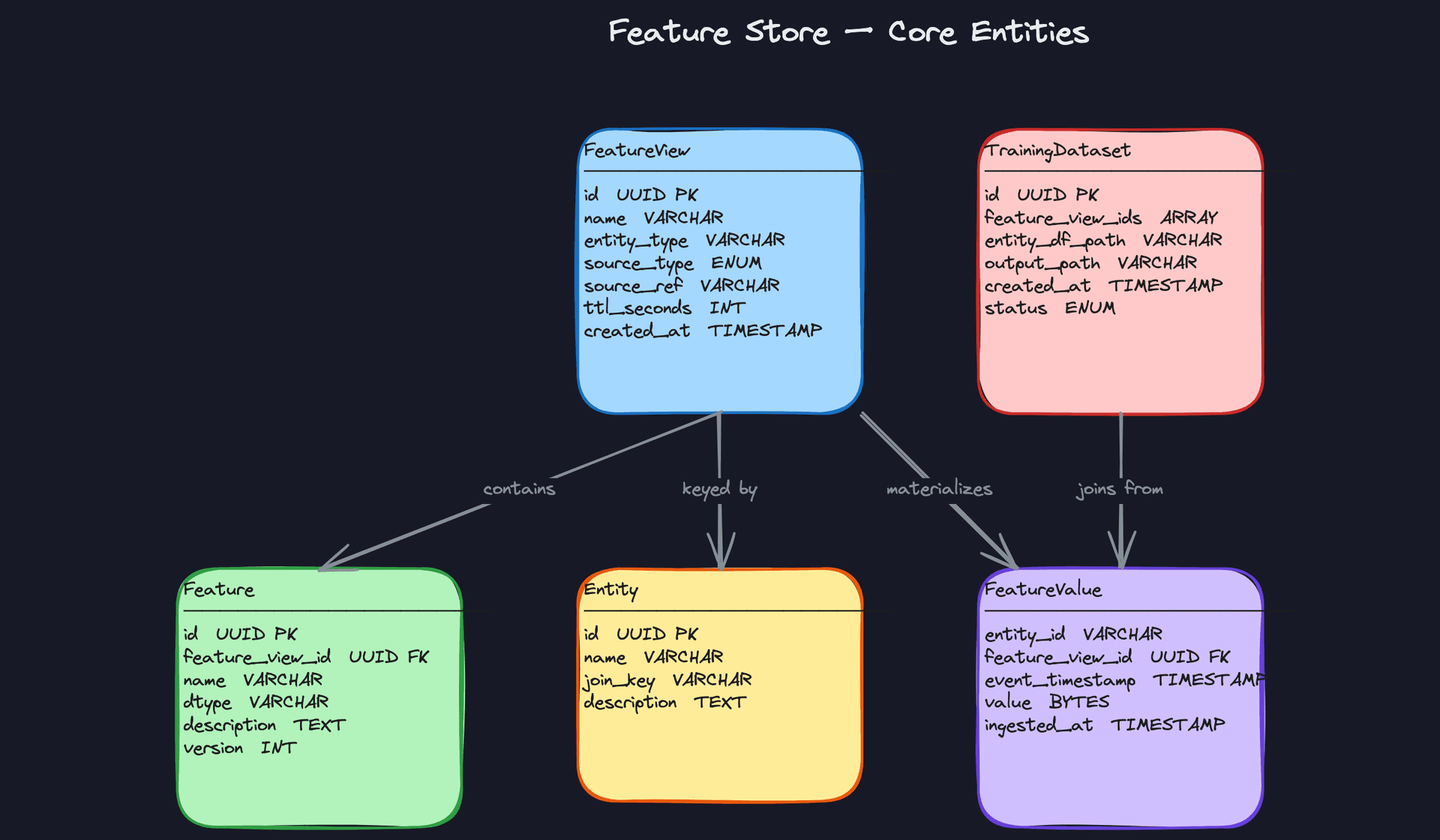
Key insight: The Feature Registry (thefeature_views,features, andentitiestables) is a small, relational metadata store. It never holds feature values. Keeping the control plane separate from the data plane is what lets you scale ingestion and serving independently.
API Design
The feature store exposes four core operations: register a feature view, ingest features, retrieve a training dataset, and serve features online. Each maps to a distinct access pattern.
// Register a new feature view with its source and schema
POST /feature-views
{
  "name": "user_activity_features",
  "entity_type": "user",
  "source_type": "batch",
  "source_ref": "snowflake.prod.user_activity_daily",
  "ttl_seconds": null,
  "features": [
    { "name": "purchase_count_30d", "dtype": "int32" },
    { "name": "avg_session_duration_7d", "dtype": "float64" }
  ]
}
-> { "feature_view_id": "uuid", "status": "registered" }
// Trigger materialization of a feature view into the offline and online stores
POST /feature-views/{feature_view_id}/materialize
{
  "start_date": "2024-01-01",
  "end_date": "2024-03-01",
  "target": "both"          // "offline", "online", or "both"
}
-> { "job_id": "uuid", "status": "submitted" }
// Request a point-in-time correct training dataset
POST /training-datasets
{
  "feature_view_ids": ["uuid-1", "uuid-2"],
  "entity_df_path": "s3://ml-data/entities/churn_labels_2024q1.parquet",
  "output_path": "s3://ml-data/training/churn_features_v3.parquet"
}
-> { "dataset_id": "uuid", "status": "pending" }
// Poll training dataset status
GET /training-datasets/{dataset_id}
-> {
     "dataset_id": "uuid",
     "status": "complete",
     "output_path": "s3://ml-data/training/churn_features_v3.parquet",
     "row_count": 4200000
   }
// Online feature serving: fetch latest feature values for an entity
GET /feature-views/{feature_view_id}/online-features?entity_id=user_123
-> {
     "entity_id": "user_123",
     "features": {
       "purchase_count_30d": 14,
       "avg_session_duration_7d": 342.5
     },
     "event_timestamp": "2024-03-15T10:22:00Z"
   }
// Batch online serving: fetch features for multiple entities in one call
POST /online-features/batch
{
  "feature_view_id": "uuid",
  "entity_ids": ["user_123", "user_456", "user_789"]
}
-> {
     "results": [
       { "entity_id": "user_123", "features": { ... } },
       { "entity_id": "user_456", "features": { ... } }
     ]
   }
The verb choices here are deliberate. Registration and materialization use POST because they create or trigger resources. Online serving for a single entity uses GET since it's a pure read with no side effects, which means it's cache-friendly at the HTTP layer. The batch online serving endpoint uses POST because the entity list in the request body can be arbitrarily large and doesn't belong in a query string.
Common mistake: Candidates often design a single /features endpoint that tries to serve both training and online use cases. Don't. Training retrieval is an async, compute-heavy job that returns a file path. Online serving is a synchronous, sub-10ms lookup. They have completely different contracts and should never share an endpoint.The materialization endpoint returns a job_id immediately rather than blocking. Backfilling two years of feature history through a synchronous HTTP call would time out in seconds. Async job submission with a status poll is the right pattern here, and mentioning it unprompted signals that you've thought about real operational constraints.
High-Level Design
The feature store has four distinct data flows, and you need to walk through each one clearly. Interviewers at companies like Uber and Airbnb will expect you to distinguish between the ingestion paths, the training path, and the serving path without conflating them. Get that separation right and the rest of the design falls into place.
1) Batch Ingestion: Computing Features from the Data Warehouse
Components: Data Warehouse (Snowflake/BigQuery), Spark Batch Job, Offline Store (Parquet on S3/GCS), Online Store (Redis/DynamoDB), Feature Registry.
The batch pipeline is your foundation. Most features in a production ML system are batch-computed, things like a user's 30-day purchase count or a seller's average rating over the last quarter. These don't need to be real-time; they just need to be correct and available.
Data flow:
- A scheduler (Airflow, for example) triggers the Spark job on a fixed cadence, typically daily.
- The Spark job consults the Feature Registry to fetch the transformation logic and output schema for each FeatureView it's responsible for.
- It reads raw input tables from the data warehouse, applies the transformations, and produces rows keyed by
(entity_id, feature_view_id, event_timestamp). - Those rows are written to the Offline Store as Parquet files, partitioned by date and entity type. This is the historical record used for training.
- For features flagged as "online-materialized," the job also writes the latest value per entity to the Online Store (Redis or DynamoDB), overwriting whatever was there before.
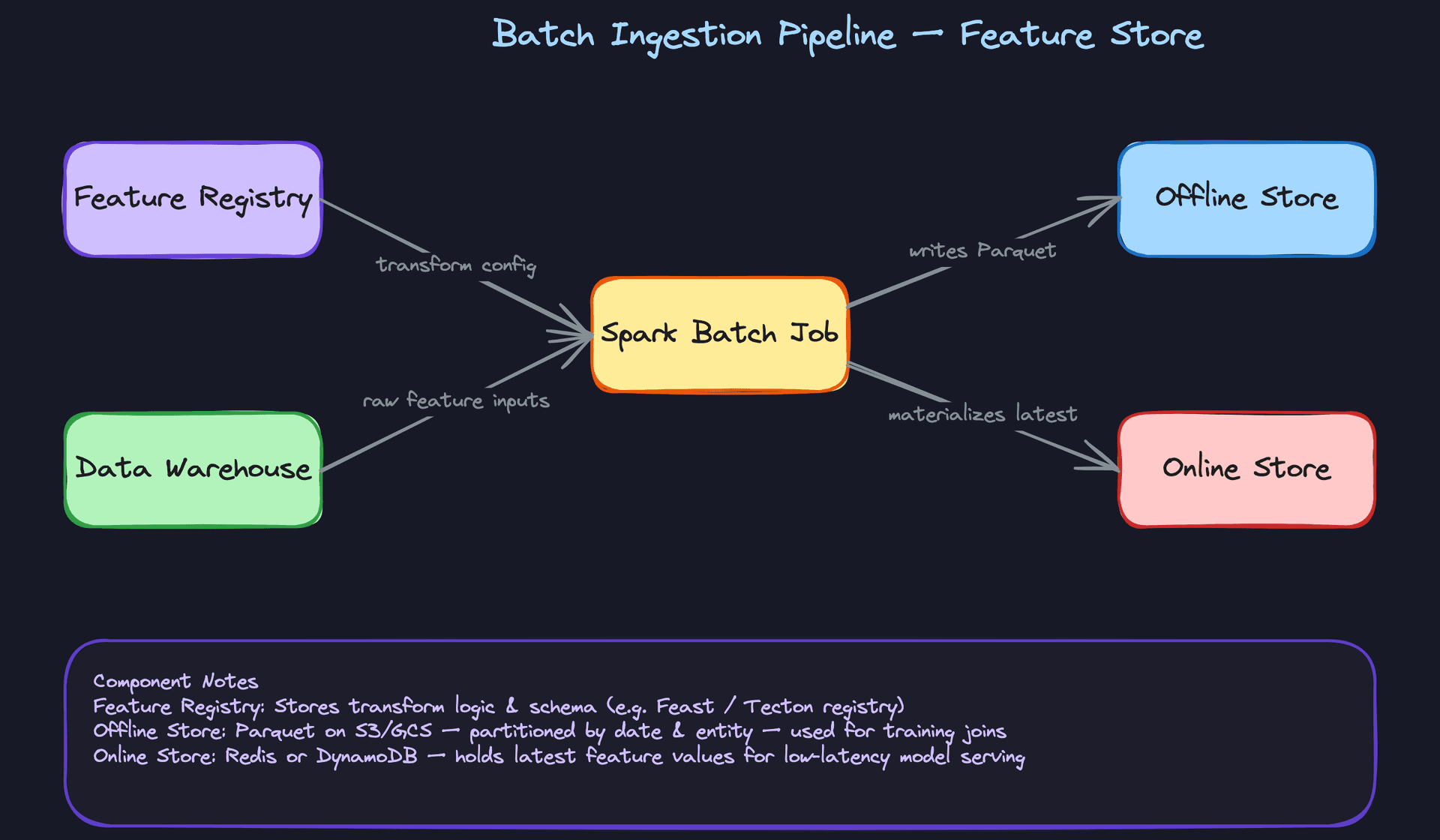
The key decision here is the dual-write: the same job writes to both stores. This guarantees that the feature values in the online store are computed with the same transformation logic as the offline store. If you let separate jobs handle each store independently, you're inviting training-serving skew in through the back door.
One trade-off to call out: batch materialization into Redis is expensive if you have hundreds of millions of entities. You don't want to blindly materialize everything. A practical approach is to only push features for entities that have been active in the last N days, letting cold entities fall back to an on-demand lookup path at serving time.
# Simplified Spark batch job structure
def run_batch_ingestion(feature_view_name: str, date: str):
    registry = FeatureRegistry()
    fv = registry.get_feature_view(feature_view_name)

    # Read raw inputs from warehouse
    raw_df = spark.read.format("bigquery").load(fv.source_ref)

    # Apply registered transformation
    feature_df = apply_transform(raw_df, fv.transform_config)

    # Add event_timestamp column
    feature_df = feature_df.withColumn("event_timestamp", lit(date).cast("timestamp"))

    # Write to offline store (partitioned Parquet)
    (feature_df
        .write
        .partitionBy("date", "entity_type")
        .mode("overwrite")
        .parquet(f"s3://feature-store/offline/{feature_view_name}/date={date}"))

    # Materialize latest values to online store
    if fv.online_enabled:
        materialize_to_redis(feature_df, fv)
Common mistake: Candidates often design the batch job to write only to the offline store and assume a separate process will sync values to Redis. That separate process is where skew creeps in. Keep it one job, one transformation, two write targets.
2) Streaming Ingestion: Real-Time Features via Kafka and Flink
Components: Kafka (event bus), Flink Streaming Job, Online Store (Redis), Offline Store (for consistency backfill), Feature Registry.
Batch features are stale by design. A user's click count from yesterday is fine for some models, but a fraud detection model needs to know what that user did in the last five minutes. That's where streaming ingestion comes in.
Data flow:
- Application events (clicks, purchases, page views) are published to Kafka topics in real time.
- A Flink job subscribes to the relevant topics. It consults the Feature Registry for the aggregation window configuration (e.g., "sum of clicks over a 1-hour tumbling window for user_id").
- Flink computes the windowed aggregation continuously and emits feature values as they update.
- Those values are written directly to the Online Store with a TTL matching the feature's configured freshness window. A 1-hour click count feature might have a TTL of 90 minutes.
- Flink also writes to the Offline Store so that streaming-computed features have a historical record. Without this, you can't use streaming features in training jobs.
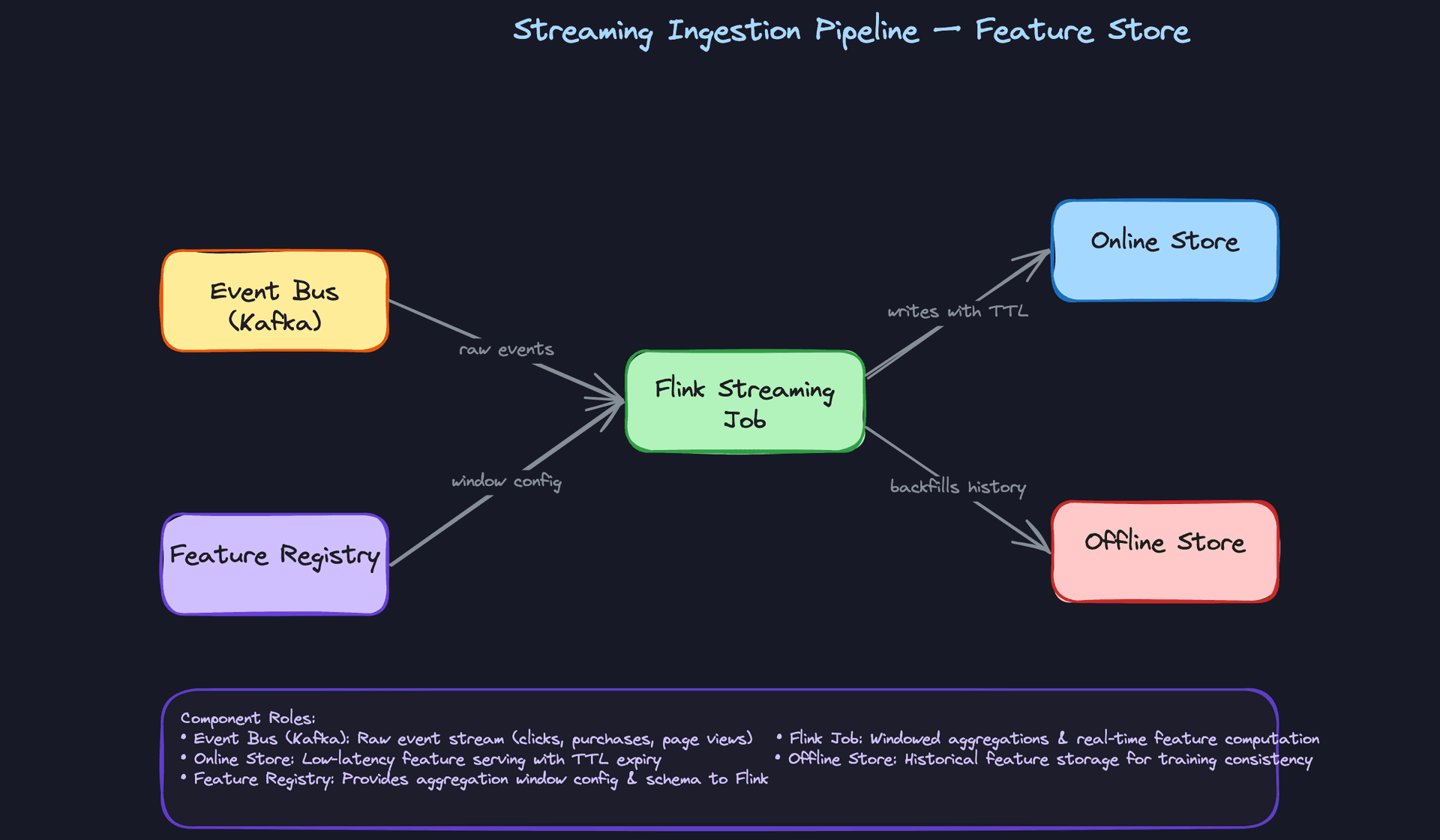
The TTL on the online store entry is doing real work here. If the Flink job falls behind or crashes, you don't want stale values sitting in Redis indefinitely and being served as if they're current. The TTL forces a natural expiry, and your serving layer should handle a cache miss gracefully (either return null or fall back to the last known batch value).
Key insight: Writing streaming feature values back to the offline store is the step most candidates skip. If you don't do this, your training data can only use batch features, and any model that was trained with streaming features becomes impossible to retrain correctly.
The trade-off between Flink and Spark Structured Streaming is worth a sentence if your interviewer asks. Flink has lower latency and better support for event-time semantics and out-of-order events. Spark Structured Streaming is easier to operate if your team already runs Spark everywhere. For a feature store where you need sub-minute feature freshness, Flink is the right call.
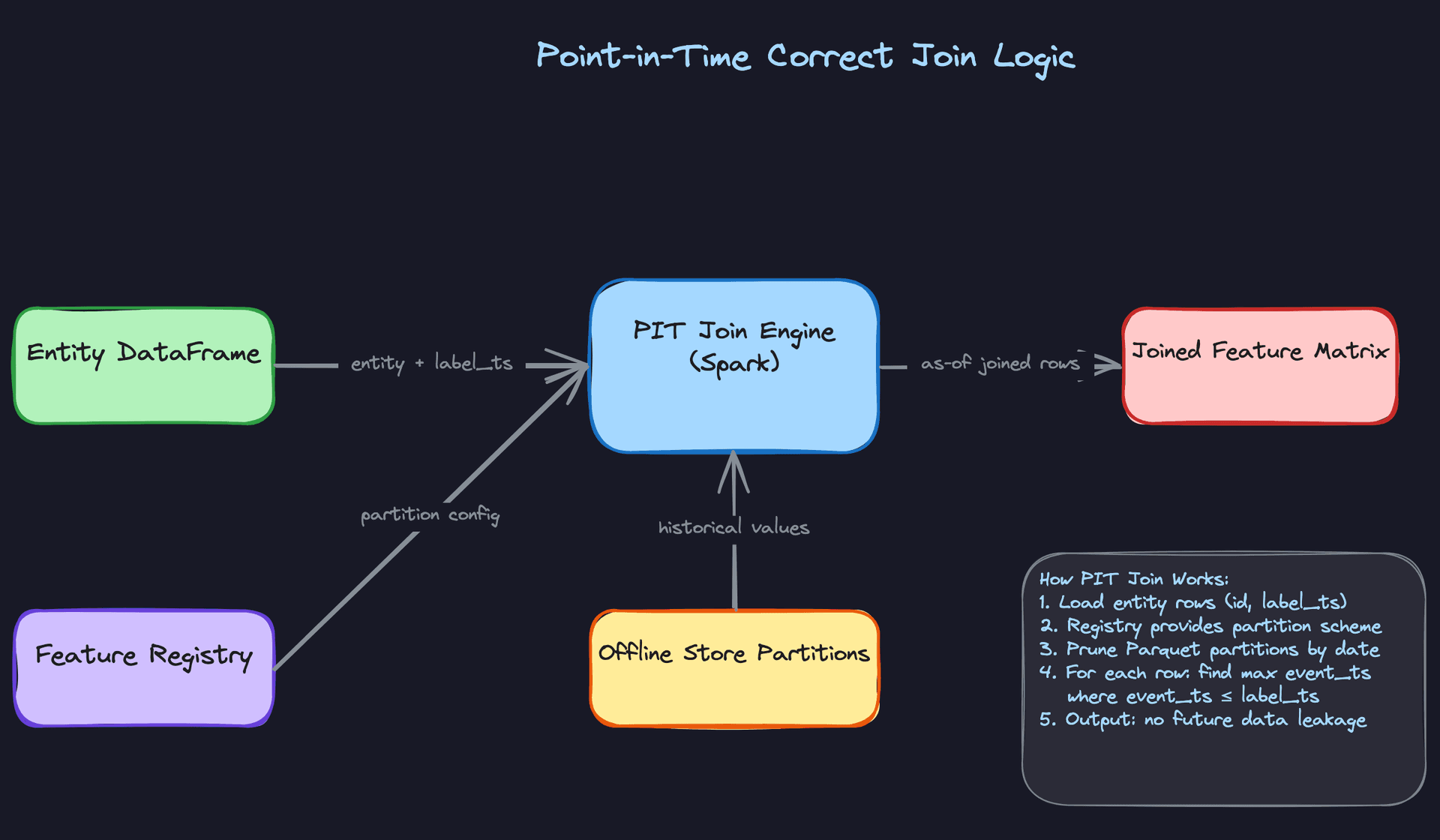
3) Training Data Retrieval: Point-in-Time Correct Joins
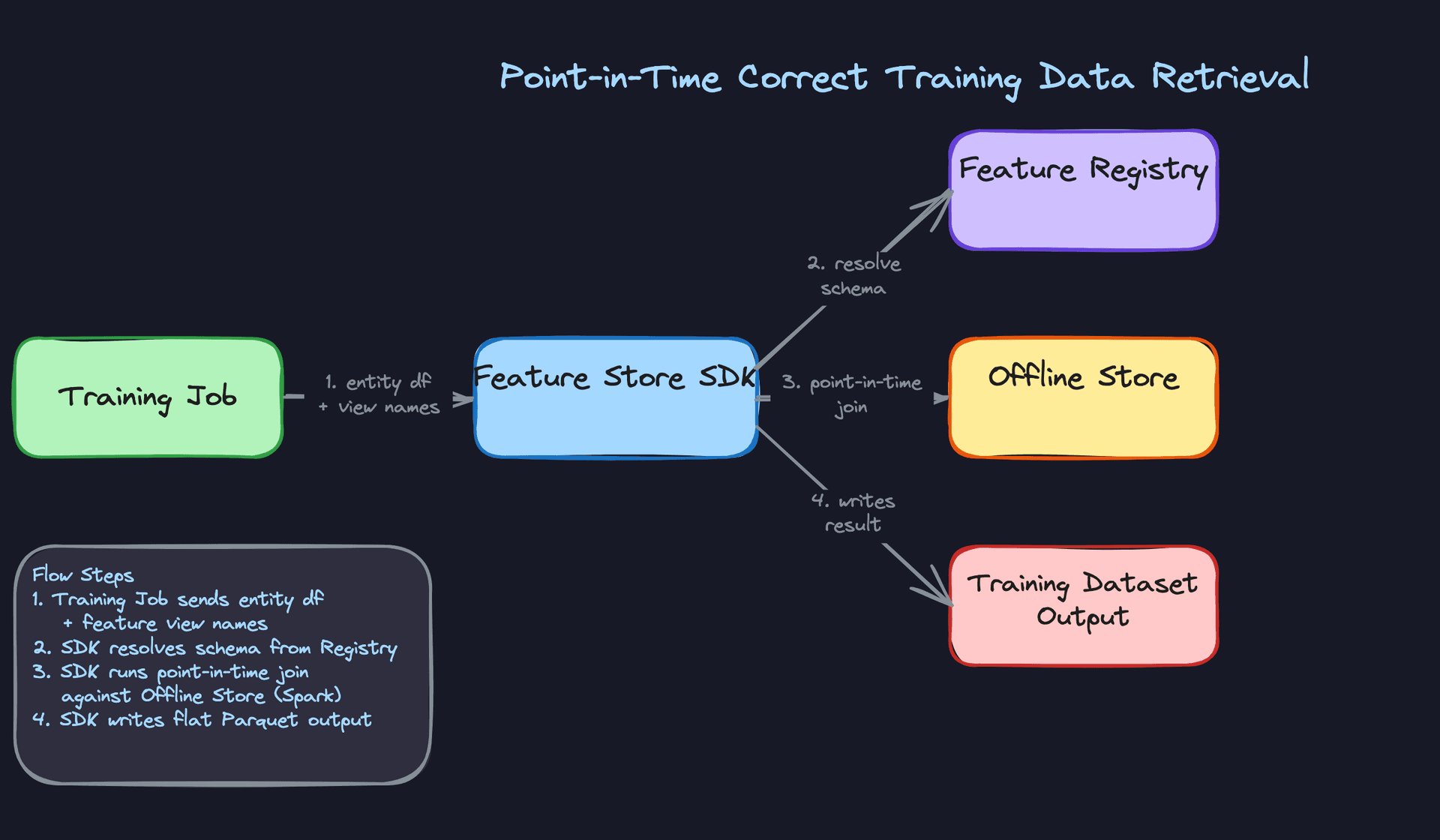
Components: Training Job, Feature Store SDK, Offline Store (Parquet on S3/GCS), Feature Registry, Training Dataset Output.
This is the path that separates a real feature store from a glorified feature table. The problem is data leakage: if your training job naively joins on the latest feature value, it will use information that wasn't available at the time the label was generated. Your model will look great in training and fall apart in production.
Data flow:
- The training job constructs an entity dataframe: a table of
(entity_id, label_timestamp)rows, one per training example. - It passes this dataframe and a list of FeatureView names to the Feature Store SDK.
- The SDK consults the Feature Registry to resolve which Parquet partitions and columns to read for each FeatureView.
- For each row in the entity dataframe, the SDK (running a Spark job under the hood) finds the feature value with the largest
event_timestampthat is still less than or equal to that row'slabel_timestamp. This is the as-of join. - The result is a flat feature matrix: one row per training example, with all feature columns populated as they existed at label time.
- That matrix is written to object storage as a Parquet file and registered in the Feature Registry as a TrainingDataset artifact.
# Pseudocode for the point-in-time join
def point_in_time_join(entity_df, feature_view_name, registry):
    fv = registry.get_feature_view(feature_view_name)

    # Load offline store partitions covering the label timestamp range
    min_ts = entity_df.select(min("label_timestamp")).collect()[0][0]
    max_ts = entity_df.select(max("label_timestamp")).collect()[0][0]

    feature_df = (spark.read.parquet(fv.offline_path)
                  .filter(col("event_timestamp").between(min_ts, max_ts)))

    # As-of join: for each entity row, get latest feature value <= label_timestamp
    joined = (entity_df
              .join(feature_df, on="entity_id", how="left")
              .filter(col("event_timestamp") <= col("label_timestamp"))
              .withColumn("rank", row_number().over(
                  Window.partitionBy("entity_id", "label_timestamp")
                        .orderBy(col("event_timestamp").desc())
              ))
              .filter(col("rank") == 1)
              .drop("rank", "event_timestamp"))

    return joined
The partition pruning on event_timestamp is critical for performance. Without it, you're scanning the entire feature history for every training run. Partitioning the offline store by date and filtering to the label timestamp range before the join keeps this tractable even with years of history.
Interview tip: If your interviewer asks why you can't just use the latest feature value, walk through a concrete example. "If a user made a fraudulent transaction on March 5th, and we're training a model on that event, we can't use their account age feature as of today. We need their account age as of March 5th. Otherwise the model learns from the future."
4) Online Serving: Low-Latency Feature Retrieval at Inference Time
Components: ML Inference Service, Feature Serving API, Feature Registry, Online Store (Redis/DynamoDB), Response Cache.
When a model needs to score a request in real time, it can't wait for a Spark job. The online serving path needs to return a complete feature vector in under 10ms at p99. Every design decision here is in service of that number.
Data flow:
- The ML inference service receives a prediction request and calls the Feature Serving API with an
entity_idand one or more FeatureView names. - The Feature Serving API calls the Feature Registry to resolve the full list of feature keys it needs to fetch for those views.
- The API checks an optional in-process response cache (a short-lived local cache, 1-5 second TTL) for the entity. Hot entities like popular items or active users will hit this cache frequently.
- On a cache miss, the API issues a pipelined multi-key GET to Redis, fetching all feature values for the entity in a single round trip.
- The API assembles the feature vector, validates that no required features are missing, and returns the result to the inference service.
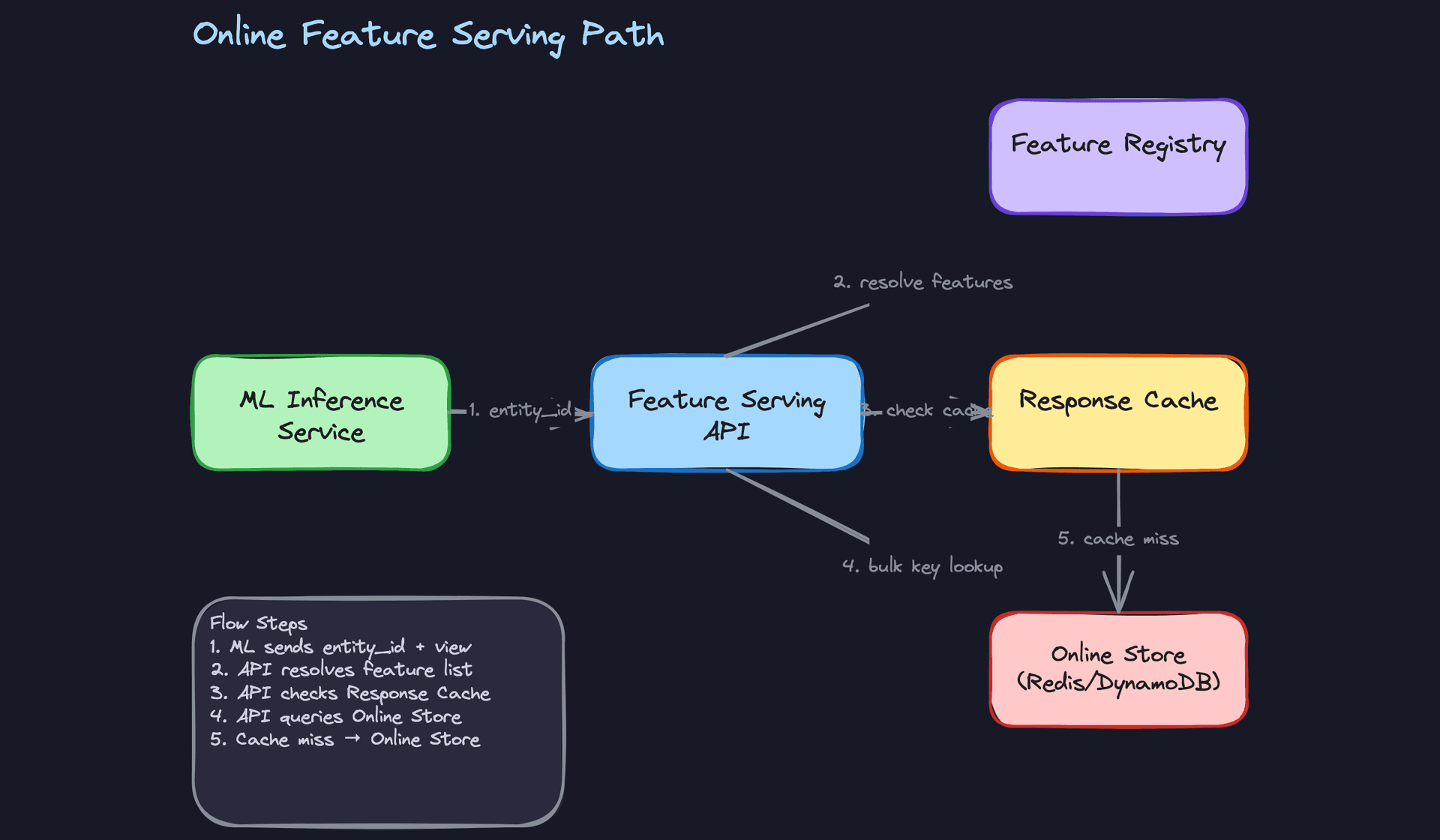
The pipelined Redis GET is the performance lever here. If you issue one GET per feature, you pay a network round trip per feature. A model with 50 features would be dead on arrival. Pipelining all keys into a single round trip is non-negotiable.
The response cache is optional but worth mentioning. For a recommendation model scoring the same popular item thousands of times per second, even a 2-second local cache cuts Redis load dramatically. The staleness trade-off is acceptable because the features themselves (batch-computed) are already 24 hours old.
Common mistake: Candidates forget to handle missing features. What happens if a feature value doesn't exist in Redis for a given entity? You need a defined fallback: return null, return a default value, or return an error. The inference service needs to know what to expect. Leaving this undefined will get you pushed on in the interview.
// Feature Serving API request/response
{
  "request": {
    "entity_id": "user_123",
    "feature_views": ["user_engagement_features", "user_demographic_features"]
  },
  "response": {
    "entity_id": "user_123",
    "features": {
      "clicks_last_1h": 14,
      "clicks_last_7d": 203,
      "account_age_days": 412,
      "country": "US"
    },
    "metadata": {
      "freshness_ms": {
        "user_engagement_features": 45000,
        "user_demographic_features": 86400000
      }
    }
  }
}
Returning freshness metadata in the response is a nice touch that signals operational maturity. The inference service can use it to decide whether a feature is too stale to trust, or to emit monitoring metrics.
5) The Feature Registry: Control Plane for the Entire System
Every component described above consults the Feature Registry before doing anything. It's not a data path, it's the control plane. But it's worth calling out explicitly because candidates often treat it as an afterthought.
The registry stores the metadata that makes the system coherent: FeatureView definitions, transformation logic, schema per feature, entity join keys, TTL configurations, backfill status, and version history. Both ingestion jobs and the serving API read from it at startup (and sometimes at runtime) to know what to compute and how.
CREATE TABLE feature_views (
    id              UUID PRIMARY KEY DEFAULT gen_random_uuid(),
    name            VARCHAR(255) NOT NULL UNIQUE,
    entity_type     VARCHAR(100) NOT NULL,          -- e.g. 'user', 'item'
    source_type     VARCHAR(20) NOT NULL,            -- 'batch' or 'stream'
    source_ref      TEXT NOT NULL,                  -- table name or Kafka topic
    transform_sql   TEXT,                           -- SQL or UDF reference
    ttl_seconds     INT,                            -- for online store expiry
    online_enabled  BOOLEAN NOT NULL DEFAULT false,
    backfill_status VARCHAR(20) DEFAULT 'pending',  -- 'pending','running','complete'
    version         INT NOT NULL DEFAULT 1,
    created_at      TIMESTAMP NOT NULL DEFAULT now()
);

CREATE TABLE features (
    id              UUID PRIMARY KEY DEFAULT gen_random_uuid(),
    feature_view_id UUID NOT NULL REFERENCES feature_views(id),
    name            VARCHAR(255) NOT NULL,
    dtype           VARCHAR(50) NOT NULL,           -- 'INT64', 'FLOAT32', 'STRING'
    default_value   TEXT,
    version         INT NOT NULL DEFAULT 1,
    created_at      TIMESTAMP NOT NULL DEFAULT now(),
    UNIQUE (feature_view_id, name, version)
);
The registry should be treated as a strongly consistent store. Use Postgres or a similar ACID database. This is not the place for eventual consistency; if an ingestion job and the serving API disagree on a feature's schema, you have a production incident.
Interview tip: When you introduce the registry, frame it as the answer to "how do you prevent two teams from computing the same feature differently?" The registry is the contract. Ingestion writes to it. Serving reads from it. Nobody computes features ad hoc outside of it.
Putting It All Together
The full system has two ingestion paths feeding two storage layers, with a single control plane coordinating everything.
Batch jobs run daily, reading from the warehouse and writing historical feature values to the Offline Store while also refreshing the Online Store for active entities. Streaming jobs run continuously, keeping the Online Store current for features that need sub-minute freshness. The Offline Store is the source of truth for training; the Online Store is the source of truth for inference.
When a training job runs, it goes through the SDK, which executes a point-in-time join against the Offline Store using the label timestamps from the entity dataframe. The result is a leakage-free feature matrix written back to object storage. When the model goes to production, the inference service calls the Feature Serving API, which fans out to Redis and returns the same features, computed with the same transformation logic, in under 10ms.
The Feature Registry sits above all of it, enforcing schema contracts, tracking versions, and ensuring that every component in the system is speaking the same language about what a feature is and how it should be computed.
Deep Dives
Interviewers won't just accept "I'd use a feature store." They'll push on the hard parts. These are the five areas where candidates separate themselves.
"How do we prevent data leakage during training?"
This is the most common trap in ML systems design. The question sounds simple, but most candidates don't realize they're describing a leaky system until the interviewer points it out.
Bad Solution: Latest-value join
The naive approach: take your entity dataframe (rows of user_id + label), join it against the feature table on entity_id, and grab the most recent feature value for each user. Simple, fast, wrong.
The problem is that "most recent" means most recent at query time, not at label time. If you're training a churn model on labels from six months ago, you're joining against feature values that were computed last week. The model sees data that didn't exist when the label was generated. Your offline metrics will look great. Your online metrics will be garbage.
Warning: Candidates often say "I'd join on the latest feature value" without realizing this leaks future data. If the interviewer asks "what timestamp are you joining on?", the correct answer is the label timestamp, not now().
Good Solution: As-of join using label_timestamp
The fix is conceptually straightforward: for each row in your entity dataframe, find the feature value whose event_timestamp is the largest value that is still less than or equal to the row's label_timestamp. This is an as-of join, sometimes called a point-in-time join.
# Pseudocode for as-of join logic
# entity_df: columns = [entity_id, label_timestamp]
# feature_df: columns = [entity_id, event_timestamp, feature_value]

from pyspark.sql import functions as F
from pyspark.sql.window import Window

w = Window.partitionBy("entity_id").orderBy("event_timestamp").rowsBetween(Window.unboundedPreceding, 0)

# Join entity rows to all feature rows where event_timestamp <= label_timestamp
joined = entity_df.join(
    feature_df,
    on="entity_id",
    how="left"
).filter(
    F.col("event_timestamp") <= F.col("label_timestamp")
)

# Pick the latest feature value before the label timestamp
joined = joined.withColumn(
    "rank",
    F.row_number().over(
        Window.partitionBy("entity_id", "label_timestamp")
              .orderBy(F.col("event_timestamp").desc())
    )
).filter(F.col("rank") == 1)
This works, but it's slow at scale. If your feature table has billions of rows and your entity dataframe has millions of rows, a naive as-of join will scan enormous amounts of data even if most of it is irrelevant.
Great Solution: Partitioned Parquet with partition pruning + watermarked Spark join
Store feature values in the offline store as Parquet files partitioned by date(event_timestamp). When you run the point-in-time join, you can prune partitions aggressively: for a given label timestamp, you only need to scan partitions within a bounded lookback window (say, 90 days). You never need to scan the entire history.
The Feature Registry stores the lookback window per feature view. The join engine reads that config and passes it as a partition filter before the join executes. Combined with Spark's broadcast join for small entity dataframes, this makes point-in-time joins tractable even at Uber or Airbnb scale.
def point_in_time_join(entity_df, feature_view_name, registry, spark):
    config = registry.get_feature_view(feature_view_name)
    lookback_days = config.lookback_days  # e.g. 90

    # Compute partition bounds from label timestamps
    min_label_ts = entity_df.agg(F.min("label_timestamp")).collect()[0][0]
    max_label_ts = entity_df.agg(F.max("label_timestamp")).collect()[0][0]

    partition_start = (min_label_ts - timedelta(days=lookback_days)).date()
    partition_end = max_label_ts.date()

    feature_df = spark.read.parquet(config.offline_store_path).filter(
        (F.col("dt") >= str(partition_start)) &
        (F.col("dt") <= str(partition_end))
    )

    return as_of_join(entity_df, feature_df)
Tip: Mentioning partition pruning unprompted is a strong signal. It shows you understand that correctness alone isn't enough; the join has to be efficient enough to run in a training pipeline without timing out.
"How do we prevent training-serving skew?"
Training-serving skew is subtle and devastating. A model trained on one version of a feature and served another will degrade silently. You won't see errors; you'll just see your model perform worse than expected in production.
Bad Solution: Separate transform code for batch and serving
The most common anti-pattern: your data team writes a Spark job that computes user_avg_purchase_last_30d for training, and your ML engineer writes a Python function in the inference service that computes the same thing at serving time. Two implementations, supposedly equivalent.
They won't stay equivalent. Someone updates the Spark job to fix a bug. Nobody updates the Python function. Now your training data and your serving data are computed differently, and you have no way to detect it automatically.
Warning: This is how skew actually happens at most companies. It's not malicious; it's just two teams moving independently. The fix is architectural, not disciplinary.
Good Solution: Shared transformation definitions in the Feature Registry
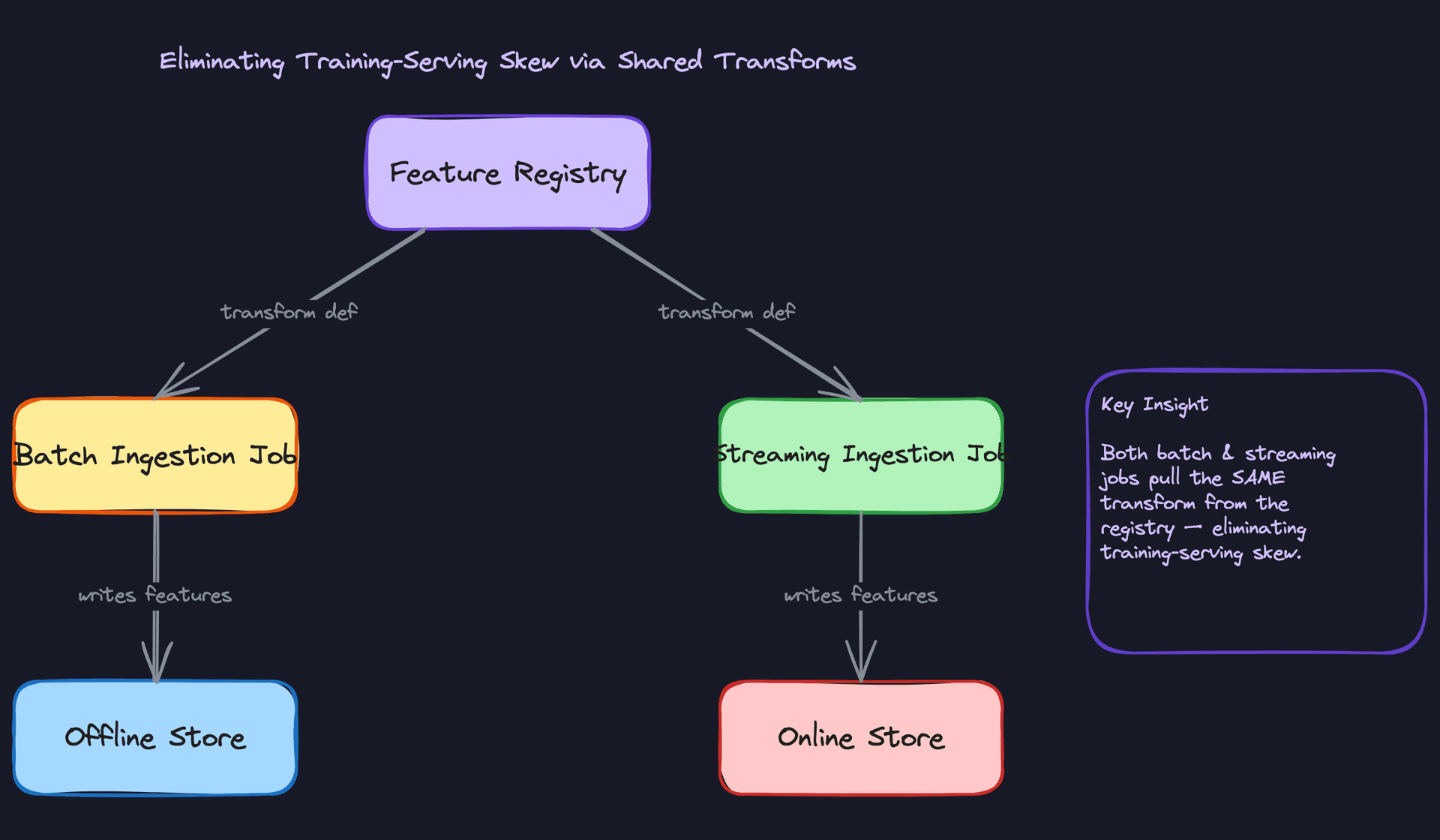
Store the transformation logic in the Feature Registry as a versioned artifact, either a SQL expression or a Python UDF. Both the batch ingestion job and the streaming ingestion job pull the transform definition from the registry at runtime and apply it. There's one definition, two execution environments.
# Feature view definition stored in registry
feature_view = FeatureView(
    name="user_purchase_stats",
    entity="user_id",
    source=BatchSource(table="dw.user_events"),
    features=[
        Feature(
            name="avg_purchase_last_30d",
            dtype="float64",
            transform="AVG(purchase_amount) OVER (PARTITION BY user_id ORDER BY event_ts ROWS BETWEEN 30 PRECEDING AND CURRENT ROW)"
        )
    ]
)
Both the Spark job and the Flink job deserialize this definition and apply it. If someone changes the transform, they change it once, and both paths pick it up on their next run.
The trade-off: SQL transforms are portable across batch and streaming, but complex Python logic is harder to run in Flink without a Python operator. You'll need to constrain what transform types are supported.
Great Solution: Push transformations into the feature store itself
The best version of this is on-demand feature computation at serving time. Instead of pre-computing and storing transformed values, the serving layer stores raw inputs and applies the canonical transform at request time. The same transform code that ran during ingestion runs again during serving, on the same inputs.
This eliminates skew by construction. There's no "batch path" and "serving path"; there's one path. The feature store's serving API is the only place transforms execute.
# Serving API applies the registered transform at request time
def get_features(entity_id: str, feature_view_name: str) -> dict:
    config = registry.get_feature_view(feature_view_name)
    raw_inputs = online_store.get(entity_id, config.raw_input_keys)

    # Same transform definition used during ingestion
    transform_fn = registry.load_transform(config.transform_ref)
    return transform_fn(raw_inputs)
The cost is latency: you're doing compute in the serving path. For simple transforms (ratios, log transforms), this is fine. For heavy aggregations over long windows, you still need pre-materialization. The great answer acknowledges this trade-off and proposes a hybrid: pre-materialize expensive aggregations, compute cheap transforms on-demand.
Tip: Senior candidates distinguish between transform types. "I'd push simple transforms into the serving layer and pre-materialize expensive windowed aggregations" is a much stronger answer than "I'd share the transform definition."
"How do we hit sub-10ms p99 latency for online feature serving?"
The interviewer is testing whether you understand that latency at p99 is a different problem than latency at p50. A single slow Redis call can blow your SLA if you're not careful about how you structure lookups.
Bad Solution: Sequential single-key Redis lookups
The obvious implementation: for each feature in a feature view, issue a GET to Redis with the key {entity_id}:{feature_name}. If a feature view has 20 features, that's 20 sequential round trips to Redis. At 1ms per round trip, you're already at 20ms before you've done anything else.
Even if you parallelize the calls, you're still paying per-call overhead and connection setup costs. At high QPS, this creates thundering herd problems on Redis.
Good Solution: Pipelined multi-key batch lookup
Store all features for a given entity and feature view under a single Redis hash key: {feature_view}:{entity_id}. A single HGETALL returns all features in one round trip. For multiple feature views, use Redis pipelining to batch the lookups into a single network round trip.
import redis

def get_feature_vector(entity_id: str, feature_view_names: list, redis_client) -> dict:
    pipe = redis_client.pipeline(transaction=False)

    for view_name in feature_view_names:
        key = f"{view_name}:{entity_id}"
        pipe.hgetall(key)

    results = pipe.execute()  # Single round trip for all views

    feature_vector = {}
    for view_name, view_features in zip(feature_view_names, results):
        feature_vector.update({
            f"{view_name}.{k.decode()}": float(v)
            for k, v in view_features.items()
        })

    return feature_vector
This gets you to sub-5ms for most requests. The remaining tail latency comes from Redis cluster routing, GC pauses in the serving process, and occasional cold keys.
Great Solution: Two-tier cache with in-process LRU for hot entities
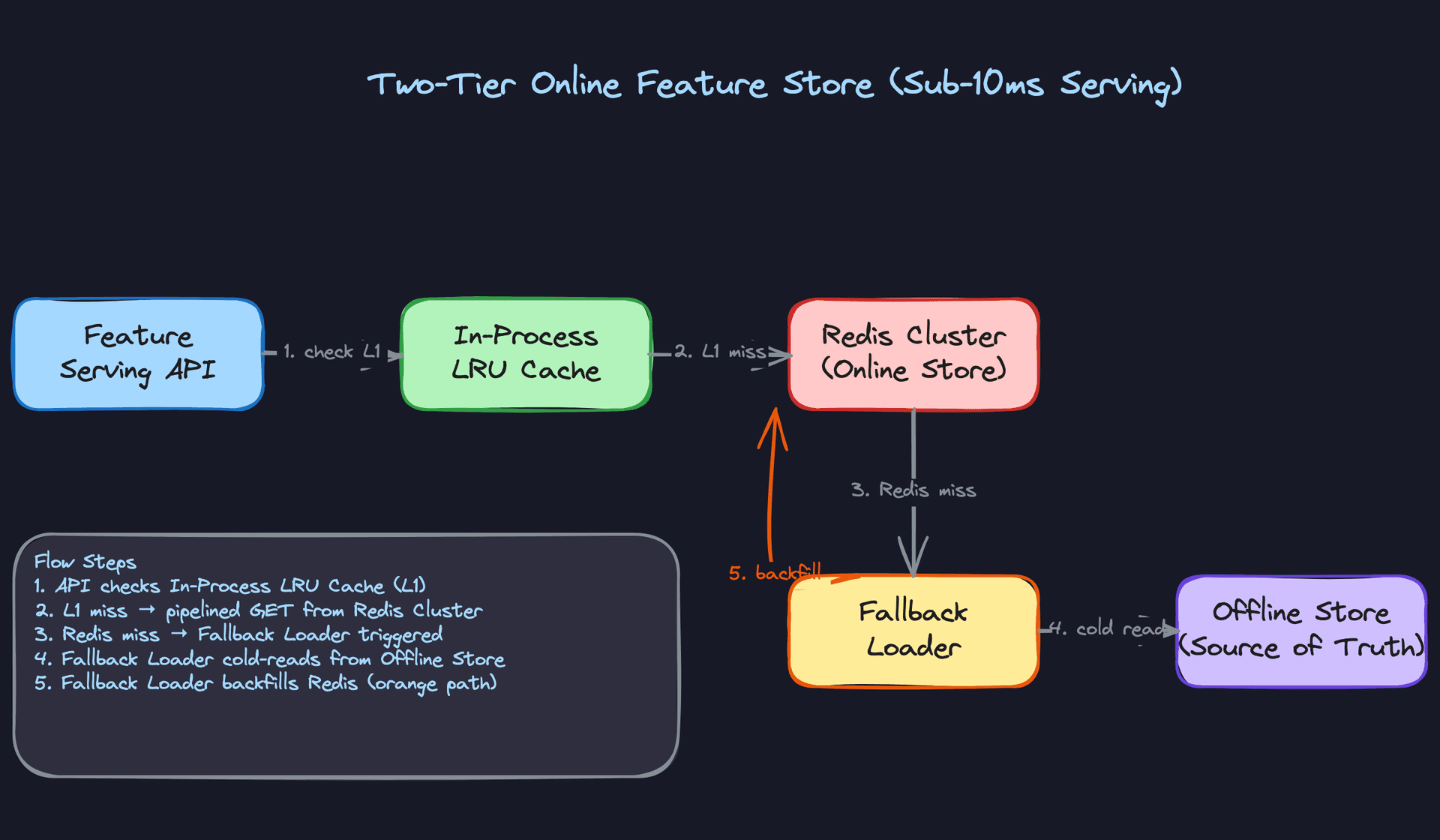
For the hottest entities (top 1% of users by traffic), even a single Redis round trip adds variance. Add an in-process LRU cache per serving pod with a short TTL (1 to 5 seconds). Hot entity lookups never leave the process. Cold entities fall through to Redis. Redis misses (rare, cold-start only) fall through to the offline store and backfill Redis.
from cachetools import TTLCache
import threading

class FeatureServingLayer:
    def __init__(self, redis_client, ttl_seconds=2, maxsize=10_000):
        self.redis = redis_client
        self.l1_cache = TTLCache(maxsize=maxsize, ttl=ttl_seconds)
        self.lock = threading.Lock()

    def get(self, entity_id: str, feature_view: str) -> dict:
        cache_key = f"{feature_view}:{entity_id}"

        # L1: in-process cache
        if cache_key in self.l1_cache:
            return self.l1_cache[cache_key]

        # L2: Redis
        result = self.redis.hgetall(cache_key)
        if result:
            with self.lock:
                self.l1_cache[cache_key] = result
            return result

        # L3: cold path (offline store backfill, omitted for brevity)
        return self._cold_load(entity_id, feature_view)
The TTL on the L1 cache is the key design decision. Too short and you get no benefit; too long and your serving layer sees stale features. For most use cases, 1 to 5 seconds is acceptable. For fraud detection or real-time bidding, you might drop it to 500ms or skip L1 entirely.
Tip: Bring up the TTL trade-off without being asked. "The L1 TTL bounds our staleness at the cost of cache hit rate" shows you understand that this isn't a free optimization.
"What happens when a feature's schema changes?"
Schema changes are inevitable. A feature that was a float becomes a double. A new feature gets added to a view. A feature gets deprecated. How you handle this determines whether your feature store is safe to operate or a footgun.
Bad Solution: In-place mutation
The naive approach: update the feature definition in the registry, redeploy the ingestion job, and start writing the new schema. Existing consumers (training jobs, inference services) are expected to update their code.
In practice, this breaks things immediately. A training job that was reading user_age as INT now gets FLOAT and fails with a type error. An inference service reading a feature vector of length 20 now gets length 21 and crashes the model. In-place mutation has no safe rollout path.
Warning: Candidates who say "I'd update the schema and notify consumers" are describing a process that requires perfect coordination across every downstream system simultaneously. That never happens cleanly in production.
Good Solution: Additive-only changes with backward-compatible schemas
Enforce a rule: the only allowed schema changes are additive. You can add a new feature to a view. You cannot rename, remove, or change the type of an existing feature. New features default to null for historical rows.
Use Avro or Protobuf for the feature value serialization format, both of which support backward-compatible schema evolution natively. A consumer reading an older schema version simply ignores fields it doesn't know about.
# Avro schema for a feature view - adding a field is safe
schema_v1 = {
    "type": "record",
    "name": "UserPurchaseStats",
    "fields": [
        {"name": "avg_purchase_last_30d", "type": "float"},
        {"name": "total_purchases_last_7d", "type": "int"}
    ]
}

# v2 adds a field with a default - backward compatible
schema_v2 = {
    "type": "record",
    "name": "UserPurchaseStats",
    "fields": [
        {"name": "avg_purchase_last_30d", "type": "float"},
        {"name": "total_purchases_last_7d", "type": "int"},
        {"name": "max_purchase_last_30d", "type": ["null", "float"], "default": None}  # safe addition
    ]
}
This handles additive changes well. It doesn't handle breaking changes (type mutations, renames) at all.
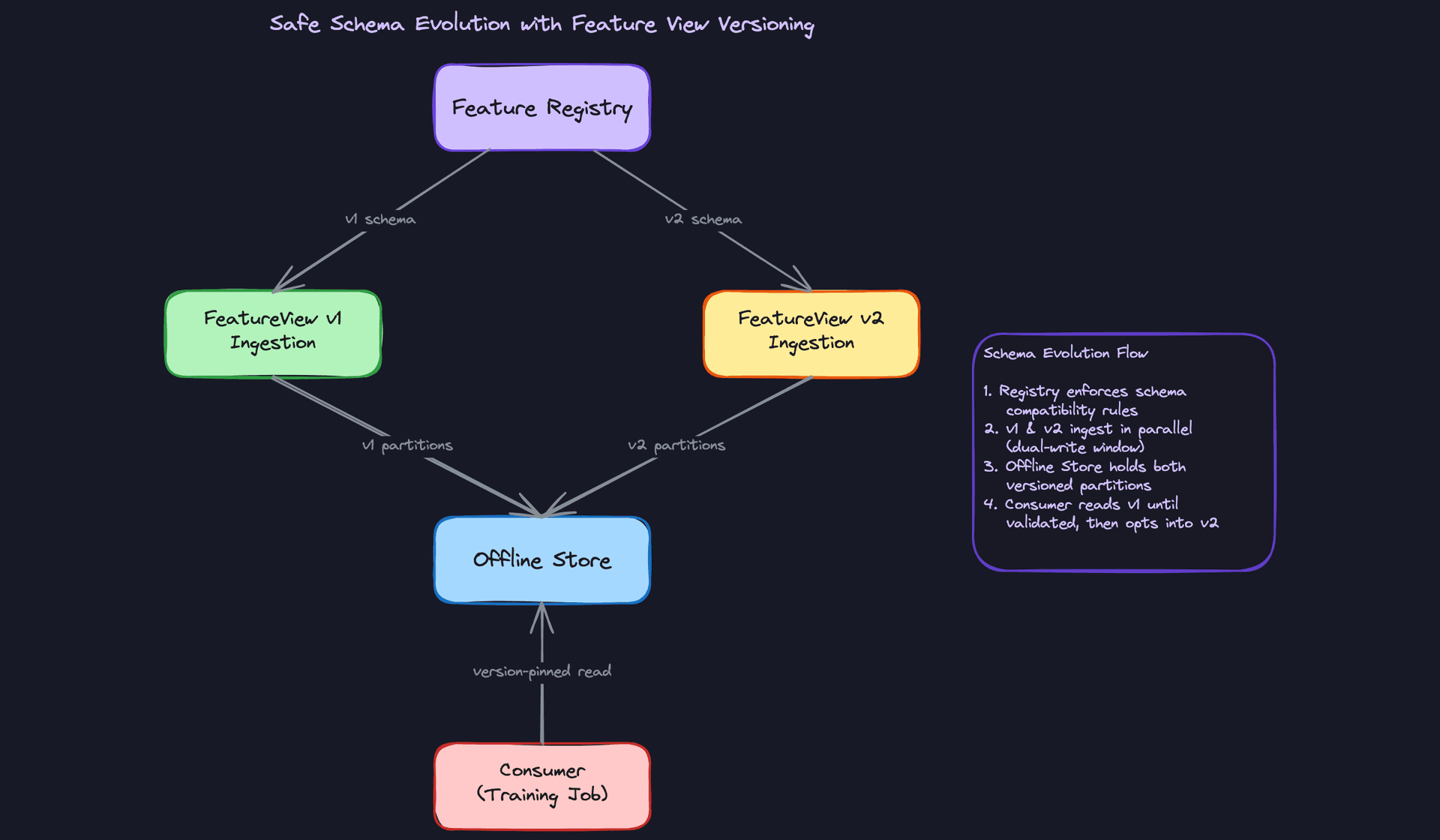
Great Solution: Feature view versioning with dual-write migration window
For breaking changes, version the entire feature view. user_purchase_stats_v1 and user_purchase_stats_v2 coexist in the registry. The ingestion pipeline dual-writes to both during a migration window. Consumers pin to a version explicitly and migrate on their own schedule.
-- Registry tracks version per feature view
CREATE TABLE feature_view_versions (
    feature_view_id   UUID NOT NULL REFERENCES feature_views(id),
    version           INT NOT NULL,
    schema_json       JSONB NOT NULL,
    status            VARCHAR(20) NOT NULL DEFAULT 'active',  -- 'active', 'deprecated', 'sunset'
    deprecated_at     TIMESTAMP,
    sunset_at         TIMESTAMP,                              -- hard cutoff for consumers
    PRIMARY KEY (feature_view_id, version)
);
Once all consumers have migrated to v2, you mark v1 as deprecated with a sunset date. The ingestion job stops writing v1 after the sunset date. The registry enforces this: any consumer still pinned to v1 after sunset gets a hard error at job startup, not a silent data issue.
Tip: The dual-write window is what separates a good answer from a great one. It decouples the producer migration timeline from the consumer migration timeline, which is the only way to safely evolve schemas in a system with many downstream consumers.
"How do we backfill historical features when a new feature is added?"
A new feature is registered. Training jobs want to use it immediately for models covering the last two years of data. But the feature only started being computed today. What do you do?
Bad Solution: Only compute going forward
The simplest answer: start the ingestion job, let it compute features from today onward, and tell training teams to wait until enough history accumulates. For a model that needs 12 months of training data, that means waiting 12 months. Nobody will accept this.
Good Solution: One-time Spark backfill from the warehouse
Trigger a Spark job that reads the raw source data from the warehouse for the full historical range, applies the feature transformation, and writes the results to the offline store. This can run in parallel with the ongoing ingestion job since it's writing to historical partitions that don't overlap with today's data.
# Airflow DAG for a one-time backfill
from airflow import DAG
from airflow.providers.apache.spark.operators.spark_submit import SparkSubmitOperator
from datetime import datetime, timedelta

def create_backfill_dag(feature_view_name: str, start_date: str, end_date: str):
    with DAG(
        dag_id=f"backfill_{feature_view_name}",
        start_date=datetime(2024, 1, 1),
        schedule_interval=None,  # triggered manually
        catchup=False,
    ) as dag:

        backfill = SparkSubmitOperator(
            task_id="run_backfill",
            application="s3://jobs/feature_backfill.py",
            application_args=[
                "--feature-view", feature_view_name,
                "--start-date", start_date,
                "--end-date", end_date,
            ]
        )

    return dag
This works for a single run. The problem is failure handling. If the job fails halfway through two years of data, you have no way to know which partitions completed and which didn't. Rerunning from scratch wastes hours of compute and risks writing duplicate data.
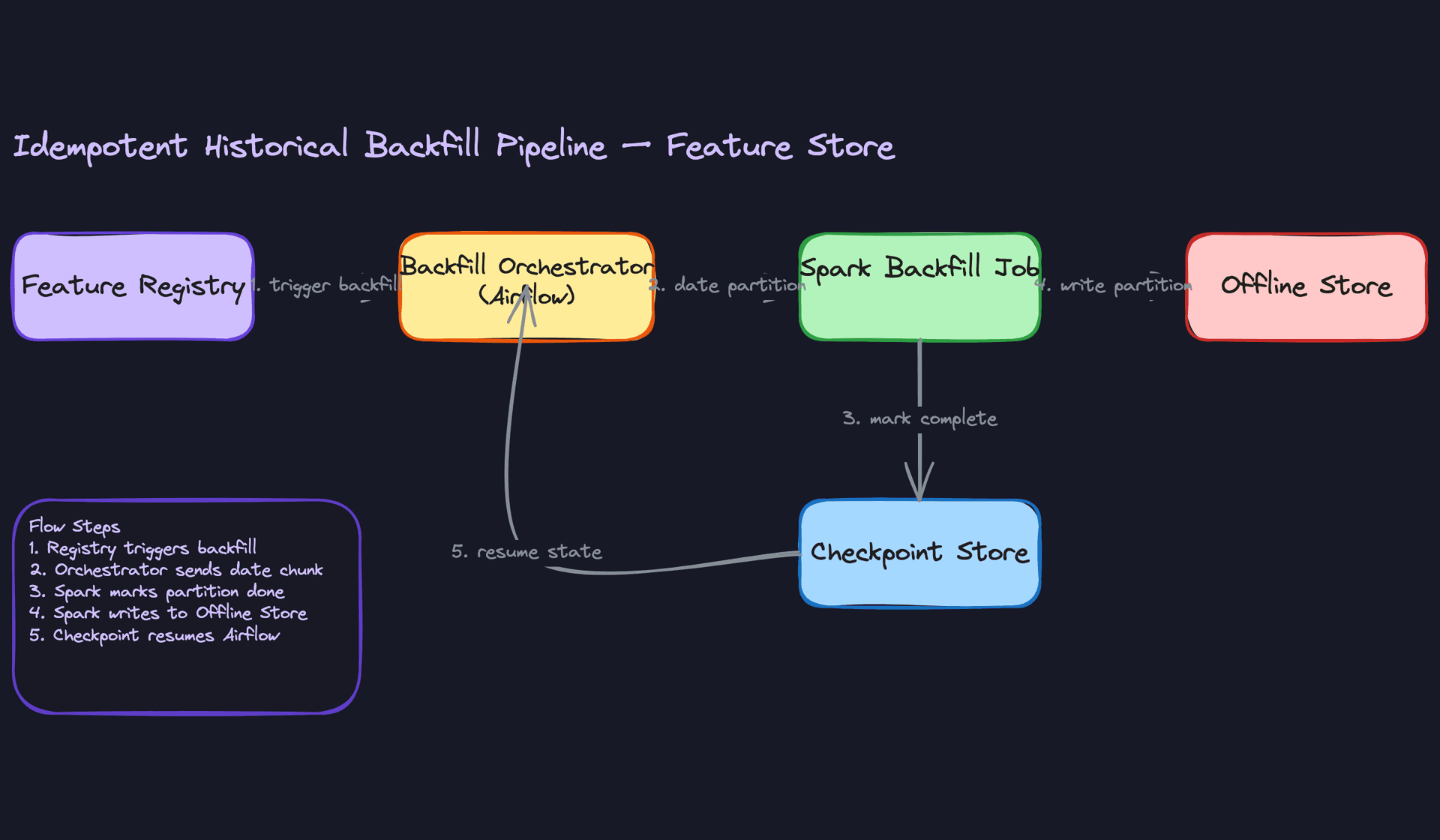
Great Solution: Idempotent backfill with checkpointing and registry-gated access
Break the backfill into daily partition jobs orchestrated by Airflow. Each partition job writes to a specific date partition in the offline store and records its completion in a checkpoint store. If the job fails and restarts, it skips already-completed partitions. Every partition write is idempotent: writing the same partition twice produces the same result.
def run_partition_backfill(feature_view_name: str, partition_date: str,
                            checkpoint_store, offline_store, spark):
    # Idempotency check
    if checkpoint_store.is_complete(feature_view_name, partition_date):
        print(f"Partition {partition_date} already complete, skipping.")
        return

    # Compute features for this date partition
    df = spark.read.table("dw.user_events").filter(
        F.col("event_date") == partition_date
    )

    features = apply_transforms(df, feature_view_name)

    # Overwrite is safe because transforms are deterministic
    features.write.mode("overwrite").parquet(
        f"s3://feature-store/{feature_view_name}/dt={partition_date}/"
    )

    checkpoint_store.mark_complete(feature_view_name, partition_date)
The registry tracks backfill status per feature view: pending, in_progress, complete. Training jobs that request a feature view in pending or in_progress status get a hard error with a message explaining the backfill timeline. This prevents a training job from silently training on incomplete history and producing a model with hidden data gaps.
ALTER TABLE feature_views
ADD COLUMN backfill_status VARCHAR(20) NOT NULL DEFAULT 'complete',
ADD COLUMN backfill_complete_through DATE;

-- Training job SDK checks this before executing a point-in-time join
-- SELECT backfill_status, backfill_complete_through
-- FROM feature_views WHERE name = $1
Tip: The registry gate is what interviewers at Staff level are listening for. Anyone can describe a backfill job. Proactively raising "how do we prevent training jobs from using incomplete data during the backfill?" shows you're thinking about operational correctness, not just the happy path.
What is Expected at Each Level
Interviewers calibrate their bar differently for this problem. A feature store touches enough distinct systems (streaming pipelines, object storage, low-latency serving, schema registries) that it's easy to see exactly where a candidate's depth runs out. Here's what each level needs to show.
Mid-Level
- Clearly explain why you need both an offline and online store. "The offline store is for bulk historical reads during training; the online store is for sub-10ms point lookups at inference time" is the answer. Conflating the two, or proposing a single store for both, is a red flag.
- Describe a working batch ingestion pipeline: Spark reads from the warehouse, applies transformations, writes Parquet to the offline store, and materializes the latest values into Redis. You don't need to optimize it yet, just get the flow right.
- Explain point-in-time correctness conceptually. You should be able to say "we join features using the label timestamp, not the current timestamp, to avoid leaking future data into training." You don't need to write the Spark join logic from scratch.
- Define the core entities: FeatureView, Feature, Entity, and FeatureValue. Know that FeatureValue rows are keyed by
(entity_id, feature_view_id, event_timestamp)and explain why that timestamp column exists.
Senior
- Design both ingestion paths without being prompted. The batch path (Spark + warehouse) and the streaming path (Kafka + Flink writing to the online store with TTL) should come up naturally, along with a clear explanation of when you need each.
- Own the training-serving skew problem. The answer isn't just "use the same features." It's that transformation logic must live in the Feature Registry as the single source of truth, and both the batch job and the streaming job pull from it. Separate codepaths for training and serving is how skew happens.
- Propose a concrete online serving design with latency reasoning. Pipelined multi-key Redis lookups, why a local in-process LRU cache helps for hot entities, and what TTL values you'd set to bound staleness without serving stale data too long.
- Handle schema evolution without breaking consumers. Additive-only changes, backward-compatible Avro or Protobuf schemas, and a dual-write window so downstream training jobs can migrate on their own schedule.
Staff+
- Proactively raise the backfill problem. When a new feature is registered, historical data doesn't exist yet. A staff candidate brings up idempotent Spark backfills with checkpoint stores, and explains why the Feature Registry should gate training job access until the backfill is complete.
- Propose a versioning model that decouples producers from consumers. Feature view versions should let a producer ship a breaking schema change while consumers stay pinned to v1 until they're ready. This is an organizational concern as much as a technical one.
- Discuss the push vs. pull trade-off for feature computation. Push-based materialization (pre-computing and storing feature values) gives you low-latency serving but requires freshness SLA management. Pull-based on-demand computation (computing features at request time) avoids staleness but blows your latency budget. Staff candidates know which features belong in each bucket and why.
- Think about operational maturity: freshness monitoring per feature view, alerting when a batch job misses its SLA, and what happens to your model's predictions when a feature goes stale or missing values start appearing.
The strongest signal at any level is bringing up data freshness unprompted. Knowing that batch features might be 24 hours stale and streaming features might be seconds stale, and being able to say "for a fraud model, that matters; for a weekly recommendation email, it doesn't" shows you understand the actual ML context, not just the plumbing.
Key takeaway: A feature store's entire purpose is consistency: the same feature value, computed the same way, available at training time and inference time. Every design decision in this system, from shared transform definitions to point-in-time joins to dual-write schema migrations, exists to protect that guarantee.
