
Understanding the Problem
Product definition: A real-time analytics pipeline ingests high-volume event streams from multiple sources, processes them with sub-minute latency, and serves aggregated metrics to dashboards, alerting systems, and downstream consumers.
What is a Real-Time Analytics Pipeline?
At its core, this system is an always-on data infrastructure layer that turns a firehose of raw events into queryable, actionable metrics. Think of it as the plumbing between "something happened" (a user clicked a button, a sensor fired, a service threw an error) and "someone can see it on a dashboard 30 seconds later."
The hard part isn't ingesting events. Kafka handles that. The hard part is doing it correctly at scale: without dropping events, without double-counting, and without breaking every downstream consumer the moment a product team adds a new field to their event payload.
Functional Requirements
Before you sketch a single box on the whiteboard, you need to pin down what this pipeline actually does. The scope creep trap in this interview is treating "real-time analytics" as one thing when it's really four different systems bolted together.
Core Requirements
- Ingest high-volume event streams from multiple sources (clickstream, application metrics, IoT sensors) at up to 500K events/sec at peak load
- Process events with windowed aggregations (tumbling and sliding windows) and deliver results to a serving layer within 60 seconds of event occurrence
- Serve pre-aggregated metrics to internal BI dashboards and customer-facing analytics UIs with sub-second read latency
- Trigger alerts when metric values breach configured thresholds, with alerting latency independent of dashboard refresh cadence
- Retain raw events durably for at least 30 days to support reprocessing and backfills when processing bugs are discovered
Below the line (out of scope)
- User-facing query interfaces or custom report builders (we serve pre-aggregated metrics, not arbitrary SQL)
- ML feature pipeline serving (different freshness and consistency contracts; deserves its own design)
- Multi-region active-active replication of the pipeline itself
Note: "Below the line" features are acknowledged but won't be designed in this lesson.
Non-Functional Requirements
"Real-time" is doing a lot of work in this problem statement. Nail down what it actually means before you commit to an architecture.
- Freshness: Dashboard metrics must reflect events within 60 seconds of ingestion (p99). Alerting must fire within 10 seconds of a threshold breach.
- Throughput: Sustain 500K events/sec at peak, with the ability to absorb 10x spikes (5M events/sec) for up to 5 minutes without data loss.
- Availability: The ingestion and serving layers must target 99.9% uptime. A pipeline outage that silences dashboards for 10 minutes is a P1 incident.
- Correctness: Aggregated metrics must be exactly-once; double-counting due to job restarts is not acceptable. Late-arriving events (up to 2 hours late, common from mobile clients) must be reconcilable without corrupting already-served results.
- Schema flexibility: Event schemas evolve frequently. The pipeline must handle schema changes without requiring coordinated restarts across producers and consumers.
Tip: Always clarify requirements before jumping into design. This shows maturity. Interviewers specifically watch whether you distinguish dashboard SLAs from alerting SLAs. They're different systems with different latency budgets, and conflating them leads to over-engineered or under-engineered solutions.
Back-of-Envelope Estimation
Start with the numbers you've established, then derive what the system actually needs to handle.
Assumptions
- 500K events/sec sustained peak; average event size of 500 bytes (Avro-encoded with schema)
- 30-day raw event retention in Kafka + cold storage
- 10 distinct metric aggregations computed per event on average
- Pre-aggregated results stored at 1-minute granularity, retained for 1 year
| Dimension | Calculation | Result |
|---|---|---|
| Peak ingestion throughput | 500K events/sec × 500 bytes | ~250 MB/sec (~2 Gbps) |
| Daily raw event volume | 250 MB/sec × 86,400 sec | ~21 TB/day |
| 30-day raw retention (Kafka + S3) | 21 TB/day × 30 days | ~630 TB |
| Aggregated metric writes/sec | 500K events × 10 aggregations / 60-sec window | ~83K metric writes/sec |
| 1-year aggregated metrics storage | 83K writes/sec × 60 bytes × 86,400 × 365 | ~160 TB |
| Kafka partition count (at 10 MB/sec/partition) | 250 MB/sec / 10 MB/sec | ~25 partitions minimum (round to 50 with headroom) |
A few things to flag here. The 630 TB raw retention number is why you don't store raw events in Kafka alone. Kafka is expensive at that scale; you tier to S3-backed Iceberg after the retention window. And the 83K metric writes/sec to your serving store is high enough that naive Redis key-per-metric designs will hit memory limits fast, which is a design constraint you'll want to address in the serving layer.
The Set Up
Core Entities
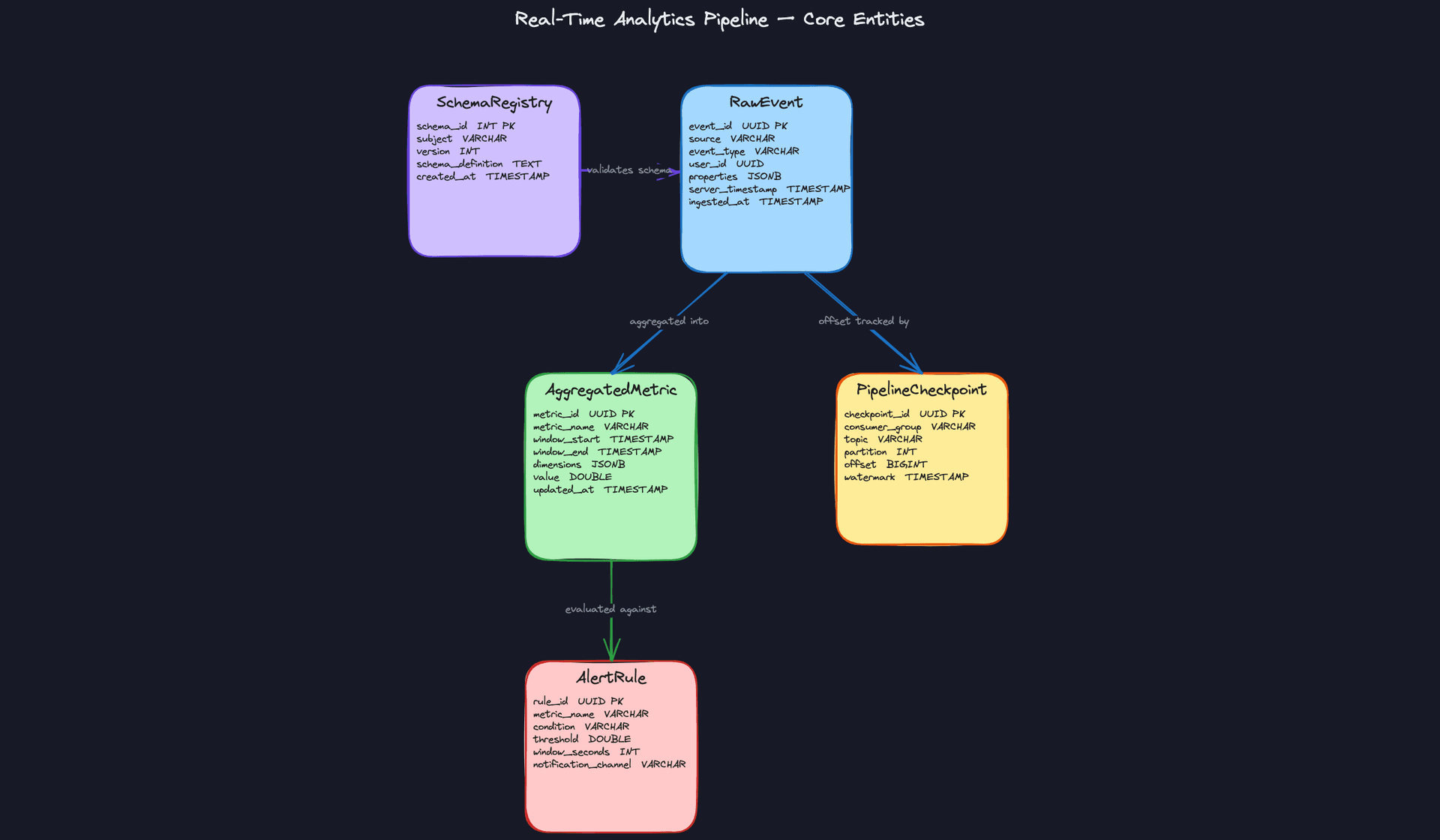
Four entities drive this system. Two are data entities that live on the hot path (raw events and aggregated metrics), one is an operational entity (pipeline checkpoints), and one is a configuration entity (alert rules). Keeping that distinction clear in your interview will signal that you understand the difference between data flow and control flow.
RawEvent is the immutable log entry. Every event that enters the system gets written here exactly once. Think of it as your source of truth: if a downstream job produces wrong aggregates, you replay from this table. The properties column is intentionally schemaless (JSONB) to accommodate different event types without schema migrations on the hot path.
CREATE TABLE raw_events (
    event_id         UUID PRIMARY KEY DEFAULT gen_random_uuid(),
    source           VARCHAR(100) NOT NULL,          -- e.g. 'web', 'ios', 'backend-payments'
    event_type       VARCHAR(100) NOT NULL,          -- e.g. 'page_view', 'purchase', 'error'
    user_id          UUID,                           -- nullable for anonymous events
    properties       JSONB NOT NULL DEFAULT '{}',   -- arbitrary event payload
    server_timestamp TIMESTAMP NOT NULL,             -- assigned at ingestion, not by client
    ingested_at      TIMESTAMP NOT NULL DEFAULT now()
);

CREATE INDEX idx_raw_events_source_ts ON raw_events(source, server_timestamp DESC);
CREATE INDEX idx_raw_events_type_ts   ON raw_events(event_type, server_timestamp DESC);
Key insight: Notice server_timestamp is set by the ingestion layer, not the producer. Client clocks drift. If you let producers set the timestamp, your windowed aggregations will silently produce wrong results. This is the kind of detail interviewers love to probe.AggregatedMetric is what dashboards actually read. Your Flink job writes pre-computed rollups here after each window closes. The dimensions column stores the grouping keys (country, device type, etc.) as JSONB so you can support arbitrary dimension combinations without altering the schema every time a product team wants a new breakdown.
CREATE TABLE aggregated_metrics (
    metric_id    UUID PRIMARY KEY DEFAULT gen_random_uuid(),
    metric_name  VARCHAR(200) NOT NULL,              -- e.g. 'purchase_count', 'p99_latency'
    window_start TIMESTAMP NOT NULL,
    window_end   TIMESTAMP NOT NULL,
    dimensions   JSONB NOT NULL DEFAULT '{}',        -- e.g. {"country": "US", "device": "ios"}
    value        DOUBLE PRECISION NOT NULL,
    updated_at   TIMESTAMP NOT NULL DEFAULT now()
);

CREATE UNIQUE INDEX idx_agg_metrics_window
    ON aggregated_metrics(metric_name, window_start, window_end, dimensions);
CREATE INDEX idx_agg_metrics_name_ts
    ON aggregated_metrics(metric_name, window_start DESC);
The UNIQUE INDEX on (metric_name, window_start, window_end, dimensions) is doing real work here. It makes writes idempotent: if a Flink job restarts and replays a window, the upsert lands in the same row instead of creating a duplicate. Mention this explicitly in your interview.
PipelineCheckpoint is how you track exactly-once processing state. Each Flink consumer group commits its Kafka offset and the last watermark it processed per partition. If the job crashes, it recovers from the last committed checkpoint rather than re-reading from the beginning of the topic.
CREATE TABLE pipeline_checkpoints (
    checkpoint_id  UUID PRIMARY KEY DEFAULT gen_random_uuid(),
    consumer_group VARCHAR(200) NOT NULL,
    topic          VARCHAR(200) NOT NULL,
    partition      INT NOT NULL,
    offset         BIGINT NOT NULL,                 -- last committed Kafka offset
    watermark      TIMESTAMP NOT NULL,              -- last processed event-time watermark
    updated_at     TIMESTAMP NOT NULL DEFAULT now(),
    UNIQUE (consumer_group, topic, partition)       -- one row per partition per consumer group
);
In practice, Flink manages checkpoint state internally via RocksDB and S3 snapshots. This table represents the logical concept. You don't necessarily build it yourself, but you should be able to explain what it's tracking and why.
AlertRule is a configuration entity. It defines thresholds against metric streams: "if error_rate exceeds 5% over a 60-second window, fire a PagerDuty alert." The critical design point is that this table lives outside the hot path. Your Flink alerting job reads these rules at startup (or polls for changes), not on every event. Coupling rule evaluation to per-event processing would make your alerting latency dependent on rule store throughput.
CREATE TABLE alert_rules (
    rule_id              UUID PRIMARY KEY DEFAULT gen_random_uuid(),
    metric_name          VARCHAR(200) NOT NULL,
    condition            VARCHAR(50) NOT NULL,       -- e.g. 'GREATER_THAN', 'LESS_THAN'
    threshold            DOUBLE PRECISION NOT NULL,
    window_seconds       INT NOT NULL,               -- evaluation window duration
    notification_channel VARCHAR(200) NOT NULL,      -- e.g. 'pagerduty://team-data-eng'
    enabled              BOOLEAN NOT NULL DEFAULT true,
    created_at           TIMESTAMP NOT NULL DEFAULT now()
);
Common mistake: Candidates often design alert rules as part of the stream processing job itself, hardcoded into the Flink topology. That means every rule change requires a job restart. Storing rules as configuration and loading them dynamically keeps the pipeline operational while product teams iterate on thresholds.
API Design
The API surface here is smaller than you might expect. Most of the system is internal pipeline infrastructure. The external-facing API covers three concerns: event ingestion, metric reads for dashboards, and alert rule management.
// Ingest a single event or a batch of events from a producer
POST /v1/events
{
  "events": [
    {
      "source": "web",
      "event_type": "page_view",
      "user_id": "uuid-optional",
      "properties": { "page": "/checkout", "referrer": "google" },
      "client_timestamp": "2024-01-15T10:30:00Z"   // advisory only; server sets server_timestamp
    }
  ]
}
-> {
  "accepted": 42,
  "rejected": 1,
  "errors": [{ "index": 3, "reason": "schema_validation_failed" }]
}
POST is the right verb here because ingestion is not idempotent at the HTTP layer. The pipeline handles idempotency downstream via event_id. Batching is important: at 500K events/sec, per-event HTTP calls would saturate your ingestion service with connection overhead.
// Read pre-aggregated metrics for a dashboard panel
GET /v1/metrics/{metric_name}?window_start=...&window_end=...&dimensions=country:US,device:ios
-> {
  "metric_name": "purchase_count",
  "windows": [
    {
      "window_start": "2024-01-15T10:00:00Z",
      "window_end":   "2024-01-15T10:01:00Z",
      "value": 1842,
      "dimensions": { "country": "US", "device": "ios" }
    }
  ]
}
This is a GET because it's a pure read with no side effects. The query hits Redis for recent windows and falls back to Iceberg via Trino for historical ranges. The dashboard service handles that routing transparently; callers don't need to know which store answered.
// Create a new alert rule
POST /v1/alert-rules
{
  "metric_name": "error_rate",
  "condition": "GREATER_THAN",
  "threshold": 0.05,
  "window_seconds": 60,
  "notification_channel": "pagerduty://team-data-eng"
}
-> {
  "rule_id": "uuid",
  "created_at": "2024-01-15T10:30:00Z"
}

// Update an existing alert rule (e.g. change threshold)
PUT /v1/alert-rules/{rule_id}
{ "threshold": 0.03 }
-> { "rule_id": "uuid", "updated_at": "..." }

// Disable a rule without deleting it
PATCH /v1/alert-rules/{rule_id}
{ "enabled": false }
-> { "rule_id": "uuid", "enabled": false }
Use PUT for full replacement of a rule and PATCH for partial updates like toggling enabled. Soft-disabling rules with enabled: false rather than DELETE preserves audit history, which matters when you're debugging why an alert stopped firing at 2am.
Interview tip: If the interviewer asks why you're not exposing a write API for raw events directly to Kafka, explain the tradeoff. Direct Kafka producers are faster but require clients to manage Avro serialization and schema registry integration. An HTTP ingestion service adds a network hop but gives you a clean place to enforce schema validation, rate limiting, and authentication before anything touches the message bus.
High-Level Design
Five moving parts make this pipeline work: ingestion, stream processing, serving, alerting, and error handling. We'll walk through each one in order, because the design decisions in each layer constrain what's possible in the next.
1) Ingesting Events into Kafka
Core components: Event producers (web, mobile, backend services), Schema Registry, Kafka cluster, Kafka Connect
Events arrive from many sources simultaneously. Your job is to get them into a durable, ordered log without letting bad data in.
Producers serialize events as Avro and register their schema with the Schema Registry before publishing. The registry acts as a gatekeeper: if the event doesn't match a registered schema, it's rejected at the producer before it ever touches Kafka. This is much cheaper than catching bad data downstream after it's already been aggregated into metrics.
Data flow:
- Producer serializes an event to Avro, embedding the schema ID in the message header
- Schema Registry validates the schema ID and checks compatibility against the registered version
- On success, the producer publishes to the appropriate Kafka topic, partitioned by
sourceorevent_type - Kafka assigns an offset and replicates the message across brokers
- Malformed events that fail validation are routed to a dead-letter queue (DLQ) topic
{
  "event_id": "uuid-v4",
  "source": "mobile-ios",
  "event_type": "page_view",
  "user_id": "uuid-v4",
  "properties": {
    "page": "/checkout",
    "session_id": "abc123"
  },
  "server_timestamp": "2024-01-15T10:23:45.123Z"
}
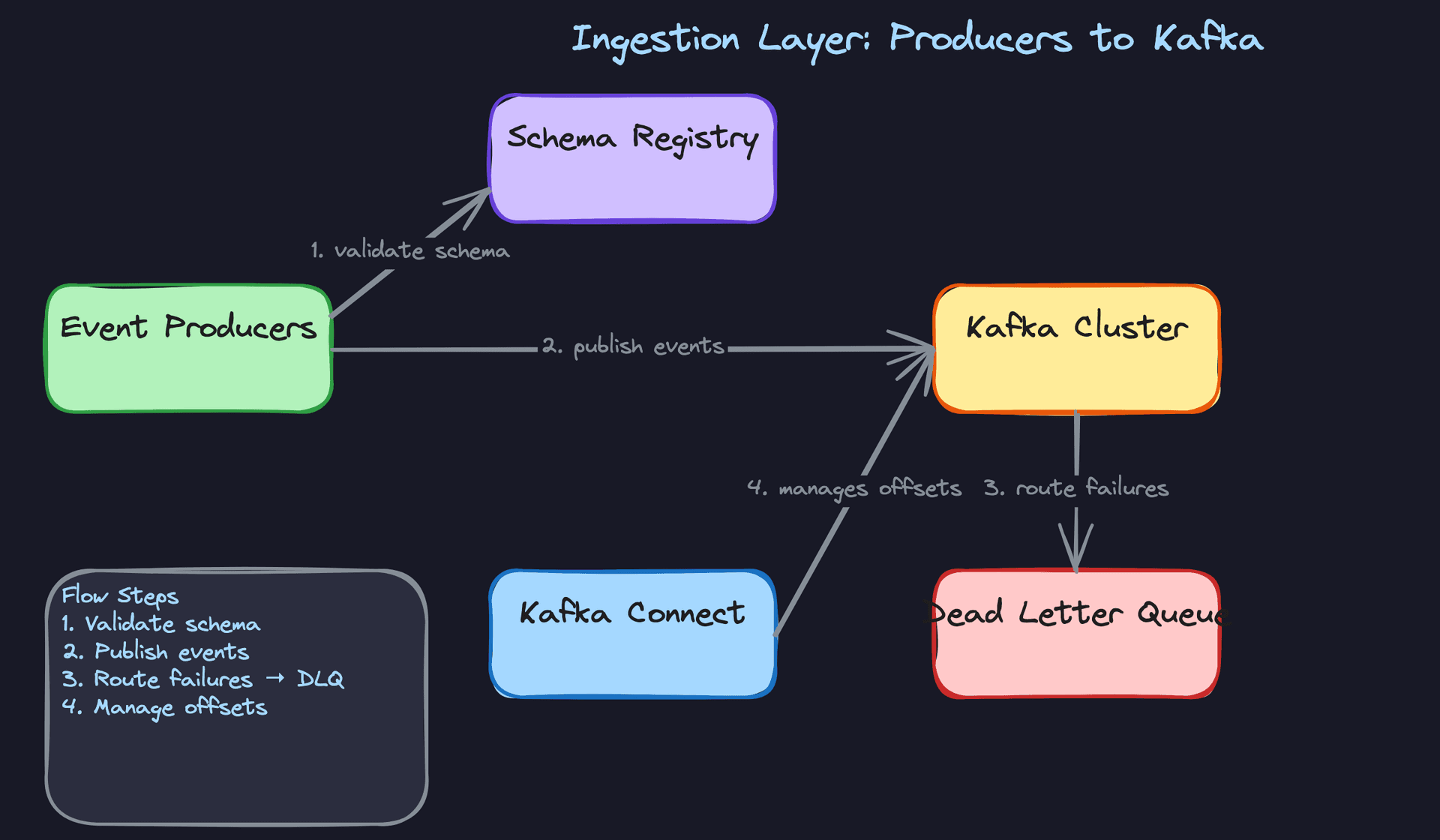
Partitioning strategy matters here. Partitioning by event_type keeps related events on the same partition, which makes windowed aggregations cheaper because Flink tasks don't need to shuffle data across the network. Partitioning by source is better if you have wildly uneven event volumes per type and want to avoid hot partitions. Ask your interviewer what the event distribution looks like before committing.
Interview tip: Mention the schema registry unprompted. Most candidates say "write to Kafka" and move on. Explaining that the registry enforces Avro contracts at write time, not read time, signals that you've thought about data quality at the source rather than cleaning up messes downstream.
One more thing: set Kafka's retention to at least 7 days for raw events. This gives you a reprocessing window if a downstream bug corrupts aggregates. You'll want this when the deep dive on backfills comes up.
2) Stream Processing: Windowed Aggregations with Flink
Core components: Flink aggregation job, RocksDB state backend, Redis, Iceberg on S3
Flink reads from Kafka and does the heavy lifting: grouping events into time windows, computing aggregates, and writing results to two different stores.
Data flow:
- Flink consumers read from Kafka partitions, tracking offsets via checkpoints
- Each event is assigned an event-time timestamp from
server_timestamp(not processing time) - Events are keyed by
(metric_name, dimension_values)and routed to the appropriate window operator - Tumbling windows (e.g. 1-minute buckets) fire when the watermark passes the window boundary
- Sliding windows (e.g. 5-minute window sliding every 30 seconds) overlap, giving smoother trend lines for dashboards
- Completed window results are written to Redis for low-latency serving and to Iceberg on S3 for durability
# Flink windowed aggregation (pseudocode, PySpark-style for readability)
events = (
    kafka_source
    .assign_timestamps_and_watermarks(
        WatermarkStrategy
        .for_bounded_out_of_orderness(Duration.of_seconds(30))
        .with_timestamp_assigner(lambda e: e["server_timestamp"])
    )
)

aggregated = (
    events
    .key_by(lambda e: (e["event_type"], e["properties"].get("page")))
    .window(TumblingEventTimeWindows.of(Time.minutes(1)))
    .aggregate(CountAggregator())
)

aggregated.add_sink(RedisSink())
aggregated.add_sink(IcebergSink(table="aggregated_metrics"))
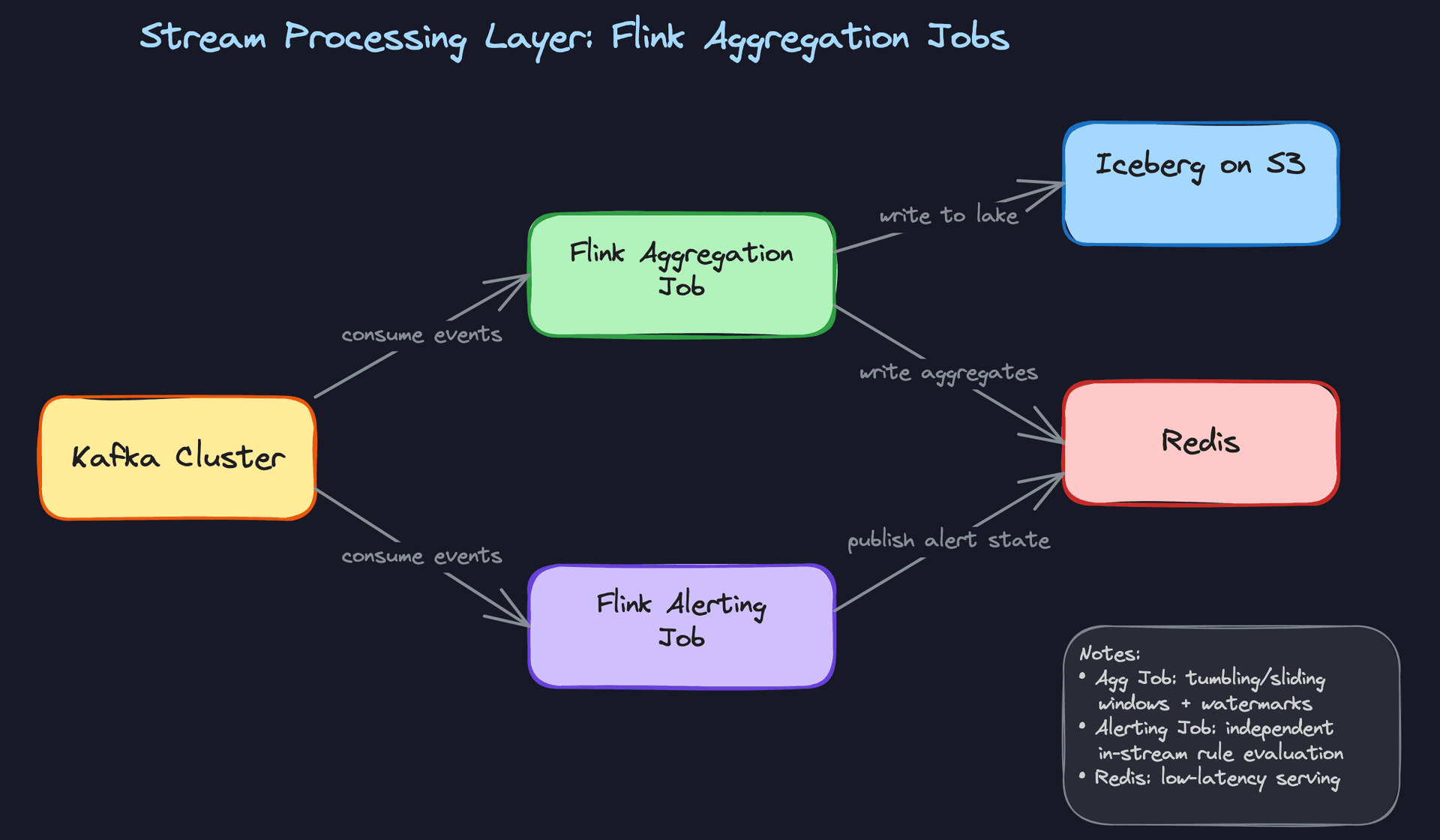
The RocksDB state backend is the right choice here. In-memory state backends can't handle the volume at 500K events/sec across many concurrent windows. RocksDB spills to local disk and checkpoints to S3, so Flink can recover without reprocessing from the beginning of the Kafka topic.
Common mistake: Candidates often propose a single output sink. Writing only to Redis means you lose history when keys expire. Writing only to Iceberg means dashboard queries are too slow. You need both, and the interviewer will push you on this if you don't bring it up yourself.
The dual-write adds complexity, but it's the right trade-off. The Flink job treats both sinks as part of the same checkpoint transaction, so either both writes succeed or neither does.
3) Serving Pre-Aggregated Metrics to Dashboards
Core components: Redis, Iceberg on S3, Trino/Athena, Dashboard service
Two query patterns dominate: "show me the last 5 minutes of checkout conversion rate" and "show me checkout conversion rate for the last 90 days broken down by country." These have completely different latency and throughput characteristics, and one store can't serve both well.
Data flow for real-time dashboard queries:
- Dashboard service receives a request for a metric over a recent time window
- It constructs a Redis key:
metric:{metric_name}:{dimension_hash}:{window_start} - Redis returns the pre-aggregated value in under 5ms
- Dashboard service assembles the time series from multiple Redis keys and returns it to the UI
Data flow for historical/ad-hoc queries:
- User submits a query spanning weeks or months
- Dashboard service routes the request to Trino (or Athena)
- Trino scans the relevant Iceberg partitions on S3, pruning by
window_startpartition column - Results are returned in seconds to minutes depending on scan size
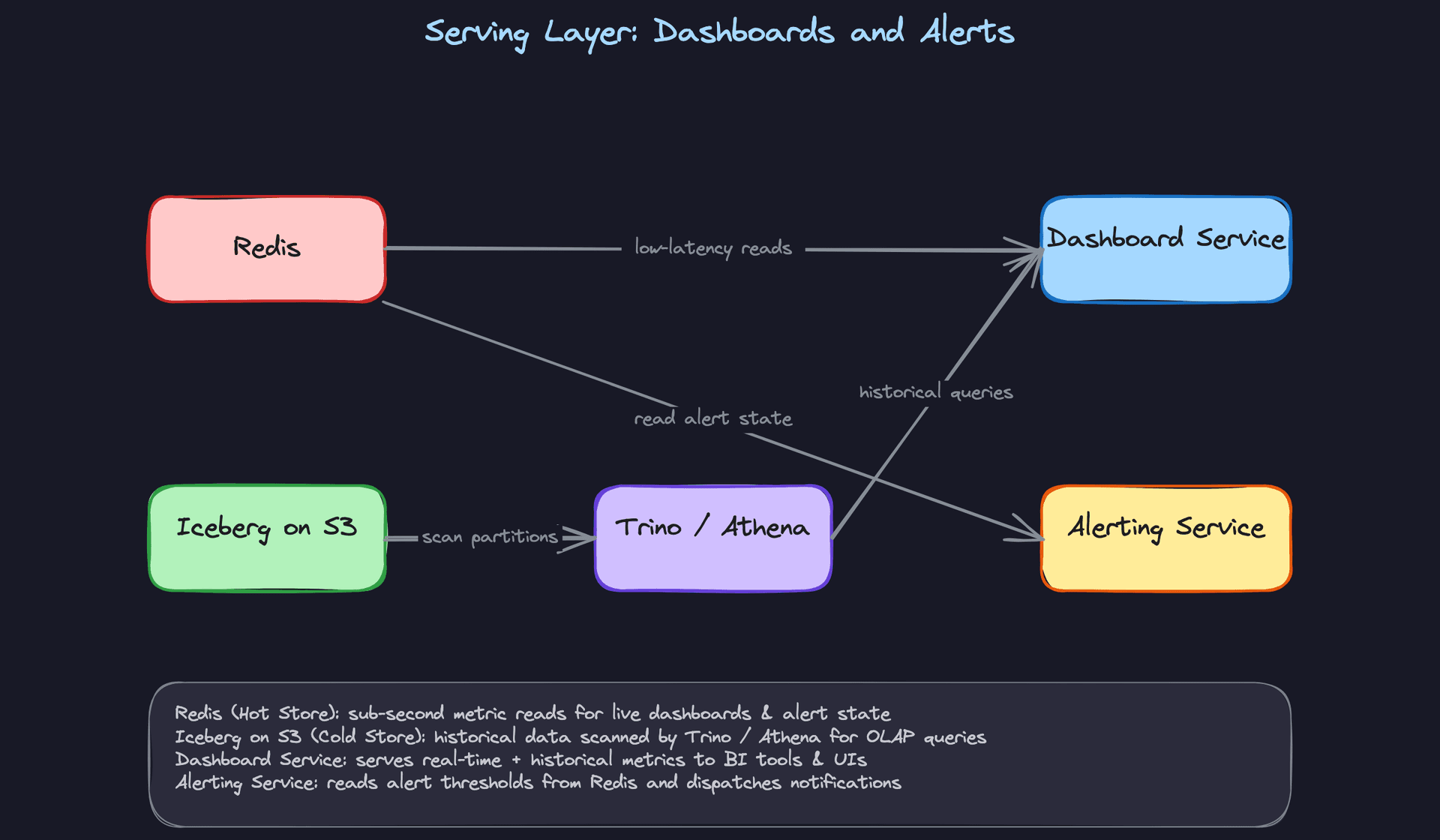
Redis keys should have a TTL matching your retention policy for hot data, typically 24 to 48 hours. Anything older goes to Iceberg. The dashboard service needs to know which store to hit based on the query's time range, which is a simple routing decision: if window_start is within the last 48 hours, hit Redis; otherwise, hit Trino.
Key insight: Iceberg's partition pruning is what makes historical queries tolerable. If you partition theaggregated_metricstable byDATE(window_start), Trino skips irrelevant files entirely. Without this, a 90-day query scans everything.
Don't put OLAP queries on Redis. It's not designed for range scans across thousands of keys, and you'll saturate the connection pool under any real query load.
4) Alerting as an Independent Flink Job
Core components: Flink alerting job, AlertRule store (Postgres), Redis, notification service
Alerting can't depend on the aggregation job. If the aggregation job is backpressured or restarting, you still need alerts to fire. So the alerting job reads directly from the same Kafka topic, independently.
Data flow:
- Flink alerting job reads from the same Kafka topics as the aggregation job, using a separate consumer group
- Alert rules are loaded from Postgres at job startup and refreshed periodically (every 30 seconds)
- For each event, the job evaluates whether the rolling count or rate for a given metric crosses a threshold within the rule's window
- When a threshold is breached, the job writes an alert event to Redis and publishes to a notification topic
- The notification service consumes the alert topic and dispatches to PagerDuty, Slack, or email
-- Alert rules are configuration, not hot-path data
CREATE TABLE alert_rules (
    rule_id           UUID PRIMARY KEY DEFAULT gen_random_uuid(),
    metric_name       VARCHAR(255) NOT NULL,
    condition         VARCHAR(50) NOT NULL,   -- 'gt', 'lt', 'eq'
    threshold         DOUBLE PRECISION NOT NULL,
    window_seconds    INT NOT NULL,
    notification_channel VARCHAR(255) NOT NULL,
    is_active         BOOLEAN NOT NULL DEFAULT true,
    updated_at        TIMESTAMP NOT NULL DEFAULT now()
);
Keeping alert rules in Postgres (not in the Flink job's state) means you can update thresholds without restarting the job. The job polls for changes. This is a small operational detail that interviewers love to probe: "what happens if someone changes an alert threshold at 2am during an incident?"
Interview tip: Explicitly say that the alerting job uses a separate Kafka consumer group. This tells the interviewer you understand that consumer groups track offsets independently, so the alerting job can fall behind or restart without affecting the aggregation job's progress.
Alerting latency should be in the 5 to 15 second range for most use cases. If you need sub-second alerting, you'd skip windowing entirely and evaluate rules on individual events as they arrive, at the cost of higher false-positive rates.
5) Dead-Letter Queue for Failed Events
Core components: DLQ Kafka topic, DLQ monitor, reprocessing job
Every pipeline has bad data. The question is whether you lose it or handle it gracefully.
Data flow:
- Schema Registry rejects a malformed event at the producer; the producer catches the exception and publishes the raw bytes to the
events.dlqtopic with error metadata attached - Processing failures inside Flink (e.g. a null pointer on a missing field) also route to the DLQ via a side output
- A DLQ monitor tracks the growth rate of the DLQ topic and fires an alert if it exceeds a threshold (e.g. more than 1% of total event volume)
- Once the upstream schema bug is fixed, a reprocessing job reads from the DLQ, re-validates events, and replays them into the main topic
{
  "original_payload": "<raw bytes>",
  "error_type": "SchemaValidationError",
  "error_message": "Field 'server_timestamp' is required but missing",
  "source_topic": "events.clickstream",
  "failed_at": "2024-01-15T10:23:45.456Z",
  "producer_host": "web-prod-07"
}
The DLQ is your audit trail. Without it, you have no way to know how many events you lost or what was in them. With it, you can answer "did we miss any checkout events during the schema migration?" with a concrete number.
Common mistake: Candidates propose retry logic instead of a DLQ. Retrying schema validation failures in a tight loop just creates backpressure. Route to DLQ immediately, fix the root cause, then replay. Retries are for transient network errors, not structural data problems.
Putting It All Together
The full pipeline is three parallel paths sharing a single Kafka backbone.
The ingestion layer enforces data contracts at the source via the Schema Registry, so the stream processing layer can trust what it receives. Flink runs two independent jobs from the same topics: one for windowed aggregations, one for alerting. Aggregation results land in both Redis (for fresh, low-latency reads) and Iceberg (for durable, queryable history). The dashboard service routes queries to the right store based on time range. Failed events go to the DLQ instead of being silently dropped, giving the team a recovery path.
The key architectural principle throughout: each layer has one job, and failures in one layer don't cascade into others. The alerting job doesn't wait for aggregations. The DLQ doesn't block the main pipeline. The serving layer doesn't force OLAP queries onto a hot cache.
At 500K events/sec, you're looking at roughly 50 Kafka partitions (assuming 10K events/sec per partition as a conservative ceiling), a Flink cluster with 20 to 40 task slots, and a Redis cluster sized for the hot window of pre-aggregated keys. Iceberg on S3 handles the rest at storage costs orders of magnitude cheaper than keeping everything in Redis.
Deep Dives
These are the questions that separate candidates who've read about streaming systems from those who've actually run them in production. Expect the interviewer to push hard on at least two of these.
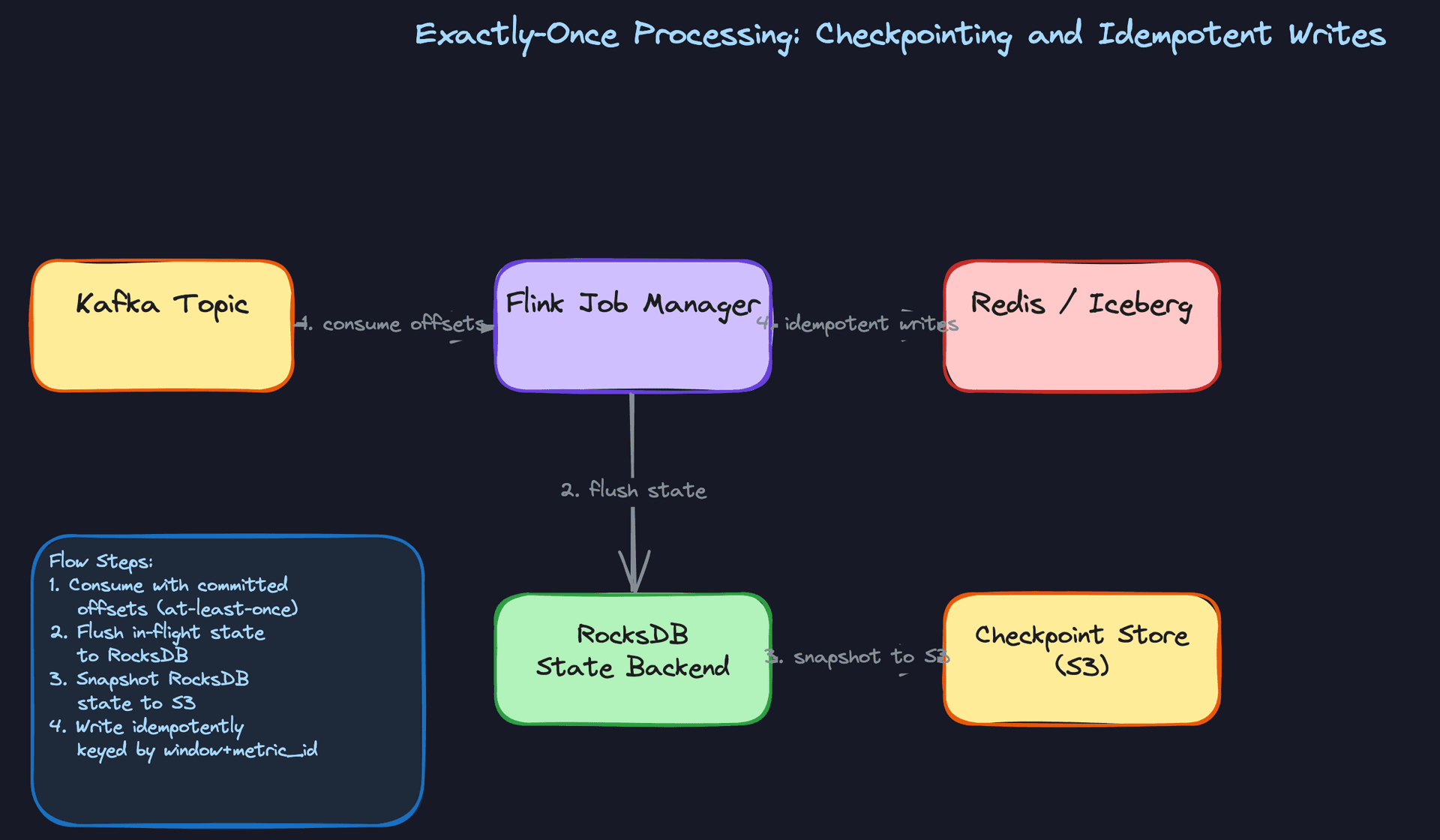
"How do we prevent double-counting when a Flink job restarts mid-window?"
This one comes up constantly. A Flink task manager crashes halfway through a 5-minute tumbling window. When the job recovers, does it reprocess events it already counted? If your answer is "we just restart and hope for the best," you're going to lose points fast.
Bad Solution: At-Least-Once Processing with Manual Deduplication
The naive approach is to let Flink run with at-least-once guarantees and then deduplicate on the read side. You store a processed_event_ids set somewhere (Redis, maybe a Bloom filter) and check it before updating your aggregates.
This breaks down at scale. At 500K events/sec, that deduplication store becomes a bottleneck and a single point of failure. Worse, your aggregates are mutable state spread across two systems with no transactional boundary between them. A partial write leaves you with corrupted counts and no clean way to detect it.
Warning: Candidates often propose deduplication as a substitute for exactly-once semantics. It's not. Deduplication handles duplicate events; it doesn't protect against partial state writes when the job crashes mid-checkpoint.
Good Solution: Flink Checkpointing with RocksDB State Backend
Flink's checkpointing mechanism gives you exactly-once semantics within the job itself. Every N seconds (configurable, typically 30-60s for low-latency pipelines), Flink snapshots all operator state to durable storage using the Chandy-Lamport algorithm. If the job crashes, it recovers from the last successful checkpoint and replays only the Kafka messages after the committed offset.
RocksDB as the state backend is the right call here over the default heap-based backend. Window state for a high-volume pipeline can easily reach tens of gigabytes. Keeping that on the JVM heap causes GC pressure and checkpoint timeouts. RocksDB spills to local disk and snapshots incrementally to S3.
# Flink job configuration (PyFlink)
env = StreamExecutionEnvironment.get_execution_environment()

# Enable checkpointing every 30 seconds
env.enable_checkpointing(30_000)  # ms

# Exactly-once mode
env.get_checkpoint_config().set_checkpointing_mode(
    CheckpointingMode.EXACTLY_ONCE
)

# RocksDB state backend with S3 checkpoint storage
env.set_state_backend(EmbeddedRocksDBStateBackend())
env.get_checkpoint_config().set_checkpoint_storage(
    "s3://your-bucket/flink-checkpoints"
)

# Minimum pause between checkpoints to avoid overlap
env.get_checkpoint_config().set_min_pause_between_checkpoints(10_000)
The catch: checkpointing only covers state inside Flink. Your writes to Redis or Iceberg are still outside the checkpoint boundary. If the job crashes after computing a window result but before writing it, you'll recompute and write again on recovery.
Great Solution: End-to-End Exactly-Once with Idempotent Sink Writes
The full solution closes the gap between Flink's internal guarantees and the external sinks. For Redis, you key every aggregate write by (metric_name, window_start, window_end, dimensions). A recomputed window produces the same key and simply overwrites the previous value. The write is naturally idempotent.
For Iceberg, you use Flink's two-phase commit sink. Flink writes data files during the checkpoint but only commits the snapshot to the Iceberg catalog when the checkpoint succeeds. If the job crashes before the checkpoint completes, the uncommitted files are abandoned and the catalog never sees them.
# Idempotent Redis write keyed by window identity
def write_aggregate_to_redis(redis_client, metric_name, window_start,
                              window_end, dimensions, value):
    # Key is deterministic: same window always produces same key
    key = f"metric:{metric_name}:{window_start.isoformat()}:{window_end.isoformat()}"

    # HSET is idempotent: rewriting the same window is safe
    redis_client.hset(key, mapping={
        "value": value,
        "dimensions": json.dumps(dimensions),
        "updated_at": datetime.utcnow().isoformat()
    })
    # TTL keeps the hot store from growing unbounded
    redis_client.expire(key, 86400)  # 24 hours
On the Kafka side, configure your consumers to commit offsets only after a successful checkpoint, not on a timer. This ties offset commits to Flink's recovery point, so replays always start from a consistent position.
Tip: Senior candidates mention the two-phase commit sink for Iceberg unprompted. It's the detail that shows you understand where exactly-once guarantees actually end inside Flink and where you have to do extra work to extend them to your sinks.
"How do we handle events that arrive late from mobile clients?"
Mobile apps buffer events locally and flush them when connectivity returns. A user opens your app on a plane, generates 40 events, and lands two hours later. Those events hit Kafka with timestamps from two hours ago. Your 5-minute windows closed long ago. What do you do?
Bad Solution: Use Processing Time for Windows
Processing time is the timestamp when Flink receives the event, not when it actually occurred. It's simple to implement and there's no late-data problem because events are always "on time" relative to wall clock.
The problem is that your aggregates become meaningless for any business question that cares about when things actually happened. "How many users clicked checkout between 2pm and 3pm?" becomes unanswerable because your 2pm-3pm window contains events that occurred at 11am and events that occurred at 4pm, depending on network conditions.
Warning: Processing-time windows are fine for infrastructure metrics (throughput, error rates) where you care about "right now." For any user-behavior analytics, they produce results that can't be trusted. Candidates who propose processing time without acknowledging this trade-off are missing the point of the question.
Good Solution: Event-Time Watermarks with Allowed Lateness
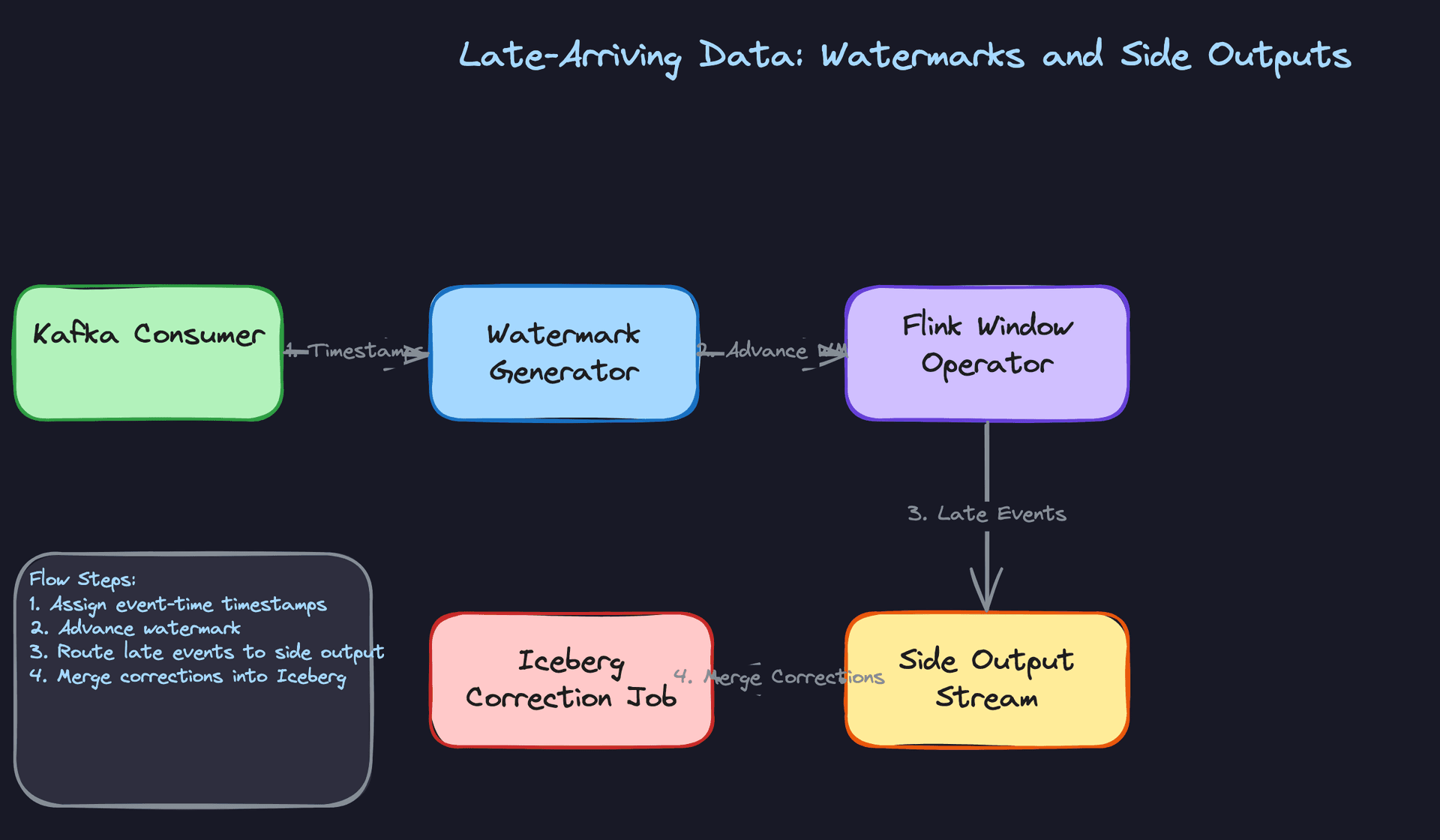
Flink's event-time processing assigns each event to a window based on its event_timestamp field, not when it arrived. A watermark is a signal that says "I'm confident all events with timestamps before T have now arrived." When the watermark advances past a window's end time, Flink fires the window result.
You configure a watermark strategy with a bounded out-of-orderness. For mobile clients, something like 5 minutes is reasonable for most events. You also set allowed_lateness on the window, which keeps the window state alive for a grace period after the watermark fires, updating the result if late events trickle in.
from pyflink.datastream.watermark_strategy import WatermarkStrategy
from pyflink.common import Duration

# Watermark strategy: assume events arrive within 5 minutes of event time
watermark_strategy = (
    WatermarkStrategy
    .for_bounded_out_of_orderness(Duration.of_minutes(5))
    .with_timestamp_assigner(
        # Extract event_timestamp from the event payload
        lambda event, _: event["server_timestamp_ms"]
    )
)

stream = kafka_source_stream.assign_timestamps_and_watermarks(
    watermark_strategy
)

# Window with 2-minute allowed lateness after watermark fires
windowed_stream = (
    stream
    .key_by(lambda e: (e["metric_name"], e["dimension_value"]))
    .window(TumblingEventTimeWindows.of(Time.minutes(5)))
    .allowed_lateness(Time.minutes(2))
    .aggregate(MetricAggregateFunction())
)
The trade-off: a 5-minute out-of-orderness bound means your dashboard results are at least 5 minutes stale. Tighten the bound and you get fresher results but more events classified as late.
Great Solution: Side Outputs for Late Data with Iceberg Corrections
Events that arrive after the allowed lateness window closes aren't just dropped. You route them to a Flink side output stream, which feeds a separate correction job. That job merges the late events into the already-written Iceberg partitions using Iceberg's MERGE INTO semantics, updating the historical aggregate without touching the hot Redis store.
# Define a side output tag for late events
late_output_tag = OutputTag("late-events", Types.MAP(Types.STRING(), Types.STRING()))

class LateDataAwareWindowFunction(ProcessWindowFunction):
    def process(self, key, context, elements, out):
        # Emit normal result to main output
        result = compute_aggregate(elements)
        out.collect(result)

    def on_late_arrival(self, element, ctx, out):
        # Route to side output instead of discarding
        ctx.output(late_output_tag, element)

# Main stream gets normal results
main_stream = windowed_stream.process(LateDataAwareWindowFunction())

# Side output gets late arrivals for async correction
late_stream = main_stream.get_side_output(late_output_tag)
late_stream.add_sink(IcebergCorrectionSink())
The correction job runs on a slower cadence (every 15-30 minutes) and issues targeted partition rewrites. Dashboards showing historical data automatically pick up the corrections on their next query. Real-time dashboards are unaffected because they read from Redis, which only holds the current window.
Tip: The side output pattern is what staff-level candidates reach for. It shows you've thought about the full lifecycle of a late event: it doesn't just get ignored, it gets corrected, and the correction is decoupled from the hot path.
"How do we evolve the event schema without breaking downstream consumers?"
A product team wants to add a session_id field to the click event schema. Sounds simple. But you have three Flink jobs reading that topic, a Spark batch job doing daily rollups, and an Iceberg table with six months of historical data. A naive schema change can silently corrupt all of them.
Bad Solution: JSON with No Schema Enforcement
Some teams skip schema enforcement entirely and use raw JSON. Producers add fields whenever they want, consumers ignore fields they don't recognize. Flexible, right?
In practice, this means a typo in a field name (user_Id instead of user_id) silently produces null values in your aggregates for weeks before anyone notices. You have no contract between producers and consumers, no version history, and no way to detect breaking changes before they hit production. The DLQ stays empty because nothing is technically invalid; it's just wrong.
Good Solution: Avro with Schema Registry in BACKWARD Compatibility Mode
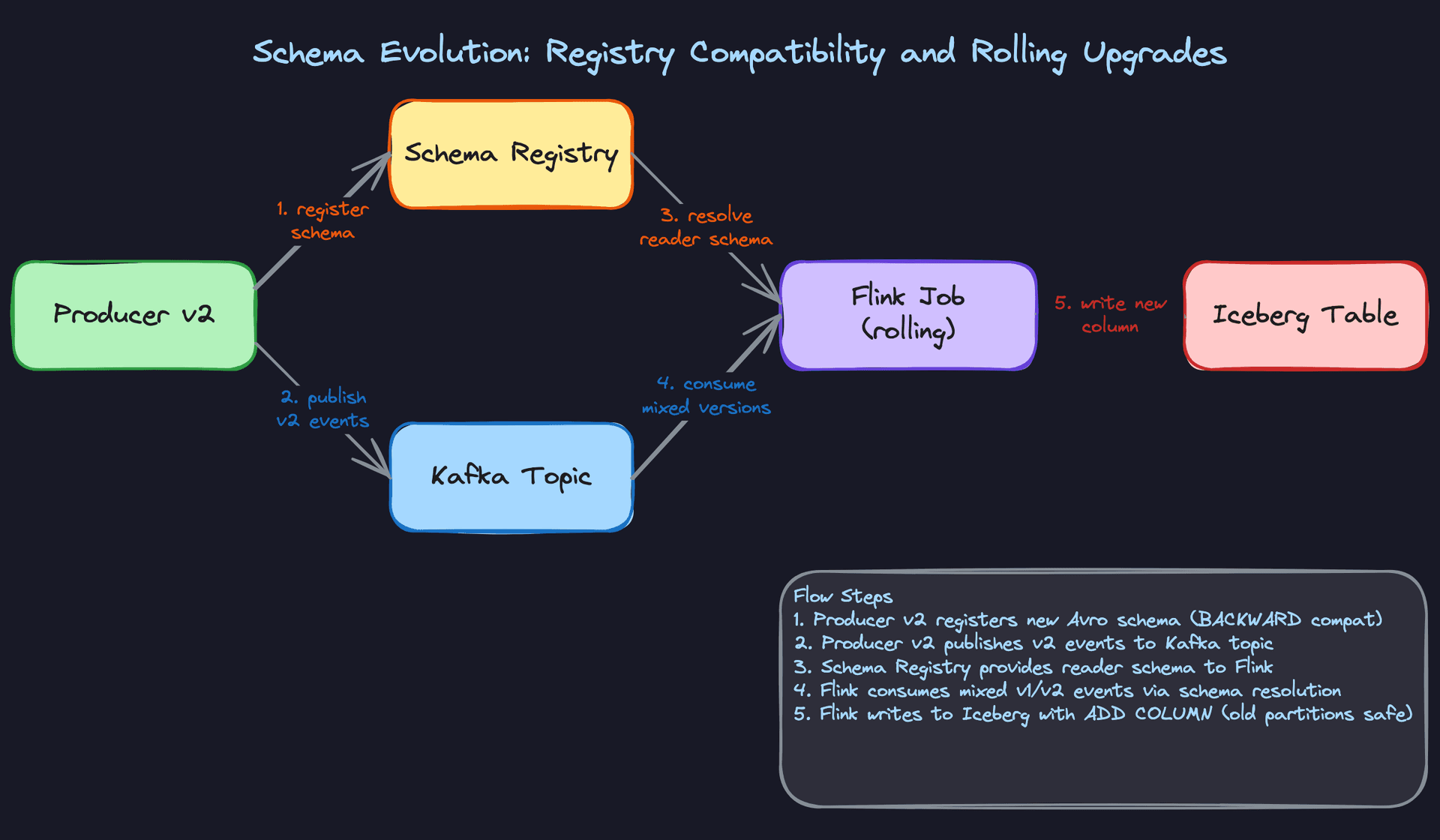
Avro with a schema registry gives you a versioned contract. Every schema change is registered before any producer starts writing the new format. The registry enforces compatibility rules: in BACKWARD mode, new schemas must be readable by the previous version's reader. That means you can add optional fields with defaults, but you can't remove required fields or change types.
// v1 schema
{
  "type": "record",
  "name": "ClickEvent",
  "fields": [
    {"name": "event_id", "type": "string"},
    {"name": "user_id", "type": "string"},
    {"name": "event_type", "type": "string"},
    {"name": "timestamp_ms", "type": "long"}
  ]
}

// v2 schema: adding session_id as optional field with default
{
  "type": "record",
  "name": "ClickEvent",
  "fields": [
    {"name": "event_id", "type": "string"},
    {"name": "user_id", "type": "string"},
    {"name": "event_type", "type": "string"},
    {"name": "timestamp_ms", "type": "long"},
    {"name": "session_id", "type": ["null", "string"], "default": null}
  ]
}
During the rollout window, the Kafka topic contains a mix of v1 and v2 messages. Avro schema resolution handles this: the reader (your Flink job) uses its own schema to decode messages, filling in the default null for session_id when reading v1 events. No job restart required.
Great Solution: FULL Compatibility Mode with Iceberg Schema Evolution
BACKWARD compatibility protects existing consumers from new producers, but it doesn't protect new consumers from old data. For a pipeline that needs to backfill or reprocess historical events, you want FULL compatibility: new schemas must be both backward and forward compatible. That rules out removing fields entirely, but it's the right constraint for a system where old events live in Iceberg for months.
On the Iceberg side, you issue an ALTER TABLE to add the new column. Iceberg's schema evolution is metadata-only: existing Parquet files don't get rewritten. Old partitions simply return null for the new column, which is exactly what you want.
-- Add session_id to Iceberg table without rewriting historical data
ALTER TABLE analytics.click_events
ADD COLUMN session_id VARCHAR;

-- Existing partitions return NULL for session_id
-- New partitions written by v2 Flink job will populate it
-- Query works across both old and new partitions transparently
SELECT
    date_trunc('hour', window_start) AS hour,
    COUNT(*) AS total_clicks,
    COUNT(session_id) AS clicks_with_session  -- NULLs excluded naturally
FROM analytics.click_events
WHERE window_start >= '2024-01-01'
GROUP BY 1;
The schema registry acts as the gatekeeper. Before any producer deploys v2, they register the new schema. The registry validates compatibility and rejects it if the change would break existing consumers. Only after registration succeeds does the producer deploy. This makes schema changes a deliberate, auditable operation rather than an accident waiting to happen.
Tip: Candidates who mention FULL compatibility (not just BACKWARD) and connect it to backfill safety are showing staff-level thinking. Most candidates stop at "add a default value." The follow-up question is always "what happens when you need to reprocess six months of data with the new schema?" You need to have that answer ready.
"How do we know our aggregates are actually correct?"
Silent data quality failures are the hardest problems in data engineering. Your pipeline is running, dashboards are updating, no errors in the logs. But your aggregates are 15% lower than reality because a Kafka consumer group fell behind three hours ago and nobody noticed.
Bad Solution: Trust the Pipeline
Relying on the absence of errors as a signal of correctness. If Flink isn't throwing exceptions and Redis is getting writes, everything must be fine.
This fails because most data quality issues aren't errors. They're silent: a misconfigured watermark that drops late events, a partition imbalance that causes one shard to lag, a schema change that causes a field to deserialize as null. The pipeline hums along producing wrong numbers with no complaint.
Warning: "We'd see it in the error logs" is a red flag answer. Interviewers at companies like Airbnb and Uber will push back immediately. Silent correctness failures are more dangerous than loud failures because they erode trust in data without triggering any alerts.
Good Solution: Consumer Lag Monitoring and Row-Count Reconciliation
Two independent checks cover most failure modes. First, monitor Kafka consumer group lag per partition. If any partition's lag exceeds a threshold (say, 5 minutes of data at normal throughput), page the on-call engineer. Lag is a leading indicator: it tells you the pipeline is falling behind before aggregates become stale.
Second, run a periodic reconciliation job that compares the number of events Kafka says were produced (end offset minus start offset per partition) against the number of rows written to Iceberg for the same time window. A significant discrepancy means events were dropped somewhere in the pipeline.
def reconcile_window(kafka_admin_client, iceberg_table,
                     window_start, window_end, topic):
    """
    Compare Kafka message count to Iceberg row count for a time window.
    Returns the discrepancy ratio; alert if > 0.01 (1%).
    """
    # Count messages in Kafka for the window
    # (requires timestamp-based offset lookup)
    start_offsets = kafka_admin_client.offsets_for_times(
        {TopicPartition(topic, p): int(window_start.timestamp() * 1000)
         for p in get_partitions(topic)}
    )
    end_offsets = kafka_admin_client.offsets_for_times(
        {TopicPartition(topic, p): int(window_end.timestamp() * 1000)
         for p in get_partitions(topic)}
    )
    kafka_count = sum(
        end_offsets[tp].offset - start_offsets[tp].offset
        for tp in start_offsets
    )

    # Count rows in Iceberg for the same window
    iceberg_count = spark.sql(f"""
        SELECT COUNT(*) FROM {iceberg_table}
        WHERE server_timestamp >= '{window_start}'
          AND server_timestamp < '{window_end}'
    """).collect()[0][0]

    discrepancy = abs(kafka_count - iceberg_count) / max(kafka_count, 1)
    return discrepancy
Great Solution: Multi-Layer Observability with DLQ Rate Alerting
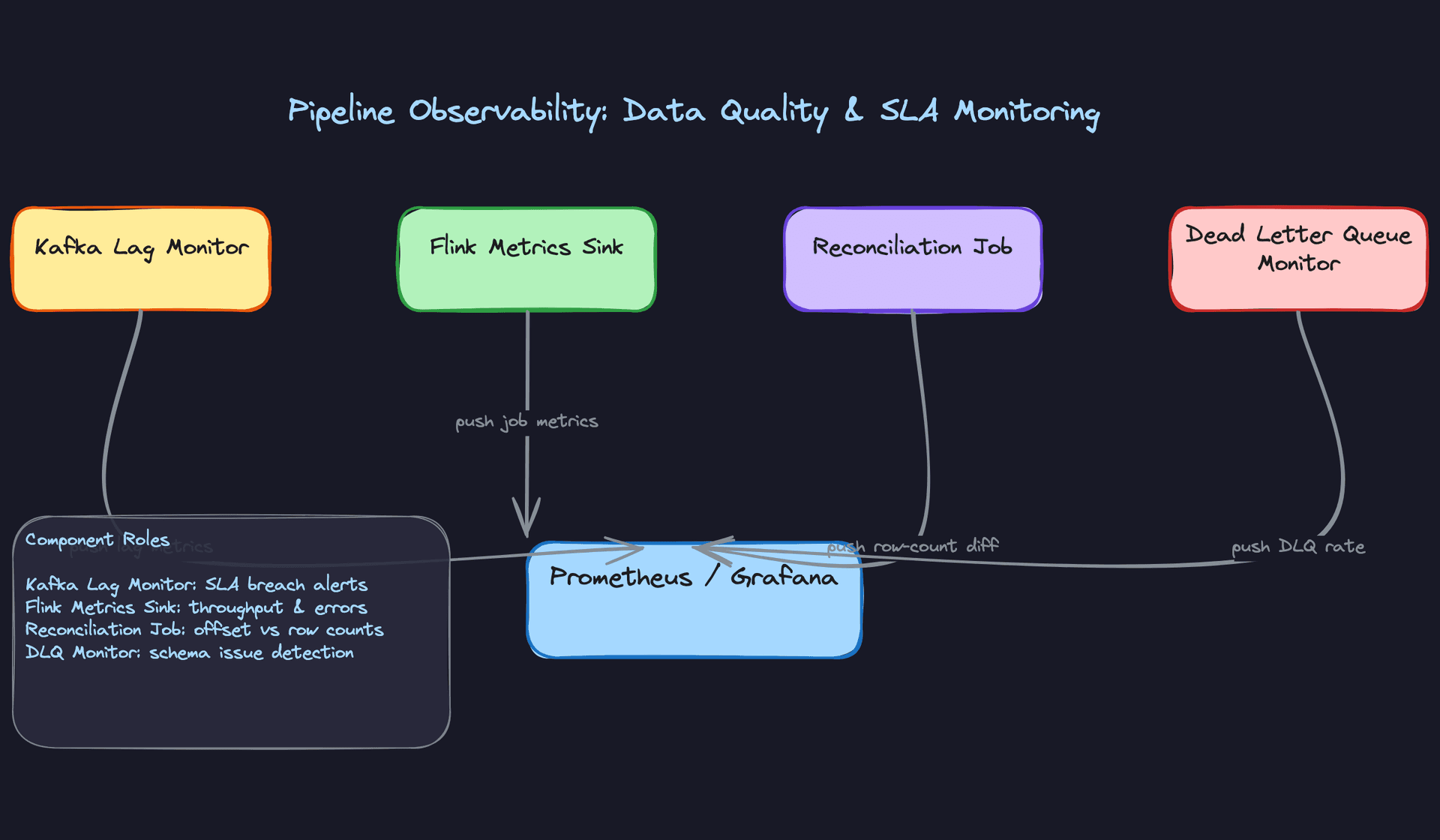
The complete observability stack has four layers working together. Kafka lag monitoring catches pipeline slowdowns. Row-count reconciliation catches drops. Flink's built-in metrics sink (throughput, checkpoint duration, backpressure ratio) catches processing bottlenecks before they become lag. And DLQ growth rate catches upstream schema issues at the source.
The DLQ rate is particularly valuable. A sudden spike in DLQ messages almost always means a producer deployed a schema change without registering it. You want to alert on DLQ growth rate (messages per minute), not just total DLQ size, because a slow leak is just as dangerous as a sudden flood.
On top of these, add anomaly detection on the aggregate values themselves. If your "active users per minute" metric drops 40% in two minutes with no corresponding drop in traffic, that's a data quality signal, not a business event. A simple z-score check against a rolling baseline catches this class of failure.
def check_metric_anomaly(metric_name, current_value,
                          historical_values, z_threshold=3.0):
    """
    Flag aggregate values that deviate significantly from recent history.
    Run this after each window closes.
    """
    mean = statistics.mean(historical_values)
    stdev = statistics.stdev(historical_values)

    if stdev == 0:
        return False  # No variance in history, skip check

    z_score = abs(current_value - mean) / stdev

    if z_score > z_threshold:
        emit_alert(
            metric=metric_name,
            value=current_value,
            expected_range=(mean - z_threshold * stdev,
                           mean + z_threshold * stdev),
            z_score=z_score
        )
        return True
    return False
All four signals feed into a single Prometheus/Grafana dashboard. The on-call engineer sees one view: lag, reconciliation diff, Flink health, and DLQ rate. When something goes wrong, the combination of signals usually points directly at the layer that failed.
Tip: Candidates who propose row-count reconciliation as a correctness check (not just lag monitoring) stand out. It's the difference between knowing your pipeline is running and knowing your pipeline is correct. Bring this up unprompted and you'll get a visible reaction from the interviewer.
What is Expected at Each Level
Every interviewer on this problem is testing the same underlying question: do you understand the difference between event time and processing time, and can you explain why that distinction breaks windowed aggregations when you get it wrong? That question applies whether you're mid-level or staff. Everything else below is layered on top of it.
Mid-Level
- Identify Kafka as the ingestion backbone and explain why: durability, replay, partition-based parallelism. You don't need to size it perfectly, but you should know partitioning by
event_typeorsourceis a deliberate choice, not a default. - Propose a stream processor (Flink or Spark Structured Streaming) and explain what it does: reads from Kafka, applies windowed aggregations, writes results downstream. You don't need to explain RocksDB state backends, but you should know windowing exists.
- Distinguish between a fast serving store (Redis for pre-aggregated metrics) and a durable analytical store (Iceberg or Parquet on S3 for historical queries). Conflating these two is a red flag.
- Articulate at least one consistency trade-off. "If the Flink job restarts, we might double-count" is enough. You don't need to solve it at this level, just show you see the problem.
Senior
- Go deep on exactly-once semantics without being prompted. Explain Flink checkpointing, RocksDB state snapshots, and why idempotent writes to Redis (keyed by
window_start + metric_name) are necessary even after you've solved the Flink side. - Explain watermark strategy for late-arriving mobile events. The interviewer will push on this. Know the trade-off: a generous allowed lateness improves correctness but delays result emission. Know what a side output is and how late data flows into Iceberg as a correction.
- Raise schema evolution as a production concern before the interviewer asks. Mention Avro, schema registry compatibility modes (BACKWARD is the safe default), and what happens to your Flink job when the topic contains mixed v1 and v2 messages during a producer rollout.
- Size the system with real numbers. If you're at 500K events/sec with an average event size of 500 bytes, that's 250MB/sec into Kafka. At 7-day retention, that's roughly 150TB. Know whether your partition count supports that throughput and whether your state backend can hold a 5-minute tumbling window in memory.
Common mistake: Senior candidates often nail the happy path but go quiet when the interviewer asks "what happens when the Flink job is down for 20 minutes?" Have an answer: consumer lag accumulates, the job replays from its last checkpoint, and you need to verify the serving store wasn't partially written before the crash.
Staff+
- Drive the conversation toward silent failures. A pipeline that drops 3% of events without throwing errors is worse than one that crashes loudly. You should propose row-count reconciliation between Kafka offsets and Iceberg row counts, DLQ growth rate alerting, and freshness SLA monitoring as first-class requirements, not afterthoughts.
- Discuss what a backfill actually looks like operationally. If a bug in your Flink aggregation logic corrupts three hours of metrics, how do you replay? Can you re-read from Kafka (only if within retention window), or do you fall back to raw events in Iceberg? What do you tell the dashboard consumers while corrections are in-flight?
- Think about pipeline extensibility. If a product team wants to add a new dimension to an existing metric (say, breaking down
checkout_eventsbydevice_type), does that require a Flink job restart? A schema migration? A new Redis key pattern? Staff candidates design for this kind of change being cheap. - Bring up the Lambda vs Kappa trade-off and take a position. Lambda (separate batch and streaming paths) gives you correctness guarantees but doubles your operational surface area. Kappa (streaming only, with replay as your batch layer) is what most modern pipelines favor. Know why, and know where Kappa breaks down (very long historical reprocessing windows, for instance).
Key takeaway: Real-time analytics pipelines fail in subtle ways: late data silently skews aggregates, schema changes quietly break consumers, and Flink restarts cause double-counts that nobody notices until a business metric looks wrong. The best candidates design for observability and correctness from the start, not as a retrofit.
