
Understanding the Problem
Product definition: A real-time analytics dashboard ingests high-velocity event streams, aggregates metrics continuously, and serves live data to concurrent viewers with low end-to-end latency.
What is a Real-Time Dashboard?
A real-time dashboard is an external- or internal-facing product that turns a firehose of raw events into readable metrics, updated continuously. Think of Stripe's live transaction monitor, Datadog's infrastructure metrics view, or an Uber operations center watching ride requests tick up in real time. The core challenge isn't building a dashboard. It's building the pipeline behind it that can keep up.
What separates this from a standard analytics product is the latency contract. Users expect the numbers on screen to reflect what's happening right now, not what happened an hour ago. That constraint forces every architectural decision: how you ingest, how you aggregate, and how you serve.
Functional Requirements
Before writing a single box on the whiteboard, ask the interviewer: "When you say real-time, do you mean sub-second, a few seconds, or micro-batch on the order of minutes?" The answer completely changes your architecture. Sub-second pushes you toward Redis and streaming aggregation. A few seconds is comfortable with Flink and SSE push. Minutes opens the door to Spark micro-batch. Don't assume.
Also clarify the event source. Clickstream data from a web app looks nothing like IoT sensor telemetry or financial transaction feeds. Volume, schema regularity, and key cardinality all vary wildly. And ask who's viewing the dashboard: internal analysts with flexible query needs, or external customers expecting polished, pre-built widgets? External-facing means multi-tenancy, stricter SLAs, and data isolation from day one.
Core Requirements
- Ingest raw events from producers (applications, SDKs, services) into a durable event bus
- Process and aggregate events in near-real-time using windowed computations (e.g., 1-minute tumbling windows)
- Store aggregated metrics in a queryable serving layer optimized for low-latency reads
- Serve metric data to dashboard clients via a query API, with live updates pushed to connected viewers
- Evaluate alert thresholds continuously and trigger notifications when metrics breach defined conditions
Below the line (out of scope)
- User authentication, dashboard sharing permissions, and access control management
- Custom query builder or ad hoc SQL interface for analysts
- ML-based anomaly detection on metric streams
Note: "Below the line" features are acknowledged but won't be designed in this lesson.
Non-Functional Requirements
- End-to-end latency: Event ingested to dashboard updated in under 5 seconds (p99). Sub-second is aspirational but not the baseline target.
- Availability: 99.9% uptime for the query serving layer. The ingestion pipeline can tolerate brief consumer lag without data loss, thanks to Kafka durability.
- Scale: 100,000 events per second at peak ingest. Up to 10,000 concurrent dashboard viewers. Dimension cardinality up to 1 million unique values per dimension (e.g., user IDs, product SKUs).
- Data freshness vs. correctness: Late-arriving events (up to 60 seconds behind watermark) must be handled without silently corrupting aggregates.
Back-of-Envelope Estimation
Assume a mid-sized SaaS platform: 100K events/sec at peak, each event averaging 500 bytes. Dashboard viewers poll or subscribe to metric updates every 5 seconds.
| Dimension | Assumption | Result |
|---|---|---|
| Peak ingest rate | 100K events/sec × 500 bytes | ~50 MB/s raw ingest bandwidth |
| Kafka retention (24h) | 50 MB/s × 86,400 sec | ~4.3 TB retained in Kafka |
| Aggregated metric rows | 1K unique metric+dimension combos × 1-min windows × 24h | ~1.4M rows/day in serving store |
| Metric storage (1 year) | 1.4M rows/day × 365 × ~200 bytes/row | ~100 GB/year (very manageable) |
| Query API read QPS | 10K viewers × 1 query per 5 sec | ~2,000 QPS to serving layer |
| S3 raw archive | 50 MB/s compressed ~5x | ~850 GB/day archived |
The numbers tell an important story: raw event volume is large, but pre-aggregation collapses it dramatically. Your serving store handles a few thousand QPS against a relatively small dataset, which is well within ClickHouse or Druid's comfort zone. The expensive part is the streaming pipeline, not the query layer.
Tip: Always clarify requirements before jumping into design. Candidates who nail the latency definition question early signal to the interviewer that they understand the problem space, not just the tooling.
The Set Up
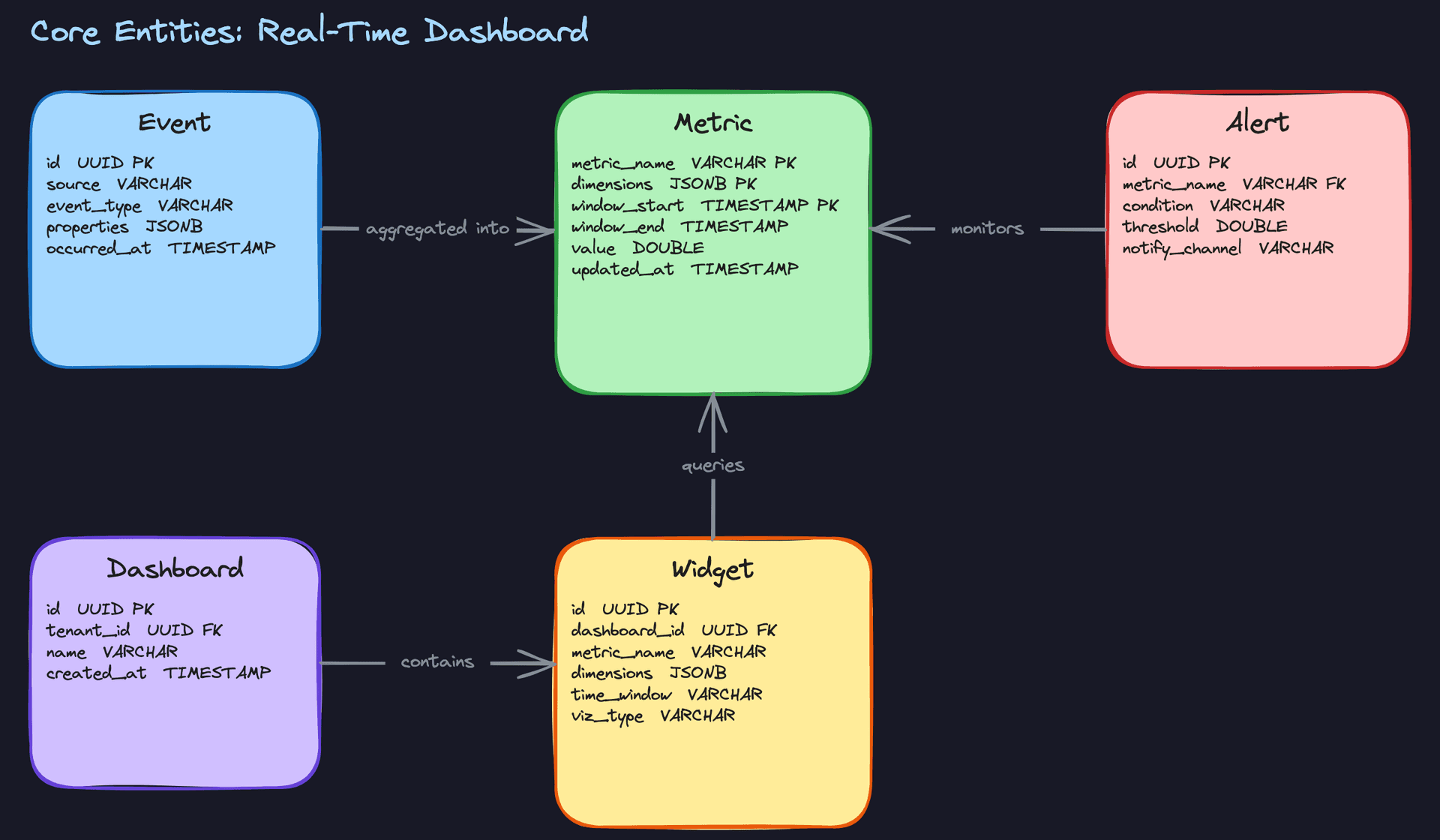
Before touching architecture, you need to agree on what the system actually manages. Five entities cover everything: Event, Metric, Dashboard, Widget, and Alert. Get comfortable explaining each one in a sentence, because the interviewer will probe whether you understand the data flow before you start drawing boxes.
Core Entities
Event is the raw inbound fact. A user clicks a button, a server emits a latency measurement, a payment clears. Events are ephemeral on the hot path. You consume them, transform them, and move on. You are not building a data lake here; raw events are not stored in your serving layer long-term.
Metric is what survives. It's the pre-aggregated time-series value that your stream processor writes after crunching a window of events. Think: checkout_count, dimensions {region: "us-east", plan: "pro"}, window 2024-01-15 14:05:00 to 14:06:00, value 342. This is what dashboards actually query.
Dashboard and Widget are configuration, not data. A Dashboard is a named collection of widgets owned by a tenant. A Widget holds a query definition: which metric, which dimensions, which time window, which visualization type. The serving layer resolves that query at read time against the Metric store. Nothing about the widget changes when new data arrives; only the query result does.
Alert lives close to the aggregation layer intentionally. It references a metric and a threshold, and your stream processor evaluates it continuously as new windows close. Keeping alert evaluation inside Flink (rather than polling from a separate service) means you catch threshold breaches within seconds of the window completing.
Key insight: Two different storage systems serve two different entity types here. Dashboard and Widget configs belong in Postgres or any relational store. Metric time-series data belongs in ClickHouse, Druid, or a purpose-built OLAP engine. Conflating these into one database is a common early mistake that causes pain at scale.
-- Raw events: written by producers, consumed by Flink, NOT stored long-term in the hot path.
-- In practice this table lives in Kafka or a transient buffer, not a persistent OLTP store.
-- Shown here for schema clarity only.
CREATE TABLE events (
    id           UUID PRIMARY KEY DEFAULT gen_random_uuid(),
    tenant_id    UUID NOT NULL,
    source       VARCHAR(100) NOT NULL,          -- e.g. 'checkout-service', 'mobile-sdk'
    event_type   VARCHAR(100) NOT NULL,          -- e.g. 'page_view', 'payment_completed'
    properties   JSONB NOT NULL DEFAULT '{}',    -- arbitrary key-value dimensions
    occurred_at  TIMESTAMP NOT NULL              -- event time, not ingest time
);
-- Aggregated metric rows written by the stream processor.
-- Lives in ClickHouse or Druid; primary key enforces idempotent upserts during backfill.
CREATE TABLE metrics (
    metric_name   VARCHAR(200) NOT NULL,         -- e.g. 'checkout_count', 'p99_latency_ms'
    tenant_id     UUID NOT NULL,
    dimensions    JSONB NOT NULL DEFAULT '{}',   -- e.g. {"region": "us-east", "plan": "pro"}
    window_start  TIMESTAMP NOT NULL,
    window_end    TIMESTAMP NOT NULL,
    value         DOUBLE PRECISION NOT NULL,
    updated_at    TIMESTAMP NOT NULL DEFAULT now(),
    PRIMARY KEY (metric_name, tenant_id, dimensions, window_start)
);
CREATE INDEX idx_metrics_tenant_time ON metrics(tenant_id, metric_name, window_start DESC);
-- Dashboard and Widget are config entities. These live in Postgres.
CREATE TABLE dashboards (
    id          UUID PRIMARY KEY DEFAULT gen_random_uuid(),
    tenant_id   UUID NOT NULL,
    name        VARCHAR(255) NOT NULL,
    created_at  TIMESTAMP NOT NULL DEFAULT now()
);

CREATE TABLE widgets (
    id            UUID PRIMARY KEY DEFAULT gen_random_uuid(),
    dashboard_id  UUID NOT NULL REFERENCES dashboards(id) ON DELETE CASCADE,
    metric_name   VARCHAR(200) NOT NULL,
    dimensions    JSONB NOT NULL DEFAULT '{}',   -- filter dimensions for this widget's query
    time_window   VARCHAR(50) NOT NULL,          -- e.g. 'last_1h', 'last_24h'
    viz_type      VARCHAR(50) NOT NULL,          -- e.g. 'line_chart', 'counter', 'bar_chart'
    created_at    TIMESTAMP NOT NULL DEFAULT now()
);
CREATE INDEX idx_widgets_dashboard ON widgets(dashboard_id);
-- Alert rules evaluated by the stream processor on each completed window.
CREATE TABLE alerts (
    id              UUID PRIMARY KEY DEFAULT gen_random_uuid(),
    tenant_id       UUID NOT NULL,
    metric_name     VARCHAR(200) NOT NULL,
    dimensions      JSONB NOT NULL DEFAULT '{}',  -- scope the alert to specific dimensions
    condition       VARCHAR(10) NOT NULL,          -- 'gt', 'lt', 'gte', 'lte', 'eq'
    threshold       DOUBLE PRECISION NOT NULL,
    notify_channel  VARCHAR(255) NOT NULL,         -- e.g. Slack webhook URL, PagerDuty key
    created_at      TIMESTAMP NOT NULL DEFAULT now()
);
API Design
Five functional requirements, five endpoint groups. The interviewer will likely ask you to walk through at least two of these in detail, so know the request and response shapes cold.
// Ingest a raw event from a producer (app, SDK, service)
POST /v1/events
{
  "tenant_id": "uuid",
  "source": "checkout-service",
  "event_type": "payment_completed",
  "properties": { "region": "us-east", "plan": "pro", "amount_usd": 49.99 },
  "occurred_at": "2024-01-15T14:05:32Z"
}
-> { "event_id": "uuid", "status": "accepted" }
// Query a metric time series for a widget (called by the Query API when resolving a widget)
GET /v1/metrics/{metric_name}?tenant_id=uuid&dimensions={"region":"us-east"}&from=2024-01-15T13:00:00Z&to=2024-01-15T14:00:00Z&window=1m
-> {
     "metric_name": "checkout_count",
     "windows": [
       { "window_start": "2024-01-15T13:00:00Z", "window_end": "2024-01-15T13:01:00Z", "value": 312 },
       ...
     ]
   }
// Create a dashboard
POST /v1/dashboards
{ "tenant_id": "uuid", "name": "Payments Overview" }
-> { "dashboard_id": "uuid" }

// Add a widget to a dashboard
POST /v1/dashboards/{dashboard_id}/widgets
{
  "metric_name": "checkout_count",
  "dimensions": { "region": "us-east" },
  "time_window": "last_1h",
  "viz_type": "line_chart"
}
-> { "widget_id": "uuid" }
// Subscribe to live metric updates for a dashboard (WebSocket or SSE)
GET /v1/dashboards/{dashboard_id}/stream
-> SSE stream: data: { "widget_id": "uuid", "value": 342, "window_start": "...", "updated_at": "..." }
// Create an alert rule
POST /v1/alerts
{
  "tenant_id": "uuid",
  "metric_name": "p99_latency_ms",
  "dimensions": { "service": "checkout" },
  "condition": "gt",
  "threshold": 500,
  "notify_channel": "https://hooks.slack.com/..."
}
-> { "alert_id": "uuid" }
POST for event ingestion because you're creating a new resource and the operation is not idempotent by nature. The event query endpoint uses GET because it's a pure read with no side effects, and query parameters carry the filter dimensions. The /stream endpoint is also a GET because the client is opening a read subscription, not mutating anything.
Common mistake: Candidates sometimes design the stream endpoint as a WebSocket with bidirectional communication. For a dashboard, clients only receive data; they never push. SSE is simpler, works over HTTP/2, and is easier to load-balance. Save WebSockets for cases where the client actually needs to send messages back.
The event ingestion endpoint should return 202 Accepted, not 200 OK. You're acknowledging receipt and handing off to Kafka; you're not confirming the event has been processed. That distinction matters when the interviewer asks about delivery guarantees.
High-Level Design
The system has two distinct paths. The hot path moves events from producers through a stream processor into an OLAP store, then out to live dashboard clients. The cold path handles historical backfill via batch reprocessing. Keep these mentally separate as you walk through the design, because conflating them is one of the most common ways candidates lose the thread.
1) Event Ingestion
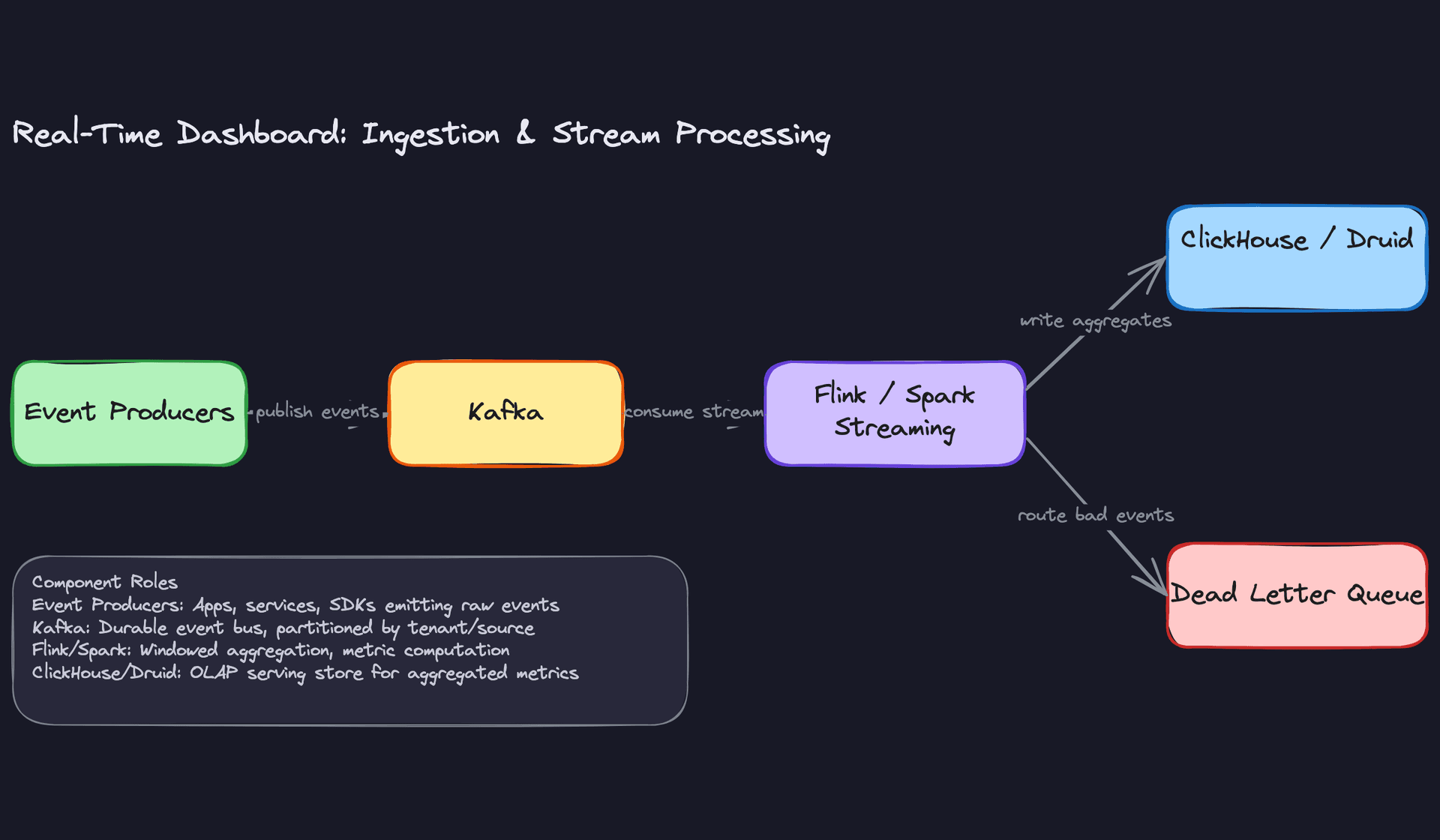
Core components: Event producers (apps, mobile SDKs, backend services), Kafka, Dead Letter Queue
Producers need somewhere to dump events without caring how fast the downstream processing is. That's Kafka's job.
Data flow:
- Producers serialize events as Avro or JSON and publish to a Kafka topic (e.g.,
raw_events). - Topics are partitioned by
tenant_idorsource. This keeps one tenant's traffic from starving another's and lets you scale consumers independently per partition group. - Kafka retains events for 7 days by default. This is your free replay window for reprocessing.
- Malformed events that fail schema validation get routed to a Dead Letter Queue topic (
raw_events_dlq) for inspection and replay.
{
  "id": "evt_01HZ9K3M",
  "source": "checkout-service",
  "event_type": "order_placed",
  "properties": {
    "user_id": "u_4829",
    "amount": 59.99,
    "region": "us-east"
  },
  "occurred_at": "2024-11-01T14:32:01.123Z"
}
The partition key matters more than most candidates realize. If you partition by event_type, a single high-volume event type becomes a hot partition. Partitioning by tenant_id distributes load more evenly and aligns with multi-tenancy isolation later.
Common mistake: Candidates often say "write events directly to ClickHouse" and skip Kafka entirely. That works at low volume, but you lose replay, backpressure handling, and the ability to add new consumers (like an alerting engine) without touching producers.
2) Stream Processing and Aggregation
Core components: Flink (or Spark Structured Streaming), ClickHouse / Druid (write target)
Raw events are facts. Dashboards need metrics. The stream processor is what turns one into the other.
Data flow:
- Flink consumers read from the
raw_eventsKafka topic, one consumer group per logical job. - Events are parsed and validated. Bad events are emitted to the DLQ via a side output.
- A tumbling 1-minute window groups events by
(metric_name, dimensions, window_start)and computes aggregates: counts, sums, unique counts (HyperLogLog), and percentiles (t-digest). - At window close, Flink emits one aggregate record per group and writes it to ClickHouse.
- Flink advances its watermark based on event timestamps, allowing up to 30 seconds of late arrival before closing a window.
# Flink windowed aggregation (PySpark Structured Streaming equivalent)
from pyspark.sql import functions as F
from pyspark.sql.types import *

aggregated = (
    events_stream
    .withWatermark("occurred_at", "30 seconds")
    .groupBy(
        F.window("occurred_at", "1 minute"),
        "event_type",
        "properties.region"
    )
    .agg(
        F.count("*").alias("event_count"),
        F.approx_count_distinct("properties.user_id").alias("unique_users"),
        F.sum("properties.amount").alias("total_amount")
    )
)
Tumbling windows are the right default here. Sliding windows produce overlapping output that multiplies your write volume. Session windows are useful for user-behavior analysis but add complexity you don't need in the base design. Start with tumbling and let the interviewer push you toward something more complex.
Key insight: The stream processor is also where alerting logic lives. Flink can evaluate threshold conditions on each emitted aggregate and publish alert events to a separate Kafka topic, keeping alert latency as low as the window size.
3) Metric Serving Store
Core components: ClickHouse (or Apache Druid), pre-aggregated metric rows
The serving store is what your query API actually hits. It needs to answer questions like "give me order counts by region for the last 30 minutes" in under 100ms, across potentially billions of rows.
ClickHouse and Druid are both strong choices. ClickHouse wins on SQL familiarity, operational simplicity, and raw query speed for pre-aggregated data. Druid wins on native streaming ingestion and built-in tiered storage for long retention windows. For most interview discussions, ClickHouse is the easier choice to justify.
The schema is the key design decision here:
CREATE TABLE metrics (
    metric_name     VARCHAR(100) NOT NULL,          -- e.g. 'order_placed_count'
    tenant_id       UUID NOT NULL,
    dimensions      VARCHAR(500) NOT NULL,           -- serialized k=v pairs for filtering
    window_start    DATETIME NOT NULL,
    window_end      DATETIME NOT NULL,
    value           DOUBLE NOT NULL,
    updated_at      DATETIME NOT NULL DEFAULT now()
)
ENGINE = ReplacingMergeTree(updated_at)             -- idempotent upserts on reprocessing
PARTITION BY toYYYYMMDD(window_start)
ORDER BY (tenant_id, metric_name, dimensions, window_start);
ReplacingMergeTree is the right engine choice in ClickHouse because it handles idempotent writes naturally. When a backfill job rewrites a window, the row with the latest updated_at wins. You don't need to coordinate deletes.
Interview tip: When you mention ClickHouse, expect the interviewer to ask "why not just use Postgres or BigQuery?" The answer is query latency. Postgres can't scan hundreds of millions of rows sub-second. BigQuery can, but its query startup latency (1-3 seconds) is too high for live dashboard refreshes. ClickHouse is purpose-built for this workload.
4) Query API and Live Push
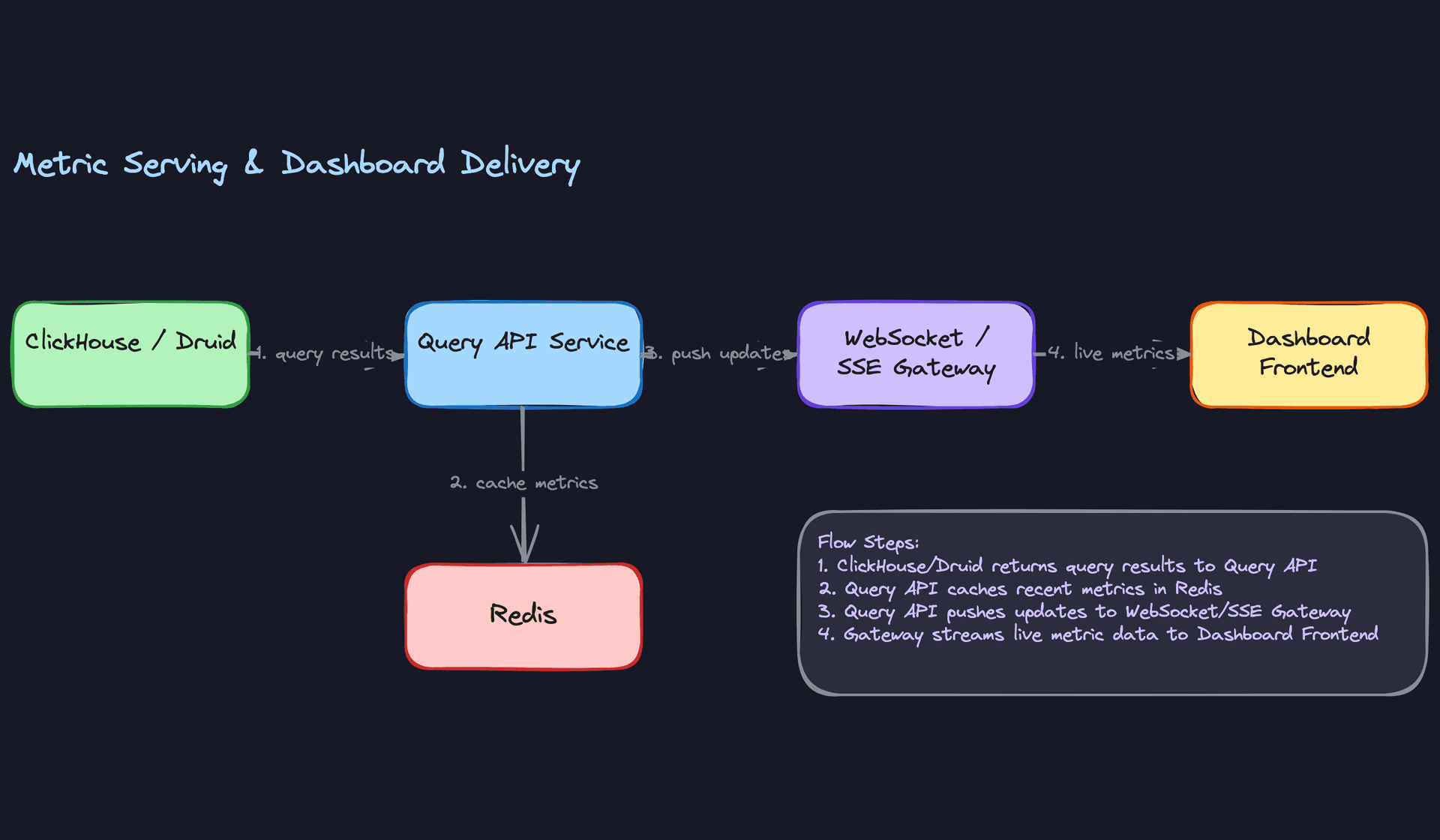
Core components: Query API service, Redis, WebSocket / SSE gateway, dashboard frontend
This layer translates what a widget wants ("show me order counts by region, last 30 minutes, refreshed every 5 seconds") into OLAP queries, and pushes results to connected clients without them polling.
Data flow:
- A dashboard client opens a WebSocket or SSE connection to the Query API service on page load.
- The client sends a subscription message listing the widget IDs it wants to track.
- The Query API translates each widget's configuration into a ClickHouse SQL query and fetches the initial snapshot.
- Results are cached in Redis with a TTL matching the widget's refresh interval (e.g., 5 seconds). Subsequent clients viewing the same widget hit Redis, not ClickHouse.
- A background refresh loop re-executes queries on the refresh interval and pushes updated values to all subscribed clients via the SSE/WebSocket gateway.
// Widget subscription message (client → API)
{
  "action": "subscribe",
  "widgets": [
    {
      "widget_id": "wgt_882",
      "metric_name": "order_placed_count",
      "dimensions": { "region": "us-east" },
      "time_window": "last_30m",
      "refresh_interval_s": 5
    }
  ]
}
SSE is simpler than WebSockets for this use case. Dashboard data flows one direction: server to client. SSE is HTTP/1.1 compatible, automatically reconnects, and doesn't require a full duplex channel. Use WebSockets only if clients need to send frequent messages back (e.g., interactive filter changes at high frequency).
The Redis cache is critical for fan-out. If 500 users are viewing the same dashboard, you want one ClickHouse query per refresh cycle, not 500. Redis holds the latest metric snapshot per widget query key, and the Query API fans it out to all subscribers.
Common mistake: Candidates sometimes propose having each client poll the Query API directly on a short interval. At 500 concurrent viewers and a 5-second refresh, that's 100 queries per second hitting ClickHouse just for one dashboard. The server-side push model collapses that to one query per widget per interval, regardless of viewer count.
Putting It All Together
The full architecture has a clean separation of concerns across four layers.
Ingestion: Producers write to Kafka, partitioned by tenant. Kafka buffers events, absorbs producer spikes, and provides replay.
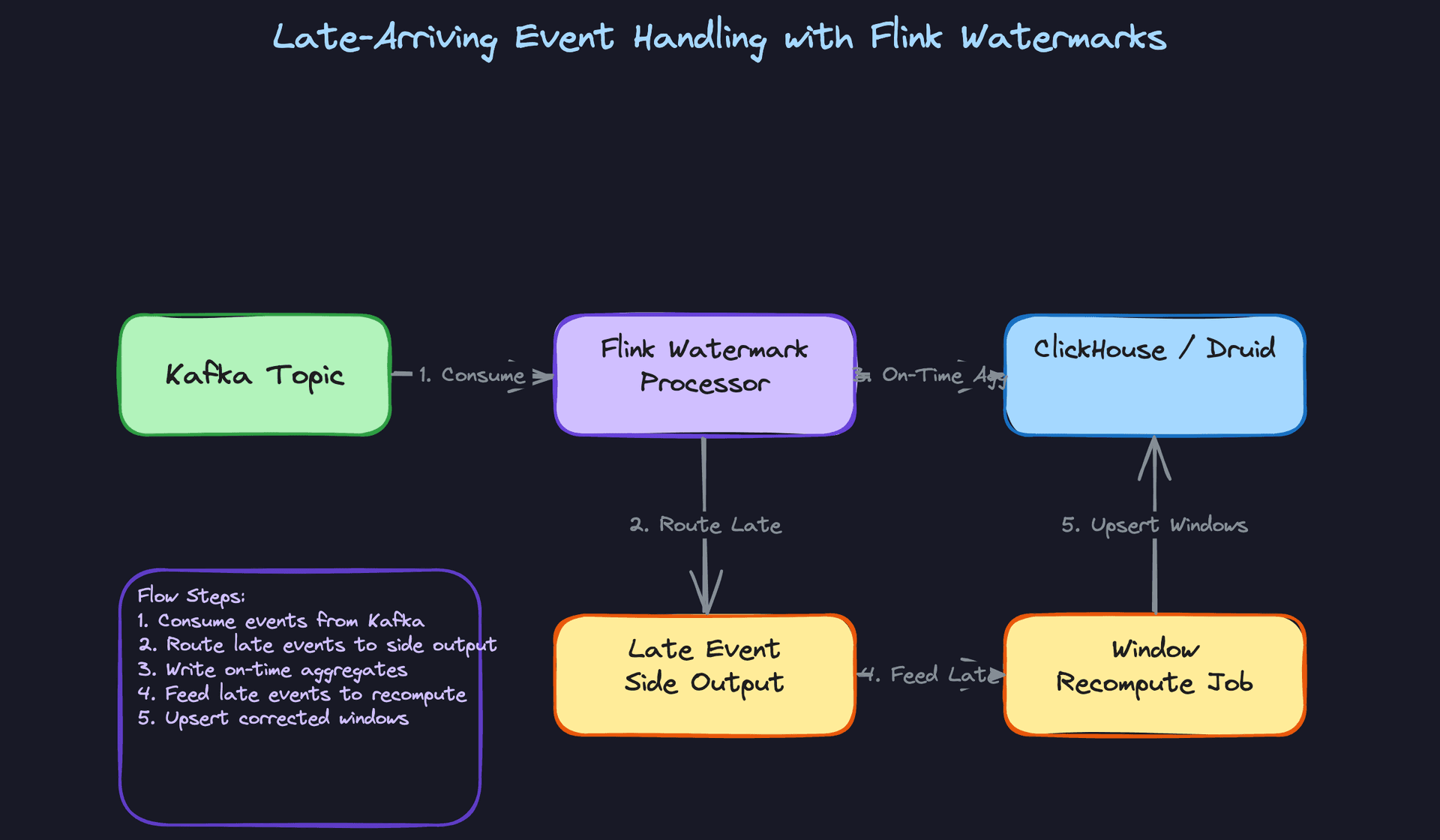
Processing: Flink reads from Kafka, computes tumbling-window aggregates, and writes metric rows to ClickHouse. Late events go to a side output for recomputation. Alerts are evaluated here before metrics even reach the serving store.
Serving: ClickHouse answers OLAP queries in under 100ms. Redis caches recent metric snapshots to absorb fan-out from concurrent viewers. The Query API translates widget configs into SQL and manages client subscriptions.
Delivery: The SSE/WebSocket gateway maintains persistent connections to dashboard clients and pushes metric updates as they arrive from the Query API refresh loop.
The hot path end-to-end latency target is under 5 seconds: roughly 1 second for Kafka buffering, 1-2 seconds for Flink window computation, and under 1 second for ClickHouse query plus Redis cache write plus SSE push. The cold path (S3 archive to Spark batch to ClickHouse) runs independently and never touches the hot path serving layer.
Interview tip: Draw the hot path and cold path as two separate flows on your diagram. Interviewers notice when candidates treat backfill as an afterthought. Showing that you've separated the concerns signals senior-level thinking about operational reality.
Deep Dives
The interviewer has seen your high-level design. Now they want to stress-test it. These are the questions that separate candidates who've thought deeply about real-time systems from those who've memorized the happy path.
"How do we guarantee low-latency metric freshness for dashboard clients?"
Bad Solution: Per-Widget Polling
The naive approach is having each dashboard widget poll ClickHouse directly on a timer, say once per second. It's simple to implement and requires no extra infrastructure.
The problem is math. If you have 5,000 concurrent dashboard viewers, each with 10 widgets, that's 50,000 queries per second hitting your OLAP store. ClickHouse is fast, but it's not designed to serve tens of thousands of point queries per second. You'll either saturate the cluster or spend a fortune scaling it horizontally just to handle read fan-out, not actual analytical load.
Warning: Candidates who propose polling often underestimate the fan-out. The interviewer will ask "what happens at 10,000 concurrent users?" and the math falls apart immediately. Always think about N viewers times M widgets.
Good Solution: Server-Sent Events from the Query API
Instead of each client hammering the database, the Query API service polls ClickHouse once per metric (not once per widget per client) and pushes updates to all subscribed clients over Server-Sent Events. One query feeds thousands of viewers watching the same metric.
This is a solid step forward. You've collapsed N*M database queries into just M queries, where M is the number of distinct metrics being watched. The trade-off is that the Query API now holds long-lived HTTP connections and needs to manage subscription state. That's manageable with something like Redis to track which clients are watching which metrics.
Great Solution: Flink Writes to Redis Pub/Sub, Query API Fans Out
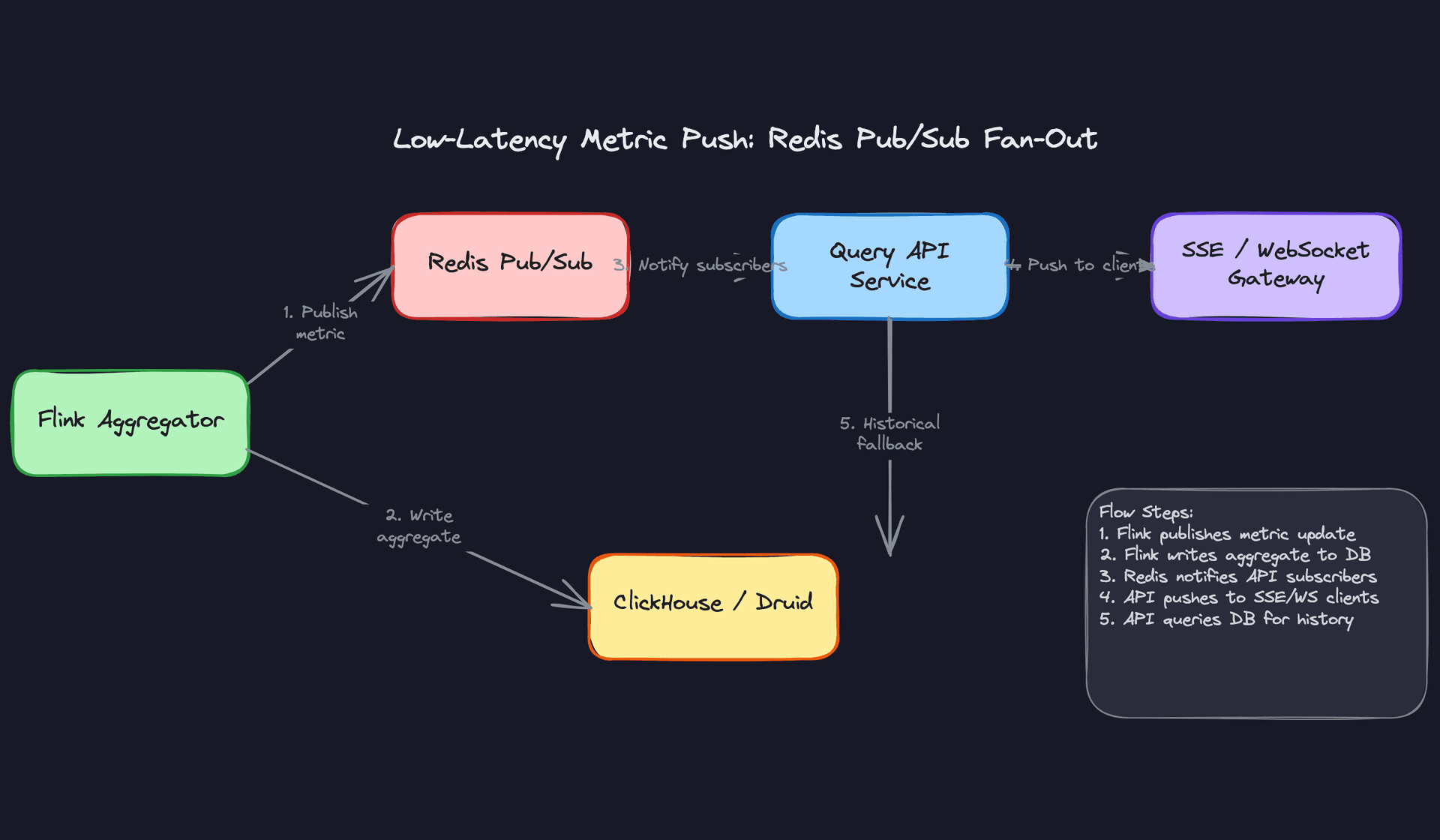
The real win is removing the Query API from the polling loop entirely. When Flink finishes computing a windowed aggregate, it publishes the result to a Redis pub/sub channel keyed by metric name. The Query API subscribes to those channels and immediately fans the update out to connected clients. End-to-end latency drops to the time it takes Flink to close the window plus a few milliseconds of Redis round-trip.
ClickHouse stays in the picture, but only for historical queries and initial page loads. When a client first opens a dashboard, the Query API fetches the last N data points from ClickHouse to populate the chart, then switches to the Redis-driven live stream. You get fast initial render and sub-second updates without overloading your OLAP store.
# Flink sink: publish metric update to Redis pub/sub after window close
class RedisMetricSink(SinkFunction):
    def __init__(self, redis_client):
        self.redis = redis_client

    def invoke(self, metric: dict, context):
        channel = f"metric:{metric['metric_name']}:{metric['dimensions_hash']}"
        payload = json.dumps({
            "value": metric["value"],
            "window_start": metric["window_start"].isoformat(),
            "window_end": metric["window_end"].isoformat(),
        })
        self.redis.publish(channel, payload)
        # Also write to ClickHouse for durability and historical queries
        self.clickhouse_client.insert("metrics", [metric])
Tip: Describing the dual-write pattern (Redis for live push, ClickHouse for durability) is what senior candidates do. It shows you understand that pub/sub is ephemeral. If the Query API restarts, it needs ClickHouse to reconstruct state. Mention this explicitly.
"How do we handle backfill when aggregation logic changes?"
This comes up constantly in production. A bug in your Flink job has been silently undercounting a metric for two weeks. Or a new business requirement means you need a metric that didn't exist before. Either way, you need to reprocess historical events and write corrected results into ClickHouse.
Bad Solution: Manual SQL Corrections
Some candidates suggest writing UPDATE statements directly against the metrics table to patch the wrong values. Don't do this.
You'd have to know exactly which rows are wrong, manually derive the correct values, and hope your fix logic matches what the pipeline would have computed. It doesn't scale past a handful of rows, it's not auditable, and it completely breaks down if the bug affects millions of windows across hundreds of dimensions.
Warning: Any answer involving manual data correction in production is a red flag. It signals you haven't thought about operational repeatability.
Good Solution: Kafka Replay Within Retention
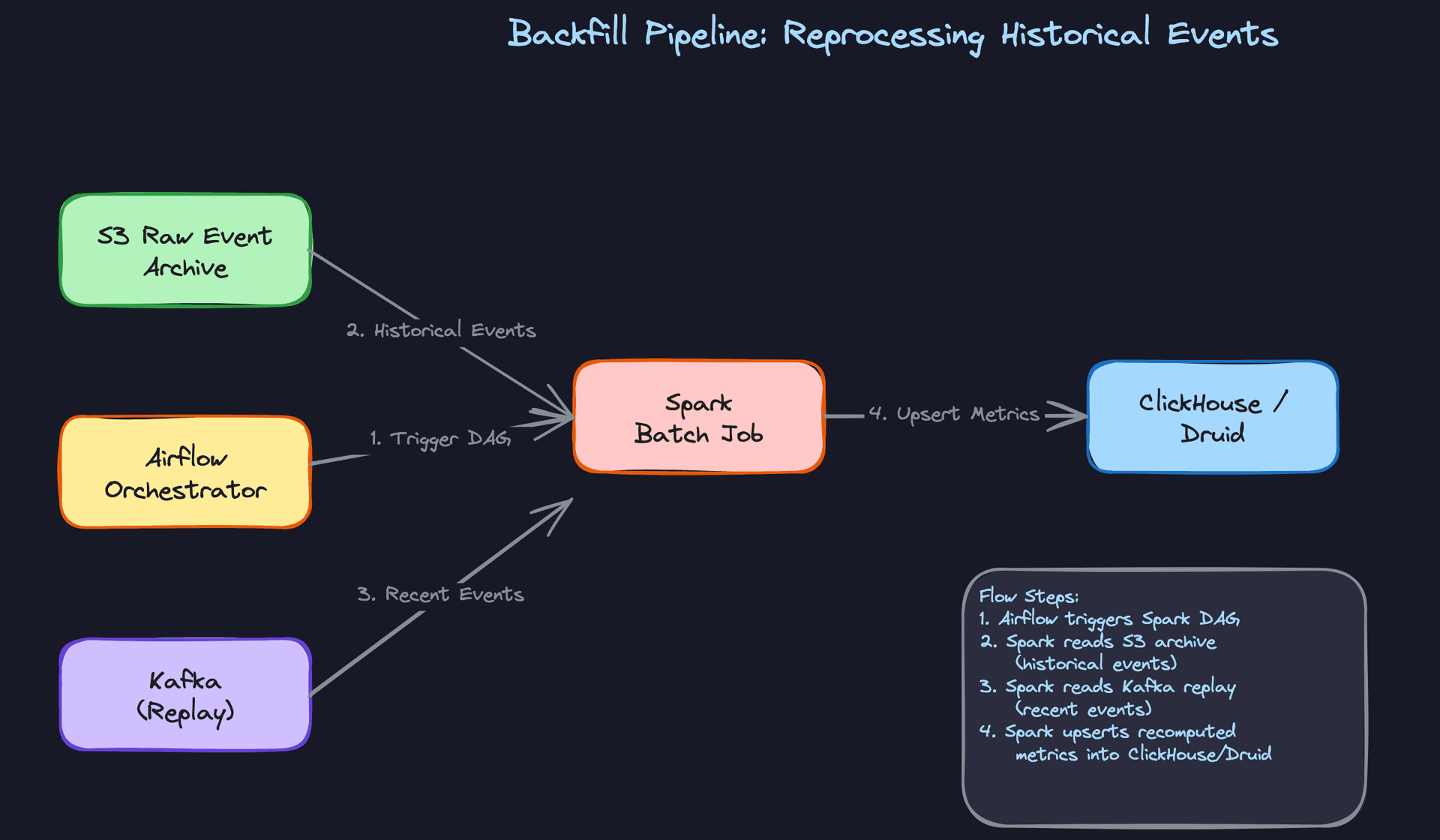
If the bug was introduced recently and your Kafka retention covers the affected window (typically 7 days), you can reset the Flink consumer group offset back to the start of the affected period, fix the job logic, and replay. Flink reprocesses the events and writes corrected aggregates to ClickHouse.
For this to work cleanly, your ClickHouse writes need to be idempotent. Use INSERT OR REPLACE semantics or a ReplacingMergeTree engine so that reprocessed rows overwrite the stale ones rather than duplicating them.
-- ClickHouse table using ReplacingMergeTree for idempotent upserts
CREATE TABLE metrics (
    metric_name   String,
    dimensions    String,        -- JSON-serialized dimension map
    window_start  DateTime,
    window_end    DateTime,
    value         Float64,
    updated_at    DateTime DEFAULT now()
)
ENGINE = ReplacingMergeTree(updated_at)
PARTITION BY toYYYYMM(window_start)
ORDER BY (metric_name, dimensions, window_start);
The limitation is obvious: Kafka retention has a ceiling. If you need to backfill 90 days of data, you can't rely on the broker.
Great Solution: Spark Batch Job Against the S3 Raw Event Archive
Your pipeline should be writing raw events to S3 in Parquet or Avro format as a side effect of Kafka consumption. This is your source of truth for backfill. When you need to reprocess any time range, an Airflow-orchestrated Spark job reads the relevant S3 partitions, applies the corrected aggregation logic, and upserts results into ClickHouse.
The key design decision is keeping the aggregation logic shared between your Flink streaming job and your Spark batch job. If they diverge, your backfill produces different numbers than your live pipeline, which is worse than having no backfill at all.
# PySpark backfill job: recompute 1-minute tumbling window aggregates
from pyspark.sql import SparkSession
from pyspark.sql.functions import window, count, col

spark = SparkSession.builder.appName("metric_backfill").getOrCreate()

# Read from partitioned S3 archive
events = spark.read.parquet(
    "s3://events-archive/year=2024/month=03/day=*/hour=*/"
)

aggregated = (
    events
    .filter(col("event_type") == "page_view")
    .groupBy(
        window(col("occurred_at"), "1 minute"),
        col("tenant_id"),
        col("page_id"),
    )
    .agg(count("*").alias("value"))
    .select(
        col("window.start").alias("window_start"),
        col("window.end").alias("window_end"),
        col("tenant_id"),
        col("page_id"),
        col("value"),
    )
)

# Write to ClickHouse with upsert semantics
aggregated.write \
    .format("jdbc") \
    .option("url", CLICKHOUSE_JDBC_URL) \
    .option("dbtable", "metrics") \
    .mode("append") \
    .save()
Tip: Mentioning that the Flink and Spark jobs should share aggregation logic (ideally from a common library) is a staff-level observation. It's the difference between a backfill that restores trust in your data and one that creates a second source of inconsistency.
"How do we handle late-arriving events without corrupting our metrics?"
Events don't always arrive in order. A mobile SDK might buffer events for 30 seconds before flushing. A microservice might retry a failed publish minutes later. Flink's windowed aggregations close windows based on watermarks, and by default, anything that arrives after the watermark is silently dropped.
Bad Solution: Ignore Late Events
Most candidates acknowledge late events exist and then say "we'll set a generous watermark allowance, like 5 minutes." That helps, but it doesn't solve the problem. It just shifts it. Events that are 6 minutes late still get dropped, and you've now delayed every window result by 5 minutes, which kills your freshness SLA.
You've also done nothing to detect when late-event rates spike, which is often the first signal that something upstream is broken.
Good Solution: Side Output Streams
Flink lets you route late events to a side output stream instead of dropping them. You process the on-time events normally, close the window, write the aggregate, and collect the stragglers separately for later reconciliation.
# Flink: route late events to side output tag
from pyflink.datastream import OutputTag
from pyflink.datastream.window import TumblingEventTimeWindows
from pyflink.common import Time

late_output_tag = OutputTag("late-events")

windowed_stream = (
    event_stream
    .key_by(lambda e: (e["tenant_id"], e["metric_name"]))
    .window(TumblingEventTimeWindows.of(Time.minutes(1)))
    .allowed_lateness(Time.seconds(30))
    .side_output_late_data(late_output_tag)
    .aggregate(MetricAggregateFunction())
)

late_events = windowed_stream.get_side_output(late_output_tag)
late_events.add_sink(LateEventSink())  # write to S3 or a separate Kafka topic
This is solid. You're not losing data. The trade-off is that your metrics are initially written with incomplete data, and you need a reconciliation step to correct them.
Great Solution: Periodic Window Recomputation with Alerting
The complete answer combines side outputs with a periodic recompute job. Every N minutes (say, every 5 minutes), a lightweight job reads the accumulated late events for the last few windows and issues corrected upserts to ClickHouse. Because you're using ReplacingMergeTree, the corrected rows overwrite the initial estimates.
Layer alerting on top. If the late-event rate for a given producer exceeds a threshold (say, 2% of events are arriving more than 60 seconds late), fire an alert. Late-event spikes are almost always a symptom of a producer-side problem: a flapping service, a network partition, or a SDK bug. Catching it early prevents a slow accumulation of data quality debt.
-- Query to monitor late-event rate per producer (run every 5 minutes)
SELECT
    source,
    countIf(arrival_lag_seconds > 60) AS late_count,
    count(*) AS total_count,
    round(100.0 * late_count / total_count, 2) AS late_pct
FROM events_audit
WHERE received_at >= now() - INTERVAL 10 MINUTE
GROUP BY source
HAVING late_pct > 2.0
ORDER BY late_pct DESC;
Tip: Candidates who connect late-event handling to data quality monitoring stand out. It shows you think about the pipeline as a system that needs observability, not just a data transformation that either works or doesn't.
What is Expected at Each Level
The pipeline itself isn't what separates candidates. Everyone draws Kafka pointing at a stream processor pointing at an OLAP store. What separates them is what they say next.
Mid-Level
- Sketch the full hot path: Kafka for ingestion, Flink or Spark Structured Streaming for windowed aggregation, ClickHouse or Druid as the serving store, and a query API that pushes updates to the frontend. You don't need to justify every choice in depth, but you need a reason for each one.
- Define the core entities correctly: raw events are ephemeral, pre-aggregated metrics are durable, and widgets hold query definitions rather than cached results.
- Recognize that "real-time" is ambiguous and ask the interviewer to pin it down. Sub-second, five seconds, and two minutes are three completely different architectures.
- Notice the latency vs. cost tension. Polling ClickHouse every second per widget doesn't scale. You may not fully resolve it, but naming it shows you understand the problem.
Senior
- Come prepared with numbers. How many events per second at peak? What's the storage growth rate for pre-aggregated metrics at 1-minute granularity across 10,000 tenants? Interviewers at this level expect you to size the system, not just draw it.
- Address late-arriving events without being asked. Explain Flink watermarks, what happens to events that arrive after the window closes, and why side-output streams exist. "We'll just drop late events" is not an acceptable answer for a financial or operational dashboard.
- Articulate the pre-aggregation trade-off explicitly. Finer granularity (per-minute rollups) gives query flexibility but multiplies storage. Coarser granularity (hourly rollups) is cheaper but breaks ad hoc drill-downs. Pick a stance and defend it.
- Propose a backfill strategy before the interviewer asks. When aggregation logic changes, you need a path to reprocess historical data. Kafka replay for recent events, S3 archive for older ones, Spark batch jobs writing idempotent upserts back to ClickHouse.
Staff+
- Drive toward schema evolution. Raw events written to Kafka today will have different fields in six months. How does the pipeline handle Avro schema changes without breaking downstream Flink jobs? What's the compatibility mode (backward, forward, full) and who owns the schema registry?
- Model cost explicitly. ClickHouse on dedicated hardware, Druid on cloud VMs, and Pinot on managed infrastructure have very different cost profiles at 100 billion events per day. A staff candidate can sketch the cost curve and explain which inflection point triggers a migration.
- Talk about graceful degradation. When Kafka consumer lag spikes during a traffic surge, what happens to dashboard freshness? Does the system have a circuit breaker that falls back to cached snapshots? Does it alert on-call before users notice staleness?
- Establish data quality contracts. If a producer starts emitting malformed events or drops a required field, the pipeline needs to detect it, route it to a dead letter queue, and alert the owning team. This is an operational concern most candidates skip entirely.
Key takeaway: A real-time dashboard is not a single system; it's three systems working in sequence: an ingestion layer that never loses events, a processing layer that computes correct aggregates even when events arrive late, and a serving layer that delivers fresh data without hammering the OLAP store on every client refresh. Get all three right, and the rest is configuration.
