
Slowly Changing Dimensions
Your Q3 revenue report says the West region had a terrible quarter. But half those "West" customers actually moved to the East region months ago. The numbers aren't lying exactly; they're just answering the wrong question. That's what happens when you don't handle slowly changing dimensions correctly.
Dimensions are the descriptive context in your data warehouse: the customer's name, their region, a product's category, an employee's department. They're the "who" and "what" that give your raw transaction numbers meaning. Unlike the facts themselves (a sale happened, an event fired, a click was recorded), dimension attributes change occasionally. A customer relocates. A product gets recategorized. An employee switches teams. Infrequent, but meaningful.
The "slowly changing" part is what makes this tricky. If a customer's region changed a hundred times a day, you'd design a time-series table from the start. But because these changes are rare, it's tempting to just overwrite the old value and move on. That's the trap. One quiet UPDATE and suddenly every historical fact tied to that customer now reflects who they are today, not who they were when the transaction happened. Your trend reports silently corrupt themselves, and nobody notices until someone asks why the regional numbers don't match last year's presentation.
In interviews, this comes up the moment you're designing any warehouse or reporting pipeline. The classic prompt is something like "a customer changes their address, how do you handle that?" There are three main strategies you'll need to walk through: Type 1 (overwrite), Type 2 (add a new row), and Type 3 (add a column for the previous value). Type 2 is the one you need to know cold. It's the right default for analytical correctness, and interviewers will probe hard on the details.
How It Works
Start with a customer record. Alice lives in the West region. She places an order in January, then moves to the East region in June, then places another order in August. Simple enough. But your data warehouse needs to answer two very different questions correctly: "What region was Alice in when she placed the January order?" and "What region is Alice in right now?"
Those two questions have different answers. How you store Alice's data determines whether your warehouse can answer both.
The Anatomy of a Dimension Table
A dimension table holds the descriptive context around your facts. For a customer dimension, that means things like name, region, tier, and signup date. Not the transactions themselves, just the "who" and "what" behind them.
Every dimension table has a natural key: the identifier from the source system, like customer_id = 42. That's Alice's ID in your CRM. But the warehouse also assigns its own surrogate key, a synthetic integer like dim_customer_sk = 101. This distinction matters more than most candidates realize.
For dimensions that need to track history (Type 2, which we'll cover in the next section), you also add an effective date range and a current-row flag: eff_start_date, eff_end_date, and is_current. These columns are what let you answer point-in-time questions.
The Fact-to-Dimension Join
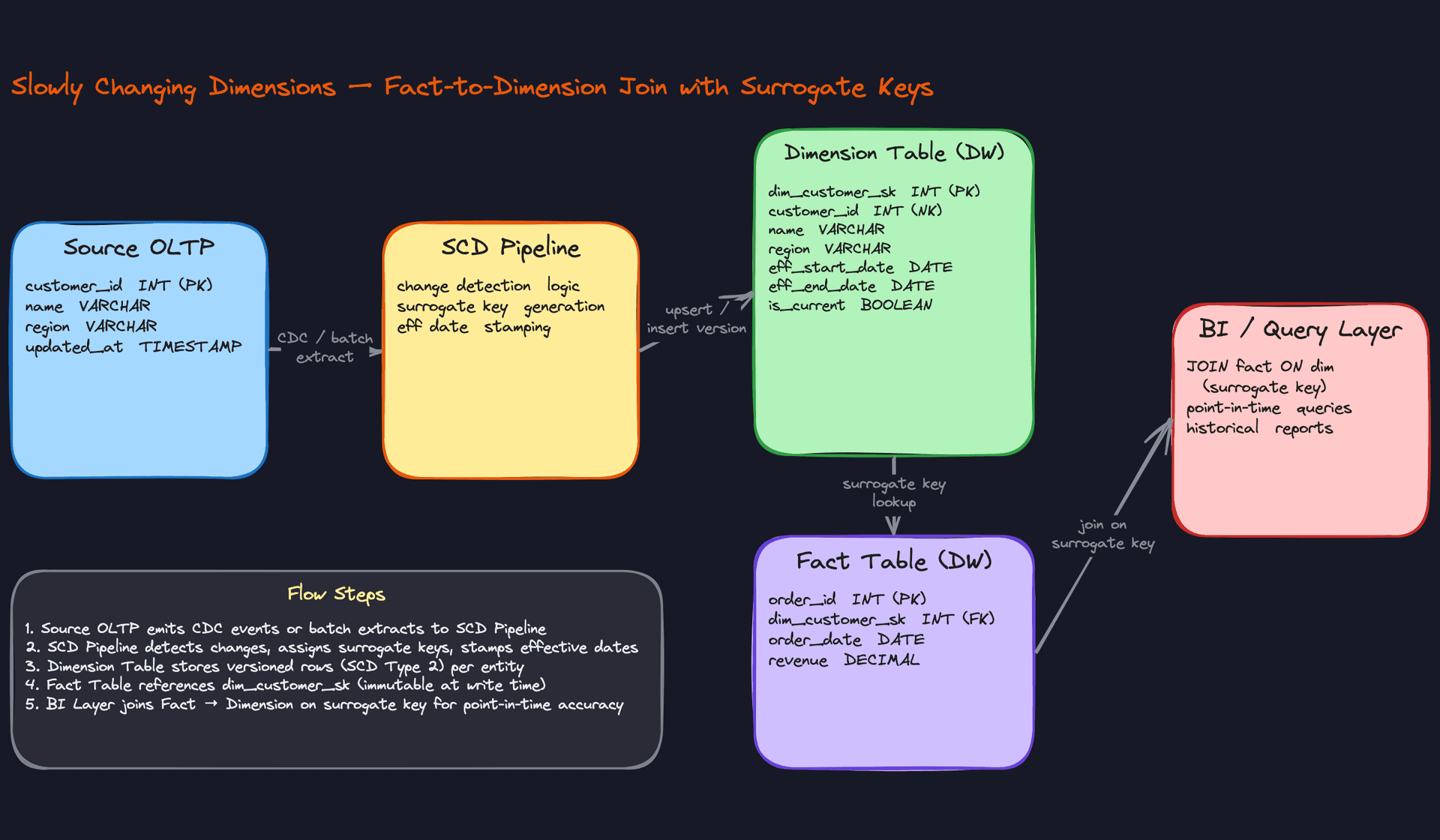
Fact tables record events: orders, page views, transactions. Each fact row stores the surrogate key of the dimension record that was active at the time of the event, not the natural key.
When your BI tool runs a query, it joins the fact table to the dimension table on that surrogate key. The surrogate key resolves to exactly one dimension row, the snapshot of Alice's attributes at the moment of the event. That's the whole mechanism.
Here's what that flow looks like:
Why a Naive Overwrite Breaks Everything
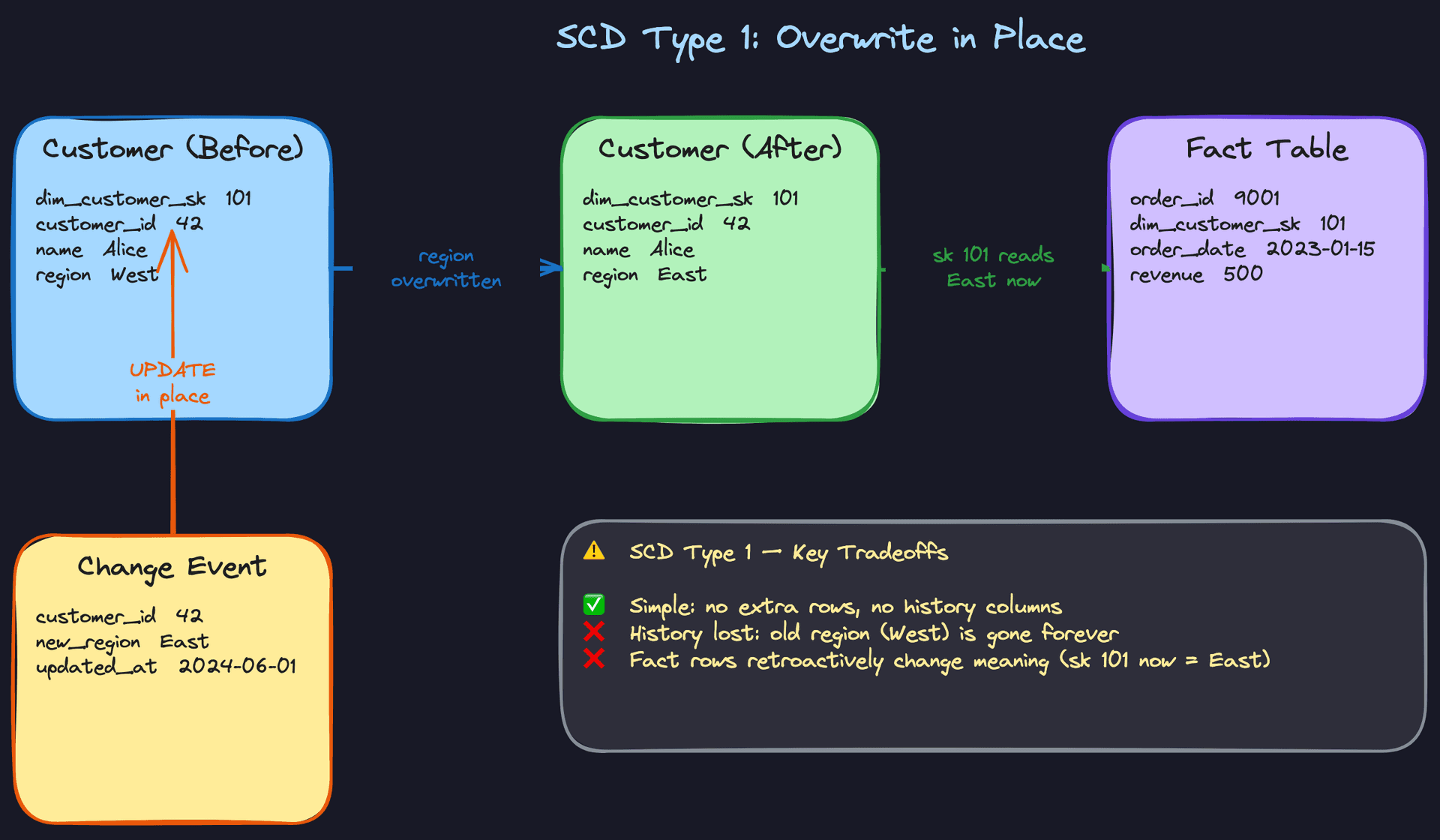
Suppose you skip all of this and just run an UPDATE when Alice moves to the East region. One row, one customer, keep it simple.
Now that January order, which is sitting in your fact table pointing to dim_customer_sk = 101, resolves to a customer in the East region. Your Q1 regional sales report now shows that sale attributed to East. It wasn't. Alice was in West when she bought. The report is wrong, and nothing in your system will tell you it's wrong.
This is the silent corruption problem. No errors, no warnings, just quietly incorrect trend analysis. A regional sales comparison from six months ago is now meaningless.
Common mistake: Candidates often say "I'd just update the customer record" when asked how they'd handle a dimension change. That's the right instinct for a transactional system. In a data warehouse, it's the wrong answer unless you've explicitly decided history doesn't matter.
The Surrogate Key as a Time Machine
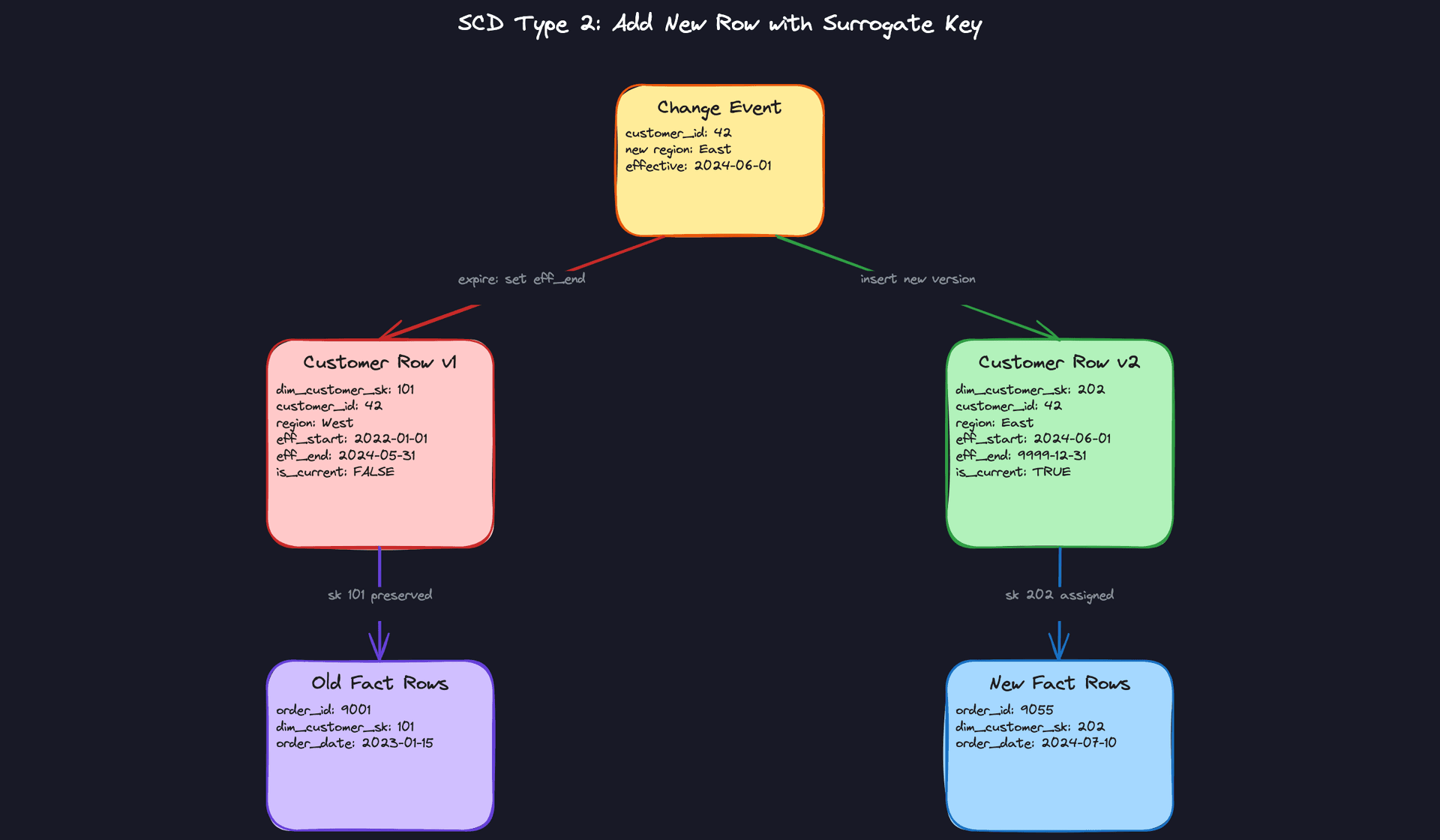
The fix is to give each version of Alice its own surrogate key. When Alice moves to East, you don't overwrite row 101. You expire it (set eff_end_date to yesterday, is_current to FALSE) and insert a new row with dim_customer_sk = 202, region = East, and is_current = TRUE.
The January fact row still points to 101. The August fact row points to 202. Both are correct. Your regional sales report now accurately reflects where Alice was when each purchase happened.
Think of surrogate keys like Git commits. The natural key is the filename; it stays the same. But each version of the file gets its own commit hash, and you can check out any point in history.
Your interviewer cares about this because it's the foundation of analytical correctness. If you can't explain why the fact table stores a surrogate key instead of the natural key, you haven't demonstrated that you understand how historical reporting actually works.
Where the Source System Fits In
One thing candidates often miss: the source OLTP system doesn't know or care about any of this. Your CRM just stores Alice's current address. It overwrites the old one. That's fine for a transactional system.
The SCD logic lives entirely in your pipeline. Your pipeline is responsible for detecting that a change happened (usually via CDC or a batch comparison), deciding which SCD strategy to apply, generating the new surrogate key, and writing the versioned record to the warehouse. The source system hands you current state; your pipeline is what turns that into history.
This matters in interviews because it clarifies ownership. If an interviewer asks "how does your warehouse know Alice moved?", the answer isn't "the CRM tells it." The answer is "my pipeline compares the incoming record to the current dimension row and detects the delta."
Your 30-second explanation: "Dimension tables describe the entities behind your facts, like customers or products. When those attributes change, you have a choice: overwrite the old value and lose history, or insert a new versioned row with its own surrogate key and preserve it. Fact tables store the surrogate key at the time of the event, so when you join them at query time, you get the dimension snapshot that was true when the event happened, not what's true today. That's how you keep historical reports accurate."
Patterns You Need to Know
In an interview, you'll usually need to pick a specific approach. Here are the ones worth knowing.
Type 1: Overwrite
When a change comes in, you just update the existing row. No new row, no history, no trace that anything was different before. The old value is gone.
This is appropriate in exactly two situations: the original value was wrong (a data entry error, not a real-world change), or history genuinely doesn't matter for your use case. The danger is that it's also the easiest thing to reach for by default, and that's where things go quietly wrong. Every fact row that referenced that dimension now tells a different story than it did yesterday. Your Q3 regional sales report now attributes those sales to wherever the customer lives today, not where they lived when they bought.
Ask yourself: "Was this a correction, or did something in the real world actually change?" If it's the latter and you have any analytical reporting downstream, Type 1 is probably the wrong call.
Common mistake: Candidates default to Type 1 because it's simple to implement. The interviewer will ask "what happens to historical reports?" and the answer is: they silently break. Know this before you propose it.
Type 2: Add a New Row
This is the one you need to know cold. When a change arrives, you close out the existing row by setting its eff_end_date and flipping is_current to false, then insert a brand-new row with a new surrogate key, the updated attribute values, and a fresh eff_start_date. Old fact rows still point to the original surrogate key. New fact rows get the new one. History is perfectly preserved.
The mechanism that makes this work is the surrogate key. Because each version of a customer gets its own key, a sale from 18 months ago will always resolve to the region, tier, or segment that customer belonged to at the time of that sale. No retroactive rewriting, no silent corruption.
When to reach for this: any time analytical correctness over time matters. Revenue by customer segment, churn analysis, cohort reporting. If the interviewer asks how you'd handle a customer changing their address, Type 2 is your default answer.
Interview tip: Don't just say "I'd use Type 2." Say why. "I'd use Type 2 because we need to preserve which segment a customer belonged to at the time of each transaction. Overwriting would corrupt any trend analysis that slices revenue by region over time."
Type 3: Add a New Column
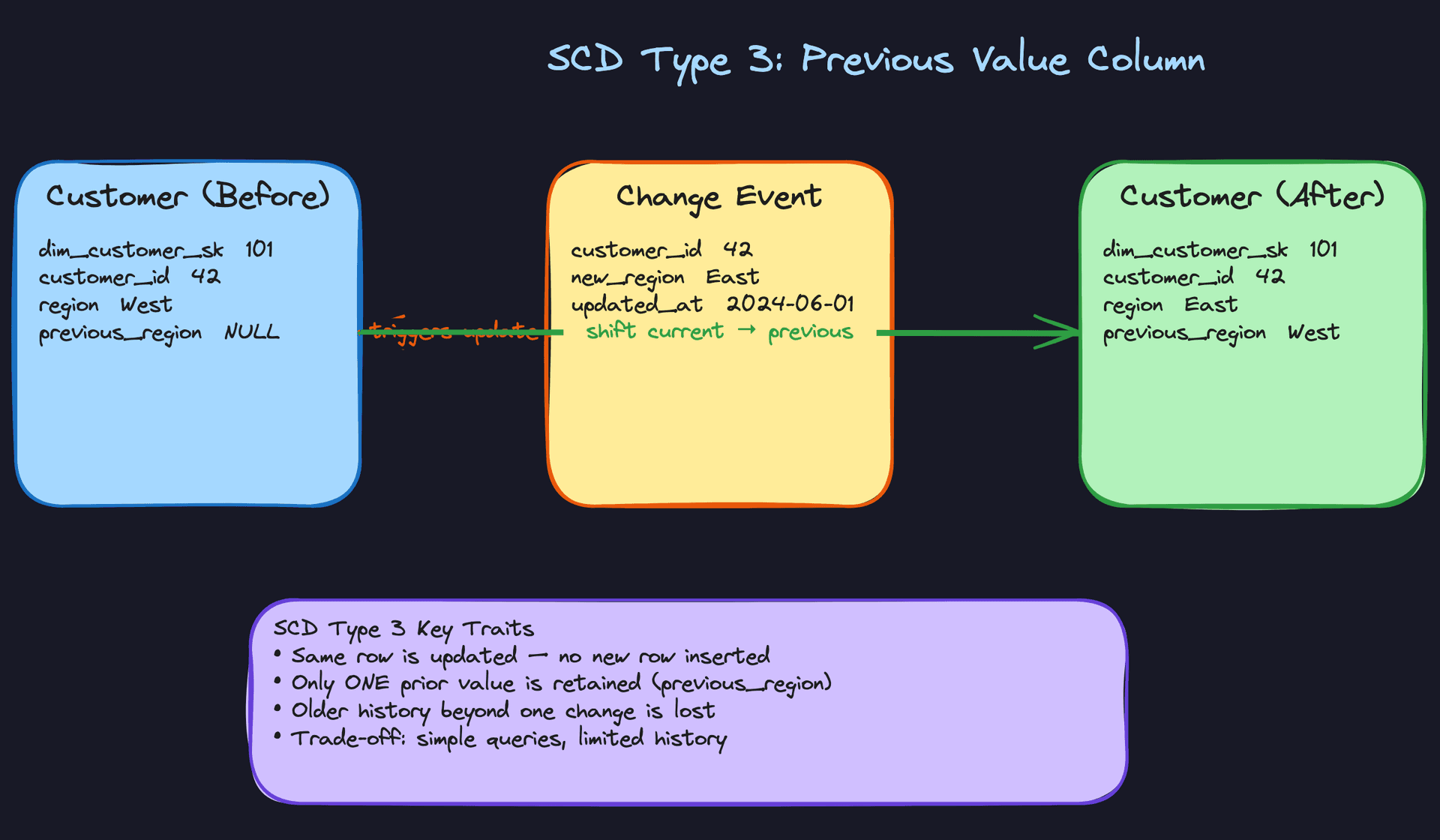
Instead of a new row, you add a column. The row gets a previous_region field alongside current_region, and when a change comes in, you shift the current value into the previous column and write the new value into current.
It's cheap to implement and easy to query, but it only ever remembers one step back. If Alice moves West to East to Central, you lose the West entirely. In practice, Type 3 shows up when stakeholders want a simple "current vs. previous" comparison and nothing more, like a product category that was recently reorganized and you want to report on both the old and new groupings during a transition period.
When to reach for this: when the interviewer's scenario explicitly only needs one prior value, or when they ask about a one-time reorganization where you want to compare before and after.
Key insight: Type 3 is a schema-level commitment to forgetting history. Every additional change overwrites the previous snapshot. If there's any chance you'll need more than two versions, don't use it.
Type 4 and Type 6: Advanced Variants Worth Naming
You probably won't need to design these in an interview, but knowing they exist signals depth.
Type 4 separates current and historical data into two physical tables: a main dimension table with only the current row, and a separate history table with all prior versions. This keeps the current-state queries fast and simple while still preserving full history for those who need it. It's worth mentioning if your interviewer asks about query performance trade-offs with Type 2.
Type 6 is a hybrid that combines Types 1, 2, and 3 in a single row. The Type 2 component is the foundation: each change still inserts a new versioned row with its own surrogate key, preserving the full history of what was true at each point in time. The Type 3 component adds a historical_attribute column to each row that captures the value as it was when that particular row was created, so you can always see what was true at that moment without a self-join. The Type 1 component is the twist: a separate current_attribute column exists on every row for a given natural key, and it gets overwritten across all versions whenever a new change arrives. That means any row in the history table, no matter how old, always reflects the absolute latest state in that one column. The result is that you can query current state without a filter, historical state at transaction time without a join, and point-in-time state all from the same table. It sounds complicated because it is. Mention it if the interviewer pushes on "can we query both current state and historical state without a join?" but don't volunteer it unprompted.
Comparison at a Glance
| Type | Mechanism | History Preserved | Best For |
|---|---|---|---|
| Type 1 | Overwrite existing row | None | Data corrections, non-historical attributes |
| Type 2 | Insert new row with new surrogate key | Full | Analytical accuracy over time |
| Type 3 | Add previous-value column | One version back | Simple before/after comparisons |
| Type 4 | Separate current and history tables | Full (in history table) | High-read current-state queries |
For most interview problems, you'll default to Type 2. It's the only approach that gives you full historical accuracy without compromising how fact tables join to dimensions over time. Reach for Type 1 only when you can clearly articulate that the change is a correction or that no downstream report cares about the old value. Type 3 is a niche tool; if you use it, be ready to explain exactly why one prior version is enough.
What Trips People Up
Here's where candidates lose points — and it's almost always one of these.
The Mistake: Joining on the Natural Key
A candidate will sketch out their Type 2 dimension table, add the is_current flag, and then say "so in the fact table, we join on customer_id to get the customer's region." The interviewer nods and waits.
The problem: in a Type 2 dimension, customer_id is not unique. Alice moving from West to East means two rows both have customer_id = 42. If your fact table stores the natural key and you join on it, you get a fan-out. Every historical order suddenly joins to two rows, and your revenue numbers double. Or you add WHERE is_current = TRUE and accidentally re-attribute all old orders to Alice's current region, which is exactly the problem Type 2 was supposed to solve.
The fact table must store the surrogate key (dim_customer_sk), not the natural key. That surrogate key pins each fact row to the exact dimension snapshot that was current when the event happened. This is the entire point of the surrogate key, and skipping it unravels the whole design.
Interview tip: When you introduce your dimension table schema, explicitly say: "The fact table stores the surrogate key, not the business key. That's what lets us do point-in-time accurate joins." Say it proactively. Don't wait to be caught.
The Mistake: Forgetting Late-Arriving Facts
Most candidates design the happy path: event happens, dimension is current, surrogate key gets stamped on the fact row, done. Then the interviewer asks: "What if a transaction from last Tuesday shows up in your pipeline today, but the customer changed their address on Wednesday?"
The wrong answer is "we'd join on is_current = TRUE." That gives you the customer's address as of today, not as of last Tuesday. Your January sale just got attributed to a region the customer wasn't in until March.
Handling this correctly means your lookup logic uses an effective-date range query: find the dimension row where eff_start_date <= event_date AND eff_end_date > event_date. That's a range join, not a simple equality join, and it's meaningfully more expensive at scale. Know that going in.
Common mistake: Candidates add is_current = TRUE to every dimension join as a reflex. The interviewer hears: "I've never thought about what happens when data arrives out of order."The Mistake: Saying "Type 2" Without Earning It
Interviewers have heard "I'd use Type 2" hundreds of times. If you say it without justification, expect a follow-up like: "Why not just overwrite? The business only cares about current customers." Candidates who picked Type 2 because it sounds right freeze here.
You need to be able to connect the strategy to a concrete reporting failure. Something like: "If we overwrite, our Q3 regional sales report will attribute revenue to whatever region the customer is in today, not where they were when they bought. If we're evaluating a West Coast expansion that happened in April, the data will look wrong for every customer who moved since then." That's the answer. Make the cost of Type 1 vivid and specific.
The flip side is also true. If the interviewer describes a use case where history genuinely doesn't matter (say, correcting a typo in a customer's name), defaulting to Type 2 is the wrong call. Knowing when NOT to use it is just as important as knowing how it works.
The Mistake: Ignoring What Type 2 Actually Costs
Type 2 is the right answer for historical accuracy. It is not a free answer. Candidates who treat it as a drop-in solution without acknowledging the operational weight tend to get pushed hard in the follow-up.
The table grows with every change. A customer who updates their address four times has four rows. At millions of customers over years, that's a lot of rows, and your dimension table is no longer small. Range joins on effective dates are slower than equality joins, and they're harder to optimize with standard indexing. Backfilling a new attribute across all historical versions means touching every row, not just the current ones.
If you're working with Delta Lake or Iceberg, MERGE operations make the insert-and-expire pattern manageable. dbt's snapshot feature handles a lot of the bookkeeping. But none of that makes the underlying complexity disappear; it just makes it less painful to implement. Mention the trade-offs, then mention the tooling. That ordering matters.
The Mistake: Designing a Pipeline That Breaks on Rerun
This one comes up when the interviewer asks: "What happens if your pipeline fails halfway through and reruns?" Candidates who haven't thought about idempotency will say something like "it picks up where it left off" and move on. That's not an answer.
If your SCD Type 2 pipeline isn't idempotent, a rerun on the same change event inserts a second new version row. Now you have two "current" rows for the same customer. Every downstream join is broken, and depending on your deduplication logic, you may not catch it until a report looks wrong.
The fix is to make change detection deterministic: before inserting a new version, check whether a row with that natural key and that effective start date already exists. If it does, skip the insert. This is the kind of operational thinking that separates candidates who've actually built these pipelines from candidates who've only read about them.
Interview tip: When you describe your SCD pipeline, add one sentence unprompted: "And the pipeline is idempotent; reruns on the same input won't create duplicate version rows." It's a small thing that signals a lot.
How to Talk About This in Your Interview
When to Bring It Up
SCD questions rarely announce themselves. You need to recognize the trigger phrases.
Any time you hear "customers change over time," "product categories get reorganized," or "we need to track historical state," that's your cue. Same goes for "our reports look wrong when we backfill" or "we're joining sales data to a customer table." Those symptoms almost always trace back to an SCD problem that someone hasn't named yet.
More broadly: if you're designing any data warehouse, reporting layer, or analytical pipeline that joins facts to descriptive attributes, SCD belongs in the conversation. Bring it up before the interviewer has to ask.
Sample Dialogue
Interviewer: "Let's say a customer changes their shipping address. How would you handle that in the data warehouse?"
You: "Before I commit to an approach, one question: do we need historical reports to reflect where the customer lived at the time of the order, or do we just care about their current address?"
Interviewer: "Yeah, we'd want to know, like, what region they were in when they actually bought something. We have regional sales targets."
You: "Then I'd go Type 2. Every time a customer's address changes, we insert a new row in the dimension table with a new surrogate key, an effective start date, and we expire the old row by setting its end date. The fact table stores the surrogate key, so old orders still point to the old address. Your regional sales report stays accurate no matter how many times a customer moves."
Interviewer: "Okay but what if they change their address like, three times in one day? We're pulling from CDC."
You: "Good edge case. Type 2 handles multiple versions fine structurally, you'd just end up with three new rows. The real concern is ordering. If your CDC events arrive out of order, you could expire rows in the wrong sequence and end up with overlapping effective date ranges. So you need to sort by the source timestamp before applying changes, and your pipeline needs to be idempotent so replaying events doesn't create duplicate versions."
Interviewer: "Why not just overwrite the address? Simpler, right?"
You: "Simpler to implement, yes. But imagine you're running a report on Q3 revenue by region. If you overwrite, every customer who moved since Q3 now shows up in their new region. Your historical numbers shift silently. Finance signs off on a report that's quietly wrong. That's the failure mode Type 1 creates, and it's the kind of bug that's really hard to detect after the fact."
Follow-Up Questions to Expect
"How do you look up the right dimension row for a late-arriving fact?" You do a range join: match the fact's event timestamp against the dimension's eff_start_date and eff_end_date, not a simple is_current = TRUE filter, because the current row might not have been current when the event happened.
"How does this work at scale? Millions of customers, frequent changes?" Delta Lake and Apache Iceberg both support MERGE operations that make Type 2 upserts tractable at scale; dbt also has native snapshot support that handles the expire-and-insert pattern for you without custom pipeline logic.
"When would you actually choose Type 1?" When the change is a data correction, not a real-world event. If a customer's name was misspelled and you're fixing it, there's no meaningful history to preserve. Type 1 is the right call there.
"What's the downside of Type 2 you'd want to flag to stakeholders?" Table size grows with every change, range joins are slower than equality joins, and backfills get expensive because you have to reconstruct the full version history. It's the right trade-off for analytical correctness, but it's not free.
What Separates Good from Great
- A mid-level candidate recites the three SCD types and picks Type 2. A senior candidate asks the clarifying question first, commits to Type 2 with a concrete business justification, and proactively names the operational costs before the interviewer has to drag them out.
- Mid-level stops at the happy path. Senior brings up late-arriving facts, CDC ordering, and idempotency without being prompted, because those are the things that actually break in production.
- Dropping dbt snapshots or Iceberg MERGE into the conversation naturally, not as a name-drop but tied to a specific problem ("this is why you'd reach for dbt snapshots instead of hand-rolling the expire logic"), signals that you've actually built this, not just read about it.
Key takeaway: SCD questions are really about data correctness over time. Default to Type 2, justify it with a concrete reporting example, and show you understand the cost of getting it wrong.
