
Understanding the Problem
Product definition: A data migration system moves data reliably from one storage system to another, at scale, with validation, auditability, and a clear cutover strategy.
What is a Data Migration System?
Most engineers have run a migration before: a pg_dump, a one-off Spark job, maybe a dbt seed. A production-grade migration system is a different animal. It needs to handle petabytes across weeks, survive worker failures mid-flight, prove the data arrived correctly, and give you a clean way out if something goes wrong.
The scope varies enormously. You might be moving relational tables from an on-prem Postgres cluster to Snowflake, migrating a Hive metastore to Apache Iceberg on S3, or syncing a live OLTP database to a cloud data warehouse with near-zero downtime. Each of those has different constraints, and the first thing you should do in your interview is nail down exactly which one you're solving.
Functional Requirements
Before writing a single component, ask the interviewer these questions. The answers change the entire design.
- What is the migration scope? Tables, files, or streams? From where to where (OLTP to OLAP, on-prem to cloud, warehouse to warehouse)? Rough row counts and data volume?
- What is the downtime budget? One-time migration with a maintenance window, or zero-downtime live cutover using dual-write or CDC?
- What does "done" look like? Row count parity, checksum matching, business-metric reconciliation, or all three?
- What are the compliance requirements? PII fields that need masking, encryption in transit and at rest, audit trail obligations for GDPR, HIPAA, or SOC2?
- What is the rollback plan? If the migration fails halfway through, can you revert? How long does the source system stay live after cutover?
Below the line (out of scope for this lesson):
- Real-time streaming ingestion as a permanent ongoing sync (we'll cover the CDC pattern, but not design a full streaming platform)
- Multi-region active-active replication
- Automated schema inference from unstructured sources (e.g., raw JSON logs with no schema)
Note: "Below the line" features are acknowledged but won't be designed in this lesson.
Non-Functional Requirements
For this lesson, assume you're migrating a large e-commerce platform's transaction history from an on-prem Postgres cluster to Snowflake. The numbers below are grounded in that scenario.
- Data volume: 50 TB total, across 200 tables, with the largest table holding 10 billion rows
- Throughput: The system must sustain at least 500 MB/s of extraction throughput to complete within a 30-hour window
- Durability: Zero data loss. Every row in the source must be accounted for in the destination, verified by checksum
- Downtime: Maximum 15-minute maintenance window for final cutover; the bulk migration runs in the background before that
- Auditability: Every state transition, validation result, and operator action must be logged immutably for 7 years (SOC2 + internal policy)
- Resumability: A worker crash or network partition must not require restarting the entire migration; the system picks up from the last committed checkpoint
Back-of-Envelope Estimation
Start with the extraction rate you need, then work backward to figure out how many workers and how much staging storage you're dealing with.
| Metric | Calculation | Result |
|---|---|---|
| Total data volume | 50 TB across 200 tables | 50 TB |
| Target migration window | 30 hours | 108,000 seconds |
| Required throughput | 50 TB / 108,000 s | ~475 MB/s |
| Workers needed (at 50 MB/s each) | 475 / 50 | ~10 parallel workers |
| Staging storage (S3/GCS, 1.2x buffer) | 50 TB × 1.2 | ~60 TB |
| Parquet compression ratio (vs raw Postgres) | ~4:1 typical | ~12.5 TB on disk |
| Checkpoint writes per partition (10M rows/partition) | 50 TB / avg row size 5KB = 10B rows; 10B / 10M | ~1,000 partitions |
| Validation queries (source + destination per partition) | 1,000 × 2 | ~2,000 count/checksum queries |
Ten workers at 50 MB/s each is achievable with a modest Spark cluster or even a pool of EC2 instances running custom Python workers. The 60 TB staging buffer is the number that surprises most candidates; you need headroom for retries, partial files, and the original data sitting alongside the transformed Parquet output.
Tip: Always clarify requirements before jumping into design. Interviewers want to see you distinguish between a one-time bulk migration and an ongoing sync early, because those are fundamentally different systems with different failure modes, not just different configurations of the same pipeline.
The Set Up
Core Entities
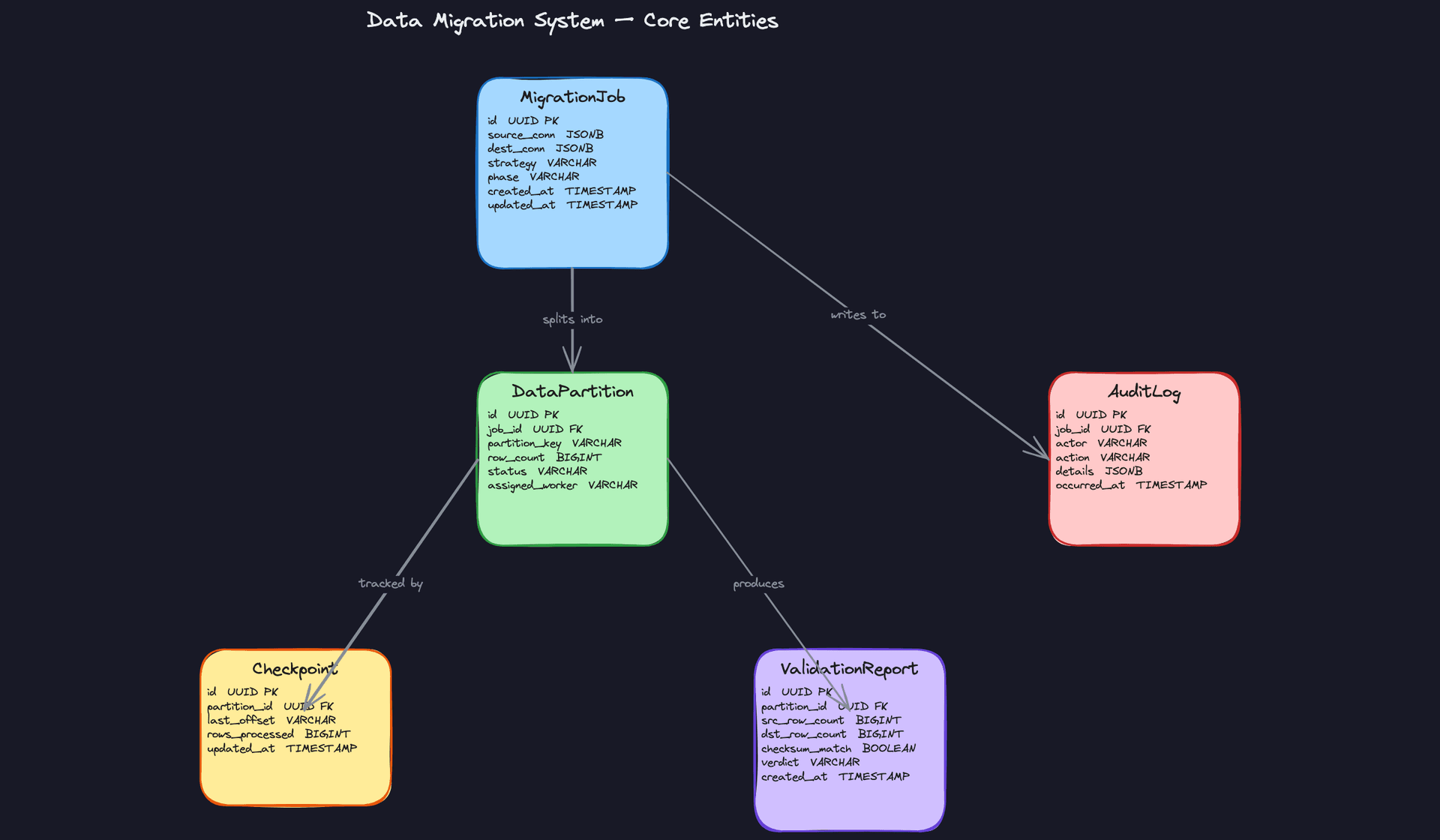
Five entities do the heavy lifting here. Get comfortable explaining each one, because interviewers will probe them individually.
MigrationJob is the top-level record for everything about a migration: where data is coming from, where it's going, which strategy to use (full-load, incremental, or CDC), and what phase the job is currently in. The phase field is your state machine. It moves forward through PLANNING → EXTRACTING → TRANSFORMING → LOADING → VALIDATING → COMPLETE, and can land in FAILED at any point.
DataPartition is how you make a migration parallelizable. Instead of one worker trying to move a 10TB table, you split it into thousands of logical chunks, each assigned to a single worker. This is also your unit of retry: if one partition fails, you re-run just that slice, not the whole job.
Checkpoint is what separates a resumable pipeline from a fragile one. Each worker writes its last successfully committed offset after every batch. If a worker crashes and restarts, it reads the checkpoint and picks up from there instead of starting over. Without this, a failure at hour 6 of an 8-hour migration means starting from scratch.
ValidationReport is your audit trail for correctness. After each partition loads, the validation engine compares source and destination metrics and writes a report. The cutover gate won't open until every partition has a passing report. This is the thing that lets you confidently tell your stakeholders "yes, the data is correct."
AuditLog is append-only. Nobody deletes from it, nobody updates it. It records every state transition, every manual action, every triggered rollback, with an actor, timestamp, and details payload. GDPR audits, SOC2 reviews, post-mortems: this table is what you point to.
CREATE TABLE migration_jobs (
    id              UUID PRIMARY KEY DEFAULT gen_random_uuid(),
    name            VARCHAR(255) NOT NULL,
    source_conn     JSONB NOT NULL,                  -- connection metadata: host, port, db, credentials ref
    dest_conn       JSONB NOT NULL,                  -- same structure for destination
    strategy        VARCHAR(50) NOT NULL,             -- 'full_load', 'incremental', 'cdc'
    phase           VARCHAR(50) NOT NULL DEFAULT 'PLANNING',  -- state machine field
    schedule        VARCHAR(100),                    -- cron expression for incremental jobs; NULL for one-time
    created_by      VARCHAR(255) NOT NULL,
    created_at      TIMESTAMP NOT NULL DEFAULT now(),
    updated_at      TIMESTAMP NOT NULL DEFAULT now()
);

CREATE TABLE data_partitions (
    id              UUID PRIMARY KEY DEFAULT gen_random_uuid(),
    job_id          UUID NOT NULL REFERENCES migration_jobs(id),
    partition_key   VARCHAR(255) NOT NULL,           -- e.g. "user_id BETWEEN 0 AND 999999"
    estimated_rows  BIGINT,
    status          VARCHAR(50) NOT NULL DEFAULT 'PENDING',  -- PENDING, IN_PROGRESS, DONE, FAILED
    assigned_worker VARCHAR(255),                    -- worker pod/process ID
    created_at      TIMESTAMP NOT NULL DEFAULT now()
);

CREATE INDEX idx_partitions_job_status ON data_partitions(job_id, status);

CREATE TABLE checkpoints (
    id              UUID PRIMARY KEY DEFAULT gen_random_uuid(),
    partition_id    UUID NOT NULL REFERENCES data_partitions(id),
    last_offset     VARCHAR(255) NOT NULL,           -- last primary key or cursor value processed
    rows_processed  BIGINT NOT NULL DEFAULT 0,
    updated_at      TIMESTAMP NOT NULL DEFAULT now(),
    UNIQUE (partition_id)                            -- one checkpoint per partition
);

CREATE TABLE validation_reports (
    id              UUID PRIMARY KEY DEFAULT gen_random_uuid(),
    partition_id    UUID NOT NULL REFERENCES data_partitions(id),
    src_row_count   BIGINT NOT NULL,
    dst_row_count   BIGINT NOT NULL,
    null_rate       NUMERIC(5, 4),                  -- fraction of nulls in key columns
    checksum_match  BOOLEAN NOT NULL,
    verdict         VARCHAR(20) NOT NULL,            -- 'PASS' or 'FAIL'
    failure_reason  TEXT,                            -- populated when verdict = 'FAIL'
    created_at      TIMESTAMP NOT NULL DEFAULT now()
);

CREATE TABLE audit_logs (
    id              UUID PRIMARY KEY DEFAULT gen_random_uuid(),
    job_id          UUID NOT NULL REFERENCES migration_jobs(id),
    actor           VARCHAR(255) NOT NULL,           -- user email or system service name
    action          VARCHAR(100) NOT NULL,           -- e.g. 'JOB_STARTED', 'CUTOVER_TRIGGERED', 'ROLLBACK_INITIATED'
    details         JSONB NOT NULL DEFAULT '{}',     -- arbitrary context: partition IDs, error messages, etc.
    occurred_at     TIMESTAMP NOT NULL DEFAULT now()
);

CREATE INDEX idx_audit_logs_job ON audit_logs(job_id, occurred_at DESC);
Interview tip: When you present these schemas, lead with the relationships, not the columns. Say "DataPartition belongs to a MigrationJob, Checkpoint belongs to a DataPartition" before you get into field-level details. Interviewers want to see that you understand the domain before you start optimizing column types.
API Design
The control plane needs five core operations: create a job, monitor its progress, inspect a specific partition, fetch validation results, and trigger cutover (or rollback). Keep the API surface small. This is an internal tool, not a public product.
// Create a new migration job
POST /api/v1/migration-jobs
{
  "name": "postgres-to-bigquery-users",
  "source_conn": { "type": "postgres", "host": "...", "database": "prod" },
  "dest_conn": { "type": "bigquery", "project": "...", "dataset": "..." },
  "strategy": "full_load",
  "partition_column": "user_id",
  "partition_count": 500
}
-> { "job_id": "uuid", "phase": "PLANNING", "created_at": "..." }
// Get current job status and partition summary
GET /api/v1/migration-jobs/{job_id}
-> {
     "job_id": "uuid",
     "phase": "LOADING",
     "partitions": {
       "total": 500,
       "pending": 120,
       "in_progress": 40,
       "done": 335,
       "failed": 5
     },
     "estimated_completion": "..."
   }
// List validation reports for a job (filterable by verdict)
GET /api/v1/migration-jobs/{job_id}/validations?verdict=FAIL
-> {
     "reports": [
       {
         "partition_id": "uuid",
         "src_row_count": 10000,
         "dst_row_count": 9998,
         "checksum_match": false,
         "verdict": "FAIL",
         "failure_reason": "row count mismatch: delta of 2"
       }
     ]
   }
// Trigger cutover or rollback
POST /api/v1/migration-jobs/{job_id}/cutover
{ "action": "CUTOVER" }   // or "ROLLBACK"
-> { "status": "accepted", "triggered_by": "user@company.com", "at": "..." }
// Pause or resume a running job
PATCH /api/v1/migration-jobs/{job_id}
{ "phase": "PAUSED" }
-> { "job_id": "uuid", "phase": "PAUSED" }
POST for job creation and cutover actions makes sense because both are non-idempotent state changes. GET for status and validation reads. PATCH for the pause/resume toggle, since you're partially updating the job resource rather than replacing it.
Common mistake: Candidates sometimes design a single GET /status endpoint and call it done. You need the validation report endpoint to be queryable independently. During an incident at 2am, the engineer on call needs to pull up failed partitions immediately, without wading through a giant status blob.The cutover endpoint deserves a moment of attention. It accepts both CUTOVER and ROLLBACK as actions on the same route because they're two sides of the same decision point. The server validates preconditions (all partitions passing, lag below threshold) before accepting the request. If those checks fail, it returns a 409 Conflict with the blocking reason, not a 200.
High-Level Design
Every data migration, regardless of scale, passes through the same three phases: Extract, Transform, and Load. The interesting design work is in how you orchestrate those phases across petabytes of data, keep them resumable, validate correctness in parallel, and hand off control cleanly at cutover. Walk your interviewer through each piece in order.
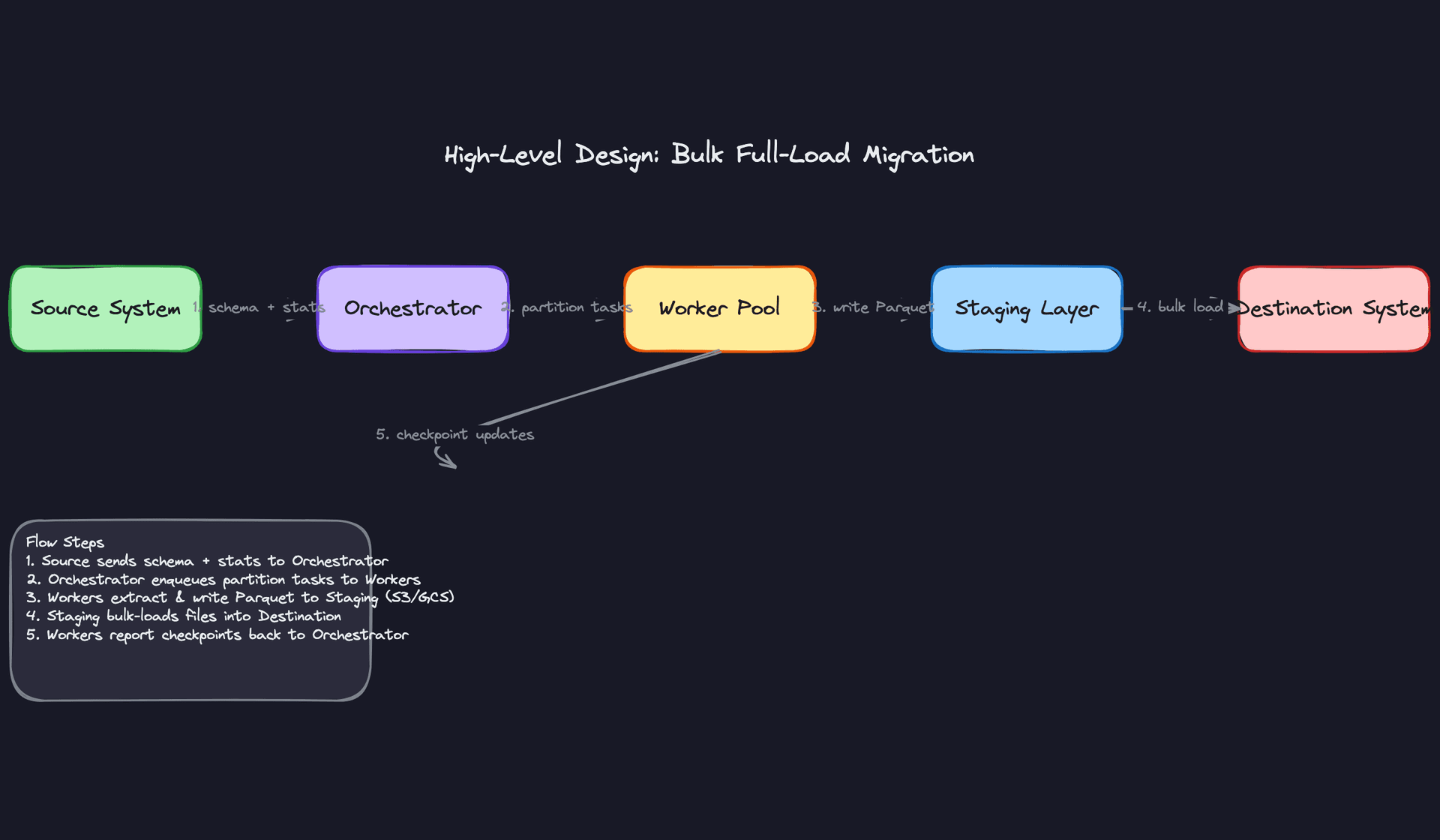
1) Extract: Reading from Source and Writing to Staging
Core components: Source System, Orchestrator, Worker Pool, Staging Layer (S3/GCS)
The Orchestrator kicks things off by querying the source system's metadata: table sizes, row counts, primary key ranges, and partition statistics. It uses that information to split the data into DataPartition records, each representing a manageable chunk (say, 1 million rows or a date-range slice of a partitioned table).
- The Orchestrator creates a
MigrationJobrecord and sets its phase toEXTRACTING. - It generates
DataPartitionrecords, one per logical chunk, and enqueues a task for each onto a Kafka topic or SQS queue. - Workers pull tasks from the queue. Each worker reads its assigned partition from the source using a bounded query (e.g.,
WHERE id BETWEEN :start AND :end). - The worker serializes the rows to Parquet and writes the file to a staging path in object storage:
s3://migrations/{job_id}/{partition_id}/data.parquet. - After a successful write, the worker commits a
Checkpointrecord with the last processed offset.
def extract_partition(partition: DataPartition, staging_bucket: str) -> str:
    query = f"""
        SELECT * FROM {partition.table_name}
        WHERE {partition.pk_column} >= {partition.start_key}
          AND {partition.pk_column} < {partition.end_key}
    """
    df = source_conn.read(query)
    output_path = f"s3://{staging_bucket}/{partition.job_id}/{partition.id}/data.parquet"
    df.to_parquet(output_path, engine="pyarrow", compression="snappy")
    checkpoint_store.commit(partition.id, last_offset=partition.end_key)
    return output_path
The staging layer is non-negotiable. Writing extracted data to object storage before loading decouples extraction from loading, so a failed load doesn't force you to re-read the source. It also gives you a point-in-time snapshot you can audit later.
Interview tip: When you mention partitioning, your interviewer will almost certainly ask "how do you choose partition size?" The answer depends on memory constraints and parallelism. A good default is partitions that fit comfortably in a single worker's memory (256MB to 1GB of raw data). Too small and you drown in task overhead; too large and a single worker failure wastes hours of work.
2) Transform: Schema Mapping, Type Coercions, and PII Masking
Core components: Worker Pool, Transform Layer, Schema Registry
Transformation happens in the worker, between reading from staging and writing to the destination. This is where you apply field renames, type coercions (e.g., VARCHAR to TIMESTAMP), default injection for new nullable columns, and PII masking rules.
- The worker reads the Parquet file from staging into a Spark or pandas DataFrame.
- It fetches the transform configuration for this job from the Schema Registry or a config store. This config describes field mappings, type casts, and masking rules.
- The worker applies transformations column by column.
- Any record that fails transformation (type mismatch, null constraint violation) is routed to a Dead Letter Queue rather than failing the entire partition.
- The transformed DataFrame is written back to a separate staging path:
s3://migrations/{job_id}/{partition_id}/transformed.parquet.
def transform_partition(df: pd.DataFrame, transform_config: dict) -> pd.DataFrame:
    # Field renames
    df = df.rename(columns=transform_config["field_mappings"])

    # Type coercions
    for col, dtype in transform_config["type_casts"].items():
        df[col] = df[col].astype(dtype)

    # PII masking
    for col in transform_config["pii_columns"]:
        df[col] = df[col].apply(lambda x: hashlib.sha256(str(x).encode()).hexdigest())

    return df
Keeping transform logic in a versioned config (not hardcoded in the worker) matters more than it sounds. When a source schema changes mid-migration, you update the config and re-run affected partitions without touching worker code.
Common mistake: Candidates often skip PII handling entirely or mention it as an afterthought. Bring it up proactively. Migrations are one of the highest-risk moments for PII exposure, especially when data lands in a staging bucket that has broader access than production.
3) Load: Writing to the Destination in Parallel Batches
Core components: Worker Pool, Destination System, Checkpoint Store
Loading is the most dangerous phase. Writes need to be idempotent so that a worker crash and retry doesn't produce duplicate rows.
- The worker reads the transformed Parquet file from staging.
- It issues an upsert (MERGE or INSERT ... ON CONFLICT) to the destination, keyed on the source primary key.
- After a successful write, it updates the
DataPartitionstatus toLOADEDand writes a finalCheckpoint. - The Orchestrator polls partition statuses. Once all partitions reach
LOADED, it advances theMigrationJobphase toVALIDATING.
Using upserts instead of plain inserts is the key design decision here. If a worker crashes after writing but before committing its checkpoint, the retry will re-send the same rows. An upsert absorbs that gracefully. A plain insert produces duplicates that are painful to clean up in an analytical store.
4) Validation: Running Quality Checks in Parallel with Loading
Core components: Validation Engine, Source Snapshot, Destination Snapshot, ValidationReport Store, Alerting System
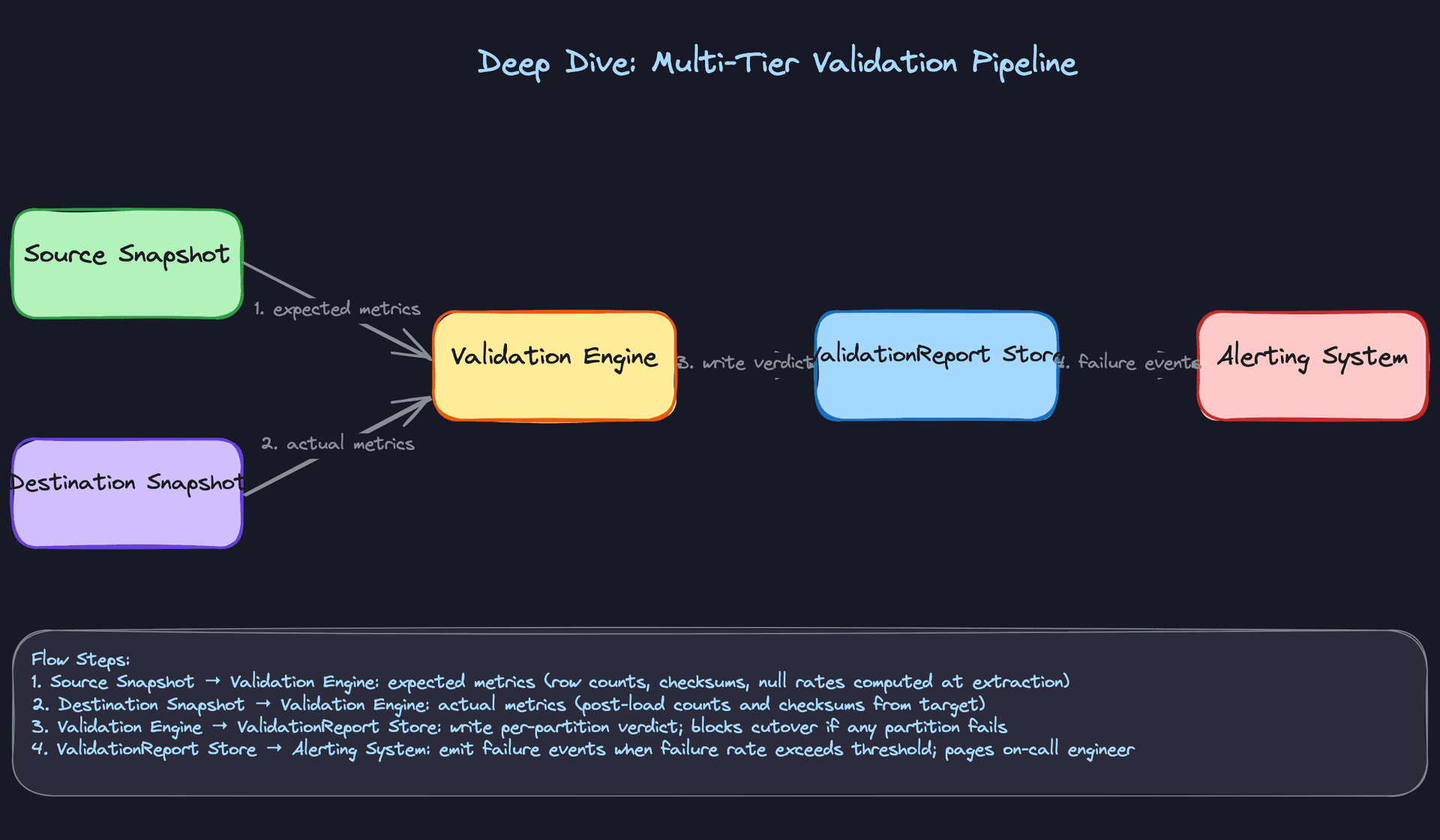
Validation doesn't wait for all partitions to finish loading. It runs partition by partition as each one completes, so you surface data quality problems early rather than discovering them after a 12-hour load job finishes.
- When a partition's status flips to
LOADED, the Orchestrator enqueues a validation task. - The Validation Engine reads the source row count and checksum that were captured at extraction time (stored in the
DataPartitionrecord). - It queries the destination for the same partition's row count and computes a checksum over the loaded rows.
- It compares the two and writes a
ValidationReportwith aPASSorFAILverdict. - If any partition fails, the Orchestrator pages the on-call engineer and blocks the cutover signal.
-- Checksum query run against both source and destination per partition
SELECT
    COUNT(*)                          AS row_count,
    SUM(HASHBYTES('SHA2_256', CAST(id AS VARCHAR)
        || CAST(updated_at AS VARCHAR))) AS checksum
FROM orders
WHERE id BETWEEN :start_key AND :end_key;
Tiering your validation is worth mentioning explicitly to the interviewer. Row count parity is the floor, not the ceiling. Checksum matching catches silent data corruption. Business-metric reconciliation (e.g., "total revenue in destination matches source within 0.01%") is what actually gives stakeholders confidence to approve cutover.
Key insight: Validation is a gate, not a report. The cutover signal should be physically blocked until everyValidationReportshowsPASS. Don't rely on a human remembering to check a dashboard.
5) Control Plane: Triggering, Pausing, and Initiating Cutover
Core components: Control Plane API, UI Dashboard, Orchestrator
The Control Plane is a thin API layer that wraps the Orchestrator. Engineers interact with it to manage the full migration lifecycle without touching the database directly.
Key endpoints:
POST   /migrations                    // Create and start a new MigrationJob
GET    /migrations/{job_id}           // Fetch job status and phase
GET    /migrations/{job_id}/partitions // Per-partition status and validation results
POST   /migrations/{job_id}/pause     // Pause all workers gracefully
POST   /migrations/{job_id}/resume    // Resume from last checkpoint
POST   /migrations/{job_id}/cutover   // Initiate cutover (blocked if validation incomplete)
POST   /migrations/{job_id}/rollback  // Revert to source system
The pause/resume flow is worth spelling out. When an engineer hits pause, the Orchestrator stops dispatching new tasks. In-flight workers finish their current batch and commit their checkpoints before stopping. Nothing is abandoned mid-write. Resume simply re-opens the task queue from the last committed checkpoint.
The cutover endpoint checks a go/no-go condition before doing anything: all partitions must be in LOADED status, all ValidationReport verdicts must be PASS, and replication lag (in CDC mode) must be below a configured threshold. If any condition fails, the API returns a 409 with the blocking reason.
6) Migration Strategy: Bulk Full-Load vs. CDC-Based Live Migration
This is the highest-leverage design decision in the entire interview. Get it wrong and everything downstream is wrong too.
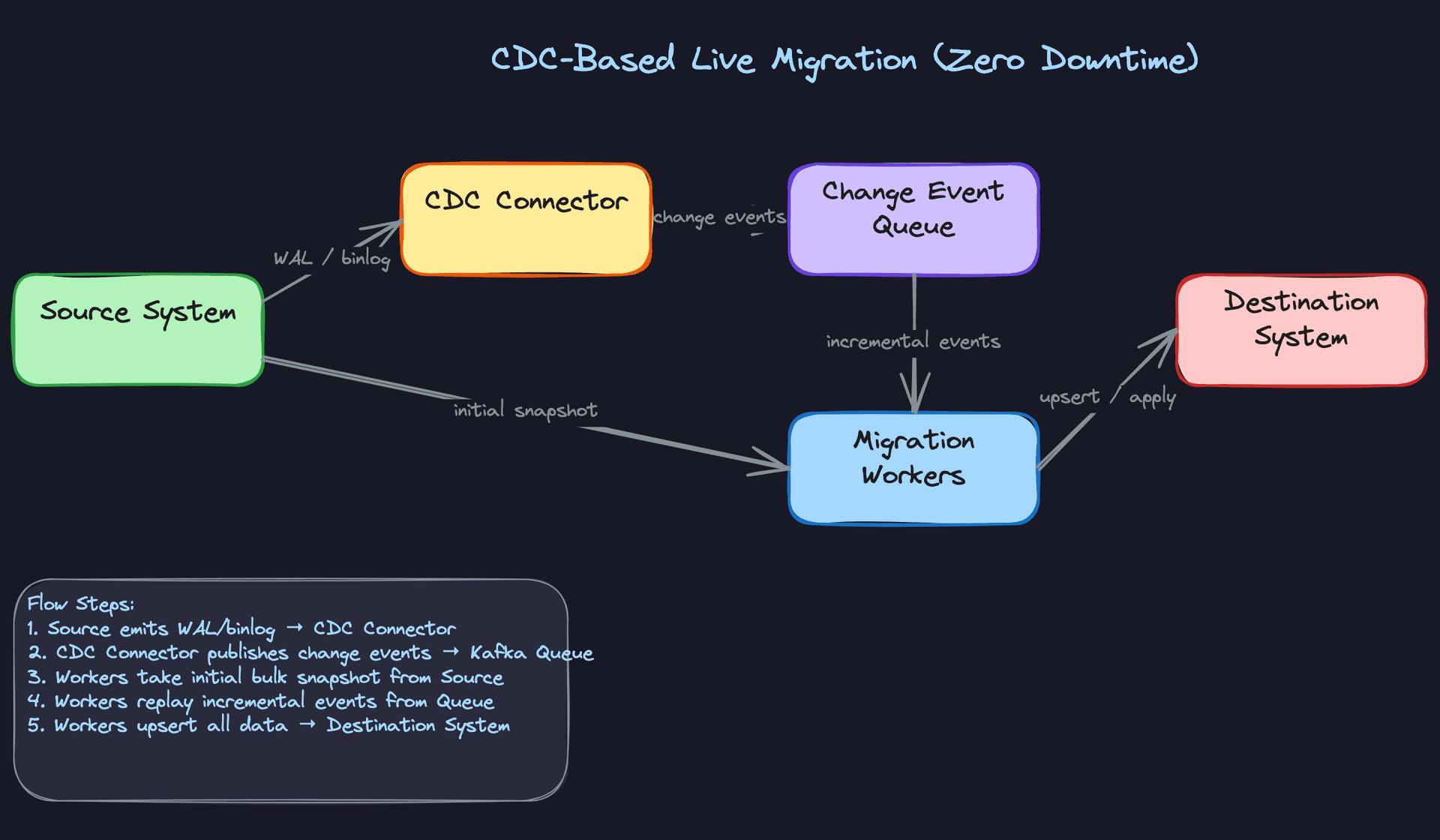
Bulk full-load takes a snapshot of the source at a point in time, migrates it, and requires a maintenance window during which the source is read-only. It's simpler to implement, easier to validate, and the right choice when downtime is acceptable (internal tooling migrations, warehouse-to-warehouse moves, historical data loads).
CDC-based live migration uses Debezium or a similar connector to capture every insert, update, and delete from the source's write-ahead log or binlog. The migration runs in two phases: first a bulk snapshot of the current state, then continuous replay of change events until the destination catches up. When lag drops below an acceptable threshold (say, under 5 seconds), you flip the cutover switch. Zero downtime, but significantly more operational complexity.
The CDC approach introduces ordering guarantees you have to reason about carefully. An update that arrives before its corresponding insert (due to snapshot/replay overlap) will silently drop the row if you're not handling it with upserts and idempotency keys.
Interview tip: Don't wait for the interviewer to ask which strategy to use. After clarifying requirements, state your recommendation and justify it. "Given that the business requires less than 30 seconds of downtime and the source is Postgres, I'd use CDC with Debezium. If they could tolerate a 2-hour maintenance window, bulk full-load would be simpler and lower risk." That kind of opinionated reasoning is exactly what separates senior candidates.
Putting It All Together
The full system has two parallel tracks running simultaneously. The data track moves through Extract, Transform, and Load in partitioned batches, with workers pulling tasks from a queue and committing checkpoints after each successful write. The validation track shadows the data track, running quality checks on each loaded partition and writing verdicts to the ValidationReport store.
The Orchestrator ties both tracks together: it creates partitions, dispatches tasks, monitors heartbeats, and advances the job's phase state machine. The Control Plane sits on top, giving engineers the ability to pause, inspect, and ultimately trigger cutover only after every validation gate has cleared.
For bulk migrations, the flow is linear: snapshot the source, partition it, extract to staging, transform, load, validate, cut over. For CDC migrations, the flow is concurrent: start the CDC connector before the snapshot, run the bulk load, then drain the change event backlog until lag is negligible, then cut over. The schemas, checkpointing logic, and validation pipeline are identical in both cases. Only the extraction mechanism and cutover timing differ.
That architectural separation, keeping the migration mechanics generic and swapping only the extraction strategy, is worth calling out explicitly. It means you can support both strategies with the same worker pool and the same validation engine.
Deep Dives
The interviewer won't stay at the high level for long. Once you've sketched the ETL pipeline and mentioned partitioning, expect them to push on the hard parts: what happens when a worker crashes mid-batch, what happens when the source schema changes on day three of a week-long migration, and how you actually flip the switch without taking down production. These are the questions that separate candidates who've thought about data migration from candidates who've done it.
"How do we guarantee zero data loss?"
This is the first place most interviews go deep. The instinct is to say "we use transactions" and move on. Don't.
Bad Solution: Trust the pipeline
The naive approach is to run workers that read a batch, write it to the destination, and move on. If a worker crashes halfway through a batch, you restart it from the beginning of that batch. Sounds fine until you realize "the beginning of that batch" is ambiguous after a crash. Did the write partially succeed? Did the destination get half the rows? You don't know, so you re-send everything and hope your destination handles duplicates gracefully.
It won't. Most bulk-load destinations (Snowflake COPY, BigQuery load jobs) don't deduplicate on insert. You end up with duplicate rows, and you won't notice until a downstream analyst flags that revenue numbers are 12% too high.
Warning: Saying "we'll just retry on failure" without explaining how you prevent duplicates is a red flag. Interviewers hear this constantly and it signals you haven't thought through failure modes.
Good Solution: Checkpointing with at-least-once delivery
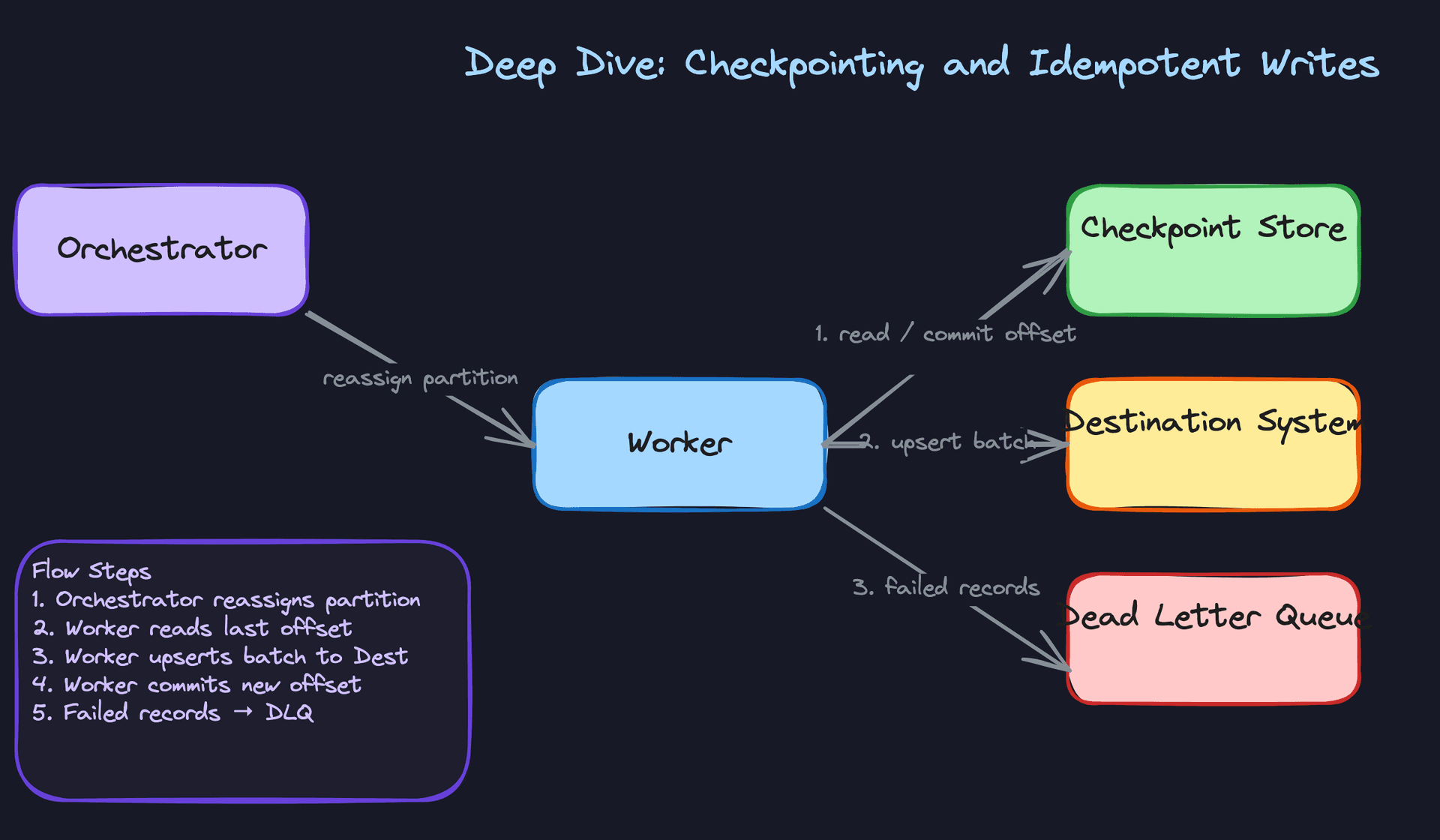
Add a checkpoint store (Postgres or Redis works fine) that records the last successfully committed offset per partition. Before a worker starts processing, it reads its checkpoint. After it successfully writes a batch to the destination, it commits the new offset. On restart, it picks up from the last committed offset rather than the beginning.
This gives you at-least-once delivery: you might re-send a batch after a crash, but you won't skip one. The catch is that "at-least-once" still means duplicates are possible if the write succeeded but the checkpoint commit failed. You need the destination to handle re-delivered batches safely.
def process_partition(partition_id: str, source_conn, dest_conn, checkpoint_store):
    offset = checkpoint_store.get_offset(partition_id) or 0

    while True:
        batch = source_conn.read_batch(partition_id, offset=offset, limit=10_000)
        if not batch:
            break

        # Upsert ensures idempotency: re-delivered rows overwrite, not duplicate
        dest_conn.upsert(
            table="target_table",
            records=batch,
            conflict_key="primary_key"
        )

        offset += len(batch)
        checkpoint_store.commit_offset(partition_id, offset)
The upsert on a stable primary key is what makes re-delivery safe. If the same row arrives twice, the second write is a no-op.
Great Solution: Idempotent writes with partition-level deduplication keys
The great solution makes idempotency explicit and auditable. Each partition gets a deterministic batch_id derived from the partition key and offset range. The destination write includes this batch_id, and the destination table has a unique constraint on (primary_key, batch_id). Any re-delivered batch hits the constraint and is silently ignored.
This is stronger than a plain upsert because it handles cases where the source record itself changed between retries. A plain upsert would overwrite the first write with a potentially stale re-delivery. The deduplication key prevents that.
CREATE TABLE migration_target (
    id              UUID NOT NULL,
    batch_id        VARCHAR(64) NOT NULL,   -- deterministic: partition_id + offset_range
    payload         JSONB NOT NULL,
    migrated_at     TIMESTAMP NOT NULL DEFAULT now(),
    PRIMARY KEY (id),
    UNIQUE (id, batch_id)                   -- blocks duplicate batch delivery
);
Pair this with a dead-letter queue for records that fail after N retries. You don't want one bad row blocking an entire partition indefinitely. The orchestrator monitors worker heartbeats and reassigns stalled partitions automatically.
Tip: Mentioning the dead-letter queue unprompted signals operational maturity. Most candidates design for the happy path. Senior engineers design for the 0.01% of records that will always be weird.
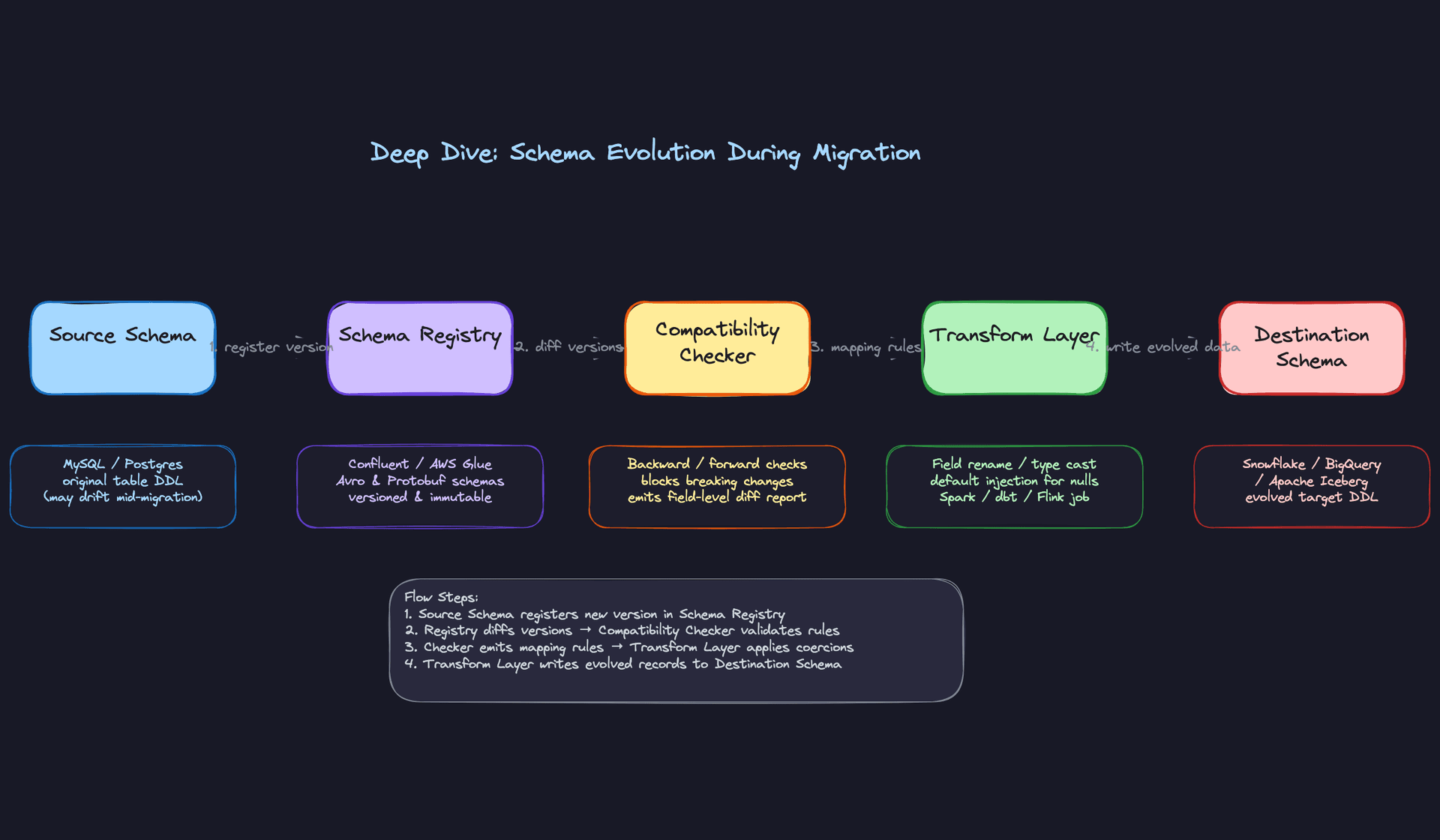
"How do we handle schema evolution mid-migration?"
Long migrations (days or weeks for petabyte-scale datasets) have a nasty property: the source schema can change while you're still reading from it. A column gets added, a type gets widened, a nullable field becomes required. Your pipeline was built against the schema from day one. Now what?
Bad Solution: Hard-code the schema at job start
Most candidates define the schema once when the migration job is created and use it for the entire run. This works fine for short migrations. For anything running longer than a day, you're one ALTER TABLE away from a pipeline crash.
The failure mode is subtle: your Spark job was reading user_age as INT. Someone ran ALTER COLUMN user_age TYPE BIGINT. Your next batch fails with a type cast error, the worker crashes, and now you're paging someone at 2am to figure out why the migration stopped at partition 847 of 1,200.
Warning: Candidates who skip schema evolution entirely are implicitly assuming migrations are fast and sources are frozen. Interviewers at companies like Airbnb or Uber, where migrations run for weeks, will call this out immediately.
Good Solution: Schema versioning with compatibility checks
Register the source schema in a schema registry (Confluent Schema Registry or AWS Glue) at job start. Each time a worker reads a new batch, it checks whether the inferred schema matches the registered version. If it detects a drift, it registers the new version and runs a compatibility check before proceeding.
Backward-compatible changes (adding a nullable column, widening a numeric type) can be handled automatically. The transform layer injects defaults for new columns and applies safe type coercions. Forward-incompatible changes (dropping a column, narrowing a type) pause the migration and alert the team.
def check_schema_compatibility(registry, job_id: str, new_schema: dict) -> str:
    current = registry.get_latest_schema(job_id)

    added_columns = set(new_schema) - set(current)
    removed_columns = set(current) - set(new_schema)
    type_changes = {
        col for col in set(current) & set(new_schema)
        if current[col] != new_schema[col]
    }

    if removed_columns or any(is_narrowing(current[c], new_schema[c]) for c in type_changes):
        raise IncompatibleSchemaChange(f"Breaking change detected: {removed_columns or type_changes}")

    if added_columns:
        registry.register_new_version(job_id, new_schema)
        return "EVOLVED"

    return "UNCHANGED"
Great Solution: Avro schema registry with per-batch schema tagging
Tag every batch with the schema version it was written under. The transform layer resolves the correct mapping rules for each batch independently, so batches written under schema v1 and batches written under schema v3 can coexist in the staging layer without conflict.
This matters most when you're doing parallel backfills. Partition 1 might be mid-flight under schema v1 while partition 900 starts under schema v3. Without per-batch tagging, your transform layer has no way to know which mapping to apply.
Avro handles this naturally: each Avro file embeds a schema fingerprint, and the reader resolves it against the registry at read time. Parquet with a Glue catalog gives you similar properties. The destination (Iceberg or Delta Lake) should use schema-on-write with evolution enabled so new columns are added to the table definition automatically.
# Avro writer tags each batch with its schema version
def write_batch_to_staging(batch, schema_version: int, s3_path: str):
    schema = registry.get_schema(schema_version)
    avro_schema = avro.parse(json.dumps(schema))

    with open(s3_path, "wb") as f:
        writer = DataFileWriter(f, DatumWriter(), avro_schema)
        writer.set_meta("schema.version", str(schema_version).encode())
        for record in batch:
            writer.append(record)
        writer.close()
Tip: Bringing up Iceberg's schema evolution support (adding columns, renaming fields without rewriting data files) shows you know the modern data lake stack. It's a concrete answer to "how does the destination handle new columns?" that most candidates can't give.
"How do we validate that the migrated data is actually correct?"
Finishing the load isn't the same as finishing the migration. You need to prove the destination has exactly what the source had. How you answer this question tells the interviewer a lot about your data quality instincts.
Bad Solution: Row count check
Count rows in source, count rows in destination, compare. If they match, ship it. This is the first thing every candidate says, and it's not wrong, it's just nowhere near sufficient.
Row counts can match even when data is wrong. A worker that wrote 1,000 rows but corrupted 50 values still passes a count check. A migration that dropped a column entirely still passes a count check. You've proven you moved the right number of rows, not that you moved the right data.
Good Solution: Checksum-based partition validation
For each partition, compute a deterministic checksum over the row content at extraction time. After loading, compute the same checksum over the destination rows. Compare them.
-- Source-side checksum per partition
SELECT
    partition_key,
    COUNT(*) AS row_count,
    MD5(STRING_AGG(CAST(id AS TEXT) || CAST(updated_at AS TEXT) || payload, ',' ORDER BY id)) AS content_checksum
FROM source_table
WHERE partition_key = :partition_key
GROUP BY partition_key;
Run the same query on the destination and compare both row_count and content_checksum. A mismatch tells you exactly which partition is wrong, which is far more useful than knowing the overall count is off by some unknown amount.
The trade-off: checksum queries are expensive on large tables. Run them on a representative sample (every 10th partition, or all partitions above a row-count threshold) rather than exhaustively if you're under time pressure.
Great Solution: Multi-tier validation with business-metric reconciliation
Row counts and checksums catch structural problems. Business-metric reconciliation catches semantic ones. After loading, run a set of domain-specific queries against both source and destination and compare the results.
RECONCILIATION_QUERIES = [
    {
        "name": "total_revenue_usd",
        "source_sql": "SELECT SUM(amount_usd) FROM orders WHERE created_at < :cutoff",
        "dest_sql":   "SELECT SUM(amount_usd) FROM orders WHERE created_at < :cutoff",
        "tolerance":  0.001  # 0.1% variance allowed for floating point
    },
    {
        "name": "active_user_count",
        "source_sql": "SELECT COUNT(DISTINCT user_id) FROM sessions WHERE date >= :start",
        "dest_sql":   "SELECT COUNT(DISTINCT user_id) FROM sessions WHERE date >= :start",
        "tolerance":  0.0    # exact match required
    }
]

def run_reconciliation(queries, source_conn, dest_conn, params) -> list[dict]:
    results = []
    for q in queries:
        src_val = source_conn.scalar(q["source_sql"], params)
        dst_val = dest_conn.scalar(q["dest_sql"], params)
        variance = abs(src_val - dst_val) / max(src_val, 1)
        results.append({
            "metric": q["name"],
            "passed": variance <= q["tolerance"],
            "variance_pct": round(variance * 100, 4)
        })
    return results
This is what stakeholders actually care about. A data scientist doesn't care that your checksums matched; they care that the revenue numbers in the new warehouse match the ones they've been reporting for the last two years. Tying validation to business metrics makes the sign-off conversation much easier.
The validation engine writes a ValidationReport per partition and blocks the cutover signal until all partitions pass. Any failure above a configurable threshold (say, more than 0.1% of partitions failing) pages the on-call engineer before you get anywhere near cutover.
"How do we execute cutover with minimal downtime?"
Everything up to this point has been preparation. Cutover is where the risk concentrates. The question the interviewer is really asking: how do you flip the switch without a 4am rollback?
Bad Solution: Stop the world
Take a maintenance window, stop all writes to the source, run a final sync, update the connection string, bring everything back up. Simple, auditable, and completely unacceptable for any system with a meaningful SLA.
Even if you negotiate a 2-hour window, you're betting that the final sync finishes in time, that the destination is healthy, and that nothing goes wrong during the switch. Any one of those bets failing means you're either extending the window or rolling back under pressure.
Warning: Proposing a maintenance window without acknowledging its trade-offs reads as inexperience. Always frame it as "acceptable for internal tools or low-traffic systems, not for production services with SLA commitments."
Good Solution: Dual-write with lag monitoring
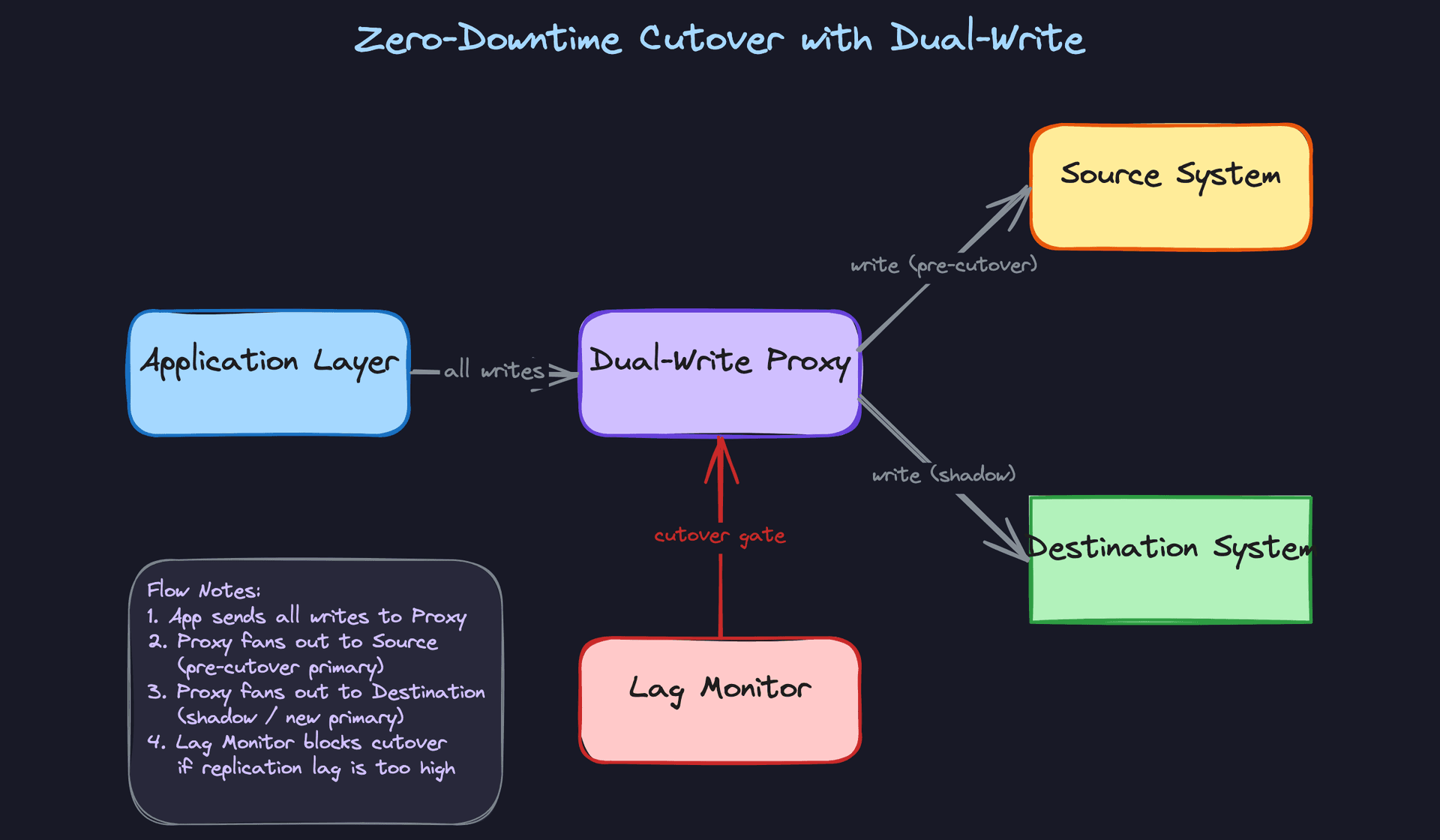
Start writing to both source and destination simultaneously before cutover. The application layer (or a thin proxy) fans out every write to both systems. Reads still go to the source. You monitor the lag between source and destination continuously.
When lag drops to zero and stays there for a defined stability window (say, 5 minutes), you flip reads to the destination. Writes continue to both for a short overlap period, then you drain the source writes and decommission it.
The lag monitor is the critical piece. If lag spikes during the stability window, you hold the cutover. You don't proceed until the system proves it can keep up.
Great Solution: Read-shadow with automated go/no-go
Dual-write gets you most of the way there. The great solution adds a read-shadow phase before you commit to the cutover. For a configurable percentage of read traffic (start at 1%, ramp to 10%), issue the same query to both source and destination and compare the results in the background. Don't serve the destination result yet; just log any discrepancies.
This surfaces data correctness issues that your validation pipeline might have missed, under real query patterns from real users. If the shadow comparison shows a 0% discrepancy rate over a meaningful traffic sample, that's a much stronger signal than any synthetic validation check.
The go/no-go checklist should be automated, not a manual sign-off:
def evaluate_cutover_readiness(job_id: str) -> CutoverDecision:
    checks = [
        lag_monitor.current_lag_seconds(job_id) < 30,
        lag_monitor.stable_for_minutes(job_id, minutes=5),
        validation_store.all_partitions_passed(job_id),
        shadow_reader.discrepancy_rate(job_id) < 0.001,
        destination_health.error_rate_pct(job_id) < 0.1,
    ]

    if all(checks):
        return CutoverDecision.GO

    failed = [i for i, c in enumerate(checks) if not c]
    return CutoverDecision.NO_GO(failed_checks=failed)
Rollback is equally automated. If error rates on the destination spike within the first 30 minutes post-cutover, the system automatically shifts reads back to the source and pages the team. The source stays live for at least 24 hours post-cutover for exactly this reason.
Tip: Describing the rollback trigger as automated rather than manual is what staff-level candidates do. It shows you've thought about what happens at 3am when nobody is watching the dashboard.
What is Expected at Each Level
Interviewers calibrate their expectations based on your level. A mid-level candidate who can't explain checkpointing isn't failing; a staff candidate who never raises observability probably is. Know where the bar sits for you.
Mid-Level
- Design a working bulk full-load pipeline: source reads, partitioning, staging to S3 or GCS, and a final load into the destination. You don't need CDC, but you need to show you understand why partitioning matters for parallelism and restartability.
- Explain the ETL phases clearly. Extract, transform, load should each have a defined boundary in your design, not blur together into "we move the data."
- Implement basic checkpointing. You should know that workers need to persist their last committed offset so a restart doesn't re-process from scratch. Even a simple Postgres table with
(partition_id, last_offset)is enough. - Run row-count validation before declaring success. Matching source and destination counts per partition is the minimum bar. You don't need checksums at this level, but you need something.
Senior
- Go beyond row counts. A senior candidate proposes a multi-tier validation strategy: row counts first, then checksum-based partition comparison, then business-metric reconciliation queries that confirm the data makes sense, not just that it arrived.
- Handle schema evolution proactively. What happens if a column is added to the source mid-migration? You should know the answer involves a schema registry, backward/forward compatibility checks, and a transform layer that injects defaults rather than failing hard.
- Make writes idempotent. Upserts keyed on stable primary keys, deduplication at the partition level, and a dead-letter queue for records that can't be applied cleanly. Retries should be safe.
- Raise the cutover problem without being asked. Propose either a maintenance window with a clear go/no-go checklist or a dual-write pattern with lag monitoring. Explain the trade-offs between the two. The interviewer wants to see that you've thought past the happy path.
Staff+
- Own the operational story. Lag dashboards, per-partition error rates, SLA tracking, and automated rollback triggers are not nice-to-haves at this level. You should describe what the on-call runbook looks like when a validation report fails at 3am.
- Think in petabytes across multiple tables simultaneously. How does the orchestrator prioritize work when 40 tables are migrating in parallel and one is starving the others? What does backpressure look like? How do you bound memory and I/O on the worker pool?
- Distinguish one-time migration from ongoing sync as fundamentally different design problems. A one-time lift-and-shift can tolerate a maintenance window and a simple checkpoint store. An ongoing sync needs CDC, schema evolution handling baked into the pipeline, and a reconciliation job that runs continuously. Conflating them is a red flag.
- Address multi-region and compliance concerns unprompted. Where does PII get masked, and can you prove it to an auditor? If the source is in the EU and the destination is in the US, what does that mean for your staging layer? Staff candidates surface these constraints early and propose concrete mitigations.
Key takeaway: Data migration looks like a one-time ETL job until something goes wrong mid-flight. The design that separates strong candidates from weak ones is everything that happens after the first failure: checkpointing that makes restarts safe, validation that catches silent corruption, and a cutover plan that gives you a real rollback option. Build for the failure path first.
