
Understanding the Problem
Product definition: A production-grade ETL pipeline extracts data from one or more source systems, transforms it into a clean and queryable form, and loads it into an analytical store where downstream consumers can reliably access it.
An ETL pipeline sounds simple until you're designing one for real. The "extract" step alone can mean anything from a nightly Postgres dump to a real-time Kafka consumer processing millions of events per second. Getting the requirements right before you draw a single box on the whiteboard is what separates a senior engineer's answer from a mid-level one.
The first question to ask your interviewer: what are the source systems? A pipeline pulling from a transactional Postgres database looks completely different from one consuming a Kafka topic or polling a third-party REST API. Postgres gives you SQL and cursors; Kafka gives you offsets and consumer groups; a REST API gives you rate limits and pagination headaches. Each one changes your extraction strategy, your failure model, and your retry logic.
Tip: Always clarify requirements before jumping into design. Spending two minutes on this shows maturity and prevents you from designing the wrong system entirely.
Functional Requirements
Core Requirements
- Extract data from at least one source system (transactional database, event stream, or external API) on a defined schedule or trigger
- Transform raw data: clean, join, aggregate, and apply business logic to produce curated datasets
- Load transformed data into a target analytical store (Snowflake, BigQuery, or a data lake on S3/GCS)
- Track pipeline execution metadata: run status, row counts, start/finish timestamps, and error details
- Enforce data quality checks before data is promoted to production tables
Below the line (out of scope)
- Real-time serving of pipeline outputs to end-user applications (sub-second latency use cases)
- Self-serve pipeline authoring UI for non-engineers
- Cross-pipeline data lineage visualization
Note: "Below the line" features are acknowledged but won't be designed in this lesson.
Non-Functional Requirements
Latency / SLA. Downstream consumers need data ready within a defined window. For this design, assume a 2-hour SLA for batch pipelines: data extracted at midnight should be queryable by 2am. This is a realistic target for a nightly analytics use case at a mid-size company.
Throughput. The pipeline should handle up to 500GB of raw data per daily run across all source tables, with peak extraction rates around 50MB/s during the load window.
Reliability. Pipeline runs must be idempotent. A run that fails halfway through and is retried should produce exactly the same output as a clean run, with no duplicate rows in the target table. Target 99.9% successful run completion over a 30-day window.
Scalability. The system should support 50+ source tables and 20+ concurrent pipeline runs without resource contention. Individual tables can range from 10K rows (small reference data) to 500M rows (event tables requiring incremental extraction).
Back-of-Envelope Estimation
For a mid-size company with a transactional Postgres source and a Snowflake target, here are reasonable working numbers.
| Dimension | Assumption | Estimate |
|---|---|---|
| Source tables | 50 tables, nightly batch | 50 pipeline runs/day |
| Average table size | 10M rows, ~200 bytes/row | 2GB per table |
| Total daily data volume | 50 tables x 2GB | ~100GB raw/day |
| Incremental extract size | 1% of rows change daily | ~1GB incremental/day |
| Transformed output size | ~40% compression with Parquet | ~60GB curated/day |
| Annual storage growth | 60GB/day x 365 | ~22TB/year in warehouse |
| Peak extraction throughput | 100GB over 2-hour window | ~14MB/s sustained |
| Metadata store writes | 50 runs x 10 DQ checks each | ~500 rows/day in Postgres |
The storage numbers tell you something important: at 22TB/year of curated data, you're well within the range where partitioning strategy matters a lot. A poorly partitioned table in Snowflake or BigQuery will cost you 10x more in compute than a well-partitioned one. That's a design decision you'll want to justify explicitly.
The Set Up
Core Entities
Four entities do the heavy lifting in an ETL pipeline's metadata layer. Notice that none of these store the actual data being processed. They store everything you need to operate, debug, and replay the pipeline.
SourceConfig defines what to extract and how. Think of it as a recipe: which database, which table, what schedule, and what connection parameters. One SourceConfig can spawn hundreds of PipelineRuns over its lifetime.
PipelineRun is the execution record for a single run of a pipeline. It captures start and end times, how many rows were extracted versus loaded, and a terminal status. When something breaks at 3am, this is the first table your on-call engineer opens.
DataQualityCheck is not a logging afterthought. It's a first-class entity that records the result of every quality rule applied during a run: null rate checks, uniqueness constraints, range validations. Each check is tied to a specific PipelineRun, so you can trace exactly which run introduced bad data.
AuditLog goes deeper, capturing row-level before/after state for critical transformations. This is what keeps your compliance team happy and your debugging sessions short. That said, storing full row snapshots for every transformation in a high-volume pipeline gets expensive fast, both in storage and write throughput. In practice, you'd scope audit logging to genuinely sensitive entities (financial records, PII changes) and consider sampling or async writes for everything else.
Key insight: All four of these entities live in a metadata store (Postgres works fine, or a dedicated catalog like Apache Atlas) that is completely separate from your data warehouse. The warehouse holds the transformed data. The metadata store holds the story of how it got there.
-- Enforce valid status values across the schema
CREATE TYPE run_status AS ENUM ('RUNNING', 'SUCCESS', 'FAILED', 'PARTIAL');
CREATE TYPE check_severity AS ENUM ('BLOCKING', 'WARNING', 'SLA');
CREATE TYPE audit_operation AS ENUM ('INSERT', 'UPDATE', 'DELETE');

CREATE TABLE source_config (
    id               UUID PRIMARY KEY DEFAULT gen_random_uuid(),
    name             VARCHAR(255) NOT NULL UNIQUE,         -- human-readable pipeline name
    source_type      VARCHAR(50) NOT NULL,                 -- 'postgres', 'kafka', 'api'
    connection_params JSONB NOT NULL,                      -- host, port, table; NO raw credentials
    secret_ref_id    VARCHAR(255),                         -- reference key into Secrets Manager / Vault
    schedule_cron    VARCHAR(100),                         -- NULL = triggered manually
    is_active        BOOLEAN NOT NULL DEFAULT true,
    created_at       TIMESTAMP NOT NULL DEFAULT now(),
    updated_at       TIMESTAMP NOT NULL DEFAULT now()
);

CREATE TABLE pipeline_run (
    id               UUID PRIMARY KEY DEFAULT gen_random_uuid(),
    source_config_id UUID NOT NULL REFERENCES source_config(id),
    status           run_status NOT NULL DEFAULT 'RUNNING',
    rows_extracted   BIGINT,                               -- NULL until extraction completes
    rows_loaded      BIGINT,                               -- NULL until load completes
    watermark_start  TIMESTAMP,                            -- lower bound for incremental extract
    watermark_end    TIMESTAMP,                            -- upper bound for incremental extract
    started_at       TIMESTAMP NOT NULL DEFAULT now(),
    finished_at      TIMESTAMP,                            -- NULL while still running
    error_message    TEXT                                  -- populated on FAILED status
);

CREATE INDEX idx_pipeline_run_source ON pipeline_run(source_config_id, started_at DESC);
CREATE INDEX idx_pipeline_run_status ON pipeline_run(status) WHERE status = 'FAILED';

CREATE TABLE data_quality_check (
    id               UUID PRIMARY KEY DEFAULT gen_random_uuid(),
    pipeline_run_id  UUID NOT NULL REFERENCES pipeline_run(id),
    rule_name        VARCHAR(100) NOT NULL,                -- e.g. 'null_rate', 'uniqueness', 'range'
    column_name      VARCHAR(100),                         -- NULL for table-level rules
    severity         check_severity NOT NULL DEFAULT 'BLOCKING',
    passed           BOOLEAN NOT NULL,
    observed_value   NUMERIC,                              -- e.g. 0.03 for 3% null rate
    threshold_value  NUMERIC,                              -- e.g. 0.01 for 1% max null rate
    failure_detail   TEXT,
    checked_at       TIMESTAMP NOT NULL DEFAULT now()
);

CREATE INDEX idx_dq_run ON data_quality_check(pipeline_run_id, passed);

CREATE TABLE audit_log (
    id               UUID PRIMARY KEY DEFAULT gen_random_uuid(),
    pipeline_run_id  UUID NOT NULL REFERENCES pipeline_run(id),
    entity_type      VARCHAR(100) NOT NULL,                -- e.g. 'orders', 'user_events'
    entity_id        JSONB NOT NULL,                       -- supports simple, UUID, BIGINT, or composite keys
    operation        audit_operation NOT NULL,
    before_state     JSONB,                                -- NULL for inserts
    after_state      JSONB,                                -- NULL for deletes
    logged_at        TIMESTAMP NOT NULL DEFAULT now()
);

CREATE INDEX idx_audit_run ON audit_log(pipeline_run_id);
CREATE INDEX idx_audit_entity ON audit_log(entity_type, logged_at DESC);
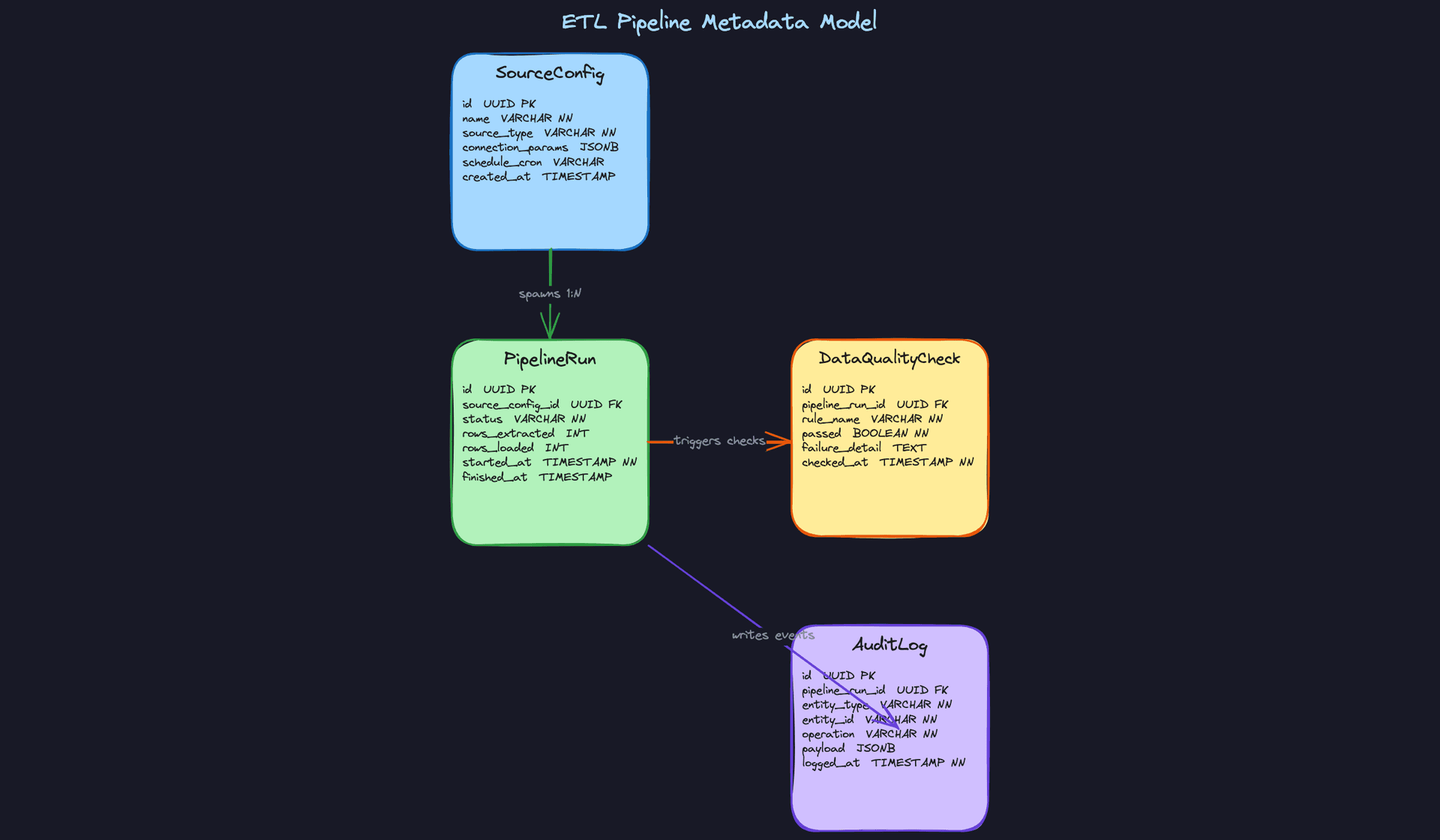
Common mistake: Candidates often skip thewatermark_startandwatermark_endcolumns onpipeline_run. Without them, you have no way to know which time window a run covered, which makes debugging late-arriving data and replaying specific windows nearly impossible.
A few schema decisions worth calling out explicitly. The secret_ref_id column on source_config is intentional: connection_params holds non-sensitive connection metadata (host, port, table name), while the actual credentials live in a secret store like AWS Secrets Manager or HashiCorp Vault. The pipeline job resolves the secret at runtime using secret_ref_id as the lookup key. Storing raw passwords in a JSONB column is a security failure waiting to happen.
The run_status, check_severity, and audit_operation types are defined as Postgres ENUMs rather than plain VARCHAR. This means the database itself rejects invalid values. You can't accidentally write "SUCESS" or "blocking" and have it silently persist. If you're on a database that doesn't support ENUMs natively, a CHECK constraint achieves the same guarantee.
audit_log.entity_id uses JSONB rather than VARCHAR. Source systems don't all use simple string keys. Some use UUIDs, some use BIGINTs, and some use composite keys like {"order_id": 123, "line_item": 4}. JSONB handles all of these without forcing you to stringify everything and lose type information.
API Design
An ETL pipeline's API serves two audiences: the orchestrator (Airflow, Prefect) that triggers and updates runs programmatically, and the operators who need to inspect run history, trigger replays, and review quality failures.
// Register a new pipeline source
POST /sources
{
  "name": "orders_postgres",
  "source_type": "postgres",
  "connection_params": { "host": "db.prod.internal", "db": "prod", "table": "orders" },
  "secret_ref_id": "arn:aws:secretsmanager:us-east-1:123456789:secret:orders-db-creds",
  "schedule_cron": "0 2 * * *"
}
-> { "id": "uuid", "name": "orders_postgres", "created_at": "..." }
// Trigger a pipeline run (called by orchestrator or manually)
POST /sources/{source_id}/runs
{
  "watermark_start": "2024-01-15T00:00:00Z",
  "watermark_end":   "2024-01-16T00:00:00Z"
}
-> { "run_id": "uuid", "status": "RUNNING", "started_at": "..." }
// Update run status (called by the pipeline job itself as it progresses)
PATCH /runs/{run_id}
{
  "status": "SUCCESS",
  "rows_extracted": 842000,
  "rows_loaded": 841997,
  "finished_at": "2024-01-16T02:47:00Z"
}
-> { "run_id": "uuid", "status": "SUCCESS" }
// Fetch run history for a source (used by operators and monitoring dashboards)
GET /sources/{source_id}/runs?status=FAILED&limit=20
-> {
  "runs": [
    { "run_id": "uuid", "status": "FAILED", "started_at": "...", "error_message": "..." }
  ]
}
// Submit data quality check results for a run
POST /runs/{run_id}/quality-checks
{
  "checks": [
    {
      "rule_name": "null_rate",
      "column_name": "user_id",
      "severity": "BLOCKING",
      "passed": false,
      "observed_value": 0.04,
      "threshold_value": 0.01
    }
  ]
}
-> { "blocking_failures": 1, "warnings": 0, "proceed": false }
The verb choices follow a clear logic. POST /sources/{id}/runs creates a new execution instance, so POST is correct even though it feels like a trigger. PATCH /runs/{run_id} uses PATCH rather than PUT because the pipeline job is updating a subset of fields as it progresses, not replacing the whole record. The quality check endpoint returns a proceed boolean so the pipeline job can make a single API call and immediately know whether to continue to the load step or halt.
Interview tip: When you present this API, the interviewer will likely ask who calls PATCH /runs/{run_id}. The answer is the pipeline job itself, not the orchestrator. The orchestrator knows when a task starts and finishes at the DAG level, but only the job knows row counts and error details. This distinction shows you understand the separation of concerns between orchestration and execution.High-Level Design
Start with the simplest version of the problem: someone needs data from a production database to land in a warehouse where analysts can query it. Everything else is complexity you add when you have a reason to.
1) Batch ETL: Extract, Transform, Load
Core components: Source DB, Extractor job, Raw Landing Zone (S3/GCS), Transform Layer (Spark or dbt), Data Warehouse (Snowflake/BigQuery).
The data flow:
- The Extractor connects to the source database (Postgres, MySQL) and pulls data, either a full table scan or an incremental slice. For incremental extraction, you have two main strategies: watermark-based polling (querying rows where
updated_at > last_run_timestamp) and Change Data Capture (CDC). CDC tools like Debezium read directly from the database's replication log, capturing every insert, update, and delete with much lower source load. Watermarks are simpler to implement; CDC is more complete and more common in production at scale. - Raw records land in S3 or GCS as Parquet files, partitioned by extraction date. Nothing is transformed yet. This is your safety net.
- The Transform Layer reads from the raw zone, applies business logic (joins, aggregations, type casting, deduplication), and writes curated output.
- Curated data is loaded into the Data Warehouse, where it becomes queryable by analysts or downstream pipelines.
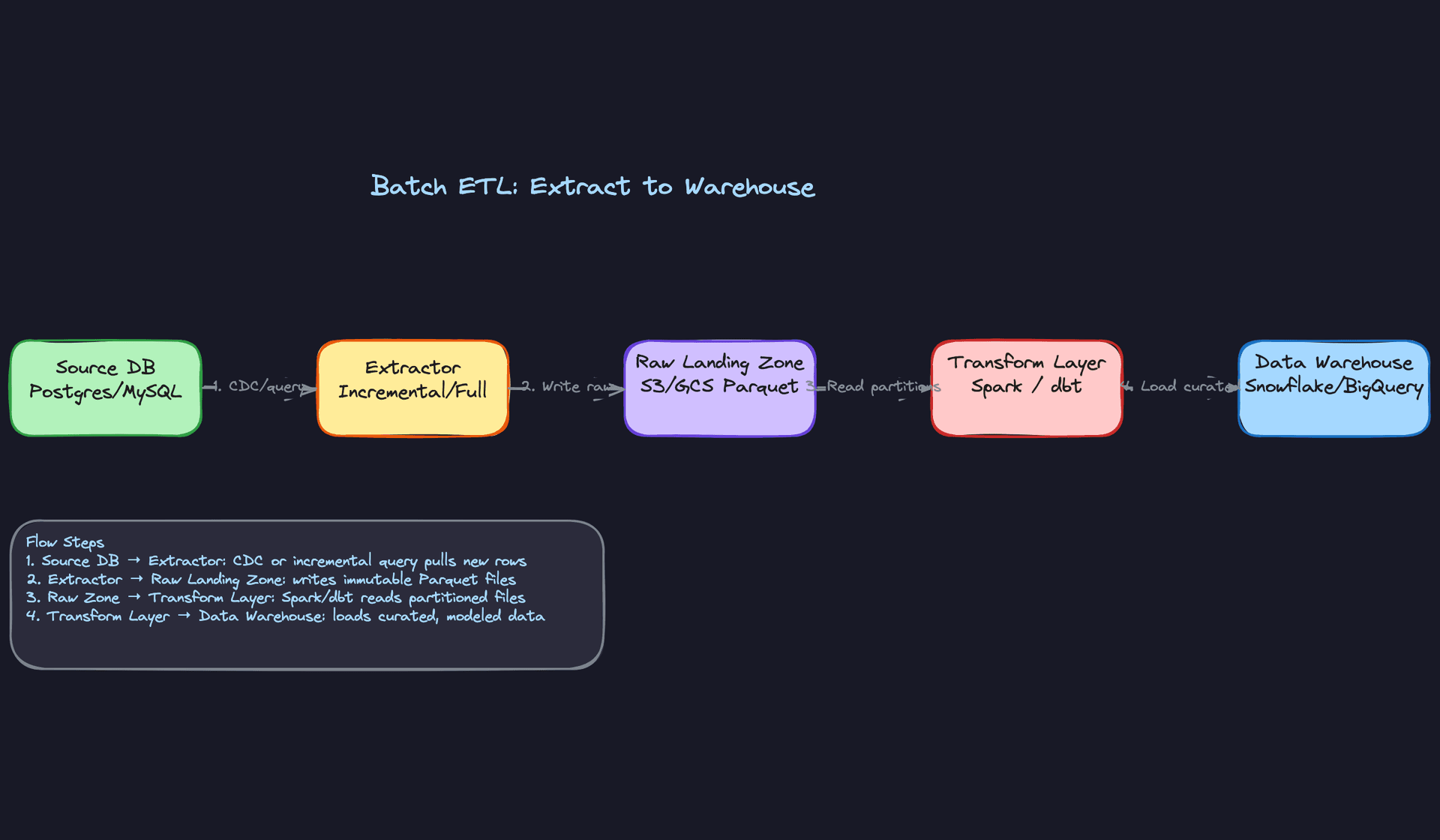
The most important design decision here is the separation between raw and curated storage. Raw data is immutable. You never overwrite it. If your transformation has a bug, you fix the logic and re-run against the raw files without touching the source database again. This is what makes the pipeline replayable.
Common mistake: Candidates often skip the raw landing zone and transform data in-flight before writing anywhere. This feels simpler but destroys your ability to backfill or debug. If the transform job fails halfway through, you have no clean starting point.
On format choice: Parquet is the right default for batch. It's columnar, splittable, and compresses well. You'd only reach for Avro if schema evolution and streaming consumers are a primary concern, since Avro's row-oriented format pairs better with Kafka-based pipelines.
2) Orchestration: Scheduling, Dependencies, and Retries
Core components: Orchestrator (Airflow DAG or Prefect flow), Metadata Store, alerting hooks.
A pipeline with no orchestrator is just a cron job. It has no dependency management, no retry logic, and no visibility into what ran and what didn't.
The orchestrator acts as the control plane:
- Airflow schedules the DAG on a cron interval (say, every hour or nightly at 2am).
- Each stage of the pipeline is a task in the DAG:
extract,transform,quality_check,load. Tasks have explicit dependencies, sotransformwon't start untilextractsucceeds. - If
extractfails, Airflow retries it with exponential backoff. If it fails past the retry limit, the run is markedFAILEDand an alert fires. - A Quality Gate task sits between transform and load. It runs your data quality checks and blocks the load if critical checks fail.
- PipelineRun status is written to the metadata store after each terminal state, giving operators a full audit trail.
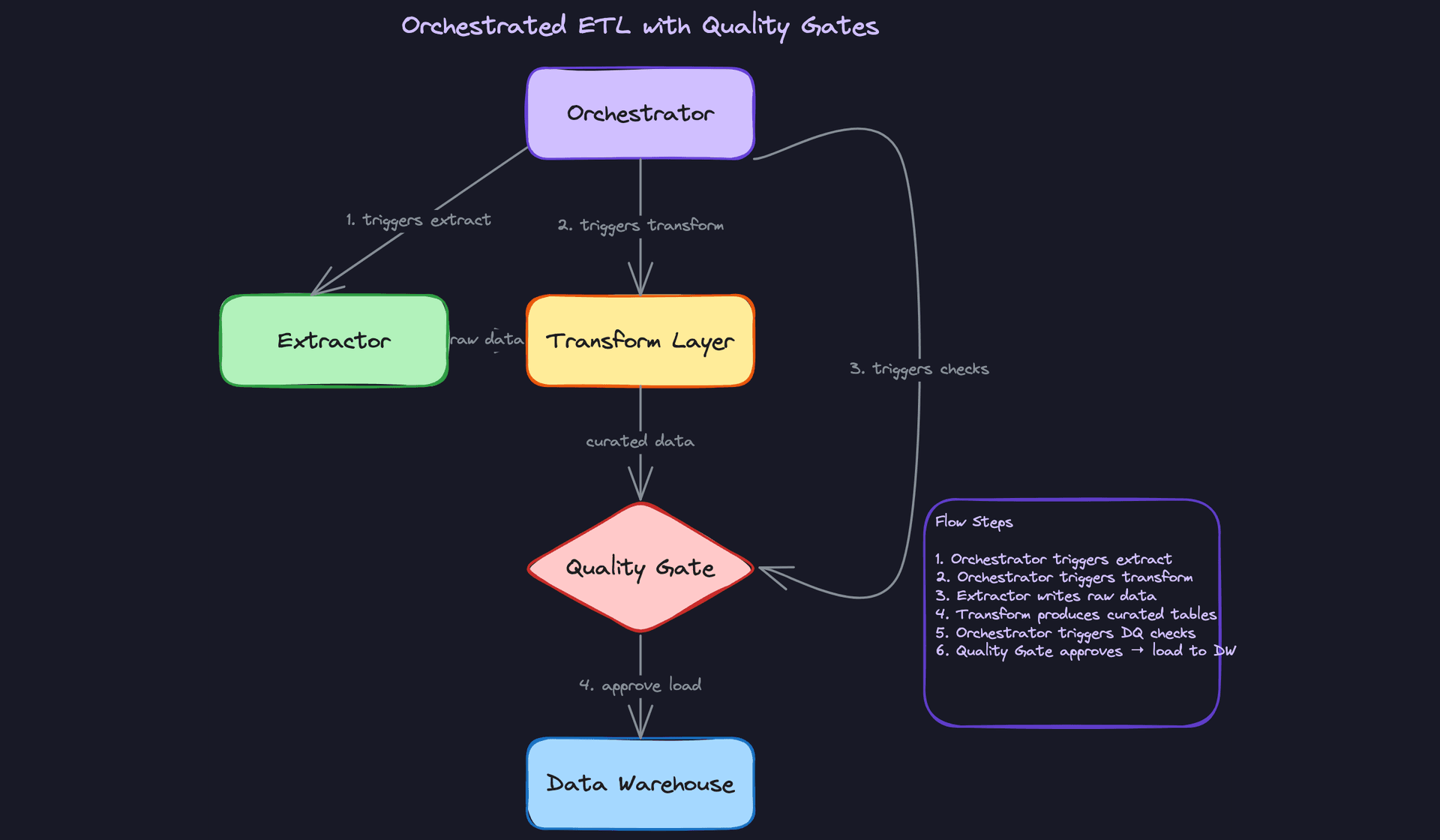
The metadata store does more than track run status. It's also where you record schema versions (so you know what shape the data had at extraction time), data lineage (which source tables fed which warehouse tables), and pipeline configuration snapshots (so you can reproduce exactly what ran for a given partition). Without this, debugging a data issue from three weeks ago becomes archaeology.
Interview tip: When the interviewer asks "how do you handle failures?", don't just say "we retry." Walk through the retry policy (how many times, what backoff), what happens at the retry limit, and how operators are notified. That level of specificity separates senior candidates from mid-level ones.
Airflow is the industry default and most interviewers will be familiar with it. Prefect and Dagster are worth mentioning if you want to signal awareness of the ecosystem, but don't spend time defending a tool choice unless asked.
One thing to get right in your DAG design: idempotency at the task level. Every task should be safe to re-run. If transform runs twice for the same partition, the output should be identical. This is what makes retries safe. You'll see exactly how to enforce this in the deep dives with partition overwrite semantics.
3) Streaming Path: Low-Latency Alongside Batch
Core components: Kafka (event log), Flink job (stream processor), Serving Layer (Druid or ClickHouse), Data Warehouse (eventual sync).
Not every pipeline needs streaming. But when an interviewer asks "what if analysts need data within 5 minutes of an event happening?", your batch pipeline can't answer that. Here's where you add a parallel path.
- Application services publish events to Kafka as they happen (user checkouts, ride completions, ad impressions). Kafka partitions by entity ID to preserve ordering per entity. Events are serialized using Avro or Protobuf, not raw JSON. Both formats enforce a schema at write time, which means a producer can't silently change a field type and break every downstream consumer. Avro pairs naturally with the Confluent Schema Registry; Protobuf is common in shops already using gRPC. Either way, agreeing on a serialization format is a data contract decision, and it belongs in your design conversation.
- A Flink job consumes the Kafka topic, applies stateful transformations (sessionization, running totals, enrichment via lookup tables), and emits aggregated records.
- Aggregates are written to a low-latency serving layer like Druid or ClickHouse, which supports sub-second analytical queries.
- The same Flink job (or a separate sink) writes raw events to the data warehouse for historical analysis, eventually converging with the batch path.
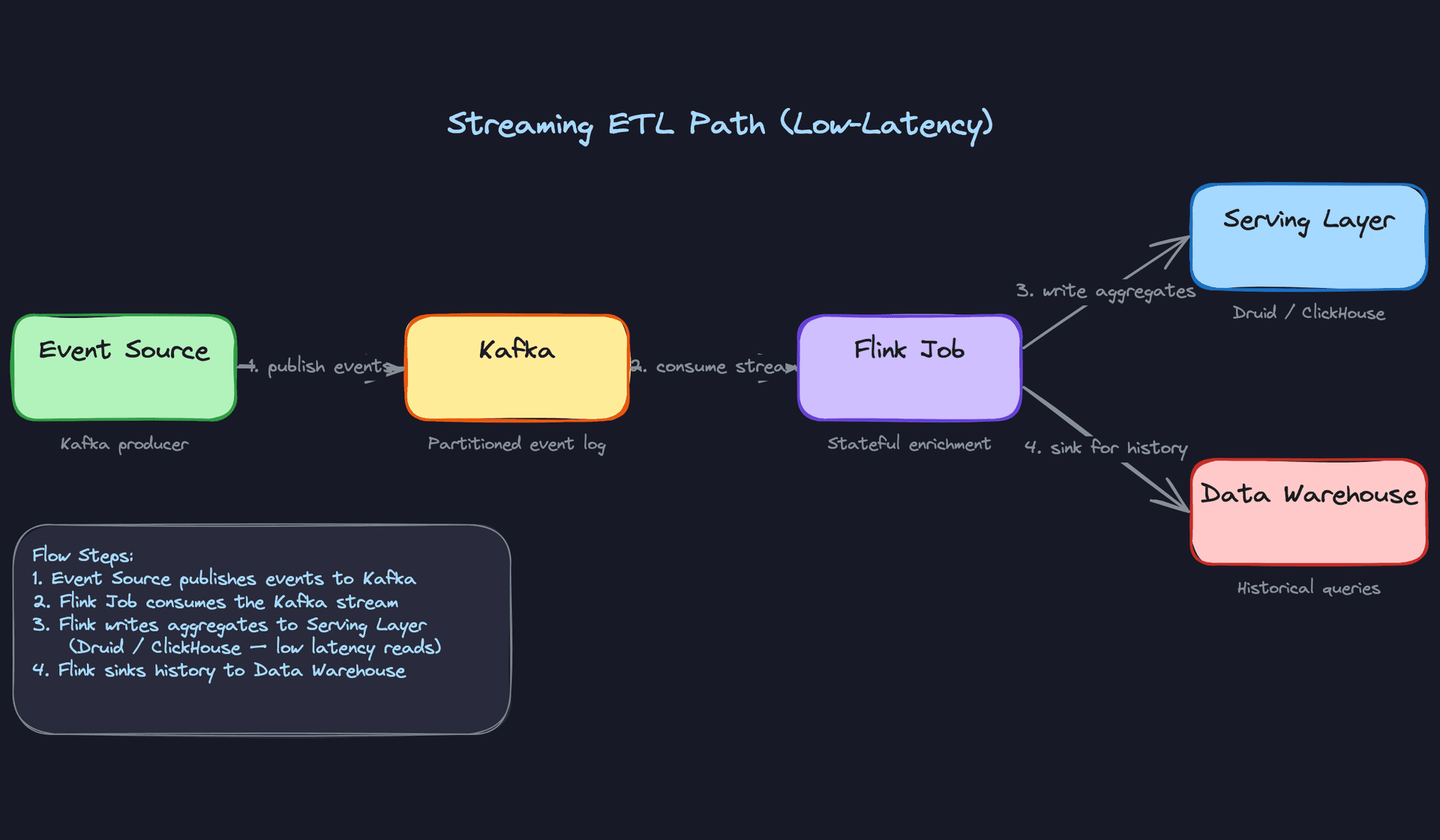
The key trade-off here is operational complexity vs. latency. Flink is powerful but it's another system to operate, tune, and monitor. Checkpointing, state backend configuration, and watermark handling all require expertise. Don't propose streaming unless the SLA actually demands it.
Key insight: The batch and streaming paths share the same raw storage layer. Batch jobs read from S3; streaming jobs sink to S3 as well. This means your transformation logic (in dbt or Spark) can be applied to both, and your data warehouse sees a unified view. This is the Lambda Architecture pattern, though in practice many teams simplify to Kappa (streaming only) when Flink can handle the historical load.
A question interviewers love to ask: "what happens when the Flink job falls behind?" The answer is that Kafka retains messages for a configurable window (say, 7 days). If the consumer lags, it catches up by replaying from its last committed offset. You don't lose data; you just have temporary latency. That's a fundamentally different failure mode than a batch job that misses a window entirely.
4) Monitoring and Alerting
Core components: PipelineRun metadata table, Prometheus/Datadog, PagerDuty.
Every pipeline run writes its status to the metadata store: rows extracted, rows loaded, start time, finish time, and terminal status (SUCCESS, FAILED, PARTIAL). This isn't just for debugging; it's the foundation of your SLA monitoring.
A metrics exporter reads from PipelineRun and pushes to Prometheus or Datadog. You define two alert types:
- SLA breach: the pipeline didn't finish by its expected completion time. Downstream consumers are blocked.
- Quality check failure: a blocking DQ check failed. Data landed in the warehouse but shouldn't be trusted.
Both route to PagerDuty for on-call notification. Quality check failures also notify the downstream team directly, since they need to know their dashboards may be stale.
Common mistake: Candidates treat monitoring as an afterthought, mentioning it in one sentence at the end. Interviewers at companies like Airbnb and Uber care deeply about operational maturity. Talk about what you'd alert on, who gets paged, and what the runbook looks like. That's what distinguishes a pipeline that works in a demo from one that runs reliably at 3am.
Row count anomaly detection is worth mentioning here. If yesterday's extract had 2 million rows and today's has 200,000, that's probably a bug, not a slow day. A simple z-score check on row counts per partition catches a surprising number of upstream issues before they reach analysts.
Putting It All Together
The full architecture has two parallel data paths sharing a common storage and metadata layer.
The batch path runs on a schedule: Airflow triggers the extractor, raw data lands in S3 as Parquet, Spark or dbt transforms it, quality gates validate it, and clean data loads into Snowflake or BigQuery. Every run is tracked in the metadata store, along with schema versions, lineage, and configuration.
The streaming path runs continuously: Kafka receives Avro or Protobuf-serialized events, Flink processes and aggregates them, results go to a low-latency serving layer for real-time queries, and raw events sink to the warehouse for historical completeness.
Both paths share the raw landing zone, the quality check framework, and the PipelineRun metadata model. Monitoring spans both, with SLA alerts and quality failures routing to on-call.
The staging area (raw zone) is the architectural linchpin. It's what makes the whole system replayable, debuggable, and safe to iterate on without fear of losing source data.
Deep Dives
The interviewer has seen your high-level design. Now they want to stress-test it. These are the questions that separate candidates who've read about ETL from candidates who've actually debugged a pipeline at 2am.
"How do we guarantee a failed pipeline run doesn't corrupt or double-count data?"
This is the first place interviewers go after you sketch the happy path. Your answer here signals whether you think about pipelines as data contracts or just scripts that run on a schedule.
Bad Solution: Overwrite the target table in place
The naive approach is to write transformation output directly to the production table as rows are processed. If the job fails halfway through, you re-run it and hope the INSERT OR REPLACE logic handles duplicates. Some candidates add a DELETE WHERE date = '2024-01-15' before the insert to "clean up" first.
This breaks in two ways. First, the delete-then-insert window leaves the table in an inconsistent state that downstream queries can hit. Second, if the job fails after the delete but before the insert completes, you've lost data with no recovery path.
Warning: Candidates who say "we just truncate and reload" are describing a data loss scenario, not a safety mechanism. Interviewers will push on what happens if the reload fails.
Good Solution: Partition overwrite with idempotent keys
Write output to a dedicated partition (say, dt=2024-01-15) and configure your write mode as overwrite for that partition only. In Spark, this looks like:
(
    df.write
    .mode("overwrite")
    .partitionBy("dt")
    .parquet("s3://data-warehouse/orders/")
)
Set spark.sql.sources.partitionOverwriteMode=dynamic so only the target partition is replaced, not the entire table. Now re-running the job is safe: the partition either exists in full or doesn't exist at all. You've made the operation idempotent.
The limitation is that this only works cleanly when your output maps neatly to a single partition. Cross-partition writes, late-arriving data, or slowly changing dimensions require more care.
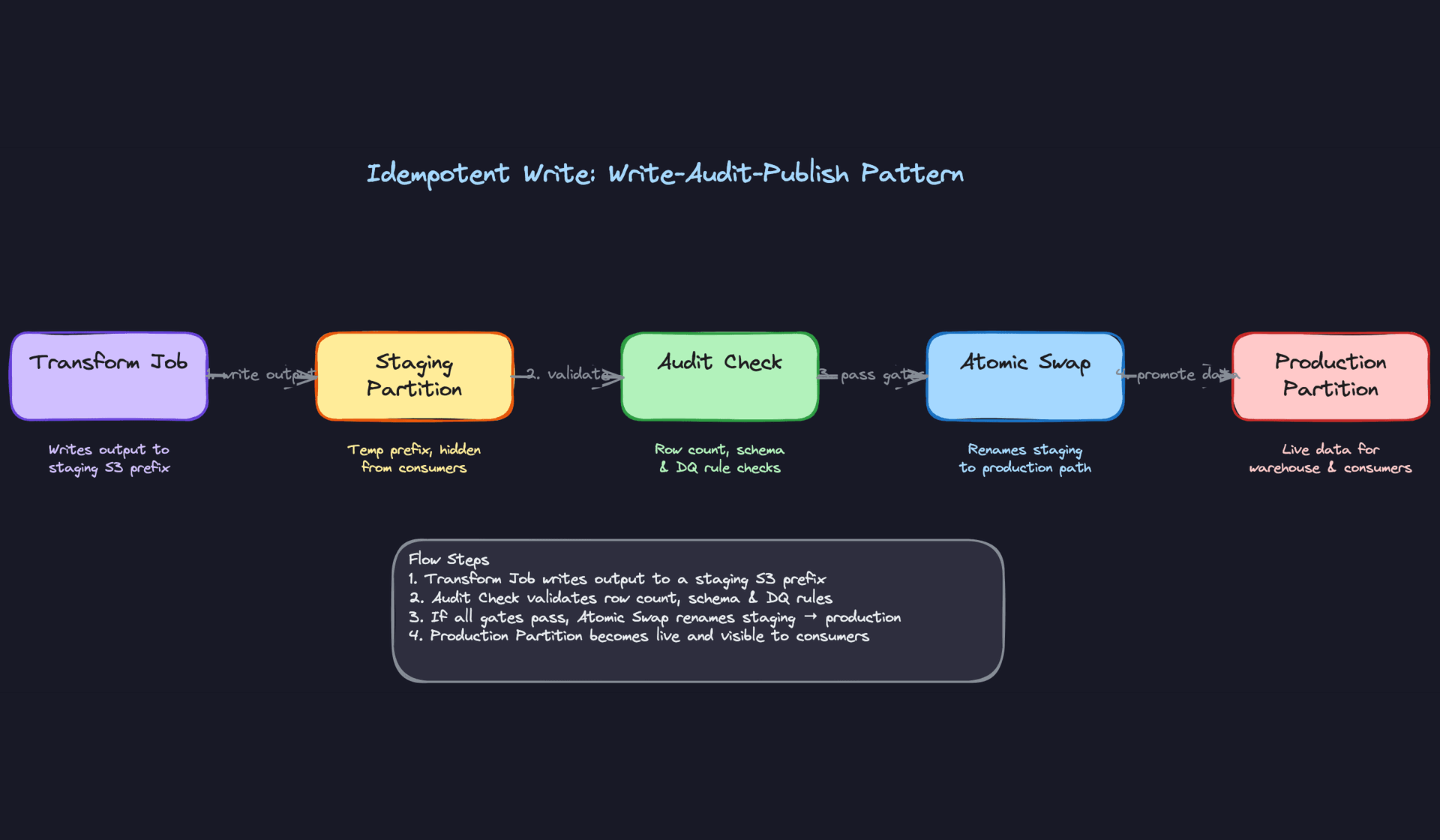
Great Solution: Write-Audit-Publish pattern
Instead of writing directly to the production path, your transform job writes to a staging prefix that consumers can't see. An audit step then validates the output (row counts, null rates, schema conformance) before an atomic rename promotes the data to the production path.
STAGING_PATH = "s3://data-warehouse/staging/orders/dt=2024-01-15/"
PROD_PATH    = "s3://data-warehouse/orders/dt=2024-01-15/"

# Step 1: Write to staging
df.write.mode("overwrite").parquet(STAGING_PATH)

# Step 2: Audit
row_count = spark.read.parquet(STAGING_PATH).count()
assert row_count > MIN_EXPECTED_ROWS, f"Row count {row_count} below threshold"

# Step 3: Atomic swap (S3 rename or Delta REPLACE WHERE)
s3.copy(STAGING_PATH, PROD_PATH)
s3.delete(STAGING_PATH)
The atomic swap is the key. Consumers either see the old partition or the new one, never a partial write. On Delta Lake, you can replace this with a REPLACE WHERE transaction that gives you ACID guarantees at the table level without the S3 rename dance.
Tip: Mentioning the write-audit-publish pattern by name, and explaining why the staging path is invisible to consumers until promotion, is exactly what distinguishes senior candidates. Most people describe partition overwrite; fewer describe the audit gate that blocks promotion on failure.
"How do we handle incremental extraction at scale?"
At 10,000 rows, a SELECT * every hour is fine. At 500 million rows, it's a full table scan that locks your source database and takes 40 minutes. The interviewer wants to know you've thought past the toy case.
Bad Solution: Timestamp-based polling with updated_at
Query the source table for rows where updated_at > last_run_timestamp. Simple, easy to implement, works in development.
The problem is that updated_at is only as reliable as the application writing it. Soft deletes are invisible. Rows updated by a DBA directly in SQL often don't trigger the column update. And if your source database clock drifts even slightly, you'll miss rows that fall in the gap. You'll also miss hard deletes entirely.
Warning: Saying "I'd use an updated_at watermark" without acknowledging its failure modes is a red flag. The interviewer will immediately ask "what about deletes?" and you need a real answer.Good Solution: Watermark-based extraction with deduplication
Keep a persistent watermark store (a small Postgres table or even a file in S3) that records the last successfully processed high-water mark per source table. On each run, extract rows above the watermark, process them, then advance the watermark only after a successful load.
def get_watermark(source_table: str) -> datetime:
    row = db.execute(
        "SELECT last_processed_at FROM watermarks WHERE source_table = %s",
        (source_table,)
    ).fetchone()
    return row["last_processed_at"] if row else datetime(2000, 1, 1)

def advance_watermark(source_table: str, new_mark: datetime):
    db.execute("""
        INSERT INTO watermarks (source_table, last_processed_at)
        VALUES (%s, %s)
        ON CONFLICT (source_table)
        DO UPDATE SET last_processed_at = EXCLUDED.last_processed_at
    """, (source_table, new_mark))
Add a small overlap window (extract rows from watermark - 10 minutes) to catch late writers, then deduplicate on a natural key in the transform layer. This handles most late-arrival cases without CDC infrastructure.
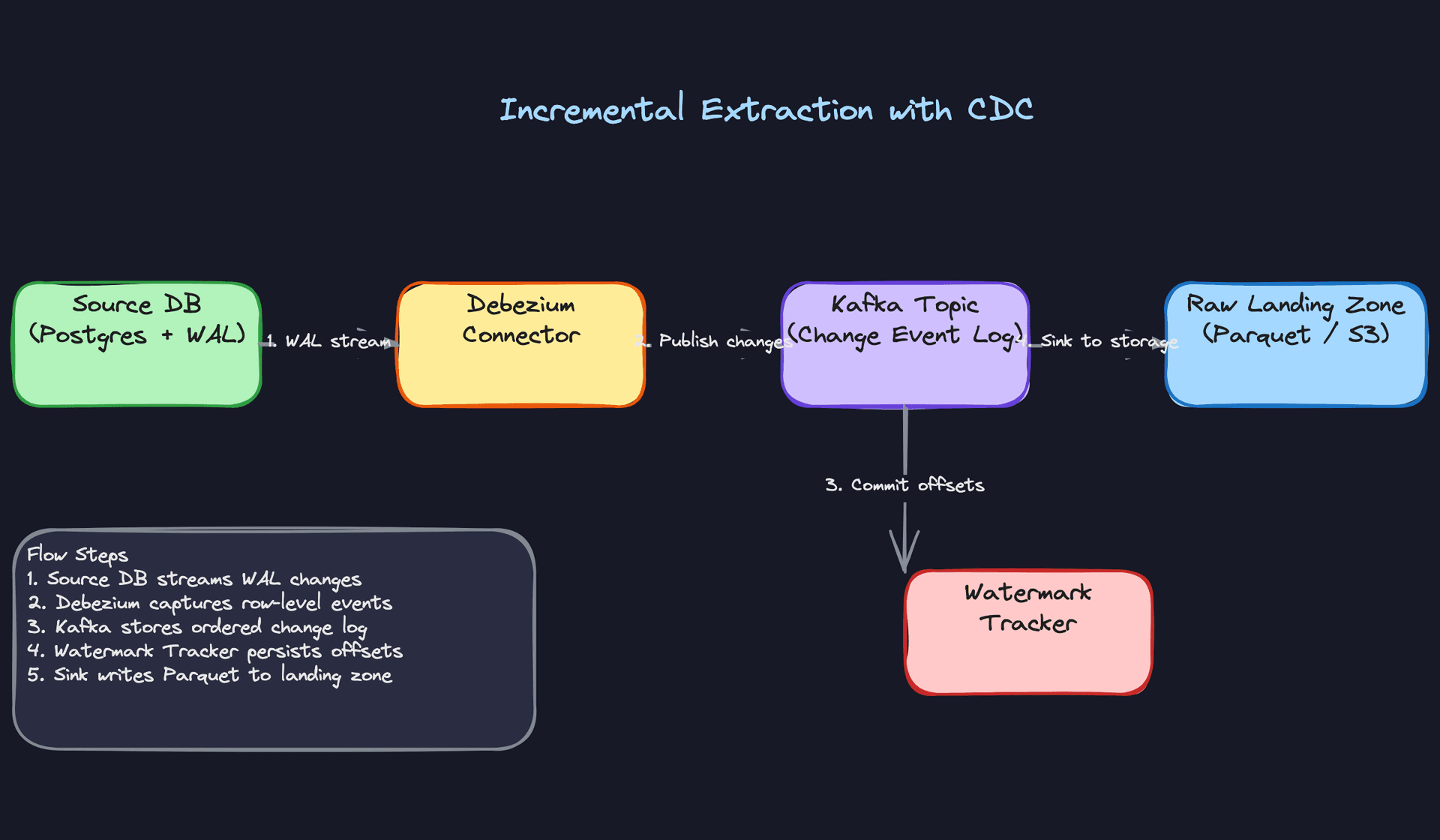
Great Solution: CDC with Debezium
Change Data Capture reads directly from the database's write-ahead log. Every insert, update, and delete generates an event in Kafka before your application even commits the transaction. You get deletes for free, you don't touch the source database with queries, and you get sub-second latency if you need it.
Debezium publishes events in a structured envelope:
{
  "op": "u",
  "before": { "id": 42, "status": "pending" },
  "after":  { "id": 42, "status": "shipped" },
  "source": { "table": "orders", "lsn": 1234567 }
}
Your consumer tracks the Kafka offset (not a timestamp) as its watermark. Re-running from any offset is safe and deterministic. Late-arriving records are handled by the Kafka retention window; you can replay days of history just by resetting the consumer group offset.
The operational cost is real: Debezium requires WAL access on the source database, a Kafka cluster, and connector management. For a small source table updated 1,000 times a day, watermark polling is probably the right call. For a high-volume orders table with hard deletes, CDC is worth the overhead.
Tip: Frame the trade-off explicitly. Saying "I'd use CDC here because we need deletes and the source team can grant WAL access, but I'd use watermark polling for the low-volume reference tables" shows you're making a real engineering decision, not just reciting a pattern.
"What happens when the source schema changes under us?"
Source teams rename columns. They add nullable fields. Occasionally they change a VARCHAR to a JSONB and don't tell anyone. Your pipeline needs a strategy for all three cases, not just the polite one.
Bad Solution: Infer schema at read time
Let Spark or your warehouse loader infer the schema from each new file. When a new column appears, it just shows up. When a column is removed, queries that reference it break at runtime.
Schema inference is fine for exploration. In production, it means a source team's migration silently corrupts your downstream tables. You find out when an analyst files a ticket three days later.
Good Solution: Schema enforcement with explicit versioning
Register your expected schema in code and fail fast on mismatch:
EXPECTED_SCHEMA = StructType([
    StructField("order_id",    StringType(),    nullable=False),
    StructField("user_id",     StringType(),    nullable=False),
    StructField("amount_usd",  DecimalType(10,2), nullable=True),
    StructField("created_at",  TimestampType(), nullable=False),
])

def validate_schema(df: DataFrame, expected: StructType):
    incoming_fields = {f.name: f.dataType for f in df.schema.fields}
    for field in expected.fields:
        if field.name not in incoming_fields:
            raise SchemaValidationError(f"Missing field: {field.name}")
        if incoming_fields[field.name] != field.dataType:
            raise SchemaValidationError(
                f"Type mismatch on {field.name}: "
                f"expected {field.dataType}, got {incoming_fields[field.name]}"
            )
This makes schema changes a loud, immediate failure rather than a silent corruption. The downside is that additive changes (new nullable columns) also fail, which can be overly strict if your source team adds columns frequently.
Great Solution: Schema registry with compatibility enforcement
Use a schema registry (Confluent Schema Registry for Avro/Protobuf, or Delta Lake's built-in schema evolution) that enforces a compatibility mode. BACKWARD compatibility means new schema versions can read data written by the previous version. FORWARD means old readers can read new data. FULL enforces both.
For Kafka-based pipelines, the Confluent registry rejects producer registrations that violate the configured compatibility mode before a single byte hits the topic. For Delta Lake tables, you configure evolution behavior per table:
-- Allow new columns to be added automatically
ALTER TABLE orders
SET TBLPROPERTIES ('delta.columnMapping.mode' = 'name',
                   'delta.minReaderVersion' = '2',
                   'delta.minWriterVersion' = '5');

-- Merge with schema evolution enabled
MERGE INTO orders AS target
USING new_orders AS source
ON target.order_id = source.order_id
WHEN MATCHED THEN UPDATE SET *
WHEN NOT MATCHED THEN INSERT *;
In dbt, version your models explicitly when a breaking change arrives. A v2 model runs in parallel with v1 during a migration window, giving downstream consumers time to cut over without a hard deadline.
The real win here is that schema changes become a negotiated contract, not a surprise. Source teams register a new schema version; the registry tells them immediately if it breaks compatibility; your pipeline never sees an invalid payload.
Tip: Bringing up compatibility modes (backward, forward, full) and explaining the difference shows you've actually operated a schema registry in production. Most candidates just say "use Avro." That's not enough.
"How do we backfill 90 days of data after fixing a transformation bug?"
This comes up in almost every senior interview. The answer reveals whether you understand the operational reality of running pipelines alongside a backfill without starving one or the other.
Bad Solution: Re-run the DAG manually for each date
Go into Airflow, clear the failed runs for the last 90 days, and let them re-execute. Simple, but you've just queued 90 DAG runs that compete with today's production pipeline for the same Spark cluster and Airflow worker slots.
Production SLAs slip. The on-call gets paged. The backfill takes three days instead of six hours because it's throttled by production traffic. You've solved the data correctness problem by creating an availability problem.
Good Solution: Partition-based backfill with resource isolation
Run the backfill as a separate Airflow pool with a hard cap on concurrency. A dedicated pool means backfill tasks can't consume more than, say, 4 worker slots, while production runs get 20.
# In your Airflow DAG
backfill_task = SparkSubmitOperator(
    task_id="backfill_orders_transform",
    application="jobs/orders_transform.py",
    conf={
        "spark.executor.instances": "10",   # smaller cluster than prod
        "spark.yarn.queue": "backfill",      # isolated YARN queue
    },
    pool="backfill_pool",                    # Airflow pool with max_active=4
    priority_weight=1,                       # lower than production tasks
)
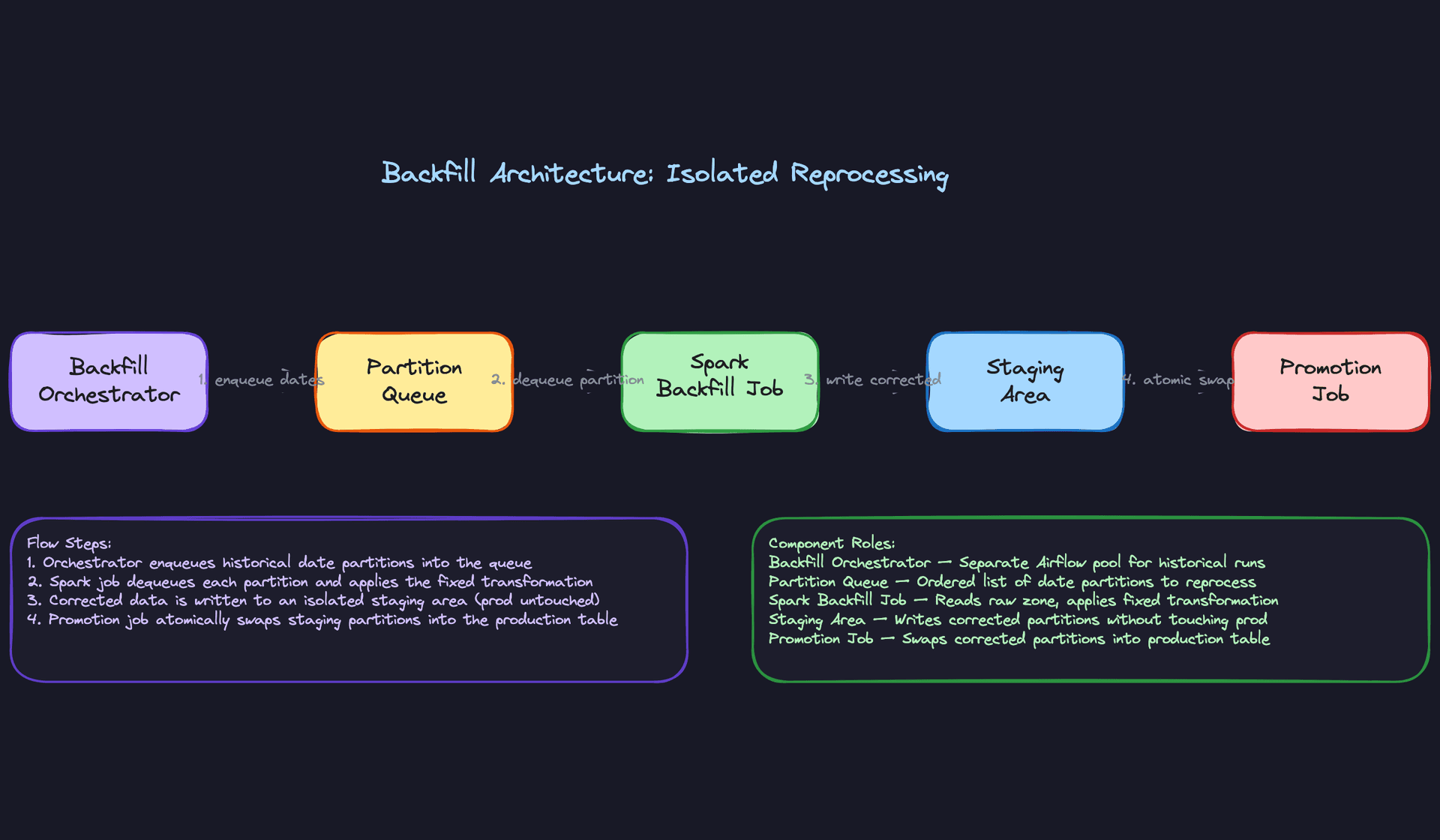
Process partitions oldest-first so the most stale data gets fixed first. Write corrected partitions to a staging path, validate them, then promote atomically. Never touch the production partition until the corrected one is fully validated.
Great Solution: Isolated backfill infrastructure with a promotion job
For large backfills (90+ days, high data volume), the best approach is to decouple the backfill compute entirely from production. Spin up a separate Spark cluster (or a separate Databricks job cluster) that reads from the raw landing zone, applies the fixed transformation, and writes to a staging table. A separate promotion job then swaps corrected partitions into the production table one at a time, with a validation gate between each swap.
This means a backfill job crash has zero impact on production. You can also run the backfill at full speed during off-peak hours and pause it during business hours, without touching Airflow's production scheduler at all.
The metadata model matters here too. Each backfill run should create its own PipelineRun record with a backfill=true flag and the target partition date. That way your lineage system can distinguish "this partition was written by a backfill on 2024-03-01 using transformation v2.3" from the original production run. Debugging the next bug becomes much faster.
Tip: Mentioning that backfill runs should be tracked separately in your metadata store, and explaining why (lineage, debugging, audit), is the kind of operational detail that gets you to staff-level conversations. It shows you're thinking about the pipeline as infrastructure that other teams depend on, not just a script you run once.
"How do we enforce data quality without blocking every pipeline on every check?"
Most candidates say "we run null checks." That's a start, but it's not a framework. The interviewer wants to know how you decide which failures halt the pipeline and which ones just send a Slack message.
Bad Solution: All-or-nothing quality checks
Run a suite of checks after transformation. If any check fails, the pipeline stops. Sounds safe, but in practice a single flaky check on a low-priority column blocks the entire downstream dependency graph. Analysts can't query yesterday's data because one optional field had a 0.3% null rate instead of 0%.
The other failure mode is the opposite: no checks at all, because "we'll add them later." Silent bad data is worse than a failed pipeline. Downstream models build on corrupt inputs for weeks before anyone notices.
Good Solution: Tiered quality framework
Classify every check into one of three tiers before you write a single assertion:
Blocking checks halt the pipeline and page on-call. These cover things that would make the data actively harmful: primary key uniqueness violations, referential integrity failures, row counts that are 50% below yesterday's baseline. If these fail, loading the data would be worse than having no data.
Warning checks log a failure, fire a Slack alert, but let the pipeline continue. A 2% null rate on a non-critical field, a slight distribution shift in a metric column. The data is still usable; the team should investigate but not at 3am.
SLA checks run after the load completes and notify downstream consumers if their expected data isn't ready by a contracted time. These are separate from data correctness; they're about availability.
def run_quality_checks(df: DataFrame, pipeline_run_id: str, checks: list[QualityCheck]):
    for check in checks:
        result = check.evaluate(df)
        log_check_result(pipeline_run_id, check.name, result)

        if not result.passed:
            if check.tier == "blocking":
                raise DataQualityError(f"Blocking check failed: {check.name}")
            elif check.tier == "warning":
                send_alert(channel="#data-quality", message=result.detail)
            # SLA checks are evaluated separately after load
Great Solution: Anomaly detection on top of rule-based checks
Static thresholds break when data volume grows or business patterns shift seasonally. A check that says "row count must be > 1,000,000" will false-alarm every Christmas when order volume drops.
Layer anomaly detection on top of your rule-based checks. Track a rolling 14-day baseline for key metrics (row count, null rates, value distributions) and alert when today's value is more than N standard deviations from the baseline. This catches regressions that static rules miss, and it self-adjusts as your data grows.
Store every check result in your DataQualityCheck table with the actual value, the expected range, and the tier. Over time, this gives you a quality history per pipeline that you can trend, report on, and use to tighten thresholds. When a downstream team asks "was the data good last Tuesday?", you have a precise answer.
Tip: Framing data quality as a tiered contract with downstream consumers, rather than a set of assertions you run for your own peace of mind, is the senior framing. It shows you understand that pipelines exist to serve other teams, and those teams need predictable guarantees, not just "we try our best."
What is Expected at Each Level
Mid-Level
- Design a working batch pipeline with a clear extract, transform, load flow. You should be able to sketch the path from source database to data warehouse without prompting.
- Know the difference between full and incremental loads, and have an opinion on when each is appropriate. "Incremental is always better" is not an answer; small tables often warrant full refreshes.
- Implement basic idempotency through partition overwrite. If your pipeline runs twice, the output should be identical, not doubled.
- Put together a simple Airflow DAG with task dependencies and retry logic. You don't need to know every Airflow operator, but you should understand why orchestration exists and what breaks without it.
Senior
- Go beyond "it failed, we retry." Proactively address exactly-once semantics, explain the write-audit-publish pattern, and describe what happens to the target table when a job crashes mid-write.
- Drive the CDC conversation yourself. Watermark-based extraction, Debezium, handling late-arriving records: these shouldn't require the interviewer to drag them out of you.
- Justify your technology choices with trade-offs. Spark vs. dbt is not a trick question; the right answer depends on transformation complexity, team skill set, and whether you need imperative logic or declarative SQL. Say that.
- Propose a tiered data quality framework, not just null checks. Blocking failures, warnings, and SLA notifications are three different things and should be treated as such.
Staff+
- Think in pipelines, plural. A staff-level answer addresses how you build infrastructure that supports dozens or hundreds of pipelines, not just the one you're designing today. Multi-tenant orchestration, shared transformation libraries, and self-serve tooling for analysts all belong in this conversation.
- Own the backfill problem at scale. When a transformation bug surfaces after 90 days, you need a strategy that reprocesses historical partitions without starving production jobs. Separate Airflow pools, resource quotas, and staged partition promotion are the tools here.
- Establish SLA contracts with downstream consumers. Staff engineers think about the data warehouse as a product. Who depends on this pipeline? What do they need to know when it's late? How do you communicate schema changes before they break a model?
- Bring up lineage and observability unprompted. A metadata layer that tracks pipeline runs, data quality results, and row-level provenance is what separates a pipeline you can debug at 2am from one you can only guess at.
Key takeaway: The thing that separates good ETL design from great ETL design is not the happy path. It's what happens when a job fails halfway through, a source schema changes overnight, or someone discovers a bug that's been silently corrupting 90 days of data. Design for those moments, and the rest takes care of itself.
