
Understanding the Problem
Product definition: An event-driven data platform is a centralized infrastructure layer that ingests high-volume structured events from diverse producers, routes them through stream and batch processing pipelines, and delivers data to real-time dashboards and analytical stores without tight coupling between producers and consumers.
Most backend systems have a point where "just query the database" stops working. Traffic spikes, cross-team dependencies pile up, and suddenly every team is blocked on every other team's schema changes. An event-driven data platform solves this by making the event stream the contract. Producers emit events; consumers read what they need. Neither side knows the other exists.
The two use cases you need to scope immediately are real-time analytics and batch analytics. They look similar on the surface but pull the architecture in opposite directions. Real-time means sub-minute latency to a dashboard or alert. Batch means daily aggregations, ML feature tables, and historical reporting. The same event often needs to feed both, which is why the design ends up with a dual-sink architecture rather than a single storage layer.
Functional Requirements
Core Requirements
- Producers can publish structured events (user actions, system signals, business transactions) to named topics, with schema validation enforced at write time
- The platform routes events to a real-time processing path (sub-minute latency) and a batch processing path (partitioned object storage for historical queries)
- Stream processing jobs can enrich, filter, and aggregate events before writing to downstream serving stores
- Batch processing jobs can read from the historical event archive, run heavy aggregations or ML feature generation, and write results to an analyst-facing query layer
- The platform tracks data lineage from producer topic through pipeline to output dataset, and enforces freshness SLAs with automated alerting on failures
Below the line (out of scope)
- Self-serve producer onboarding UI (we'll assume schema registration happens via CLI or API)
- Event replay triggered by consumers on demand (we'll cover backfill as an operator-driven operation)
- Cross-region replication and disaster recovery failover
Note: "Below the line" features are acknowledged but won't be designed in this lesson.
Non-Functional Requirements
- Throughput: 500K events/sec at peak, with headroom to 1M events/sec during traffic spikes
- Real-time latency: Events visible in dashboards within 30 seconds end-to-end (p99)
- Batch freshness: Partitions available for Spark and warehouse queries within 15 minutes of the processing window closing
- Durability and retention: Events retained for 7 days in Kafka for replay; indefinitely in object storage (Iceberg) for historical backfill
- Delivery semantics: At-least-once by default; exactly-once available for pipelines where duplicate records would cause correctness issues (financial aggregations, ML labels)
- Compliance: Events may contain PII; the platform must support field-level masking before data lands in analyst-accessible stores
Back-of-Envelope Estimation
Start with the numbers the interviewer gave you, then derive everything else. Assume 500K events/sec peak, average payload of 1KB per event, 30 distinct event types, and a 7-day Kafka retention window.
| Metric | Calculation | Result |
|---|---|---|
| Peak ingest throughput | 500K events/sec × 1KB | ~500 MB/sec |
| Daily event volume | 500K × 86,400 sec (blended avg ~250K/sec) | ~21.6 billion events/day |
| Daily raw storage (Kafka) | 250K avg × 1KB × 86,400 | ~21.6 TB/day |
| Kafka retention (7 days) | 21.6 TB × 7 | ~150 TB |
| Object store (Parquet, ~5x compression) | 21.6 TB / 5 | ~4.3 TB/day compressed |
| Object store (1 year) | 4.3 TB × 365 | ~1.6 PB/year |
| Flink output to Druid/ClickHouse | ~10% of events post-filter | ~50K writes/sec |
150TB in Kafka is a real number and it shapes your broker sizing conversation immediately. The 1.6PB annual object store figure is why you'll need a tiered storage policy: hot partitions on SSD-backed storage, cold partitions on cheaper object storage with a lifecycle rule.
Tip: Always clarify requirements before jumping into design. Candidates who open with "let me just draw the Kafka cluster" before pinning down latency SLAs and delivery semantics tend to design the wrong system with confidence. The interviewer is watching whether you ask the right questions first.
One question that separates good candidates from great ones: "Is exactly-once delivery a hard requirement, or is at-least-once with idempotent consumers acceptable?" Exactly-once adds real latency and operational complexity. If the downstream consumer can handle deduplication, at-least-once is almost always the better trade-off. Know which one you're building before you touch the architecture.
The Set Up
Core Entities
Four entities drive this platform. Get these right and the rest of the design falls into place naturally.
Event is the raw payload a producer emits. Every event carries a reference to a specific schema version, which is how the platform enforces contracts at write time. Without that schema_id link, a producer can silently change their payload shape and corrupt every downstream job that depends on it.
Schema is the versioned contract for a given event type. It stores the Avro or Protobuf definition as JSON, plus a compatibility mode that tells the registry what kinds of changes are allowed. This is what lets you evolve a checkout_completed event to include a new discount_code field without breaking the Flink job that was written against version 1.
Pipeline is the unit of operational ownership. It knows its source topics, its processing mode (streaming or batch), its owner team, and its SLA in minutes. When something breaks at 2am, the on-call engineer looks at the Pipeline record to know who owns it and what the freshness guarantee is.
DataSet is what consumers actually query. It tracks the storage path, partition key, row count, and a quality score computed after each pipeline run. Downstream analysts and ML jobs should check the quality score and refreshed_at timestamp before trusting a partition.
CREATE TABLE events (
    id             UUID PRIMARY KEY DEFAULT gen_random_uuid(),
    schema_id      UUID NOT NULL REFERENCES schemas(id),  -- enforces contract at write time
    topic          VARCHAR(255) NOT NULL,                  -- e.g. 'orders.checkout_completed'
    payload        JSONB NOT NULL,                         -- raw event body
    producer_id    VARCHAR(255) NOT NULL,                  -- identifies the emitting service
    partition_key  VARCHAR(255) NOT NULL,                  -- typically entity ID for Kafka routing
    emitted_at     TIMESTAMP NOT NULL                      -- producer-side timestamp
);

CREATE INDEX idx_events_topic_emitted ON events(topic, emitted_at DESC);
CREATE INDEX idx_events_schema ON events(schema_id);
CREATE TABLE schemas (
    id             UUID PRIMARY KEY DEFAULT gen_random_uuid(),
    topic          VARCHAR(255) NOT NULL,                  -- event type this schema belongs to
    version        INT NOT NULL,                           -- monotonically increasing
    definition     JSONB NOT NULL,                         -- Avro or Protobuf schema as JSON
    compatibility  VARCHAR(50) NOT NULL DEFAULT 'BACKWARD', -- BACKWARD | FORWARD | FULL | NONE
    created_at     TIMESTAMP NOT NULL DEFAULT now(),
    UNIQUE (topic, version)
);
CREATE TABLE pipelines (
    id             UUID PRIMARY KEY DEFAULT gen_random_uuid(),
    name           VARCHAR(255) NOT NULL UNIQUE,
    mode           VARCHAR(50) NOT NULL,                   -- 'streaming' or 'batch'
    owner_team     VARCHAR(255) NOT NULL,
    sla_minutes    INT NOT NULL,                           -- max acceptable latency for output freshness
    source_topics  JSONB NOT NULL,                         -- array of Kafka topic names consumed
    created_at     TIMESTAMP NOT NULL DEFAULT now()
);
CREATE TABLE datasets (
    id             UUID PRIMARY KEY DEFAULT gen_random_uuid(),
    pipeline_id    UUID NOT NULL REFERENCES pipelines(id),
    partition_key  VARCHAR(255) NOT NULL,                  -- e.g. 'event_date=2024-01-15'
    row_count      BIGINT NOT NULL DEFAULT 0,
    quality_score  FLOAT,                                  -- 0.0–1.0, NULL = not yet evaluated
    storage_path   VARCHAR(1024) NOT NULL,                 -- S3/GCS path to Parquet/Iceberg partition
    refreshed_at   TIMESTAMP,                              -- NULL = partition not yet written
    created_at     TIMESTAMP NOT NULL DEFAULT now()
);

CREATE INDEX idx_datasets_pipeline ON datasets(pipeline_id, partition_key);
CREATE INDEX idx_datasets_freshness ON datasets(refreshed_at DESC) WHERE quality_score IS NOT NULL;
The lifecycle flows like this: a producer emits an Event, the platform validates it against the Schema version referenced in the message header, a Pipeline picks it up and transforms it, and the output lands in a DataSet partition that consumers can query. The quality_score and refreshed_at on DataSet are the handshake between the pipeline and its consumers. No score, no query.
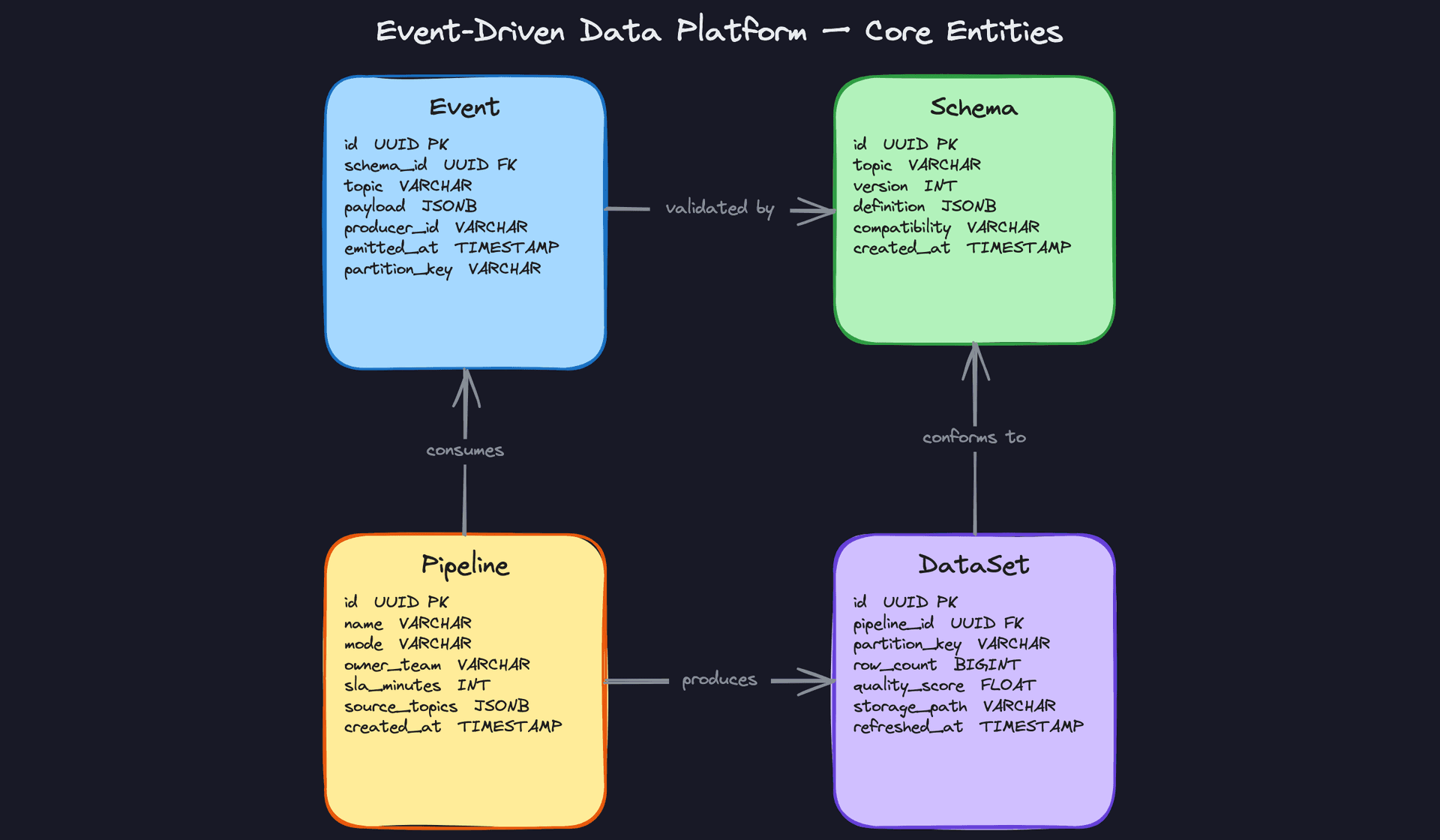
Key insight: Theschema_idforeign key oneventsis doing real work here. It means every event in the system is traceable to an exact schema version. When a Flink job breaks because a field changed shape, you can query the events table and immediately see which schema version introduced the problem.
API Design
The platform needs three categories of endpoints: one for producers publishing events, one for schema management, and one for consumers checking dataset health. These map directly to the three actors in the system.
// Publish a batch of events to a topic
POST /v1/events
{
  "topic": "orders.checkout_completed",
  "schema_version": 3,
  "events": [
    {
      "partition_key": "user_123",
      "payload": { "order_id": "ord_456", "amount": 99.99 },
      "emitted_at": "2024-01-15T10:30:00Z"
    }
  ]
}
-> {
  "accepted": 1,
  "rejected": 0,
  "dead_lettered": 0
}
// Register a new schema version for a topic
POST /v1/schemas/{topic}
{
  "definition": { ... },   // Avro or Protobuf schema as JSON
  "compatibility": "BACKWARD"
}
-> {
  "schema_id": "uuid",
  "version": 4,
  "compatible": true
}
// Retrieve the latest (or specific) schema for a topic
GET /v1/schemas/{topic}?version=3
-> {
  "schema_id": "uuid",
  "topic": "orders.checkout_completed",
  "version": 3,
  "definition": { ... },
  "compatibility": "BACKWARD"
}
// Check freshness and quality of a dataset partition
GET /v1/datasets/{pipeline_id}/partitions/{partition_key}
-> {
  "partition_key": "event_date=2024-01-15",
  "row_count": 4821903,
  "quality_score": 0.998,
  "refreshed_at": "2024-01-15T01:14:22Z",
  "storage_path": "s3://data-lake/orders/event_date=2024-01-15/"
}
// Register or update a pipeline definition
POST /v1/pipelines
{
  "name": "orders-daily-aggregation",
  "mode": "batch",
  "owner_team": "data-platform",
  "sla_minutes": 60,
  "source_topics": ["orders.checkout_completed", "orders.refund_initiated"]
}
-> {
  "pipeline_id": "uuid",
  "created_at": "2024-01-15T00:00:00Z"
}
POST is the right verb for publishing events and registering schemas because both operations create new records and are not idempotent by default. GET for schema retrieval and dataset health checks keeps those reads cacheable, which matters when hundreds of Flink tasks are fetching schema definitions on startup.
Common mistake: Candidates often design a single /ingest endpoint that accepts one event at a time. At 500K events/sec, per-event HTTP calls are a non-starter. Batching at the API layer is mandatory, and the response should tell the producer exactly how many events were accepted versus dead-lettered so they can handle partial failures.The schema registration endpoint deserves a second look. It returns a compatible: true/false field synchronously. This means the registry runs the compatibility check inline before persisting the new version, and producers get an immediate rejection if their change would break existing consumers. That synchronous check is what prevents silent schema drift from propagating into the pipeline.
High-Level Design
The platform has three distinct layers that each serve a different consumer need: ingestion, stream processing, and batch processing. A governance plane sits across all three. Walk through them in order, because each layer feeds the next.
1) Event Ingestion and Schema Validation
Core components: Producer services (microservices, mobile clients), Schema Registry, Kafka Cluster, Dead Letter Queue (DLQ).
Every event that enters the platform goes through the same gate: schema validation before it touches Kafka. This is non-negotiable. Without it, a single producer pushing a malformed payload can corrupt downstream Flink jobs and Spark pipelines silently.
Data flow:
- A producer fetches the registered Avro or Protobuf schema for its event type from the Schema Registry.
- The producer serializes the event payload against that schema locally before publishing.
- The Kafka broker (with the Schema Registry interceptor enabled) re-validates the schema ID embedded in the message header on write.
- If validation passes, the message lands in the appropriate Kafka topic, partitioned by entity ID (e.g.,
user_idororder_id). - If validation fails, the broker routes the message to a Dead Letter Queue topic for inspection and alerting.
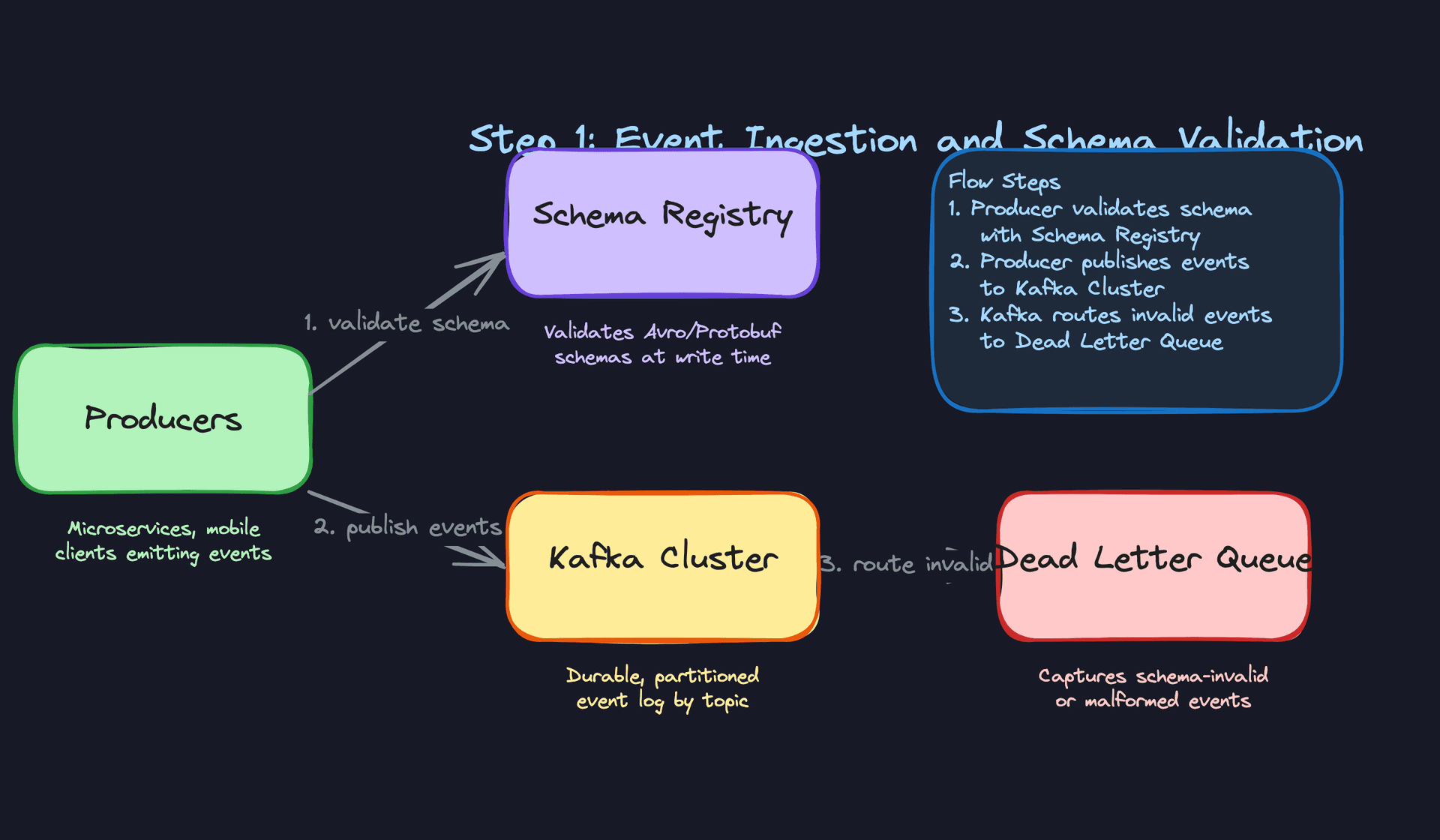
Partitioning by entity ID is a deliberate choice. It guarantees that all events for the same entity land on the same partition, preserving ordering for downstream stateful Flink jobs. If you partition randomly, you lose the ability to do per-user sessionization or per-order event sequencing without expensive cross-partition joins.
The DLQ is not an afterthought. It's how your on-call team discovers that a mobile client shipped a breaking schema change without going through the registry. Every DLQ message should emit a metric that triggers an alert.
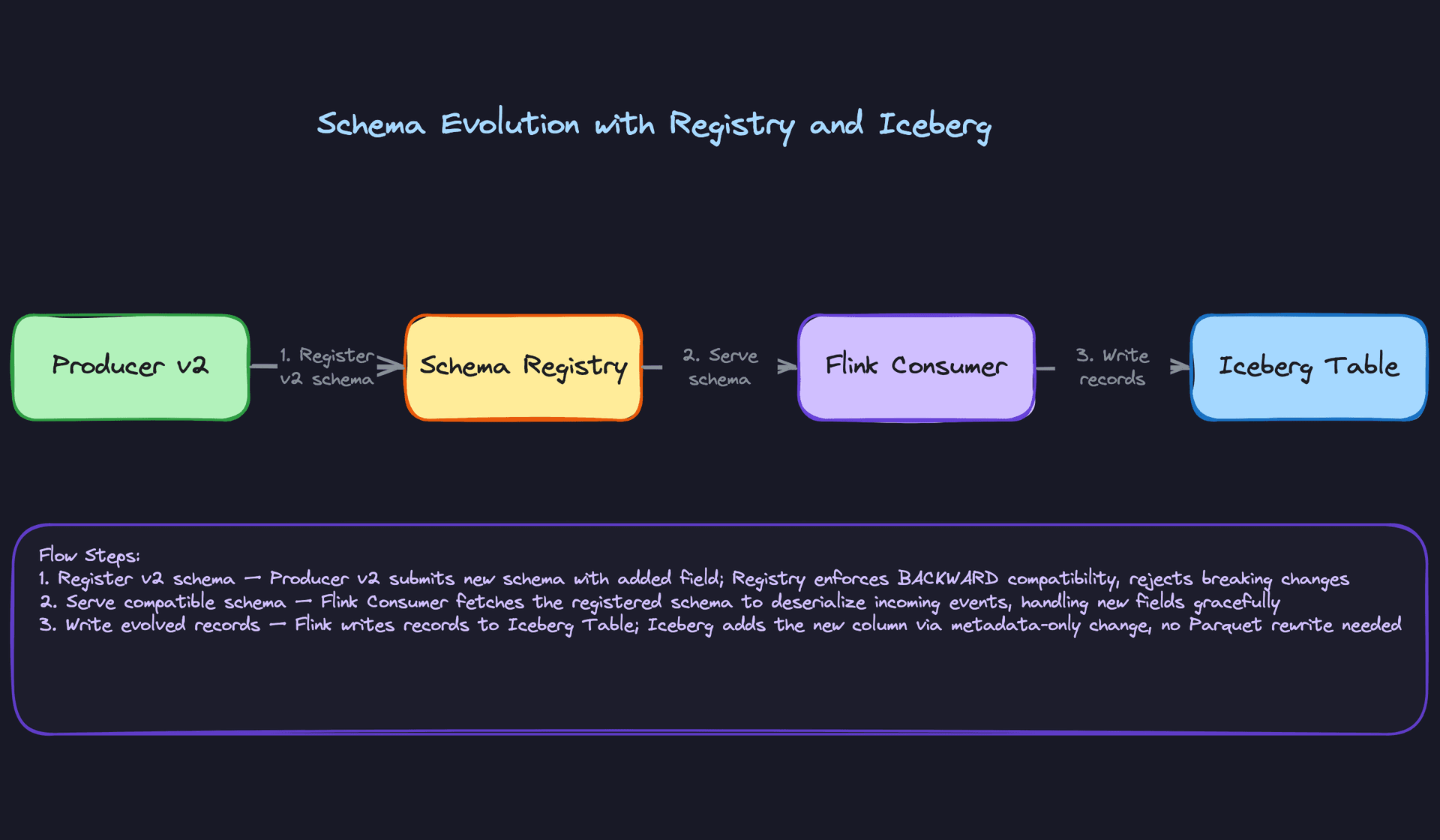
Key insight: The Schema Registry is your contract enforcement layer. Producers register schemas before deploying. The registry enforces compatibility mode (BACKWARD by default), so a new schema version can always be read by consumers using the previous version. This is what lets you evolve schemas without coordinating a synchronized rollout across every producer and consumer simultaneously.
Here's what the Kafka topic configuration looks like for a high-volume event stream at 500K events/sec:
{
  "topic": "orders.checkout_completed",
  "partitions": 64,
  "replication_factor": 3,
  "retention_ms": 604800000,
  "cleanup_policy": "delete",
  "compression_type": "lz4",
  "schema_registry": {
    "subject": "orders.checkout_completed-value",
    "compatibility": "BACKWARD",
    "schema_type": "AVRO"
  }
}
64 partitions gives you enough parallelism for Flink consumers to scale horizontally. Seven-day retention (604800000ms) is your replay window for backfills, which becomes important in the deep dives.
Common mistake: Candidates often skip the DLQ entirely or treat it as optional. Interviewers notice. At 500K events/sec, even a 0.01% malformed event rate is 50 events/sec hitting your pipeline. Without a DLQ, those either crash your job or get silently dropped.
2) Stream Processing and Dual-Sink Write
Core components: Flink cluster, enrichment lookup store (Redis or a broadcast state), Druid or ClickHouse (real-time OLAP), Iceberg table on S3/GCS.
Once events are in Kafka, Flink takes over. Each Flink job subscribes to one or more Kafka topics and does three things: enriches the event, applies any filtering or transformation logic, and writes to two sinks at the same time.
Data flow:
- Flink consumers read from Kafka topic partitions, one task slot per partition.
- Each event is enriched with contextual data. A
checkout_completedevent, for example, gets joined with a user segment lookup (served from Redis or Flink broadcast state) to attachuser_tierandgeo_region. - Flink applies windowing for any aggregations needed at the stream layer (e.g., 1-minute tumbling windows for revenue totals).
- The enriched event is written to Druid or ClickHouse for real-time dashboard queries. This path targets sub-30-second end-to-end latency.
- Simultaneously, the same enriched event is written to Iceberg on S3/GCS in Parquet format, partitioned by
event_dateandevent_type. This is the durable, queryable archive for the batch layer.
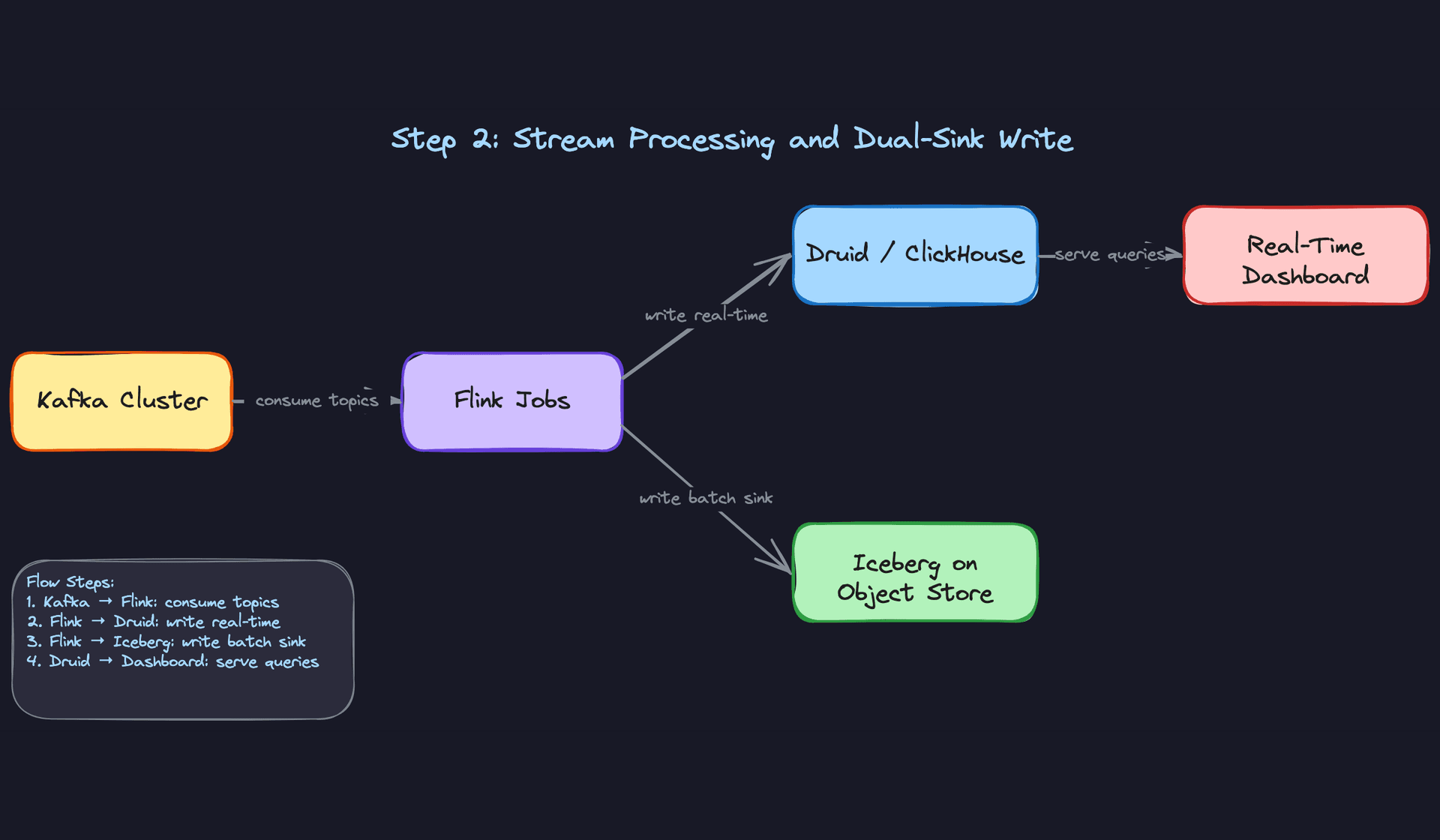
The dual-sink pattern is the core architectural decision here. You're trading some write complexity for a clean separation between latency tiers. Druid and ClickHouse are purpose-built for sub-second aggregation queries over recent data but aren't designed to hold years of history cheaply. Iceberg on object storage is the opposite: cheap at scale, but query latency is measured in seconds to minutes, not milliseconds.
# Simplified Flink job structure (PyFlink)
from pyflink.datastream import StreamExecutionEnvironment
from pyflink.datastream.connectors.kafka import KafkaSource
from pyflink.datastream.connectors.iceberg import IcebergSink

env = StreamExecutionEnvironment.get_execution_environment()
env.enable_checkpointing(60_000)  # checkpoint every 60 seconds

kafka_source = KafkaSource.builder() \
    .set_bootstrap_servers("kafka:9092") \
    .set_topics("orders.checkout_completed") \
    .set_group_id("flink-checkout-processor") \
    .set_value_only_deserializer(AvroDeserializationSchema()) \
    .build()

stream = env.from_source(kafka_source, WatermarkStrategy.for_bounded_out_of_orderness(...), "Kafka Source")

enriched = stream \
    .map(enrich_with_user_segment) \
    .filter(lambda e: e.amount > 0)

# Sink 1: real-time OLAP
enriched.sink_to(clickhouse_sink)

# Sink 2: durable archive
enriched.sink_to(
    IcebergSink.for_row_type(row_type)
        .table_loader(table_loader)
        .build()
)

env.execute("checkout-stream-processor")
Checkpoint interval matters here. Every 60 seconds is a reasonable default: short enough to limit reprocessing on failure, long enough not to saturate your state backend with snapshot overhead. You'll revisit this trade-off in the exactly-once deep dive.
Interview tip: When you mention the dual-sink write, expect the interviewer to ask "why not just query Iceberg for real-time too?" The answer is file commit latency. Flink writes Iceberg files on checkpoint commit, so the freshest data in Iceberg is always at least one checkpoint interval old. Druid and ClickHouse accept row-level inserts and make data queryable in seconds, which is what dashboards need.
3) Batch Processing and the Serving Layer
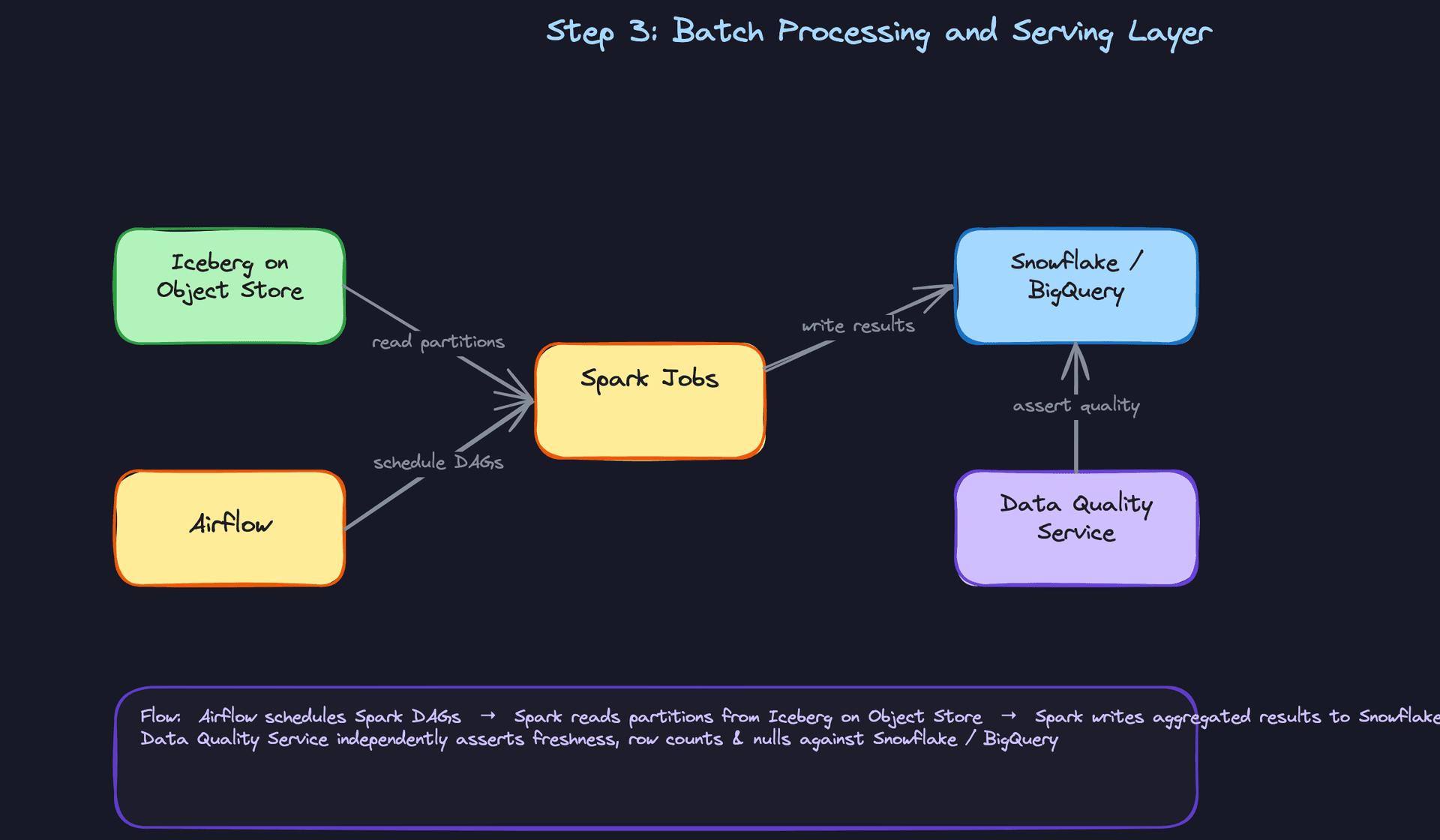
Core components: Airflow (orchestration), Spark cluster, Iceberg tables (source), Snowflake or BigQuery (serving layer), Data Quality service.
The stream layer handles freshness. The batch layer handles depth. Spark jobs scheduled by Airflow do the work that's too expensive for streaming: multi-day aggregations, ML feature generation, complex joins across multiple event types.
Data flow:
- Airflow triggers a Spark DAG on a schedule (hourly, daily, or event-driven via a sensor that watches for new Iceberg partition commits).
- The Spark job reads from the Iceberg table, using partition pruning to scan only the relevant
event_datepartitions. - Transformations run: aggregations, sessionization, feature engineering. Results are written to Snowflake or BigQuery as analyst-facing tables.
- After the write completes, the Data Quality service runs assertions: row count within expected range, null rate below threshold, partition freshness within SLA.
- If assertions pass, the DataSet is marked as available and downstream consumers (dashboards, ML training jobs, analyst queries) can proceed. If they fail, an alert fires and the DataSet is quarantined.
The Airflow DAG for a daily aggregation pipeline looks roughly like this:
from airflow import DAG
from airflow.providers.apache.spark.operators.spark_submit import SparkSubmitOperator
from airflow.sensors.external_task import ExternalTaskSensor
from datetime import datetime, timedelta

with DAG(
    dag_id="checkout_daily_aggregation",
    schedule_interval="0 3 * * *",  # 3am UTC daily
    start_date=datetime(2024, 1, 1),
    catchup=True,  # enables backfill
    default_args={"retries": 2, "retry_delay": timedelta(minutes=5)},
) as dag:

    wait_for_iceberg_partition = ExternalTaskSensor(
        task_id="wait_for_raw_events",
        external_dag_id="flink_iceberg_sink_monitor",
        external_task_id="partition_complete",
        timeout=3600,
    )

    run_aggregation = SparkSubmitOperator(
        task_id="run_checkout_aggregation",
        application="s3://jobs/checkout_daily_agg.py",
        conf={
            "spark.sql.extensions": "org.apache.iceberg.spark.extensions.IcebergSparkSessionExtensions",
            "spark.sql.catalog.iceberg": "org.apache.iceberg.spark.SparkCatalog",
        },
    )

    run_quality_checks = SparkSubmitOperator(
        task_id="run_quality_assertions",
        application="s3://jobs/quality_checker.py",
    )

    wait_for_iceberg_partition >> run_aggregation >> run_quality_checks
catchup=True is critical. It's what makes Airflow backfills work: when you deploy a new pipeline or fix a bug, Airflow will automatically schedule all missed historical runs. Every batch pipeline in this platform should have it enabled.
Common mistake: Writing directly to Snowflake or BigQuery from Flink to avoid the batch layer entirely. It sounds simpler, but you lose partition-level idempotency, compaction control, and the ability to cheaply reprocess historical data. The Iceberg layer is the reprocessing buffer. Don't skip it.
4) Metadata, Lineage, and Governance
Core components: Data Catalog (DataHub or Apache Atlas), Data Quality service, DataSet metadata store, alerting integration (PagerDuty).
Every pipeline and dataset in the platform needs to be discoverable and trustworthy. Without a governance plane, analysts can't tell whether a table is fresh, data engineers can't trace a quality failure back to its source, and compliance teams can't answer "where does this PII field come from?"
Data flow:
- When a new Kafka topic is created, the Schema Registry emits a registration event that DataHub ingests, creating a lineage node for the source.
- When a Flink or Spark job starts, it registers its input topics and output datasets with the catalog via a metadata API call.
- After each pipeline run, the Data Quality service writes a quality score and freshness timestamp to the DataSet metadata record.
- If a quality check fails or a partition is late relative to its SLA, the alerting system fires a PagerDuty incident tagged to the owning team.
This layer doesn't change how data flows. It changes whether your organization can operate the platform at scale. At 50 pipelines it's optional. At 500 it's mandatory.
Interview tip: Most candidates skip governance entirely. Mentioning DataHub, lineage tracking, and SLA-based alerting unprompted signals that you've operated data platforms in production, not just designed them on paper. Bring it up before the interviewer asks.
Putting It All Together
The complete platform is a chain of four layers, each with a clear responsibility boundary.
Producers emit structured events that the Schema Registry validates before Kafka accepts them. Invalid events are routed to a DLQ and never touch the processing layer. Flink consumes from Kafka, enriches events, and fans out to two sinks: Druid or ClickHouse for sub-minute real-time queries, and Iceberg on object storage for durable, partitioned archival. Airflow schedules Spark jobs that read from Iceberg, run heavy aggregations, and write analyst-ready tables to Snowflake or BigQuery. The Data Quality service asserts correctness after every pipeline run, and DataHub maintains end-to-end lineage from producer topic to serving table.
The result is a platform where a checkout_completed event emitted by a mobile app is visible in a real-time revenue dashboard within 30 seconds, available for Spark batch aggregations within 15 minutes, and queryable by analysts in Snowflake by the next morning, all with schema contracts enforced at every boundary and quality checks gating every consumer.
Deep Dives
Interviewers at companies like Uber and Airbnb use these questions to separate candidates who've read about event platforms from candidates who've actually debugged one at 3am. Each question below has a trap answer, a decent answer, and the answer that gets you the offer.
"How do you prevent a producer schema change from breaking downstream pipelines?"
Your Flink job is happily consuming checkout_completed events. A backend team deploys a change that renames user_id to userId. Your job silently starts producing nulls. Nobody notices for six hours. This is the schema evolution problem, and it's more common than you'd think.
Bad Solution: Document the schema in a wiki
The naive answer is "we'll just communicate schema changes through Slack or a runbook." Teams agree to not make breaking changes. There's a shared doc somewhere.
This fails immediately at scale. You have dozens of producer teams and hundreds of consumers. No one reads the doc. No one knows what "breaking" means. A well-intentioned engineer adds a required field and takes down three pipelines.
Warning: Candidates who say "we'll enforce this through process and documentation" are signaling they've never operated a multi-team data platform. Interviewers will push back hard here.
Good Solution: Schema Registry with compatibility enforcement
Confluent Schema Registry (or AWS Glue Schema Registry) gives you programmatic enforcement. Every producer must register their schema before publishing. The registry rejects registrations that violate the configured compatibility mode.
The three modes you need to know cold:
- BACKWARD: new schema can read data written by the old schema. Consumers can upgrade first. Safe for adding optional fields, deleting fields with defaults.
- FORWARD: old schema can read data written by the new schema. Producers can upgrade first. Safe for adding fields with defaults.
- FULL: both directions. Most restrictive, but the safest for platforms where you can't coordinate upgrade order.
For most event platforms, BACKWARD compatibility is the right default. Consumers (Flink jobs, Spark pipelines) upgrade on their own schedule, and the registry guarantees they can always deserialize older messages.
# Producer-side: schema is fetched and validated before publish
from confluent_kafka.avro import AvroProducer
from confluent_kafka.avro.serializer import SerializerError

producer = AvroProducer(
    {
        "bootstrap.servers": "kafka:9092",
        "schema.registry.url": "http://schema-registry:8081",
    },
    default_value_schema=checkout_schema,  # registered Avro schema
)

try:
    producer.produce(
        topic="checkout_completed",
        value={"user_id": "abc123", "amount": 49.99},
    )
except SerializerError as e:
    # Schema registry rejected the payload; route to dead letter queue
    dlq_producer.produce(topic="checkout_completed.dlq", value=str(e))
The problem with stopping here: the registry protects Kafka, but your Iceberg tables have their own schema. A column addition that passes the registry can still cause a Spark job to fail if the table definition is out of sync.
Great Solution: Registry enforcement plus Iceberg schema evolution
Iceberg's schema evolution is the second half of the story. When a new field appears in your Avro schema, you run an ALTER TABLE to add the column to Iceberg. Iceberg does this without rewriting existing Parquet files. Old files simply return null for the new column, which is exactly the BACKWARD-compatible behavior you want.
-- Add a new optional field to the Iceberg table
-- No data rewrite. Existing Parquet files return NULL for this column.
ALTER TABLE raw_events.checkout_completed
ADD COLUMN discount_code STRING;
The Flink sink picks up the new column automatically because it reads the schema from the registry at job startup. Your Spark jobs downstream see a consistent table schema regardless of when each event was written.
The key operational detail: make schema evolution a two-step deploy. First, add the column to Iceberg and register the new Avro schema in BACKWARD mode. Second, deploy the producer change. This ordering guarantees consumers are never ahead of the table definition.
Tip: Senior candidates mention the two-step deploy order unprompted. It shows you've thought about the operational sequence, not just the steady-state design.
"How do we guarantee exactly-once processing at 500K events/sec?"
This question has a lot of surface area. Interviewers are testing whether you understand the actual mechanism or just know the buzzword.
Bad Solution: "Flink has exactly-once built in, just enable it"
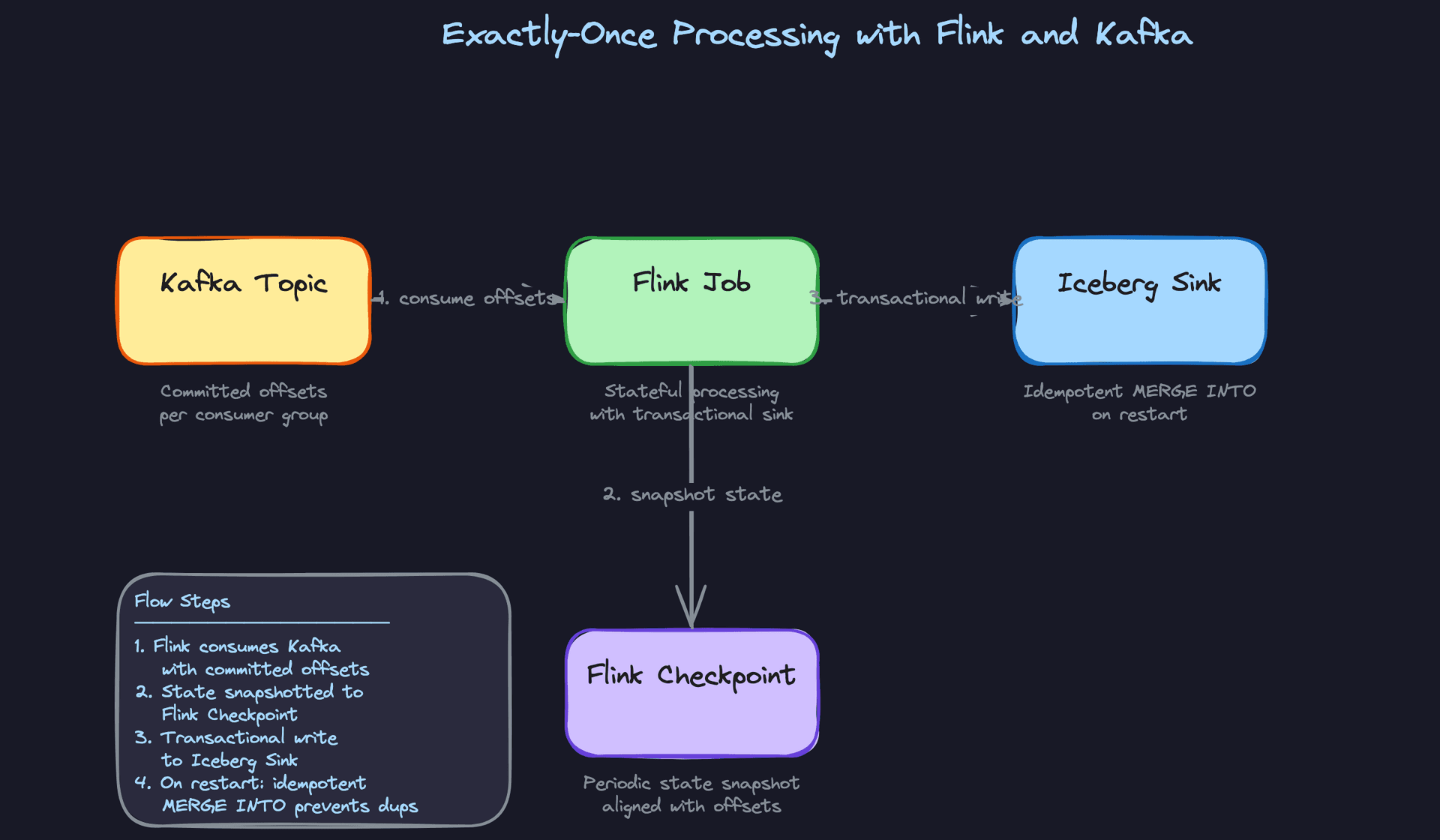
Candidates who say "set processing.guarantee=exactly_once and you're done" are half right and fully dangerous. Exactly-once in Flink requires coordination across three components: Kafka source offsets, Flink state, and the sink. If your sink doesn't participate in the two-phase commit protocol, you don't have exactly-once. You have exactly-once state with at-least-once output.
Writing to S3 directly with a non-transactional writer? At-least-once. Writing to a JDBC sink without idempotency keys? Duplicates on restart.
Warning: This is the most common place candidates confidently give a wrong answer. "Flink supports exactly-once" is true. "My pipeline has exactly-once" requires proof.
Good Solution: Flink checkpointing aligned with Kafka offsets
The actual mechanism: Flink periodically injects checkpoint barriers into the event stream. When a barrier passes through all operators, Flink snapshots its state (including the Kafka consumer offset it has processed up to) to a durable store like S3 or HDFS. On restart after a failure, Flink resets to the last successful checkpoint and replays from that Kafka offset.
# Flink job configuration for exactly-once with Kafka source
env = StreamExecutionEnvironment.get_execution_environment()

# Checkpoint every 30 seconds, stored in S3
env.enable_checkpointing(30_000)  # ms
env.get_checkpoint_config().set_checkpointing_mode(
    CheckpointingMode.EXACTLY_ONCE
)
env.get_checkpoint_config().set_min_pause_between_checkpoints(10_000)
checkpoint_storage = FileSystemCheckpointStorage("s3://checkpoints/flink/")
env.get_checkpoint_config().set_checkpoint_storage(checkpoint_storage)

# Kafka source with committed offsets
kafka_source = KafkaSource.builder() \
    .set_bootstrap_servers("kafka:9092") \
    .set_topics("checkout_completed") \
    .set_group_id("checkout-flink-job") \
    .set_starting_offsets(OffsetsInitializer.committed_offsets()) \
    .set_value_only_deserializer(AvroDeserializationSchema()) \
    .build()
The trade-off is real: shorter checkpoint intervals mean lower potential data loss on failure, but each checkpoint introduces a brief pause in processing. At 500K events/sec, a 30-second checkpoint interval means up to 30 seconds of replay on restart. A 5-second interval cuts that replay window but adds overhead. You need to benchmark this against your latency SLA.
Great Solution: Transactional Kafka sink plus idempotent Iceberg writes
For true end-to-end exactly-once, the sink must participate. Flink's Kafka producer sink supports transactions: it holds writes in an uncommitted transaction until the checkpoint succeeds, then commits. If the job fails before the checkpoint completes, the transaction is aborted and consumers never see the partial write.
For the Iceberg sink, the mechanism is different. Iceberg uses snapshot isolation. Flink writes Parquet files to a staging location, then commits a new snapshot atomically. On restart, any uncommitted snapshot is simply abandoned. The table only ever reflects completed snapshots.
For the Druid/ClickHouse real-time path, idempotency is handled differently since those sinks don't support two-phase commit. You write with a deterministic event ID and use INSERT OR REPLACE semantics, so replayed events overwrite rather than duplicate.
-- Iceberg: idempotent upsert using MERGE INTO on restart
-- event_id is deterministic (from Kafka message key + offset)
MERGE INTO processed_events AS target
USING staged_events AS source
  ON target.event_id = source.event_id
WHEN MATCHED THEN
  UPDATE SET target.processed_at = source.processed_at,
             target.enriched_data = source.enriched_data
WHEN NOT MATCHED THEN
  INSERT (event_id, user_id, processed_at, enriched_data)
  VALUES (source.event_id, source.user_id, source.processed_at, source.enriched_data);
Tip: The strongest candidates acknowledge that exactly-once adds latency and operational complexity, then make a deliberate call: use it for financial events and audit logs, accept at-least-once with idempotent consumers for high-volume behavioral events where a duplicate page view doesn't matter.
"How do we reprocess historical events when a pipeline bug is discovered?"
A pipeline has been miscalculating revenue attribution for two weeks. You need to reprocess 14 days of checkout_completed events, write corrected data to the serving layer, and do it without taking down the live pipeline or confusing downstream consumers.
Bad Solution: Replay everything from Kafka
The instinct is to seek Kafka back to the start of the affected window and replay. This works if your Kafka retention covers the full window. Default Kafka retention is 7 days. If the bug is two weeks old, you're already out of luck for half the data.
Even within the retention window, replaying through the live Flink job means your real-time consumers see a mix of live events and historical replays on the same topic. Dashboards spike. Alerts fire. On-call gets paged.
Warning: Candidates who only mention Kafka replay without addressing the retention limit or the live-consumer interference problem will lose points here.
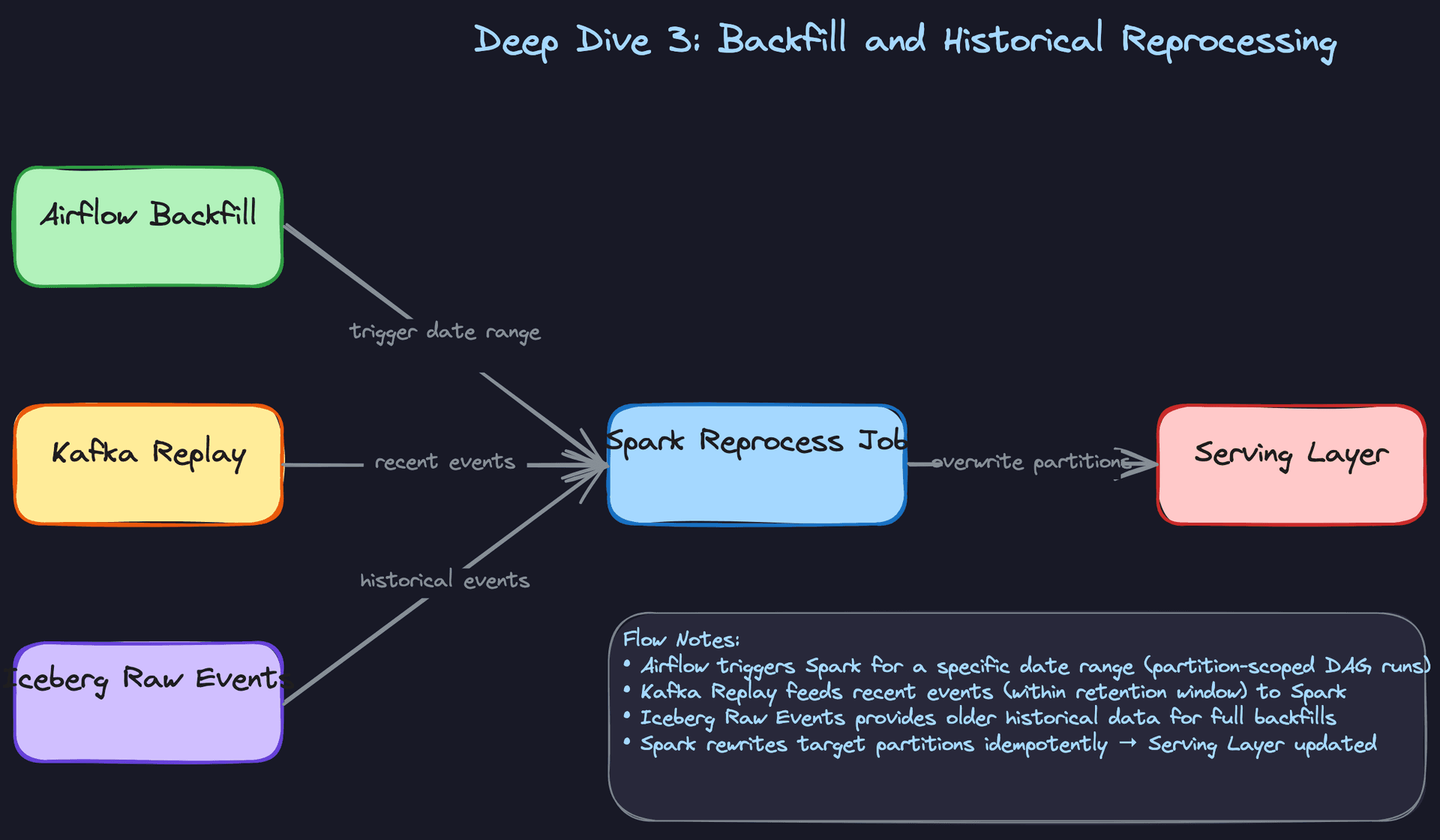
Good Solution: Separate reprocessing job reading from Iceberg raw events
The right pattern is to store raw events in Iceberg as an immutable archive, separate from the processed output. When you need to backfill, you spin up a dedicated Spark job that reads from the Iceberg raw event table (not Kafka), applies the corrected logic, and overwrites the affected output partitions.
from pyspark.sql import SparkSession
from pyspark.sql.functions import col, to_date

spark = SparkSession.builder \
    .config("spark.sql.catalog.iceberg", "org.apache.iceberg.spark.SparkCatalog") \
    .getOrCreate()

# Read only the affected date range from raw event archive
raw_events = spark.read.format("iceberg") \
    .load("iceberg.raw_events.checkout_completed") \
    .filter(
        (col("event_date") >= "2024-01-01") &
        (col("event_date") <= "2024-01-14")
    )

# Apply corrected attribution logic
corrected = raw_events.withColumn(
    "attributed_revenue",
    corrected_attribution_udf(col("payload"))
)

# Overwrite only the affected partitions (dynamic partition overwrite)
spark.conf.set("spark.sql.sources.partitionOverwriteMode", "dynamic")
corrected.write.format("iceberg") \
    .mode("overwrite") \
    .option("partitionOverwriteMode", "dynamic") \
    .save("iceberg.processed_events.revenue_attribution")
Dynamic partition overwrite is critical here. It replaces only the partitions touched by the job, leaving unaffected partitions intact. Without it, a full overwrite would wipe data outside the backfill window.
Great Solution: Airflow-coordinated partition-scoped backfill with consumer isolation
The production pattern adds two things: Airflow orchestration and consumer isolation.
Airflow's backfill command triggers DAG runs for a specific date range, one run per partition. This gives you retry granularity at the partition level. If the January 5th partition fails, you rerun just that date, not the entire two-week window.
# Trigger backfill for the affected date range
airflow dags backfill \
  --start-date 2024-01-01 \
  --end-date 2024-01-14 \
  --reset-dagruns \
  revenue_attribution_pipeline
Consumer isolation means the backfill job writes to a staging table first. Downstream consumers keep reading the original table. Once the backfill completes and passes data quality checks, you swap the table pointer (or rename partitions) atomically. Consumers see the corrected data appear cleanly, not mid-reprocess.
For events older than Kafka retention, the Iceberg raw event archive is your only source of truth. This is why storing raw events in Iceberg before any transformation is non-negotiable. It's your time machine.
Tip: Mention the two-source strategy explicitly: Kafka for recent replays (within retention), Iceberg raw archive for anything older. Interviewers at Airbnb and Uber will specifically ask which one you'd use for a 90-day backfill.
"How do you guarantee a DataSet is fresh and complete before consumers query it?"
A data scientist runs a revenue report at 9am. The pipeline finished, but a network hiccup caused 3% of events to drop silently. The report is wrong. Nobody knows.
Bad Solution: Trust the pipeline to succeed
Assuming a successful Airflow task means complete data is the most common mistake on data platforms. Tasks can succeed while writing partial data, skipping partitions, or silently swallowing errors in try/except blocks.
Don't do this.
Good Solution: Post-pipeline row count and null-rate assertions
After each pipeline run, a quality service queries the output partition and compares it against expectations. At minimum: row count within a threshold of yesterday's equivalent partition, null rate on critical columns below a configured limit, and partition freshness within the SLA window.
def run_quality_checks(dataset_id: str, partition_date: str) -> QualityResult:
    metrics = compute_partition_metrics(dataset_id, partition_date)

    checks = [
        # Row count within 20% of 7-day moving average
        RowCountCheck(
            actual=metrics.row_count,
            expected=metrics.rolling_avg_7d,
            threshold=0.20,
        ),
        # Critical columns must be < 1% null
        NullRateCheck(
            column="user_id",
            actual=metrics.user_id_null_rate,
            max_allowed=0.01,
        ),
        # Partition must land within SLA window
        FreshnessCheck(
            refreshed_at=metrics.refreshed_at,
            sla_minutes=pipeline.sla_minutes,
        ),
    ]

    results = [check.evaluate() for check in checks]
    quality_score = sum(r.passed for r in results) / len(results)

    update_dataset_quality_score(dataset_id, partition_date, quality_score)
    return QualityResult(passed=all(r.passed for r in results), score=quality_score)
If checks fail, the partition is marked as unhealthy in the DataSet metadata table and downstream consumers can check that flag before querying.
Great Solution: Three-layer quality with SLA alerting and consumer gating
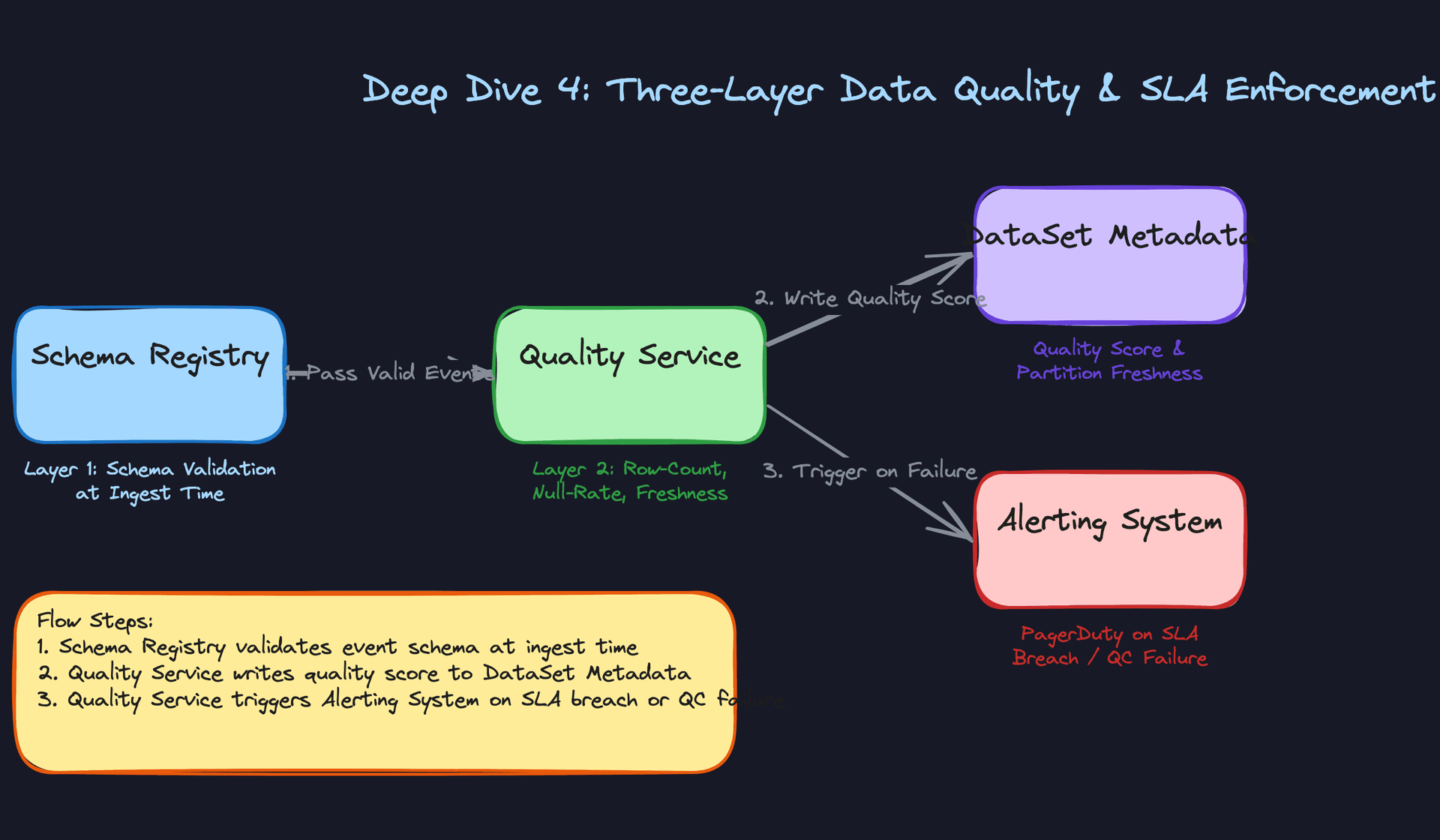
The full pattern has three distinct layers, each catching a different class of problem.
Layer 1 is schema validation at ingest, handled by the Schema Registry. Malformed events never enter the pipeline. They go to the dead letter queue.
Layer 2 is the post-pipeline assertions above. These catch data volume anomalies, null explosions, and distribution shifts that schema validation can't see.
Layer 3 is SLA alerting. A separate process watches the refreshed_at timestamp on each DataSet partition. If a partition hasn't refreshed within its SLA window, it fires a PagerDuty alert to the owning team before consumers even notice.
The consumer gating piece is what separates a mature platform from a basic one. Downstream tools (Snowflake, Superset, ML feature stores) check the quality_score and refreshed_at fields in the DataSet metadata before executing queries. A dashboard can show a "data delayed" banner instead of silently serving stale numbers.
Tip: Framing this as three layers with different failure modes shows systems thinking. Layer 1 catches structural problems, Layer 2 catches volume problems, Layer 3 catches timing problems. Interviewers will nod when you name all three.
"How do we keep query performance fast as the Iceberg table grows?"
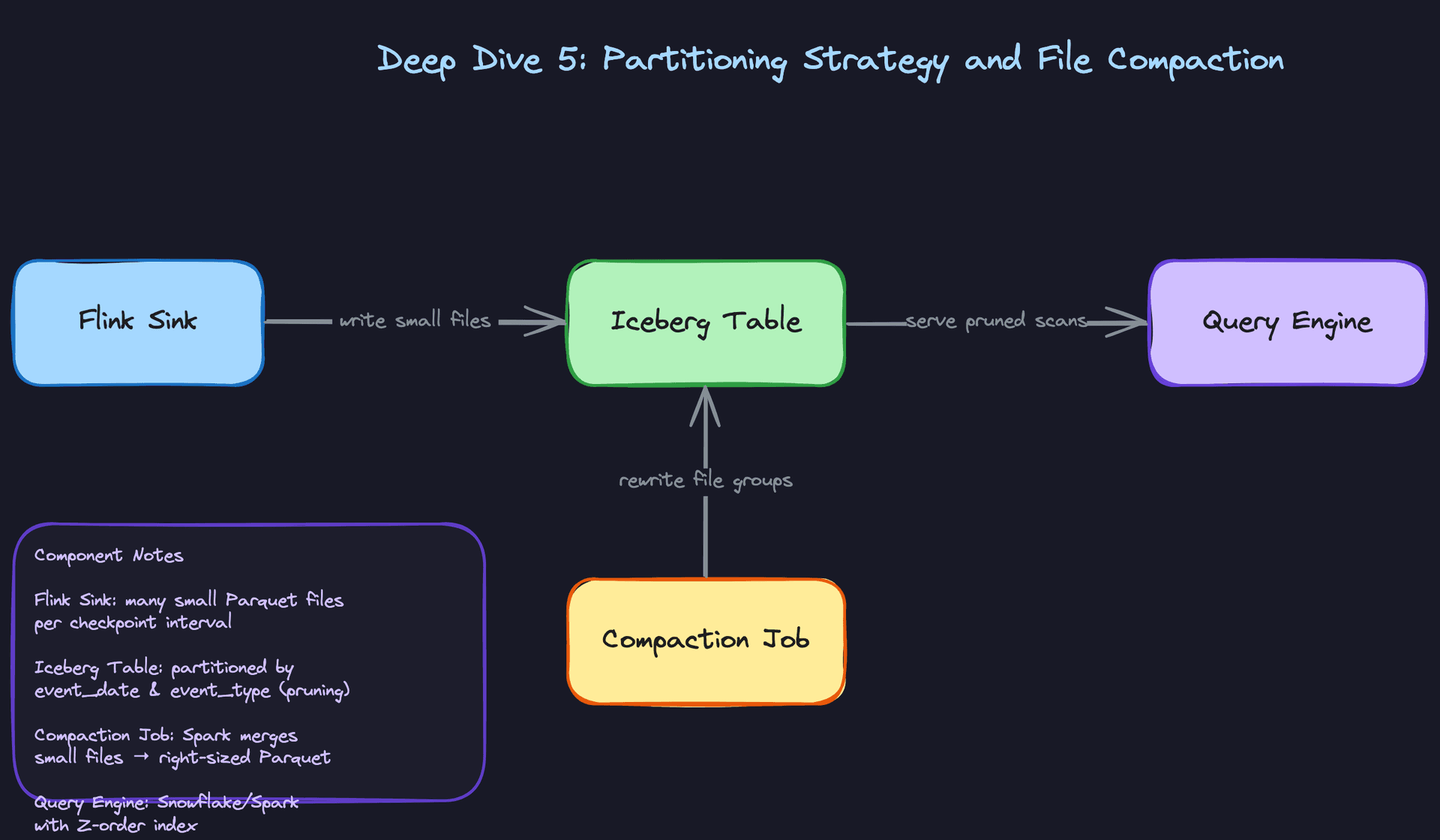
A Flink job writing at 500K events/sec creates a new Parquet file every checkpoint interval. At a 30-second checkpoint, that's 2 files per minute, 2,880 files per day, per topic. After a month, Spark is opening 86,000 files just to read one month of data. Query planning time alone takes minutes.
Bad Solution: Partition by event timestamp only
Partitioning by event_hour or event_date is a start, but if your queries filter on both date and event type, Spark still scans every event type within the date partition. For a table with 200 event types, that's a 200x over-scan on typical queries.
The small file problem also doesn't go away with better partitioning. Flink writes small files regardless of partition scheme because it flushes on checkpoint boundaries, not on file size.
Good Solution: Composite partitioning plus scheduled compaction
Partition by (event_date, event_type) so queries that filter on both dimensions skip irrelevant partitions entirely. A query for checkout_completed events on January 5th touches exactly one partition directory instead of scanning all 200 event types.
CREATE TABLE raw_events.checkout_completed (
    event_id     VARCHAR NOT NULL,
    user_id      VARCHAR NOT NULL,
    amount       DECIMAL(12, 2),
    event_date   DATE NOT NULL,
    event_type   VARCHAR(100) NOT NULL,
    emitted_at   TIMESTAMP NOT NULL,
    payload      MAP<STRING, STRING>
)
USING iceberg
PARTITIONED BY (event_date, event_type);
Then run a daily Spark compaction job that rewrites small files into right-sized Parquet files (128MB to 512MB is the typical target):
from pyiceberg.catalog import load_catalog

catalog = load_catalog("glue", **{"type": "glue"})
table = catalog.load_table("raw_events.checkout_completed")

# Rewrite files in the last 2 days' partitions
# Targets files smaller than 128MB, merges into 512MB files
table.rewrite_data_files(
    options={
        "rewrite-job-order": "bytes-asc",
        "target-file-size-bytes": str(512 * 1024 * 1024),
        "min-file-size-bytes": str(32 * 1024 * 1024),
    }
)
This cuts file counts by an order of magnitude and dramatically reduces Spark's planning overhead.
Great Solution: Z-ordering for multi-dimensional filter acceleration
Composite partitioning handles coarse-grained pruning. Z-ordering handles fine-grained skipping within a partition.
If analysts frequently filter on (user_id, event_date) or (region, event_type), Z-ordering physically co-locates rows with similar values for those columns within each Parquet file. The key difference from a standard multi-column sort: Z-ordering interleaves the sort keys using a space-filling curve, so the data locality benefit applies to queries filtering on any subset of the specified columns, not just queries that lead with the first sort key. Iceberg's column statistics (min/max per file) then let the query engine skip entire files that can't contain matching rows, without reading them.
Iceberg exposes Z-ordering through the rewrite-job-order option in rewrite_data_files, with the target columns passed as a comma-separated string:
from pyiceberg.catalog import load_catalog

catalog = load_catalog("glue", **{"type": "glue"})
table = catalog.load_table("raw_events.checkout_completed")

# Z-order compaction on high-cardinality filter columns.
# Uses a space-filling curve to co-locate rows across both dimensions,
# enabling file skipping for queries filtering on user_id, event_date, or both.
table.rewrite_data_files(
    options={
        "rewrite-job-order": "zorder",
        "sort-columns": "user_id,event_date",
        "target-file-size-bytes": str(512 * 1024 * 1024),
    }
)
Contrast this with a standard sort compaction, which would use "rewrite-job-order": "bytes-asc" and a SortOrder object. That approach optimizes for queries filtering on the leading sort column. Z-ordering is the right call when your query patterns are multi-dimensional and you can't predict which column analysts will filter on first.
The operational pattern is: Flink writes continuously (many small files), a lightweight compaction job runs every hour to merge recent files, and a heavier Z-order compaction runs nightly on the previous day's partitions. This keeps the table queryable in near-real-time while maintaining long-term query performance.
Tip: Mentioning the small file problem proactively, before the interviewer asks, is a strong signal. It shows you've thought about what happens to the platform six months after launch, not just on day one. Bonus points if you can articulate when Z-ordering beats a standard sort: when query filters are unpredictable across multiple high-cardinality columns.
What is Expected at Each Level
Interviewers calibrate their expectations based on your level, but one thing is universal: every design decision you make should trace back to the requirements you gathered at the start. Latency SLA, event volume, consumer diversity, compliance constraints. If you can't point to one of those anchors when explaining a choice, you're designing in a vacuum.
Mid-Level
- Walk through the full Kafka-Flink-Iceberg pipeline end-to-end. You should be able to explain why Kafka topics are partitioned by entity ID (ordering guarantees within a partition, even distribution of load) without being prompted.
- Articulate the split between the real-time path (Flink writing to Druid or ClickHouse for sub-minute dashboards) and the batch path (Flink writing to Iceberg, Spark reading it later). These are not interchangeable; they serve different latency contracts.
- Handle basic schema evolution. Adding a nullable field with a default value is a safe, backward-compatible change. Know why removing a field or changing a type is not.
- Know what a dead letter queue is and why it exists. Invalid events should never silently disappear. They go to a DLQ so the owning team can inspect, fix, and replay them.
Senior
- Go deep on exactly-once semantics. Flink checkpoints must be aligned with Kafka offset commits, and your Iceberg sink needs to handle restarts idempotently. A
MERGE INTOon a deduplication key is the standard pattern. Know the latency cost: shorter checkpoint intervals mean lower duplicate exposure but higher overhead. - Design the three-layer data quality framework without being asked. Schema validation at ingest, row-count and null-rate assertions post-pipeline, and freshness SLA alerting when a partition is late. Each layer catches a different class of failure.
- Proactively raise the small-file problem. Flink writes one file per checkpoint per partition, which means thousands of tiny Parquet files accumulate fast. A scheduled Spark compaction job rewrites them into right-sized files. Interviewers notice when you bring this up unprompted.
- Own the backfill trade-off. Kafka replay works within the retention window (typically 7 days). Beyond that, you're reading from the Iceberg raw event archive. Airflow's backfill command handles partition-scoped reruns for both paths. Know when to use each.
Staff+
- Shift the conversation toward platform governance. How does a new producer team onboard without breaking existing Flink consumers? The answer is schema registry compatibility modes enforced as a gate, not a suggestion. BACKWARD compatibility means existing consumers can read new messages. FULL compatibility means both directions are safe. You should be able to explain when each is appropriate.
- Think about blast radius. A single misbehaving producer flooding a shared Kafka cluster can starve every other consumer. Topic isolation, producer quotas, and consumer group separation are the mechanisms. Staff candidates raise these proactively because they've seen what happens when you don't.
- Design for operational maturity across dozens of pipelines. Metadata-driven SLA alerting (each Pipeline record carries an
sla_minutesfield, and a monitoring job checksDataSet.refreshed_atagainst it) scales better than per-pipeline custom alerts. PagerDuty integration should be automatic, not manual. - Address evolution over time. What happens when you need to migrate from Druid to ClickHouse for the real-time path? Your Flink jobs should write to an abstracted sink interface so the storage layer can be swapped without rewriting processing logic. Platform longevity depends on keeping those layers decoupled.
The exactly-once vs. at-least-once question will come up at every level. Don't default to "we need exactly-once." Exactly-once adds checkpoint overhead, increases end-to-end latency, and complicates your sink implementation. At-least-once with idempotent consumers is often the right call, especially when your Iceberg MERGE INTO already handles duplicates. The strong answer is knowing when each trade-off is worth it, not treating exactly-once as the obvious default.
Key takeaway: An event-driven data platform is not a single pipeline; it's a contract between producers and consumers enforced by schema governance, quality checks, and SLA metadata. The architecture only holds at scale if every layer, from Kafka topic isolation to Iceberg compaction to freshness alerting, is designed to fail safely and recover automatically without human intervention.
