
Understanding the Problem
Product definition: A log aggregation system collects logs from distributed services, transports them reliably at scale, stores them across hot and cold tiers, and makes them queryable for both real-time alerting and historical analysis.
What is a Log Aggregation System?
Every service your company runs is constantly writing logs: a payment service recording transaction attempts, a Kubernetes node reporting CPU pressure, an API gateway logging every 4xx and 5xx. The problem is that these logs live on thousands of different hosts, in different formats, with no consistent way to search across them. A log aggregation system solves that by pulling all of it into one place.
The design changes significantly depending on what "logs" actually means in scope. Application logs are semi-structured and high-volume. Infrastructure logs are lower-volume but operationally critical. Audit logs have strict durability requirements and sometimes legal retention obligations. In this lesson, we'll design for all three, but you should clarify this with your interviewer before touching the whiteboard.
Functional Requirements
The first question to ask is: what does the system actually need to do? The answer splits into two very different use cases. Real-time monitoring needs logs indexed within seconds so an on-call engineer can query "show me all ERROR logs from the payments service in the last 5 minutes." Historical analysis needs months of data queryable efficiently, even if queries take a few seconds to return.
Core Requirements
- Collect logs from distributed services and hosts via agents (sidecars, daemons) and a structured ingestion API
- Transport logs durably to a central processing layer with at-least-once delivery guarantees
- Support real-time querying of recent logs: full-text search, severity filtering, and time-window aggregations with low latency (sub-second for hot data)
- Store logs long-term in a cost-efficient cold tier, queryable for historical analysis and backfills
- Evaluate alert rules against the live log stream and fire notifications when thresholds are breached
Below the line (out of scope)
- Log-based anomaly detection using ML models
- Multi-tenant access control and per-team data isolation
- Distributed tracing visualization (trace_id correlation is in scope; the full tracing UI is not)
Note: "Below the line" features are acknowledged but won't be designed in this lesson.
Non-Functional Requirements
Scale and latency targets here are not arbitrary. They directly determine whether you need Elasticsearch or can get away with something simpler, and whether Kafka is necessary or overkill.
- Throughput: 500,000 log events per second at peak across all services (roughly 1,000 services emitting ~500 events/sec each)
- Hot query latency: p99 under 2 seconds for full-text search queries over the last 7 days of data
- Durability: No log loss for audit logs; at-least-once delivery is acceptable for application and infrastructure logs
- Retention: 7 days in the hot store (Elasticsearch), 1 year in the cold store (object storage), with configurable per-pipeline TTLs
- Availability: 99.9% uptime for the ingestion path; brief query unavailability is tolerable during maintenance windows
Back-of-Envelope Estimation
Start with your anchor number: 500K events/sec at peak. From there, everything else follows.
| Metric | Calculation | Result |
|---|---|---|
| Peak ingestion rate | 500K events/sec | 500,000 events/sec |
| Average log event size | ~1 KB (message + metadata + payload) | 1 KB |
| Raw ingestion bandwidth | 500K × 1 KB | ~500 MB/sec |
| Daily raw volume | 500 MB/sec × 86,400 sec | ~43 TB/day |
| Hot store (7 days, Elasticsearch) | 43 TB × 7 × 1.5x index overhead | ~450 TB |
| Cold store (1 year, Parquet compressed) | 43 TB × 365 × 0.2x compression ratio | ~3.1 PB |
| Kafka retention (48-hour buffer) | 500 MB/sec × 172,800 sec | ~86 TB |
A few things to flag to your interviewer. The 1.5x Elasticsearch index overhead is a real number; full-text indexing is expensive. The 0.2x Parquet compression ratio is realistic for log data with repetitive field names and values. And that 86 TB Kafka cluster is why you need to think carefully about partition count and broker sizing before the interview ends.
Tip: Always clarify requirements before jumping into design. Asking "are audit logs in scope, and do they need exactly-once semantics?" in the first two minutes signals maturity. It also protects you from designing the wrong system for 45 minutes.
The Set Up
Core Entities
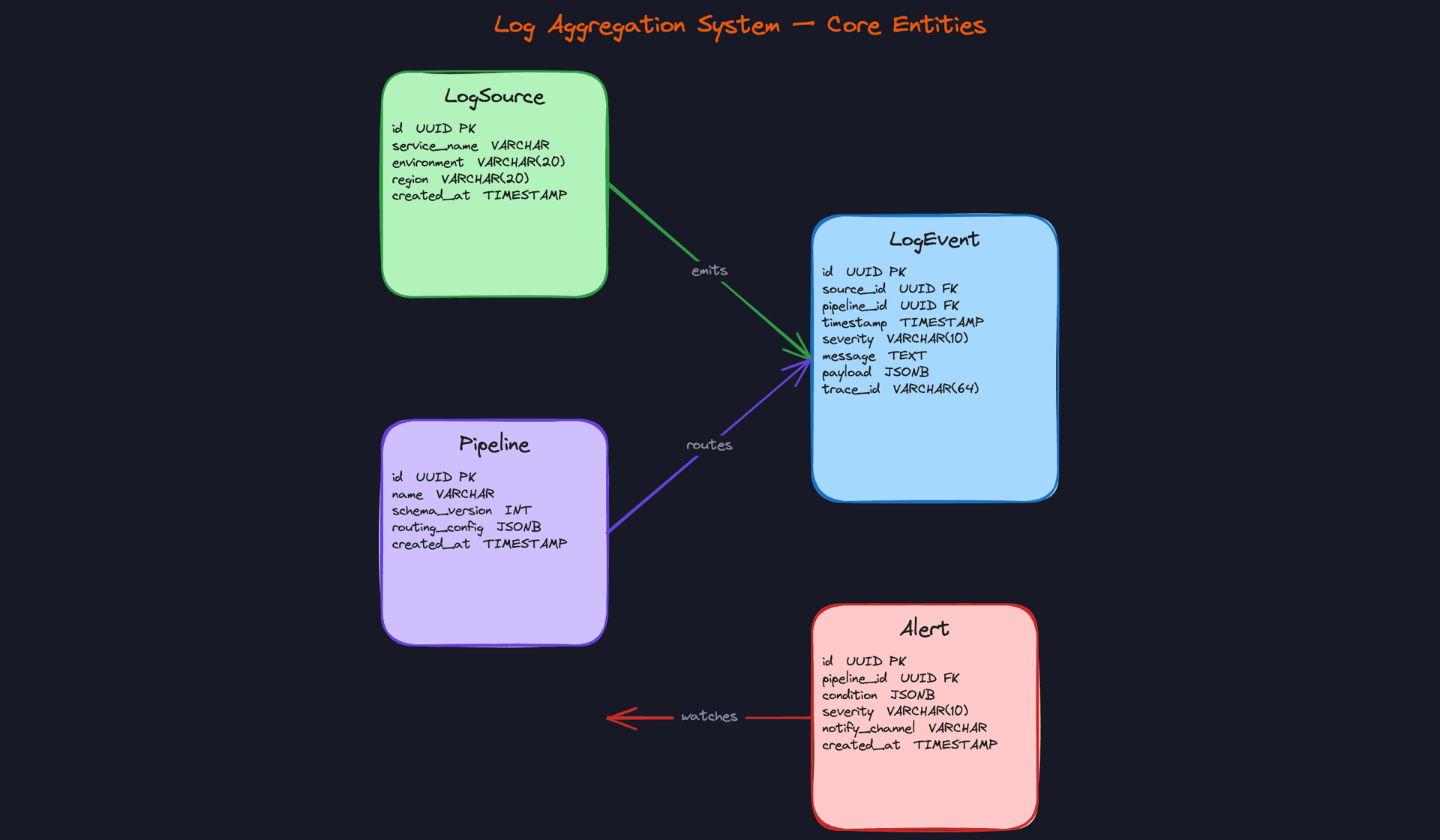
Four entities drive this system. LogEvent is the center of gravity. Everything else either produces it, routes it, or reacts to it.
LogSource represents the emitting service or host. Think of it as the identity card for whatever is sending logs: a payment service in prod-us-east, a Kubernetes pod in staging, a database host in EU. These metadata fields aren't just bookkeeping. They're what you'll partition on and filter by when a query comes in asking "show me all ERROR logs from the checkout service in production."
Pipeline is a named ingestion route with its own schema version and routing config. This is what lets you evolve your log format without breaking every downstream consumer at once. When the payments team adds a new field to their log payload, they bump the pipeline schema version. Flink knows which deserialization logic to apply per version.
Alert is a threshold-based rule tied to a pipeline. It doesn't store alert history; it stores the rule itself. The condition is a JSONB blob so you can express anything from "error rate > 5% over 60 seconds" to "any log matching pattern X from service Y."
CREATE TABLE log_sources (
    id           UUID PRIMARY KEY DEFAULT gen_random_uuid(),
    service_name VARCHAR(255) NOT NULL,              -- e.g. 'checkout-service', 'payments-api'
    environment  VARCHAR(20) NOT NULL,               -- 'production', 'staging', 'dev'
    region       VARCHAR(20) NOT NULL,               -- 'us-east-1', 'eu-west-1'
    created_at   TIMESTAMP NOT NULL DEFAULT now()
);

CREATE INDEX idx_log_sources_service ON log_sources(service_name, environment);
CREATE TABLE pipelines (
    id             UUID PRIMARY KEY DEFAULT gen_random_uuid(),
    name           VARCHAR(255) NOT NULL UNIQUE,     -- e.g. 'payments-prod-v2'
    schema_version INT NOT NULL DEFAULT 1,           -- bumped on schema changes
    routing_config JSONB NOT NULL DEFAULT '{}',      -- filter rules, sink targets, sampling rate
    created_at     TIMESTAMP NOT NULL DEFAULT now()
);
CREATE TABLE log_events (
    id         UUID PRIMARY KEY DEFAULT gen_random_uuid(),
    source_id  UUID NOT NULL REFERENCES log_sources(id),
    pipeline_id UUID NOT NULL REFERENCES pipelines(id),
    timestamp  TIMESTAMP NOT NULL,                   -- event time, not ingest time
    severity   VARCHAR(10) NOT NULL,                 -- 'DEBUG', 'INFO', 'WARN', 'ERROR', 'FATAL'
    message    TEXT,                                 -- raw log line
    payload    JSONB NOT NULL DEFAULT '{}',          -- structured fields (request_id, latency_ms, etc.)
    trace_id   VARCHAR(64)                           -- links to distributed trace spans
);

-- Queries almost always filter by source + time range
CREATE INDEX idx_log_events_source_time  ON log_events(source_id, timestamp DESC);
-- Severity filtering for alerting and dashboards
CREATE INDEX idx_log_events_severity     ON log_events(severity, timestamp DESC);
-- Trace correlation lookups
CREATE INDEX idx_log_events_trace        ON log_events(trace_id) WHERE trace_id IS NOT NULL;
The timestamp field deserves a callout. Always store event time, not ingest time. A log that arrives 30 seconds late due to network jitter should still be queryable at its actual occurrence time. Store ingest time separately if you need it for pipeline latency monitoring.
CREATE TABLE alerts (
    id             UUID PRIMARY KEY DEFAULT gen_random_uuid(),
    pipeline_id    UUID NOT NULL REFERENCES pipelines(id),
    condition      JSONB NOT NULL,                   -- e.g. {"metric": "error_rate", "threshold": 0.05, "window_seconds": 60}
    severity       VARCHAR(10) NOT NULL,             -- 'P1', 'P2', 'P3'
    notify_channel VARCHAR(255),                     -- 'pagerduty', 'slack:#oncall', 'email:team@co.com'
    created_at     TIMESTAMP NOT NULL DEFAULT now()
);

CREATE INDEX idx_alerts_pipeline ON alerts(pipeline_id);
Interview tip: If the interviewer asks whypayloadis JSONB instead of a fixed schema, your answer is: log structures vary wildly across services and change frequently. JSONB lets you store arbitrary structured fields without a migration. The trade-off is that you lose compile-time schema enforcement, which is exactly why thePipeline.schema_versionfield and a Schema Registry exist upstream.
API Design
The system needs four core API surfaces: submitting logs, querying them, managing pipelines, and managing alert rules.
// Submit a batch of log events from a collector agent
POST /v1/logs
{
  "source_id": "uuid",
  "pipeline_id": "uuid",
  "events": [
    {
      "timestamp": "2024-01-15T10:23:45.123Z",
      "severity": "ERROR",
      "message": "Payment gateway timeout",
      "payload": { "request_id": "abc123", "latency_ms": 5002 },
      "trace_id": "4bf92f3577b34da6"
    }
  ]
}
-> { "accepted": 47, "rejected": 0, "batch_id": "uuid" }
Batching is non-negotiable here. Agents should never send one event per HTTP request. A single service can emit thousands of log lines per second, and per-event HTTP overhead would saturate both the agent and the ingestion layer instantly.
// Query logs with filtering and time range
GET /v1/logs?source_id=uuid&severity=ERROR&start=2024-01-15T10:00:00Z&end=2024-01-15T11:00:00Z&q=timeout&limit=100&cursor=opaque_token
-> {
  "events": [ ... ],
  "next_cursor": "opaque_token",
  "total_matched": 4821
}
The q parameter is a full-text search term routed to Elasticsearch. The query API decides internally whether to hit the hot store or cold store based on the time range. Callers don't need to know that distinction exists.
// Register or update a pipeline (schema version + routing config)
PUT /v1/pipelines/{pipeline_id}
{
  "name": "payments-prod",
  "schema_version": 3,
  "routing_config": {
    "sampling_rate": 1.0,
    "sinks": ["elasticsearch", "s3"],
    "drop_severities": ["DEBUG"]
  }
}
-> { "pipeline_id": "uuid", "schema_version": 3 }
// Create an alert rule on a pipeline
POST /v1/alerts
{
  "pipeline_id": "uuid",
  "condition": {
    "metric": "error_rate",
    "threshold": 0.05,
    "window_seconds": 60
  },
  "severity": "P1",
  "notify_channel": "pagerduty"
}
-> { "alert_id": "uuid" }
POST for creating alerts, PUT for pipelines because pipeline updates are idempotent by ID. The log submission endpoint uses POST because each batch is a new write, not an update to an existing resource.
Common mistake: Candidates sometimes design a single /v1/logs GET endpoint that accepts a raw SQL-like query string. Don't do this. You need structured parameters so the query layer can make intelligent routing decisions (hot vs. cold store, which index to hit). A free-form query string makes that impossible without parsing it first.High-Level Design
The system has five moving parts, and each one has a job. Get the boundaries wrong and you'll either lose logs at scale or build something that costs a fortune to query. Walk through each step in order during your interview; interviewers want to see that you understand the data flow end-to-end before you start optimizing.
1) Log Collection
Every service, pod, and host in your infrastructure is constantly writing logs. The first problem is getting those logs off the machine reliably, without the application caring about what happens next.
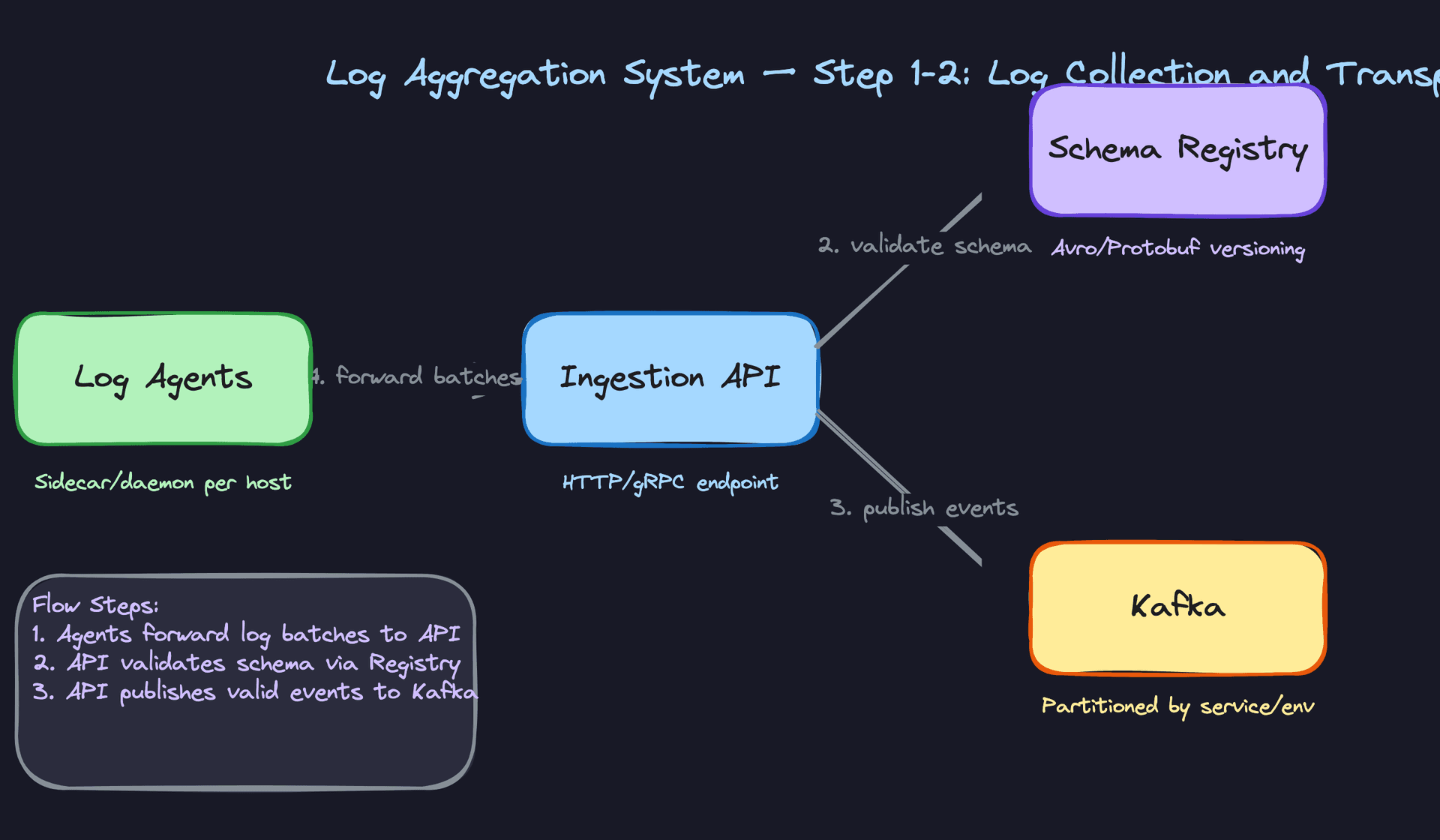
Core components: - Log Agent (Fluentd, Filebeat, or a custom sidecar container) - Local disk buffer - Ingestion API (HTTP/gRPC endpoint)
Data flow:
- The application writes logs to stdout, a file, or a local Unix socket. The agent tails that output continuously.
- The agent batches log lines into small chunks (say, 512KB or every 5 seconds, whichever comes first) and holds them in a local buffer.
- The agent attempts to forward the batch to the Ingestion API over the network.
- If the network is unavailable or the Ingestion API is slow, the agent spills the buffer to local disk rather than dropping records.
- Once the Ingestion API acknowledges receipt, the agent clears that buffer segment and moves forward.
The local buffer is the most important design decision at this layer. Without it, a 30-second network blip means you lose 30 seconds of logs from every host in your fleet. With disk-backed buffering, the agent just keeps writing locally and catches up when connectivity returns.
Interview tip: Interviewers will ask "what happens if the agent crashes?" The answer is that disk-backed buffers survive agent restarts. Fluentd and Filebeat both track a read position (a cursor file) so they can resume from where they left off, not from the beginning of the file.
One thing to flag explicitly: agents should be lightweight. They run on every host, so a memory leak or a CPU spike in the agent is a fleet-wide incident. This is why most teams use a battle-tested agent rather than rolling their own.
2) Ingestion and Transport
Once logs leave the agent, you need something that can absorb massive write bursts without losing data and that lets downstream processors work at their own pace.
Core components: - Ingestion API (stateless, horizontally scalable) - Schema Registry (Avro or Protobuf schema validation) - Kafka cluster (partitioned by service and environment)
Data flow:
- The Ingestion API receives a batch from the log agent over HTTP or gRPC.
- Before writing to Kafka, the API validates the log payload against the registered schema for that pipeline. Malformed records go to a Dead Letter Queue (DLQ), not into the main stream.
- Valid records are published to a Kafka topic. Topic partitioning strategy matters here: partition by
service_name + environmentso that all logs from a single service land on the same set of partitions, preserving rough ordering and enabling efficient consumer filtering. - Kafka acknowledges the write back to the Ingestion API (
acks=allfor durability), which then acknowledges back to the agent. - The agent clears its local buffer for that batch.
Common mistake: Candidates often skip schema validation at the ingestion boundary and push it downstream into the stream processor. The problem is that by then, a bad record is already in Kafka and will block or corrupt your pipeline. Reject at the gate.
Kafka's retention window is what makes this architecture recoverable. If your stream processor has a bug and you need to reprocess three days of logs, you can reset the consumer group offset and replay directly from Kafka, no special backfill job needed, as long as the data is still within the retention window. Set retention to at least 7 days for this reason.
The topic structure also matters for throughput. A rough rule: target 10-20MB/s per partition. If you're ingesting 5GB/s across 50 services, you need enough partitions to distribute that load. You can always add partitions later, but repartitioning an active topic is painful, so size generously upfront.
3) Stream Processing
Kafka holds the raw bytes. The stream processor is what turns those bytes into something useful: validated, enriched log records routed to the right storage layer.
Core components: - Flink job (or Spark Structured Streaming) - Pipeline schema configuration - Two output sinks: hot store and cold store
Data flow:
- The Flink job subscribes to the Kafka topics as a consumer group.
- For each incoming record, Flink deserializes the payload using the schema version embedded in the Kafka message header (fetched from the Schema Registry).
- The record is validated against the pipeline's expected schema. Fields are type-checked; required fields are verified present.
- Enrichment: Flink joins the log record against a broadcast state table of
LogSourcemetadata (service name, environment, region) using thesource_id. This avoids storing redundant metadata on every raw log event. - The enriched record fans out to two sinks simultaneously: Elasticsearch for the hot path, and a Parquet writer targeting S3 for the cold path.
- Alert rules are evaluated in-line as a side output of the same Flink job (covered in Step 5).
# Simplified Flink fan-out logic (PyFlink pseudocode)
class LogEnrichmentFunction(MapFunction):
    def map(self, raw_record):
        schema_version = raw_record.headers["schema_version"]
        parsed = deserialize(raw_record.value, schema_version)

        source_meta = self.source_lookup[parsed["source_id"]]
        enriched = {
            **parsed,
            "service_name": source_meta["service_name"],
            "environment": source_meta["environment"],
            "region": source_meta["region"],
        }
        return enriched

# Fan-out to two sinks
enriched_stream = raw_stream.map(LogEnrichmentFunction())
enriched_stream.add_sink(ElasticsearchSink(...))   # hot path
enriched_stream.add_sink(IcebergSink(...))          # cold path
The fan-out to two sinks is a key architectural decision. You could write to S3 first and have Elasticsearch pull from there, but that adds latency to the hot path. Writing to both simultaneously keeps the hot path fast (sub-second indexing) while the cold path catches up asynchronously.
Key insight: Flink's checkpointing mechanism is what gives you at-least-once delivery guarantees here. If the job crashes mid-batch, it restarts from the last checkpoint and replays from Kafka. Combined with idempotent writes to Elasticsearch (using the log event ID as the document ID), you get effectively exactly-once behavior without the overhead of Kafka transactions.
4) Storage Tiering
Two very different query patterns need two very different storage systems. Trying to serve both from a single store is where teams get into trouble.
Core components: - Elasticsearch (hot tier, last 7 days) - Object storage on S3/GCS with Apache Iceberg (cold tier, long-term retention) - Index lifecycle management policy in Elasticsearch
Data flow:
Hot path: 1. Flink writes enriched log records to Elasticsearch using the bulk API. 2. Each log event is indexed as a document with log_event_id as the document ID (enabling idempotent upserts). 3. Elasticsearch indexes the message field for full-text search and severity, service_name, timestamp as keyword/date fields for structured filtering. 4. An index lifecycle policy automatically deletes or moves indices older than 7 days to free up disk.
Cold path: 1. Flink writes Parquet files to S3 via the Iceberg sink, partitioned by (date, service_name). 2. Small files accumulate during low-traffic periods; a periodic Spark compaction job merges them into larger, query-efficient files. 3. Athena or Trino queries the Iceberg table directly, using partition pruning to avoid scanning irrelevant data.
-- Iceberg table definition for cold log storage
CREATE TABLE logs.events (
    log_event_id  VARCHAR        NOT NULL,
    source_id     VARCHAR        NOT NULL,
    service_name  VARCHAR        NOT NULL,
    environment   VARCHAR(20),
    region        VARCHAR(20),
    severity      VARCHAR(10),
    message       TEXT,
    payload       MAP<STRING, STRING>,
    trace_id      VARCHAR(64),
    event_ts      TIMESTAMP      NOT NULL,
    ingest_date   DATE           NOT NULL   -- partition column
)
USING iceberg
PARTITIONED BY (ingest_date, service_name);
The partition strategy here is deliberate. Most historical queries are time-bounded ("show me errors from the payments service last Tuesday"), so partitioning by ingest_date first and service_name second lets Athena skip the vast majority of files on any given query.
Common mistake: Partitioning byservice_namefirst anddatesecond sounds equivalent but performs worse for time-range queries. Always put the higher-cardinality time dimension first when queries are predominantly time-bounded.
The cost difference between these two tiers is dramatic. Elasticsearch on EBS storage runs roughly 10-20x more expensive per GB than Parquet on S3. Keeping only 7 days in Elasticsearch and everything else on S3 can cut your storage bill by 80% or more at scale.
5) Query and Alerting
The last piece is letting engineers actually use the data: querying logs and getting woken up when something goes wrong.
Core components: - Query API (stateless routing layer) - Elasticsearch (recent queries) - Athena/Trino (historical queries) - Flink CEP side output (real-time alerting) - Notification service (PagerDuty, Slack)
Data flow (queries):
- A client (Kibana, an internal dashboard, or a direct API call) sends a query with a time range and filter predicates.
- The Query API inspects the time range. If the window falls entirely within the last 7 days, it routes to Elasticsearch. If it spans older data, it routes to Athena/Trino against the Iceberg table. If it spans both, it fans out to both and merges results.
- Results are returned to the client, sorted by timestamp descending.
Data flow (alerting):
- The same Flink job that handles enrichment emits a side output stream for alert evaluation.
- Alert rules (stored in the
Alertentity) are loaded into Flink as broadcast state, so rule changes propagate to all parallel tasks without a job restart. - Flink evaluates each rule using a tumbling or sliding window (e.g., "more than 100 ERROR events from the payments service in any 60-second window").
- When a rule fires, Flink writes an alert event to a dedicated Kafka topic consumed by the Notification Service.
- The Notification Service deduplicates alerts (using a cooldown window per rule) and fans out to PagerDuty, Slack, or email.
Interview tip: When the interviewer asks about alerting latency, the answer is that evaluating rules in Flink gives you sub-second detection from the moment a log event is ingested. Polling Elasticsearch on a cron job introduces at minimum a 30-60 second lag, which is unacceptable for production incident response.
The Query API's routing logic is simple but important to state explicitly. It's the seam between your hot and cold stores, and it's where you can add caching for repeated historical queries without touching either storage layer.
Putting It All Together
The full architecture is a linear pipeline with a fan-out at the processing layer. Logs flow from agents on every host, through a stateless Ingestion API, into Kafka as the durable backbone, through a Flink job that enriches and validates, and out to two storage tiers. A Query API sits in front of both stores and routes based on time range. Alerting is a side output of the same Flink job, keeping the critical path fast.
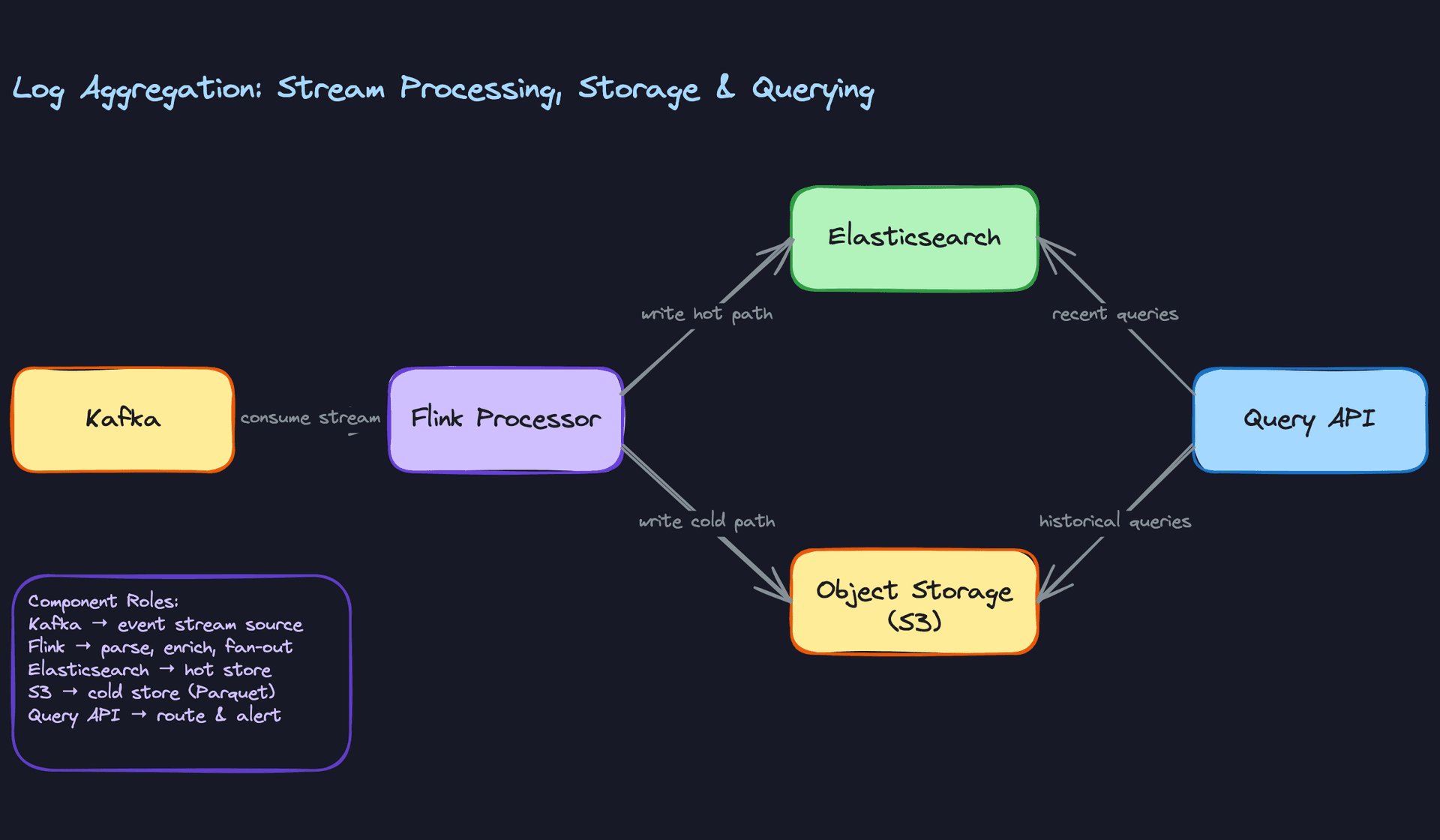
The key structural insight is that Kafka decouples every layer from every other layer. Agents don't need to know about Flink. Flink doesn't need to know about Elasticsearch's indexing speed. If Elasticsearch falls behind, Kafka absorbs the backpressure and Flink catches up when it recovers. That decoupling is what makes the system operationally manageable at scale.
Deep Dives
"How do we handle high-throughput ingestion without losing log data?"
At 100,000 log events per second across hundreds of services, your ingestion layer is the most likely place to drop data. The question isn't whether you'll see traffic spikes. It's whether your pipeline survives them.
Bad Solution: Synchronous HTTP with No Buffering
Each log agent makes a synchronous HTTP call to the ingestion API for every log line. If the API is slow or the network hiccups, the agent blocks. If it times out, the log is dropped. There's no retry, no local buffer, no acknowledgment.
This breaks in production almost immediately. A single downstream slowdown cascades into log loss across every service simultaneously. You have no way to recover what was dropped.
Warning: Candidates who propose direct agent-to-Elasticsearch writes fall into the same trap. Elasticsearch is not designed to absorb burst ingestion, and a write failure means permanent data loss.
Good Solution: Local Agent Buffering with Kafka as the Bus
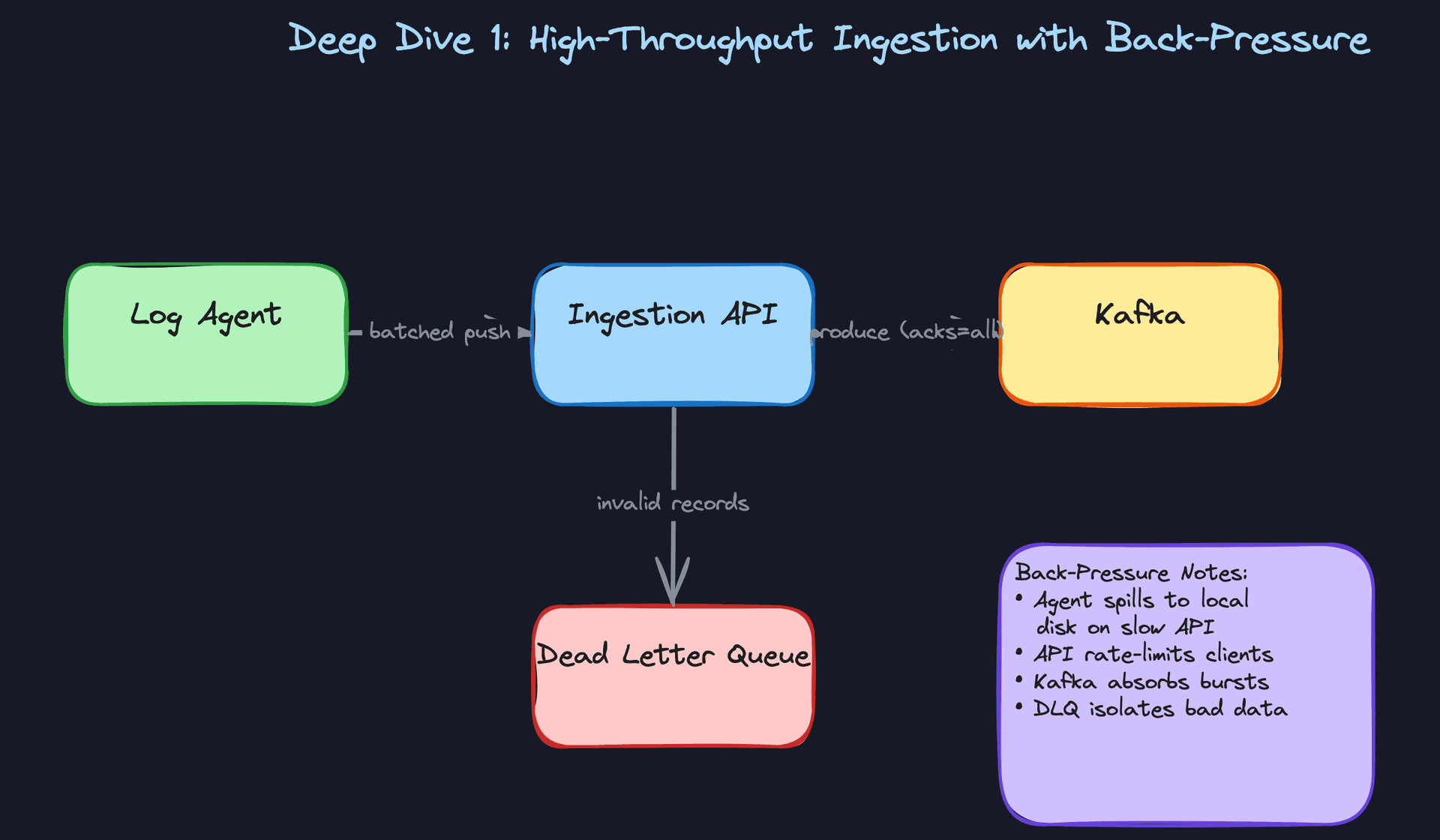
Run a log agent (Fluentd, Filebeat, or a custom sidecar) on every host. The agent tails log files or reads from a local socket, batches records, and writes to a local disk buffer before forwarding. If the ingestion API is unavailable, the agent spills to disk and retries. Nothing is dropped.
The ingestion API publishes to Kafka with acks=all, meaning the broker only acknowledges the write once all in-sync replicas have persisted it. This gives you durability even if a broker dies mid-write.
# Kafka producer config for durable ingestion
producer_config = {
    "bootstrap.servers": "kafka-broker-1:9092,kafka-broker-2:9092",
    "acks": "all",              # wait for all ISR replicas
    "retries": 10,
    "retry.backoff.ms": 200,
    "linger.ms": 5,             # batch for 5ms to improve throughput
    "batch.size": 65536,        # 64KB batches
    "compression.type": "lz4",  # compress before sending
}
The trade-off: acks=all adds latency compared to acks=1. For most log pipelines, that's a worthwhile trade. Audit logs especially should never use acks=1.
Great Solution: Back-Pressure-Aware Agents with Partition Sizing
The good solution handles steady-state load. The great solution handles the moment your biggest service has a bug and starts emitting 10x normal log volume.
Add explicit back-pressure signaling. When Kafka consumer lag grows past a threshold, the ingestion API returns a 429 with a Retry-After header. The agent respects this and spills to its local disk buffer rather than hammering the API. The disk buffer acts as a shock absorber, smoothing out bursts without dropping events.
Partition sizing matters here. A single Kafka partition is a sequential write log, and you can typically push 10-50 MB/s through one partition. If your target throughput is 500 MB/s, you need at least 10-50 partitions. Partition by (service_name, environment) so that consumers can filter efficiently and one noisy service doesn't starve others.
# Partition count estimation
target_throughput_mb_per_sec = 500
throughput_per_partition_mb = 20   # conservative estimate
replication_factor = 3

min_partitions = target_throughput_mb_per_sec / throughput_per_partition_mb
# = 25 partitions minimum; round up to 32 for headroom
Tip: Mentioning partition sizing and back-pressure together is a strong signal. Most candidates talk about Kafka in the abstract. Knowing that a partition is a sequential log with throughput limits, and sizing accordingly, is what separates senior candidates from mid-level ones.
"How do we handle schema evolution without breaking downstream pipelines?"
Your log schema will change. A team adds a new field, renames one, or changes a type from string to integer. If you have no schema enforcement, that change silently corrupts your pipeline.
Bad Solution: Free-Form JSON with No Enforcement
Producers write whatever JSON they want. The Flink processor tries to parse it. When a field changes type or disappears, the job throws a deserialization exception, the consumer falls behind, and you're paging someone at 2am to figure out which service changed its log format.
There's no audit trail of what changed or when. Rollback is manual. Backfilling the corrupted window requires guessing at the old schema from memory.
Warning: "We'll just use JSON and handle it in the processor" is the answer that tells an interviewer you haven't operated a real pipeline at scale. Schema drift is one of the most common causes of data quality incidents.
Good Solution: Avro with Schema Registry
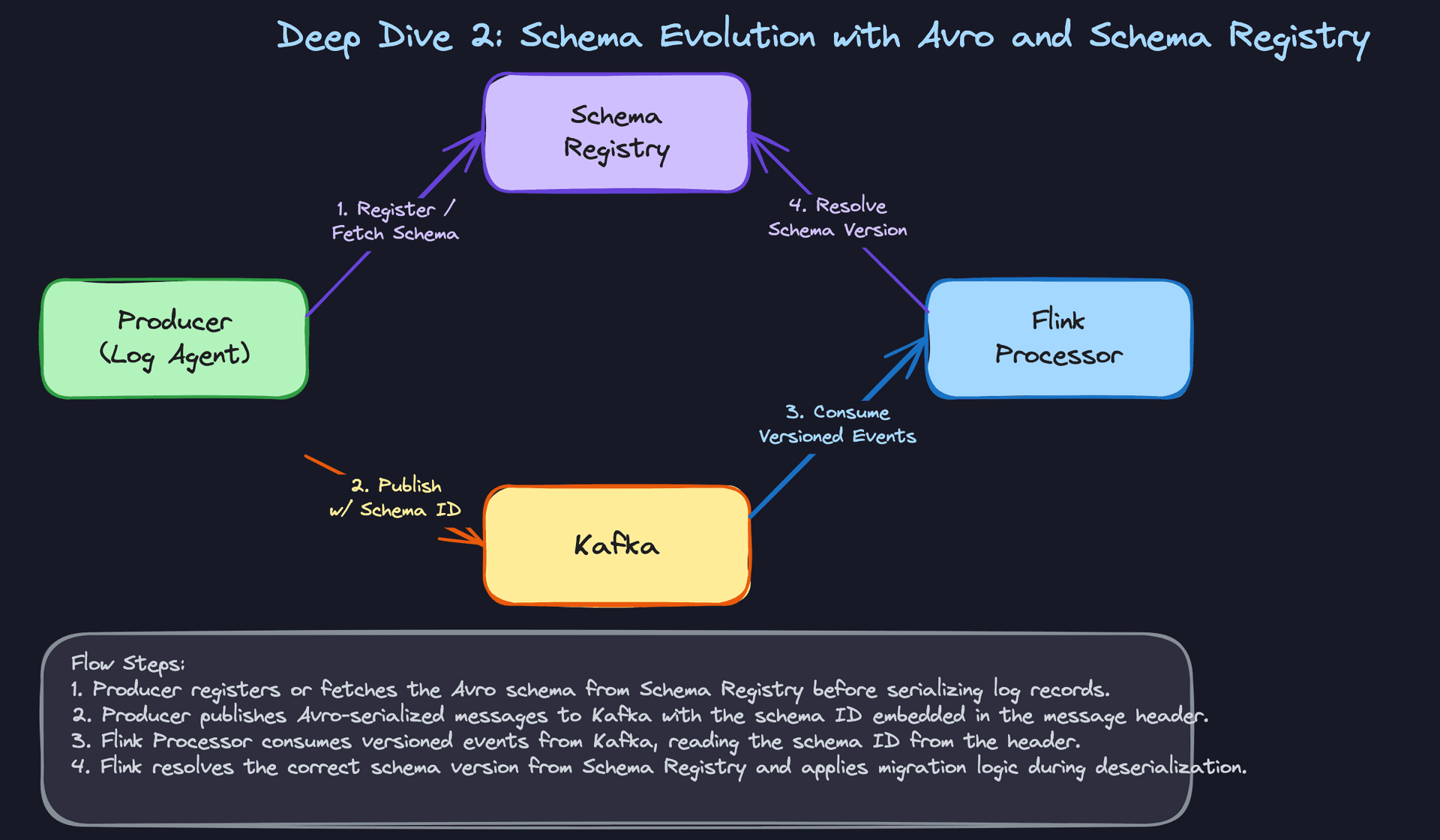
Every log producer registers its schema with a Schema Registry (Confluent's is the standard reference). The registry enforces compatibility rules: a new field must have a default value (backward-compatible), and you can't remove a required field without a migration plan.
The producer serializes the log record as Avro and includes the schema ID in the Kafka message header. The Flink consumer reads the header, fetches the schema from the registry, and deserializes correctly even if the schema has evolved since the message was written.
# Avro schema for a log event (v2 adds optional trace_id)
log_event_schema_v2 = {
    "type": "record",
    "name": "LogEvent",
    "namespace": "com.company.logs",
    "fields": [
        {"name": "timestamp",   "type": "long"},
        {"name": "source_id",   "type": "string"},
        {"name": "severity",    "type": {"type": "enum", "name": "Severity",
                                         "symbols": ["DEBUG","INFO","WARN","ERROR"]}},
        {"name": "message",     "type": "string"},
        {"name": "payload",     "type": ["null", "string"], "default": None},
        # New in v2 — has a default so v1 consumers still work
        {"name": "trace_id",    "type": ["null", "string"], "default": None},
    ]
}
This handles the common case: additive changes. It breaks down when you need a non-backward-compatible change, like renaming a field or changing a type.
Great Solution: Pipeline-Level Schema Versioning with Per-Version Flink Logic
Store the schema version on the Pipeline entity itself. When a breaking schema change is needed, you create a new pipeline version rather than mutating the existing one. The Flink processor carries deserialization logic for each known schema version and routes records to the correct handler based on the version embedded in the message header.
This means old and new producers can coexist during a rollout. You don't need a flag day where every service deploys simultaneously. The processor handles both versions until the old one drains.
# Flink deserialization router
def deserialize_log_event(raw_message: bytes, schema_version: int) -> LogEvent:
    if schema_version == 1:
        return deserialize_v1(raw_message)
    elif schema_version == 2:
        return deserialize_v2(raw_message)
    else:
        raise UnknownSchemaVersionError(f"No handler for schema version {schema_version}")

# In the Flink operator:
class LogDeserializationOperator(MapFunction):
    def map(self, kafka_record):
        version = kafka_record.headers.get("schema_version", 1)
        return deserialize_log_event(kafka_record.value, version)
When you eventually deprecate v1, you run a backfill to re-encode the old records as v2, then drop the v1 handler. Zero downtime, clean audit trail, no guesswork.
Tip: Describing schema versioning as a property of the pipeline entity, not just a Kafka header, shows you're thinking about the operational lifecycle. Interviewers at Uber and Airbnb will push on exactly this: "What happens when you need a breaking change?" Have a concrete answer.
"How do we manage storage costs as log volume grows?"
Log data compounds fast. At 500 MB/s ingestion, you're writing 43 TB per day. Keeping everything in Elasticsearch is financially untenable within weeks.
Bad Solution: Elasticsearch Forever
Elasticsearch is excellent for recent, frequently queried logs. It's expensive for everything else. Storing 90 days of logs in Elasticsearch means paying for hot SSD storage and keeping shards allocated even for data that gets queried once a month.
Elasticsearch also degrades under heavy write load when index sizes grow unbounded. Shard rebalancing, merge operations, and JVM pressure all increase as you accumulate data. Eventually you're spending more time keeping Elasticsearch healthy than using it.
Warning: Candidates who treat Elasticsearch as both the ingestion sink and the long-term archive are conflating two very different access patterns. Interviewers will probe this directly.
Good Solution: TTL in Elasticsearch plus Parquet on S3
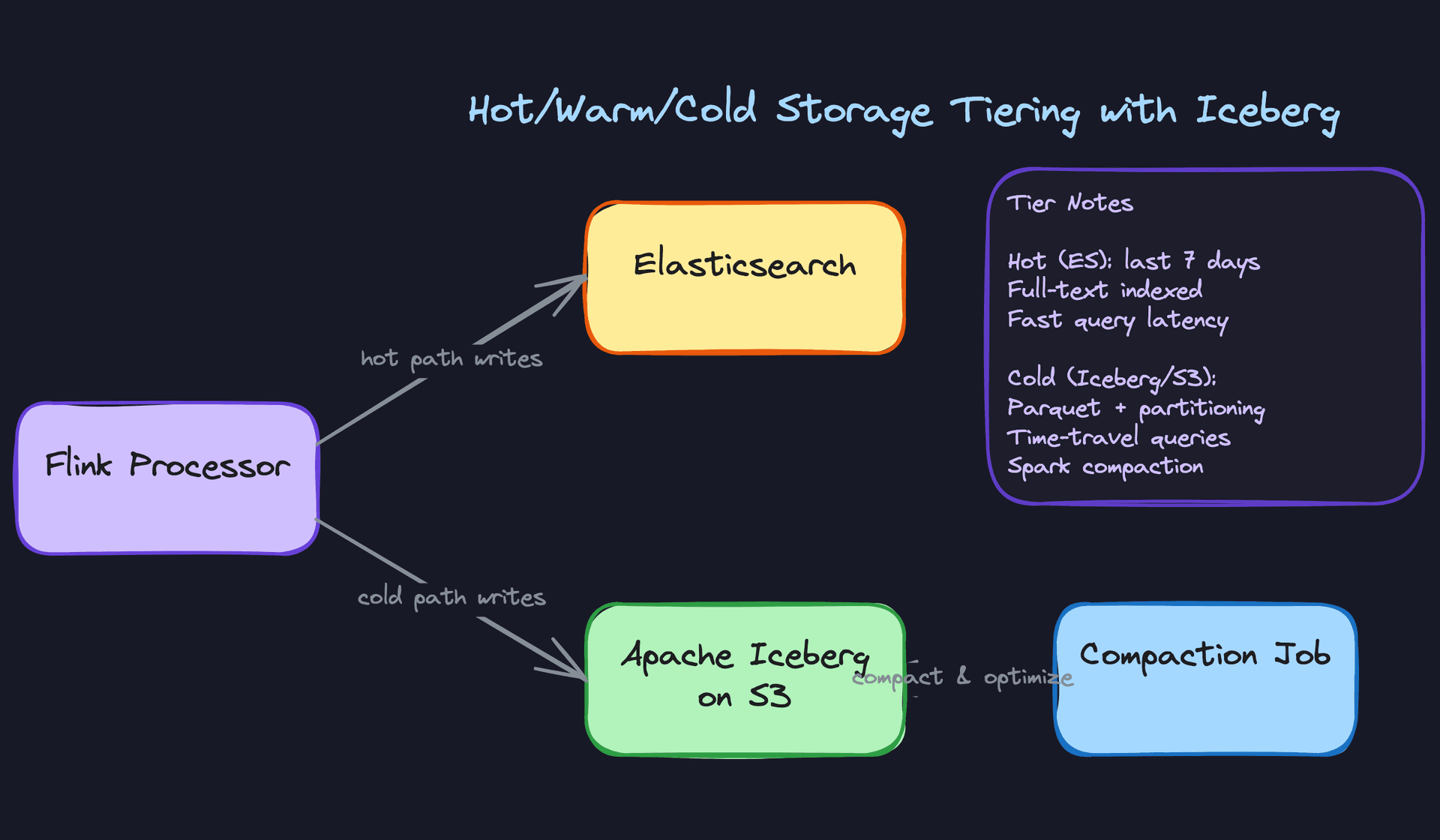
Set an index lifecycle policy in Elasticsearch: keep the last 7 days hot, delete anything older. Simultaneously, the Flink processor writes all records to S3 as Parquet files, partitioned by date and service.
s3://logs-cold/
  year=2024/month=11/day=15/service=payments/
    part-00000.parquet
    part-00001.parquet
  year=2024/month=11/day=15/service=auth/
    part-00000.parquet
Historical queries run via Athena or Trino against the Parquet files. Recent queries hit Elasticsearch. The query API layer decides which store to use based on the time range in the request.
The weakness: Flink writes many small Parquet files. A 5-minute micro-batch window for the payments service might produce dozens of 10MB files. Athena's query planner has to open each one, and small file overhead kills query performance on large time ranges.
Great Solution: Apache Iceberg with Automated Compaction
Replace the raw Parquet layout with an Apache Iceberg table. Iceberg adds a metadata layer on top of Parquet that enables partition pruning, hidden partitioning, and time-travel queries without changing the underlying file format.
The Flink processor writes to Iceberg directly. A periodic Spark compaction job (run every few hours via Airflow) merges the small files produced by streaming writes into larger, optimally-sized files. Iceberg's snapshot model means the compaction job and live readers never conflict.
# Airflow DAG: compact Iceberg partitions older than 4 hours
from airflow.decorators import dag, task
from datetime import datetime, timedelta

@dag(schedule_interval="0 */4 * * *", start_date=datetime(2024, 1, 1))
def compact_log_iceberg():

    @task
    def run_compaction(partition_date: str):
        spark.sql(f"""
            CALL logs_catalog.system.rewrite_data_files(
                table => 'logs.events',
                strategy => 'binpack',
                where => 'event_date = DATE "{partition_date}"',
                options => map(
                    'target-file-size-bytes', '134217728',  -- 128MB target
                    'min-input-files', '5'
                )
            )
        """)

    run_compaction(partition_date="{{ ds }}")
Iceberg also gives you time-travel for free. When a schema bug corrupts a partition, you can query the table as of a snapshot before the bad write and use that to drive a targeted backfill. That capability alone justifies the added complexity over raw Parquet.
Tip: Bringing up Iceberg's snapshot isolation and time-travel in the context of backfill recovery, not just storage efficiency, is the kind of cross-cutting thinking that distinguishes staff-level candidates. It shows you're connecting the storage layer design to operational concerns downstream.
"How do we build real-time alerting that fires within seconds of a threshold breach?"
The naive answer is "query Elasticsearch on a schedule." That works until it doesn't, and the failure modes are subtle.
Bad Solution: Polling Elasticsearch on a Cron
Every minute, a cron job runs a query like "count ERROR logs from the payments service in the last 5 minutes." If the count exceeds a threshold, fire an alert.
The problems stack up quickly. One-minute polling means up to 60 seconds of latency before an alert fires. Elasticsearch under write load returns stale results. If the cron job itself is slow or the Elasticsearch cluster is degraded, the alert silently stops firing. And if the same condition persists across multiple cron runs, you get duplicate alerts.
Warning: This is the answer most candidates give first. It's not wrong as a starting point, but stopping here signals you haven't thought about what happens at scale or under failure.
Good Solution: Flink Windowed Aggregations
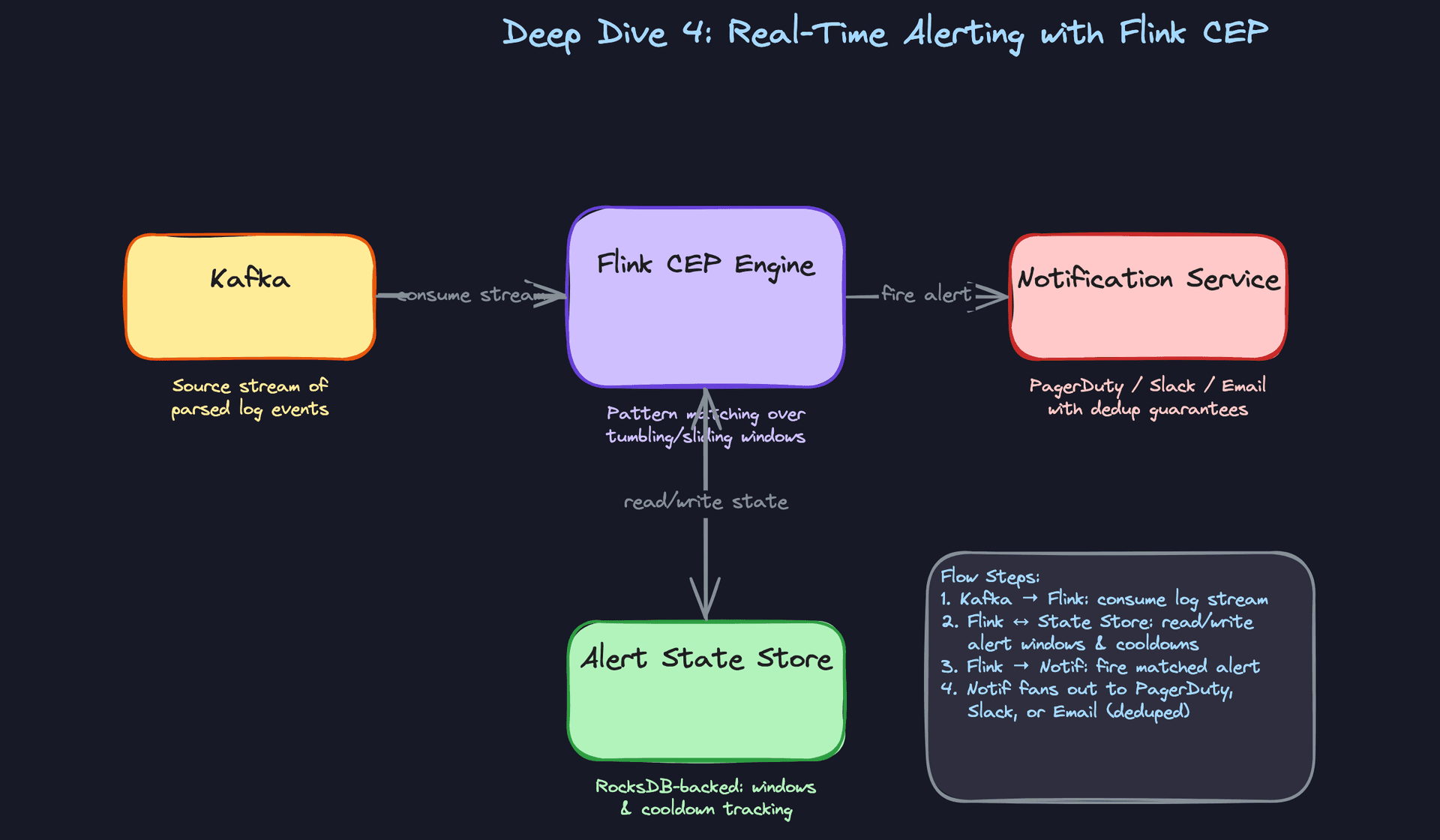
Move the alerting logic into the stream processor. A Flink job consumes the parsed log stream from Kafka and evaluates alert rules using tumbling or sliding windows.
# Flink: count ERROR events per service in 1-minute tumbling windows
error_stream = (
    log_stream
    .filter(lambda e: e.severity == "ERROR")
    .key_by(lambda e: e.source_id)
    .window(TumblingEventTimeWindows.of(Time.minutes(1)))
    .aggregate(CountAggregator())
)

# Fire alert if count exceeds threshold
def check_threshold(service_id, count, threshold=100):
    if count > threshold:
        fire_alert(service_id, count)
This gets you sub-minute latency and keeps alerting logic out of your query store. The trade-off: all alert rules are hardcoded in the Flink job. Adding a new alert rule requires a job redeployment.
Great Solution: Flink CEP with Stateful Deduplication
A dedicated Flink CEP (Complex Event Processing) layer evaluates alert rules dynamically. Rules are stored in a database and loaded into the Flink job at startup (or hot-reloaded via a control stream). Each rule defines a pattern: event type, field filters, aggregation function, window size, and threshold.
The critical addition is stateful deduplication. Without it, a sustained error spike fires one alert per window, flooding on-call with hundreds of pages. The CEP engine tracks active alert windows in RocksDB-backed state and enforces a cooldown period per rule. An alert that fired 3 minutes ago won't fire again for another 10 minutes unless the condition clears and re-triggers.
# Simplified CEP rule structure
alert_rule = {
    "rule_id": "payments-error-spike",
    "filter": {"service": "payments", "severity": "ERROR"},
    "window_seconds": 60,
    "threshold": 100,
    "aggregation": "count",
    "cooldown_seconds": 600,   # suppress re-alerts for 10 minutes
    "notify_channel": "pagerduty:payments-oncall"
}

# RocksDB state key: (rule_id, window_start)
# Value: {"last_fired_at": timestamp, "active": bool}
The cooldown state also survives Flink checkpoints. If the job restarts, it doesn't lose track of which alerts are in their suppression window and accidentally re-fires everything.
Tip: Mentioning RocksDB-backed state for cooldown tracking shows you understand that stateful stream processing has operational implications beyond just the logic. Flink's state backend choice affects recovery time and memory pressure. That's a detail that lands well with senior interviewers.
"How do we reprocess historical logs when our pipeline logic changes?"
Reprocessing is inevitable. A schema bug corrupts two hours of data. A new enrichment field needs to be backfilled across 30 days of logs. An alert rule was wrong and you need to retroactively recompute aggregations. Every production log pipeline eventually needs to replay.
Bad Solution: Replay from Kafka
Kafka retains messages for a configurable period. The obvious answer is to reset consumer offsets and replay.
This works for recent data within the retention window (typically 7 days). It completely fails for anything older. And even within the retention window, replaying at full speed puts the same load on your downstream systems as live ingestion, which can overwhelm Elasticsearch during business hours.
Warning: Proposing Kafka replay as your primary backfill strategy without acknowledging the retention limit is a red flag. Interviewers will immediately ask "what if the data is 30 days old?" Have an answer ready.
Good Solution: Spark Batch Job Reading from Cold Storage
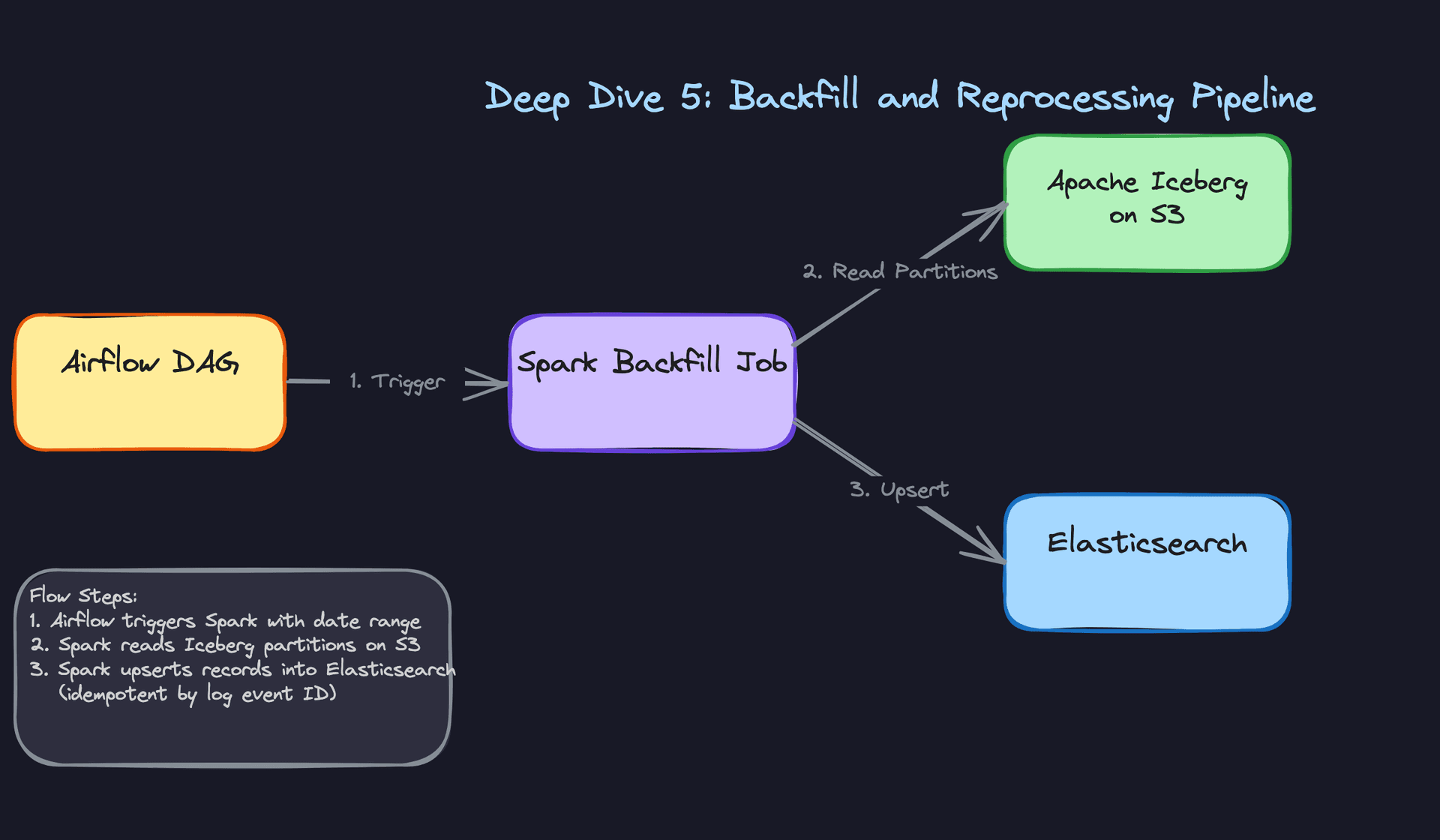
The cold store (S3 Parquet or Iceberg) is your source of truth for historical data. A Spark job reads the relevant partitions, applies the new logic, and writes the results back to Elasticsearch using the log event's UUID as the document ID. Because Elasticsearch upserts on document ID, re-running the job is safe. It overwrites the old record rather than creating a duplicate.
from pyspark.sql import SparkSession
from pyspark.sql.functions import col, udf

spark = SparkSession.builder.appName("log-backfill").getOrCreate()

# Read only the affected partitions
logs = spark.read.format("iceberg").load("logs_catalog.logs.events").filter(
    (col("event_date") >= "2024-11-01") & (col("event_date") <= "2024-11-15")
)

# Apply new enrichment logic
enriched = logs.withColumn("region", extract_region_udf(col("source_id")))

# Write to Elasticsearch with idempotent upsert
enriched.write \
    .format("org.elasticsearch.spark.sql") \
    .option("es.resource", "logs-2024-11") \
    .option("es.mapping.id", "id") \      # log event UUID as doc ID
    .option("es.write.operation", "upsert") \
    .mode("append") \
    .save()
Orchestrate this with an Airflow DAG that accepts a date range as a parameter, so on-call engineers can trigger targeted backfills without touching code.
Great Solution: Parameterized Airflow DAG with Rate Limiting and Progress Tracking
The good solution works but can overwhelm Elasticsearch if you throw 30 days of data at it at full Spark throughput. The great solution adds rate limiting at the write stage and breaks the backfill into daily partitions, each running as a separate Airflow task. If one partition fails, you retry just that day rather than the entire range.
Add a progress table that records which partitions have been successfully reprocessed. The DAG checks this table before submitting each Spark job, making the entire backfill idempotent at the partition level.
@dag(
    schedule_interval=None,  # triggered manually
    params={"start_date": "2024-11-01", "end_date": "2024-11-15"}
)
def log_backfill_dag():

    @task
    def get_pending_partitions(start_date, end_date):
        # Returns dates not yet in the backfill_progress table
        return query_pending_partitions(start_date, end_date)

    @task
    def backfill_partition(partition_date: str):
        submit_spark_job(
            partition_date=partition_date,
            max_records_per_second=50_000,   # rate limit writes to ES
        )
        mark_partition_complete(partition_date)

    pending = get_pending_partitions(
        start_date="{{ params.start_date }}",
        end_date="{{ params.end_date }}"
    )
    backfill_partition.expand(partition_date=pending)
The rate limit is the piece most candidates miss. Elasticsearch has a finite indexing throughput. Blasting it with a full backfill during peak hours will degrade live query performance for your users. Throttling the backfill to 50% of Elasticsearch's write capacity keeps the system stable while the reprocessing runs in the background.
Tip: Connecting the backfill design back to Elasticsearch's write capacity, and proposing explicit rate limiting, shows operational maturity. It's the difference between a design that works in a demo and one that works on a Tuesday afternoon when the payments service is also under load.
What is Expected at Each Level
Interviewers calibrate their expectations based on your level, but one thing is constant across all three: they want concrete answers when they push on failure modes. "It depends" without a follow-up is not an answer. "Kafka consumer lag grows, so we monitor lag per partition and scale out Flink task managers horizontally, but we also need to make sure Elasticsearch can absorb the catch-up writes without falling over" is an answer.
Mid-Level
- Sketch the full pipeline end-to-end: agents collecting logs, Kafka as the transport layer, a stream processor fanning out to hot and cold storage. You don't need to name-drop every tool, but you should know why each layer exists.
- Explain why Kafka sits in the middle. The answer isn't "it's a message queue." It's that Kafka decouples producers from consumers, absorbs burst traffic, and gives you replay when the downstream processor crashes or falls behind.
- Define the core entities clearly: LogEvent, LogSource, Pipeline, Alert. Know which fields matter for partitioning and querying (timestamp, service name, severity) and why you'd store the payload as JSONB rather than a flat schema.
- When the interviewer asks what happens if the stream processor falls behind, give a real answer. Kafka consumer lag grows, recent logs don't make it to Elasticsearch, dashboards go stale. The mitigation is horizontal scaling plus a lag alert that fires before users notice.
Senior
- Go beyond "use Avro with Schema Registry" and explain the operational reality. When a new field gets added to a log schema, you need backward-compatible evolution so old Flink jobs can still deserialize messages produced by updated agents. Walk through what a breaking change looks like and how you'd prevent it from reaching production.
- Storage cost is a real concern at scale. A senior candidate proposes a concrete tiering strategy: Elasticsearch holds the last 7 days with an index lifecycle policy that deletes older indices automatically, while Parquet on S3 with Iceberg handles everything beyond that. Bonus if you mention compaction jobs to prevent the small-file problem from killing query performance.
- Backfills come up constantly in log systems, whether from a schema bug, a new enrichment field, or a missed data window. Explain how you'd run a Spark job against the cold store, and why idempotent upserts using the log event ID as the Elasticsearch document ID make reprocessing safe to run multiple times.
- Unprompted: mention data quality checks. If a service suddenly stops emitting logs, that's a silent failure. A volume-drop alert on the Kafka topic, or a Flink job that tracks expected-vs-actual event counts per source, catches this before an on-call engineer finds out from a customer.
Staff+
- Drive the conversation toward delivery semantics and their real costs. At-least-once is the practical default for most log pipelines, but audit logs may require exactly-once. Exactly-once with Kafka and Flink is achievable via transactional producers and two-phase commit sinks, but it adds latency and operational complexity. A staff candidate makes this trade-off explicit rather than assuming one answer fits all log types.
- Multi-region comes up at companies operating globally. You should have a point of view on whether each region runs an independent pipeline (lower blast radius, higher operational overhead) or whether logs are replicated cross-region into a central aggregation cluster (simpler querying, higher egress cost, replication lag risk).
- The alerting layer needs a design that prevents alert storms. A single bad deploy can trigger thousands of error-level log events in seconds. A staff candidate proposes per-rule cooldown windows, deduplication in the Flink CEP layer using RocksDB-backed state, and a suppression mechanism so on-call engineers get one page, not five hundred.
- Think about how this system evolves. Log volumes grow. New teams onboard. Query patterns shift from "search by message text" to "aggregate error rates by trace ID." A staff-level answer addresses how the pipeline schema, storage partitioning strategy, and query routing layer accommodate that growth without a full redesign every eighteen months.
Key takeaway: A log aggregation system is only as good as its weakest link under pressure. The real design challenge isn't the happy path; it's what happens when Kafka lags, Elasticsearch falls behind, a schema change corrupts a partition, or a noisy service floods the pipeline. Build every layer to degrade gracefully, and make sure your monitoring catches problems before your users do.
