
Understanding the Problem
Product definition: A recommendation data pipeline ingests raw user interaction events, computes features, and produces ranked item lists that a serving layer can deliver to users in real time.
What is a Recommendation Data Pipeline?
Most recommendation systems have two visible parts: the model and the UI. The pipeline is the invisible third part, and it's where most of the engineering complexity lives. It's responsible for collecting signals, transforming them into features, feeding those features to a model, and writing the output somewhere an application can read it fast.
The tricky part is that "recommendation pipeline" means very different things depending on the surface. A homepage feed needs fresh signals and low-latency ranked output. A weekly email digest can tolerate a 24-hour-old batch job. Similar-item recommendations on a product page sit somewhere in between. Before you draw a single box on the whiteboard, you need to nail down which problem you're actually solving.
Functional Requirements
The first question to ask your interviewer: "Which recommendation surface are we building for?" For this lesson, assume a real-time homepage feed for a content platform (think Spotify's home tab or Netflix's landing page).
Core Requirements
- Ingest user interaction events (clicks, views, skips, ratings) from the application layer in real time
- Compute user and item features on both a streaming path (sub-minute freshness) and a batch path (daily long-horizon features)
- Generate ranked candidate lists per user and write them to a low-latency serving store
- Close the feedback loop by routing impression and outcome events back into the pipeline for the next model training cycle
Below the line (out of scope)
- A/B testing infrastructure and experiment assignment (we'll assume the ML team owns model evaluation)
- Real-time model inference at request time (we're pre-computing recommendations, not running the ranker inline)
- Content moderation and filtering rules applied at serving time
Note: "Below the line" features are acknowledged but won't be designed in this lesson.
Non-Functional Requirements
- Scale: 50 million daily active users, a catalog of 10 million items, and approximately 200,000 interaction events per second at peak
- Freshness SLA: Streaming features must reflect events within 2 minutes; batch features refresh every 24 hours on a nightly schedule
- Serving latency: Pre-computed recommendation lists must be readable in under 10ms at p99 from the serving store
- Fault tolerance: The pipeline must be idempotent; a failed batch run or Kafka consumer restart should produce identical output without duplicating records
Tip: Always clarify requirements before jumping into design. This shows maturity.
The freshness SLA is the single most consequential number you'll agree on. It determines whether you need a streaming path at all, which drives most of the architectural complexity downstream. If your interviewer says "nightly batch is fine," your design gets dramatically simpler.
Back-of-Envelope Estimation
Assume 50M DAU, each user generating roughly 150 events per day across sessions.
| Metric | Calculation | Result |
|---|---|---|
| Peak event ingestion QPS | 50M users × 150 events/day ÷ 86,400s × 2.5x peak factor | ~218,000 events/sec |
| Raw event storage (daily) | 218K events/sec × 86,400s × 500 bytes/event | ~9.4 TB/day |
| Feature store size (online) | 50M users × 512 floats × 4 bytes + 10M items × 512 floats × 4 bytes | ~122 GB |
| Recommendation store size | 50M users × 100 item IDs × 8 bytes × 2 (scores) | ~80 GB |
| Kafka throughput (inbound) | 218K events/sec × 500 bytes | ~109 MB/sec |
The feature store number is small enough to fit in a large Redis cluster with replication, which is why pre-computing features rather than computing them at request time is the right call at this scale. The raw event storage growing at ~9.4 TB/day means you'll want Parquet with Snappy compression and aggressive partitioning by date, which we'll cover in the high-level design.
The Set Up
Before you touch architecture, you need to agree on what you're actually modeling. Interviewers want to see that you can identify the core domain objects and their relationships before jumping to Kafka and Spark. Nail this and the rest of the design falls into place naturally.
Core Entities
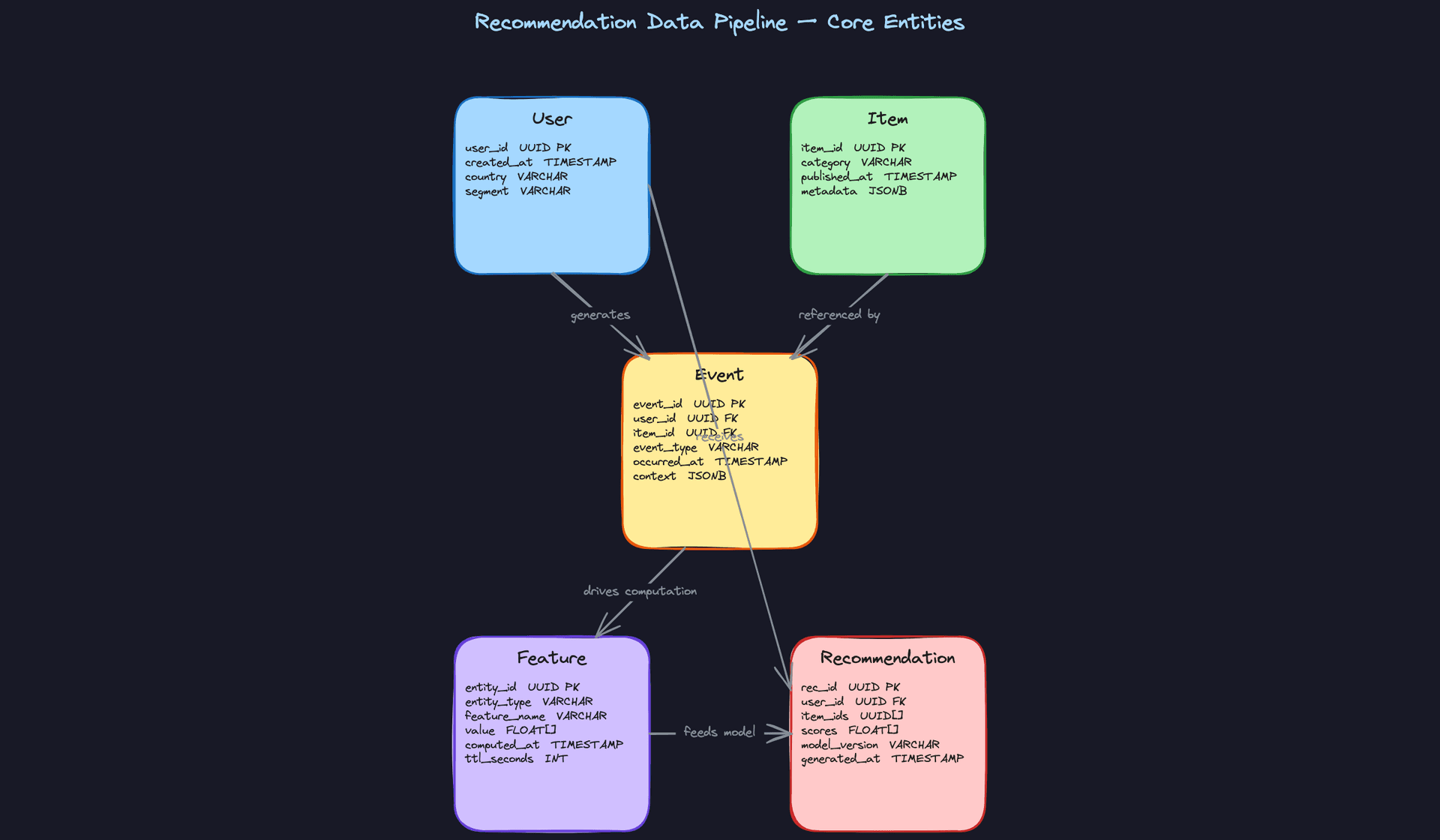
Five entities drive this system. Get comfortable explaining each one in a sentence, because the interviewer will almost certainly ask you to walk through them.
User is the consumer of recommendations. You need enough profile information to segment users and support cold-start fallbacks, but you're not building a user service here. Keep it lean.
CREATE TABLE users (
    user_id    UUID PRIMARY KEY DEFAULT gen_random_uuid(),
    created_at TIMESTAMP NOT NULL DEFAULT now(),
    country    VARCHAR(10),                        -- ISO 3166-1 alpha-2
    segment    VARCHAR(50),                        -- e.g. 'power_user', 'casual', 'new'
    metadata   JSONB NOT NULL DEFAULT '{}'         -- extensible profile attributes
);
Item is whatever you're recommending: a video, a product, an article. The metadata column does a lot of work here because item schemas vary wildly across domains, and you want schema flexibility without a migration every time a new content type appears.
CREATE TABLE items (
    item_id      UUID PRIMARY KEY DEFAULT gen_random_uuid(),
    category     VARCHAR(100) NOT NULL,
    published_at TIMESTAMP NOT NULL,
    is_active    BOOLEAN NOT NULL DEFAULT true,    -- soft-delete for expired content
    metadata     JSONB NOT NULL DEFAULT '{}'       -- title, tags, content embeddings, etc.
);

CREATE INDEX idx_items_category ON items(category);
CREATE INDEX idx_items_published ON items(published_at DESC);
Event is the connective tissue of the whole system. Every other entity either produces events or is shaped by them. An event links a user to an item at a point in time, and the event_type field is what separates a strong signal (purchase, save) from a weak one (hover, scroll-past). The context column captures session metadata like device type and page position, which become features later.
CREATE TABLE events (
    event_id    UUID PRIMARY KEY DEFAULT gen_random_uuid(),
    user_id     UUID NOT NULL REFERENCES users(user_id),
    item_id     UUID NOT NULL REFERENCES items(item_id),
    event_type  VARCHAR(50) NOT NULL,              -- 'click', 'view', 'purchase', 'skip', 'save'
    occurred_at TIMESTAMP NOT NULL,                -- client-side timestamp, not ingestion time
    ingested_at TIMESTAMP NOT NULL DEFAULT now(),  -- for lag monitoring
    context     JSONB NOT NULL DEFAULT '{}'        -- device, session_id, page_position, etc.
);

-- Partitioned by date in practice (Iceberg / Hive-style partitioning on occurred_at)
CREATE INDEX idx_events_user_time ON events(user_id, occurred_at DESC);
CREATE INDEX idx_events_item_time ON events(item_id, occurred_at DESC);
Interview tip: When you present the Event schema, point out the difference betweenoccurred_atandingested_at. Late-arriving events are common in mobile apps where users go offline. Your batch jobs should always process onoccurred_at, notingested_at, or your training data will have subtle time-ordering bugs.
Feature is the computed representation of a user or item, stored in the feature store. This is not a traditional relational table in production (you'd use Redis, DynamoDB, or a purpose-built store like Feast), but modeling it as a schema helps clarify what you're actually persisting. The ttl_seconds field matters: streaming features like "clicked in the last 5 minutes" should expire quickly, while batch features like "30-day affinity vector" can live for days.
CREATE TABLE features (
    entity_id    UUID NOT NULL,                    -- user_id or item_id
    entity_type  VARCHAR(20) NOT NULL,             -- 'user' or 'item'
    feature_name VARCHAR(100) NOT NULL,            -- e.g. 'user_affinity_vector_30d'
    value        FLOAT[] NOT NULL,                 -- embedding or scalar wrapped in array
    computed_at  TIMESTAMP NOT NULL,
    ttl_seconds  INT NOT NULL DEFAULT 86400,       -- 0 = no expiry

    PRIMARY KEY (entity_id, entity_type, feature_name)
);

CREATE INDEX idx_features_entity ON features(entity_id, entity_type);
Recommendation is the output record: a pre-ranked list of item IDs written to a serving store after the model runs. The model_version field is non-negotiable. Without it, you cannot attribute a click or a conversion back to the model that generated the recommendation, and your feedback loop breaks.
CREATE TABLE recommendations (
    rec_id           UUID PRIMARY KEY DEFAULT gen_random_uuid(),
    user_id          UUID NOT NULL REFERENCES users(user_id),
    item_ids         UUID[] NOT NULL,              -- ordered, index 0 = highest rank
    scores           FLOAT[] NOT NULL,             -- parallel array of model scores
    model_version    VARCHAR(50) NOT NULL,         -- e.g. 'ranker-v4.2.1'
    generated_at     TIMESTAMP NOT NULL DEFAULT now(),
    expires_at       TIMESTAMP                     -- NULL = serve until replaced
);

CREATE INDEX idx_recs_user ON recommendations(user_id, generated_at DESC);
API Design
A recommendation pipeline is primarily a data system, not a request/response API. But you still need well-defined interfaces at two boundaries: event ingestion (data flowing in) and recommendation retrieval (data flowing out). There's also an internal interface for the feature store that's worth defining.
// Ingest a user interaction event from the client or server
POST /events
{
  "user_id": "uuid",
  "item_id": "uuid",
  "event_type": "click | view | purchase | skip | save",
  "occurred_at": "ISO8601 timestamp",
  "context": {
    "session_id": "uuid",
    "device": "mobile | desktop",
    "page_position": 3
  }
}
-> { "event_id": "uuid", "status": "accepted" }
// Fetch pre-computed recommendations for a user
GET /recommendations/{user_id}?surface=homepage&limit=20
-> {
  "user_id": "uuid",
  "items": [
    { "item_id": "uuid", "score": 0.94, "rank": 1 },
    ...
  ],
  "model_version": "ranker-v4.2.1",
  "generated_at": "ISO8601 timestamp"
}
// Write computed features for a user or item (internal pipeline use)
PUT /features/{entity_type}/{entity_id}
{
  "features": {
    "user_affinity_vector_30d": [0.12, 0.87, ...],
    "click_count_5m": [3.0]
  },
  "computed_at": "ISO8601 timestamp",
  "ttl_seconds": 300
}
-> { "status": "ok", "entity_id": "uuid" }
POST for event ingestion makes sense because you're creating a new record and the operation is not idempotent by default (though you should add idempotency keys in production). GET for recommendations is a pure read with no side effects. PUT for feature writes is intentional: you're replacing the current feature value for an entity, not appending, so PUT's "replace the resource" semantics fit better than POST.
Common mistake: Candidates sometimes design the recommendation endpoint as a real-time scoring call, where the GET triggers a model inference on the fly. That's the wrong default. At scale, you pre-compute and cache ranked lists. Real-time scoring is a special case for very fresh signals, not the baseline architecture.
The event ingestion endpoint should feel like a fire-and-forget write from the client's perspective. The actual dual write to Kafka and cold storage happens asynchronously downstream. The client gets a 202 Accepted, not a 200 OK, which signals that the event is queued but not yet durably processed.
High-Level Design
The pipeline breaks into three stages that flow into each other: get events in reliably, compute features from those events, then generate and serve ranked recommendations. Each stage has its own latency profile, tooling, and failure modes. Walk through them in order.
1) Event Ingestion and Raw Storage
Core components: Client/App, Kafka, Flink (stream consumer), S3/GCS (batch sink), Iceberg (raw event table)
The moment a user clicks, skips, or dwells on an item, that signal needs to land somewhere durable fast. Here's the flow:
- The client emits an event payload (user_id, item_id, event_type, timestamp, context) to an event collection service.
- The collection service publishes to Kafka, partitioned by
user_id. Partitioning by user keeps all events for a given user on the same partition, which matters for ordered feature computation downstream. - Two Kafka consumers operate in parallel: a Flink job for real-time feature updates, and a batch sink consumer (e.g., Kafka Connect or a custom application) that writes Parquet files to S3/GCS.
- The Parquet files land in a date-partitioned directory structure and are registered as partitions in an Iceberg table, making them immediately queryable by Spark.
{
  "event_id": "uuid-v4",
  "user_id": "usr_abc123",
  "item_id": "itm_xyz789",
  "event_type": "click",
  "occurred_at": "2024-01-15T14:23:01.456Z",
  "context": {
    "surface": "homepage_feed",
    "position": 3,
    "session_id": "sess_def456"
  }
}
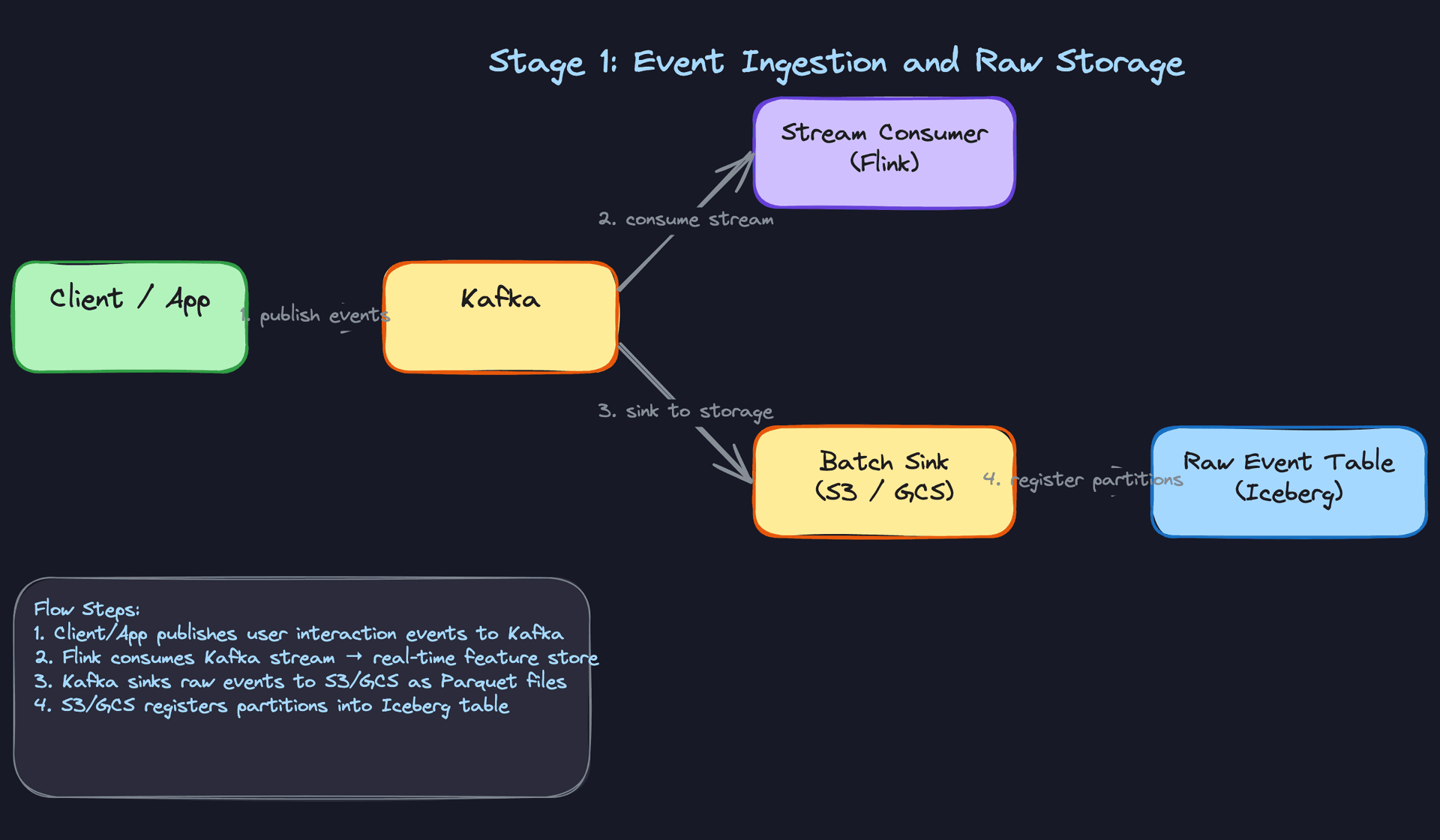
The key design decision here is the dual-write pattern: every event goes to both Kafka (for streaming) and cold storage (for batch). This is intentional redundancy. Kafka retention is typically 7 days; S3 is forever. If you need to backfill six months of features, you're reading from Iceberg, not replaying Kafka.
Common mistake: Candidates often propose writing directly to S3 from the client and skipping Kafka entirely. That works for batch, but you lose the ability to build real-time features without a major rearchitecture later. Kafka is the buffer that lets both paths coexist.
Iceberg is worth calling out explicitly. Unlike raw Parquet on S3, Iceberg gives you schema evolution, partition pruning, and time-travel queries. When your event schema adds a new field (say, dwell_time_ms), Iceberg handles the backward compatibility so your Spark jobs don't break on old partitions.
2) Feature Computation: Batch and Streaming Paths
Core components: Iceberg (source), Spark (batch), Flink (streaming), Offline Feature Store (Parquet snapshots), Online Feature Store (Redis/DynamoDB)
This is where the pipeline splits into two parallel tracks, and understanding why both exist is what separates a good answer from a great one.
The batch path runs on a daily Airflow schedule. Spark reads the full Iceberg event table and computes long-horizon features: 30-day user affinity vectors, item co-occurrence matrices, user segment embeddings. These features are accurate because they're computed over complete, deduplicated history. They're written to the offline feature store as Parquet snapshots (for training) and bulk-loaded into Redis (for serving).
# Simplified Spark job: compute 30-day user category affinity
from pyspark.sql import functions as F

events = spark.read.format("iceberg").load("prod.events") \
    .filter(F.col("occurred_at") >= F.date_sub(F.current_date(), 30)) \
    .filter(F.col("event_type").isin(["click", "purchase", "like"]))

# items DataFrame loaded from the item catalog (e.g., a separate Iceberg table)
user_affinity = events.join(items, "item_id") \
    .groupBy("user_id", "category") \
    .agg(F.count("*").alias("interaction_count")) \
    .withColumn(
        "affinity_score",
        F.col("interaction_count") / F.sum("interaction_count").over(
            Window.partitionBy("user_id")
        )
    )

user_affinity.write.format("iceberg") \
    .mode("overwrite") \
    .partitionBy("computed_date") \
    .save("prod.features.user_category_affinity")
The streaming path runs continuously. Flink consumes from Kafka and maintains short-horizon aggregations: click counts in the last 5 minutes, items viewed in the current session, real-time popularity scores. These features are written directly to the online feature store (Redis) with a TTL that matches their relevance window.
The two paths write to the same online store, with batch features serving as the stable baseline and streaming features layered on top. At read time, the ranking model sees both: a user's 30-day affinity vector from the batch job, plus their last-5-minute click signal from Flink.
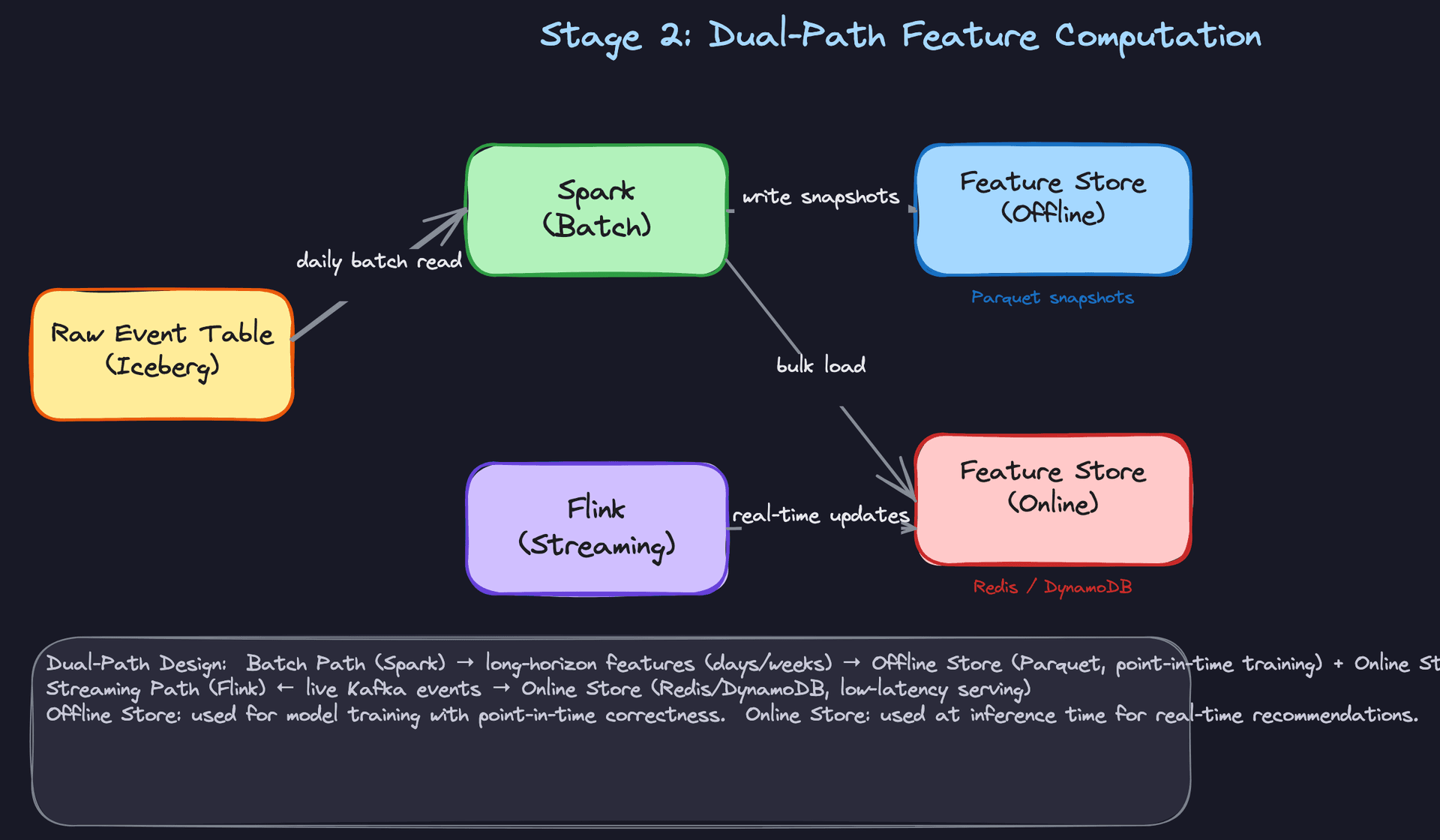
Key insight: The batch path is authoritative; the streaming path is approximate. Flink's aggregations may have slight inconsistencies under failures or reprocessing. That's acceptable because these features have short TTLs and will be overwritten by the next batch run anyway. Don't try to make the streaming path perfectly consistent; that's what the batch path is for.
One operational trap to flag: if the batch job and Flink job both write the same feature key to Redis, you need a clear merge strategy. A common pattern is namespacing: user:{user_id}:affinity:batch vs user:{user_id}:affinity:stream. The ranking model reads both and the feature vector concatenates them. This avoids silent overwrites where a stale batch write clobbers a fresh streaming update.
3) Candidate Generation, Ranking, and Serving
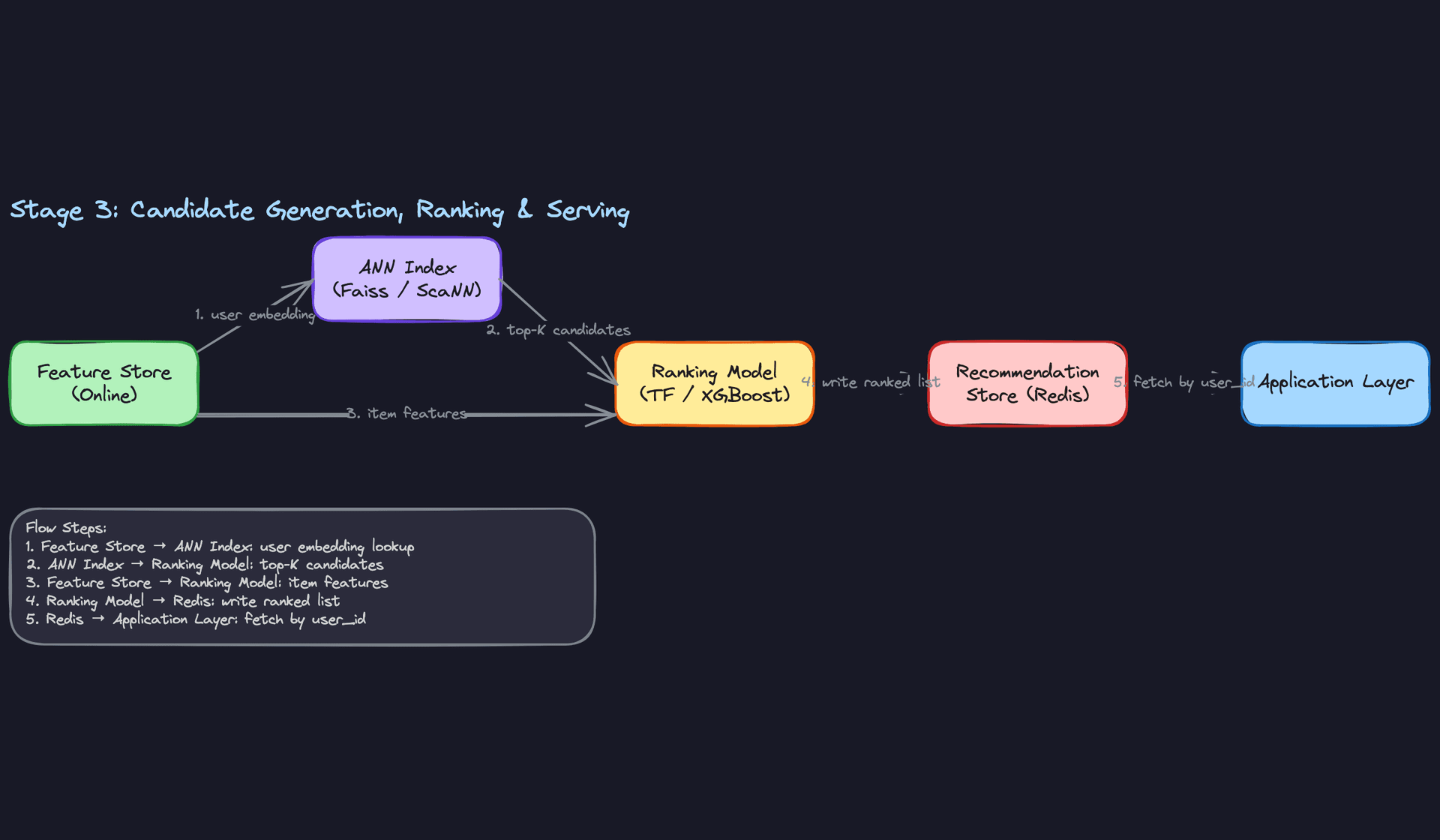
Core components: Online Feature Store, ANN Index (Faiss/ScaNN), Ranking Model, Recommendation Store (Redis), Application Layer
You cannot run a full ranking model over millions of items per user request. The candidate generation step exists to make that tractable.
- A scheduled job (daily or hourly) reads item embeddings from the feature store and builds an ANN index using Faiss or ScaNN. This index lives in memory on a dedicated fleet of retrieval servers.
- When it's time to generate recommendations for a user, either on a regular schedule or because a user event has triggered prioritization of that user's next batch generation run, the system fetches the user's embedding from the online feature store.
- The user embedding is sent to the ANN index, which returns the top-K most similar items (typically 200-500 candidates) in milliseconds.
- Those candidates, along with their full feature vectors, are passed to the ranking model (XGBoost or a TensorFlow-based neural ranker). The ranker scores each candidate using the complete feature set: user features, item features, and cross features like user-item affinity.
- The ranked list is written to Redis, keyed by
user_id, with a TTL of a few hours. - When the application layer needs recommendations, it does a single Redis GET by
user_id. No pipeline code runs at request time.
# Pseudocode: candidate generation and ranking batch job
def generate_recommendations(user_ids: list[str], top_k: int = 20):
    for user_id in user_ids:
        # Step 1: fetch user embedding from online feature store
        user_embedding = feature_store.get(f"user:{user_id}:embedding")

        # Step 2: ANN retrieval
        candidate_item_ids = ann_index.search(user_embedding, k=500)

        # Step 3: fetch item features for candidates
        item_features = feature_store.batch_get(
            [f"item:{iid}:features" for iid in candidate_item_ids]
        )

        # Step 4: rank
        scores = ranking_model.predict(user_embedding, item_features)
        ranked = sorted(zip(candidate_item_ids, scores),
                        key=lambda x: x[1], reverse=True)[:top_k]

        # Step 5: write to serving store
        redis.setex(
            f"recs:{user_id}",
            ex=3600,
            value=serialize(ranked)
        )
Pre-computing recommendations for all users is the right default for most systems. At 50K events/sec with tens of millions of users, you cannot afford to run the full retrieval-ranking pipeline at request time for every page load. The trade-off is staleness: a user who changes their preferences dramatically won't see updated recommendations until the next generation cycle. For most surfaces (homepage feed, email digest), that's acceptable.
Interview tip: When the interviewer asks "but what if the user's recommendations are stale?", the answer is to shorten the generation cycle for active users. Run the pipeline every 15 minutes for users who've had events in the last hour, and daily for inactive users. Tiered freshness by user activity is a standard pattern at Airbnb and Spotify.
The feedback loop closes here. Impression events (which recommendations were shown) and outcome events (which were clicked or purchased) flow back through Kafka into the same ingestion layer from Stage 1. They feed the feature store for the next generation cycle and accumulate in the Iceberg event table as labeled training data for the next model version. The model_version field on the Recommendation record is what makes this attribution possible: you can always trace an outcome back to the exact model that generated the recommendation.
Putting It All Together
The full pipeline is a directed cycle, not a linear flow. Events drive features, features drive recommendations, recommendations drive events. Each stage has a clear latency tier: ingestion is seconds, batch feature computation is hours, streaming feature updates are sub-minute, serving reads are under 10ms.
The Airflow DAG is the operational backbone. It schedules the daily Spark feature jobs, triggers the candidate generation run after features are ready, and monitors SLAs at each stage. If the feature job misses its SLA, the generation job should not run with stale features; it should alert and hold the previous recommendation set rather than silently degrade.
The ANN index is the architectural piece candidates most often forget. Without it, you're either running the ranker over all items (impossible at scale) or doing random candidate sampling (terrible quality). The retrieval-then-rank pattern is standard across Netflix, YouTube, and Pinterest for exactly this reason.
Deep Dives
Interviewers won't just ask you to sketch the happy path. Once you've laid out the high-level design, they'll push on the hard parts: freshness guarantees, cold start, skew, backfills, and data quality. These are the questions that separate candidates who've read about recommendation systems from candidates who've actually operated them.
"How do we guarantee feature freshness SLAs?"
This is the first place most interviews get interesting. Your answer reveals whether you understand that "freshness" isn't a single dial you turn up.
Bad Solution: Batch-Only Feature Computation
Run a nightly Spark job over the raw event table, compute all user and item features, and bulk-load them into Redis. Simple, cheap, and easy to reason about.
The problem is that a user who clicks ten items at 9 PM gets recommendations based on their behavior from yesterday morning. For a homepage feed, that's a terrible experience. For an email digest sent at 6 AM, it might be perfectly fine. Batch-only works when your freshness SLA is measured in hours, not minutes.
Warning: Candidates often propose batch-only because it's the easiest to explain. Interviewers will immediately ask "what if a user just signed up?" or "what about trending items?" and the batch-only answer falls apart. Know when to defend it and when to move on.
Good Solution: Streaming-Only with Flink
Consume every event from Kafka in real time, maintain running aggregates in Flink's state backend (RocksDB), and push updates to the online feature store within seconds of each event. Freshness problem solved.
The operational cost is real, though. Flink state management is complex. You need to handle late-arriving events, manage watermarks carefully, and deal with the fact that your streaming aggregates diverge from your batch ground truth over time due to out-of-order events and reprocessing gaps. If your Flink job crashes and restarts from a checkpoint, you may have a window of inconsistent features that silently degrade model quality.
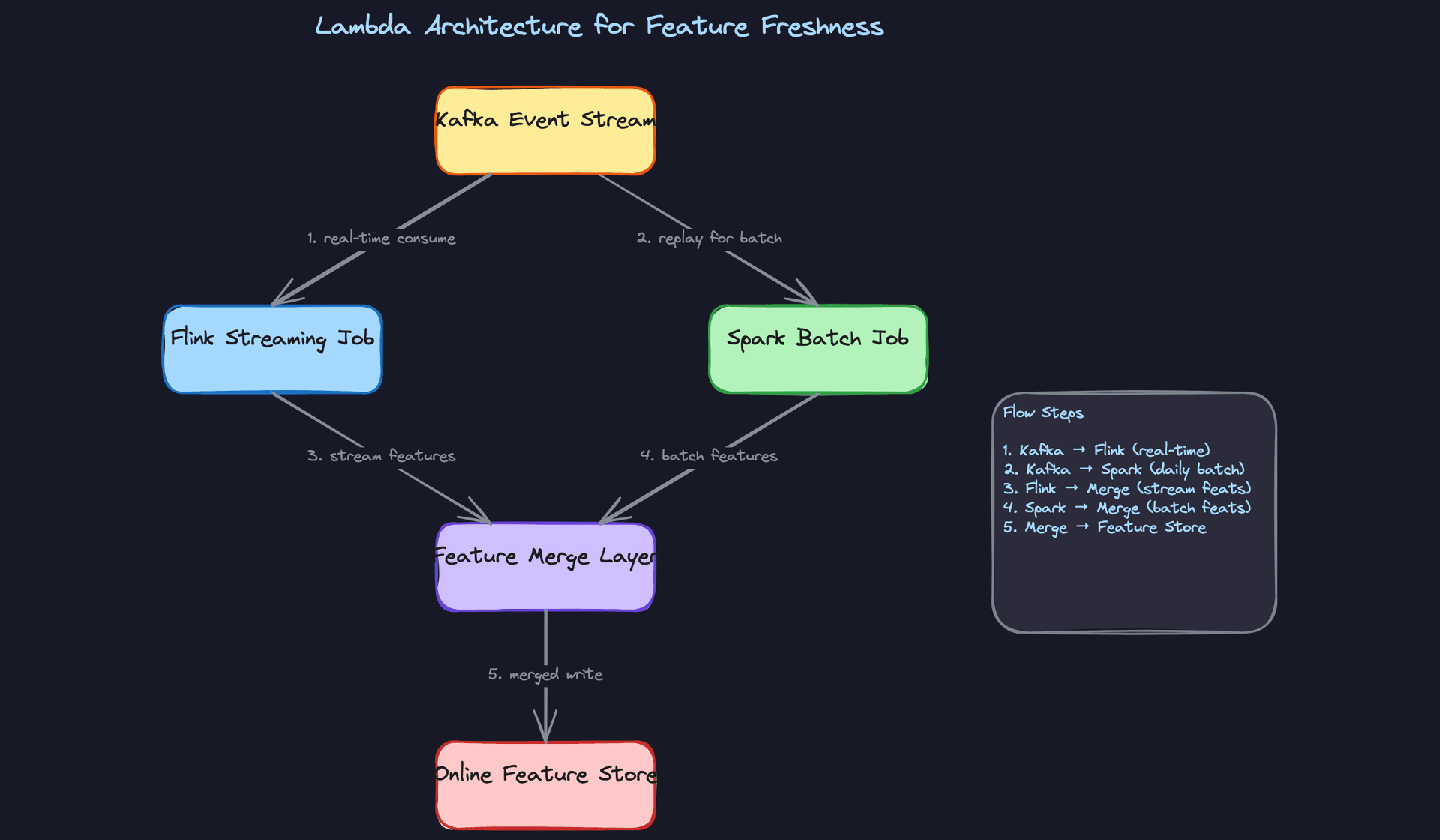
Great Solution: Lambda Architecture with a Merge Layer
Run both paths. Flink handles short-horizon features (last-5-minute click counts, session-level signals) with sub-minute latency. Spark handles long-horizon features (30-day affinity vectors, item popularity over rolling windows) on a daily schedule. At read time, a merge layer combines both, with the streaming value taking precedence for keys that exist in both.
def get_merged_features(user_id: str, feature_store_online, feature_store_batch) -> dict:
    # Streaming features: recent signals, low TTL
    stream_features = feature_store_online.get(
        entity_id=user_id,
        feature_names=["click_count_5m", "session_item_ids"],
        source="stream"
    )
    # Batch features: stable long-horizon signals
    batch_features = feature_store_online.get(
        entity_id=user_id,
        feature_names=["affinity_vector_30d", "avg_dwell_time_7d"],
        source="batch"
    )
    # Stream wins on overlap; batch fills gaps
    return {**batch_features, **stream_features}
The dual-write consistency trap is the thing most candidates miss here. If your Flink job and your Spark job both write to the same feature key, you need a clear precedence rule and TTL strategy. Flink writes should carry a short TTL (say, 10 minutes) so that if the streaming job falls behind, the batch value naturally takes over rather than serving a stale streaming value indefinitely.
Tip: Naming the Lambda architecture by name is fine, but what distinguishes senior candidates is explaining the merge layer and the TTL-based fallback. That's the part that actually makes it work in production.
"How do we handle cold start for new users and new items?"
Cold start is a trap question. The naive answer is "show popular items," which is technically correct but incomplete. The interviewer wants to see you think through the full lifecycle.
Bad Solution: Global Popularity Fallback
When a new user arrives with no history, return the top-N most popular items globally. When a new item is added, wait until it accumulates enough interactions to appear in the model's training data.
For users, this works for about five minutes before it feels like a broken experience. For items, this is worse: new items never get shown, so they never accumulate interactions, so they never get recommended. You've built a rich-get-richer loop that buries new inventory.
Warning: If you only mention popularity fallback and move on, the interviewer will assume you haven't thought about item cold start. Always address both sides.
Good Solution: Content-Based Bootstrapping
For new items, compute an embedding from structured metadata (category, tags, description text via a pre-trained encoder) and insert it directly into the ANN index. The item is immediately retrievable by similarity without needing any interaction history.
For new users, collect whatever signals are available at registration (declared preferences, device type, referral source, country) and map them to a prior feature vector using a lookup table built from users with similar signup attributes. It's not personalized, but it's better than global popularity.
def bootstrap_item_embedding(item_metadata: dict, text_encoder, category_embeddings: dict) -> list[float]:
    # Encode text fields
    text_vec = text_encoder.encode(
        item_metadata.get("title", "") + " " + item_metadata.get("description", "")
    )
    # Blend with category prior
    category_vec = category_embeddings.get(item_metadata["category"], [0.0] * 128)
    alpha = 0.7  # weight toward text signal
    blended = [alpha * t + (1 - alpha) * c for t, c in zip(text_vec, category_vec)]
    return blended
Great Solution: Streaming Bootstrap for Users, Exploration Budget for Items
The moment a new user fires their first few events, the Flink streaming path picks them up and begins building a real feature vector. You don't wait for the next batch run. Within minutes of a user's first click, you have a sparse but real signal to work with. Set a low-confidence flag on the feature record so the ranker can apply a higher exploration weight (epsilon-greedy or UCB) rather than pure exploitation.
For new items, pair the content-based embedding with a deliberate exploration budget: reserve a small slot in every recommendation list (say, position 8 out of 10) for items with fewer than 1,000 impressions. This forces exposure, collects interaction data, and lets the model learn item quality without contaminating the top slots.
Tip: Mentioning the exploration budget for new items is a Staff-level signal. It shows you understand that cold start isn't just a data problem; it's a product policy decision about how much exploration you're willing to trade against short-term relevance.
"How do we prevent training/serving skew from silently corrupting model quality?"
"Silently" is the key word. Training/serving skew is dangerous precisely because the model keeps making predictions. It just makes worse ones, and you often don't notice until CTR has been declining for two weeks.
Bad Solution: Recompute Features at Training Time from the Raw Event Table
When you go to train a new model, run a Spark job over the raw event table to compute features for each training example. At serving time, compute the same features from the online feature store.
The problem is that "the same features" is a lie. The batch job sees the full event history up to today. At serving time six months ago, the model only had access to events up to that moment. If you train on affinity_vector_30d computed over today's data but the model was served with affinity_vector_30d computed over data from six months ago, you've introduced a future-leakage bias. The model learns patterns it couldn't have seen at inference time.
Warning: This is one of the most common and most damaging mistakes in production ML pipelines. Candidates who haven't operated a recommendation system at scale often don't know this problem exists.
Good Solution: Point-in-Time Correct Feature Joins
When building the training dataset, join each training example (user, item, label) to the feature values that were available at the time the impression was served, not the feature values computed today. Apache Iceberg's time-travel queries make this tractable: you can query the feature table AS OF TIMESTAMP '2024-03-15 14:32:00' to reconstruct the exact feature state at serving time.
-- Point-in-time correct join using Iceberg time travel
SELECT
    e.user_id,
    e.item_id,
    e.label,                          -- 1 = click, 0 = no click
    f_user.value AS user_affinity_vec,
    f_item.value AS item_embedding
FROM training_impressions e
JOIN feature_snapshots FOR SYSTEM_TIME AS OF e.served_at f_user
    ON f_user.entity_id = e.user_id
    AND f_user.feature_name = 'affinity_vector_30d'
JOIN feature_snapshots FOR SYSTEM_TIME AS OF e.served_at f_item
    ON f_item.entity_id = e.item_id
    AND f_item.feature_name = 'item_embedding'
This works, but it requires your feature store to retain historical snapshots. Storage costs grow fast if you're writing features for millions of entities daily.
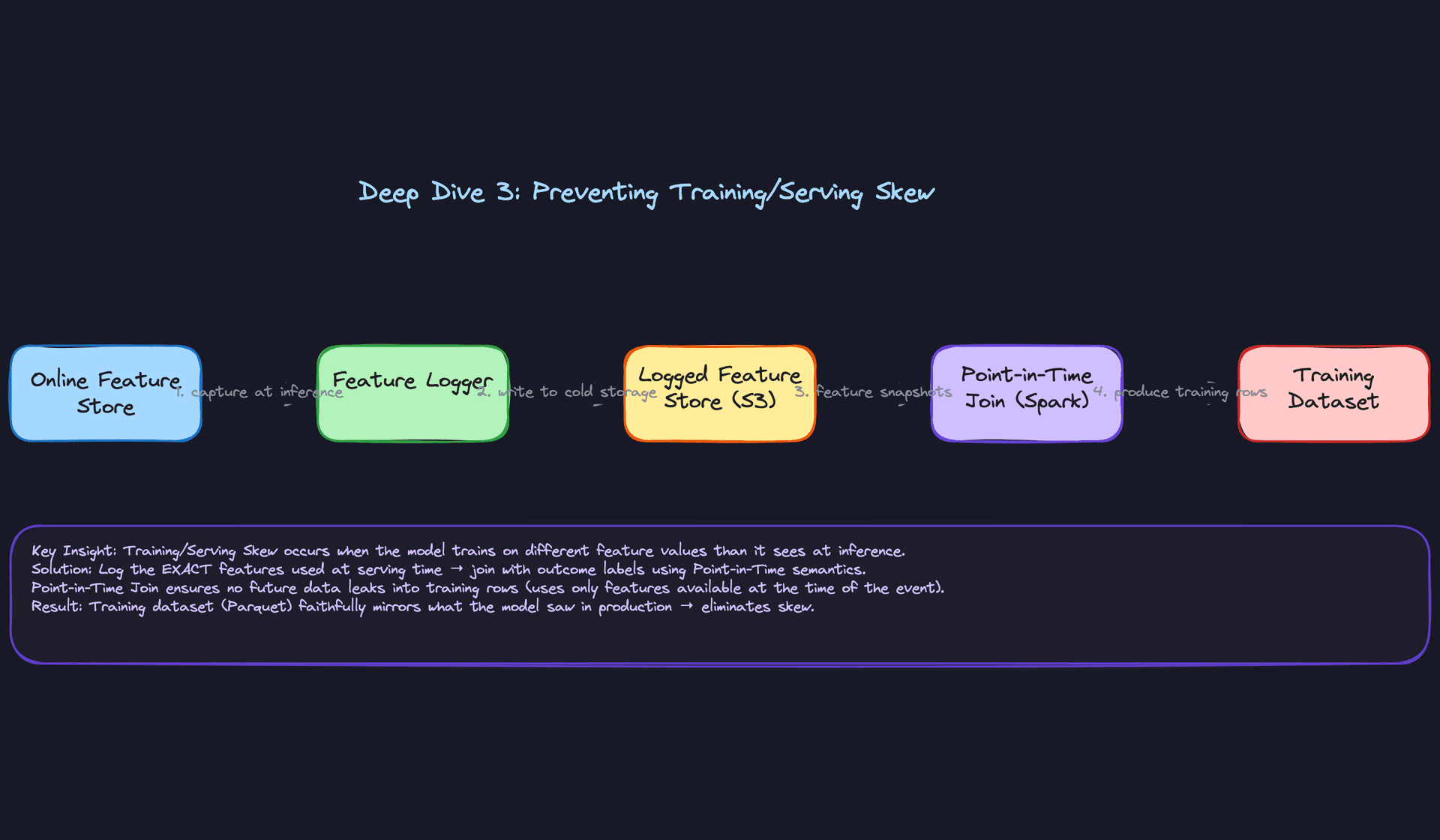
Great Solution: Log Features at Serving Time
Don't rely on time-travel reconstruction. At inference time, after the ranking model reads features from the online store, log the exact feature values it used, along with the user_id, item_id, and a request_id, to a cold storage sink (S3 in Parquet). When you build the training dataset, join on request_id to get the exact features the model saw, not a reconstruction of them.
This eliminates the reconstruction approximation entirely. Time-travel queries are best-effort; logged features are ground truth.
def rank_and_log(user_id: str, candidates: list[str], feature_store, logger):
    features = feature_store.get_multi(
        entities=[(user_id, "user")] + [(c, "item") for c in candidates]
    )
    scores = ranking_model.predict(features)
    ranked = sorted(zip(candidates, scores), key=lambda x: -x[1])

    # Log the exact feature state used for this inference
    logger.log({
        "request_id": generate_uuid(),
        "user_id": user_id,
        "served_at": datetime.utcnow().isoformat(),
        "features": features,           # exact values, not keys
        "ranked_items": [r[0] for r in ranked],
        "scores": [r[1] for r in ranked]
    })
    return ranked
The logged feature store becomes the authoritative input for training. The Spark point-in-time join then just reads from this log rather than reconstructing from snapshots.
Tip: Proposing feature logging at serving time, and explaining why it's more reliable than time-travel reconstruction, is exactly the kind of answer that gets a senior candidate marked as Staff-ready. It shows you've thought about what happens when the feature store schema changes between serving and training.
"How do we design the pipeline to support backfills?"
Backfills come up constantly: a bug in a feature computation job, a new feature you want to compute over historical data, or a model retrain that needs two years of clean training examples. If your pipeline isn't designed for them, a backfill becomes a multi-week incident.
Bad Solution: Re-run the Production Job with a Different Date Parameter
Point the production Spark job at a historical date range, let it run, and write output to the same tables. Simple.
This breaks in two ways. First, if the job isn't idempotent, re-running it appends duplicate rows rather than replacing the correct partition. Second, running backfill and production jobs against the same output table simultaneously creates race conditions: the backfill job overwrites a partition the production job just wrote, or vice versa.
Warning: Non-idempotent backfills are a data corruption vector. If you can't safely re-run a job twice and get the same result, you will eventually corrupt your feature store.
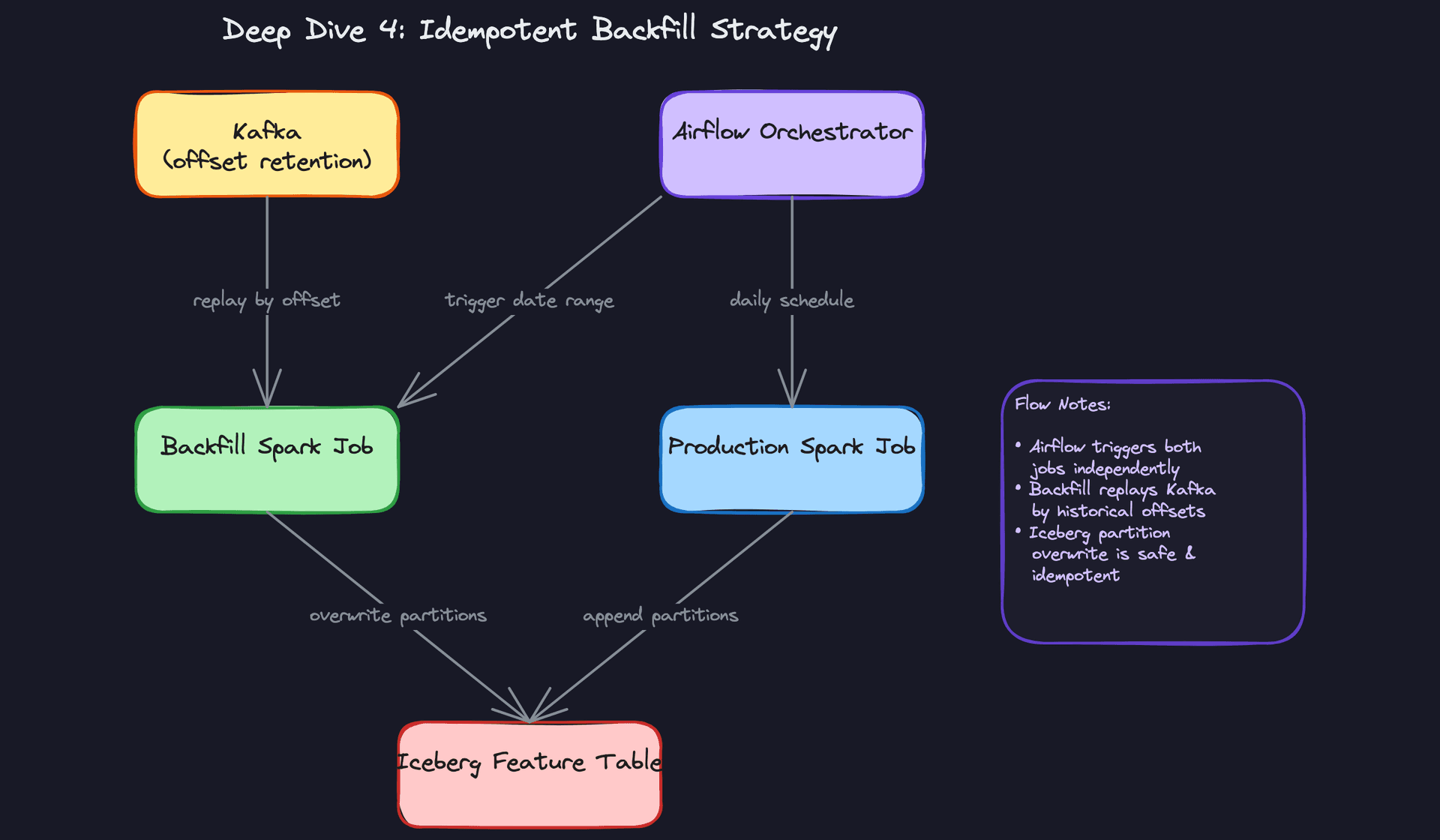
Good Solution: Idempotent Jobs with Partition Overwrite
Design every Spark job to write with INSERT OVERWRITE semantics on a deterministic partition key (usually date). Running the job twice for the same date produces the same output, not duplicates. Use Iceberg's atomic partition replace to make the overwrite transactional.
from pyspark.sql import SparkSession

def run_feature_job(spark: SparkSession, processing_date: str):
    events = spark.read.format("iceberg").load("raw_events") \
        .filter(f"date = '{processing_date}'")

    features = compute_affinity_features(events)  # deterministic transformation

    # Atomic partition overwrite: safe to re-run
    features.writeTo("feature_store.user_affinity") \
        .option("partitionOverwriteMode", "dynamic") \
        .overwritePartitions()
Parameterize the job by processing_date and trigger backfill runs through Airflow's backfill CLI with a date range. Each date is an independent task; failures can be retried without touching adjacent partitions.
Great Solution: Parallel Backfill with Isolated Output and Cutover
Run the backfill job writing to a separate output path (a staging table or a prefixed partition namespace) while the production job continues writing to the live table uninterrupted. Validate the backfill output (row counts, feature distribution checks, null rates) before cutting over. Then do an atomic swap at the table level.
This means production never reads from a partially-complete backfill. Users don't get degraded recommendations while the backfill is in flight.
For Kafka replay, set consumer group offsets explicitly rather than relying on auto.offset.reset. This lets you replay a precise time window without affecting the production consumer group.
from kafka import KafkaConsumer, TopicPartition

def create_backfill_consumer(topic: str, start_ts_ms: int, end_ts_ms: int):
    consumer = KafkaConsumer(bootstrap_servers="kafka:9092",
                             group_id="backfill-recsys-20240315",  # isolated group
                             auto_offset_reset="none")
    partitions = consumer.partitions_for_topic(topic)
    tps = [TopicPartition(topic, p) for p in partitions]
    # Seek to exact timestamp offset
    offsets = consumer.offsets_for_times({tp: start_ts_ms for tp in tps})
    for tp, offset_meta in offsets.items():
        consumer.seek(tp, offset_meta.offset)
    return consumer, end_ts_ms
Tip: The parallel-run-then-cutover pattern is what separates candidates who've done backfills from candidates who've only planned them. Mention that you'd validate with a data quality check before the swap, and you've answered this question at a Staff level.
"How do we monitor data quality in a recommendation pipeline?"
Most candidates answer this with "set up alerts on pipeline failures." That's table stakes. The harder problem is detecting silent degradation: the pipeline runs successfully but produces wrong data.
The first thing to monitor is null rates on incoming events. If item_id suddenly goes null in 15% of click events because a client-side change broke the event schema, your feature computation jobs will silently produce sparse or incorrect features. A null rate alert on Kafka consumer lag combined with field-level completeness checks catches this before it reaches the feature store.
Feature drift is the next layer. Compute the distribution of key features (user affinity vector norms, click count aggregates) daily and alert when the distribution shifts beyond a threshold. A sudden spike in average click_count_5m across all users probably means a bot event flood, not a product improvement.
from scipy.stats import ks_2samp

def detect_feature_drift(baseline_df, current_df, feature_col: str, threshold: float = 0.1):
    baseline_vals = baseline_df[feature_col].dropna().values
    current_vals = current_df[feature_col].dropna().values
    stat, p_value = ks_2samp(baseline_vals, current_vals)
    if stat > threshold:
        raise DataQualityAlert(
            f"Feature drift detected on '{feature_col}': KS stat={stat:.3f}, p={p_value:.4f}"
        )
The subtlest signal is CTR drop as a data quality indicator. If click-through rate on recommendations falls 20% overnight and the model hasn't changed, your first hypothesis should be a data quality issue, not a model quality issue. Check whether the feature store was populated correctly, whether the ANN index was rebuilt with the latest embeddings, and whether the recommendation store has stale entries from a failed refresh job. Treating CTR as a pipeline health metric, not just a product metric, is the mindset shift that distinguishes engineers who've been paged at 2 AM from engineers who haven't.
Tip: Framing CTR as a data quality signal, not just a business metric, is a strong answer. It shows you understand that the pipeline and the model are coupled, and that pipeline failures often manifest as model failures.
What is Expected at Each Level
The bar shifts significantly as you move up the ladder. A mid-level candidate who nails the happy path will pass. A senior candidate who only nails the happy path will not.
Mid-Level
- Design the three-stage pipeline correctly: event ingestion into Kafka, feature computation split across batch (Spark) and streaming (Flink), and ranked output written to a low-latency serving store like Redis.
- Name the feature store as a distinct component and explain why it exists. "It decouples feature computation from model serving" is the answer. Vague hand-waving about "storing features somewhere" is not.
- Partition the raw event table by date and explain why. Knowing that
WHERE occurred_at = '2024-01-15'should scan one partition, not the whole table, signals real pipeline experience. - Sketch the core schemas: Events, Features, and Recommendations with correct foreign keys, types, and at least one index choice you can defend.
Senior
- Bring up training/serving skew without being asked. The interviewer is waiting for this. If you only design the forward path and never mention that your model could silently train on features it never actually saw at inference time, that's a gap.
- Articulate the Lambda vs. Kappa trade-off clearly. Lambda (batch + streaming layers merged at read time) gives you accuracy and recency but doubles your operational surface. Kappa (streaming only, with replayable Kafka) is simpler but puts pressure on your stream processor to handle both real-time and backfill workloads. Know when each is worth it.
- Address cold start proactively. New users and new items are not edge cases in a recommendation system; they are the default state for a significant fraction of your traffic. Have a concrete answer: content-based fallbacks, popularity priors, bootstrapping from first-session events.
- Explain backfill idempotency. Idempotent Spark jobs writing to isolated Iceberg partitions, with Airflow parameterized by date range, running in parallel with production before cutover. That's the answer.
Staff+
- Own the SLA contract between the pipeline and the ML team. Who is on-call when feature freshness degrades? What's the alerting threshold? Staff candidates treat this as an organizational design problem, not just a technical one. The pipeline has customers, and those customers need a contract.
- Drive toward data quality monitoring as a first-class concern. Feature drift detection, null rate alerting on incoming events, and the insight that a sudden CTR drop might be a data quality signal rather than a model regression. Knowing the difference before you page the ML team matters.
- Discuss cost and latency trade-offs at scale: ANN index sharding strategies when your item catalog hits hundreds of millions, feature TTL policies that balance Redis memory costs against staleness risk, and whether pre-computing recommendations for all users nightly is cheaper than on-demand ranking at request time.
- Propose a zero-downtime model version transition strategy. Writing new recommendations under a shadow
model_versionkey, validating quality metrics before flipping the application layer, and keeping the old version warm for rollback. This is operational maturity, and it's what separates someone who has shipped a recommendation system from someone who has only designed one on a whiteboard.
Key takeaway: A recommendation pipeline is not just a data movement problem. The candidates who stand out treat it as a system with multiple customers (the ML team, the application layer, the business), explicit SLA contracts at each boundary, and a feedback loop that must be designed as carefully as the forward path. Get the plumbing right, then show you understand what flows through it and why it matters.
