Join Data Science Interview MasterClass (September Cohort) led by FAANG Data Scientists | Just 6 seats remaining...
Data Science MasterClass (September) | 6 seats left
Data Warehousing
Data Warehousing
Your Postgres database is fast. It handles thousands of transactions per second, your app is snappy, and your engineers are happy. Then a product manager asks: "Can you give me daily revenue by country, broken down by user cohort, for the last two years?" That query scans billions of rows, joins four tables, and aggregates across your entire history. Your Postgres instance grinds to a halt, your app slows to a crawl, and you've just discovered why transactional databases and analytical workloads are fundamentally incompatible.
A data warehouse exists to solve that mismatch. It's a separate, read-optimized store built specifically for analytical queries: aggregations over massive datasets, joins across dozens of tables, and the kind of historical reporting that would destroy an OLTP database. Instead of storing data row by row, it stores data column by column, which means a query summing revenue only reads the revenue column off disk, skipping everything else. That physical difference is what lets Snowflake or BigQuery scan terabytes in seconds.
When interviewers at Airbnb, Uber, or Spotify ask about your analytics infrastructure, they expect you to talk fluently about Snowflake, BigQuery, Redshift, and Databricks SQL. Not just name them. The real test is whether you understand the design decisions underneath: how you partition and cluster tables, how you model your schema, how you load data incrementally without blowing your SLAs. Those choices determine whether your warehouse costs $500 a month or $50,000, and whether your analysts get their dashboards in seconds or minutes. That's what this lesson is about.
How It Works
Start with your operational database: a Postgres instance handling user signups, an app emitting click events to Kafka, S3 filling up with raw log files. Each of these systems is optimized for writes and point lookups. None of them can handle a query that scans three years of revenue data across 200 million rows without grinding to a halt.
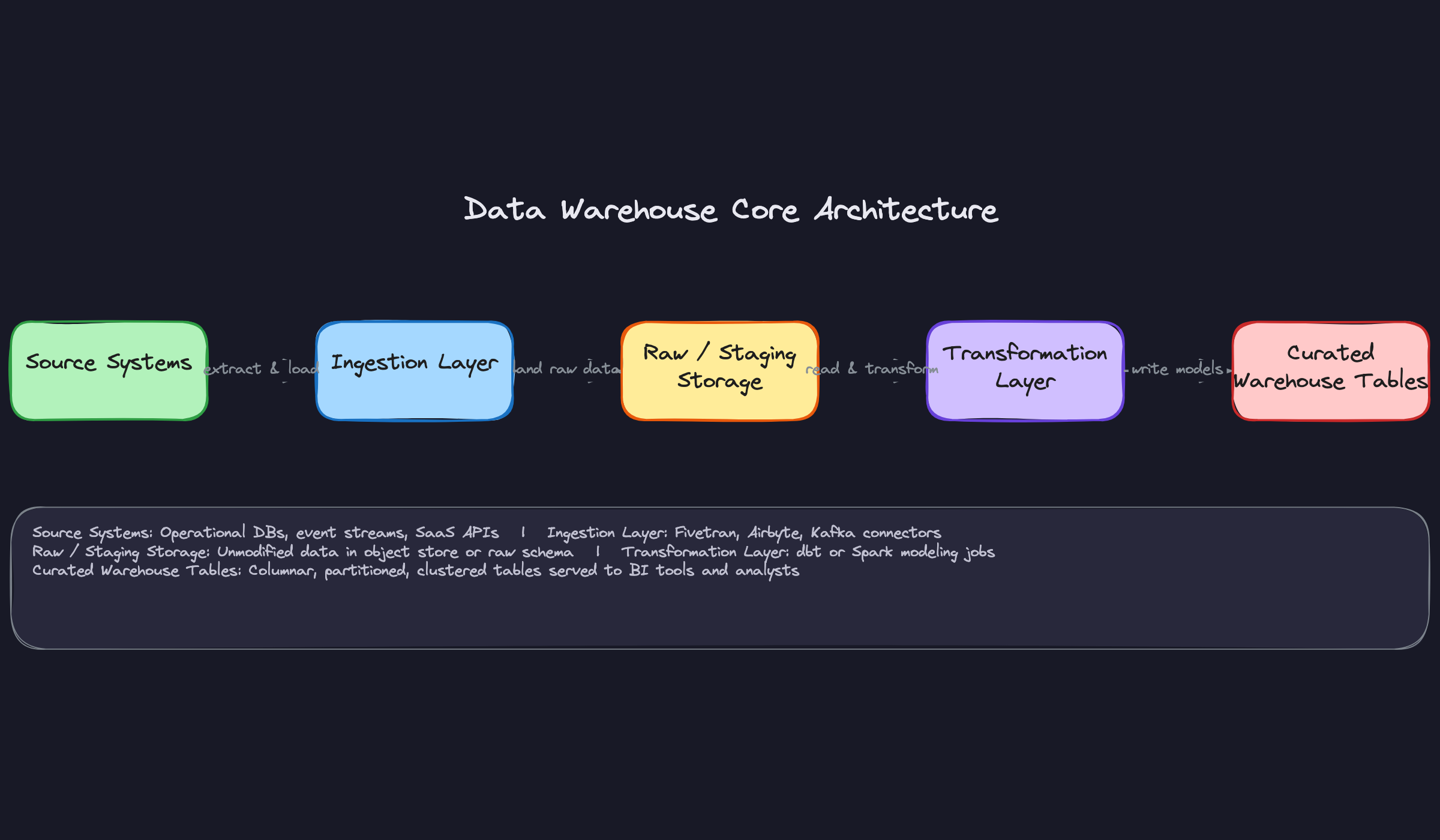
The warehouse exists downstream of all of that. Data flows out of those source systems through an ingestion layer (tools like Fivetran, Airbyte, or custom Kafka connectors) and lands in raw or staging storage, untouched. From there, transformation jobs (dbt models, Spark pipelines) reshape that raw data into clean, curated tables. Those curated tables are what your BI tools and analysts actually query.
Think of it like a library. The ingestion layer is the loading dock where books arrive. Raw storage is the back room where everything gets catalogued. Transformations are the librarians organizing books onto shelves. The curated layer is the public floor where readers (analysts) actually work.
Here's what that flow looks like:
Columnar Storage: Why Aggregations Are Fast
In a row-oriented database, every row is stored together on disk. To compute SUM(revenue), the engine reads every column of every row, discards everything except revenue, and then adds it up. That's a lot of wasted I/O.
A columnar store flips this. All revenue values live together in one contiguous block on disk. To compute SUM(revenue), the engine reads exactly one column and nothing else. At the scale of billions of rows, that difference is the gap between a query that runs in seconds and one that times out.
Columnar layout also enables compression ratios that row stores can't touch. Values in the same column tend to be similar (lots of "USD", lots of dates in the same range), so run-length encoding and dictionary compression squeeze them dramatically. Your interviewer cares about this because storage cost and I/O throughput are directly connected to query cost in systems like BigQuery, which bills per byte scanned.
MPP: How Terabyte Queries Finish in Seconds
Modern warehouses use massively parallel processing. When you submit a query, the engine doesn't run it on one machine. It breaks the work into fragments and distributes them across a fleet of worker nodes, each responsible for scanning a slice of the data in parallel. Results get aggregated at the end.
This is why Snowflake and BigQuery can scan terabytes in seconds. The work is embarrassingly parallel across partitions, and the engine coordinates the fan-out and fan-in automatically. You don't configure this; you just benefit from it.
Your interviewer may ask how you'd design for query performance. The honest answer is that MPP handles the parallelism, but you control how data is physically organized, which determines how much data each node has to scan in the first place. That's where partitioning and clustering come in.
Separation of Storage and Compute
This is the architectural shift that separates cloud-native warehouses from legacy systems like Teradata or early Redshift. In older architectures, storage and compute lived on the same nodes. Scaling compute meant buying more storage, and vice versa.
Snowflake and BigQuery decouple these entirely. Data lives in object storage (S3, GCS). Compute (virtual warehouses in Snowflake, slots in BigQuery) spins up on demand, reads from that shared storage, and scales independently. Two teams can run heavy queries simultaneously without competing for the same hardware, and you only pay for compute while it's running.
In an interview, if someone asks how you'd handle concurrent heavy workloads without degrading query performance, this is the answer. Spin up separate compute clusters pointed at the same storage layer. No data duplication required.
Micro-Partitioning and Metadata Pruning
Snowflake automatically divides every table into micro-partitions: small compressed chunks of data (typically 50-500MB uncompressed) with metadata tracking the min and max values of every column within each chunk. When a query filters on event_date = '2024-01-15', Snowflake checks the metadata and skips every partition that can't possibly contain that date. It never reads those files at all.
BigQuery achieves the same effect through explicit partitioned tables (physically separated by a date or integer column) and clustered tables (data sorted within partitions by one or more columns). The difference is that BigQuery requires you to declare partitioning and clustering upfront, while Snowflake's micro-partitioning is automatic. Clustering in Snowflake is an optional, explicit optimization on top.
The interviewer wants to know that you understand pruning is the mechanism behind fast filtered queries, not just "partitioning makes things faster." Pruning means the engine skips data it doesn't need before it ever touches disk.
Patterns You Need to Know
In an interview, you'll usually need to pick a specific approach. Here are the ones worth knowing.
Star Schema (and Its Relatives)
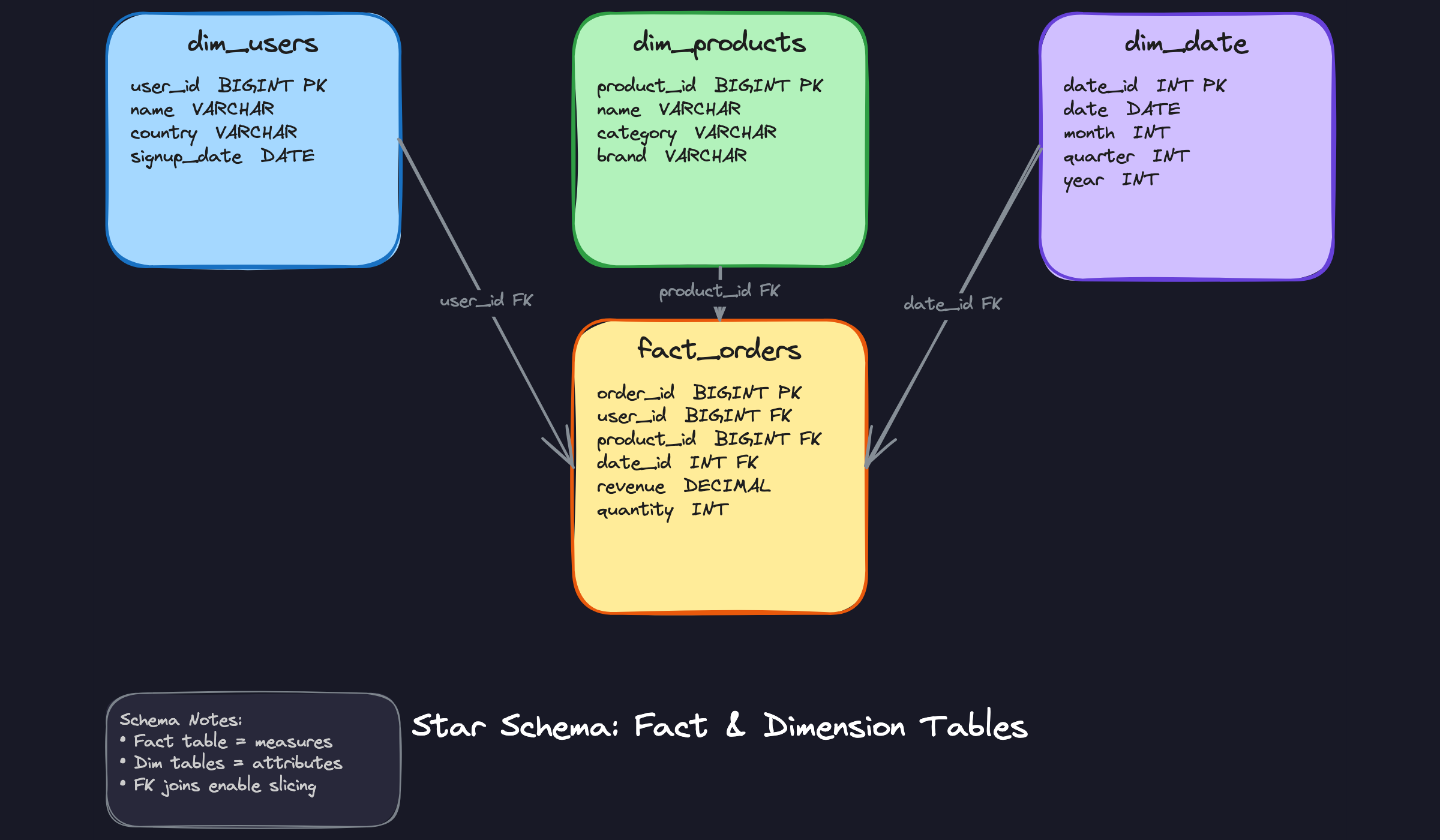
The star schema is the workhorse of analytical modeling. You have one central fact table holding measurable events (orders, page views, transactions) with foreign keys pointing outward to denormalized dimension tables (users, products, dates). When an analyst runs "total revenue by country and product category last quarter," the query engine joins the fact table to three dimension tables and aggregates. That's it. The denormalization means fewer joins, and fewer joins means faster queries.
The snowflake schema is the normalized cousin. Instead of one flat dim_products table, you'd have dim_products pointing to dim_categories pointing to dim_departments. It saves storage and avoids update anomalies, but every additional join layer adds latency. In practice, most teams start snowflaked and then denormalize when query performance becomes a problem. The third variant, One Big Table (OBT), skips joins entirely by pre-joining everything into a single wide table. Analysts love it; your storage bill will not.
The Kimball and Inmon philosophies sit behind all of this. Kimball is bottom-up: you build star schemas per business process (one for orders, one for support tickets) and let them coexist. Inmon is top-down: you build a normalized enterprise warehouse first, then feed downstream data marts. Most shops you'll interview at run a Kimball-influenced hybrid, so frame your answer that way unless they tell you otherwise.
When to reach for this: any time the interview involves BI dashboards, analyst-facing tables, or reporting pipelines. Star schema is the default answer for dimensional modeling questions.
Medallion Architecture
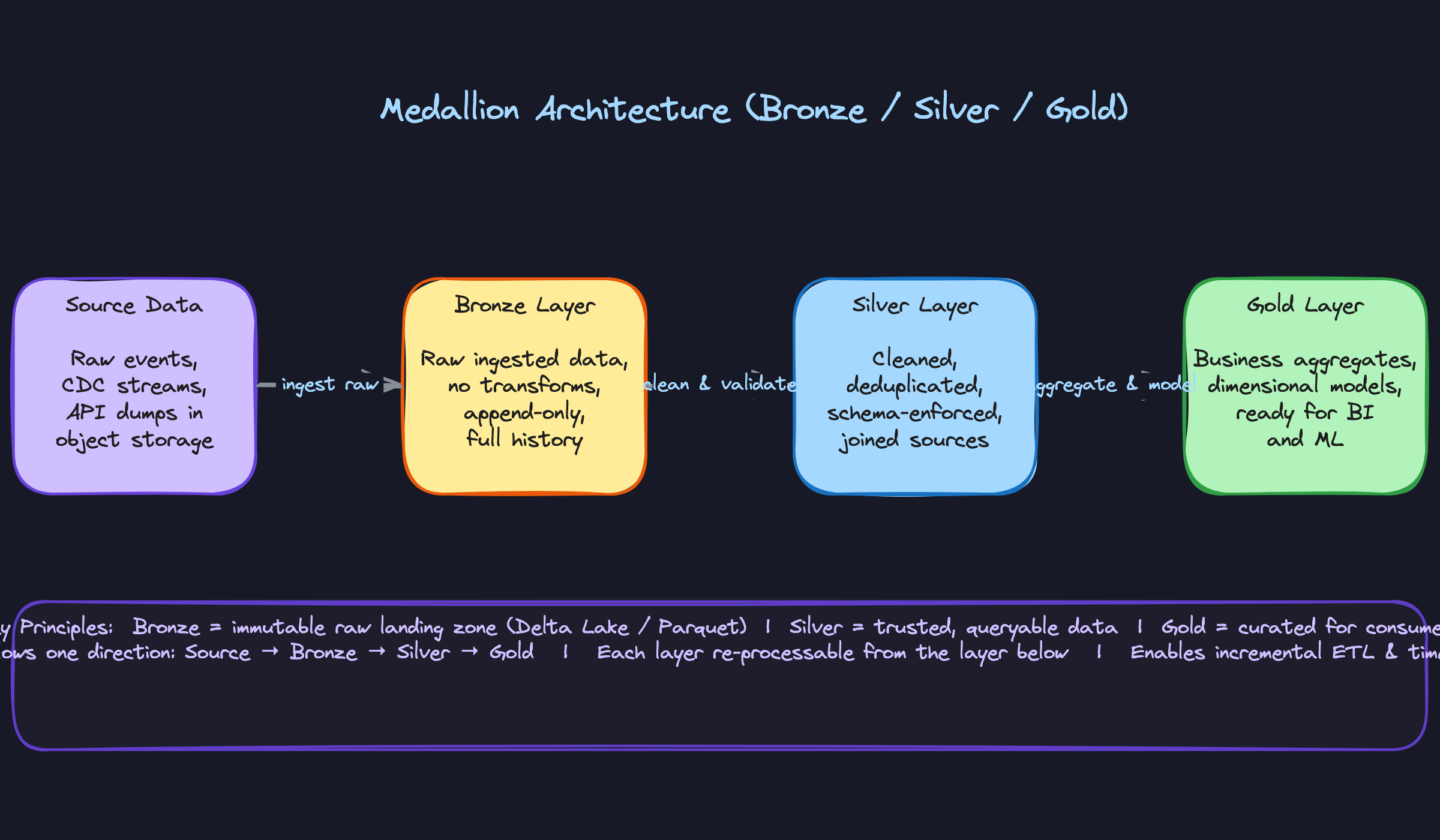
If the company runs on a lakehouse (Databricks, Delta Lake, Iceberg on S3), this is the pattern you'll be expected to describe fluently. Raw data lands in the Bronze layer exactly as it arrived from the source, no transformations, append-only. Think of it as your audit log. Silver applies cleaning, deduplication, and schema enforcement, and often joins across sources to produce a reliable, trusted dataset. Gold is where business logic lives: aggregated metrics, dimensional models, ML feature tables. Analysts and BI tools hit Gold.
The reason this pattern dominates at companies like Airbnb and Uber is that it separates concerns cleanly. If a transformation bug corrupts Silver, you can reprocess from Bronze without re-ingesting from the source. That reprocessing guarantee is what makes backfills tractable at scale.
When to reach for this: any question involving a lakehouse, Delta Lake, or Iceberg. Also reach for it when the interviewer asks how you'd handle data quality issues or backfills, because the layered architecture is your answer.
Slowly Changing Dimensions (SCD)
This is the pattern candidates fumble most often, usually because they've heard the term but never built one in production.
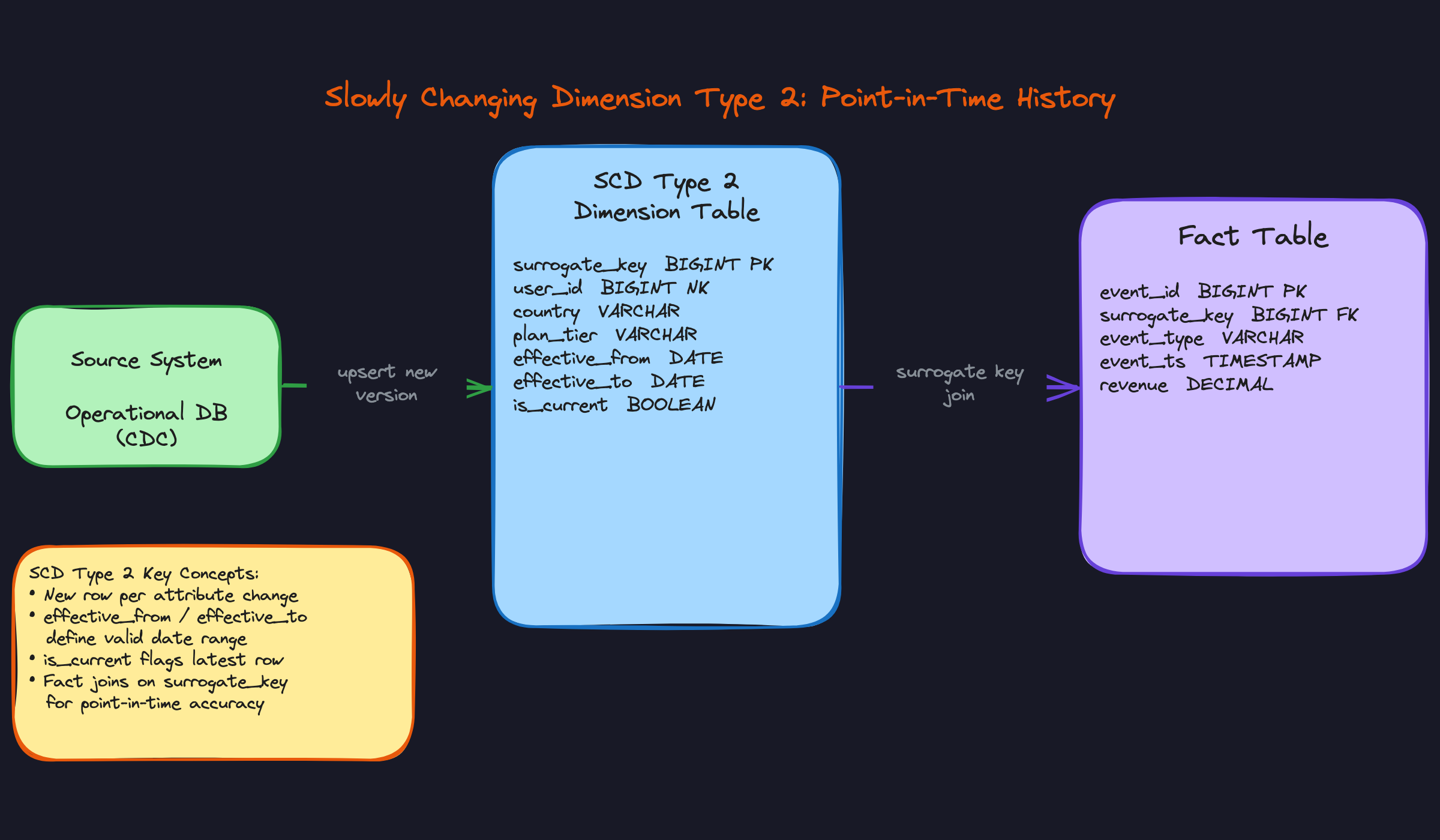
The problem it solves: a user changes their country from Germany to Canada. Do you overwrite the old value (Type 1), add a new row with effective dates (Type 2), or add a column for the previous value (Type 3)? Type 1 is simple but destroys history. Type 3 only tracks one prior state, which breaks down fast. Type 2 is what you'll use almost every time in a serious warehouse. Each change creates a new row with effective_from, effective_to, and an is_current flag. Your fact table references a surrogate key (not the natural user ID), so a revenue event from March correctly joins to the user's March attributes, not their current ones.
The cost is real: Type 2 tables grow with every attribute change, and point-in-time joins require filtering on is_current or date ranges, which adds query complexity. Use surrogate keys, not natural keys from the source system. Natural keys can be reused or changed; surrogate keys are stable by design.
When to reach for this: any time the interviewer mentions historical reporting, audit trails, or "what did this user look like at the time of the event." That's your cue to bring up Type 2.
Incremental Load Patterns
Full refresh sounds simple: truncate the table, reload everything from the source. At a few million rows, it works fine. At tens of billions of rows scanned daily, it becomes a budget and latency problem fast.
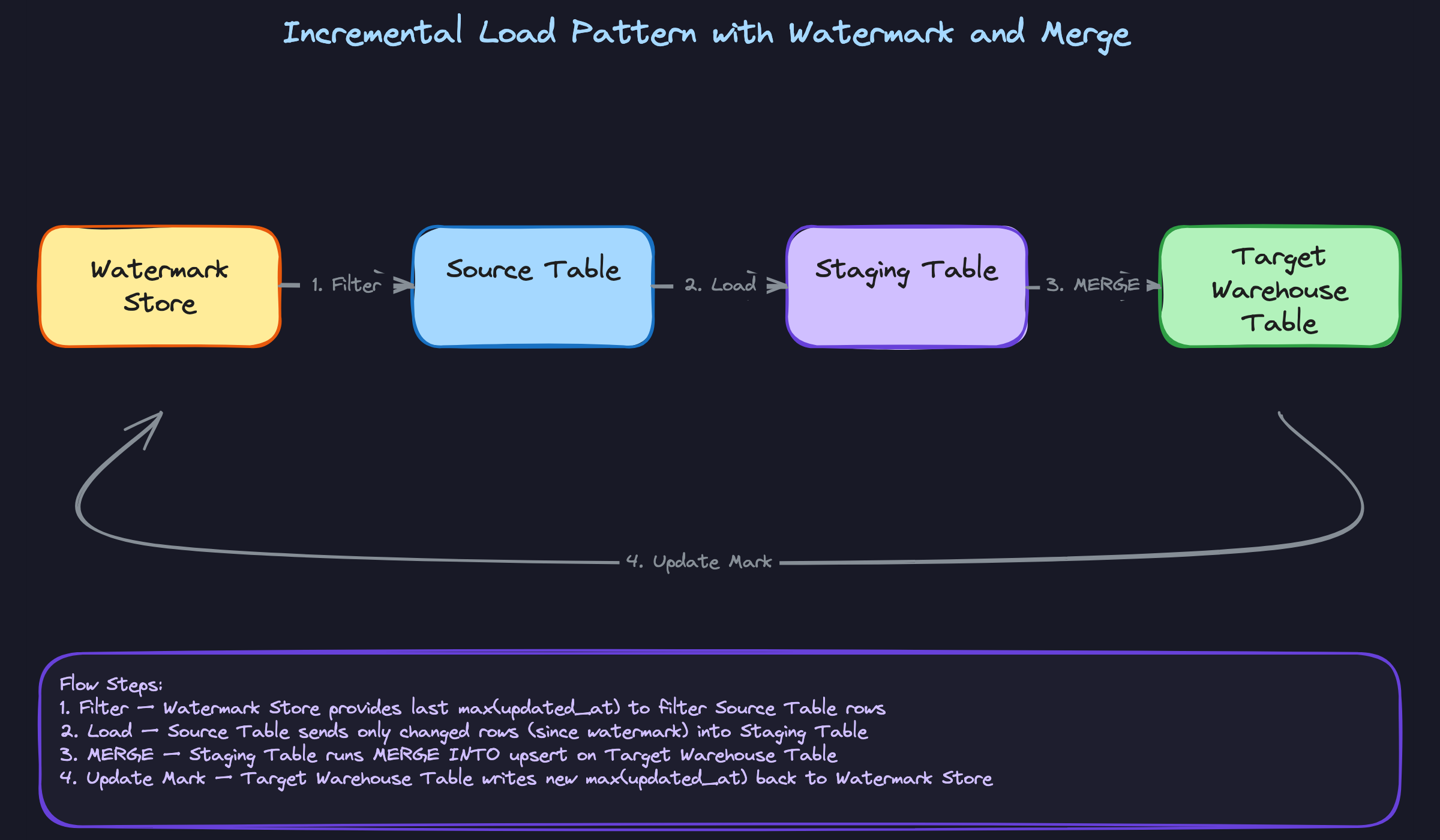
Incremental loading solves this by only processing rows that changed since the last run. The standard approach uses a watermark: you store the max(updated_at) from the last successful run, then on the next run you filter the source to rows where updated_at > watermark. Those rows land in a staging table, and then a MERGE INTO statement upserts them into the target. When the merge succeeds, you advance the watermark. The idempotency requirement is non-negotiable here: if the pipeline fails mid-run and retries, it must produce the same result as if it had succeeded the first time. Watermark-based loads satisfy this because re-running with the same watermark pulls the same rows.
The catch with MERGE INTO in columnar stores is that it's expensive. Parquet files are immutable; a merge rewrites entire files. Delta Lake and Iceberg handle this with transaction logs and file-level metadata, which is exactly why they exist. If you're on a pure object store without a table format, merges are painful enough that you might prefer append-only with deduplication at read time.
When to reach for this: any pipeline design question where the source table is large, updates frequently, or has strict SLA requirements. Incremental load is the production-grade answer.
Comparing the Patterns
| Pattern | Primary Problem Solved | Key Trade-off | Best Fit |
|---|---|---|---|
| Star Schema | Fast analytical queries with clean joins | Denormalization means update complexity | BI dashboards, dimensional reporting |
| Medallion Architecture | Data quality isolation and reprocessability | More pipeline stages to maintain | Lakehouse environments, backfill-heavy systems |
| SCD Type 2 | Point-in-time historical accuracy | Storage growth, complex joins | Audit trails, historical attribution |
| Incremental Load | Scalable pipeline refresh without full scans | Merge cost, idempotency complexity | Large tables with frequent updates |
For most interview problems, you'll default to star schema for modeling and incremental load for pipeline design. Reach for medallion architecture when the stack involves Delta Lake or Iceberg, and bring in SCD Type 2 the moment anyone mentions historical accuracy or point-in-time reporting. These patterns aren't mutually exclusive; a mature warehouse uses all of them together.
What Trips People Up
Here's where candidates lose points — and it's almost always one of these.
The Mistake: Treating Partitioning and Clustering as the Same Thing
You'd be surprised how often candidates say something like "yeah, I'd partition by user_id to make the queries faster" and leave it there. When the interviewer probes, it becomes clear they're using "partitioning" as a catch-all for any physical organization strategy.
Partitioning and clustering solve different problems. Partitioning physically splits your data into separate folders or files by a column value. When a query filters on event_date = '2024-01-15', the engine skips every other partition entirely. That's file-level pruning, and it's massive. Clustering (or sort keys in Redshift) works within a partition, ordering rows so that range scans can skip blocks of data inside a single file. You need both, and the column choices matter independently.
The column you partition on should match your coarsest, most common filter. The column you cluster on should match your secondary filter or join key. Saying "I'd partition by event_date because our queries almost always filter on a date range, then cluster on user_id because our secondary filters are user-scoped" is the answer that lands.
The Mistake: Defaulting to Star Schema Without Asking About Query Patterns
"I'd model this as a star schema with a central fact table and dimension tables for users, products, and dates." Interviewers hear this constantly. It's not wrong, exactly. It's just incomplete in a way that signals you learned dimensional modeling from a textbook and haven't had to defend a schema decision under production pressure.
Star schema is a great default when your analysts run ad-hoc queries across many dimensions. But if the interviewer tells you analysts always join the same five tables and run aggregations on a fixed set of columns, a partially denormalized One Big Table might be significantly faster and cheaper. Fewer joins means less shuffle in a distributed query engine. At Snowflake or BigQuery scale, that matters.
The fix is simple: ask before you prescribe. "What do the most common query patterns look like? Are analysts joining across many dimensions or mostly filtering and aggregating on a few columns?" That question alone signals architectural maturity. Then commit to a schema and explain the trade-off.
The Mistake: Fumbling Surrogate Keys in SCD Discussions
When SCD Type 2 comes up, a lot of candidates describe the pattern correctly at a high level (add a new row, track effective dates, set is_current) and then join the fact table back to the dimension on user_id. That's the bug.
Natural keys from source systems are not stable. A user_id from your CRM can get reassigned, merged, or reused after a deletion. If your fact table joins on user_id, you lose the ability to accurately reconstruct what a user's attributes looked like at the time of the event. That's the entire point of Type 2, and joining on the natural key breaks it.
The fact table needs to reference the surrogate key, the system-generated, immutable identifier assigned to each version of a dimension record. When a user changes their plan tier, you insert a new row with a new surrogate key. Events that happened before the change point to the old surrogate key. Events after point to the new one. Point-in-time accuracy holds.
Candidates who skip this detail signal they've read about SCDs but haven't built one. Candidates who explain it unprompted signal they've debugged one at 2am.
The Mistake: Not Knowing Why MERGE INTO Is Expensive
"I'd use a MERGE INTO to upsert changed records into the target table." Fine answer. But when the interviewer asks "what's the performance implication of that?", a lot of candidates go blank or say something vague about it being slower than inserts.
Here's what's actually happening. Columnar file formats like Parquet are immutable. You can't update a row in place. A MERGE INTO has to identify which files contain the affected rows, rewrite those entire files with the changes applied, and swap the old files out. At scale, that's a lot of I/O, and it can rewrite far more data than you actually changed.
Delta Lake and Apache Iceberg exist partly to make this tractable. They maintain a transaction log that tracks which files are active, which are deleted, and what changed in each commit. That metadata layer makes merges faster and gives you ACID guarantees without rewriting your entire table. Knowing that distinction, and being able to say "I'd use Delta Lake here specifically because MERGE INTO on raw Parquet at this volume would be prohibitively expensive," is the kind of answer that separates candidates who've operated these systems from candidates who've only designed them on whiteboards.
How to Talk About This in Your Interview
When to Bring It Up
Listen for these cues. They're your signal to shift into warehouse design mode.
- "Our analysts are running slow queries on the production database" (OLTP/OLAP mismatch, introduce the warehouse layer)
- "We need historical reporting" or "we need point-in-time accuracy" (SCD Type 2 territory)
- "Our pipeline is taking too long / costing too much" (partitioning, clustering, incremental loads)
- "How would you design the storage layer for our analytics platform?" (full medallion architecture answer)
- "We're thinking about Snowflake vs. BigQuery" (trade-off discussion, not a feature list)
- Any mention of "audit trail," "regulatory reporting," or "how users looked at time X" (Type 2 SCDs, surrogate keys)
If the interviewer mentions BI tools, dashboards, or analysts querying data directly, the conversation is about warehouse design. Get ahead of it.
Sample Dialogue
updated_at. Full refresh is simpler to reason about, but once your fact table hits tens of billions of rows, the compute cost makes it non-negotiable to go incremental. I'd use MERGE INTO for the dimension tables and append-only for the fact table where possible, since merges on columnar storage are expensive."Follow-Up Questions to Expect
"How would you handle late-arriving data?" Partition by event date but load based on processed_at, and build in a reprocessing window (typically 3-7 days) so late events land in the right partition without corrupting earlier aggregates.
"What's the difference between partitioning and clustering?" Partitioning physically separates data into separate files or folders by a column, enabling the engine to skip entire partitions; clustering sorts data within those partitions so range scans on secondary columns read fewer blocks.
"How do you ensure idempotency in your incremental pipeline?" Design the MERGE logic so re-running it with the same watermark window produces the same result: match on natural key, update if changed, insert if new, and never duplicate.
"When would you NOT use a data warehouse?" When your access patterns are key-value lookups, when data needs to be served in milliseconds to an application, or when you're storing unstructured data. Warehouses are optimized for scans and aggregations, not point reads.
What Separates Good from Great
- A mid-level candidate picks a schema model (star schema, usually) and explains it correctly. A senior candidate asks about query patterns first, then justifies the schema choice against those patterns, and proactively flags the maintenance trade-offs.
- Mid-level answers on SCD stop at "Type 2 adds a new row." Senior answers explain the surrogate key requirement, the impact on fact table joins, and the storage growth cost. Interviewers who've built SCDs in production will probe exactly here.
- When pushed back on complexity ("isn't this over-engineered?"), strong candidates agree on the simplicity point first, then anchor the complexity to scale. Defending your design without acknowledging the trade-off reads as inexperienced. Acknowledging it and explaining when it's worth it reads as senior.


