Join Data Science Interview MasterClass (September Cohort) led by FAANG Data Scientists | Just 6 seats remaining...
Data Science MasterClass (September) | 6 seats left
Columnar Storage & Query Engine Internals
Columnar Storage & Query Engine Internals
A row-oriented database scanning a 500-column events table to answer SELECT user_id, COUNT(*), SUM(revenue) has to read every single column for every single row, even the 497 columns you don't care about. That's not a configuration problem. That's a fundamental mismatch between how the data is stored and how analytical queries actually work.
Columnar storage flips the layout. Instead of storing each row's values together on disk, it stores each column's values together. When your query touches 3 of 500 columns, the engine reads roughly 0.6% of the data a row store would. The rest never leaves disk.
Every major cloud warehouse, Snowflake, BigQuery, Redshift, and Databricks, is built on this bet. Interviewers at these companies don't just want to hear "it stores data by column." They want to know how that layout enables compression, how the query engine skips irrelevant data before reading it, and why updating a single row is surprisingly expensive. That's what separates candidates who've used these systems from candidates who understand them.
How It Works
Start with a table that has 200 columns. Your query needs three of them. In a row-oriented database, every row is stored as a contiguous block on disk: all 200 column values packed together, one row after another. To get your three columns, the storage engine has to read every single row in full, dragging all 197 irrelevant columns off disk just to throw them away. That's not a minor inefficiency. On a large table, you're reading 100x more data than you actually need.
A columnar store flips the layout. Instead of grouping by row, it groups by column. All values for event_date live together. All values for user_id live together. Your three-column query now reads three column files and ignores everything else. Roughly 1.5% of the I/O a row store would burn.
Think of it like a spreadsheet stored as a stack of transparencies, one per column, instead of one sheet per row. You pull out only the transparencies you need.
The Read Path, Step by Step
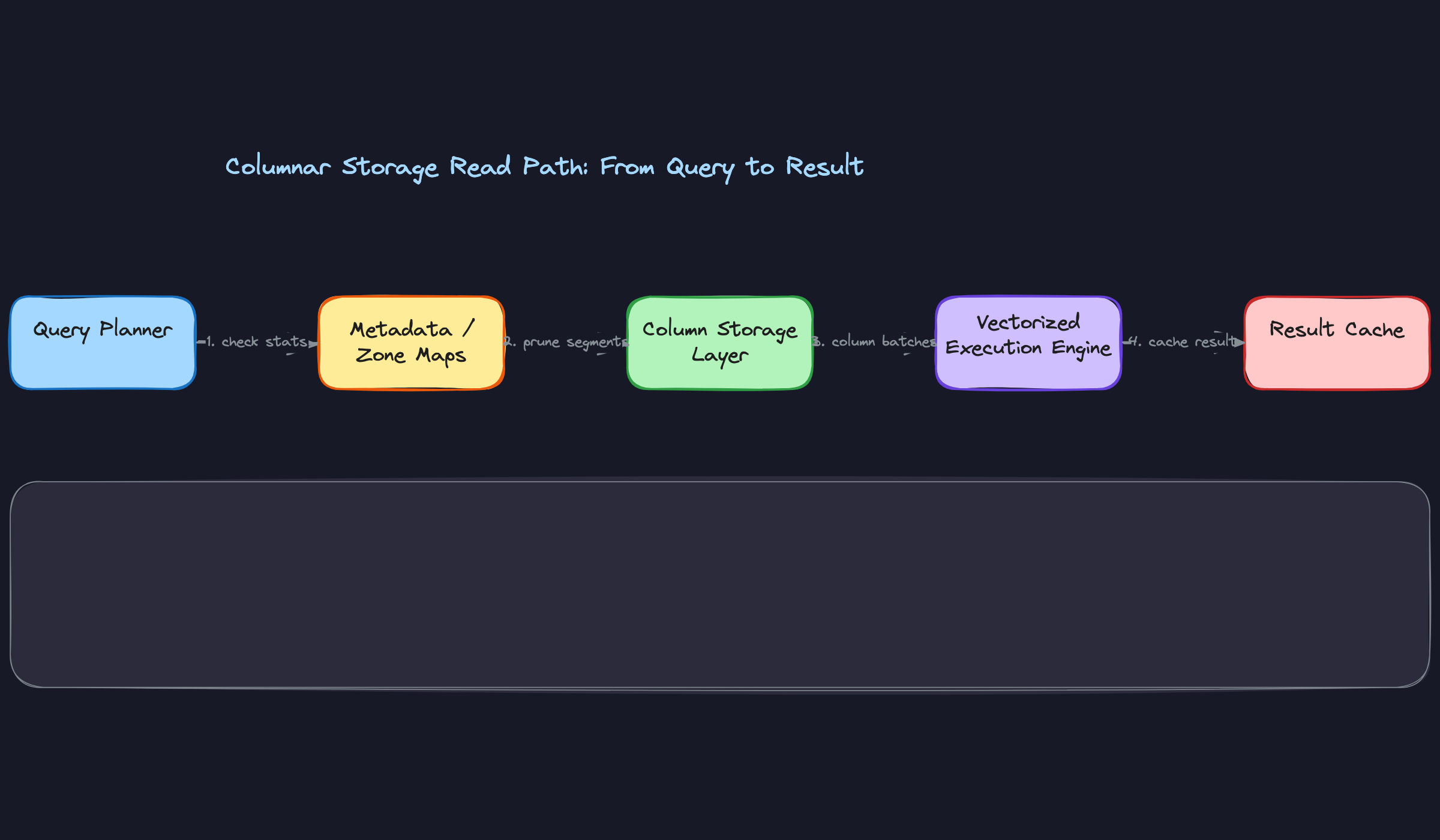
When a query hits the engine, the planner's first job is figuring out which columns are actually needed. It parses your SELECT list and WHERE clause, then hands a column list to the storage layer. The storage layer fetches only those column files, or in Snowflake's case, the relevant micro-partitions containing those columns.
Those column chunks land in the execution engine as batches. The engine doesn't process one row at a time; it works through entire column vectors, applying filters and aggregations in tight loops. More on vectorized execution in the next section, but the key point here is that the data arriving at the execution engine is already narrow and pre-filtered by column.
Here's what that flow looks like:
Compression Comes Almost for Free
Because a column file holds values of a single type, often with similar magnitude or limited cardinality, compression ratios are dramatically better than in row stores. A status column with values like "active", "inactive", and "pending" repeated millions of times compresses to almost nothing with dictionary encoding. A created_at timestamp column compresses well with delta encoding, storing the difference between consecutive values rather than full timestamps.
This matters in interviews because interviewers will ask you why columnar warehouses are cheaper to run, not just faster. The answer isn't just "less I/O." It's less I/O AND smaller storage footprint AND lower cloud storage bills. Compression is doing real work on both dimensions.
Zone Maps: Skipping Without Looking
Each column chunk, or micro-partition in Snowflake's terminology, stores metadata alongside the data itself: the minimum value, maximum value, and null count for that column segment. These are called zone maps.
When your WHERE clause says WHERE event_date = '2024-01-15', the query engine checks zone maps before reading anything. If a partition's zone map says its event_date range is 2024-03-01 to 2024-03-31, the engine skips it entirely. No decompression, no deserialization, no I/O. The data never leaves storage.
This is the foundation of partition pruning, and it's why column ordering and clustering matter so much in practice. If similar dates are physically co-located, zone maps are tight and pruning is aggressive. If data arrived in random order, zone maps overlap and the engine can't skip anything useful.
Late Materialization: Filters First, Assembly Second
Here's a subtlety that separates candidates who've read about columnar storage from those who actually understand it.
When a query has both a filter and a projection, a naive engine might fetch all needed columns, then apply the filter, then discard non-matching rows. Late materialization does it the other way around. The engine fetches the filter column first, evaluates the predicate, and builds a bitmask: row 1 matches, row 2 doesn't, row 5 matches, and so on. Only then does it fetch the remaining columns, and only for the rows that passed the filter.
If your WHERE clause eliminates 95% of rows, you just avoided reading 95% of the data in every other column. On a wide table with a selective filter, this is a massive win.
Your interviewer cares about this because it demonstrates you understand that columnar storage isn't just about physical layout. The query engine has to be designed to exploit that layout. The storage format and the execution model have to work together.
Patterns You Need to Know
In an interview, you'll usually need to pick a specific approach. Here are the ones worth knowing.
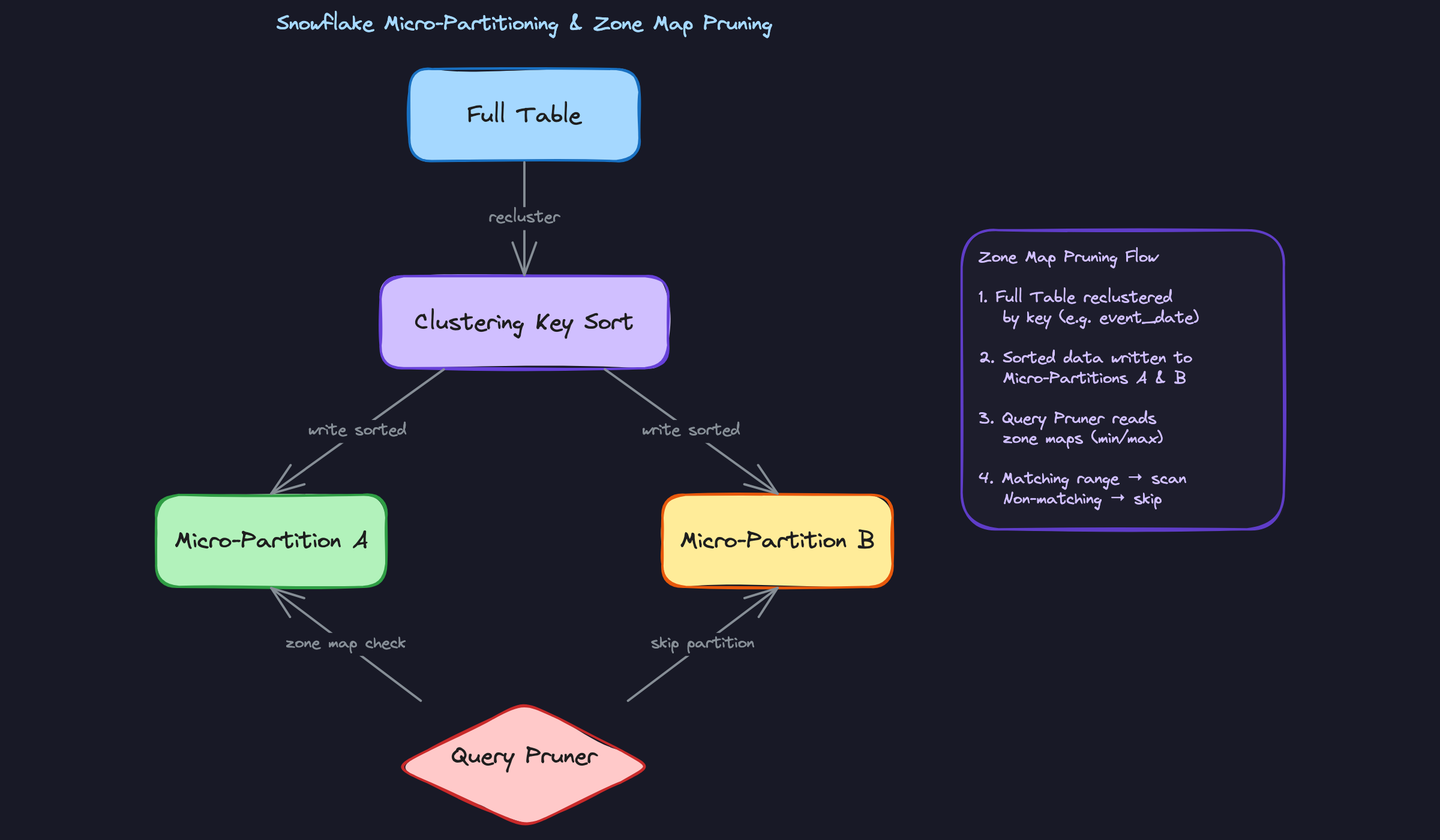
Micro-Partitioning and Clustering Keys (Snowflake)
Snowflake never asks you to manually partition your tables. Instead, it automatically slices every table into immutable ~16MB micro-partitions as data arrives, and each one stores its own zone map: the min and max value for every column inside it. When a query runs, the planner checks those zone maps and skips any micro-partition whose range can't possibly contain matching rows. On a well-organized table, this means scanning a tiny fraction of your data without you writing a single PARTITION BY clause.
The catch is that data arrives in ingestion order, not query order. If your most common filter is WHERE event_date = '2024-01-15' but rows landed in random date order, your micro-partitions will have heavily overlapping date ranges and pruning becomes nearly useless. That's where clustering keys come in: you tell Snowflake to physically re-sort the table by a column (or set of columns), which reduces overlap and makes zone map pruning dramatically more effective. But re-clustering runs as a background service that consumes credits. Always mention that trade-off when you bring it up.
When to reach for this: any time an interviewer asks how Snowflake handles large table scans, or asks you to optimize a slow filter query on a high-cardinality date or ID column.
Columnar Compression Encodings
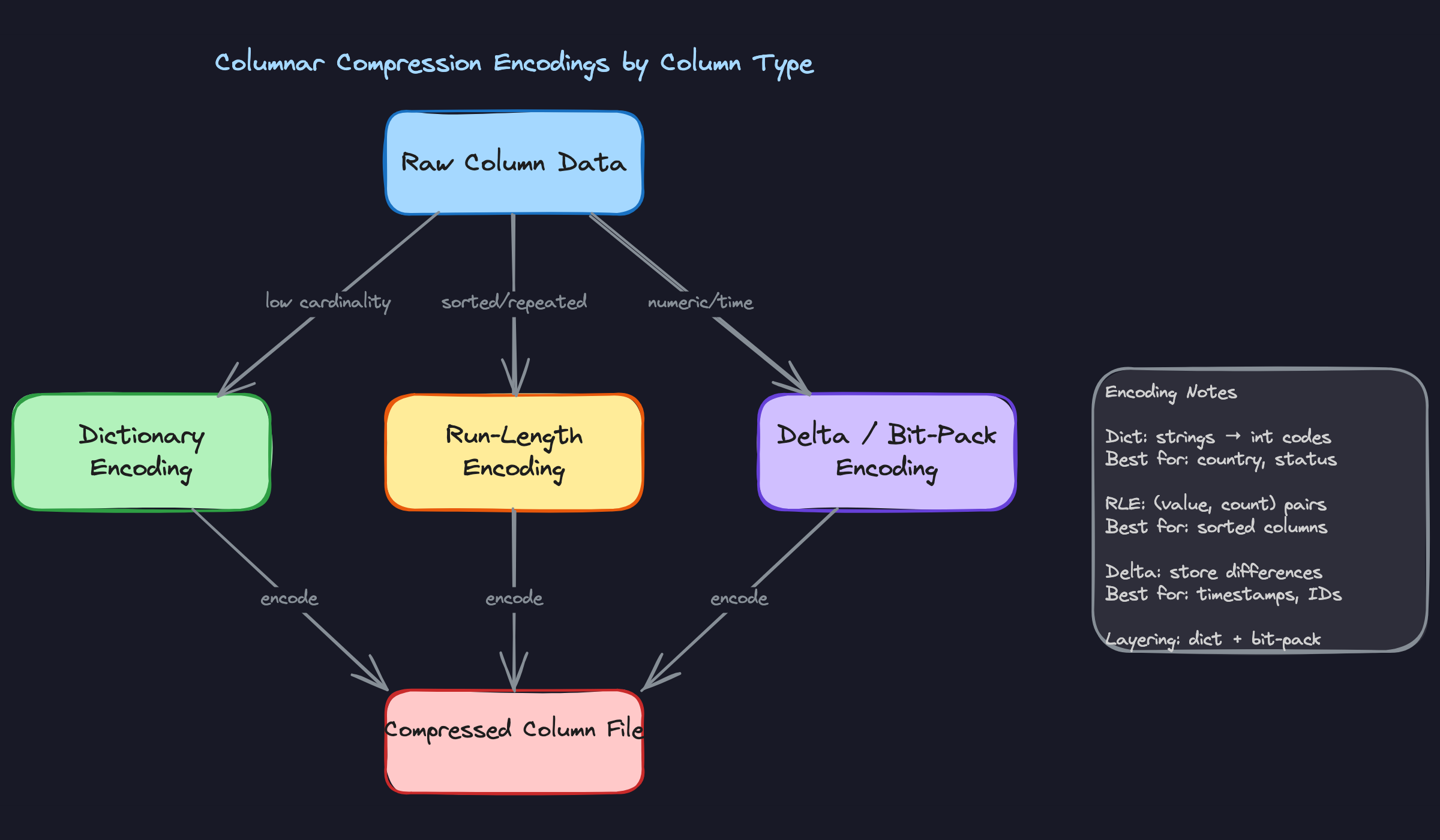
The reason columnar storage compresses so well is simple: a column holds values of the same type, often with patterns the encoder can exploit. The engine picks the encoding automatically, but you need to know what it's choosing and why.
Dictionary encoding is the workhorse for low-cardinality string columns. A column like country or order_status might have 50 distinct values across 500 million rows. Instead of storing the full string every time, the engine builds a lookup table and stores a small integer code per row. Run-length encoding targets sorted or repeated values: if a column has 10,000 consecutive rows all with status = 'active', it stores that as one (value, count) pair instead of 10,000 strings. Delta encoding is what you want for timestamps and monotonically increasing IDs: rather than storing the full value each time, it stores the difference between consecutive values, which is usually a tiny number that compresses further with bit-packing. These encodings are often layered, dictionary encoding followed by bit-packing on the integer codes, squeezing even more out of the data.
When to reach for this: when an interviewer asks why columnar storage is more storage-efficient than row storage, or asks how you'd reduce storage costs on a large warehouse table.
Vectorized vs. Interpreted Execution
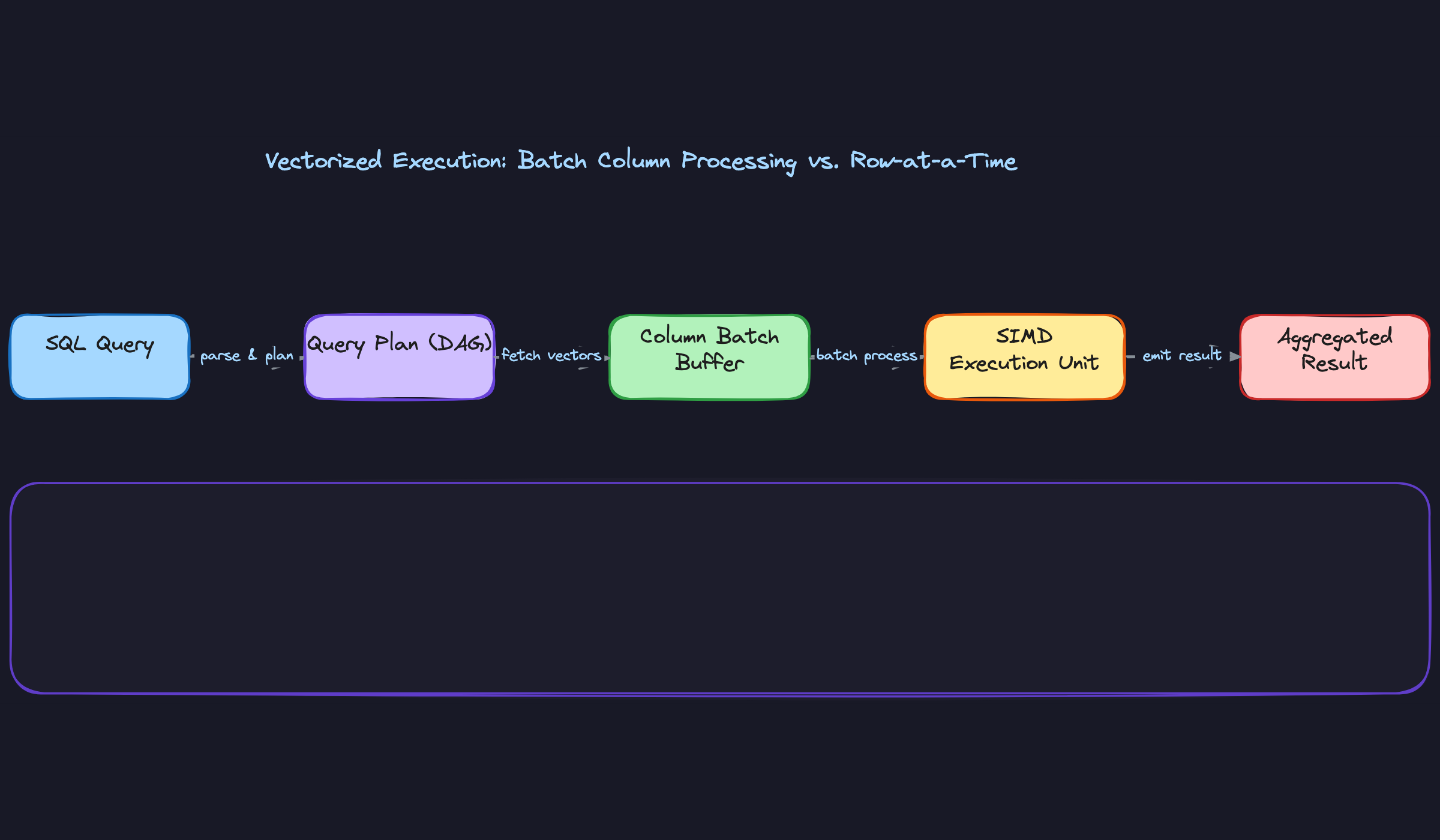
Older engines like early Hive processed queries one row at a time. Each row traveled through a chain of operator functions (filter, project, aggregate), with a virtual function call at every step. That overhead is manageable for small datasets. At billions of rows, the function call overhead and cache misses dominate execution time.
Vectorized execution flips the model. Instead of pulling one row through the pipeline, the engine pulls a batch of 1,024 rows for a single column, processes the entire batch with a tight loop that fits in L2/L3 CPU cache, and uses SIMD instructions to apply the same operation to multiple values in a single CPU cycle. Snowflake, BigQuery, and DuckDB all work this way. The practical result is that aggregations and filters on large datasets run orders of magnitude faster, not because of more parallelism across nodes, but because each CPU core is doing far more useful work per clock cycle.
When to reach for this: when an interviewer asks why modern cloud warehouses outperform older Hadoop-era tools on analytical queries, or asks you to explain what happens inside the execution engine.
Predicate Pushdown and Projection Pruning
These two optimizations work together and are easy to explain as a pair. Projection pruning means the query engine only fetches the columns your query actually references. If your table has 200 columns and your SELECT touches 4 of them, the storage layer reads roughly 2% of the data. That's the baseline benefit of columnar storage.
Predicate pushdown goes further. When your query has a WHERE clause, the engine doesn't wait until data is in memory to apply the filter. It pushes the filter condition down to the file reader, which checks row group statistics (min/max values stored in Parquet or ORC metadata) before decompressing anything. If a row group's max value for user_id is 5,000 and your filter is WHERE user_id > 100,000, that row group is skipped entirely, no decompression, no deserialization, no I/O. At the catalog level, this same logic applies to partition metadata: the planner eliminates whole partitions before even opening files. The two mechanisms stack, and together they're why a well-structured query against a petabyte-scale table can return in seconds.
When to reach for this: whenever an interviewer asks how a query against a massive table avoids a full scan, or asks you to explain the difference between partition pruning and row group skipping.
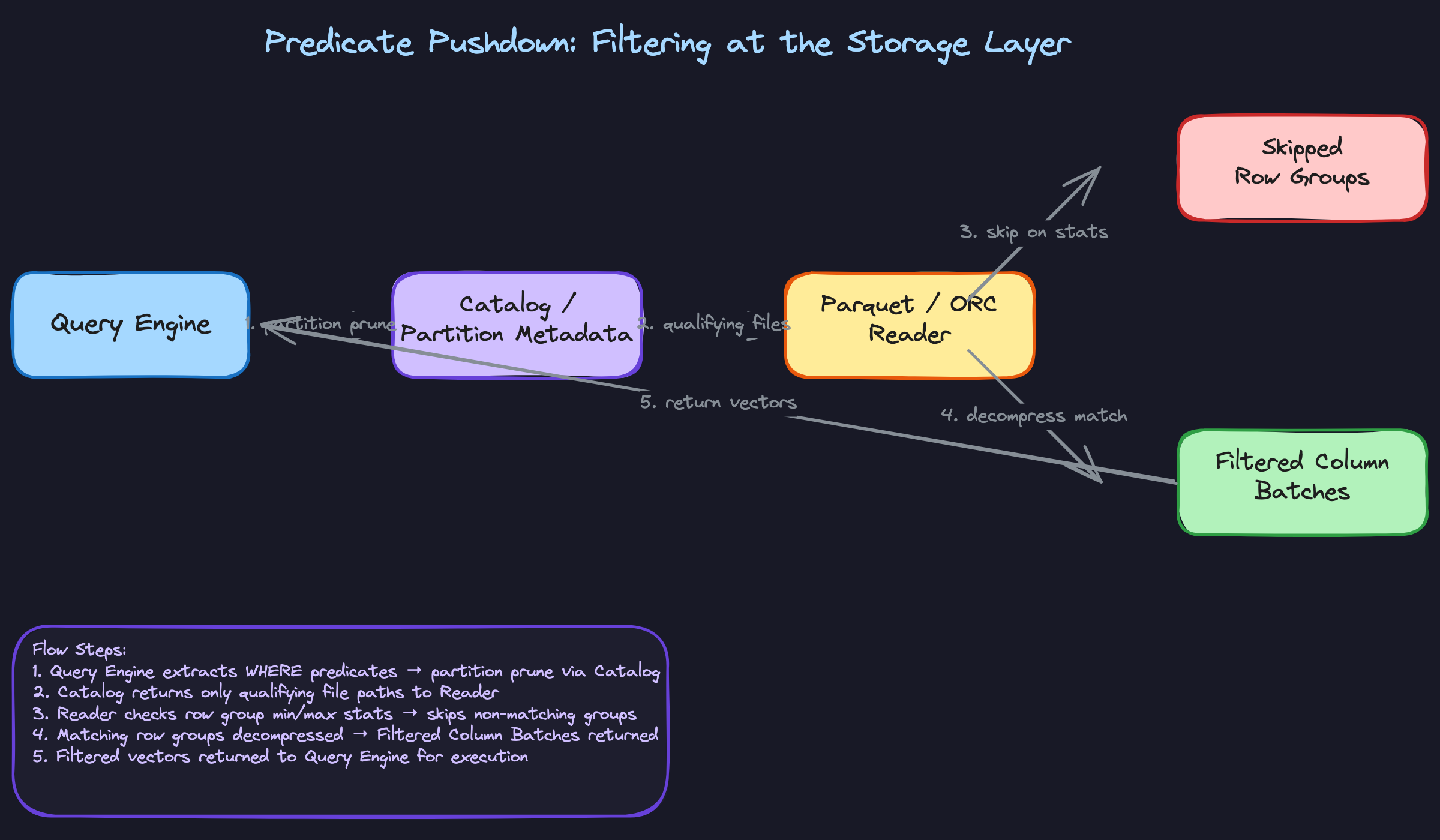
Comparison: The Four Patterns at a Glance
| Pattern | What It Optimizes | Where It Lives | Key Cost/Trade-off |
|---|---|---|---|
| Micro-partitioning + Clustering Keys | Partition pruning on filter columns | Storage layer (Snowflake) | Re-clustering consumes credits; not always necessary |
| Columnar Compression Encodings | Storage size and I/O volume | On-disk file format | Encoding choice is automatic; wrong table design can hurt ratios |
| Vectorized Execution | CPU efficiency per core | Execution engine | Requires columnar in-memory layout; not a fit for row-at-a-time OLTP |
| Predicate Pushdown + Projection Pruning | Data read from storage | File format + catalog | Only effective when statistics are accurate and queries are selective |
For most interview problems, you'll default to predicate pushdown and projection pruning as your first explanation of why columnar warehouses are fast. Reach for micro-partitioning and clustering keys when the conversation is specifically about Snowflake or when the interviewer asks how you'd optimize a slow query on a date-filtered table. Vectorized execution is the answer to pull out when someone asks why modern warehouses beat Spark or Hive on raw aggregation speed.
What Trips People Up
Here's where candidates lose points — and it's almost always one of these.
The Mistake: Conflating the File Format with the Query Engine
You'd be surprised how often candidates say something like "we're using Parquet, so our queries are fast" and leave it there. Parquet is a storage format. It defines how bytes are laid out on disk. It doesn't execute anything.
The query engine — Spark, Trino, BigQuery's Dremel, Snowflake's internal engine — is what actually reads those column files, applies predicates, and runs vectorized execution. Parquet enables the engine to do its job efficiently, but the engine is doing the work.
When an interviewer hears "Parquet makes queries fast," they're mentally flagging that you might not understand the boundary between storage and compute. That boundary is exactly what cloud warehouses are built around.
The Mistake: Recommending Clustering Keys Without Mentioning the Cost
This one trips up candidates who've read the Snowflake docs but haven't run a real workload. The answer sounds confident: "I'd add a clustering key on event_date to improve pruning." The interviewer nods, then asks: "What's the downside?"
Silence.
Snowflake's automatic micro-partitioning already gives you pruning for free based on ingestion order. A clustering key triggers a continuous background re-sort process that consumes credits. For a table that's already well-pruned, you might be paying for a re-cluster that buys you almost nothing. For a table with high overlap across partitions on a frequently-filtered column, it's absolutely worth it. The point is that the trade-off exists and you need to acknowledge it.
What to say instead: "I'd first check the clustering information using SYSTEM$CLUSTERING_INFORMATION to see the average overlap and depth. If the overlap ratio is high and this column appears in most WHERE clauses, the credit cost of reclustering is likely justified. If the data is already ingested in roughly sorted order, I'd skip it."
The Mistake: Forgetting That Columnar Formats Are Immutable
Row-oriented databases handle updates cleanly: find the row, overwrite the bytes. Columnar formats don't work that way. Every column value for a given row is stored in a separate file segment. Updating one field means rewriting the entire micro-partition or row group.
Candidates who haven't internalized this will say things like "we can just run a daily MERGE to keep the table fresh" without realizing they're describing a potentially expensive rewrite operation. At scale, a MERGE on a large Snowflake table can touch hundreds of micro-partitions and generate significant write amplification. This is exactly why Delta Lake and Apache Iceberg exist: they layer a transaction log on top of immutable Parquet files so you can track which files are "current" without rewriting everything on every change.
If you're interviewing at a company running a lakehouse architecture, not knowing this is a real problem.
The Mistake: Proposing Result Caching as a Query Optimization Strategy
Result caching is useful. It's also extremely narrow. Snowflake's query result cache and BigQuery's cached results only activate when the exact same query runs again against data that hasn't changed. Change one filter value, add a LIMIT, or have the underlying table refresh — cache miss, full scan.
The mistake sounds like this: "To speed up this dashboard query, I'd rely on Snowflake's result cache." That's fine if the dashboard runs the exact same SQL every time. But if users are filtering by date range, region, or any dynamic parameter, the cache is essentially useless for them.
Result caching is a nice bonus, not a performance strategy. The real levers are partition pruning, clustering, materialized views, and reducing the columns you scan. Lead with those.
How to Talk About This in Your Interview
When to Bring It Up
You don't need to wait for a direct question about storage formats. These are the cues that should trigger this mental model:
- The interviewer mentions a large table scan ("we have a 5TB events table and queries are slow")
- Someone asks how a cloud warehouse achieves query performance without indexes
- The conversation touches on cost optimization ("our BigQuery bill is too high")
- You're asked to compare Snowflake vs. Redshift vs. BigQuery architecturally
- The interviewer asks about data modeling for analytics and why denormalization is common in warehouses
Any time you hear "analytical workload," "aggregation at scale," or "why is this fast," columnar internals are part of the answer.
Sample Dialogue
Follow-Up Questions to Expect
"How does Snowflake's micro-partitioning differ from Hive-style partitioning?" Hive partitioning is explicit and manual, you choose a partition key and data lands in separate directories; Snowflake micro-partitions are automatic, ~16MB immutable files created on ingestion order, with zone maps maintained per partition so pruning happens without any DDL configuration.
"When would you NOT use a columnar warehouse?" Transactional workloads with frequent single-row inserts or lookups, write-heavy pipelines where you're updating individual records constantly, and any workload that genuinely needs all columns on every query. Columnar reassembly overhead hurts you when you can't skip anything.
"How does vectorized execution differ from parallel execution?" Vectorized is within a single thread: the CPU processes a batch of 1024 values per instruction using SIMD, which keeps data in L2/L3 cache and avoids per-row function call overhead. Parallel execution distributes work across threads or nodes. Modern warehouses do both simultaneously, but at completely different layers.
"Why are UPDATE and DELETE expensive in columnar stores?" Column files are immutable. A single row update requires rewriting the entire column file or micro-partition that contains it. Table formats like Delta Lake and Iceberg handle this with a transaction log that tracks which files are current, but the underlying rewrite cost doesn't go away.
What Separates Good from Great
- A mid-level answer names the concepts correctly: "BigQuery uses columnar storage, so it only reads the columns you need." A senior answer explains the mechanism and the limits: projection pruning, predicate pushdown to row groups, and exactly when those optimizations stop helping.
- Mid-level candidates treat clustering keys as a free win. Senior candidates immediately ask about the overlap ratio, mention the background reclustering credit cost, and frame it as a trade-off worth measuring rather than a default recommendation.
- The best answers connect internals to money. "Because we scan less data, we pay less" is the sentence that shows you understand why these architectural choices exist in a business context, not just how they work technically.


