Join Data Science Interview MasterClass (September Cohort) led by FAANG Data Scientists | Just 6 seats remaining...
Data Science MasterClass (September) | 6 seats left
Migrate an On-Prem Warehouse to Snowflake
Requirements & Current State
Current Architecture
Scenario: A mid-to-large enterprise running a Teradata or Netezza on-premises data warehouse wants to migrate to Snowflake, preserving full historical data, maintaining pipeline SLAs, and enabling a phased cutover with no data loss.
The legacy environment typically looks like this: a Teradata or Netezza MPP system holding 50TB to 500TB of historical data, fed by a mix of transactional databases (Oracle, SQL Server), SaaS connectors (Salesforce, Marketo), flat file drops from partners, and maybe one or two Kafka streams for near-real-time event data. ETL jobs run on Informatica, DataStage, or SSIS, often scheduled overnight in multi-hour batch windows. Hundreds of stored procedures handle business logic that nobody fully understands anymore.
The pain points are predictable but severe. Query performance degrades under concurrent load because all workloads share the same fixed MPP cluster. Scaling up means buying more hardware, which takes months and costs millions. Governance is a patchwork of view-based security and spreadsheet-tracked data owners. And the on-prem team spends more time on infrastructure maintenance than on actual data work.
Business Requirements
Before you start drawing architecture diagrams in the interview, nail down these requirements explicitly. The interviewer is watching to see if you ask.
- Data volume and growth: 200TB of historical data today, growing at roughly 500GB per day across 3,000+ tables. The largest fact tables exceed 5TB individually.
- Query latency SLAs: BI dashboards must refresh in under 30 seconds for standard reports. Ad-hoc analyst queries should complete within 2 minutes for 95% of workloads. ML feature pipelines need batch results available by 6 AM daily.
- Concurrency: 150 active analysts and data scientists, 8 BI tool connections (Tableau Server, Looker), and 40+ automated dbt/Airflow jobs running in overlapping windows during business hours.
- Cost target: Current on-prem TCO runs $2.5M annually including hardware refresh, licensing, and ops headcount. The business wants cloud costs under $1.2M in year one, with a path to further reduction as the team optimizes.
- Compliance: Customer PII is subject to GDPR and CCPA. A subset of data falls under HIPAA. All data must remain in a single cloud region (us-east-1 or equivalent) with audit logging enabled for every query touching sensitive columns.
- Freshness: Core financial and operational tables must be refreshed hourly. Marketing attribution and product analytics tables can tolerate daily batch loads. One real-time event stream (clickstream) needs to land in Snowflake within 5 minutes of generation.
Success Metrics
Vague goals like "better performance" will not survive a staff-level interview. Define what done looks like before you design anything.
- Query performance: p50 dashboard query latency under 10 seconds, p95 under 45 seconds. Ad-hoc queries against the largest fact tables should match or beat on-prem baselines, measured over a two-week parallel run.
- Cost: Storage cost under $25/TB/month. Monthly compute spend tracked per team via resource monitors, with a hard ceiling of $80K/month in the first six months while the team tunes warehouse sizes.
- Pipeline freshness: End-to-end latency from source system commit to queryable Snowflake row under 90 minutes for hourly batch workloads, under 8 minutes for the Snowpipe-based clickstream pipeline.
- Governance coverage: 100% of production tables tagged with a data owner and sensitivity classification within 60 days of cutover. PII column masking policies applied to all columns identified in the data inventory before go-live.
Warehouse Architecture
Before you write a single line of SQL, your interviewer wants to know: did you pick the right platform, and do you understand why? Most candidates jump straight to "we'll use Snowflake" without justifying it. That's a missed opportunity.
Platform Selection
Here's how the major platforms compare for a migration from a legacy on-prem warehouse:
| Snowflake | BigQuery | Redshift | |
|---|---|---|---|
| Compute-storage separation | Full separation; virtual warehouses scale independently of storage | Full separation; serverless by default, slot-based reservations available | Partial; RA3 nodes separate storage (S3) from compute, but cluster sizing still matters |
| Pricing model | Credits per second of compute; storage billed separately at ~$23/TB/month | Per-query ($5/TB scanned) or flat-rate slot reservations | On-demand per-node-hour or Reserved Instances; Serverless option available |
| SQL dialect compatibility | Closest to ANSI SQL; good Teradata/Oracle migration tooling (SnowConvert) | Standard SQL, but some dialect gaps; weaker stored procedure support | PostgreSQL-based; strong fit if source is PostgreSQL or Redshift already |
| Ecosystem fit | Native dbt support, broad BI connector ecosystem, strong data sharing | Best if you're all-in on GCP; tight BigQuery ML integration | Best for AWS-native shops already using Redshift or Glue |
| Concurrency model | Multi-cluster warehouses handle burst concurrency automatically | Slot-based; flat-rate reservations needed for predictable concurrency | Manual WLM configuration; can be painful under mixed workloads |
For this migration, Snowflake is the right call. The legacy system is almost certainly Teradata or Oracle, and Snowflake's migration tooling (SnowConvert) handles dialect translation better than anything else on the market. The credit-based pricing model also gives you predictable cost controls during the parallel run phase, when you're paying for both systems simultaneously. If the company is GCP-first, BigQuery is a legitimate alternative, but the concurrency story is weaker out of the box.
Compute & Storage Design
Storage Layer
Snowflake manages its own internal file format (a compressed, columnar format built on Parquet principles), so you don't choose Parquet vs ORC for internal tables. What you do control is how data lands in your external stage before ingestion. Use Parquet with Snappy or Zstd compression for your staging files in S3/GCS. Zstd gives better compression ratios on text-heavy columns; Snappy is faster to decompress if your extraction jobs are CPU-bound.
For partitioning in the stage, use a time-based prefix scheme: s3://bucket/raw/orders/2024/01/15/. This lets you reload specific date ranges without touching the whole table, which matters when you're debugging a bad incremental run at 2am.
Inside Snowflake, micro-partitioning is automatic. You don't manually partition tables. But you do need to think about clustering keys for large tables where queries filter on a predictable column. A 5TB events table filtered by event_date in 95% of queries is a good clustering candidate. A 200GB users table is not. The cost of automatic re-clustering is real, so don't add clustering keys speculatively.
Compute Layer
Start with a Small warehouse for BI queries and a Medium for transformations, then profile before scaling up. The most common mistake is over-provisioning on day one because "we want to be safe." You end up with an XL warehouse running at 10% utilization and a surprise bill at month end.
Workload isolation is non-negotiable. You need at least four virtual warehouses:
WH_INGEST: Snowpipe or COPY INTO jobs; can be Small, auto-suspends after 1 minuteWH_TRANSFORM: dbt runs; Medium or Large depending on model complexity; auto-suspends after 5 minutesWH_BI: Tableau/Looker queries; Small with multi-cluster enabled (min 1, max 3) to handle dashboard refresh burstsWH_ADHOC: Data science and exploratory queries; Medium, auto-suspends aggressively (1 minute), no auto-scale
The multi-cluster setting on WH_BI is what saves you from the classic problem where 20 analysts hit refresh on their dashboards at 9am and queue up behind each other. Snowflake spins up additional clusters automatically and tears them down when the burst passes.
Auto-suspend settings matter more than people think. A warehouse that never suspends costs you money 24/7. Set aggressive auto-suspend on everything except pipelines with tight SLAs, where the cold-start latency (typically 2-5 seconds) is unacceptable.
Caching Strategy
Snowflake has three caching layers, and knowing when each one applies will come up in your interview.
Result cache is account-wide and lasts 24 hours. If the same query runs twice against data that hasn't changed, the second execution returns instantly at zero compute cost. This is why you want your BI dashboards to use consistent, parameterized queries rather than dynamically generated SQL with timestamps baked in. A query with WHERE created_at > '2024-01-15 09:23:11' will never hit the result cache.
Local SSD cache (also called the data cache) lives on the virtual warehouse's compute nodes. When a warehouse reads micro-partitions from S3, it caches them on local SSD. Subsequent queries on the same warehouse that touch the same partitions skip the S3 read entirely. This is why you should avoid auto-suspending your BI warehouse too aggressively: every suspend flushes the local cache, and the next query pays the full S3 read cost again.
Metadata cache is managed by Snowflake's cloud services layer and handles things like COUNT(*), MIN(), MAX() on columns where Snowflake already tracks those statistics in micro-partition metadata. These queries can return in milliseconds without touching compute at all.
Data Organization
Layer Hierarchy
Every mature Snowflake environment uses a three-layer database structure. Don't deviate from this in your interview answer; it's the pattern interviewers expect to hear.
1PROD_DB
2├── RAW           -- exact copies of source data, no transformations
3├── STAGING       -- cleaned, typed, deduplicated; dbt staging models live here
4└── MARTS         -- business-facing aggregates and dimensional models
5
Some teams add a SANDBOX database for analyst experimentation, with a separate warehouse and tighter cost controls. That's worth mentioning at the staff level.
The raw schema is sacred. Nothing in raw gets modified after load. If a source sends you bad data, you fix it in staging, not by updating the raw table. This gives you a full audit trail and lets you replay transformations from scratch if a dbt model had a bug.
Naming Conventions
Be consistent and be explicit. A naming convention that works well in practice:
- Tables:
snake_case, singular nouns (order,customer, notorders,customers) - Staging models:
stg_<source>__<entity>(e.g.stg_salesforce__opportunity) - Mart models:
dim_<entity>orfct_<entity>(e.g.fct_order,dim_customer) - Warehouses:
WH_<WORKLOAD>in caps (e.g.WH_TRANSFORM,WH_BI)
This is the dbt community convention and most interviewers at data-forward companies will recognize it immediately.
Table Types
Snowflake gives you four table types and you should know when to use each one.
Permanent tables are the default. Full Time Travel (up to 90 days on Enterprise) and Fail-safe (7 days beyond Time Travel). Use these for anything in your marts or staging layers that has business value.
Transient tables have no Fail-safe and only 0-1 days of Time Travel. They're cheaper because Snowflake doesn't maintain the additional storage. Use them for intermediate dbt models that you can always rebuild from raw, and for the raw layer itself if you're confident your source system retains data.
External tables point to files in S3/GCS without loading data into Snowflake. Useful for querying infrequently accessed historical data or for a lakehouse pattern where you want Snowflake to read from an Iceberg or Delta table managed by another system. Query performance is slower than native tables, so don't use them for anything in your hot query path.
Materialized views pre-compute and store query results, refreshing automatically when the base table changes. They're good for expensive aggregations that many downstream queries share. The catch: they only support a subset of SQL (no joins across multiple tables in some configurations), and the automatic refresh adds compute cost.
Time Travel and Fail-Safe
On Enterprise tier, set Time Travel to 7 days for marts and 1 day for raw and staging. The marts are where accidental drops or bad dbt runs cause the most business pain; 7 days gives you a recovery window. Raw data you can reload from the source, so paying for 7 days of Time Travel storage there is wasteful.
Fail-safe is always 7 days and you can't configure it. It's Snowflake's last-resort recovery mechanism, not yours. Don't design your backup strategy around it.
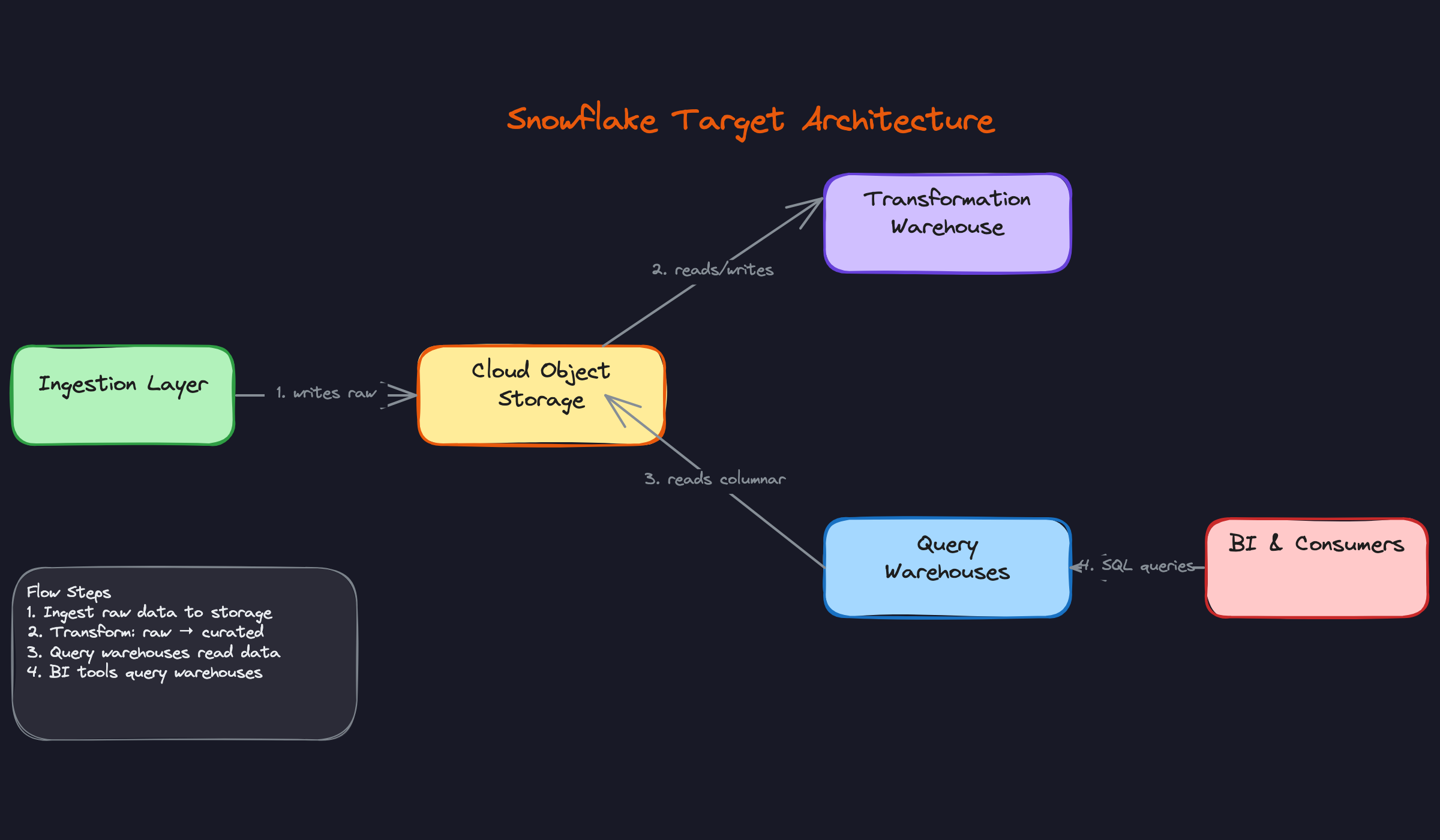
The architecture above maps directly to the legacy environment. Your on-prem staging server becomes the cloud object storage landing zone. Your shared MPP cluster becomes four isolated virtual warehouses. Your ETL server becomes Snowpipe plus dbt. The physical separation of storage and compute is what makes the whole thing elastic in a way that an on-prem system simply cannot be.
Data Pipeline Design
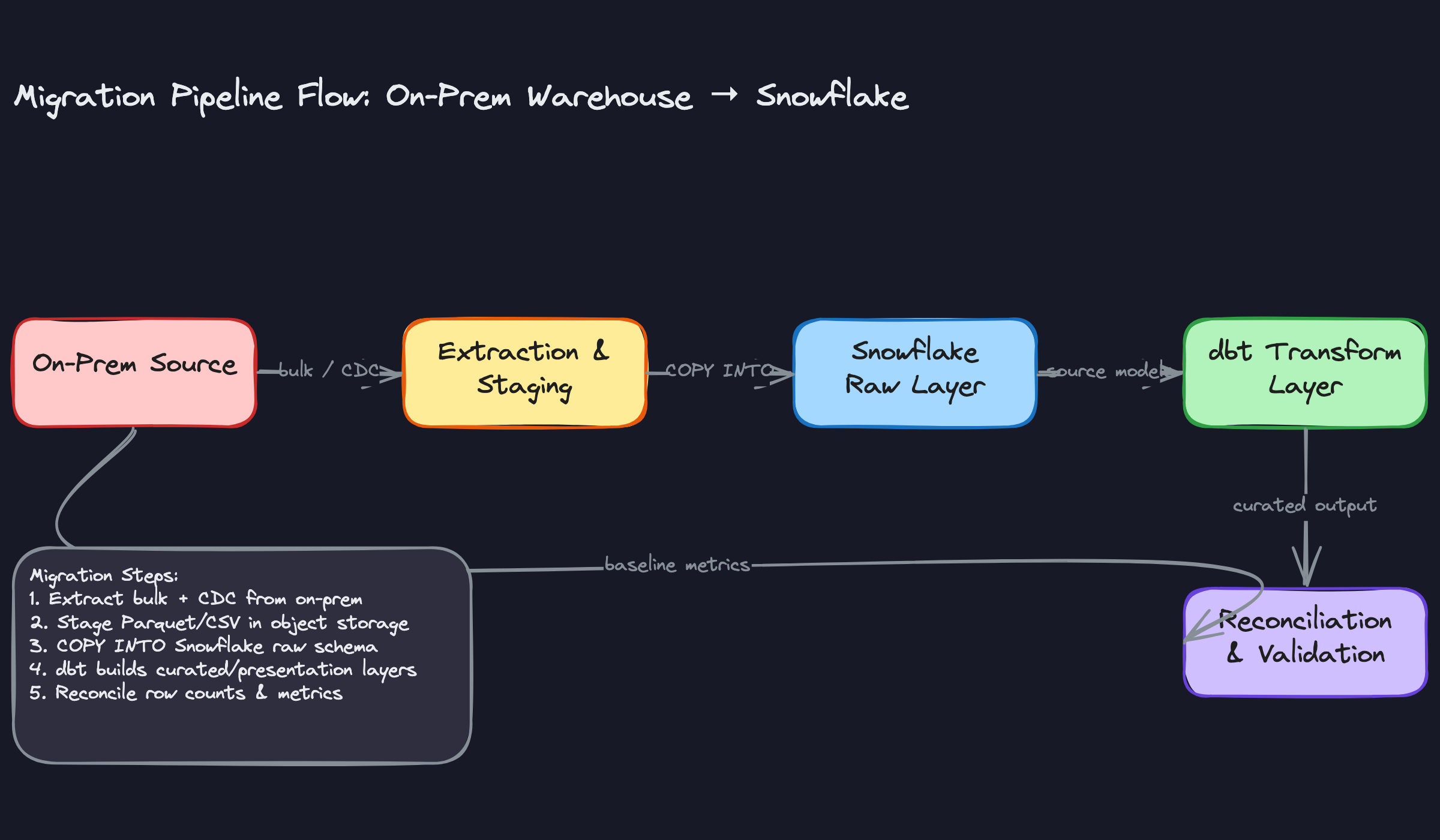
Every migration has three distinct pipeline phases, and conflating them is one of the most common ways projects blow up. The historical bulk load, the delta sync during parallel run, and the final cutover switchover each have different tooling, failure modes, and success criteria. Design them separately.
The Three Phases
Phase 1: Historical bulk load. You're extracting the full dataset from the legacy system, staging it in cloud object storage, and loading it into Snowflake's raw layer via COPY INTO. For Teradata, this usually means exporting to compressed flat files (Parquet preferred, CSV acceptable) using fastexport or Teradata Parallel Transporter (TPT). For Netezza, nzexport is the equivalent. For Oracle or SQL Server sources, sqlldr and bcp respectively are common choices. For any of these, a JDBC-based Spark job is a solid cross-platform alternative. For large tables, partition-based parallel extraction is non-negotiable. Pulling a 5TB fact table as a single serial export will take hours and is one network hiccup away from starting over.
1# Partition-based parallel extraction using PySpark
2df = spark.read \
3    .format("jdbc") \
4    .option("url", "jdbc:teradata://on-prem-host/DATABASE=sales") \
5    .option("dbtable", "sales.fct_transactions") \
6    .option("partitionColumn", "transaction_date") \
7    .option("lowerBound", "2015-01-01") \
8    .option("upperBound", "2024-12-31") \
9    .option("numPartitions", "64") \
10    .load()
11
12df.write.parquet("s3://migration-landing/raw/fct_transactions/")
13
Split by a date or integer partition column. Aim for partition sizes between 128MB and 1GB to keep Snowflake's COPY INTO efficient.
Phase 2: Delta sync. While the bulk load runs (and during the parallel validation period), the source system keeps taking writes. You need to capture those changes. For Oracle, GoldenGate is the native CDC tool. For SQL Server, Debezium over SQL Server CDC works well. For systems without CDC support, fall back to timestamp-based incremental loads: query WHERE updated_at > last_watermark. Timestamp-based is simpler but misses hard deletes, so document that limitation explicitly and decide whether it matters for your workloads.
Phase 3: Cutover. Freeze writes on the on-prem system, run one final delta sync, validate checksums, then flip connection strings. The cutover itself should take under an hour if phases 1 and 2 were executed cleanly. If your validation is failing at cutover time, that's a process problem, not a cutover problem.
Ingestion Patterns
Once you're past the initial bulk load, your steady-state ingestion design matters more than anything else.
Batch sources (databases, files): For managed SaaS sources like Salesforce or Stripe, Fivetran or Airbyte handle extraction, pagination, and schema drift automatically. For internal databases, a custom Spark or Python job gives you more control over partitioning and retry logic. Full-refresh works fine for small dimension tables. For anything over a few million rows, use incremental loads.
Streaming sources (events, logs): Kafka is the most common pattern here. You have two options: use the Snowflake Kafka connector to write directly to a Snowflake table via Snowpipe, or land events in S3/GCS first and trigger Snowpipe via SQS event notifications. The second approach is more resilient because S3 acts as a buffer. Micro-batch (every 30-60 seconds) is usually sufficient for analytics workloads. True continuous ingestion adds operational complexity that most BI use cases don't justify.
1-- Snowflake: Snowpipe auto-ingest from S3
2CREATE PIPE raw.events_pipe
3  AUTO_INGEST = TRUE
4AS
5COPY INTO raw.events
6FROM @raw.s3_stage
7FILE_FORMAT = (TYPE = 'PARQUET');
8
The AUTO_INGEST = TRUE flag means Snowpipe listens for S3 event notifications and triggers loads automatically. You're charged per file loaded, so batching small files before staging them saves real money.
API sources (SaaS tools): Extraction frequency depends on the API's rate limits and your freshness SLA. Most SaaS APIs enforce per-minute or per-hour rate limits, so your extractor needs to handle 429s with exponential backoff. Cursor-based pagination is safer than offset-based for large datasets because offsets drift when records are inserted mid-extraction.
Transformation Layer (ELT)
The biggest architectural shift from on-prem is moving from ETL to ELT. You're no longer transforming data before it lands; you're loading raw first and transforming inside Snowflake where compute is cheap and elastic.
Replace stored procedures with dbt. This is the right call for almost every migration. Stored procedures in Teradata BTEQ or Netezza nzsql are notoriously hard to test, version-control, or document. dbt gives you version-controlled SQL, a dependency graph, built-in testing, and documentation generation. Dataform is a reasonable alternative if your team is already deep in Google Cloud. Stored procedures in Snowflake should be reserved for procedural logic that genuinely can't be expressed as a SQL model.
The three-layer model maps cleanly to this migration context:
Staging models are 1:1 mirrors of source tables. Cast types, rename columns to a consistent convention, and deduplicate. No business logic here. The goal is a clean, typed representation of exactly what came out of the source system.
Intermediate models are where business logic lives: joins between entities, window functions for session attribution, aggregations for pre-computed metrics. These models are not exposed to end consumers directly; they exist to keep mart models readable.
Mart models are denormalized, consumer-specific tables. A finance mart looks different from a product analytics mart even if they share underlying source data.
1-- marts/fct_orders.sql
2WITH orders AS (
3    SELECT * FROM {{ ref('stg_orders') }}
4),
5payments AS (
6    SELECT * FROM {{ ref('stg_payments') }}
7)
8SELECT
9    o.order_id,
10    o.customer_id,
11    o.ordered_at,
12    p.total_amount,
13    p.payment_method
14FROM orders o
15LEFT JOIN payments p ON p.order_id = o.order_id
16
One thing interviewers specifically probe: how do you handle proprietary UDFs from the legacy system? Some can be rewritten as dbt macros. Others need to become Snowflake JavaScript or Python UDFs. A few genuinely have no equivalent and require rethinking the logic. Audit your UDF inventory early; surprises here cause the most cutover delays.
Orchestration & Scheduling
Airflow is the most common choice for orchestration at this scale, and for good reason: it handles complex dependency graphs, has mature retry and alerting support, and integrates with everything. If your legacy ETL lived inside Informatica or DataStage, you're essentially rebuilding that dependency graph as a DAG. That's not trivial. Budget time to map every job dependency before you write a single Airflow task.
Snowflake Tasks work well for lightweight, Snowflake-native scheduling: triggering a dbt run after a Snowpipe load completes, or chaining a few SQL transformations. They're not a replacement for Airflow when you have cross-system dependencies or need complex branching logic.
Dagster and Prefect are worth considering if you're starting fresh and want stronger data-aware scheduling (Dagster's asset-based model aligns naturally with dbt's ref graph). But if the team already knows Airflow, the switching cost rarely pays off during a migration.
Your DAG structure should follow the pipeline phases: extraction tasks feed staging load tasks, which trigger dbt transformation runs, which gate mart delivery. Keep each stage idempotent.
COPY INTO, Snowflake tracks loaded files by default, so re-running won't duplicate. For dbt incremental models, your merge key needs to be correct or you'll get duplicates on retry. For Snowpipe, idempotency depends on how you handle the SQS notification queue. Know the failure mode for each layer.Data quality checks belong between stages, not just at the end. dbt tests (not-null, unique, accepted-values, referential integrity) should run after staging models complete and block downstream transformation if they fail. For more complex statistical checks (distribution drift, unexpected nulls in previously clean columns), Great Expectations or dbt's custom generic tests work well. Define your acceptance threshold before cutover: is a 0.01% row count discrepancy acceptable? For most analytical workloads, yes. For financial reconciliation tables, probably not.
Retry strategy: extraction failures should retry with exponential backoff up to three times before alerting. Transformation failures should alert immediately and not retry automatically, because a dbt model failure usually means bad data or a logic bug that a retry won't fix. Distinguish between transient infrastructure failures and data failures in your alerting.
Performance & Cost Optimization
Most candidates can describe Snowflake's architecture. Fewer can explain why a query costs $40 instead of $0.40, or what to do when a dashboard that ran in 3 seconds on Teradata now takes 45 seconds on Snowflake. That gap is where senior and staff candidates separate themselves.
Query Performance Tuning
Micro-Partitioning and Clustering
Snowflake automatically divides every table into micro-partitions of roughly 50-500 MB of uncompressed data. Each partition stores metadata about the min/max values of every column it contains. When you filter on a column, Snowflake uses that metadata to skip partitions entirely. This is called partition pruning, and it's the single biggest lever for query performance on large tables.
Out of the box, partitions are organized in ingestion order. If your queries filter on ordered_at but data arrives in random order across dates, Snowflake can't prune much. That's when you add an explicit clustering key.
1-- Before: Full scan across all micro-partitions
2SELECT customer_id, SUM(amount)
3FROM orders
4WHERE ordered_at >= '2024-01-01'
5GROUP BY customer_id;
6
7-- After: Cluster on ordered_at so Snowflake skips ~95% of partitions
8ALTER TABLE orders CLUSTER BY (ordered_at);
9
10-- Check if clustering is actually helping
11SELECT SYSTEM$CLUSTERING_INFORMATION('orders', '(ordered_at)');
12
The output of SYSTEM$CLUSTERING_INFORMATION gives you an average_depth score. Anything above 1.5-2.0 on a large table means your clustering is degrading and Snowflake will start background re-clustering, which costs credits. That's the trade-off: clustering improves query speed but adds ongoing compute cost. For a 10 TB orders table with heavy date-range filters, it's almost always worth it. For a 50 GB lookup table, it's not.
user_id when queries actually filter on event_date. Always choose clustering keys based on your WHERE clause patterns, not on what "feels" like a good partition key from an RDBMS background.Composite clustering keys work, but keep them to two columns maximum. The order matters: put the column with the most selective filters first.
1-- Good for queries filtering on region then date
2ALTER TABLE events CLUSTER BY (region, event_date);
3
4-- Bad: user_id has too many distinct values, clustering depth degrades fast
5ALTER TABLE events CLUSTER BY (user_id, event_date);
6
Result Caching
Snowflake has two caching layers you need to know cold.
The result cache lives at the service layer and holds the exact byte-for-byte output of a query for 24 hours. If the same SQL runs again against unchanged data, Snowflake returns the cached result instantly, and you burn zero credits. This is why dashboard tools like Looker or Tableau can serve hundreds of users off a single warehouse without melting it: most users are hitting cached results.
To maximize cache hits, make sure your BI tool isn't injecting dynamic timestamps or session variables into every query. A query like WHERE report_date = CURRENT_DATE() will never cache because CURRENT_DATE() changes. Replace it with a parameterized date that your BI layer controls explicitly.
The local disk cache (sometimes called the warehouse cache) is different. It lives on the SSD of the virtual warehouse nodes and holds raw columnar data from recent scans. It's warm as long as the warehouse stays running. This is one reason auto-suspend settings matter for performance, not just cost: suspending a warehouse flushes its local cache, so the next query after resume will be slower.
Query Profiling
When a query is slow, open the Query Profile in the Snowflake UI. The three things to look for immediately:
Spill to local disk means your warehouse ran out of memory and started writing intermediate results to SSD. This is fixable by upsizing the warehouse one tier. Spill to remote storage is worse; it means you've overflowed both memory and local disk. That's a signal to upsize two tiers or rethink the query.
Remote I/O percentage tells you how much data was read from S3/GCS versus the local warehouse cache. High remote I/O on repeated queries means your warehouse is suspending too aggressively and losing its cache.
Skewed join shows up when one node in the warehouse is doing 80% of the work. Usually caused by joining on a column with a heavily skewed value distribution (think NULL or a single dominant customer ID). Fix it by filtering out the skewed values before the join, or by using SELECT /*+ skew_hint */ if you're on a recent Snowflake version.
1-- Use EXPLAIN to catch full scans before running
2EXPLAIN
3SELECT o.customer_id, SUM(o.amount), c.region
4FROM orders o
5JOIN customers c ON o.customer_id = c.id
6WHERE o.ordered_at >= '2024-01-01'
7GROUP BY o.customer_id, c.region;
8
The EXPLAIN output shows partition scan counts. If you see "partitions scanned: 8,400 of 8,400", clustering isn't helping and you need to investigate why.
Materialized Views
Use materialized views for aggregations that are expensive to compute and queried frequently with the same shape. Pre-computing a daily revenue rollup that 50 dashboards hit is a good candidate. A one-off analyst query is not.
1CREATE MATERIALIZED VIEW daily_revenue_mv AS
2SELECT
3    DATE_TRUNC('day', ordered_at) AS order_date,
4    region,
5    SUM(amount)                   AS total_revenue,
6    COUNT(DISTINCT customer_id)   AS unique_customers
7FROM orders
8GROUP BY 1, 2;
9
Snowflake refreshes materialized views automatically when the base table changes, but that refresh consumes credits on your virtual warehouse. For very high-frequency ingestion tables, the refresh cost can exceed the query savings. Check INFORMATION_SCHEMA.MATERIALIZED_VIEW_REFRESH_HISTORY to audit this.
Cost Management
Snowflake bills compute in credits per second, with each credit costing roughly $2-4 depending on your cloud region and contract. An X-Small warehouse burns 1 credit/hour. A 4X-Large burns 128 credits/hour. The math gets expensive fast if you're not deliberate.
Compute Cost Controls
Auto-suspend is the most impactful single setting you can change. The default is 10 minutes of idle time before a warehouse suspends. For a BI warehouse that gets hit sporadically during business hours, that's fine. For a batch ETL warehouse that runs once at 2 AM, set auto-suspend to 60-120 seconds after the job finishes.
1-- Tighten auto-suspend for batch workloads
2ALTER WAREHOUSE etl_warehouse SET
3    AUTO_SUSPEND = 60        -- suspend after 60s idle
4    AUTO_RESUME  = TRUE;     -- resume automatically on query
5
Right-sizing is a process, not a one-time decision. Start every new workload on a Small or Medium warehouse. Run it for a week, then pull the query profile data and look for spill. If you see consistent spill to local disk, go up one size. If you see the warehouse idle at 20% utilization, go down one size. Don't enable auto-scaling until you've right-sized first; auto-scaling adds clusters for concurrency, not for query memory.
Reserved capacity (Snowflake calls these "capacity commitments") gives you a 40-45% discount over on-demand pricing in exchange for a one-year commitment. Only commit capacity for warehouses you know will run continuously, like your production ETL and BI warehouses. Keep ad-hoc and data science warehouses on on-demand so you're not paying for idle reserved credits.
Storage Cost Controls
Snowflake charges for storage based on the average daily amount of data stored, including Time Travel and Fail-safe copies. The default Time Travel window is 1 day. Enterprise tier supports up to 90 days. Every day of Time Travel roughly doubles your storage cost for that table.
For staging tables that hold raw data before transformation, use transient tables. They have no Fail-safe period and a maximum 1-day Time Travel window, which cuts storage cost significantly.
1-- Use transient tables for raw/staging data you don't need to recover
2CREATE TRANSIENT TABLE raw.orders_stage (
3    raw_payload VARIANT,
4    loaded_at   TIMESTAMP DEFAULT CURRENT_TIMESTAMP()
5);
6
Columnar compression in Snowflake is automatic and generally excellent, but you can help it by choosing appropriate data types. Storing timestamps as TIMESTAMP_NTZ instead of VARCHAR compresses 3-5x better. Storing booleans as BOOLEAN instead of CHAR(1) matters at scale.
For old historical data that's rarely queried, consider dropping Time Travel to 0 days on those specific tables or moving the data to an external table backed by cheaper object storage tiers (S3 Glacier Instant Retrieval, for example).
Per-Query Cost Visibility and Tagging
You can tag queries with session-level metadata that shows up in QUERY_HISTORY. This is how you build a chargeback model.
1-- Tag queries with team and project for cost attribution
2ALTER SESSION SET QUERY_TAG = '{"team": "growth", "project": "q4_campaign_analysis"}';
3
4-- Then query cost by team
5SELECT
6    PARSE_JSON(query_tag):team::STRING AS team,
7    SUM(credits_used_cloud_services)   AS cloud_service_credits,
8    COUNT(*)                           AS query_count
9FROM SNOWFLAKE.ACCOUNT_USAGE.QUERY_HISTORY
10WHERE start_time >= DATEADD('day', -30, CURRENT_TIMESTAMP())
11  AND query_tag != ''
12GROUP BY 1
13ORDER BY 2 DESC;
14
Resource monitors are your circuit breaker. Set them per warehouse with a credit quota and define what happens when you hit 75%, 90%, and 100% of the quota: notify, then suspend.
1CREATE RESOURCE MONITOR growth_team_monitor
2    WITH CREDIT_QUOTA = 500          -- 500 credits per month
3    TRIGGERS
4        ON 75 PERCENT DO NOTIFY
5        ON 90 PERCENT DO NOTIFY
6        ON 100 PERCENT DO SUSPEND;
7
8ALTER WAREHOUSE growth_adhoc_wh SET RESOURCE_MONITOR = growth_team_monitor;
9
Without resource monitors, a single runaway query or a misconfigured loop in a dbt model can burn thousands of dollars overnight. This is not hypothetical.
Cost Breakdown and Optimization Targets
| Component | Typical Monthly Cost | Primary Optimization | Expected Savings |
|---|---|---|---|
| Compute (ETL pipelines) | $3,000-8,000 | Auto-suspend to 60s + right-size to actual spill data | 30-50% |
| Compute (BI/dashboards) | $2,000-5,000 | Multi-cluster auto-scale + maximize result cache hits | 20-35% |
| Compute (ad-hoc/DS) | $1,000-4,000 | Separate warehouse + resource monitors per team | 40-60% |
| Storage (current data) | $500-2,000 | Transient staging tables + appropriate data types | 15-25% |
| Storage (Time Travel) | $200-1,000 | Reduce retention to 7 days on large historical tables | 50-70% |
These ranges assume a mid-sized company (5-20 TB active data, 50-200 warehouse users). Your actual numbers will vary, but the relative impact of each optimization holds.
Scaling Strategy
At 10x Data Volume
When your data grows from 5 TB to 50 TB, the query performance problems change character. Partition pruning becomes non-negotiable; queries that scanned "only" 500 GB before now scan 5 TB without clustering. Re-clustering costs also increase, so you need to be more selective about which tables get explicit clustering keys.
Storage costs become significant enough to justify a formal data lifecycle policy. Define retention tiers: hot data (last 90 days) in standard Snowflake tables with full Time Travel, warm data (90 days to 2 years) in Snowflake with reduced Time Travel, cold data (2+ years) in external tables backed by cheap object storage.
At this scale, you'll also start hitting limits on COPY INTO throughput for bulk loads. Switch to parallel multi-file loads: split large extracts into many smaller files (100-250 MB each) so Snowflake can distribute the load across warehouse nodes.
1-- Parallel load: many small files load faster than one large file
2COPY INTO orders
3FROM @orders_stage/2024/
4FILE_FORMAT = (TYPE = PARQUET)
5PATTERN = '.*\.parquet'
6ON_ERROR = CONTINUE;
7
At 100x Concurrent Users
Going from 20 to 2,000 concurrent users is a concurrency problem, not a compute-per-query problem. This is where multi-cluster warehouses earn their keep. A multi-cluster warehouse spins up additional clusters automatically when query queue depth exceeds a threshold, then scales back down when demand drops.
1CREATE WAREHOUSE bi_warehouse
2    WAREHOUSE_SIZE = MEDIUM
3    MIN_CLUSTER_COUNT = 1
4    MAX_CLUSTER_COUNT = 5
5    SCALING_POLICY = ECONOMY;   -- ECONOMY waits longer before adding clusters vs STANDARD
6
At 2,000 users, you also need to think about workload isolation more carefully. Separate your user-facing dashboards (latency-sensitive, SLA-bound) from analyst ad-hoc queries (bursty, unpredictable) from scheduled reports (predictable, can tolerate queuing). Three separate warehouses with different sizing and auto-scaling policies.
Result cache becomes a strategic asset at this scale. Work with your BI team to standardize dashboard queries so they hit the cache instead of recomputing. A Looker PDT (persistent derived table) or a Tableau extract that refreshes once per hour is often better than 500 users each running the same live query.
When to Consider a Lakehouse
Pure Snowflake works well when your data fits in structured or semi-structured formats, your team is SQL-first, and you don't have heavy ML training workloads. The economics start to shift when you have three specific pressures.
First, if you're storing petabytes of raw data that rarely gets queried, Snowflake storage at $23/TB/month is expensive compared to S3 at $0.023/TB/month. External tables or a hybrid lakehouse pattern (Delta Lake or Iceberg on S3, queried via Snowflake's external table support) can cut storage costs by 10x for cold data.
Second, if your data science team needs to run Python-heavy workloads, Spark jobs, or train large models directly on raw data, Databricks or a Spark-on-Iceberg pattern gives them more flexibility than Snowflake's Python UDFs or Snowpark.
Third, if you have real-time streaming requirements (sub-second latency), Snowflake's Snowpipe gets you to seconds-to-minutes latency, which is fine for most analytics. True streaming analytics belongs in a system like Apache Flink writing to Iceberg, with Snowflake consuming the results.
Governance & Operations
Access Control
Snowflake's RBAC model has three system roles you need to know cold: ACCOUNTADMIN owns the account and billing, SECURITYADMIN manages users and role grants, and SYSADMIN owns database objects. In practice, you almost never log in as ACCOUNTADMIN. You build a hierarchy of custom functional roles beneath SYSADMIN and grant those to humans and service accounts.
A typical hierarchy for a data platform looks like this:
1ACCOUNTADMIN
2  └── SECURITYADMIN (manages grants)
3  └── SYSADMIN
4        └── DATA_ENGINEER (read/write on raw + curated schemas)
5              └── ANALYST (read-only on curated + presentation)
6                    └── VIEWER (read-only on presentation layer only)
7
The key principle is that no human role should own objects. Object ownership lives on a service role (say, TRANSFORMER_ROLE), and humans are granted usage through functional roles. This is the pattern that survives team turnover and avoids the "Bob left and now nobody can drop that table" problem.
Service accounts for pipelines and BI tools each get their own dedicated role. Your Airflow service account gets COPY INTO privileges on the raw schema and nothing else. Your Tableau service account gets SELECT on the presentation layer. If a credential leaks, the blast radius is contained.
Row-level and column-level security is where Snowflake genuinely beats the legacy view-based approach. Instead of maintaining a forest of security views, you attach policies directly to tables.
Dynamic data masking lets you define the masking logic once and apply it to any column:
1-- Snowflake: Masking policy for PII
2CREATE MASKING POLICY pii_mask AS (val STRING)
3RETURNS STRING ->
4  CASE WHEN CURRENT_ROLE() IN ('DATA_ENGINEER', 'ADMIN')
5       THEN val ELSE '***MASKED***' END;
6
7-- Apply it to a column
8ALTER TABLE customers
9  MODIFY COLUMN email
10  SET MASKING POLICY pii_mask;
11
Now every role that queries customers.email gets masked output automatically, with no view layer to maintain. When an analyst gets promoted to engineer, you update their role grant and the masking follows immediately.
Row access policies work the same way for multi-tenant or regional segmentation. A single orders table can serve EU and US analysts with each group seeing only their region's rows, enforced at query time by the policy function.
CREATE VIEW privileges on a schema.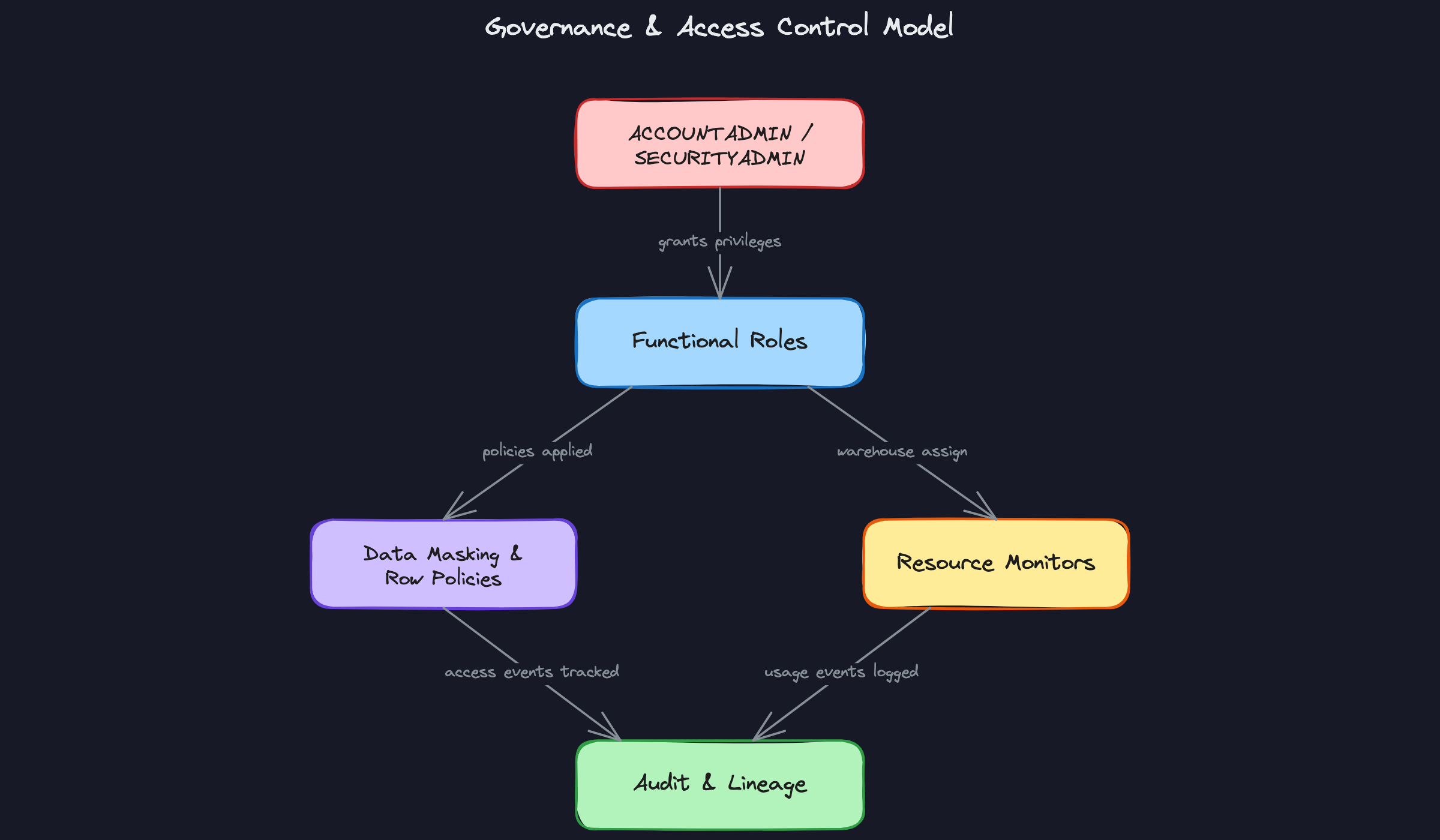
Data Quality & Observability
Getting data into Snowflake is only half the job. Knowing when that data is wrong, stale, or missing is what keeps pipelines trustworthy in production.
Freshness monitoring is the simplest check and the one that catches the most incidents. Every table that feeds a dashboard should have a _loaded_at or updated_at timestamp. A Snowflake Alert or an Airflow sensor checks that the max timestamp is within your SLA window:
1-- Detect stale tables: flag anything not loaded in the last 2 hours
2SELECT
3    table_name,
4    MAX(loaded_at) AS last_load,
5    DATEDIFF('minute', MAX(loaded_at), CURRENT_TIMESTAMP()) AS minutes_stale
6FROM raw.pipeline_metadata
7GROUP BY table_name
8HAVING minutes_stale > 120;
9
Volume anomaly detection catches silent failures: the pipeline ran, no errors, but only 200 rows loaded instead of the usual 50,000. The pattern is to track a rolling average of row counts per load and alert when a new load deviates by more than two standard deviations. dbt tests handle this well with the dbt-expectations package, or you can roll your own using ACCOUNT_USAGE.LOAD_HISTORY.
Schema drift is a nastier problem. An upstream team adds a column, renames a field, or changes a type, and your COPY INTO job starts silently dropping data or failing. The defense is to enforce schema-on-load with MATCH_BY_COLUMN_NAME in your COPY INTO statement and add a schema comparison step in your pipeline that diffs the source schema against what Snowflake expects before loading.
1COPY INTO raw.events
2FROM @my_stage/events/
3FILE_FORMAT = (TYPE = 'PARQUET')
4MATCH_BY_COLUMN_NAME = CASE_INSENSITIVE
5ON_ERROR = 'ABORT_STATEMENT';
6
For data lineage, Snowflake's Access History view (SNOWFLAKE.ACCOUNT_USAGE.ACCESS_HISTORY) gives you column-level lineage: which queries read which columns and wrote to which tables. Pair that with dbt's built-in lineage graph and you have end-to-end traceability from raw source to BI dashboard. For organizations that need a catalog UI, Atlan and Monte Carlo both integrate natively with Snowflake's metadata APIs.
Snowflake's native object tagging ties everything together. Tag columns as PII, SENSITIVE, or FINANCIAL at the schema level, and those tags propagate to downstream objects automatically. This makes compliance audits tractable: you can query all tagged columns across the account in seconds rather than hunting through documentation.
Alerting should route to wherever your team actually responds. Snowflake Alerts can call a webhook directly, which means you can push failures to PagerDuty or a Slack channel without any external infrastructure:
1CREATE ALERT stale_data_alert
2  WAREHOUSE = monitoring_wh
3  SCHEDULE = '15 MINUTES'
4  IF (EXISTS (
5    SELECT 1 FROM raw.pipeline_metadata
6    WHERE DATEDIFF('minute', loaded_at, CURRENT_TIMESTAMP()) > 120
7  ))
8  THEN CALL notify_slack('Pipeline SLA breach detected');
9
For anything more complex, Airflow's failure callbacks or Monte Carlo's anomaly detection give you richer context in the alert payload.
Disaster Recovery
Snowflake's Time Travel is your first line of defense against accidental changes. On Enterprise tier, you get up to 90 days of time travel per table. Someone ran DELETE FROM orders WHERE 1=1 at 2am? You restore with:
1-- Restore a table to its state before the accidental delete
2CREATE OR REPLACE TABLE orders AS
3SELECT * FROM orders AT (TIMESTAMP => '2024-01-15 01:55:00'::TIMESTAMP_TZ);
4
Set your time travel retention based on how long you'd realistically need to detect and recover from a bad load. For critical tables, 14 days is a reasonable default. Going to 90 days on every table adds meaningful storage cost, so be selective.
Beyond time travel, Fail-safe gives you an additional 7 days of recovery handled by Snowflake support. You can't query it yourself, but it's a backstop for catastrophic scenarios. Don't count on it as your DR strategy; it's a last resort.
For actual disaster recovery across a region outage, Snowflake's database replication lets you replicate databases to a secondary account in a different region or cloud provider. Replication is near-real-time and the secondary account can be promoted to primary if the primary region goes down.
1-- Enable replication on the primary account
2ALTER DATABASE production ENABLE REPLICATION TO ACCOUNTS aws_us_west_2.my_dr_account;
3
4-- On the secondary account, create the replica
5CREATE DATABASE production AS REPLICA OF aws_us_east_1.primary_account.production;
6
7-- Refresh the replica (or schedule this)
8ALTER DATABASE production REFRESH;
9
Your RTO and RPO targets should be defined before cutover, not after an incident. A reasonable starting point for a data warehouse (not an OLTP system) is RPO of 1 hour and RTO of 4 hours. RPO is bounded by your replication refresh frequency. RTO is bounded by how long it takes to update connection strings for all downstream consumers and validate the replica is current.
The cutover runbook itself deserves a dedicated document, but the skeleton is: freeze writes on the on-prem system, run the final delta sync, validate row counts and checksums against the baseline, flip connection strings for BI tools and pipelines, and monitor for 24 hours before decommissioning the on-prem system. Define your rollback trigger upfront, something like "if more than 5% of dashboard queries return errors within 2 hours of cutover, revert." Without a pre-agreed threshold, rollback decisions become political under pressure.
What is Expected at Each Level
Interviewers calibrate what they're listening for based on your level. The same question, "how would you migrate this warehouse to Snowflake?", has three very different correct answers depending on whether you're interviewing for a mid-level, senior, or staff role. Here's how to know which bar you're being held to.
Mid-Level
- You can explain Snowflake's compute-storage separation clearly: storage lives in S3/GCS/Azure Blob, virtual warehouses are stateless compute that scale independently. You don't need to be prompted for this; it should come up naturally when you describe why Snowflake is the right choice.
- You can walk through a bulk historical load using
COPY INTO, describe the raw/curated/presentation layer pattern, and explain why you'd use dbt for transformations instead of stored procedures. - You understand the basics of cost control: auto-suspend, auto-resume, and separating workloads into different warehouses so a runaway ad-hoc query doesn't block your BI dashboards.
- You can sketch a functional RBAC structure with at least three roles (engineer, analyst, read-only), and explain why
ACCOUNTADMINshouldn't be used for day-to-day operations.
Senior
- You design the full three-phase migration pipeline without prompting: bulk historical load, delta sync during the parallel run, and a cutover with final reconciliation. You explain what CDC looks like in practice, whether that's Debezium for Postgres or GoldenGate for Oracle.
- You discuss clustering keys with nuance. Not every large table needs one. You can articulate when automatic micro-partitioning is sufficient and when a high-cardinality filter column justifies the re-clustering cost.
- You proactively address failure scenarios. What happens if row counts diverge by 0.3% during the parallel run? What's your acceptance threshold, and who signs off on it? Interviewers at this level will push on this, and you shouldn't need the push.
- You have a warehouse sizing strategy grounded in query profiling, not guesswork. You know what spill-to-disk looks like in Query History, and you know that throwing a larger warehouse at a poorly written query is expensive and wrong.
Staff+
- You drive the architectural decision between big-bang and phased migration, and you justify it against real business constraints: downtime tolerance, team capacity, downstream consumer risk, and license cost overlap during the parallel run period. You don't just describe both options; you pick one and defend it.
- You think about governance at org scale. That means a role hierarchy that multiple teams can inherit without becoming a maintenance nightmare, object tagging for cost attribution by domain, and data masking policies that survive team reorganizations.
- You raise lakehouse integration unprompted. If the company has a data lake with Delta Lake or Iceberg tables, you discuss whether Snowflake's external tables or Iceberg support changes the migration scope, and whether a full load into Snowflake-managed storage is even the right call.
- You anticipate the org-level risks that derail migrations: downstream consumers with hardcoded connection strings, analysts who've never written SQL outside of Teradata's BTEQ dialect, and finance teams surprised by the first month's Snowflake bill. Staff-level answers include a plan for the humans, not just the data.


