Join Data Science Interview MasterClass (September Cohort) led by FAANG Data Scientists | Just 6 seats remaining...
Data Science MasterClass (September) | 6 seats left
Compute-Storage Separation & Scaling Patterns
Compute-Storage Separation & Scaling Patterns
In the early days of cloud warehousing, if you needed more storage, you bought more compute. That was the deal. Teradata, Netezza, and early Redshift clusters were tightly coupled: data lived on the same nodes that processed it, so scaling one meant scaling the other. A company archiving five years of event logs didn't need more CPU, but they paid for it anyway.
Snowflake changed that in 2012, and BigQuery and Databricks followed the same principle. The core idea is simple: store your data once in cheap object storage (S3, GCS, Azure Blob), then spin up compute separately whenever you need to query it. You're not paying for servers to babysit your data while it sits idle at 3am.
That separation is the architectural decision that defines modern cloud warehousing, and interviewers at Airbnb, Stripe, and Databricks will probe whether you actually understand the why behind it. Saying "Snowflake separates compute and storage" is table stakes. Explaining what that unlocks, what it costs you, and when it breaks down is what gets you the offer.
How It Works
Every query you run against Snowflake, BigQuery, or Redshift Serverless passes through three distinct layers. Understanding what each layer does, and what it does NOT do, is what separates a candidate who "knows Snowflake" from one who understands cloud warehouse architecture.
The bottom layer is object storage: S3, GCS, or Azure Blob. This is where your actual data lives, stored as compressed columnar files (Parquet, ORC, or Snowflake's proprietary FDN format). It's persistent, cheap, and completely decoupled from any compute resource. The data just sits there, waiting.
Above that sits the metadata and catalog layer. This is the brain of the system. It tracks which files exist, what partitions they belong to, the min/max statistics for each column in each file, and the current schema. When your query planner needs to figure out which files are worth reading, it consults this layer first, not the actual data.
At the top are the compute nodes: Snowflake virtual warehouses, BigQuery slots, Redshift Serverless compute units. These are stateless. They don't own any data. When a query arrives, they spin up, pull the relevant files from object storage into local memory and SSD, do the work, and return results. When they're idle, they can disappear entirely without losing a single byte.
Think of it like a library. The books (data) live on the shelves (object storage) permanently. The card catalog (metadata layer) tells you exactly which shelf to visit. The reading tables (compute nodes) are where you actually do the work, and when you leave, the table doesn't keep a copy of your book.
Here's what that flow looks like:
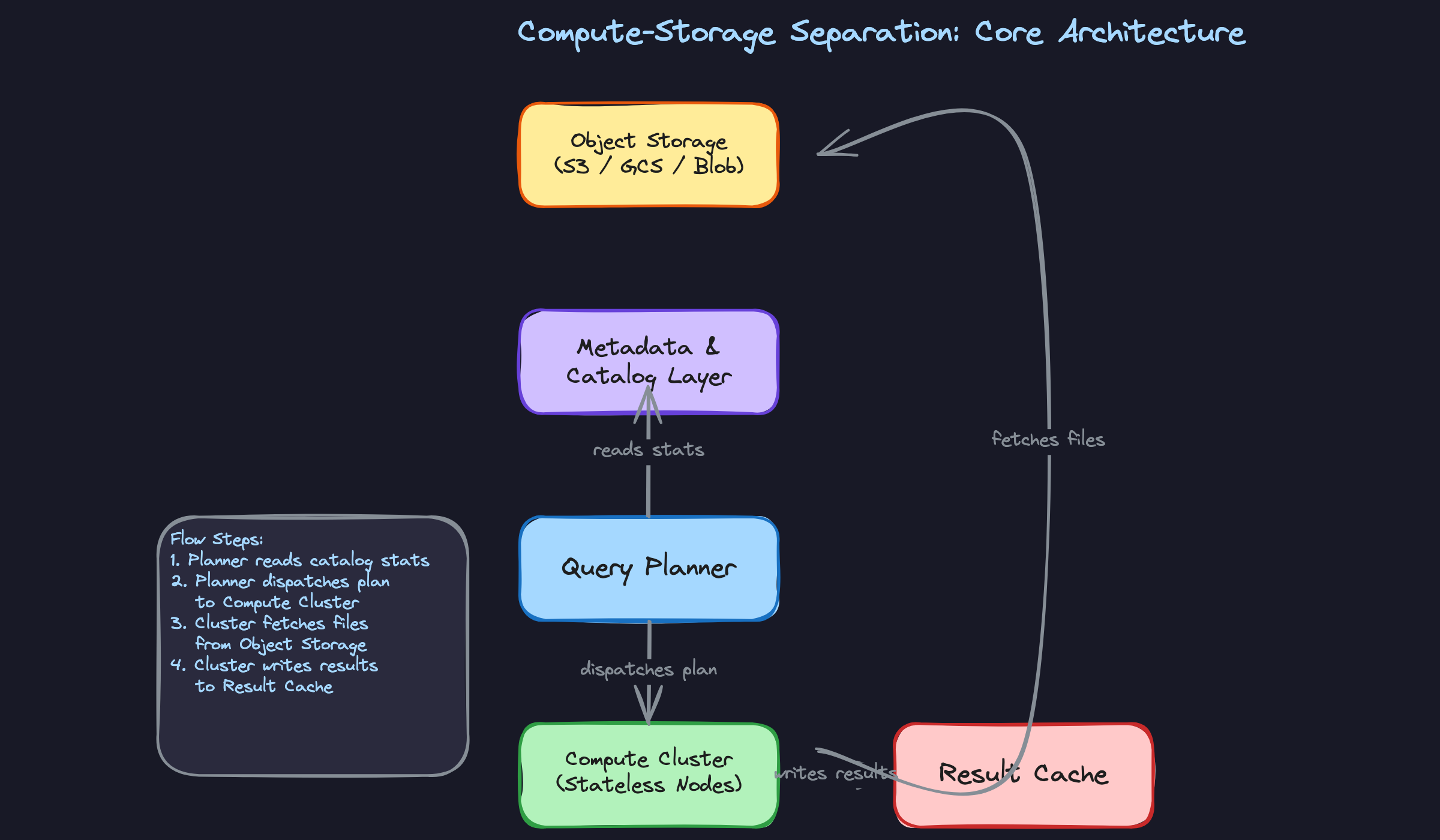
The properties that actually matter in an interview
Compute nodes are stateless. This is the foundational guarantee. Because no data lives permanently on a compute node, you can resize, replace, or multiply those nodes without any data migration. Your interviewer will care about this when they ask how you'd handle a spike in traffic or why resizing a warehouse doesn't require downtime.
Readers and writers use separate compute, pointing at the same storage. This is the answer to "how does Snowflake scale reads without blocking writes?" Your ETL pipeline runs on one virtual warehouse, your BI dashboards run on another, and both read from the same underlying files in S3. There's no read/write lock contention at the storage layer. The coordination happens at the metadata layer, which handles atomic updates to file references.
The local cache bridges the latency gap. Object storage is durable but not fast. A round-trip to S3 for a cold query can be slow. So compute nodes maintain a local SSD cache of recently accessed files. Snowflake calls this the "local disk cache." BigQuery has analogous shuffle and slot-level caching. The practical implication: the second time you run a query over the same data, it's much faster, because the files are already warm on the compute node. This matters because interviewers will sometimes ask why query performance varies across runs, and "cache warmth" is a real, defensible answer.
There's also a result cache layer sitting above all of this. If the exact same query runs twice against data that hasn't changed, the warehouse can return the cached result without touching compute or storage at all. Zero credits consumed. This is distinct from the local disk cache; result caching operates at the query level, not the file level.
Patterns You Need to Know
In an interview, you'll usually need to pick a specific approach. Here are the ones worth knowing.
Independent Vertical Scaling
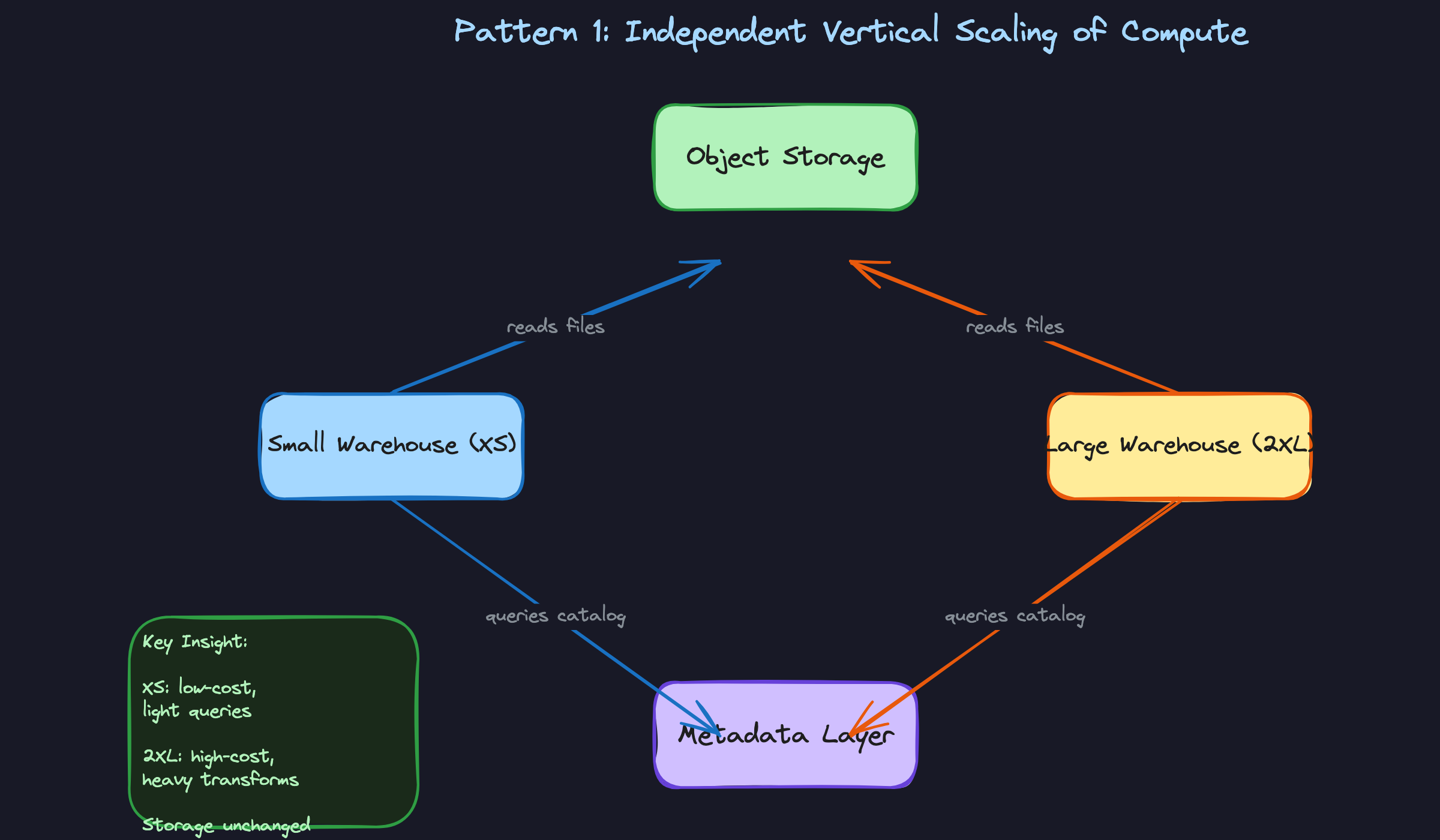
When a query is slow, the instinct is to throw more resources at it. With compute-storage separation, you can do exactly that without touching your data. You resize the virtual warehouse (in Snowflake, that means moving from XS to XL or 2XL), and the same files sitting in S3 are now processed by more nodes in parallel. No data migration, no downtime, no replication lag.
The mechanism is straightforward: a larger warehouse means more compute nodes, which means more micro-partitions can be scanned concurrently. A 2XL warehouse in Snowflake has roughly 16x the compute of an XS. BigQuery handles this differently through slot reservations, where you purchase or reserve processing capacity and assign it to projects. Redshift Serverless auto-scales RPUs (Redshift Processing Units) based on workload demand.
When to reach for this: any time an interviewer describes a single heavy query problem, like a slow dbt model running a massive join or a nightly transform that's missing its SLA window. Vertical scaling is your answer for query-level performance, not concurrency problems.
Multi-Cluster Workload Isolation
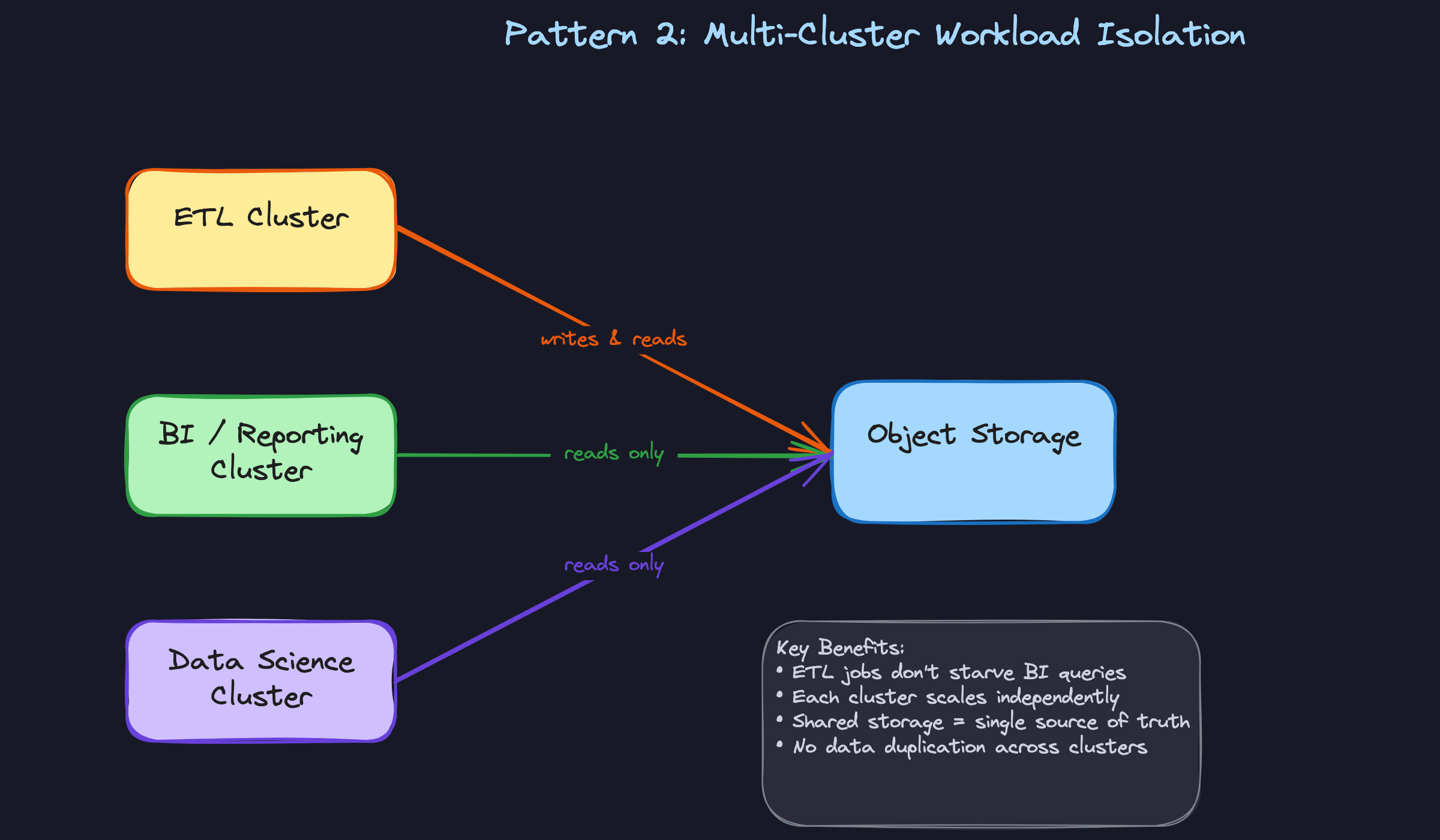
This is the pattern candidates most often conflate with vertical scaling, and interviewers notice. Multi-cluster scaling is horizontal: instead of making one warehouse bigger, you spin up multiple warehouses pointing at the same storage layer. Each cluster handles a different workload or user group, completely isolated from the others.
In practice, you'd run a dedicated ETL cluster for your ingestion pipelines, a separate BI cluster for Tableau and Looker dashboards, and maybe a third for data science ad-hoc queries. When your ETL job hammers storage with heavy writes, your BI users don't feel it. Snowflake's multi-cluster warehouse feature can also auto-scale horizontally by adding clusters when queue depth exceeds a threshold, then spinning them back down when demand drops. On Databricks, this maps to separate cluster pools per team. In BigQuery, you'd use separate reservations with capacity commitments assigned to different projects.
The trade-off is real: each active cluster costs credits independently. Running three clusters simultaneously costs three times as much as one. That's the right call when workload isolation matters more than raw cost, which it usually does at scale.
When to reach for this: any interview question about handling concurrent users, isolating ETL from reporting, or preventing one team's runaway query from degrading everyone else's experience.
Auto-Suspend and Auto-Resume
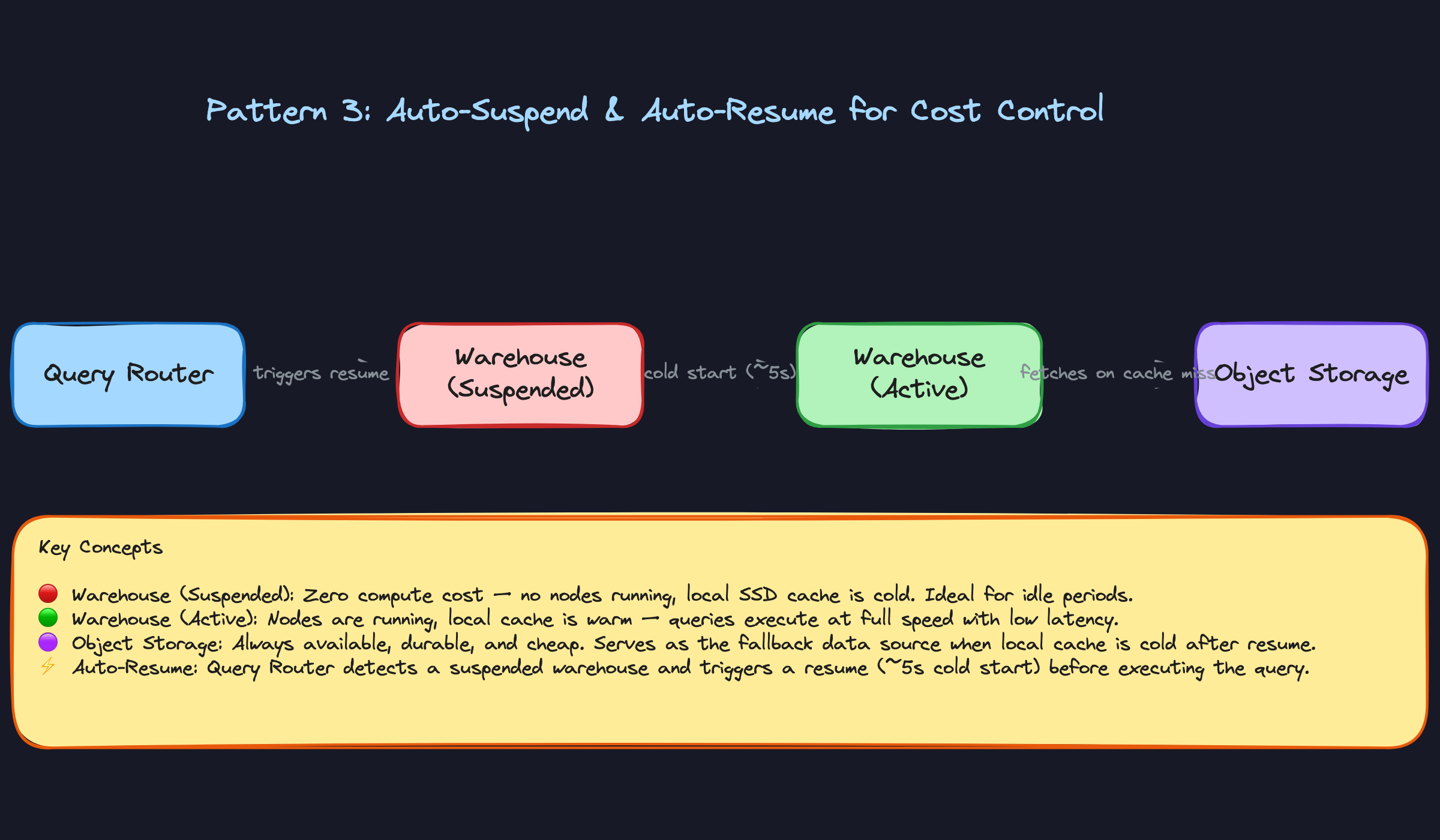
This pattern is where compute-storage separation pays its biggest dividend for cost control. Because compute nodes are stateless, you can shut them down completely when no queries are running. The data stays in object storage, untouched. When a new query arrives, the warehouse resumes in seconds and picks up exactly where it left off.
Snowflake lets you configure auto-suspend down to 60 seconds of inactivity. A warehouse that runs 2 hours a day instead of 24 hours costs roughly 90% less. Redshift Serverless takes this further by scaling to zero automatically with no manual configuration. The catch is cold-start latency: a freshly resumed Snowflake warehouse takes 5 to 15 seconds to spin up, and its local SSD cache is empty, so the first few queries after resume will fetch directly from S3 and run slower than they would on a warm cluster.
For batch pipelines that run on a schedule, this is almost always the right default. For BI dashboards with sub-second SLA expectations, you need to think harder about whether auto-suspend timeout is aggressive enough to cause user-facing pain.
When to reach for this: cost optimization questions, or any scenario where the interviewer describes a warehouse that runs intermittently (overnight jobs, weekly reports, dev environments).
Zero-Copy Cloning and Cross-Cluster Data Sharing
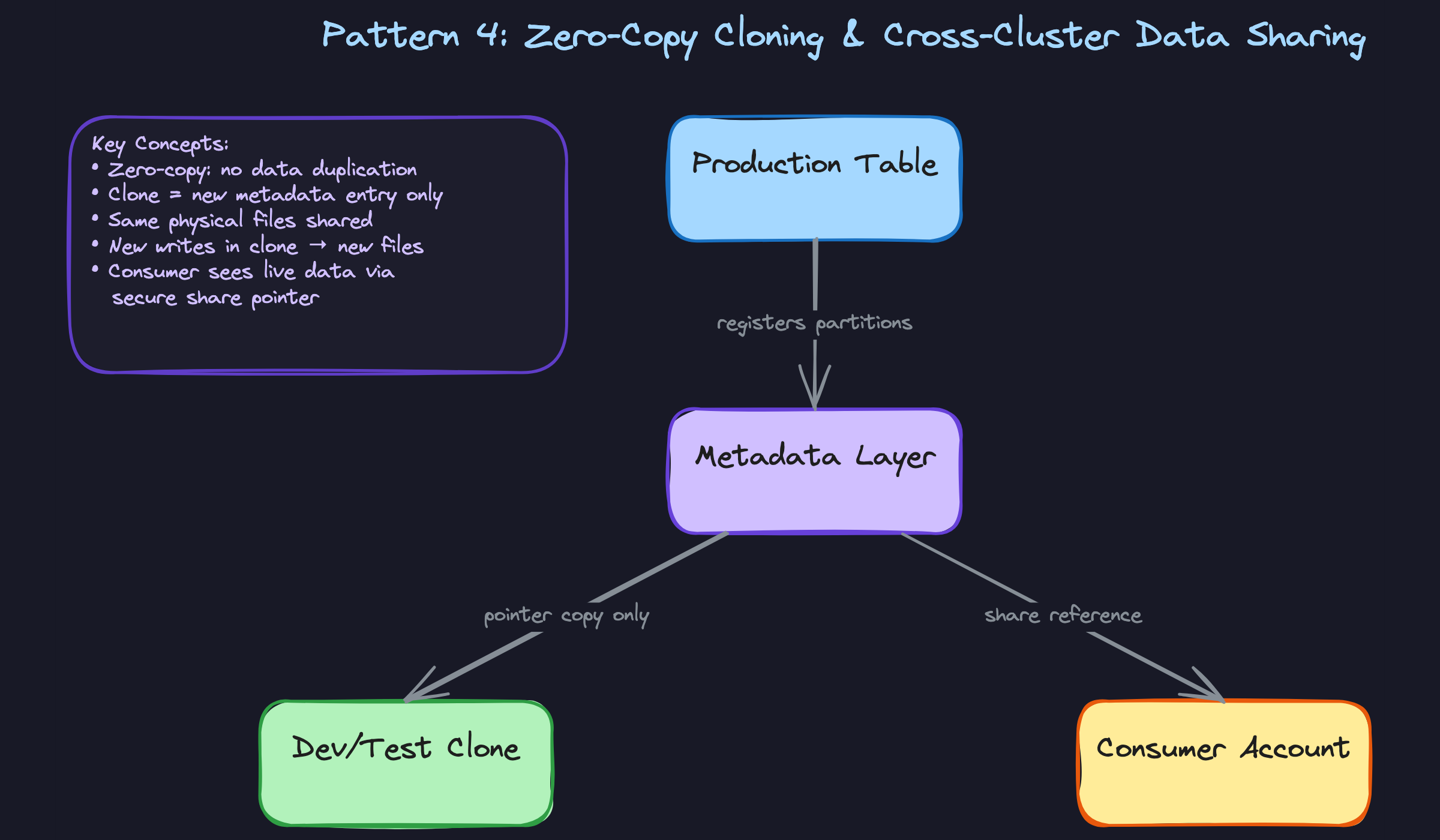
This one surprises candidates who haven't seen it before. Zero-copy cloning lets you create a full logical copy of a table or database in milliseconds, with no data duplication. The clone is just a new metadata entry pointing at the same physical files in object storage. When you write to the clone, new files are created for only the changed data. The original table is untouched.
The practical use case is dev and test environments. Instead of asking your data platform team to provision a separate copy of a 10TB production table, a developer runs CREATE TABLE orders_dev CLONE orders in Snowflake and gets an instant, isolated workspace. Storage cost is near zero until they start writing. Cross-cluster data sharing extends this idea across account boundaries: Snowflake Secure Share and Delta Sharing (available in Databricks and across clouds) let you expose data to external consumers without copying files. The consumer's compute reads directly from your storage via a metadata reference.
In a lakehouse context on Databricks or Athena, the same principle applies through Delta Lake's transaction log. A shallow clone creates a new Delta log pointing at the same Parquet files. This is metadata-only until divergence, which is exactly the same architecture, just expressed through an open format instead of a proprietary catalog.
When to reach for this: questions about data sharing between teams or external partners, fast environment provisioning, or any scenario where copying terabytes of data to create a dev environment would be the naive answer.
Comparing the Four Patterns
| Pattern | Problem It Solves | Main Cost Implication | Platform Examples |
|---|---|---|---|
| Vertical scaling | Slow individual queries | Higher credits while running | Snowflake warehouse size, BigQuery slot reservations |
| Multi-cluster isolation | Concurrency, workload contention | Multiplied by number of active clusters | Snowflake multi-cluster, Databricks cluster pools |
| Auto-suspend/resume | Idle compute waste | Near-zero when suspended; cold-start penalty | Snowflake auto-suspend, Redshift Serverless |
| Zero-copy cloning | Data duplication for dev/share | Storage cost only on diverged writes | Snowflake Clone, Delta Lake shallow clone, Delta Sharing |
For most interview problems, you'll default to multi-cluster isolation when the question is about concurrency, and vertical scaling when it's about a single slow query. Reach for auto-suspend any time cost optimization is on the table and the workload is batchable. Zero-copy cloning is the answer when the interviewer asks how you'd give a team an isolated environment without duplicating petabytes of data.
What Trips People Up
Here's where candidates lose points — and it's almost always one of these.
The Mistake: "Scaling Is Free Because Compute and Storage Are Separate"
Candidates hear "decoupled architecture" and conclude there's no performance penalty for resizing or suspending a warehouse. The answer sounds like: "You can just scale up or down anytime, no problem, the data stays in S3."
What they're missing is the local SSD cache. When you resize a Snowflake virtual warehouse or let it auto-suspend, that cache is cold-cleared. The next queries have to re-fetch all their data from object storage, which is meaningfully slower. In production, this shows up as a sudden spike in query latency right after a warehouse resumes, and it catches teams off guard.
That one sentence signals you've actually operated one of these systems, not just read the docs.
The Mistake: Treating Vertical and Horizontal Scaling as the Same Thing
This one comes up constantly. An interviewer asks how you'd handle 200 analysts hitting the warehouse at the same time, and the candidate says: "I'd scale up to a 2XL warehouse."
That's the wrong tool. A bigger warehouse gives you more parallelism for a single large query, but it doesn't help when your problem is 200 queries queuing behind each other. For concurrency, you need more clusters, not a bigger one. Multi-cluster auto-scaling spins up additional warehouse instances so queries run in parallel across separate compute pools. Vertical scaling makes one query faster. Horizontal scaling makes many queries run simultaneously.
The fix is to diagnose first. If queue time is high, add clusters. If individual query runtime is high, resize up.
The Mistake: Assuming Separation Means No Coordination Overhead
Candidates sometimes say compute and storage are independent, then wave away write complexity entirely. Something like: "Since storage is just S3, writes are simple, you just drop files in."
Writes are not simple. Every write still needs to update the metadata and catalog layer atomically. In open table formats like Delta Lake or Apache Iceberg, concurrent writers are a real operational hazard. Delta uses optimistic concurrency control, which means two writers can conflict and one will fail with a ConcurrentModificationException. Iceberg has similar mechanics. If you're running parallel dbt models that write to the same table, or streaming ingestion alongside a batch job, you need to understand how the table format handles this, because it's a genuine source of production bugs.
_delta_log. In Iceberg, it's the metadata JSON chain. Knowing these exist, and that they're the coordination mechanism, puts you ahead of most candidates.The Mistake: Ignoring Storage Costs in the Cost Optimization Answer
When asked "how do you reduce warehouse spend?", almost every candidate goes straight to compute: smaller warehouse sizes, auto-suspend, fewer credits. That's correct, but incomplete.
At petabyte scale, object storage costs are not negligible. Snowflake's Time Travel and Fail-safe features retain historical versions of your data, which means a table you "deleted" last month is still costing you storage for up to 90 days depending on your retention settings. Write-heavy workloads with high churn, think event tables or CDC pipelines that rewrite large partitions frequently, can accumulate storage bills that dwarf compute costs. Candidates who only talk about credits miss half the picture.
The complete answer mentions both sides: tune compute with auto-suspend and right-sizing, and tune storage with retention policies, table clustering to reduce rewrites, and regular audits of Time Travel settings on high-churn tables.
How to Talk About This in Your Interview
When to Bring It Up
You don't need to wait for a direct question about Snowflake or BigQuery internals. The concept of compute-storage separation is relevant any time you hear:
- "We're seeing query slowdowns when the ETL jobs run" — this is a workload isolation problem, solved by separate compute clusters.
- "Our warehouse costs are getting out of control" — three levers: warehouse sizing, auto-suspend tuning, and clustering keys for pruning.
- "We need to scale for a spike in dashboard users" — multi-cluster auto-scaling is the answer.
- "How would you set up a dev environment without duplicating our production data?" — zero-copy cloning lives here.
- "How does your lakehouse setup compare to a traditional warehouse?" — compute-storage separation is the through-line that connects both worlds.
Any question about concurrency, cost, or environment isolation is an opening.
Sample Dialogue
This one starts with a concurrency spike, which is the most common framing you'll see.
Follow-Up Questions to Expect
"How would you reduce warehouse spend without hurting performance?" Structure your answer around three levers: right-size the warehouse tier for the actual query complexity, tune auto-suspend to the shortest timeout your SLA allows, and use clustering keys so queries prune micro-partitions instead of scanning full tables.
"Doesn't auto-suspend hurt dashboard load times?" Acknowledge it honestly: yes, the first query after a cold resume is slower. Then explain the mitigations: result caching means repeated queries don't touch compute at all, and you can pre-warm the warehouse with a lightweight scheduled query before peak hours.
"How does this compare to Databricks on Delta Lake?" The separation principle is identical. Compute is Spark or Photon clusters, storage is Parquet files on S3 governed by Delta's transaction log. The main operational difference is that you're managing cluster configuration more explicitly, and Delta's transaction log handles the metadata and concurrency control that Snowflake's catalog layer handles for you.
"What happens to the cache when you resize a warehouse?" Resizing or suspending a warehouse clears the local SSD cache. The next queries re-fetch from object storage, which is slower. This is a real production gotcha, especially if you resize mid-day expecting a performance boost and instead see a temporary slowdown.
What Separates Good from Great
- A mid-level answer names the right features: "use multi-cluster warehouses, enable auto-suspend." A senior answer explains the sizing decision: why you'd set min clusters to 1 and max to 3 based on observed p95 concurrency, and how you'd monitor credit consumption to validate the choice.
- Mid-level candidates treat cost and performance as opposites. Senior candidates show they're levers you tune together: a well-clustered table with aggressive auto-suspend can be both cheaper and faster than a large always-on warehouse scanning full micro-partitions.
- The strongest answers generalize. If you can explain that the same separation pattern applies whether you're on Snowflake, BigQuery slots, or Databricks clusters on Delta Lake, you signal that you understand the architecture, not just the product.


