Join Data Science Interview MasterClass (September Cohort) led by FAANG Data Scientists | Just 6 seats remaining...
Data Science MasterClass (September) | 6 seats left
Cost & Performance Estimation for Cloud Warehouses
Cost & Performance Estimation for Cloud Warehouses
A misconfigured Snowflake warehouse at Airbnb or Stripe scale doesn't just slow down a dashboard. It burns $50,000 in a single month before anyone notices the bill. Interviewers at these companies know this, and when they ask you to estimate costs or query performance, they're not testing whether you've memorized pricing pages. They're testing whether you think like someone who owns the infrastructure budget.
Most candidates answer estimation questions by reciting architecture patterns. They talk about columnar storage and compute-storage separation without ever landing on a number. That's the gap this guide closes: not more knowledge, but a repeatable process that produces a defensible estimate with a range, a stated assumption, and a cost-reduction lever, every single time.
Every estimation answer you give needs to cover two axes: cost (credits, slot-hours, storage dollars) and performance (query latency, throughput, concurrency under load). Miss either one and the interviewer notices. The rest of this lesson gives you the framework, two worked examples across Snowflake and BigQuery, and a cheat sheet you can internalize tonight.
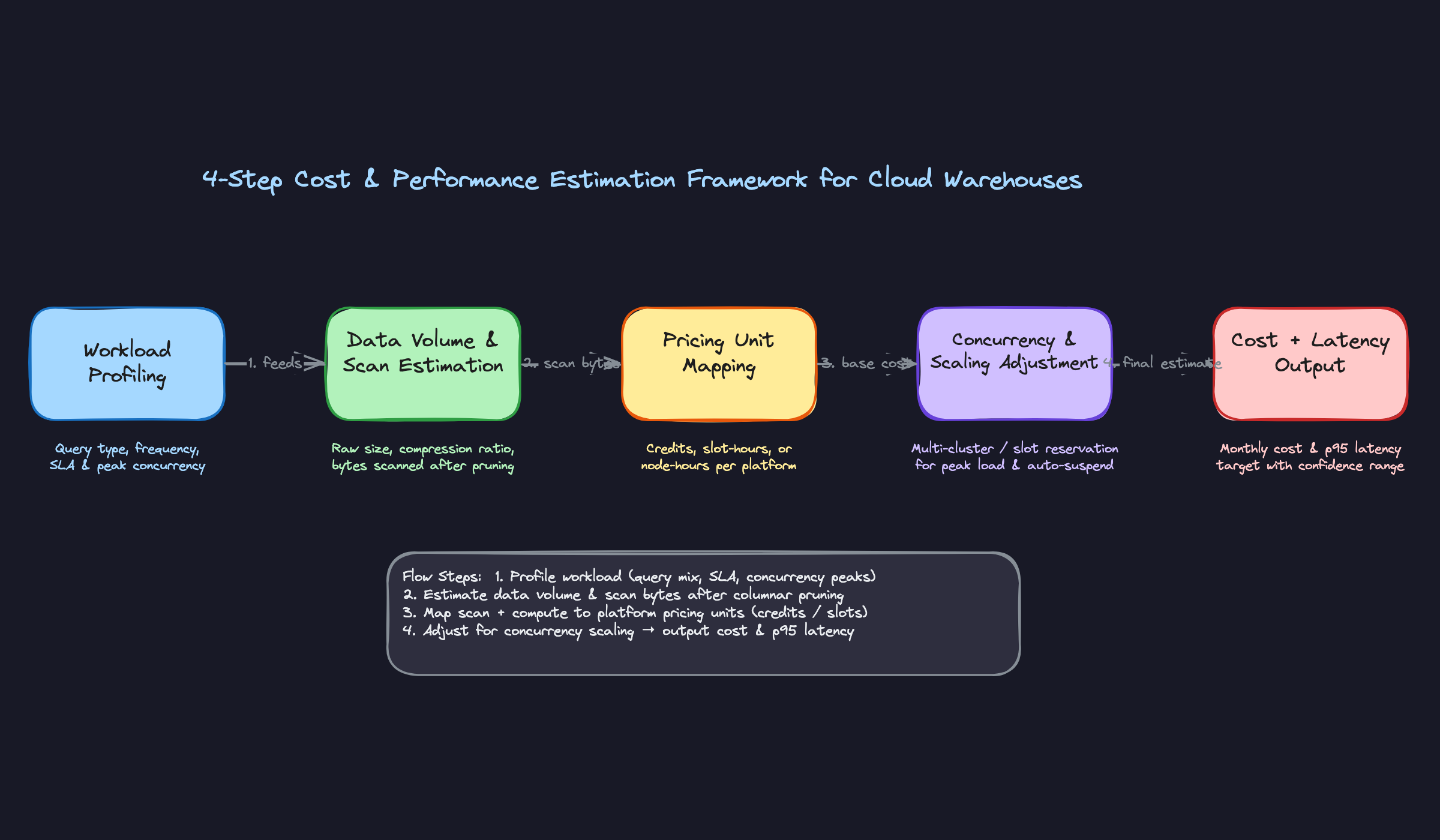
The Framework
Memorize this table. When the interviewer says "how would you estimate the cost of this system?", this is the skeleton you hang everything on.
| Phase | Time | Goal |
|---|---|---|
| 1. Clarify Workload Type | 2-3 min | Nail down query patterns, SLAs, and concurrency before touching any numbers |
| 2. Estimate Data Volume & Scan Size | 3-4 min | Get from raw table size to actual bytes scanned per query |
| 3. Map to Pricing Units | 3-4 min | Convert compute time and scan bytes into credits, slot-hours, or node-hours |
| 4. Sanity-Check Concurrency & Scaling | 2-3 min | Adjust for peak load, idle time, and auto-scaling behavior |
Four steps, roughly 12 minutes total. You should be producing a cost range and a latency target by the end.
Step 1: Clarify the Workload Type
What to do:
Ask exactly these three questions before writing a single number:
- "Is this primarily batch ETL, interactive BI, ad-hoc analytics, or a mix?" (This determines compute duration and whether caching matters at all.)
- "How many concurrent users or jobs are hitting this warehouse at peak?" (This determines whether you need multi-cluster or slot reservations.)
- "What's the SLA? Sub-second dashboards, or is 30-second query latency acceptable?" (This determines warehouse size and whether materialized views are required.)
What to say:
"Before I estimate anything, I want to make sure I understand the query pattern. Is this a dashboard that 50 analysts refresh every morning, or more of an overnight batch pipeline that runs once? Those have very different cost profiles."
If the interviewer gives you a vague answer like "mixed workload," push back gently: "Roughly what percentage is interactive versus batch? Even a 70/30 split changes the sizing significantly."
How the interviewer is evaluating you:
They're checking whether you know that workload type is the single biggest driver of cost. A batch ETL job running at 2 AM on a single X-Small warehouse is orders of magnitude cheaper than 50 analysts hammering a Medium warehouse during business hours. Candidates who skip this step and jump straight to numbers reveal that they've never actually sized a warehouse before.
Do this: Write the workload type on your whiteboard or notepad before moving on. It anchors every assumption you make in the next three steps.
Step 2: Estimate Data Volume and Scan Size
What to do:
Work through three sub-estimates in sequence:
- Raw table size. Start with row count times average row width. A 1-billion-row fact table with 50 columns averaging 20 bytes each is roughly 1 TB uncompressed.
- Apply columnar compression. Use 5x as your default (the real range is 3-7x, but 5x is a defensible middle ground). That 1 TB table is now ~200 GB on disk.
- Estimate bytes scanned after pruning. If the table is well-clustered on a date column and most queries filter to a 7-day window on a 2-year table, you're scanning roughly 7/730 of the data, about 1% of 200 GB, which is around 2 GB per query. In practice, clustering is never perfect, so apply a pruning efficiency factor and call it 80% pruning: you're scanning 20% of those micro-partitions that fall in the date range, landing at roughly 40 GB per query.
Be explicit about which assumption you're using. The "perfect pruning" number (2 GB) and the "realistic pruning" number (40 GB) are both useful anchors, and showing the interviewer both signals that you understand the difference between theoretical and operational behavior.
What to say:
"I'll start with the raw table size and work down to actual scan size, because that's what drives compute cost. I'll assume 5x columnar compression as a baseline. Even with good date clustering, pruning is rarely perfect in practice, so I'll assume about 80% of micro-partitions get eliminated, meaning we're scanning roughly 20% of the compressed table for a typical 7-day filter."
"That gives me around 40 GB scanned per query as my working estimate. If the clustering key is tightly aligned with the filter predicate and the data is well-organized, that could drop significantly, but I'd rather sanity-check against a conservative number first."
How the interviewer is evaluating you:
They want to see that you understand the difference between storage size and scan size. These can differ by two orders of magnitude. Candidates who treat them as the same number have never looked at a query profile in their life. Showing the pruning calculation, even roughly, signals real warehouse experience.
Step 3: Map to Pricing Units
What to do:
This is where you convert your scan and compute estimates into dollars. You need to know these numbers cold:
| Platform | Pricing Unit | Rough Rate |
|---|---|---|
| Snowflake | Credits per warehouse-second | ~$2-4/credit (cloud/region dependent); X-Small = 1 credit/hr, Medium = 4 credits/hr |
| BigQuery | On-demand: TB scanned | $6.25/TB scanned |
| BigQuery | Flat-rate: slot-hours (annual commitment) | ~$0.028/slot-hour per slot (billed per 100-slot increments) |
| Redshift | RA3 node-hours | ~$3.26/node-hour for ra3.4xlarge |
| Databricks | DBU (SQL warehouse) | ~$0.22/DBU (varies by tier and cloud) |
For Snowflake, the calculation is: (warehouse size in credits/hr) x (hours running) x (credit price). A Medium warehouse running for 2 hours costs 4 credits/hr x 2 hr x $3 = $24.
For BigQuery on-demand: (GB scanned per query / 1024) x $6.25 x (query count). That 40 GB scan from Step 2 costs about $0.24 per query. At 200 queries/day, that's $48/day or roughly $1,450/month.
What to say:
"On Snowflake, I'm thinking about cost in terms of warehouse uptime, not per-query. So the question becomes: how many hours per day is this warehouse actually running? With auto-suspend at 60 seconds, a warehouse serving 200 queries spread across an 8-hour window probably has maybe 3-4 hours of actual billed uptime."
"On BigQuery, I'd first check whether on-demand or a slot reservation makes more sense. The crossover depends on your query volume and consistency. On-demand at $6.25/TB is simple and scales to zero, but if you're running heavy, predictable workloads, an annual slot commitment can be significantly cheaper per query. The math changes a lot based on utilization, so I'd model both before committing."
How the interviewer is evaluating you:
Knowing the pricing model at a conceptual level is table stakes. What separates good candidates is understanding the unit economics well enough to reason about trade-offs. If you can say "at this scan volume, BigQuery on-demand is cheaper than a reservation, but if query volume doubles, we'd want to revisit that," you're demonstrating the kind of thinking that actually shows up in production cost reviews.
Don't do this: Don't say "I'd need to look up the exact pricing." You should have rough numbers memorized. Exact figures change; the order of magnitude should be in your head.
Step 4: Sanity-Check Concurrency and Auto-Scaling
What to do:
Three adjustments to make before you finalize your estimate:
- Peak concurrency. If 50 analysts all open their dashboards at 9 AM, how many queries queue up simultaneously? In Snowflake, a single-cluster warehouse queues queries beyond its concurrency limit. If your workload has sharp peaks, you need multi-cluster or your latency estimate is wrong.
- Auto-suspend idle time. A warehouse set to auto-suspend after 10 minutes versus 1 minute can differ by 5-10x in billed idle time for a low-frequency workload. At 200 queries/day spread unevenly, a 10-minute suspend window might add 2-3 hours of unnecessary billed time.
- Result cache. If analysts run the same dashboard queries repeatedly, Snowflake's result cache (valid for 24 hours) means those queries cost zero credits. BigQuery cached results are also free. Estimate your cache hit rate and subtract that from your compute cost.
What to say:
"One thing I want to sanity-check: if these 50 analysts are mostly working the same hours, we could have 20-30 concurrent queries at peak. On a single Medium warehouse in Snowflake, that's going to create queue depth. I'd either size up to a Large or enable multi-cluster with a max of 2 clusters, which roughly doubles the peak compute cost but keeps latency acceptable."
"I'm also going to adjust downward for result caching. If analysts are running the same weekly revenue dashboard repeatedly, maybe 30-40% of those 200 daily queries hit the result cache and cost nothing. That brings my estimate down meaningfully."
How the interviewer is evaluating you:
This step is where most candidates fall short. They produce a per-query cost and multiply by query count, ignoring that idle time, cache hits, and concurrency spikes can each move the final number by 30-50%. Walking through these adjustments explicitly shows you've operated a warehouse at scale, not just read the documentation.
Example: "Okay, I've worked through the four steps. My estimate is $6,000-$9,000/month for this Snowflake setup, with the range driven mainly by cache hit rate and how tightly we tune auto-suspend. The biggest lever to pull if we need to cut costs is tightening auto-suspend to 60 seconds and adding clustering keys on the date column. Want me to walk through the BigQuery alternative for comparison?"
That closing offer to compare platforms is a small move that signals you're thinking about the decision carefully, not just executing a formula.
Putting It Into Practice
Let's run the framework end-to-end on a real scenario. The setup: you're asked to estimate the monthly cost and expected query performance for an analytics workload on a 500 GB fact table, with 50 analysts running roughly 200 queries per day. The interviewer hasn't told you which platform yet. That's your first move.
Worked Example 1: Snowflake
Start by sizing the actual data your queries touch. Your raw table is 500 GB, but columnar compression typically gets you 3-7x. Use 5x as your default unless you have a reason not to.
500 GB raw / 5 = ~100 GB compressed on disk
Now estimate scan size per query. Not every query scans the whole table. If the fact table is clustered on a date column and most analyst queries filter by date range (last 30 days, last quarter), micro-partition pruning can eliminate 80-90% of the data. Call it 10-20 GB scanned per query as a working assumption.
Warehouse sizing. 200 queries/day across 50 analysts means roughly 4 queries per analyst per day. If these are spread across an 8-hour window, peak concurrency is probably 5-10 simultaneous queries, not 50. An X-Small warehouse (1 credit/hour) handles ~4-8 concurrent queries comfortably. A Medium (4 credits/hour) gives you headroom for spikes. Start with Small (2 credits/hour) and flag that you'd validate this against actual queue depth.
Credit math. Snowflake bills per second of warehouse uptime, not per query. Snowflake's default auto-suspend is 5 minutes (300 seconds), but for an analytics workload with bursty query patterns, you'd typically tune this down to 60 seconds to avoid paying for idle time between bursts. That's an optimization worth calling out explicitly in your answer.
With auto-suspend tuned to 60 seconds, a warehouse that processes a burst of queries and then sits idle burns roughly:
- Active query time: assume each query runs 10-30 seconds on a Small warehouse
- With 200 queries/day, bursty patterns, and 60-second auto-suspend: estimate 2-4 hours of actual warehouse uptime per day
- 3 hours/day x 2 credits/hour x $3/credit x 30 days = ~$540/month compute
If you left auto-suspend at the 5-minute default, idle time between query bursts would inflate that estimate to roughly $700-900/month. Worth flagging as a quick win.
Storage is almost a rounding error here. 100 GB compressed at $23/TB/month = about $2.30/month.
Total estimate: $500-700/month compute (with optimized auto-suspend), plus negligible storage. That's your range, not a single number.
Do this: Always separate compute from storage in your answer. Interviewers notice when candidates conflate them. Storage is predictable and cheap. Compute is where surprises happen.
Worked Example 2: BigQuery
Same workload, different pricing model. BigQuery gives you two options: on-demand (you pay per TB scanned) or flat-rate slot reservations (you pay for committed compute capacity regardless of usage).
On-demand math. At $6.25/TB scanned (US region), and 15 GB scanned per query on average:
200 queries/day x 15 GB = 3,000 GB = 3 TB/day 3 TB/day x $6.25 x 30 days = ~$562/month
Slot reservation math. A 100-slot reservation costs roughly $2,000/month (100 slots x $0.04/slot-hour x 720 hours). That's more expensive than on-demand at this scale.
The crossover formula is simple:
Monthly on-demand cost = daily_queries x avg_GB_scanned x $0.00625 x 30
Break-even slots = monthly_on_demand_cost / ($0.04 x 720)
At $562/month on-demand, you'd need only ~20 slots to break even. But slot reservations have a 1-year commitment minimum and a floor of 100 slots, so on-demand wins here unless query volume grows 5x.
The Interview Dialogue
Here's how this plays out in a real conversation. It's rarely as clean as a worked example.
[You sketch through the credit math above]
Do this: When an interviewer challenges an assumption, don't defend it. Adjust the number and show how it flows through your estimate. That's the whole point of using a range.
1SELECT
2  query_type,
3  AVG(bytes_scanned) / 1e9 AS avg_gb_scanned,
4  COUNT(*) AS query_count,
5  SUM(CASE WHEN is_client_generated_statement THEN 0
6           WHEN bytes_scanned = 0 THEN 1 ELSE 0 END) AS cache_hits
7FROM snowflake.account_usage.query_history
8WHERE start_time >= DATEADD('day', -30, CURRENT_TIMESTAMP())
9GROUP BY 1
10ORDER BY query_count DESC;
11
In BigQuery you'd do the same thing against INFORMATION_SCHEMA.JOBS_BY_PROJECT, filtering on cache_hit = TRUE to measure what fraction of your billed bytes you're actually avoiding.
Do this: Referencing system tables to ground your estimate in real data is a strong signal. It shows you know how to validate assumptions in production, not just theorize about them.
How to Close the Estimate
That last question is your opening to show business instincts. Don't just say "add clustering." Give a lever with a magnitude.
"The highest-impact change would be tuning the auto-suspend window. Snowflake defaults to 5 minutes, but for a bursty analyst workload with gaps between sessions, dropping that to 60 seconds could cut idle compute by 30-40% with no performance impact. Second lever: if there are a handful of expensive aggregation queries that run repeatedly, a materialized view could eliminate the scan entirely for those. Together, those two changes could realistically bring the monthly bill under $400."
Always close with performance. "On the latency side, with a Small warehouse and 10-20 GB scans, I'd expect p50 query time around 5-15 seconds and p95 under 60 seconds. If analysts start complaining about slow dashboards, that's usually a sign of warehouse queue buildup, which is your signal to either bump to Medium or enable multi-cluster auto-scaling."
Don't do this: Give a single number with no range and no stated assumptions. "$650/month" sounds confident but reads as guesswork. "$600-900/month depending on cache hit rate and auto-suspend configuration" sounds like someone who has actually operated a warehouse.
Common Mistakes
Most candidates can sketch a rough cost estimate. Where they lose points is in the details that separate someone who has actually operated a cloud warehouse from someone who has only read about it.
Treating Every Query as a Full Storage Scan
You'll hear this in interviews: "200 queries per day, each scanning 500 GB, so that's 100 TB scanned per day..." Stop. That math ignores two of the most impactful cost mechanisms in modern warehouses.
In Snowflake, an identical query run twice within 24 hours costs zero compute credits the second time. The result cache serves it directly. BigQuery works the same way. For a team of 50 analysts running dashboards, a realistic cache hit rate is 40-60%. Ignoring that doesn't just make your estimate slightly off. It makes it 2-3x too high, and the interviewer knows it.
Do this: State your cache hit rate assumption explicitly. "I'll assume a 40% result cache hit rate given analysts are likely refreshing the same dashboards repeatedly. That brings effective compute queries down to about 120/day."
Lumping Storage and Compute Into One Number
"It'll cost around $15,000/month for storage and compute combined" is a red flag. The interviewer hears: this person doesn't understand the pricing model.
Storage is boring and cheap. Snowflake charges roughly $23/TB/month on S3. BigQuery is $20/TB/month. For a 500 GB fact table, that's about $10-12/month. It barely moves the needle. Compute is where your bill explodes or stays reasonable, and it depends entirely on warehouse size, query frequency, and how aggressively you tune auto-suspend. Keep them separate in your answer, always.
Don't do this: Giving a blended number. It signals you haven't thought through which lever actually matters.
Ignoring Auto-Suspend Idle Time
A candidate who says "we'll use a Medium warehouse, that's 4 credits per hour" without mentioning auto-suspend has described a warehouse that runs 24/7. At Snowflake's standard pricing, that's roughly $14,400/month for a single Medium warehouse. Nobody wants that.
Auto-suspend is one of the highest-impact tuning decisions in Snowflake. A warehouse that auto-suspends after 60 seconds versus 10 minutes can have a 5-10x difference in billed idle time for a workload with bursty, infrequent queries. Show you know this lever exists, and state what setting you'd recommend based on the workload pattern.
Do this: "Given analysts are running queries in bursts during business hours, I'd set auto-suspend to 60 seconds. That means we're only billed during active query windows, not for the gaps between them."
Delivering a Single Point Estimate
"My estimate is $8,400 per month."
That sounds precise. It isn't. It just sounds overconfident to anyone who has actually run a warehouse in production, because they know how many assumptions are baked into that number.
Estimation questions are not math tests. Interviewers are checking whether you understand the uncertainty in your own model. A range with named assumptions ("$6,000-$10,000/month, depending on cache hit rate and whether analysts are running ad-hoc queries or hitting pre-aggregated views") tells the interviewer you've done this before. A single number tells them you haven't.
Answering Only Half the Question
Cost estimation questions almost always have a performance component, and candidates almost always forget it. They finish their cost math, say a number, and stop. The interviewer is left waiting for the other half.
Always close with latency. State your expected p50 and p95 query runtime, and name one or two conditions that would cause it to degrade. "With a Medium warehouse and good cluster pruning, I'd expect p50 around 3-5 seconds for this workload. p95 could spike to 20-30 seconds during peak concurrency if we're not running multi-cluster, or if analysts start running large ad-hoc scans that bypass the result cache." That's what a complete answer sounds like.
Don't do this: Finishing your cost estimate and waiting for the interviewer to prompt you on performance. They're testing whether you remember to cover both axes unprompted.
Quick Reference
Internalize these numbers and phrases tonight. You won't need to recite them perfectly, but knowing the right order of magnitude separates candidates who've operated these systems from candidates who've only read about them.
Platform Pricing (Rough Numbers to Know Cold)
| Platform | Pricing Unit | Ballpark Rate | Notes |
|---|---|---|---|
| Snowflake | Credit/hour of warehouse uptime | ~$2-4/credit-hour (AWS us-east) | XS = 1 credit/hr, each size doubles |
| BigQuery | TB scanned (on-demand) | ~$6.25/TB | First 1 TB/month free |
| BigQuery | Slot-hour (reservations) | ~$0.04/slot-hour | 100-slot minimum commitment |
| Redshift | RA3 node-hour | ~$3.26/hr (ra3.4xlarge) | Storage billed separately on S3 |
| Databricks | DBU (serverless SQL warehouse, medium) | ~$0.22/DBU (AWS) | Serverless vs classic DBU rates differ significantly |
You don't need exact cents. You need to know Snowflake bills by uptime (not by query), BigQuery on-demand bills by bytes scanned, and Redshift bills by node regardless of utilization.
Compression and Pruning Rules of Thumb
- Columnar compression: assume 5x by default (range is 3-7x; use 3x if the data is already semi-structured JSON, 7x for highly repetitive string columns)
- Micro-partition pruning: well-clustered tables reduce scan by 80-95%; unclustered tables scan everything
- Result cache: identical queries within 24 hours cost zero compute in Snowflake; BigQuery cached results are also free and automatic
- Metadata-only queries:
COUNT(*)on a Snowflake table hits metadata, not storage. Zero credits.
Concurrency Scaling Triggers
| Platform | Signal | What Happens |
|---|---|---|
| Snowflake | Queue depth exceeds 2 (default) | New cluster spins up; billed at full warehouse rate |
| BigQuery | Reservation utilization near 100% | Queries queue or spill to on-demand if configured |
| Redshift | WLM queue wait time climbing | Manual resize or concurrency scaling kicks in (billed per-second) |
Auto-suspend is the mirror image of this. A Snowflake warehouse that suspends after 60 seconds instead of 10 minutes can cost 10x more at low query frequency. Always ask about the suspend setting before finalizing a cost estimate.
The Cost-Reduction Lever Menu
When the interviewer asks "how would you bring this cost down?", pick from this list and explain the mechanism, not just the name:
- Clustering keys: reduce bytes scanned per query by co-locating related micro-partitions. Best ROI on large tables with high-cardinality filter columns.
- Materialized views: pre-aggregate common query patterns so downstream queries scan kilobytes instead of gigabytes.
- Auto-suspend tuning: tighten the suspend window for low-frequency workloads. Going from 10 minutes to 60 seconds on a lightly-used warehouse can cut idle compute by 80%.
- Storage tiering: move cold historical data to S3/GCS object storage and query it via external tables or Iceberg. Storage drops from ~$23/TB to ~$2/TB.
- Result cache warm-up: schedule a lightweight query to pre-warm the cache before business hours so the first analyst query of the day hits cache, not compute.
Follow-Up Questions, Pre-Answered
Interviewers almost always close with one of these three. Have a sentence ready.
"How would you monitor this in production?" "I'd query INFORMATION_SCHEMA.QUERY_HISTORY in Snowflake or INFORMATION_SCHEMA.JOBS_BY_PROJECT in BigQuery to track bytes scanned, credit consumption, and cache hit rate over time, then alert if weekly spend exceeds a threshold."
"What changes if query volume doubles?" "First I'd check whether result cache absorbs the increase. If not, I'd evaluate whether a second Snowflake cluster or additional BigQuery slot reservations is cheaper than the latency cost of queuing, and re-run the crossover calculation."
"How does this change with a lakehouse architecture?" "Compute and storage decouple even further. You're now paying for query engine time (Databricks SQL warehouse DBUs or Athena per-TB) separately from object storage, which is cheaper but adds metadata overhead from Delta or Iceberg table management."
The Framework at a Glance
| Step | What You're Doing | Time in Interview |
|---|---|---|
| 1. Clarify workload | Batch ETL, interactive BI, ad-hoc, or mixed? | 1-2 min |
| 2. Estimate data volume | Raw size, compression ratio, bytes scanned after pruning | 2-3 min |
| 3. Map to pricing units | Credits, slot-hours, or node-hours per platform | 2-3 min |
| 4. Adjust for concurrency | Multi-cluster, slot contention, auto-suspend idle | 1-2 min |
| 5. Present with range | Low/high estimate, biggest assumption, one cost lever | 1-2 min |
Phrases to Use
These land well because they signal operational experience, not just textbook knowledge.
- "Before I estimate, can I clarify whether this is interactive BI or batch ETL? The compute duration and caching behavior are pretty different."
- "I'll assume 5x columnar compression as a baseline, which puts us around 200 GB on disk. If the data is heavily nested JSON, I'd revise that down to 3x."
- "My estimate is $6,000-$10,000 per month. The wide range is mostly driven by cache hit rate, which I'd want to validate against actual query history."
- "The single biggest lever here is clustering keys. If the team isn't already clustering on the date column, that alone could cut scan volume by 80% and drop this estimate by half."
- "On performance: I'd expect p50 query latency around 5-10 seconds for this workload, with p95 climbing to 30-60 seconds during peak concurrency unless we add a second cluster."
- "I'd ground this estimate in production data by pulling
INFORMATION_SCHEMA.QUERY_HISTORYto see actual bytes scanned per query rather than relying purely on back-of-envelope math."
Red Flags to Avoid
- Giving a single point estimate ("it'll cost $8,000/month") with no range or stated assumptions
- Treating every query as a full table scan and ignoring result cache and partition pruning
- Conflating storage cost with compute cost in your answer; keep them separate and size them separately
- Forgetting to address query latency; cost without performance is half an answer
- Naming a cost-reduction technique (like materialized views) without explaining the mechanism behind it


