Join Data Science Interview MasterClass (September Cohort) led by FAANG Data Scientists | Just 6 seats remaining...
Data Science MasterClass (September) | 6 seats left
Design an E-Commerce Order System
Requirements & Access Patterns
Business Context
Domain: A transactional order system connecting customers, merchants, and payment processors, where the core data challenge is maintaining strict consistency across inventory, payments, and order state while serving high-volume reads at low latency.
Three different teams depend on this schema simultaneously, and they want very different things. Customers need fast order history reads. Merchants need a reliable fulfillment queue. Finance needs an auditable, reconcilable payment trail. Designing for all three without letting them step on each other is what makes this problem genuinely hard.
The temporal complexity here is real. An order isn't a static record; it's a state machine that moves through PENDING, CONFIRMED, SHIPPED, DELIVERED, and sometimes CANCELLED. Every transition needs to be auditable. Prices change, addresses change, and customers update their profiles after ordering. Your schema has to snapshot the right things at the right time, or you'll be debugging fulfillment disputes with corrupted historical data.
Scope matters too. For v1, you're building order creation, inventory reservation, payment capture, and order history. No warehouse management, no returns, no subscription billing. Interviewers will often try to pull you toward returns or refunds early; acknowledge those are real requirements, park them for the evolution discussion, and stay focused on the core flow.
Access Patterns
The five patterns below are the ones that will actually drive your indexing and partitioning decisions. Know them cold before you write a single CREATE TABLE.
| # | Query | Frequency | Latency | Type |
|---|---|---|---|---|
| 1 | Fetch full order with line items and shipping address by order_id | Very high (order detail page) | < 100ms | Read |
| 2 | List orders for a customer, paginated, sorted by recency | High (account page) | < 100ms | Read |
| 3 | Check inventory availability for a SKU at checkout | Very high (every checkout) | < 50ms | Read + Write (reservation) |
| 4 | Query all orders in PENDING or CONFIRMED status for fulfillment queue | High (merchant dashboard, polling) | < 200ms | Read |
| 5 | Capture payment for an order, idempotently | High (every checkout) | < 500ms | Write |
| 6 | Append a status transition to order history | High (every fulfillment event) | < 200ms | Write |
| 7 | Aggregate revenue by merchant over a time window | Occasional (finance reporting) | Batch-acceptable (minutes) | Read |
| 8 | Reconstruct full state timeline for a single order | Occasional (support, debugging) | < 500ms | Read |
| 9 | Look up a payment by idempotency key (retry deduplication) | High (payment retries) | < 50ms | Read |
Patterns 1, 2, and 4 are the ones that will push you toward specific indexes. Pattern 3 is where locking strategy becomes a schema decision. Pattern 7 is the one that will eventually break your OLTP database if you let it run there unchecked.
Scale Estimates
These numbers represent a mid-size e-commerce platform, roughly the scale where you start feeling pain but haven't yet needed to shard.
| Metric | Estimate |
|---|---|
| Registered customers | 10 million |
| Active merchants | 50,000 |
| Total orders (historical) | 500 million |
| Orders per day (steady state) | 500,000 |
| Orders per day (peak, e.g. Black Friday) | 5 million |
Rows in order_line_items | 1.5 billion (avg 3 items/order) |
Rows in order_status_history | 2 billion (avg 4 transitions/order) |
| Peak read QPS (order detail + history) | 50,000 |
| Peak write QPS (order creation + status updates) | 5,000 |
Storage for orders table | ~500 GB |
Storage for order_line_items | ~1.5 TB |
| Total OLTP storage (all tables) | ~3 TB |
The order_status_history table is the one that surprises people. At 2 billion rows, it's larger than orders itself, and it's append-only, so it grows forever. That has direct implications for partitioning strategy, which you'll address in the physical model.
Constraints
ACID is non-negotiable in two places. Order creation (reserving inventory + inserting the order + creating a pending payment) must be a single transaction. Payment capture (marking payment successful + transitioning order to CONFIRMED) is the same. If either of those fails halfway, you have corrupted state that's very hard to recover from.
Analytics and reporting can tolerate eventual consistency. Revenue aggregations running 5-10 minutes behind real-time is fine. That's what read replicas and warehouse ETL are for.
Multi-currency is a hard constraint, not an afterthought. Store all monetary amounts as integers in minor units (cents, pence, yen). Never store floats for money. Every amount column in the schema carries a corresponding currency column or inherits it from the parent order. Interviewers at Stripe will specifically ask how you handle this.
PCI compliance means you never store raw card numbers in your database. Payment method details live with your payment processor (Stripe, Adyen). Your schema stores a provider_ref (a token or charge ID) and the outcome, nothing more.
Soft deletes for cancelled orders, not hard deletes. Finance needs to reconcile cancelled orders for refund accounting. A cancelled_at timestamp on the order, combined with the full transition history in order_status_history, gives you everything you need without losing data.
Conceptual Model
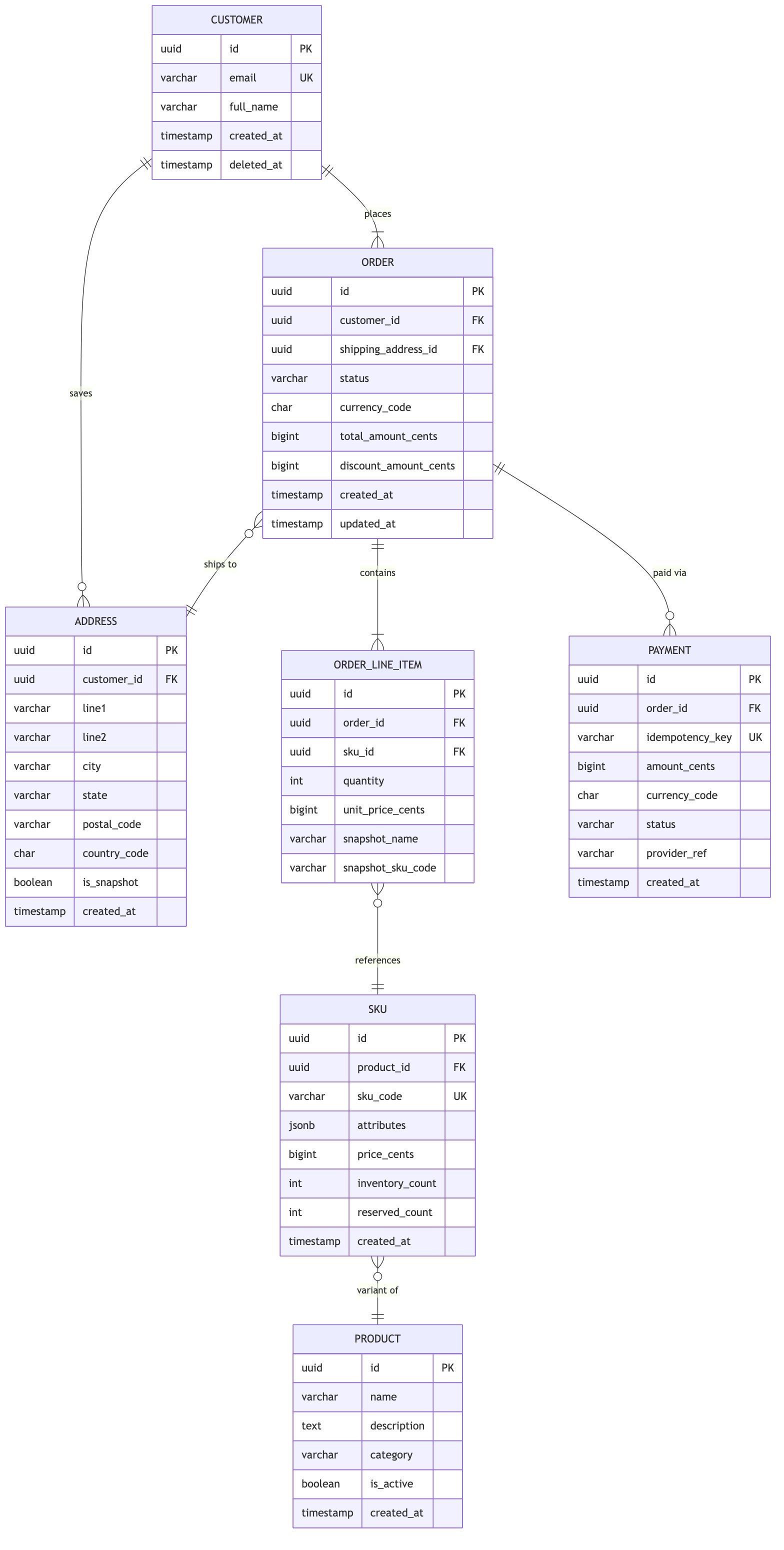
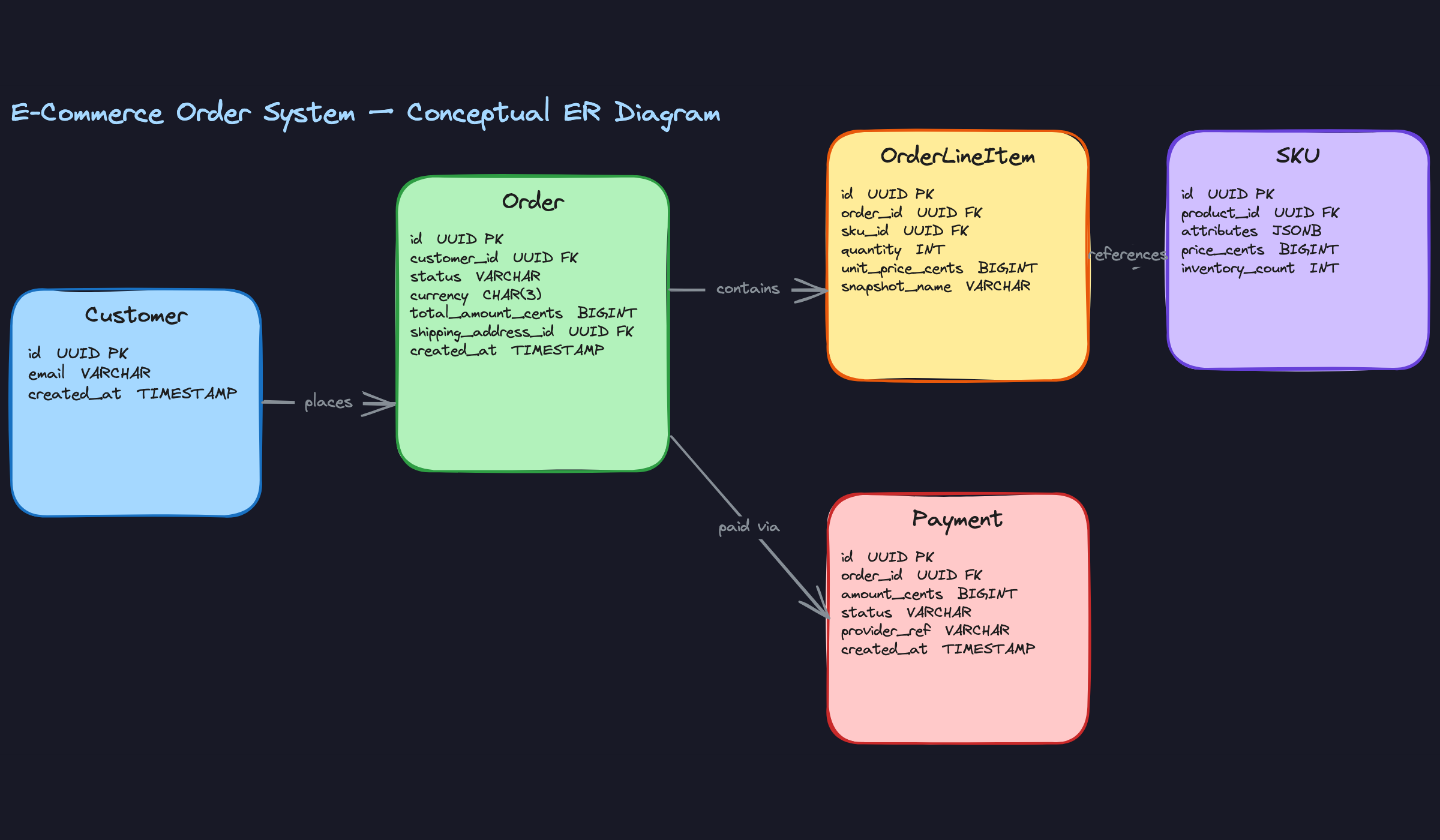
Start with the nouns in your requirements. Customers place orders. Orders contain line items. Line items reference products. Payments settle orders. Addresses tell you where to ship. Each noun that has its own attributes, its own lifecycle, or its own relationships is a candidate for a standalone entity.
Entities & Relationships
Customer — a registered buyer account with identity and contact information.
Address — a physical location record, used both as a saved address on a customer profile and as an immutable shipping snapshot on an order.
Order — the core transactional entity representing a single purchase event, with a status that transitions through a defined lifecycle.
OrderLineItem — a single purchased item within an order, capturing the SKU, quantity, and price at the moment of purchase.
Product — the catalog concept: a t-shirt, a book, a phone. It has a name, description, and category, but no price or inventory of its own.
SKU — the purchasable variant of a product. A t-shirt in size M, color blue, is a SKU. It has a price and an inventory count. This is what customers actually buy.
Payment — a single payment attempt against an order, with its own status, amount, and provider reference.
Now the relationships:
Customer to Order (1:N, required). Every order must belong to exactly one customer. A customer can have zero or many orders. This is straightforward, but the implication matters: you never store customer details on the order row itself. The customer is a foreign key, not an embedded blob.
Order to OrderLineItem (1:N, required on both sides). An order must have at least one line item, and every line item must belong to exactly one order. Line items don't exist independently. This is a composition relationship, not just an association.
OrderLineItem to SKU (N:1, required). Many line items across many orders can reference the same SKU. The line item stores the SKU as a foreign key, but critically, it also snapshots the price at purchase time. The SKU's current price is irrelevant to a historical order.
Product to SKU (1:N, required). A product must have at least one SKU to be purchasable. A SKU belongs to exactly one product. This split is what lets you model variants cleanly without duplicating catalog data.
Customer to Address (1:N, optional). A customer can save zero or many addresses to their profile. These are the addresses shown in the checkout dropdown.
Order to Address (N:1, required). Every order must have exactly one shipping address, captured as an immutable snapshot at checkout time. This is a separate record from the customer's saved address, even if it started as one.
Order to Payment (1:N, optional initially). An order starts with no payments. Over its lifecycle it can accumulate multiple payment records: a failed first attempt, a successful retry, a partial capture. Modeling this as 1:1 is a trap that breaks the moment you need to handle retries.
ER Diagram
Key Design Decisions
Why is Address a separate entity, not a JSON column on Order?
You need it in two places with different semantics. On the Customer, an address is mutable: the customer can update or delete it. On the Order, the shipping address is a historical fact that must never change. Storing it as a separate row (with is_snapshot = true) lets you point the order at an immutable record while the customer's profile address evolves independently. If you embedded the address as JSON on the order, you'd lose the ability to query orders by city or postal code efficiently. If you used a single FK to the customer's current address, you'd corrupt historical data the moment they moved.
Why split Product and SKU instead of one table?
Most candidates model a single products table with a size and color column. That works until a product has 30 variants. Then you're storing 30 rows with identical names and descriptions, and any catalog update requires touching all of them. The Product/SKU split keeps catalog data (name, description, category) in one place and variant data (price, inventory, attributes) in another. The attributes JSONB column on SKU handles arbitrary variant dimensions without requiring schema changes every time a new attribute type appears.
Why store unit_price_cents on OrderLineItem instead of joining to SKU?
Prices change. If you join to the SKU's current price when rendering an order from two years ago, you'll show the wrong number. The line item snapshot is the source of truth for what the customer actually paid. The same logic applies to snapshot_name and snapshot_sku_code: if a product is renamed or a SKU is retired, the order history should still be readable without depending on the current catalog state.
Why is Payment 1:N to Order, not 1:1?
Three real scenarios break the 1:1 assumption. First, payment failures: a customer's card declines, they retry with a different card. That's two payment records for one order. Second, partial captures: some platforms authorize the full amount at checkout but capture in multiple installments as items ship. Third, split payments: gift card plus credit card. Any of these makes a 1:1 schema wrong on day one. Model it as 1:N from the start and you never have to migrate.
payment_id foreign key directly on the orders table to represent "the" payment. This forces a 1:1 relationship at the schema level and breaks the moment you need retries. Keep the FK on the payments side only.Why use bigint for all monetary amounts instead of decimal?
Floating-point arithmetic on currency is dangerous. 0.1 + 0.2 in IEEE 754 is not 0.3. Storing amounts as integers in the smallest currency unit (cents for USD, pence for GBP, yen for JPY) eliminates rounding errors entirely. The application layer handles conversion for display. This is standard practice at Stripe, and interviewers there will notice if you reach for decimal(10,2) without explaining the trade-off.
Logical Model
The conceptual model told you what entities exist. Now you need to make every constraint, cardinality, and invariant explicit in DDL. This is where interviewers separate candidates who "know SQL" from candidates who think in schemas.
Schema Definition
Start with customers and addresses, since almost everything else references them.
CREATE TABLE customers (
    id              BIGSERIAL PRIMARY KEY,
    email           VARCHAR(255) NOT NULL,
    full_name       VARCHAR(255) NOT NULL,
    created_at      TIMESTAMPTZ  NOT NULL DEFAULT now(),
    updated_at      TIMESTAMPTZ  NOT NULL DEFAULT now(),
    CONSTRAINT uq_customers_email UNIQUE (email)
);

CREATE TABLE addresses (
    id              BIGSERIAL PRIMARY KEY,
    customer_id     BIGINT       REFERENCES customers(id) ON DELETE SET NULL,
                                 -- NULL = snapshot address no longer tied to an active customer
    line1           VARCHAR(255) NOT NULL,
    line2           VARCHAR(255),
    city            VARCHAR(100) NOT NULL,
    state           VARCHAR(100),
    postal_code     VARCHAR(20)  NOT NULL,
    country_code    CHAR(2)      NOT NULL,   -- ISO 3166-1 alpha-2
    is_snapshot     BOOLEAN      NOT NULL DEFAULT false,
                                 -- true = immutable checkout snapshot, false = customer's saved address
    created_at      TIMESTAMPTZ  NOT NULL DEFAULT now(),
    updated_at      TIMESTAMPTZ  NOT NULL DEFAULT now(),
    CONSTRAINT chk_addresses_saved_has_customer
        CHECK (is_snapshot = true OR customer_id IS NOT NULL)
                                 -- saved addresses must always belong to an active customer
);
The is_snapshot flag is a deliberate design choice. When a customer checks out, you INSERT a new address row with is_snapshot = true and point orders.shipping_address_id at it. That row never changes. The customer can update their saved address freely without corrupting historical order records.
Two things worth calling out here. First, updated_at is present even though snapshot addresses are immutable. Saved addresses (is_snapshot = false) are mutable, and you want a standard timestamp to track when a customer last edited their delivery details. Second, the CHECK (is_snapshot = true OR customer_id IS NOT NULL) constraint closes a subtle gap in the ON DELETE SET NULL behavior. When a customer is deleted, their snapshot addresses can safely have customer_id set to NULL since they exist purely as historical records on orders. But a saved address with no customer is an orphan that serves no purpose. The constraint ensures that can never happen.
1CREATE TABLE products (
2    id              BIGSERIAL PRIMARY KEY,
3    merchant_id     BIGINT       NOT NULL,   -- FK to merchants table (out of scope for v1)
4    name            VARCHAR(255) NOT NULL,
5    description     TEXT,
6    created_at      TIMESTAMPTZ  NOT NULL DEFAULT now(),
7    updated_at      TIMESTAMPTZ  NOT NULL DEFAULT now()
8);
9
10CREATE TABLE skus (
11    id                  BIGSERIAL PRIMARY KEY,
12    product_id          BIGINT      NOT NULL REFERENCES products(id) ON DELETE RESTRICT,
13    sku_code            VARCHAR(100) NOT NULL,
14    attributes          JSONB        NOT NULL DEFAULT '{}',
15                                     -- e.g. {"color": "red", "size": "M"}
16    price_cents         BIGINT       NOT NULL CHECK (price_cents >= 0),
17    currency            CHAR(3)      NOT NULL DEFAULT 'USD',
18    inventory_count     INT          NOT NULL DEFAULT 0 CHECK (inventory_count >= 0),
19    reserved_count      INT          NOT NULL DEFAULT 0 CHECK (reserved_count >= 0),
20    CONSTRAINT chk_skus_reservation CHECK (reserved_count <= inventory_count),
21    CONSTRAINT uq_skus_code UNIQUE (sku_code)
22);
23
The CHECK (reserved_count <= inventory_count) constraint is your last line of defense against overselling. It won't fire on every row update, but it will catch any bug that tries to reserve more than what's available. More on the locking strategy below.
1CREATE TABLE orders (
2    id                  BIGSERIAL PRIMARY KEY,
3    customer_id         BIGINT       NOT NULL REFERENCES customers(id) ON DELETE RESTRICT,
4    status              VARCHAR(20)  NOT NULL DEFAULT 'PENDING'
5                        CHECK (status IN ('PENDING','CONFIRMED','SHIPPED','DELIVERED','CANCELLED')),
6    currency            CHAR(3)      NOT NULL DEFAULT 'USD',
7    subtotal_cents      BIGINT       NOT NULL CHECK (subtotal_cents >= 0),
8    tax_cents           BIGINT       NOT NULL DEFAULT 0 CHECK (tax_cents >= 0),
9    shipping_cents      BIGINT       NOT NULL DEFAULT 0 CHECK (shipping_cents >= 0),
10    total_cents         BIGINT       NOT NULL CHECK (total_cents >= 0),
11    shipping_address_id BIGINT       NOT NULL REFERENCES addresses(id) ON DELETE RESTRICT,
12    placed_at           TIMESTAMPTZ  NOT NULL DEFAULT now(),
13    updated_at          TIMESTAMPTZ  NOT NULL DEFAULT now(),
14    CONSTRAINT chk_orders_total CHECK (
15        total_cents = subtotal_cents + tax_cents + shipping_cents
16    )
17);
18
That total_cents check constraint is worth calling out explicitly in your interview. It enforces that the total is always the sum of its parts, catching application bugs at the database layer rather than letting silent arithmetic errors corrupt financial records.
1CREATE TABLE order_line_items (
2    id                  BIGSERIAL PRIMARY KEY,
3    order_id            BIGINT       NOT NULL REFERENCES orders(id) ON DELETE CASCADE,
4    sku_id              BIGINT       NOT NULL REFERENCES skus(id) ON DELETE RESTRICT,
5    quantity            INT          NOT NULL CHECK (quantity > 0),
6    unit_price_cents    BIGINT       NOT NULL CHECK (unit_price_cents >= 0),
7    currency            CHAR(3)      NOT NULL,
8    snapshot_name       VARCHAR(255) NOT NULL,   -- product name at time of purchase
9    snapshot_sku_code   VARCHAR(100) NOT NULL,   -- sku_code at time of purchase
10    CONSTRAINT uq_line_items_order_sku UNIQUE (order_id, sku_id)
11);
12
snapshot_name and snapshot_sku_code are intentional denormalization. If a merchant renames a product or retires a SKU code, the order history still shows exactly what the customer bought. The UNIQUE (order_id, sku_id) constraint prevents duplicate line items for the same SKU in one order; if a customer wants two of the same item, that's expressed through quantity.
1CREATE TABLE order_status_history (
2    id              BIGSERIAL PRIMARY KEY,
3    order_id        BIGINT       NOT NULL REFERENCES orders(id) ON DELETE CASCADE,
4    from_status     VARCHAR(20),                 -- NULL for the initial PENDING transition
5    to_status       VARCHAR(20)  NOT NULL,
6    changed_by      BIGINT,                      -- user or system actor ID
7    reason          TEXT,                        -- optional cancellation reason, etc.
8    created_at      TIMESTAMPTZ  NOT NULL DEFAULT now()
9);
10
11CREATE INDEX idx_order_status_history_order ON order_status_history(order_id, created_at DESC);
12
This table is append-only by convention. You never UPDATE or DELETE rows here. Every status transition in your application layer writes a new row, giving you a complete audit trail. The orders.status column stays as the current-state cache for fast lookups; order_status_history is the source of truth for the timeline.
1CREATE TABLE payments (
2    id                  BIGSERIAL PRIMARY KEY,
3    order_id            BIGINT       NOT NULL REFERENCES orders(id) ON DELETE RESTRICT,
4    idempotency_key     VARCHAR(255) NOT NULL,
5    amount_cents        BIGINT       NOT NULL CHECK (amount_cents > 0),
6    currency            CHAR(3)      NOT NULL,
7    status              VARCHAR(20)  NOT NULL DEFAULT 'PENDING'
8                        CHECK (status IN ('PENDING','AUTHORIZED','CAPTURED','FAILED','REFUNDED')),
9    provider            VARCHAR(50)  NOT NULL,   -- e.g. 'stripe', 'braintree'
10    provider_ref        VARCHAR(255),            -- external transaction ID from the provider
11    created_at          TIMESTAMPTZ  NOT NULL DEFAULT now(),
12    updated_at          TIMESTAMPTZ  NOT NULL DEFAULT now(),
13    CONSTRAINT uq_payments_idempotency UNIQUE (idempotency_key)
14);
15UNIQUE (idempotency_key) constraint on payments is the schema-level guarantee that double-charging is impossible. If your application retries a payment request with the same key, the database rejects the duplicate INSERT. Stripe interviewers will notice immediately if this column is missing.Normalization Analysis
This schema sits at 3NF across most tables, with two deliberate exceptions.
Every non-key column depends on the whole primary key and nothing but the primary key. order_line_items.unit_price_cents depends on the line item, not on the SKU. order_line_items.snapshot_name depends on the line item, not on the product. The functional dependency sku_id -> current_price_cents exists in skus, but the line item stores its own price copy precisely to break that dependency for historical correctness.
The two intentional denormalizations:
Price and name snapshotting on order_line_items. Strictly, snapshot_name is derivable from products.name at a point in time. But products change. Storing the snapshot on the line item trades a small amount of storage for permanent historical accuracy. Every finance audit, every customer receipt, every dispute resolution depends on this being correct.
orders.status as a current-state cache. The canonical state history lives in order_status_history. Keeping status on the orders row is a denormalization: it's derivable as the to_status of the latest history row. You keep it because fulfillment queue queries (WHERE status = 'CONFIRMED') need a fast indexed lookup, not a subquery against the history table. Just make sure your application always writes both atomically in the same transaction.
Junction Tables and M:N Relationships
There is one M:N relationship in this schema: an order contains many SKUs, and a SKU can appear in many orders. order_line_items is the junction table.
The choice here is a surrogate BIGSERIAL primary key rather than a composite (order_id, sku_id) key, for two reasons. First, the UNIQUE (order_id, sku_id) constraint still enforces the M:N uniqueness, so you lose nothing. Second, foreign keys from other tables (say, a future return_line_items table) are simpler when they can reference a single integer rather than a composite key.
The relationship carries its own attributes: quantity, unit_price_cents, currency, snapshot_name, and snapshot_sku_code. These are properties of the purchase event, not of the order or the SKU in isolation. That's exactly when a junction table earns its keep.
Inventory Reservation: Locking Trade-offs
The skus table carries both inventory_count (total physical stock) and reserved_count (held for in-progress orders). Available stock is inventory_count - reserved_count.
During checkout, you need to atomically check availability and increment reserved_count. Two approaches:
Pessimistic locking uses SELECT ... FOR UPDATE to lock the SKU row for the duration of the transaction:
1BEGIN;
2
3SELECT inventory_count, reserved_count
4FROM skus
5WHERE id = $1
6FOR UPDATE;
7
8-- Application checks: inventory_count - reserved_count >= requested_quantity
9-- If yes:
10UPDATE skus
11SET reserved_count = reserved_count + $2
12WHERE id = $1;
13
14INSERT INTO order_line_items (...) VALUES (...);
15
16COMMIT;
17
This is safe and simple. Under high concurrency, though, every checkout for the same popular SKU serializes. For a flash sale with thousands of concurrent buyers, this becomes a bottleneck fast.
Optimistic locking adds a version column and uses a conditional update:
1UPDATE skus
2SET reserved_count = reserved_count + $1,
3    version = version + 1
4WHERE id = $2
5  AND version = $3
6  AND (inventory_count - reserved_count) >= $1;
7
If the row was modified between your read and your write, version won't match and the update affects zero rows. Your application detects this and retries. This scales better under read-heavy contention but adds retry logic complexity and can starve low-priority buyers during extreme spikes.
For most e-commerce workloads at early scale, pessimistic locking is the right default. It's simpler to reason about and the serialization cost only matters when a single SKU is under extreme concurrent demand.
inventory_count - reserved_count >= quantity in application code before the UPDATE, without holding a lock. This is a classic TOCTOU race. Between your check and your update, another transaction can decrement available stock. Always do the check inside the same locked transaction, or encode it as a conditional in the UPDATE's WHERE clause.Alternatives Considered
Storing order status only in order_status_history, dropping orders.status entirely. This is more normalized and eliminates the dual-write requirement. The problem is query performance. Every fulfillment queue query becomes a correlated subquery or a lateral join to find the latest status per order. On a table with 50 million rows, that's painful. The current-state cache on orders.status is worth the complexity.
Embedding line items as a JSONB array on the orders row. Some teams do this to avoid the JOIN on every order detail fetch. It works fine until you need to query across line items: "find all orders containing SKU X," "calculate total units sold per product," "flag orders where any line item price differs from current SKU price." Every one of those queries becomes a JSONB scan. Normalized line items in their own table make these trivial indexed lookups. The JOIN cost is negligible compared to the query flexibility you gain.
Physical Model
PostgreSQL is the right call for the OLTP layer here. You get ACID transactions, row-level locking (critical for inventory updates), mature partitioning support, and a rich index ecosystem. The question you'll get in an interview is: "Why not MongoDB?" The honest answer is that a document store makes the inventory reservation problem much harder. You lose row-level locking, multi-document transactions are expensive, and the schema flexibility you gain isn't useful here since order structure is well-defined and stable.
Index Design
Every index below maps to a specific access pattern. If you can't name the query an index serves, you shouldn't create it.
-- Access pattern: "List orders for a customer, newest first, with pagination"
-- Composite key: customer_id first (equality filter), placed_at DESC second (sort)
-- Column order matters: flip these and the index is useless for this query
CREATE INDEX idx_orders_customer_placed
    ON orders (customer_id, placed_at DESC);

-- Access pattern: "Fulfillment queue — fetch all PENDING and CONFIRMED orders"
-- Partial index: only indexes the ~2% of rows that are active
-- A full index on status would waste space and slow writes for no benefit
CREATE INDEX idx_orders_active_status
    ON orders (status, placed_at ASC)
    WHERE status IN ('PENDING', 'CONFIRMED');

-- Access pattern: "Look up an order by its external tracking number"
-- Unique enforces business rule; partial skips NULLs (unshipped orders have no tracking)
CREATE UNIQUE INDEX idx_orders_tracking
    ON orders (tracking_number)
    WHERE tracking_number IS NOT NULL;

-- Access pattern: "Idempotent payment lookup — has this payment key been processed?"
-- This is the index Stripe interviewers look for specifically
-- A duplicate charge is a catastrophic failure; uniqueness must be enforced at the DB layer
CREATE UNIQUE INDEX idx_payments_idempotency
    ON payments (idempotency_key);

-- Access pattern: "Fetch all line items for an order" (the N+1 killer)
-- order_id alone is sufficient; no need for a composite here
CREATE INDEX idx_line_items_order
    ON order_line_items (order_id);

-- Access pattern: "Check inventory availability for a SKU during checkout"
-- B-tree is the right default: versatile, well-understood, and handles equality lookups
-- efficiently without the operational caveats of HASH indexes
CREATE INDEX idx_skus_id
    ON skus (id);

-- Access pattern: "Revenue aggregation by merchant over a time window"
-- GIN index on JSONB metadata if you store merchant tags or attributes there
-- B-tree on merchant_id + placed_at for the common GROUP BY + date range pattern
CREATE INDEX idx_orders_merchant_placed
    ON orders (merchant_id, placed_at DESC);

-- Access pattern: "Audit trail — reconstruct state history for an order"
CREATE INDEX idx_status_history_order
    ON order_status_history (order_id, transitioned_at ASC);
One more thing on composite key ordering: the rule is equality filters first, range filters or sorts last. (customer_id, placed_at DESC) works because PostgreSQL can seek directly to a customer's rows, then scan them in order. (placed_at DESC, customer_id) would force a full index scan for any customer-specific query.
On the SKU index: you might be tempted to reach for a HASH index since the only access pattern is equality lookup (WHERE id = $1). HASH indexes do have a theoretical edge for pure equality scans, but in practice B-tree indexes are just as fast for this, support a broader range of query shapes, and don't carry the historical reliability concerns that HASH indexes had before PostgreSQL 10. Default to B-tree unless you have profiler data showing it's the bottleneck.
orders(status) for the fulfillment queue. On a table with 100M rows where 98% are DELIVERED, that index is enormous and the planner may not even use it. The partial index on active statuses only is the right answer.Partitioning Strategy
The orders table is the only one that needs partitioning in most deployments. order_line_items grows proportionally with orders (roughly 3-4x the row count), so it's a candidate too, but start with orders.
Why partition? Two reasons. First, the hot partition stays small. Queries against recent orders (fulfillment queues, customer history) only touch the current month's partition. Second, archival becomes a single DDL operation: DETACH PARTITION orders_2022_01 and move it to cold storage, no DELETE scan required.
Monthly range partitioning on placed_at is the right granularity. Daily is too fine (you end up managing hundreds of partition files). Yearly is too coarse (the hot partition is still huge).
-- Parent table: no data lives here directly
CREATE TABLE orders (
    id                  UUID            NOT NULL DEFAULT gen_random_uuid(),
    customer_id         UUID            NOT NULL REFERENCES customers(id),
    merchant_id         UUID            NOT NULL REFERENCES merchants(id),
    status              VARCHAR(20)     NOT NULL DEFAULT 'PENDING',
    currency            CHAR(3)         NOT NULL,
    total_amount_cents  BIGINT          NOT NULL CHECK (total_amount_cents >= 0),
    shipping_address_id UUID            NOT NULL,
    tracking_number     VARCHAR(100),
    placed_at           TIMESTAMPTZ     NOT NULL DEFAULT now(),
    updated_at          TIMESTAMPTZ     NOT NULL DEFAULT now()
) PARTITION BY RANGE (placed_at);

-- Monthly partitions: create these ahead of time (or via a scheduled job)
CREATE TABLE orders_2024_01 PARTITION OF orders
    FOR VALUES FROM ('2024-01-01') TO ('2024-02-01');

CREATE TABLE orders_2024_02 PARTITION OF orders
    FOR VALUES FROM ('2024-02-01') TO ('2024-03-01');

CREATE TABLE orders_2024_03 PARTITION OF orders
    FOR VALUES FROM ('2024-03-01') TO ('2024-04-01');

-- Default partition catches anything that doesn't fit (useful during partition creation lag)
CREATE TABLE orders_default PARTITION OF orders DEFAULT;
Indexes defined on the parent table are automatically created on each partition. That's the behavior you want: define once, propagate everywhere.
For order_line_items, you can co-partition it with orders using the same placed_at range if you add that column, or accept that it's a large but uniformly-accessed table and rely on the order_id index alone. At Shopify-scale (millions of orders/day), co-partitioning is worth it. At most companies, it isn't.
Materialized Views
Running revenue aggregations directly against the OLTP replica will eventually cause problems. A GROUP BY across 50M order rows, even with an index, holds locks and burns I/O that your fulfillment queries need.
The answer is materialized views for pre-computed aggregations, refreshed on a schedule.
1-- Daily revenue summary per merchant
2-- Refresh nightly via pg_cron or an external scheduler
3CREATE MATERIALIZED VIEW daily_revenue_by_merchant AS
4SELECT
5    merchant_id,
6    currency,
7    date_trunc('day', placed_at)    AS revenue_day,
8    COUNT(*)                         AS order_count,
9    SUM(total_amount_cents)          AS revenue_cents,
10    AVG(total_amount_cents)          AS avg_order_value_cents
11FROM orders
12WHERE status NOT IN ('CANCELLED', 'REFUNDED')
13GROUP BY merchant_id, currency, date_trunc('day', placed_at)
14WITH DATA;
15
16CREATE UNIQUE INDEX idx_daily_revenue_merchant_day
17    ON daily_revenue_by_merchant (merchant_id, currency, revenue_day);
18
19-- Refresh command (run via cron at 02:00 UTC daily)
20-- CONCURRENTLY requires the unique index above; it doesn't block reads during refresh
21REFRESH MATERIALIZED VIEW CONCURRENTLY daily_revenue_by_merchant;
221-- Fulfillment SLA view: time each order spent in each status
2-- Used by operations teams to identify bottlenecks
3CREATE MATERIALIZED VIEW order_state_durations AS
4SELECT
5 o.id AS order_id,
6 o.merchant_id,
7 h.from_status,
8 h.to_status,
9 h.transitioned_at,
10 LEAD(h.transitioned_at) OVER (
11 PARTITION BY o.id ORDER BY h.transitioned_at
12 ) - h.transitioned_at AS time_in_state
13FROM orders o
14JOIN order_status_history h ON h.order_id = o.id
15WITH DATA;
16
17CREATE INDEX idx_state_durations_merchant
18 ON order_state_durations (merchant_id, from_status);
19REFRESH MATERIALIZED VIEW CONCURRENTLY is the detail that separates senior from mid-level answers. A plain REFRESH takes an exclusive lock and blocks all reads on the view for the duration. CONCURRENTLY uses the unique index to diff and swap, keeping the view readable throughout. The trade-off: it takes longer and requires that unique index.Storage and Engine Considerations
A rough row width estimate helps you size your infrastructure and justify partitioning decisions in the interview.
The orders table sits around 200-250 bytes per row (UUIDs at 16 bytes each, timestamps at 8 bytes, status as a short varchar, two BIGINT amounts). At 10M orders/month, that's roughly 2.5 GB of raw data per partition before indexes. Indexes typically add 30-50% on top. Monthly partitions stay comfortably under 10 GB, which means full-partition scans are fast and archival is cheap.
order_line_items is leaner, around 100-120 bytes per row, but there are 3-4x as many of them.
For TOAST (The Oversized-Attribute Storage Technique): the attributes JSONB column on skus and any metadata JSONB on orders are the candidates. PostgreSQL automatically TOASTs values over 2KB, compressing and storing them out-of-line. You don't need to configure this explicitly, but you should know it happens. The implication: if your JSONB attributes are large and frequently read, you're paying a decompression cost on every fetch. Keep JSONB columns lean or consider extracting hot fields into typed columns.
For tablespaces: in most deployments you won't need custom tablespaces. The exception is when you're archiving old partitions to cheaper storage. You can create a tablespace pointing at a slower disk tier and move cold partitions there:
1CREATE TABLESPACE cold_storage LOCATION '/mnt/cold/pgdata';
2
3-- After detaching and re-attaching an old partition to cold storage
4ALTER TABLE orders_2022_01 SET TABLESPACE cold_storage;
5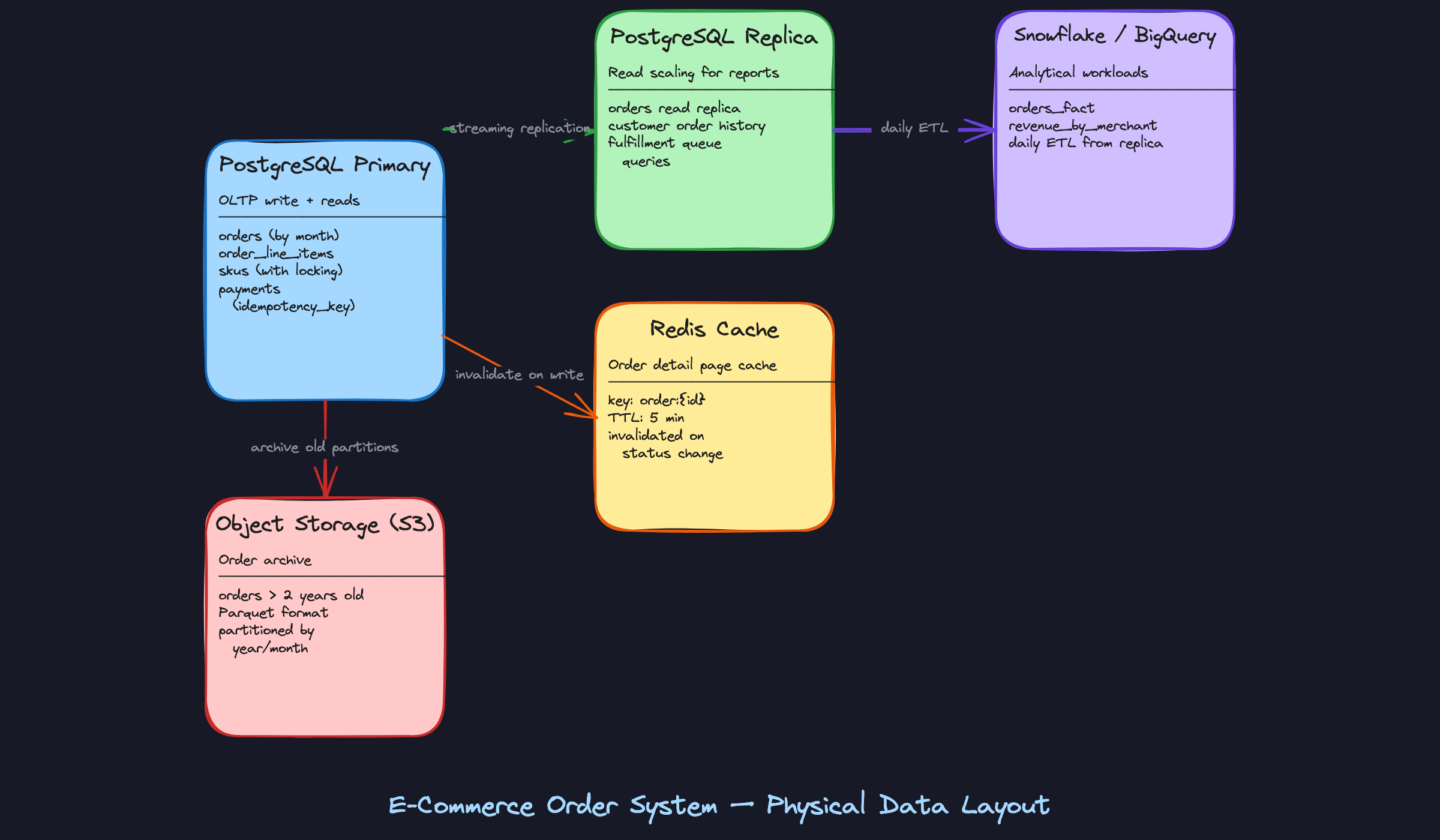
The Inventory Reservation Race Condition
This is the problem that trips up most candidates, and it's the one interviewers at high-traffic e-commerce companies will push hardest on.
Two customers hit checkout simultaneously for the last unit of a SKU. Both read inventory_count = 1, both pass the availability check, both decrement. You've just oversold.
Pessimistic locking solves it cleanly:
1BEGIN;
2
3-- Lock the SKU row for the duration of this transaction
4-- No other transaction can read or modify this row until we commit
5SELECT id, inventory_count, reserved_count
6FROM skus
7WHERE id = $1
8FOR UPDATE;
9
10-- Now safe to check and update
11UPDATE skus
12SET reserved_count = reserved_count + $quantity
13WHERE id = $1
14  AND (inventory_count - reserved_count) >= $quantity;
15
16-- If 0 rows updated, the reservation failed (insufficient stock)
17-- Application checks affected row count and returns "out of stock"
18
19COMMIT;
20
The downside is contention. Every checkout for the same SKU queues up behind the lock. For most SKUs this is fine. For a flash sale where 50,000 people are buying the same item simultaneously, it becomes a bottleneck.
Optimistic locking trades lock contention for retry cost:
1-- Read the current version
2SELECT id, inventory_count, reserved_count, version
3FROM skus WHERE id = $1;
4
5-- Attempt the update only if version hasn't changed
6UPDATE skus
7SET
8    reserved_count = reserved_count + $quantity,
9    version        = version + 1
10WHERE id      = $1
11  AND version = $current_version
12  AND (inventory_count - reserved_count) >= $quantity;
13
14-- If 0 rows updated: someone else modified the row, retry the whole transaction
15
At low-to-medium concurrency, pessimistic locking is simpler and more predictable. At flash-sale scale, optimistic locking with retries (and a circuit breaker to stop hammering the DB) is the better trade. The honest interview answer is: start with SELECT FOR UPDATE, instrument your lock wait times, and switch to optimistic only when you have data showing contention is the bottleneck.
Query Patterns & Optimization
The schema you designed in the previous sections only matters if it can serve your access patterns efficiently. Here's where you prove it. Walk through each query in your interview, explain which index it hits, and be ready to talk about what breaks at scale.
Core Queries
1. Paginated Order History for a Customer
This is your highest-traffic read. Every time a customer opens their account page, this query fires.
1-- Paginated order history with line item summary
2SELECT
3    o.id,
4    o.status,
5    o.created_at,
6    o.total_amount_cents,
7    o.currency,
8    COUNT(oli.id)        AS item_count,
9    SUM(oli.quantity)    AS total_units
10FROM orders o
11JOIN order_line_items oli ON oli.order_id = o.id
12WHERE o.customer_id = $1
13ORDER BY o.created_at DESC
14LIMIT 20 OFFSET $2;
15-- Uses: idx_orders_customer_created (B-tree on customer_id, created_at DESC)
16-- Performance: index scan on the customer_id prefix, then sort is free (index order matches)
17-- At 10k orders/customer, this stays under 5ms with the composite index
18
The OFFSET approach works fine up to a few hundred pages. For deeper pagination (say, a merchant exporting all historical orders), switch to keyset pagination using WHERE created_at < $last_seen_created_at AND id < $last_seen_id. Offset scans get slower linearly as the page number grows.
2. Full Order Detail with Line Items
The naive approach kills you here. Don't do this:
1-- ANTI-PATTERN: N+1 query
2SELECT * FROM orders WHERE id = $1;
3-- Then, for each line item:
4SELECT * FROM order_line_items WHERE order_id = $1;
5SELECT * FROM skus WHERE id = $sku_id;       -- once per line item
6SELECT * FROM products WHERE id = $product_id; -- once per line item
7
Four round trips minimum, and it scales with the number of line items. A 10-item order becomes 21 queries. Here's the single-query version:
1-- Full order detail: single JOIN, no N+1
2SELECT
3    o.id                        AS order_id,
4    o.status,
5    o.created_at,
6    o.total_amount_cents,
7    o.currency,
8    a.street_line_1,
9    a.city,
10    a.country_code,
11    json_agg(
12        json_build_object(
13            'line_item_id',    oli.id,
14            'sku_id',          oli.sku_id,
15            'product_name',    oli.snapshot_name,
16            'quantity',        oli.quantity,
17            'unit_price_cents', oli.unit_price_cents
18        ) ORDER BY oli.id
19    )                           AS line_items
20FROM orders o
21JOIN addresses a          ON a.id = o.shipping_address_id
22JOIN order_line_items oli ON oli.order_id = o.id
23WHERE o.id = $1
24GROUP BY o.id, a.id;
25-- Uses: PK lookup on orders(id), idx_order_line_items_order_id
26-- Performance: single pass, sub-10ms even with 50 line items
27
Notice snapshot_name comes from the line item itself, not from a join back to the products table. That's the price snapshotting pattern paying off: you avoid a join to a table that may have changed since the order was placed.
3. Fulfillment Queue by Status
This query runs constantly in your warehouse or fulfillment system, polling for orders that need action.
1-- Fulfillment queue: orders awaiting action
2SELECT
3    o.id,
4    o.created_at,
5    o.customer_id,
6    o.total_amount_cents
7FROM orders o
8WHERE o.status IN ('PENDING', 'CONFIRMED')
9ORDER BY o.created_at ASC
10LIMIT 100;
11-- Uses: partial index on orders(status) WHERE status IN ('PENDING', 'CONFIRMED')
12-- Performance: index contains ONLY the actionable rows, not the 200M DELIVERED orders
13
Without the partial index, this query does a full table scan across your entire orders history to find the 500 rows that are actually pending. With it, the index is tiny and the scan is near-instant. This is one of the highest-leverage index decisions in the whole schema.
status would be enormous and mostly useless; the partial index covers exactly the working set your application queries.4. Revenue Aggregation by Merchant
1-- Revenue by merchant for a time window
2SELECT
3    p.merchant_id,
4    DATE_TRUNC('day', o.created_at)   AS revenue_date,
5    o.currency,
6    SUM(oli.unit_price_cents * oli.quantity) AS gross_revenue_cents,
7    COUNT(DISTINCT o.id)               AS order_count
8FROM orders o
9JOIN order_line_items oli ON oli.order_id = o.id
10JOIN skus s               ON s.id = oli.sku_id
11JOIN products p           ON p.id = s.product_id
12WHERE o.created_at >= $1
13  AND o.created_at <  $2
14  AND o.status = 'DELIVERED'
15GROUP BY p.merchant_id, DATE_TRUNC('day', o.created_at), o.currency
16ORDER BY revenue_date DESC, gross_revenue_cents DESC;
17
Do not run this against your OLTP primary. Even against a replica, a 30-day window across 50 million orders is a multi-second query that will spike CPU and slow down your read replica for everyone else. The right answer is to pre-aggregate this into a summary table:
1CREATE TABLE daily_revenue_by_merchant (
2    merchant_id    UUID        NOT NULL,
3    revenue_date   DATE        NOT NULL,
4    currency       CHAR(3)     NOT NULL,
5    gross_revenue_cents BIGINT NOT NULL DEFAULT 0,
6    order_count    INT         NOT NULL DEFAULT 0,
7    updated_at     TIMESTAMP   NOT NULL DEFAULT now(),
8    PRIMARY KEY (merchant_id, revenue_date, currency)
9);
10
A scheduled job (or a dbt model running nightly) populates this table from the replica. Merchant dashboard queries then hit a table with thousands of rows instead of millions. If you're at Stripe or Shopify scale, this table lives in Snowflake or BigQuery, not Postgres at all.
5. Idempotent Payment Lookup
1-- Check if a payment attempt already succeeded before retrying
2SELECT
3    id,
4    status,
5    amount_cents,
6    provider_ref,
7    created_at
8FROM payments
9WHERE idempotency_key = $1;
10-- Uses: unique index on payments(idempotency_key)
11-- Performance: single-row lookup, constant time
12
This query is the guard against double-charging. Before your payment service submits a charge to Stripe or Adyen, it checks whether a payment with this idempotency key already exists and succeeded. The unique index makes this a point lookup. If a row exists with status = 'SUCCEEDED', return it immediately. If it exists with status = 'FAILED', retry. If it doesn't exist, proceed.
6. Order State Timeline (Temporal Query)
This one comes up at logistics-heavy companies. Given the order_status_history table, reconstruct the full lifecycle and calculate how long an order spent in each state.
1-- Time-in-state analysis for a single order
2WITH status_transitions AS (
3    SELECT
4        order_id,
5        status,
6        transitioned_at,
7        LEAD(transitioned_at) OVER (
8            PARTITION BY order_id
9            ORDER BY transitioned_at ASC
10        ) AS next_transitioned_at
11    FROM order_status_history
12    WHERE order_id = $1
13)
14SELECT
15    status,
16    transitioned_at                                          AS entered_at,
17    COALESCE(next_transitioned_at, now())                    AS exited_at,
18    EXTRACT(EPOCH FROM (
19        COALESCE(next_transitioned_at, now()) - transitioned_at
20    )) / 3600.0                                              AS hours_in_state
21FROM status_transitions
22ORDER BY transitioned_at ASC;
23-- Uses: idx_order_status_history_order_id
24-- Performance: tiny result set per order, window function over <10 rows
25
The LEAD window function gives you the timestamp of the next status transition. Subtract the current entry time from that to get the duration. COALESCE(next_transitioned_at, now()) handles the current state, which has no "next" transition yet.
Write Patterns
Order Creation Transaction
Everything that happens at checkout must succeed or fail together. If you decrement inventory but fail to create the order, you've lost stock. If you create the order but fail to reserve inventory, you'll oversell.
1BEGIN;
2
3-- 1. Lock the SKU rows to prevent concurrent overselling
4SELECT id, inventory_count, reserved_count
5FROM skus
6WHERE id = ANY($sku_ids)
7FOR UPDATE;
8
9-- 2. Verify availability (application checks this result before continuing)
10-- If any SKU has (inventory_count - reserved_count) < requested_quantity, ROLLBACK
11
12-- 3. Reserve inventory
13UPDATE skus
14SET reserved_count = reserved_count + $quantity
15WHERE id = $sku_id;
16
17-- 4. Create the order
18INSERT INTO orders (id, customer_id, status, currency, total_amount_cents, shipping_address_id)
19VALUES ($order_id, $customer_id, 'PENDING', $currency, $total_cents, $address_id);
20
21-- 5. Insert line items
22INSERT INTO order_line_items (order_id, sku_id, quantity, unit_price_cents, snapshot_name)
23VALUES
24    ($order_id, $sku_id_1, $qty_1, $price_1, $name_1),
25    ($order_id, $sku_id_2, $qty_2, $price_2, $name_2);
26
27-- 6. Record initial status
28INSERT INTO order_status_history (order_id, status, transitioned_at)
29VALUES ($order_id, 'PENDING', now());
30
31COMMIT;
32
The SELECT ... FOR UPDATE on SKUs is pessimistic locking. It blocks any other transaction from modifying those rows until you commit. At low concurrency this is fine. At high concurrency (flash sales, limited drops), you'll see lock contention and timeouts. The optimistic alternative uses a version column: read the version, do your update with WHERE version = $seen_version, and retry if zero rows were affected.
Idempotent Payment Insert
1INSERT INTO payments (id, order_id, amount_cents, currency, status, idempotency_key, provider_ref)
2VALUES ($id, $order_id, $amount_cents, $currency, 'PENDING', $idempotency_key, NULL)
3ON CONFLICT (idempotency_key) DO NOTHING
4RETURNING id, status;
5
If the idempotency key already exists, DO NOTHING returns zero rows. Your application interprets that as "this payment was already initiated; fetch the existing record and check its status." This pattern prevents duplicate charges when a client retries after a network timeout.
Status Transition Update
1-- Atomic status transition with audit log
2BEGIN;
3
4UPDATE orders
5SET status = $new_status, updated_at = now()
6WHERE id = $order_id
7  AND status = $expected_current_status;  -- optimistic check
8
9-- If 0 rows updated, the order was already transitioned; ROLLBACK and handle
10
11INSERT INTO order_status_history (order_id, status, transitioned_at, actor_id, notes)
12VALUES ($order_id, $new_status, now(), $actor_id, $notes);
13
14COMMIT;
15
The WHERE status = $expected_current_status clause is a lightweight optimistic lock. If another process already moved the order to a different status, your update affects zero rows and you know to re-read and re-evaluate.
Query Optimization
EXPLAIN ANALYZE on the Order Detail Query
When your interviewer asks "how would you diagnose a slow query," this is what you walk through:
1EXPLAIN (ANALYZE, BUFFERS, FORMAT TEXT)
2SELECT o.id, o.status, ...
3FROM orders o
4JOIN order_line_items oli ON oli.order_id = o.id
5JOIN addresses a ON a.id = o.shipping_address_id
6WHERE o.id = $1
7GROUP BY o.id, a.id;
8
What you're looking for in the output:
Index Scanonorders_pkey: good.Seq Scanon orders: bad, means the PK lookup failed somehow.Nested Loopjoining toorder_line_items: expected for a single order. AHash Joinhere would suggest the planner thinks you're fetching many orders.Buffers: shared hit=X read=Y: ifreadis high, the data isn't in shared_buffers and you're hitting disk. Consider increasingshared_buffersor warming the cache.- Actual rows vs. estimated rows: a large discrepancy means stale statistics. Run
ANALYZE ordersto fix it.
Where to Denormalize
The schema is normalized by design, but two places are worth denormalizing if query performance demands it.
First, add item_count and total_units directly to the orders table. The paginated order history query currently needs a JOIN to order_line_items just to count items. If you store those as computed columns (updated in the same transaction as line item inserts), the history query becomes a single-table scan.
Second, consider storing merchant_id directly on order_line_items. Right now, getting from a line item to its merchant requires order_line_items -> skus -> products -> merchant_id. Denormalizing merchant_id onto the line item makes revenue queries dramatically simpler and faster, at the cost of one extra column to keep in sync.
Caching Strategy
Not every query benefits equally from caching.
Order detail pages (query 2) are the best cache candidates. An order's content is immutable once placed; only the status changes. Cache the full order JSON in Redis keyed by order:{id}, with a 5-minute TTL. Invalidate on any status transition. A cache hit saves a multi-table JOIN on every page load.
The fulfillment queue (query 3) should not be cached. Fulfillment workers need to see new orders within seconds. Cache staleness here means delayed shipments.
Revenue aggregation (query 4) is handled by the summary table pattern, not application-level caching. The summary table is your "cache" with a known refresh cadence.
Anti-Patterns to Avoid
Querying the orders table without a partition key. Once you've range-partitioned orders by created_at, every query that omits a created_at filter forces Postgres to scan all partitions. A query like SELECT * FROM orders WHERE customer_id = $1 without a date range will hit every monthly partition. Always include a date range, or add customer_id to the partition scheme as a secondary key.
Using status as a sole filter without the partial index. The full orders table has one status column with maybe six distinct values. A regular B-tree index on status is nearly useless because each value matches a huge fraction of rows. Without the partial index covering only actionable statuses, your fulfillment queue query degrades into a sequential scan as the table grows.
Reconstructing order totals at query time. Some teams skip storing total_amount_cents on the order and instead compute it as SUM(unit_price_cents * quantity) across line items at read time. This works at small scale and then becomes a performance problem as line item counts grow. Worse, if a line item is ever corrected (refund, price adjustment), the computed total diverges from what the customer was actually charged. Store the total at write time; treat it as authoritative.
Evolution & Scale
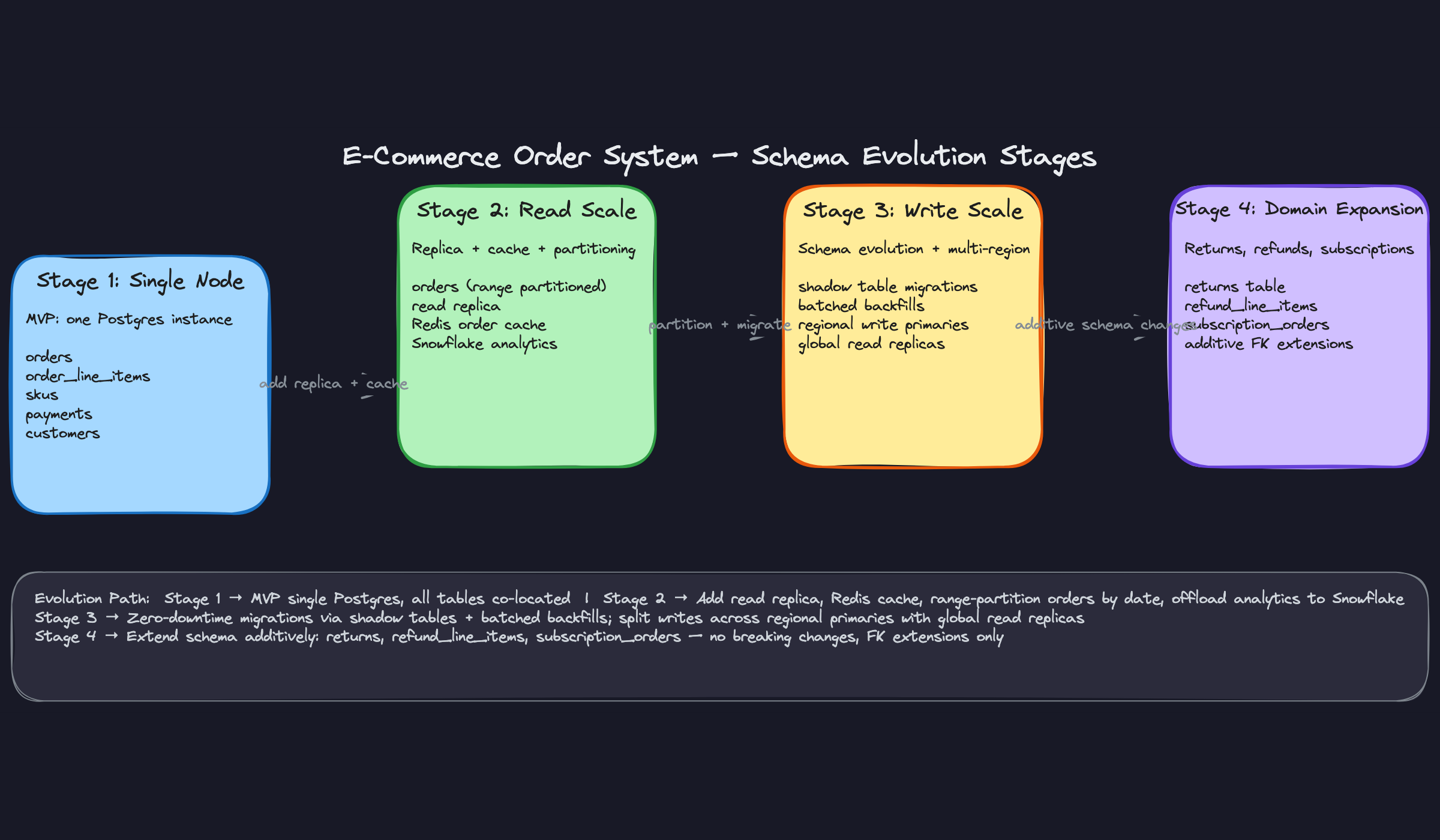
Most schemas don't fail because of bad design on day one. They fail because the team that built v1 never thought about what adding returns, multi-currency refunds, or a new region would actually require. The goal here isn't to over-engineer upfront. It's to make the inevitable changes additive, not destructive.
Stage 1: Single Node (0-1M Orders)
At this scale, your entire system fits on one PostgreSQL instance. No partitioning, no replicas, no caching layer. The schema from the logical model section runs fine here.
What breaks first isn't the database. It's the analytics queries. Your finance team starts running GROUP BY merchant_id revenue reports directly against the orders table, and suddenly your OLTP primary is choking under a full table scan at 2am. The first scaling intervention is almost always "get analytics off the primary," not "add more indexes."
The second thing that breaks: the fulfillment queue query. A SELECT * FROM orders WHERE status = 'PENDING' on a 1M-row table without a partial index will start showing up in your slow query log. Add this before you need it:
1CREATE INDEX idx_orders_pending_status
2    ON orders (status, created_at ASC)
3    WHERE status IN ('PENDING', 'CONFIRMED');
4
Stage 2: Read Scale (1M-50M Orders)
Add a read replica and point your analytics queries there. That alone buys you a lot of headroom.
The bigger structural change at this stage is partitioning the orders table. A 50M-row table with a mix of DELIVERED (cold) and PENDING (hot) rows is expensive to maintain indexes on. Monthly range partitioning keeps the hot partition small and makes archiving old data operationally trivial.
1-- Convert orders to a partitioned table (do this before you hit 10M rows)
2CREATE TABLE orders (
3    id              UUID NOT NULL DEFAULT gen_random_uuid(),
4    customer_id     UUID NOT NULL REFERENCES customers(id),
5    status          VARCHAR(20) NOT NULL DEFAULT 'PENDING',
6    currency        CHAR(3) NOT NULL,
7    total_amount_cents BIGINT NOT NULL,
8    shipping_address_id UUID NOT NULL,
9    created_at      TIMESTAMP NOT NULL DEFAULT now(),
10    PRIMARY KEY (id, created_at)   -- partition key must be in PK
11) PARTITION BY RANGE (created_at);
12
13-- Create monthly partitions
14CREATE TABLE orders_2024_01 PARTITION OF orders
15    FOR VALUES FROM ('2024-01-01') TO ('2024-02-01');
16
17CREATE TABLE orders_2024_02 PARTITION OF orders
18    FOR VALUES FROM ('2024-02-01') TO ('2024-03-01');
19
20-- Automate future partitions with pg_partman or a scheduled job
21
Each partition gets its own indexes automatically. Queries filtered by created_at hit only the relevant partition. Archiving January 2022 means detaching one partition and copying it to S3, not running a DELETE against a 50M-row table.
Add Redis for order detail page caching at this stage. The key is order:{uuid}, TTL of 5 minutes, invalidated on any status transition. Order detail pages are read-heavy and the data is stable between transitions.
Schema Migration Strategy
The hardest part of schema evolution isn't writing the SQL. It's deploying it without taking down a live system. The pattern that works is called expand-contract.
Expand: add the new structure alongside the old. New column, new table, new index. Nothing is removed. Old code still works.
Migrate: backfill existing data, update application code to write to both old and new paths.
Contract: once all reads come from the new structure and old code is fully retired, drop the old column or table.
Here's a realistic example. Your product team wants to support multiple saved addresses per customer, with a default. Right now, address data lives inline on the order. You need to extract it.
1-- STEP 1: EXPAND
2-- Add the addresses table (new structure, nothing breaks yet)
3CREATE TABLE customer_addresses (
4    id              UUID PRIMARY KEY DEFAULT gen_random_uuid(),
5    customer_id     UUID NOT NULL REFERENCES customers(id),
6    line1           VARCHAR(255) NOT NULL,
7    line2           VARCHAR(255),
8    city            VARCHAR(100) NOT NULL,
9    state           VARCHAR(100),
10    postal_code     VARCHAR(20) NOT NULL,
11    country_code    CHAR(2) NOT NULL,
12    is_default      BOOLEAN NOT NULL DEFAULT false,
13    created_at      TIMESTAMP NOT NULL DEFAULT now()
14);
15
16CREATE INDEX idx_customer_addresses_customer
17    ON customer_addresses (customer_id)
18    WHERE is_default = true;
19
20-- Add nullable FK on customers (nullable = backwards compatible)
21ALTER TABLE customers
22    ADD COLUMN default_address_id UUID REFERENCES customer_addresses(id);
23-- STEP 2: BACKFILL (run in batches, not a single UPDATE)
-- Extract shipping addresses from existing orders into customer_addresses
-- Use a DO block or a scheduled migration script
DO $$
DECLARE
batch_size INT := 1000;
last_id UUID := NULL;
BEGIN
LOOP
WITH batch AS (
SELECT DISTINCT ON (o.customer_id)
o.customer_id,
a.line1, a.line2, a.city, a.state,
a.postal_code, a.country_code
FROM orders o
JOIN addresses a ON a.id = o.shipping_address_id
WHERE o.customer_id > COALESCE(last_id, '00000000-0000-0000-0000-000000000000'::UUID)
ORDER BY o.customer_id, o.created_at DESC
LIMIT batch_size
),
inserted AS (
INSERT INTO customer_addresses
(customer_id, line1, line2, city, state, postal_code, country_code, is_default)
SELECT customer_id, line1, line2, city, state, postal_code, country_code, true
FROM batch
ON CONFLICT DO NOTHING
RETURNING customer_id, id
)
UPDATE customers c
SET default_address_id = i.id
FROM inserted i
WHERE c.id = i.customer_id;
EXIT WHEN NOT FOUND;
END LOOP;
END $$;
1-- STEP 3: CONTRACT (only after application code no longer reads inline addresses)
2-- Add NOT NULL constraint once backfill is complete and verified
3ALTER TABLE customers
4    ALTER COLUMN default_address_id SET NOT NULL;
5
6-- Old inline address columns on orders stay as immutable snapshots (don't drop them)
7-- They're the historical record of what address was used at purchase time
8
The batched backfill is non-negotiable on a live table. A single UPDATE customers SET ... on 5M rows will hold locks and cause timeouts. Batch at 1,000-5,000 rows with a short sleep between batches.
NOT NULL constraints in the same migration as the ADD COLUMN. That fails immediately if any existing rows exist. Always add nullable first, backfill, then tighten the constraint.Slowly Changing Dimensions
Several entities in this schema change over time in ways that matter for correctness.
Product prices are the most dangerous. If you store only sku.price_cents and a customer disputes a charge six months later, you have no record of what the price was when they ordered. This is why order_line_items.unit_price_cents is a snapshot, not a foreign key to the current price. That's SCD Type 1 handled at the application layer by copying the value at write time.
SKU attributes (size, color, material) need a versioned history if you want to answer "what did this product look like when the customer bought it?" That's a Type 2 pattern:
1CREATE TABLE sku_versions (
2    id              UUID PRIMARY KEY DEFAULT gen_random_uuid(),
3    sku_id          UUID NOT NULL REFERENCES skus(id),
4    attributes      JSONB NOT NULL,
5    price_cents     BIGINT NOT NULL,
6    valid_from      TIMESTAMP NOT NULL DEFAULT now(),
7    valid_to        TIMESTAMP,               -- NULL = current version
8    created_by      UUID REFERENCES users(id)
9);
10
11CREATE INDEX idx_sku_versions_current
12    ON sku_versions (sku_id, valid_from DESC)
13    WHERE valid_to IS NULL;
14
When a SKU changes, you close the current version (valid_to = now()) and insert a new row. The order_line_items table can optionally store a sku_version_id FK if you need to reconstruct the exact product state at purchase time.
Order status is already handled as an append-only audit log via order_status_history. That's the right call. Don't overwrite the status column without logging the transition.
Stage 3: Write Scale and Zero-Downtime Migrations (50M+ Orders)
At 50M orders, the operational concern shifts from query performance to schema change safety. You cannot run ALTER TABLE orders ADD COLUMN ... and hold an ACCESS EXCLUSIVE lock on a 50M-row table in production. PostgreSQL's ADD COLUMN with a non-volatile default is safe since Postgres 11 (it doesn't rewrite the table). But anything that requires a table rewrite, like changing a column type or adding a NOT NULL constraint with a default, needs the shadow table pattern.
The shadow table approach:
- Create
orders_newwith the target schema. - Set up a trigger on
ordersto dual-write all inserts and updates toorders_new. - Backfill historical rows from
orderstoorders_newin batches. - Once
orders_newis caught up (lag under a few seconds), rename in a single transaction:ALTER TABLE orders RENAME TO orders_old; ALTER TABLE orders_new RENAME TO orders;. - Drop the trigger. Verify. Drop
orders_oldafter a safe window.
1-- Trigger for dual-write during shadow migration
2CREATE OR REPLACE FUNCTION mirror_order_to_new()
3RETURNS TRIGGER AS $$
4BEGIN
5    INSERT INTO orders_new VALUES (NEW.*)
6    ON CONFLICT (id, created_at) DO UPDATE
7        SET status = EXCLUDED.status,
8            updated_at = EXCLUDED.updated_at;
9    RETURN NEW;
10END;
11$$ LANGUAGE plpgsql;
12
13CREATE TRIGGER trg_mirror_orders
14    AFTER INSERT OR UPDATE ON orders
15    FOR EACH ROW EXECUTE FUNCTION mirror_order_to_new();
16
This is the same pattern that tools like pg_repack and gh-ost (for MySQL) automate. Knowing the manual version shows you understand what those tools are actually doing.
Multi-Region Considerations
When you expand to multiple regions, the write path gets complicated fast. A customer in Singapore placing an order should write to a Singapore-region primary for latency reasons. But your merchant in London needs to see all their orders regardless of where they were placed.
The practical pattern is regional write primaries with a global read replica or a CDC fan-out to a central warehouse. Orders are written locally, replicated asynchronously to a global store, and merchant dashboards read from the global store with an acceptable replication lag (typically under a minute).
Data residency is the constraint that changes everything. If EU orders cannot leave EU infrastructure (GDPR), you cannot simply replicate everything to a US-based global replica. You need per-region schemas that are structurally identical but physically isolated, with a global aggregation layer that stores only non-PII fields (order IDs, amounts, timestamps, merchant IDs) for cross-region reporting.
Returns and Refunds: Additive Extension
A well-normalized v1 schema makes adding returns genuinely additive. You don't touch orders or order_line_items. You add new tables that reference them.
CREATE TABLE returns (
    id              UUID PRIMARY KEY DEFAULT gen_random_uuid(),
    order_id        UUID NOT NULL REFERENCES orders(id),
    reason          VARCHAR(100) NOT NULL,
    status          VARCHAR(20) NOT NULL DEFAULT 'REQUESTED',
                    -- REQUESTED → APPROVED → RECEIVED → REFUNDED
    requested_at    TIMESTAMP NOT NULL DEFAULT now(),
    resolved_at     TIMESTAMP
);

CREATE TABLE return_line_items (
    id              UUID PRIMARY KEY DEFAULT gen_random_uuid(),
    return_id       UUID NOT NULL REFERENCES returns(id),
    order_line_item_id UUID NOT NULL REFERENCES order_line_items(id),
    quantity        INT NOT NULL CHECK (quantity > 0),
    refund_amount_cents BIGINT NOT NULL,
    condition       VARCHAR(50)     -- 'UNOPENED', 'DAMAGED', etc.
);

CREATE TABLE refunds (
    id              UUID PRIMARY KEY DEFAULT gen_random_uuid(),
    return_id       UUID NOT NULL REFERENCES returns(id),
    payment_id      UUID NOT NULL REFERENCES payments(id),
    amount_cents    BIGINT NOT NULL,
    status          VARCHAR(20) NOT NULL DEFAULT 'PENDING',
    provider_ref    VARCHAR(255),
    idempotency_key VARCHAR(255) UNIQUE NOT NULL,
    created_at      TIMESTAMP NOT NULL DEFAULT now()
);

CREATE INDEX idx_returns_order ON returns (order_id);
CREATE INDEX idx_return_line_items_return ON return_line_items (return_id);
Notice refunds.idempotency_key. Same pattern as payments. Refund processing has the same double-execution risk as payment capture, and the fix is identical.
The return_line_items table references order_line_items directly. This means you can validate that a customer isn't returning more units than they ordered, and you can track partial returns (returning 1 of 3 items) without any ambiguity.
Analytics Layer
The OLTP schema is normalized for write correctness. The analytics layer needs to be denormalized for query speed. These are different goals and they warrant different schemas.
The star schema transformation is straightforward:
ordersbecomes the fact table (orders_fact), with foreign keys to dimension tables and pre-computed metrics (total amount, item count, discount amount).customers,products,merchants, anddatesbecome dimension tables.order_line_itemscan be a second fact table for item-level analysis, or rolled up intoorders_factdepending on query granularity needs.
1-- Snowflake / BigQuery fact table (simplified)
2CREATE TABLE orders_fact (
3    order_id            STRING NOT NULL,
4    customer_key        INT64 NOT NULL,    -- FK to dim_customers
5    merchant_key        INT64 NOT NULL,    -- FK to dim_merchants
6    date_key            INT64 NOT NULL,    -- FK to dim_date (YYYYMMDD integer)
7    currency_code       STRING NOT NULL,
8    total_amount_cents  INT64 NOT NULL,
9    item_count          INT64 NOT NULL,
10    status              STRING NOT NULL,
11    created_at          TIMESTAMP NOT NULL
12)
13PARTITION BY DATE(created_at)
14CLUSTER BY merchant_key, date_key;
15
For the ETL approach, CDC (Change Data Capture) via Debezium or AWS DMS is the right answer at scale. It captures every row-level change from the PostgreSQL WAL and streams it to your warehouse. Batch ETL (nightly dumps) is simpler to set up but gives you stale data and creates a large window where your analytics don't reflect reality.
Materialized views in PostgreSQL are a useful middle ground for operational reporting that doesn't need a full warehouse. A daily_revenue_by_merchant materialized view refreshed every hour keeps finance dashboards fast without touching the OLTP primary.
1CREATE MATERIALIZED VIEW daily_revenue_by_merchant AS
2SELECT
3    merchant_id,
4    DATE_TRUNC('day', o.created_at) AS revenue_date,
5    currency,
6    SUM(total_amount_cents) AS total_revenue_cents,
7    COUNT(*) AS order_count
8FROM orders o
9JOIN order_line_items oli ON oli.order_id = o.id
10JOIN skus s ON s.id = oli.sku_id
11WHERE o.status = 'DELIVERED'
12GROUP BY merchant_id, DATE_TRUNC('day', o.created_at), currency;
13
14CREATE UNIQUE INDEX ON daily_revenue_by_merchant (merchant_id, revenue_date, currency);
15
16-- Refresh on a schedule (pg_cron or external scheduler)
17REFRESH MATERIALIZED VIEW CONCURRENTLY daily_revenue_by_merchant;
18
CONCURRENTLY is the key word. Without it, the refresh holds a lock that blocks reads. With it, PostgreSQL builds the new version in the background and swaps it in. The unique index is required for concurrent refresh to work.
What is Expected at Each Level
Interviewers calibrate their expectations based on your level. The same schema question gets graded differently for an L4 versus an L6. Here's what each level actually needs to demonstrate.
Mid-Level (L4)
- Produce a clean normalized schema with correct primary keys, foreign keys, and column types. You don't need to be perfect, but
order_line_items.order_idshould referenceorders.id, not be a loose integer with no constraint. - Explain why
unit_price_centslives on the line item, not as a join to the current SKU price. If you can articulate "prices change after purchase," you've passed this checkpoint. - Spot the N+1 problem when fetching orders with their line items, and fix it with a JOIN rather than looping queries in application code.
- Bonus: mention that payment capture needs an
idempotency_keyto prevent double-charging on retries. You don't need to design the full retry system, just flag that the column needs to exist.
Senior (L5)
- Design the
order_status_historytable as an append-only audit log rather than a single mutablestatuscolumn on orders. Justify it: you need the full transition timeline for debugging fulfillment failures, not just the current state. - Tie every index to a specific query. Don't just say "index on
customer_id." Say "B-tree onorders(customer_id, created_at DESC)because the order history page paginates by recency, and the composite index satisfies both the filter and the sort without a filesort." - Walk through the inventory reservation race condition. Explain
SELECT ... FOR UPDATEfor pessimistic locking and contrast it with an optimistic version-column approach. Know which one you'd choose at 10K concurrent checkouts and why. - Propose read/write separation before the interviewer asks. Read replicas for order history and fulfillment queues, Redis for order detail page caching with invalidation on status transitions. Seniors don't wait to be prompted on this.
Staff+ (L6+)
- Drive the OLTP-to-OLAP boundary conversation yourself. Explain why revenue aggregation queries don't belong on the PostgreSQL primary, and propose a concrete path: daily ETL to Snowflake, a
daily_revenue_by_merchantsummary table built by a dbt model, and what SLAs each layer supports. - Own the schema evolution strategy end-to-end. Adding a
discount_amount_centscolumn toorder_line_itemsat 200M rows isn't aALTER TABLEyou run at 2pm on a Tuesday. Walk through adding it as nullable, backfilling in batches of 10K rows with a rate limiter, then flipping theNOT NULLconstraint once backfill is confirmed complete. - Think about the schema as a data contract between teams. When fulfillment engineers query
order_status_history, when finance reconciles viapayments, and when the data warehouse team pulls from the replica, they're all depending on your column names and types not changing without notice. Staff candidates talk about how schema changes get communicated and versioned, not just how they get executed. - Anticipate domain expansion without being asked. A well-normalized v1 schema makes adding
returnsandrefund_line_itemsadditive. A denormalized one means a rewrite. Staff candidates design for the second and third product iteration, not just the MVP.


